Preface
If you are searching for the best Spokenly alternative, you have most likely already used Spokenly and liked it. It is a real, well-made dictation app, it runs Whisper and Parakeet locally on Apple Silicon, and its Local Only Mode blocks every network request so your voice never leaves the device. That is a genuinely private tool, not a privacy poser, and it deserves the respect.
One correction first, because most pages ranking for this query are out of date and an earlier version of this one was too. Spokenly is no longer Mac-and-iPhone only. As of our check on 2 September 2026, spokenly.app offers live downloads for macOS (Universal, macOS 13.3 or later), Windows (64-bit, Windows 10 and 11), iOS (iOS 17 or later), and Linux (deb, rpm, and AppImage), with none of them marked beta or waitlist. If you read anywhere, including here, that "Spokenly markets Windows but does not ship it," that claim is now stale. We would rather correct ourselves in public than leave a wrong sentence up.
So why look elsewhere? Three honest reasons remain. Spokenly still has no Android app, so an Android phone is out. It is dictation-only, with no read-aloud, no notes vault, and no audio-file transcription. And if you want cloud-grade accuracy on the free tier you hit a setup wall, because that path asks you to bring your own OpenAI, Deepgram, or Groq API key and wire it up yourself.
This is an honest map of the field. We build Yaps, so we are biased, and we put Yaps first. But Spokenly is a solid competitor, so the case for switching is not "we are private and they are not." It is Android, scope, and getting there without the setup tax.
Mac and iPhone dictation
Spokenly
Private, on-device speech-to-text for macOS, iOS, Windows and Linux, with an unlimited free local tier. No Android app, and no read-aloud, notes vault, or audio-file transcription.
Cross-platform voice workspace
Yaps
On-device dictation plus read-aloud, a searchable notes vault, and Studio audio-file transcription, across Android, iPhone, iPad, Windows, macOS, and Linux, with a 7-day free trial and no API keys to configure.
What Is Spokenly?
Spokenly is a voice-to-text dictation app that runs speech recognition on your own machine, using Whisper Large-v3 and NVIDIA Parakeet on the Apple Silicon Neural Engine, with a Local Only Mode that blocks every network request. It ships on macOS, iOS, Windows and Linux. Local transcription is free and unlimited with no account, cloud models are available either by bringing your own OpenAI, Deepgram or Groq API key on the free plan or through a Pro subscription listed at $9.99 a month. It also includes an MCP server that pipes voice input into AI coding agents such as Claude Code and Cursor. It does speech-to-text only: there is no read-aloud, no notes vault, and no Android app.
The Best Spokenly Alternatives in 2026
Here is the shortlist, ranked for most people who are leaving or supplementing Spokenly. Every tool below was checked against its live download page or public repository on 2 September 2026, so none of these are abandoned projects. Deeper notes follow the list.
1. Yaps, best overall Spokenly alternative
Yaps is an on-device voice workspace that ships where Spokenly does not. It runs on Android, iPhone, iPad, Windows, macOS, and Linux today, plus a Chrome "Save to Yaps" extension for capturing pages straight into your vault. iOS is available now. If you moved off a Mac, or you live across a phone and a laptop, that breadth is the whole point.
Dictation is the front door. On desktop you push the Yaps hotkey and speak into any app on the system. On Android you tap the dictation button on the Yaps keyboard. It is multilingual, covering roughly 25 languages, auto-detected from your speech, so you do not switch a language setting. Core dictation runs on-device and works with the network off. Yaps also cleans up messy dictated text on-device, stripping filler words and self-corrections, fixing punctuation and capitalisation, and formatting lists and numbers, so what lands at your cursor reads like writing rather than a transcript.
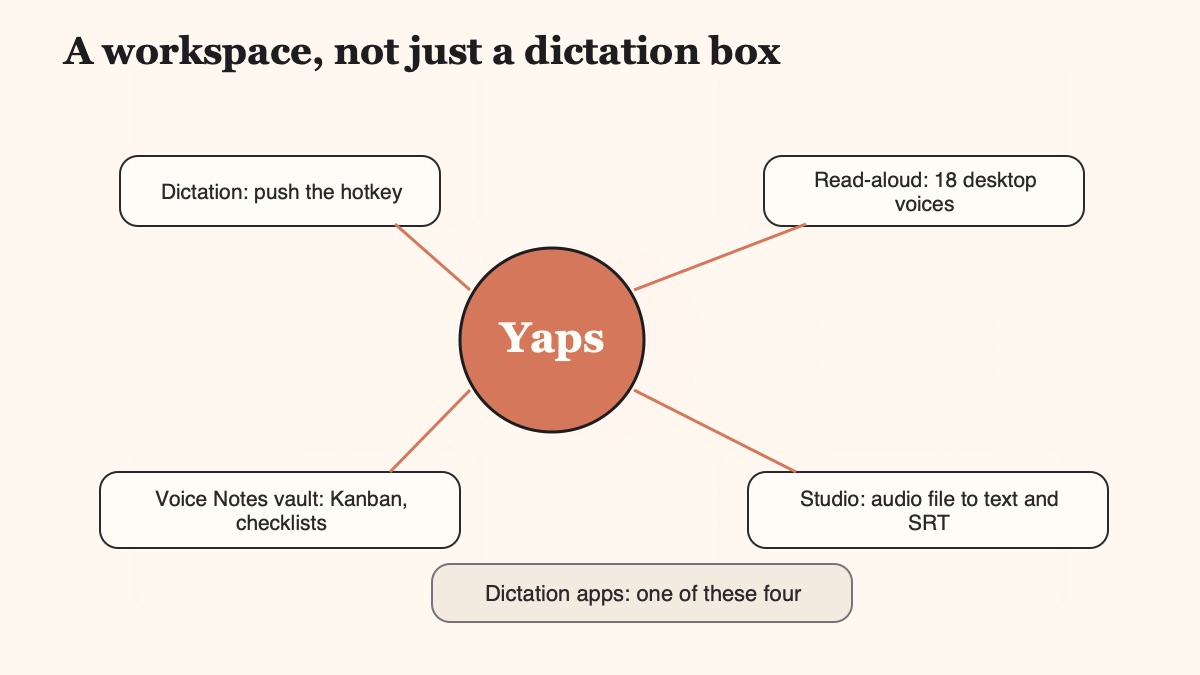
Where Yaps pulls ahead of a dictation-only tool is the rest of the workspace. There is text-to-speech read-aloud with 18 voices on desktop and 2 on mobile, so you can hear a draft before you send it. There is Voice Notes with a searchable vault that holds plain text, Kanban boards, and checklists, and syncs between mobile and desktop. And there is the Studio editor, which transcribes imported audio files offline into text or subtitles and exports WAV and SRT. Spokenly does none of these; it is speech-to-text and stops there.
Yaps gives you a 7-day free trial that needs no setup and no API keys to configure. Paid plans are Pro at $15 per month and Max at $25 per month. Best for: anyone who wants private dictation on Android or Windows, or wants read-aloud, a notes vault, and audio-file transcription in one app rather than a Mac-only dictation utility. See dictation for the full picture.
2. Spokenly, best if you want an unlimited free local tier and an MCP server
Worth keeping on the list even in a post about its alternatives, because Spokenly is genuinely good at what it does. Its local mode runs Whisper Large-v3 and NVIDIA Parakeet on the Apple Silicon Neural Engine with no network calls, and its free local transcription is unlimited, with no word cap, no time cap, and no account required. That is more generous than a capped free tier for pure local dictation. It also has a distinctive built-in MCP server that feeds voice input to AI coding agents like Claude Code, Cursor, and Codex, which no mainstream dictation peer matches. Its download page now lists macOS, Windows, iOS and Linux builds. Best for: anyone outside Android who wants unlimited free on-device dictation and does not need read-aloud, a notes vault, or file transcription.
3. Handy, best free open-source dictation
Handy is the alternative to reach for if the appeal of Spokenly was "free, local, no account" and you want that with source code you can read. It is MIT licensed with no paid tier, runs completely offline, and ships for macOS (Intel and Apple Silicon), x64 Windows, and x64 Linux. Locally it runs Whisper in Small, Medium, Turbo and Large sizes with GPU acceleration, plus Parakeet V3 on CPU with automatic language detection. Its stated position is that accessibility tooling belongs in everyone's hands rather than behind a paywall. Best for: anyone who wants Spokenly's local-only model, auditable, at zero cost. Trade-off: no mobile app, no MCP server, dictation only, and no support desk. Maintenance check: commits landing 31 August 2026, over 30,000 GitHub stars, which makes it the largest project of its kind.
4. SuperWhisper, best focused local dictation for Mac
SuperWhisper is a well-established on-device speech-to-text app for Mac that runs Whisper models locally and lets you pick model sizes. Like Spokenly, it is focused and private, and it is a good pick if dictation is genuinely all you need on macOS. Best for: Mac users who want a single-purpose local dictation tool. Trade-off: Mac only, and no read-aloud, notes, or audio-file workflow. If this is your shortlist, our SuperWhisper alternative comparison goes deeper.
5. Wispr Flow, best for cloud AI reformatting
Wispr Flow is cloud-based dictation known for aggressive AI reformatting that rewrites raw speech into polished prose. It is the opposite architectural choice to Spokenly: your audio goes to the cloud in exchange for that reformatting quality. Best for: people who prioritise cloud reformatting and do not mind their audio leaving the device. Trade-off: every dictation is a network round trip, and it is subscription-only, so it is not the pick if on-device privacy is why you liked Spokenly in the first place.
6. MacWhisper, best for batch file transcription
MacWhisper is the veteran of Whisper-on-Mac, strong at transcribing recorded audio files like interviews, lectures, and podcasts, with good model selection and fair pricing. Best for: researchers and podcasters sitting on stacks of audio who mostly need files turned into text. Trade-off: it is built around file transcription more than live system-wide dictation, and it is Mac only. Our best dictation apps for Mac comparison puts it side by side with the others here.
7. Apple Dictation, best free zero-install option
Apple Dictation is built into macOS and iOS, costs nothing, and runs mostly on-device on Apple Silicon. If you want private dictation with no download at all, it is already on your machine. Best for: zero cost and zero install. Trade-off: it caps how long a single dictation session can run, weaker on technical vocabulary, no cleanup of filler words, and none of the read-aloud, notes, or audio-file features the paid tools offer. If those caps are your pain point, see our dictation with no time limit guide.
8. OpenWhispr, best open-source pick with an iPhone build
OpenWhispr is Handy's closest peer and the one to prefer if you want open source that also reaches your phone. It is MIT licensed and free, with builds for macOS, Windows, Linux and iOS, running Whisper locally at five sizes (Tiny 75 MB, Base 142 MB, Small 466 MB, Medium 1.5 GB, Turbo 1.6 GB) or Parakeet, plus optional bring-your-own cloud keys. It also does bot-free meeting notes, recording and transcribing locally instead of sending an assistant into the call. Best for: developers who want an auditable dictation tool spanning desktop and iPhone. Trade-off: no Android app, and it is pitched at power users. Maintenance check: v1.9.2 released 29 August 2026, commits landing 1 September 2026. Our OpenWhispr alternative guide covers it in full.
We weighted platform breadth, scope beyond raw dictation, and how much setup stands between you and a working tool. Spokenly and SuperWhisper are genuinely private peers, so this is not a privacy hit piece. We built Yaps and said so; where another tool is the honest better fit for a specific need, we routed you there.
How Yaps and Spokenly Compare
The two apps overlap on the one thing that matters most, private on-device dictation, and diverge on almost everything around it. Here is the side-by-side.
| Feature | Spokenly | Yaps |
|---|---|---|
| Platforms today | macOS, iOS, Windows, Linux (no Android) | Android, iPhone and iPad, Windows, macOS, Linux + Chrome extension |
| On-device dictation | Yes (Whisper, Parakeet) | Yes |
| Free tier | Unlimited local; cloud needs your own API key | 7-day free trial, no keys |
| System-wide and mobile keyboard | Mac hotkey; iOS keyboard flagged for reliability | Desktop hotkey + full Android and iOS keyboard |
| Audio-file transcription | No | Yes (Studio, offline, to text or SRT) |
| Text-to-speech read-aloud | No | Yes (18 desktop voices, 2 mobile) |
| Notes and vault | Transcription history only | Voice Notes vault (text, Kanban, checklists), synced |
| On-device text cleanup | Automatic punctuation | Filler removal, punctuation, list and number formatting |
| Android app | No | Yes (full keyboard with on-device voice typing) |
| MCP server for coding agents | Yes | No |
| Price | Free local; Pro listed at $9.99/mo | 7-day free trial; Pro $15/mo, Max $25/mo |
Three cells deserve an honest footnote. Spokenly's unlimited free local tier really is unlimited, which beats a capped free tier for pure local dictation. Spokenly Pro at $9.99 per month is cheaper than Yaps Pro, because it is buying you less: dictation, not a workspace. And the MCP server is a genuine Spokenly win, not a rounding error, if you pipe voice into coding agents.
Who Should Choose Which
No single tool wins for everyone. Here is where the honest edges fall, including the places Spokenly is the better call.
Stay on Spokenly if
Dictation only, no Android needed
You want unlimited free local dictation with no cap, or you want the MCP server that feeds voice into Claude Code and Cursor. Yaps does not offer BYOK API keys or a coding-agent MCP, and Spokenly now covers Windows and Linux as well as Apple.
Switch to Yaps if
Cross-platform, whole workspace
You are on Android or Windows, you want read-aloud and a searchable notes vault alongside dictation, you need to transcribe audio files to text or SRT, or you just want a 7-day free trial that works out of the box with no keys to wire up.
A few specific routings. If you are a developer who wants voice piped into AI coding agents, Spokenly's MCP server is a real feature Yaps does not match, so stay. If you already own an Android phone, Spokenly simply is not there, and Yaps is the on-device answer. If your search was really "Spokenly for Windows," the honest answer in September 2026 is that Spokenly does ship a Windows build now, so you may not need to switch at all; compare on scope and Android instead of on availability. And if the appeal was "free and local," compare Spokenly against Handy before you compare it against anything paid.
Coming From Spokenly: How to Switch
The move is low-risk because Yaps has a 7-day free trial, so you can run both and compare in your real workflow before committing.
-
1
Install Yaps on your platform
Grab Yaps for Android, iPhone, iPad, Windows, macOS, or Linux from yaps.ai. You do not have to remove Spokenly first; both can run side by side during your trial.
-
2
Set a non-conflicting hotkey
The dictation default is Fn on macOS, Ctrl and the Windows key on Windows, and a double-tap of Ctrl on Linux. If Spokenly is holding a shortcut you like, rebind one of them so the two tools do not fight over the same key.
-
3
Dictate in your real work
Push the Yaps hotkey and speak into the apps you actually use. Watch how the on-device cleanup handles your filler words and punctuation compared with what you are used to.
-
4
Try the parts Spokenly does not have
Read a draft aloud before sending, capture a few Voice Notes over a day, and drop an audio file into Studio to export a transcript or SRT. This is where the workspace earns its keep.
A voice keyboard that keeps your voice on your phone.
Install Yaps on Android for offline dictation, a familiar full-size keyboard, and no screen capture. Scan the QR on desktop, or tap the Play badge on mobile.
Frequently Asked Questions
What is the best Spokenly alternative in 2026?
For most people it is Yaps, because it keeps the on-device privacy Spokenly is known for while adding the two things Spokenly lacks: an Android app and scope beyond dictation. Yaps ships on Android, iPhone, iPad, Windows, macOS, and Linux, and it bundles read-aloud, a searchable notes vault, and audio-file transcription alongside dictation. If you want free and open source instead, Handy is the strongest pick. If you only want dictation and are not on Android, Spokenly itself is still a fine answer.
Is there a Spokenly alternative for Android?
Yes. Spokenly does not ship an Android app at all, so if you are on Android the closest on-device equivalent is Yaps, which is Android-first with a full customizable keyboard and a dictation button that runs speech-to-text locally on your phone. You do not send your voice to a server to type with it.
Is Spokenly available on Windows?
Yes. As of our check on 2 September 2026, spokenly.app offers a live Windows download, listed as 64-bit, about 29 MB, for Windows 10 and 11, alongside macOS, iOS and Linux builds, with none marked beta or coming soon. Older comparison posts (including an earlier version of this one) said Spokenly marketed Windows without shipping it, and that is no longer accurate. Bear in mind that Spokenly's local models are described as running on the Apple Silicon Neural Engine, so it is worth testing the Windows build's local performance yourself before committing.
Is Spokenly available on Linux?
Yes, Spokenly publishes a Linux build as deb, rpm, and AppImage packages for x64. Yaps also ships on Linux. One honest caveat that applies to Yaps rather than Spokenly: meeting speaker labelling in Yaps is macOS and Windows only, so Linux gets meeting recording without per-speaker labels.
What is the best open source Spokenly alternative?
Handy is the strongest open-source alternative: MIT licensed, free with no paid tier, fully offline, and running on macOS, Windows and Linux. OpenWhispr is the other credible one, also MIT licensed, adding iOS builds and local meeting transcription. Both had commits landing in the final days of August 2026, so neither is abandoned. Spokenly itself is not open source.
Is Spokenly free, and is there a catch?
Spokenly's on-device transcription with Whisper and Parakeet is genuinely free forever, with no word cap, no time cap, and no account required. The catch is accuracy tiers: to use cloud models on the free plan you bring your own API key from OpenAI, Deepgram, or Groq and pay those providers directly, which is a real configuration tax for non-developers. Yaps takes the other approach with a 7-day free trial and no keys to set up.
Does Spokenly work offline and on-device?
Yes, and this is one of its real strengths. Its local mode runs Whisper Large-v3 and NVIDIA Parakeet on the Apple Silicon Neural Engine, and its Local Only Mode blocks every network request so your voice never reaches a server. Yaps shares this philosophy: core dictation runs on-device and works with the network off, so both apps pass the basic offline test.
Spokenly vs Wispr Flow vs SuperWhisper: which is best?
They make different trade-offs. Spokenly and SuperWhisper are both on-device and private, and are the picks if you want your audio to stay on your Mac; Spokenly adds an unlimited free local tier and iOS, while SuperWhisper offers granular Whisper model choice. Wispr Flow is cloud-based with strong AI reformatting, which is the opposite bet: better rewriting in exchange for sending your audio to the cloud. If you want on-device privacy plus a workspace and cross-platform reach, Yaps is the broader option.
Is Spokenly private, or does my voice leave my Mac?
In Local Only Mode your voice does not leave your Mac; every network request is blocked and transcription happens on the Neural Engine. That said, if you switch to Spokenly's cloud or BYOK models, audio does go to the provider you configured, so the privacy guarantee depends on which mode you run. Yaps processes core dictation on-device by default.
What is the Spokenly MCP server, and does Yaps have one?
Spokenly ships a built-in MCP server that lets AI coding agents like Claude Code, Cursor, and Codex consume your voice as an input tool through the Model Context Protocol. It is a genuinely distinctive developer feature that no mainstream dictation peer matches, and Yaps does not offer it. If piping voice into coding agents is central to your work, that is a real reason to keep Spokenly.
Does Spokenly do text-to-speech or read text aloud?
No. Spokenly is speech-to-text only; it turns your voice into text and does not go the other direction. If you want to hear a draft, an email, or an article read back to you, you need a separate tool. Yaps includes read-aloud with 18 voices on desktop and 2 on mobile, so dictation and playback live in one app.
Can I transcribe an audio file with Spokenly?
Spokenly is built around live dictation rather than importing recordings, so audio-file transcription is not a surfaced feature. If your job is turning interviews, lectures, or podcasts into text or subtitles, Yaps Studio transcribes imported audio files offline and exports both text and SRT, and MacWhisper is another strong Mac-only option for batch file work.
Which Spokenly alternatives are still actively maintained?
All eight on this list are actively maintained as of September 2026, and we checked rather than assumed. Handy had commits on 31 August 2026 and OpenWhispr released v1.9.2 on 29 August 2026. Spokenly, SuperWhisper, Wispr Flow and MacWhisper are all commercially shipping, Apple Dictation ships with macOS and iOS, and Yaps added iOS in August 2026. This matters more than usual in this category, because several well-known indie dictation projects have quietly stopped shipping while their websites stayed up.
How much does Spokenly cost?
Spokenly's local transcription is free and unlimited with no account required. Spokenly Pro is listed at $9.99 a month for managed cloud models and priority support. On the free plan you can still use cloud models by supplying your own OpenAI, Deepgram or Groq API key and paying those providers directly, which costs you setup time rather than a subscription.
Does Spokenly work as a keyboard on iPhone?
Spokenly does ship on iOS today, and so does Yaps. However, Spokenly's iOS keyboard reliability has been flagged in App Store reviews, with the developer's own reply at one point recommending a switch to online models, which undercuts the on-device promise. On Android and iOS, Yaps ships a full customizable keyboard with on-device voice typing.
Final Thoughts
Spokenly is a good app, and it got broader in 2026: macOS, iOS, Windows and Linux all have live downloads now. If you want unlimited free local dictation, or you rely on its MCP server for coding agents, it earns its place. We are not here to talk you out of a tool that respects your privacy, and we corrected our own out-of-date claim about its Windows build rather than leave it standing.
For everyone else, Yaps is the default. It keeps the on-device dictation that made Spokenly appealing, then answers the two questions Spokenly cannot: it runs on Android, and it wraps dictation in read-aloud, a searchable notes vault, and offline audio-file transcription, with a 7-day free trial you can use without wiring up a single API key. If free and auditable matters more than either of those, install Handy instead and we will not argue. Push the Yaps hotkey, speak, and see how much of your voice work fits in one place.