
Przedmowa
Notta does one job well: it puts a bot in your meeting, transcribes in real time, labels who said what, and hands you an AI summary at the end. For live calls across Zoom, Google Meet, and Teams, that is a genuinely useful machine.
But Notta is fully cloud-based. Every second of audio leaves your device and lives on a server. The free plan was tightened in 2026 to 120 minutes a month with a brutal three-minute cap per meeting and no transcript export. And the most common complaint in reviews is not about accuracy. It is about a three-day trial that quietly converts to a full annual charge, with refunds rarely granted.
If you have been burned by that, or if you transcribe interviews under NDA, legal audio, medical recordings, or anything you would rather not upload, the cloud-only model is the whole problem. This comparison covers the seven best Notta alternatives in 2026, from meeting bots that match Notta head-on to private, offline tools that keep your audio on your machine.
We built Yaps, so we are biased. We are also honest about where Notta and the other tools are the better pick. Where Yaps does not do something, like join a live call or label speakers, we say so plainly and point you to the right tool for that job.
Cloud meeting bot
Notta
Strong live meeting capture, speaker labels, and 100-plus languages. Fully cloud-based: your audio uploads to Notta's servers. Tight free plan, per-minute meter, and a widely reported trial-to-annual billing trap.
Offline voice toolkit
Yaps
On-device file transcription, dictation, text cleanup, voice notes, and read-aloud. Audio never leaves the device and works offline. A 7-day free trial covers every feature, then Pro is $15 a month and Max is $25.
7 najlepszych alternatyw Notta w 2026 r. (szybkie porównanie)
Here is the shortlist, ranked for most users. Deeper write-ups follow.
1. Yaps - Best Overall Notta Alternative
Yaps is an on-device voice toolkit for Android, Windows, macOS, and Linux, plus a Chrome "Save to Yaps" extension that stashes articles, bookmarks, and images into your vault. It is not a meeting bot, and that is the point. Where Notta uploads everything to the cloud, Yaps keeps your audio on the device.
The piece that maps directly onto Notta is Yaps Studio: import an audio file and transcribe it offline to clean text or SRT subtitles, then export WAV and SRT. Nothing is uploaded, it works with no internet, and there is no telemetry. Signing in starts your trial, and it does not change where the work happens: the audio becomes text on your own machine. For interviews under NDA, legal or medical recordings, or anything privacy-sensitive, that single fact, your audio never leaves your machine, is the entire reason to switch.
But Studio is one tool in a suite. Yaps also gives you on-device multilingual dictation in about 25 languages, auto-detected from your speech with no language toggle, triggered by the Yaps hotkey. It cleans up dictated text as you go, removing filler words and self-corrections, fixing punctuation and capitalisation, and auto-formatting lists and numbers. There are voice notes with kanban boards and checklists that export to Markdown and plain text, text-to-speech with 18 voices on desktop and 2 on mobile, voice commands for driving your computer, vault note sync between mobile and desktop over QR pairing or encrypted peer-to-peer, and a searchable history of everything you have transcribed.
Yaps gives you a 7-day free trial with access to every feature, so you can put it through daily work before deciding. Paid is flat at $15 a month for Pro and $25 for Max, with roughly 20 percent off annually. There is no per-minute meter.
Best for: anyone who wants private, offline file transcription plus a full on-device voice workflow, rather than a single cloud meeting lane. Trade-off: Yaps does not join live calls or do speaker diarization (both coming soon), and it transcribes fewer languages than a cloud meeting bot. If you need a live meeting bot, see Otter or Fireflies below.
2. Otter.ai - Best for Zoom-Centric Meeting Notes
Otter is the familiar name in live meeting notes, with a smooth Zoom workflow, real-time transcription, and an assistant that drafts summaries and action items. If your day is back-to-back calls, Otter feels native. Best for: teams that live in Zoom and want meeting notes without thinking about it. Trade-off: the free plan was cut to 300 minutes a month with a 30-minute cap and only three lifetime file imports, accuracy is middling on accents and crosstalk, and it is cloud-only. Pricing: Free; Pro about $8.33 a month annual (around $16.99 monthly) for 1,200 minutes; Business about $20 a seat monthly annual. For the deeper breakdown, see our Otter.ai alternative guide and the Yaps vs Otter comparison.
3. Fireflies.ai - Best for Sales Teams and CRM Workflows
Fireflies sends a recorder bot to your calls and pipes the output into your CRM, which is why revenue teams reach for it. It captures meetings, labels speakers, and pushes summaries into Salesforce, HubSpot, and the rest. Best for: sales and customer teams that need transcripts wired into a pipeline. Trade-off: the better AI features sit behind a confusing credits system, it is cloud-only, and pricing is per seat. Pricing: Free with 800 minutes a month; Pro about $10 a seat monthly annual; Business about $19 a seat monthly annual; Enterprise about $39 a seat.
4. Rev - Best for Maximum, Human-Grade Accuracy
Rev is the one to call when accuracy is non-negotiable. Its AI transcription is solid, and for the hard files, accents, heavy jargon, poor audio, you can pay for human transcribers who get it right. Best for: legal, academic, and media work where a wrong word is expensive. Trade-off: pay-per-minute adds up fast, human turnaround is not instant, and it is cloud-only. Pricing: AI at $0.25 a minute (about $15 an hour); human at $1.99 a minute (about $120 an hour); plus subscription tiers with a small free allowance of around 45 minutes a month.
5. Sonix - Best for Multilingual File Transcription with Editing
Sonix is built for turning recorded files into polished, edited transcripts, with strong multilingual support and an in-browser editor that lets you correct and format as you go. Best for: multilingual file transcription where you will hand-edit the result. Trade-off: pay-as-you-go cost stacks up on volume, there is no real-time capture, and it is cloud-only. Pricing: Standard $10 an hour pay-as-you-go; Premium $22 a seat monthly (or $16.50 annual) plus $5 an hour.
6. TurboScribe - Best for High-Volume, Cheap File Transcription
TurboScribe is the budget pick for getting a lot of audio turned into text without much fuss. Upload a file, get a transcript, export it. Best for: people with a backlog of recordings who want low cost per file. Trade-off: cloud upload is required, the "unlimited" plan hits undisclosed rate limits, and there is no live meeting capture. Pricing: Free with 3 transcriptions a day at a 30-minute cap; Unlimited $10 a month annual ($20 monthly) for files up to 10 hours. Our TurboScribe alternative write-up goes deeper on the trade-offs.
7. MacWhisper - Best for Fully Offline Transcription on a Mac
MacWhisper is the closest privacy peer to Yaps and the natural lead-in to it. Built on the open Whisper model, it transcribes imported files entirely on your Mac with nothing uploaded. Best for: Mac users who want offline file transcription in a single focused app. Trade-off: it is Mac-only, single-purpose (no dictation toolkit, no notes, no mobile), and a one-app tool rather than a suite. Pricing: free tier with the smaller models; Pro about $69 one-time; Pro Max about $149 one-time (App Store subscriptions also exist). See the full MacWhisper alternative comparison for the head-to-head against Yaps.
We weighted (1) privacy by architecture, not by promise, so an on-device tool outranks a cloud tool that merely encrypts; (2) scope beyond a single transcription lane; (3) sustainable pricing without per-minute meters or trial-to-annual traps; (4) a genuine free trial you can try before paying. We built Yaps and disclosed it. Where another tool genuinely wins, a live meeting bot, human-grade accuracy, 100-plus languages, we say so.
Co Notta robi dobrze
Credit where it is due. Notta earns its users.
The recorder bot. Notta auto-joins Zoom, Google Meet, Teams, and Webex, transcribes the call in real time, and leaves you a transcript and summary when it ends. No copying files around, no manual upload. For live meetings, this is the core job and Notta does it cleanly.
Speaker identification. Notta labels who said what across a conversation. For multi-person calls, knowing which line belongs to which speaker is the difference between a usable transcript and a wall of text.
Language coverage and translation. Notta cites 100-plus languages with auto-detection that can switch mid-meeting, plus real-time translation and bilingual transcription as paid add-ons. If your meetings cross languages, that breadth is real.
Integrations. Notion, Salesforce, HubSpot, Pipedrive, ClickUp, Slack, Google Calendar, and Zapier. Notta plugs into the tools a team already runs, which makes the transcript flow into existing workflows.
Security certifications. Notta holds SOC 2 Type II and ISO 27001, encrypts data in transit and at rest, and isolates processing. The honest caveat: certifications govern how your audio is handled on Notta's servers, not whether it gets there. It does.
Gdzie pojawiają się różnice
The core difference is architecture. Notta is a cloud meeting bot. Yaps is an on-device voice toolkit. One uploads your audio; the other never does. For a fuller sense of how this plays out against other cloud tools, our SuperWhisper alternative and Wispr Flow alternative guides cover the same privacy fault line from different angles.
Here is what the difference means in practice.
| Feature | Yaps | Notta |
|---|---|---|
| On-device, no upload | Yes | No (cloud) |
| Works offline | Yes | No |
| File transcription to text/SRT | Yes | Yes |
| On-device dictation | Yes (~25 langs) | No |
| Live meeting bot | No (coming soon) | Yes |
| Speaker identification | No (coming soon) | Yes |
| Languages transcribed | ~25 | 100-plus |
| Account required for core use | Yes (trial and plan) | Yes |
| Free tier | 7-day trial | 120 min/mo, 3-min cap |
| Voice notes, read-aloud, commands | Yes | No |
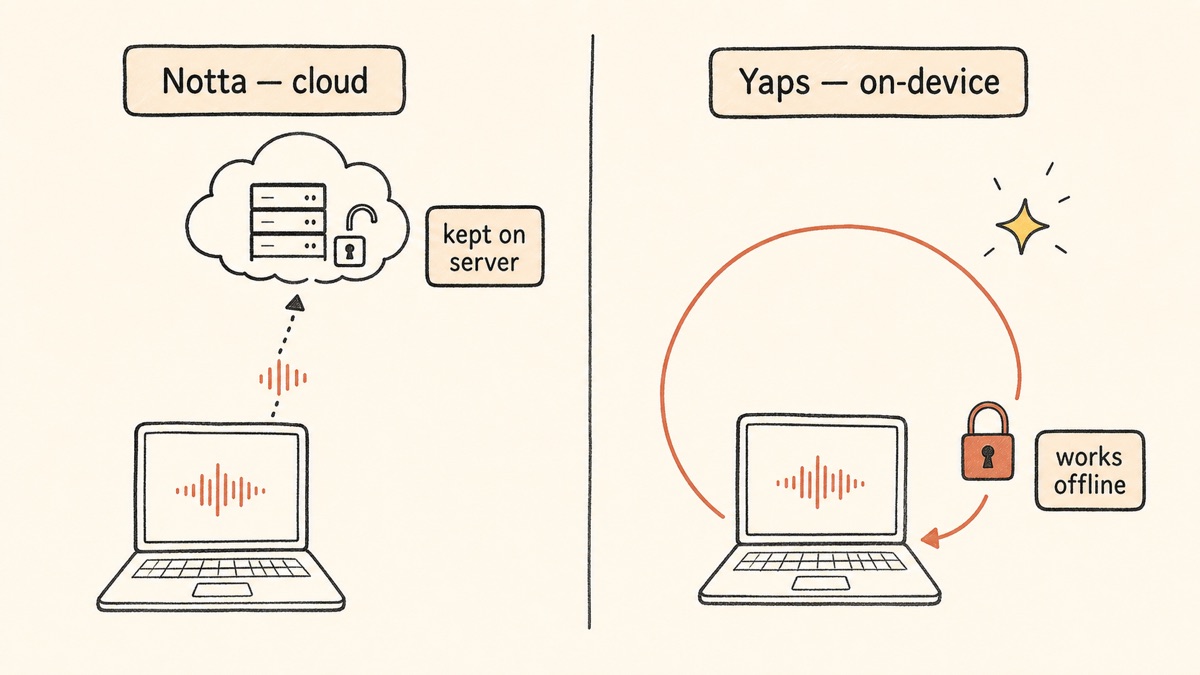
On-Device and Offline Equals Real Privacy
This is the whole game. With Notta, your audio is uploaded, processed on AWS in Tokyo, and the transcript is kept indefinitely unless you delete it. Free-tier audio is held for 90 days. The encryption and certifications are real, but they describe how your data is protected after it has left your control, not whether it leaves.
With Yaps, the audio never leaves the device. Studio transcribes the file locally, the result lands on your machine, and you can do all of it with the internet switched off. There is no server copy to leak, subpoena, or retain. For a journalist protecting a source, a lawyer handling privileged audio, or a clinician with patient recordings, that is not a feature comparison. It is a compliance and ethics line. Our HIPAA dictation guide and legal dictation guide work through what that means in regulated settings.
A Full Voice Toolkit, Not Just Transcription
Notta is a single lane: meeting notes. Yaps is a workflow. Studio handles file transcription, dictation handles live voice typing in any app, text cleanup polishes what you say, voice notes capture and organise spoken thoughts, read-aloud plays text back, voice commands drive your computer, and vault sync moves notes between phone and laptop. You are comparing one tool against six.
The practical effect: a researcher can transcribe an interview file in Studio, dictate the write-up in any document with the Yaps hotkey, have the draft read back aloud to catch errors, and capture follow-up questions as voice notes, all in one app, all on-device. With Notta, only the first step is even in scope, and that step ships your audio to the cloud.
Reach and a Free Trial That Actually Works
Yaps ships on Android as a full keyboard and dictation app, on Windows and macOS as a desktop app, and as a Chrome extension. The 7-day free trial unlocks every feature, with no per-meeting cap and no export lockout. Notta's free tier gives you 120 minutes a month, caps each online meeting at three minutes, and blocks transcript export entirely, which makes it more of a demo than a usable plan.
Porównanie prywatności
Both tools handle your audio responsibly within their own model. The models are not the same.
Notta is cloud-only. Audio uploads to its servers, is processed in isolated environments that are destroyed after use, and is encrypted in transit (TLS 1.3) and at rest (AES-256). It carries SOC 2 Type II, ISO 27001, and CCPA compliance. Transcripts are retained indefinitely unless deleted; free-tier audio is kept 90 days. The honest framing: your audio leaves your device and lives on AWS in Tokyo. The protections are good, but they protect data that is no longer in your hands.
Yaps processes core features on-device: file transcription, dictation, and text cleanup all run locally with no audio upload. There is no telemetry, and the account you sign in with covers the trial and your plan rather than where the audio is processed. The only data that ever leaves the device is text, not audio, and only if you opt into the cloud read-aloud voices, which is clearly labeled. Disconnect from the internet and Yaps still transcribes. That is the test cloud tools cannot pass.
For sensitive recordings, on-device is the safer default by construction. There is no server-side copy to be breached, retained past its usefulness, or compelled by a third party. Our piece on voice privacy in regulated industries digs into why architecture beats policy here.
Porównanie cen
| Yaps | Notta | |
|---|---|---|
| Free tier | 7-day free trial, every feature | 120 min/mo, 3-min cap per meeting, no export |
| Entry paid plan | Pro $15/mo | Pro about $13.99/mo (about $8.17 annual) |
| Top plan | Max $25/mo | Business about $27.99/seat/mo |
| Annual discount | About 20% off | About 40% off |
| Billing model | Flat monthly, no per-minute meter | Per-minute allowance, per-seat at team tier |
| Trial trap | None (7-day trial, then a flat plan) | 3-day trial widely reported to auto-bill a year |
| Account required | Yes (trial and plan) | Yes |
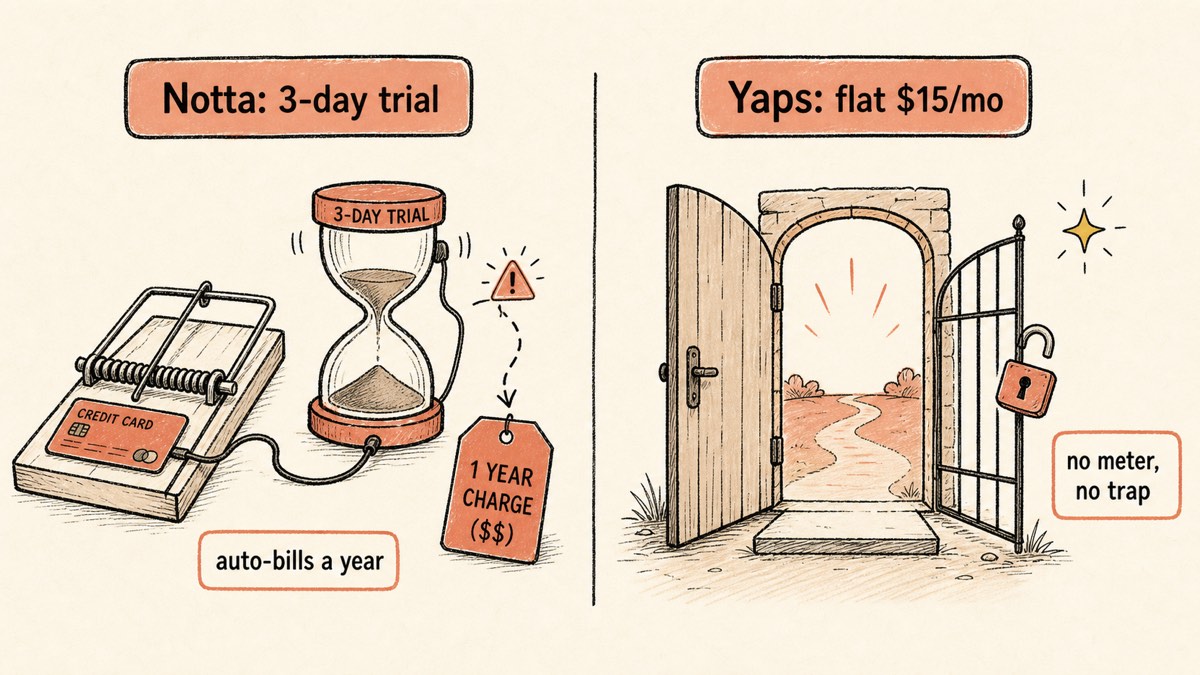
Notta's annual discount looks steeper on paper, but the per-minute allowance and the trial-to-annual conversion are where the cost surprises live. Yaps is flat: one price and no per-minute meter. If you only need occasional file transcription, the 7-day free trial lets you try it before you commit.
Kto powinien wybrać co
Choose Yaps if:
- You transcribe sensitive audio and need it to stay on your device
- You want offline file transcription to text or SRT with nothing uploaded
- You want dictation, text cleanup, voice notes, and read-aloud in one app
- You are on Android, Windows, macOS, or Linux and want a free trial you can genuinely test with
- You are tired of per-minute meters and trial-to-annual billing traps
Choose a cloud meeting bot (Notta, Otter, or Fireflies) if:
- You need a bot to join live Zoom, Meet, or Teams calls automatically
- You need speaker identification to label who said what
- You transcribe across many languages or need real-time translation
- You want transcripts wired into Notion, Salesforce, Slack, or Zapier
Choose a cloud file tool (Sonix, TurboScribe, or Rev) if:
- You have a backlog of recordings and want low cost per file or human-grade accuracy
- You need an in-browser editor or multilingual file transcription at volume
Kto powinien naprawdę wybrać Nottę
We will be honest. There are jobs where Notta, or another cloud tool, is the right answer and Yaps is not.
If you need live meeting capture. If your core need is a bot that joins Zoom, Meet, or Teams, transcribes in real time, and hands you a summary when the call ends, Notta is built for exactly that. Yaps does not join calls and does not transcribe live meetings yet (it is coming soon). Otter and Fireflies are the other strong picks here.
If you need to know who said what. Notta labels speakers across a conversation. Yaps does not do speaker diarization (also coming soon). For multi-person interviews or panel recordings where attribution matters, choose Notta, Otter, or Rev.
If you transcribe across many languages or need translation. Notta covers 100-plus languages with real-time translation and bilingual transcription. Yaps dictation handles about 25 languages, and its desktop read-aloud covers 31, so the genuine gap is the breadth of transcribed languages and the live translation, not the reading. Heavy multilingual users should weigh Notta or Sonix.
If you depend on deep integrations. Notta pushes transcripts into Notion, Salesforce, HubSpot, Slack, and Zapier. Yaps is not built around a third-party integration marketplace. If your workflow lives inside a CRM, Notta or Fireflies fits better.
Yaps also does not offer OCR or document scanning, an audiobook library or cloud voice marketplace, or live meeting transcription today. We would rather tell you that up front than have you discover it after switching.
Przewodnik po migracji: przejście z Notta na Yaps
If you mostly use Notta to turn recordings into text, and you would rather that audio never leave your device, the move is quick. Yaps' 7-day free trial lets you run both side by side, so you can compare them on your real files before deciding anything.
Step 1: Install Yaps
Download Yaps from yaps.ai for Android, Windows, macOS, or Linux. You do not need to uninstall Notta to test Studio file transcription. On desktop you create an account to start the 7-day free trial, and the transcribing still happens on your own machine. Both can coexist while you evaluate.
Step 2: Run a Real File Through Studio
Take a recording you have already transcribed in Notta and import it into Yaps Studio. Transcribe it offline, export the text or SRT, and compare the output against your Notta transcript. Notice that nothing uploaded and that it worked with the internet off.
Step 3: Export Your Notta Transcripts First
If you are on a paid Notta plan, export the transcripts you want to keep before you cancel. Notta's free plan blocks export, so do this while your paid access is active.
Step 4: Cancel Notta Before the Trial or Renewal Date
This is the step reviews warn about. Cancel inside Notta's account settings before the three-day trial ends or before the annual renewal date, because Notta is widely reported to auto-convert trials to annual billing with refunds rarely granted. Set a calendar reminder.
Step 5: Adopt the Rest of the Toolkit
The biggest gain is not replacing Notta. It is the features Notta never had. Set the Yaps hotkey, dictate a few documents, let text cleanup polish them, capture a couple of voice notes, and have a draft read back to you. After a week, you will know whether the on-device toolkit has earned its place.
Step 6: Decide and Clean Up
Once you have decided, remove the tool you are not keeping. If you stick with Yaps, you are done: no recurring upload and no per-minute meter.
Privacy by architecture, not by policy. If the audio never leaves the device, no breach, retention window, or billing dispute can expose what was never uploaded.
Yaps for Android, Windows, macOS, and Linux
A voice keyboard that keeps your voice on your phone.
Install Yaps on Android for offline dictation, a familiar full-size keyboard, and no screen capture. Scan the QR on desktop, or tap the Play badge on mobile.
Często zadawane pytania
What is the best Notta alternative in 2026?
It depends on the job. Otter or Fireflies are best for live meeting bots, Sonix or TurboScribe for cloud file transcription, and Yaps or MacWhisper if you want private, offline, on-device transcription that never uploads your audio. For most privacy-conscious users who transcribe files and dictate, Yaps is the default pick.
Is there a free alternative to Notta?
Yes. Yaps offers a 7-day free trial with no upload, MacWhisper has a free tier, Otter gives 300 minutes a month, Fireflies gives 800 minutes a month, and TurboScribe allows 3 transcriptions a day. Unlike Notta's free plan, Yaps does not cap each session at three minutes or block export.
Can I transcribe audio files without uploading them to the cloud?
Yes. Yaps Studio and MacWhisper transcribe imported files entirely on your device with nothing uploaded. Notta cannot do this, because it is cloud-only and uploads all audio to its servers for processing.
Does Yaps do live meeting transcription like Notta?
No. Yaps does not join calls or transcribe meetings live yet, though it is coming soon. For live meeting capture today, use Notta, Otter, or Fireflies. Yaps handles imported audio files offline in Studio instead.
Does Yaps support speaker identification, knowing who said what?
No. Yaps does not do speaker diarization yet, though it is coming soon. Notta, Otter, and Rev label speakers across a conversation, so choose one of those if attribution matters for your recordings.
Is Notta safe and private?
Notta encrypts data in transit and at rest and holds SOC 2 Type II and ISO 27001 certifications, but your audio is uploaded to its cloud on AWS in Tokyo. The protections govern data after it leaves your device. For true privacy where audio never leaves your machine, an on-device tool like Yaps is the safer choice.
Why are people unhappy with Notta?
The most common complaint is the three-day trial auto-billing a full year, with difficult cancellation and refunds rarely granted. Reviewers also cite a near-useless free plan (a three-minute cap per meeting and no export), and accuracy dips with accents, crosstalk, and background noise.
How do I cancel Notta and avoid being charged?
Cancel inside Notta's account settings before the three-day trial ends or before your annual renewal date. Notta is widely reported to auto-convert trials to annual billing with refunds rarely granted, so set a calendar reminder and cancel early to be safe.
What is the cheapest way to transcribe audio?
On-device tools like Yaps and MacWhisper never upload your audio and do not charge per file. Among cloud tools, TurboScribe at $10 a month annual and Sonix at $10 an hour are among the lowest cost, though both require uploading your audio.
Can I get SRT subtitles from my audio?
Yes. Yaps Studio exports SRT subtitles offline from imported audio files. MacWhisper, Sonix, and TurboScribe also produce subtitle files, though those tools upload your audio to the cloud first.
Does Yaps work offline?
Yes. Yaps core dictation, text cleanup, and Studio file transcription all run fully offline on the device. Notta requires an internet connection because it processes everything in the cloud.
What platforms does Yaps run on?
Yaps runs on Android as a full AI keyboard, on Windows, on macOS, and on Linux, plus a Chrome "Save to Yaps" extension. iOS is coming soon. Notta runs on web, iOS, Android, a Chrome extension, and a Mac and Windows desktop app, but is fully cloud-based.
How many languages does Yaps transcribe?
Yaps dictation handles about 25 languages, auto-detected from your speech with no language toggle. Notta covers 100-plus languages, so heavy multilingual users or those needing real-time translation may prefer Notta or Sonix.
Notta vs Otter, which is better?
Notta has the stronger recorder bot and far wider language coverage, while Otter has a more familiar Zoom workflow but a tighter free plan. Both are cloud-only, so for private offline transcription neither is the answer; Yaps or MacWhisper is.
What is the best private alternative to Notta for sensitive recordings?
Yaps is the strongest private alternative: offline Studio file transcription plus on-device dictation, with nothing uploaded at any point, so the recording stays on hardware you own. MacWhisper on a Mac is the other on-device option. Both keep your audio on your own device, which Notta cannot do.
Wniosek
Notta is a capable cloud meeting bot. If you need a recorder to join live calls, label speakers, and span 100-plus languages, it does that well, and so do Otter and Fireflies.
But for transcribing files you would rather not upload, for dictation, for a free trial that does not cap you at three minutes, and for a flat price with no trial-to-annual trap, the right default is Yaps. It transcribes your audio on-device, works offline, keeps every recording on your own machine, and bundles dictation, text cleanup, voice notes, and read-aloud into one app on Android, Windows, macOS, and Linux.
The honest line: if your work is live meetings, choose a cloud bot. If your work is files, sensitive audio, or daily voice, choose the tool that never sends your voice anywhere. Try the Yaps free trial on a real recording and let the result decide.