
Preface
Voice notes solved the wrong problem. They made it easier to send a message and harder to receive one.
The person on the other end now has to find somewhere they can play audio, listen at your pace rather than theirs, and hold the whole thing in their head because they cannot skim it. Which is why so many voice notes sit unplayed, and why "sorry, just seen this" has become a genre.
Dictating the message solves it properly. You still talk, which is the fast part. They get text, which is the useful part. Nobody has to find headphones.
The remaining question is where your voice goes on the way. Most phone dictation sends it to a server. This guide covers doing it on the phone itself, in WhatsApp and every other messaging app, with the audio never leaving the device.
The keyboard is the right place for this
Messaging apps do not each need their own dictation feature, and mostly they do not have one. What they have is a text field.
So the tool that works everywhere is a keyboard. Install it once, and dictation appears in WhatsApp, in your SMS app, in Signal, Telegram, Instagram, Slack, a note to yourself, and a search box. There is nothing to integrate and no app that gets left out when it updates.
This is also why a keyboard is the honest place to worry about privacy. A keyboard sees everything you type, which is a lot of trust to hand over. The version worth using is one where the voice recognition runs on the phone, so the sensitive part never travels.
A voice note is easy to send and expensive to receive. Dictation moves the cost back to the person who chose to talk.
Yaps for Android
The distinction that trips people up
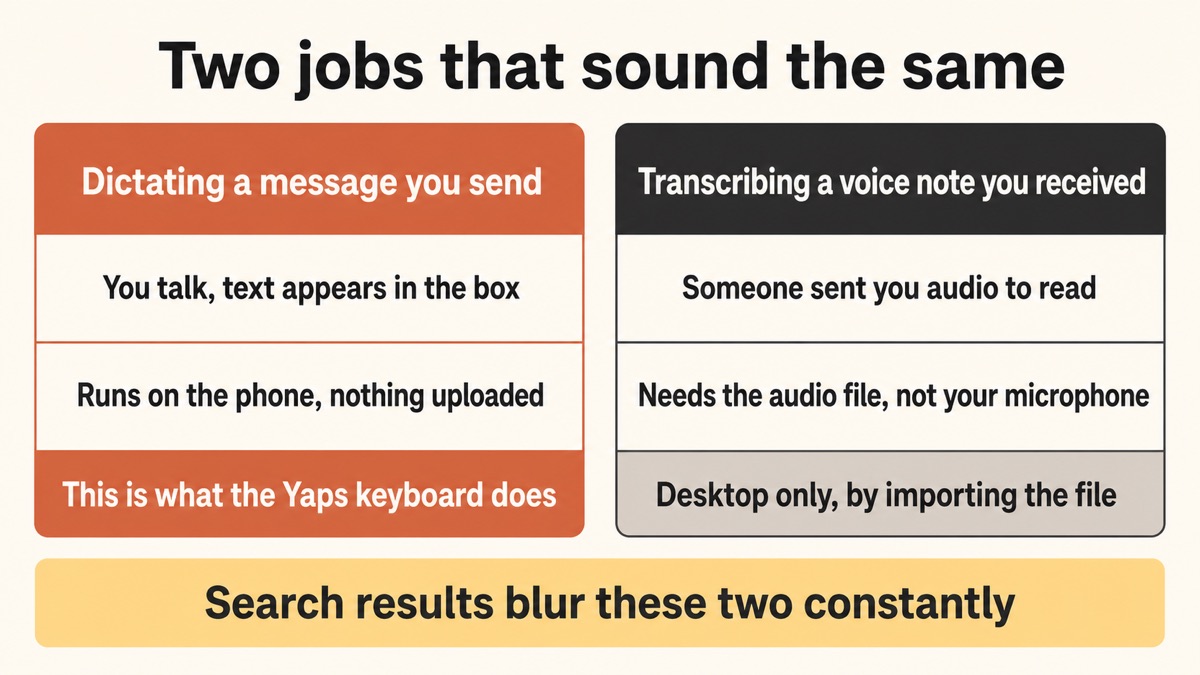
Two different jobs get searched for with almost the same words, and only one of them is what this guide does.
Dictating a message you are sending. You talk, text appears in the message box, you press send. That is what the Yaps keyboard does, on the phone, offline.
Transcribing a voice note somebody sent you. Someone sends you two minutes of audio and you want to read it instead. That is a different job: it needs the audio file, not your microphone.
Yaps does not transcribe incoming voice notes on the phone. If you have the audio file and you are on a computer, you can import it into Studio and transcribe it there offline. On Android, the dictation half is what exists. Worth knowing before you install anything, because plenty of search results blur the two.
Sending a voice note
Fast for you, slow for them
You talk for ninety seconds and it is done. They need a quiet moment, headphones or a speaker, and ninety seconds of their own. They cannot skim it, search it later, or reply to one specific line without listening twice.
Dictating the message
Fast for you, easy for them
You still talk, so it is just as quick to compose. They get text they can read in five seconds, search next month, and quote back at you. Filler words and punctuation are cleaned up on the way, so it reads like writing rather than a transcript.
Setting it up
1. Install it and enable the keyboard
Install Yaps from the Play Store, then enable the Yaps keyboard in Android settings and pick it as your input method. Android walks you through this the first time.
There is a free tier on Android covering voice typing, voice notes, and read-aloud on the device.
2. Prove it is offline
Turn off wifi and mobile data. Open any text field. Dictate a sentence.
If the words appear with no connection, the recognition happened on your phone. This takes thirty seconds and is the only way to know for certain rather than trusting a marketing page, including ours.
3. Open a chat and press the dictation button
Tap into the message field in WhatsApp, Messages, Signal, Telegram, or anything else, and press the dictation button on the keyboard. It is a dedicated button on the Yaps keyboard rather than a key combination, so there is nothing to memorise.
Speak in full sentences at your normal pace. Do not over-enunciate, and do not speak in single words: more context makes the result better, in every language.
4. Read it before you send it
Yaps puts the text in the box and stops there. Pressing send is your job.
That is deliberate. Dictation gets proper nouns wrong more often than anything else, so the half-second where you glance at the message before sending is worth keeping. It is also the difference between a tool that helps you write and a tool that speaks on your behalf.
Why the offline part matters for messages specifically
Everyone accepts that a work document should stay private. Messages get treated as trivial, and they are not.
The contents of your messaging apps are the most detailed record of your life that exists anywhere. Who you talk to, when, about what, in what mood. A dictation tool sits directly in that stream, because it hears the message before the messaging app encrypts it.
This is the gap people miss when they switch to an encrypted messenger. End-to-end encryption protects the message in transit between you and the recipient. It does nothing about a keyboard that sent your speech to a server before the message existed. If you chose Signal for a reason, the keyboard you dictate into is part of the same decision.
An on-device keyboard closes that gap. The audio is turned into text on the phone, and the messaging app encrypts the text as usual.
| What matters | Yaps keyboard | Cloud voice keyboards | Sending a voice note |
|---|---|---|---|
| Voice stays on the phone | Yes | No, uploaded | Audio is sent as the message |
| Works with no signal | Yes | No | Records, sends when back online |
| Recipient can skim it | Yes, it is text | Yes | No |
| Searchable later | Yes | Yes | No |
| Works in every app | Yes, it is a keyboard | Usually | Only apps with voice notes |
| Cleans up filler words | Yes, on device | Varies | No, every um is included |
When is a voice note still the right call? When tone is the message. An apology, a happy birthday, a difficult conversation with someone who needs to hear that you are not angry. Text flattens all of that, and dictation flattens it too, because it produces text. Send the voice note in those cases and dictate the rest.
It is a full keyboard, not just a microphone
Worth saying, because a voice-only keyboard would be a bad trade. You do not want to switch keyboards every time you need to type a password or a single word.
The Yaps keyboard does the ordinary things: tap typing, swipe or glide typing, autocorrect, themes and fonts, height adjustment, one-handed mode, clipboard support for text and images, and more than 20 languages. Dictation is a button on it rather than the whole point of it.
That matters for messaging in particular, where you constantly alternate between a long dictated message and a two-word reply that is faster to thumb.
There is a fuller tour of the keyboard itself in the guide to the private Android voice keyboard, and a wider comparison in the best AI keyboard for Android.
Who gets the most out of this
People who send long messages. If your texts run to paragraphs, thumb-typing is the bottleneck and speaking removes it.
People whose recipients hate voice notes. Most of them. Dictating is the compromise where you keep the speed and they keep the ability to skim.
Anyone typing in a second language. Accented characters and unfamiliar spelling are slow to thumb and easy to speak. Dictation covers about 25 languages, detected automatically, so a bilingual thread does not need a settings change.
People with hand pain, RSI, or limited dexterity. Thumb-typing at volume is genuinely painful for some people, and a phone keyboard is the worst offender. See voice input for RSI.
Anyone on a patchy connection. Commutes, lifts, basements, rural roads. On-device dictation does not care, and a cloud keyboard falls back to nothing.
The short version
Dictate the message instead of sending a voice note. You keep the speed of talking and the other person gets text they can actually use.
Install Yaps on Android, enable the keyboard, and prove it works with the connection off. Press the dictation button in WhatsApp or any other app, speak the whole message in one go, read it, then send it yourself. Keep sending voice notes for the messages where tone is the point.
Frequently Asked Questions
How do I use voice to text in WhatsApp?
Install a keyboard with dictation built in, then tap into the WhatsApp message field and press its dictation button. WhatsApp has no dictation of its own; it has a text field, and your keyboard supplies the voice typing. With the Yaps keyboard on Android the recognition runs on the phone, so the audio is not uploaded and it keeps working with mobile data off.
Can I dictate text messages on Android without Google?
Yes. The Yaps keyboard does the recognition on the phone rather than sending your voice to a server, so dictation works with no connection and no third-party service receives the audio. That is the practical difference from the default voice typing on most Android phones, which processes speech in the cloud. Our guide to voice typing on Android without Google covers the wider switch.
Does it work in Signal and Telegram too?
Yes, and in every other app with a text field, because it is a keyboard rather than an integration. Signal, Telegram, Messages, Instagram, Slack, email, and search boxes all work the same way. Nothing needs to be added per app, and an app update cannot break it.
Can Yaps transcribe a voice note someone sent me?
Not on the phone. Dictation captures your own speech as you talk; transcribing an incoming voice note is a different job that needs the audio file. On a computer you can import an audio file into Studio and transcribe it offline. On Android, the dictation half is what exists today, which is worth knowing because search results often blur the two.
Is dictating a message more private than sending a voice note?
In one specific sense, yes: with on-device dictation the audio never leaves your phone, whereas a voice note sends the recording itself to the recipient and their provider. Both are then subject to whatever your messaging app does. The bigger point is that a cloud keyboard uploads your speech before the messaging app ever encrypts anything, which quietly undoes part of why people choose an encrypted messenger.
Does it work without an internet connection?
Yes. The speech model is installed on the phone, so dictation works in a lift, on the underground, on a rural road, and in aeroplane mode. Verify it in thirty seconds: turn off wifi and mobile data, open any text field, and dictate a sentence.
Will it send the message automatically?
No, and that is deliberate. Yaps puts the text in the box and stops, so you read it before pressing send. Dictation gets proper nouns wrong more often than anything else, and the half-second glance is what stops a mangled name going out.
Does it add punctuation and capitalisation?
Yes, on the device, along with removing filler words like "um" and "you know" and formatting lists when you speak one. That is what makes a dictated message read like something you wrote rather than a transcript of you thinking aloud. Dictate the whole message in one go for the best results, because cleanup works on what you said as a unit.
What languages can I dictate messages in?
About 25, detected automatically rather than chosen from a menu, so a thread that switches between two languages does not need a settings change. The keyboard itself types in more than 20 languages. A sentence that switches language halfway through is the hard case for any tool, so split those into two dictations.
Is it a full keyboard or just a microphone?
A full keyboard. Tap typing, swipe and glide typing, autocorrect, themes and fonts, height adjustment, one-handed mode, and clipboard support for text and images are all there, with dictation as a button on it. You are not switching keyboards to type a password or a two-word reply.
Does it work on iPhone?
Not yet. Yaps runs on Android, Windows, macOS, and Linux today, and an iPhone and iPad version is coming soon. On iOS, third-party keyboards are also more restricted than on Android, which is part of why the Android version came first.
What does it cost?
There is a free tier on Android covering voice typing, voice notes, and read-aloud on the device. Desktop is separate: a 7-day free trial, then Pro at $15 a month or Max at $25 a month.
Does a keyboard app see everything I type?
Any keyboard can, which is exactly why the question is worth asking of whichever one you use. The distinction that matters is where the processing happens: Yaps does speech recognition and cleanup on the phone rather than sending them to a server, so the sensitive part never travels. We wrote more about what happens to voice data generally in protecting your voice data.