Preface
You tap the microphone on your Android keyboard, say a sentence, and it appears as text. Convenient. On most Android phones, though, that sentence took a detour: your audio was streamed to Google's servers, transcribed there, and sent back. If you have gone to the trouble of de-Googling your phone, switched to GrapheneOS, or simply do not want Google in the middle of everything you say, that detour is the whole problem.
The good news is that voice typing without Google is a real, working category in 2026, and you do not have to give up dictation to get there. The honest news is that there is more than one right answer, and the best one for you depends on how strictly open-source your requirements are. This guide covers exactly how the Google dependency works, how to remove it, the open-source keyboards that keep recognition on your phone, and the polished no-Google option that also syncs your notes across devices.
Why Android Voice Typing Goes Through Google
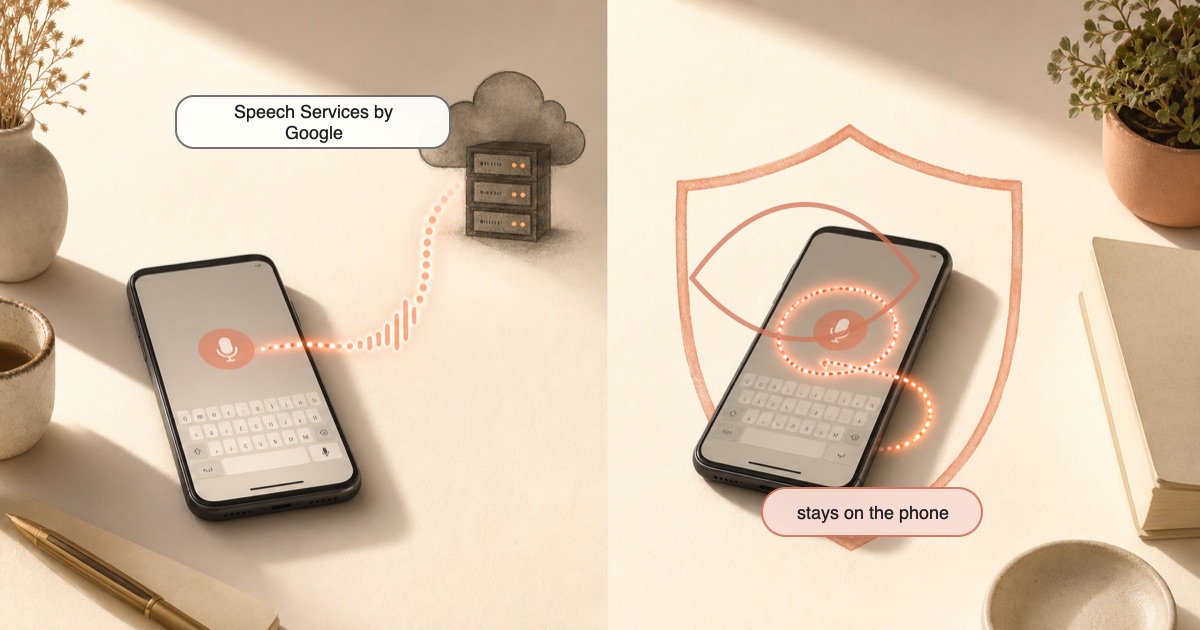
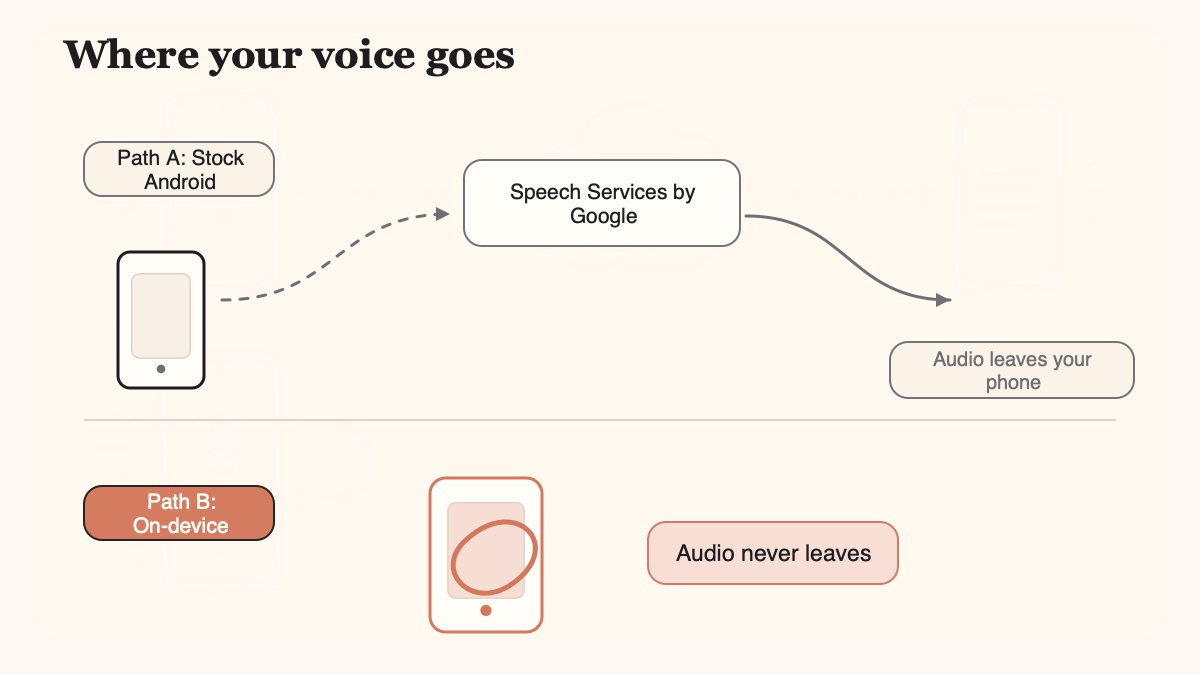
Here is the part almost nobody explains. The keyboard is not usually the thing doing the transcription. On stock Android, the actual speech-to-text engine is a separate system component called "Speech Services by Google" (you may see it listed as "Speech Recognition & Synthesis," package com.google.android.tts). Gboard, Google Docs voice typing, and most third-party keyboards do not transcribe your voice themselves. They hand the audio off to that Google component and wait for text to come back.
That design matters because it means the Google dependency is a single, removable piece. If you disable or deny that component, the whole "call Google to transcribe" path breaks, which is exactly what a de-Googled setup wants.
On classic Gboard voice typing, that transcription is a cloud round-trip by default. Your audio is streamed to Google's servers for recognition, which is why it needs an internet connection at all. The exception is newer Pixel devices (Pixel 6 and later) with "advanced" or "faster voice typing," where Google keeps recognition on the device and states plainly that "the text that you speak stays on your device and is not sent to Google servers." On everything else, it is a cloud call.
There is a second, separate reason privacy-minded users want off Google entirely. Beyond recognition, Gboard can send voluntary "audio donation" snippets (up to fifteen seconds) to Google to improve its models, and it participates in federated learning. Those are controllable and opt-in, but they exist by default in the Google ecosystem. When your goal is "Google should not be processing my voice," the cleanest answer is not to tune a dozen Google toggles. It is to get the keyboard off Google altogether.
Why Gboard's own "offline" mode is a partial answer
Gboard does offer an on-device option. Under Settings, System, Languages and input, Gboard, Voice typing, you can enable "Offline speech recognition" and download a language pack (each pack is roughly 50 to 100 MB). Turn it on and dictation runs on the device instead of the cloud.
It helps, but it does not fully get you off Google. The offline pack still ships inside Gboard, which is a Google app and depends on Google's app being present. And there is an accuracy cost: the offline model is a small, compressed on-device model constrained by your phone's storage and compute, so it makes more mistakes on uncommon words, technical terms, names, and accents than the cloud path does. Google's cloud can lean on far larger models and over 100 languages; the offline pack supports far fewer, with English the strongest. Useful as a stopgap, but not a de-Googled solution.
How to Remove Google From Android Voice Typing
Work through the options below in the order that matches how strict you want to be. The first three tame or remove Google's own path; the last two replace it with a keyboard that never calls Google in the first place. Settings paths vary by Android version and by device, so treat these as the typical path that may differ slightly on yours.
Turn Gboard off the cloudGboard
Go to Settings, System, Languages and input, Gboard, Voice typing, and switch on Offline speech recognition. Download your language pack, around 50 to 100 MB. Recognition now runs on the phone, but it is still inside Google's app and uses a smaller, less accurate model.
Stop Google voice typing on SamsungGalaxy
On a Galaxy phone, go to Settings, General management, Language and input, On-screen keyboard, Manage keyboards, and turn off Voice input (called Dictation on newer One UI). On One UI 5 and later it may live under Samsung Keyboard settings, Voice input. Disable it in both Samsung Keyboard and Gboard if both are active.
Remove the Google speech backendSystem
Go to Settings, Apps, Speech Services by Google, and choose Disable. This is the system-wide cut: with the backend gone, no keyboard on the phone can call Google to transcribe your voice. You will then need an on-device keyboard for dictation.
Install an on-device keyboardReplace
Install a keyboard that transcribes on the phone itself. FUTO Keyboard has offline voice input built in. HeliBoard needs FUTO Voice Input added. Yaps runs dictation fully on-device. None of them need Google services to transcribe a sentence.
Verify it is truly offlineProof
Turn on airplane mode, or on GrapheneOS deny the app's Network permission, then dictate. If it still transcribes instantly with no Processing delay, recognition is genuinely on the device. If it stalls or fails, it was reaching for the cloud.
That is the full playbook. Options A through C keep you inside Google's stack while limiting or cutting the cloud path; options D and E move you to a keyboard that was designed to transcribe on the phone. For a de-Googled phone, D or E is the real destination.
The Open-Source Route: FUTO Keyboard and HeliBoard
If your hard requirement is fully open-source, auditable software, this is your answer, and it is a good one. Two names lead the de-Googled keyboard world, and they deserve real credit.
FUTO Keyboard is a source-available Android keyboard with offline voice input built right in, based on the Whisper speech model. It markets itself as "100% Offline, 100% Private," with no internet connection used and no data transmitted or stored. It is a free download (Play Store, F-Droid, or GitHub) with an optional one-time payment to support development. If you want one app that gives you both a keyboard and on-device dictation with source you can inspect, FUTO is the headline pick.
HeliBoard is a popular open-source (GPL) keyboard forked from OpenBoard, and a favourite on F-Droid and de-Googled ROMs. It has no built-in voice typing on its own; it expects you to pair it with FUTO Voice Input for offline dictation. That makes it the assemble-it-yourself route: maximally open, slightly more setup, and a great fit for people who already run a minimal F-Droid-only phone.
Let us be direct about this. If fully open-source is a non-negotiable requirement for you, FUTO Keyboard or HeliBoard-plus-FUTO is the correct pick, full stop. A well-behaved offline keyboard with no network access is as private as voice typing gets, and Yaps is not going to claim to beat that on the privacy axis. Yaps is not open-source. That is a real difference, and if source-availability is your line, the FOSS peers win it cleanly.
Where GrapheneOS Fits
If you are on GrapheneOS, you have the strongest de-Googled toolkit of anyone reading this, and a couple of options built for exactly this problem.
GrapheneOS is actively building its own on-device speech-to-text (English first, more languages to follow). Its full-time developer already shipped Transcribro, an on-device speech-to-text app available on the Accrescent app store, which is currently the most practical de-Googled dictation option that comes from the ecosystem itself. GrapheneOS also confirms that both Apple and Google support offline speech-to-text through local models, so on-device transcription is a mature capability, not an experiment.
The feature that makes GrapheneOS special here is the per-app, per-profile Network permission toggle, which stock Android does not have. It lets you fully revoke internet access from an app after you have installed it. Pair that with any genuinely on-device dictation keyboard (FUTO, HeliBoard plus FUTO, Yaps, or Transcribro) and you get a hard, verifiable guarantee: with Network denied, the app physically cannot send your audio anywhere, and if it still transcribes, the work is provably happening on the phone. That is a stronger proof than any marketing promise.
To be clear about our lane: Yaps does not replace or out-privacy the GrapheneOS-native path. If you are a GrapheneOS purist, Transcribro and the FOSS keyboards are the ecosystem-blessed route. Yaps runs perfectly well on GrapheneOS with Network denied, and its angle is being a polished, cross-platform keyboard with workspace features, not out-purifying a phone that is already about as private as phones get.
The Options Side by Side
| Option | Yaps | FUTO Keyboard | HeliBoard + FUTO | Gboard offline | Transcribro |
|---|---|---|---|---|---|
| On-device recognition | Yes | Yes | Yes | Yes | Yes |
| Needs no Google services | Yes | Yes | Yes | No (Google app) | Yes |
| Open-source | No | Source-available | Yes (GPL) | No | Yes |
| Built-in, no pairing | Yes | Yes | Pair FUTO voice | Yes | Standalone STT |
| Multilingual dictation | ~25 auto | Whisper langs | Whisper langs | Few (English best) | English first |
| On-device text cleanup | Yes | No | No | No | No |
| Cross-device vault sync | Yes (premium) | No | No | No | No |
| Runs on any Android | Yes | Yes | Yes | Needs Gboard | Yes |
Yaps: The Polished No-Google Option
If you do not require open-source and you want the smoothest version of no-Google voice typing, this is where Yaps fits. The Yaps Android keyboard does its dictation fully on the phone, uploads no audio, and needs no Google services to transcribe a sentence. It runs on any Android, not only Pixels, and not only de-Googled ROMs.
You dictate by tapping the dictation button on the Yaps keyboard, the same as you would tap the mic on any keyboard, except the transcription happens on the device. Yaps runs a modern speech model on your phone, and its dictation is multilingual: roughly 25 languages, auto-detected from what you say, so you are not stuck in the English-only corner the way Gboard's offline pack tends to leave you.
What Yaps adds on top is the reason to pick it over a bare FOSS keyboard, and none of it is a privacy claim. There is on-device text cleanup that strips filler words, fixes punctuation and capitalisation, and formats lists, so your raw speech lands as clean text without a cloud round-trip. It is a full keyboard, not a bolt-on voice engine: themes, glide typing, and 25 typing languages, all in one install with nothing to pair. And premium encrypted vault sync keeps your notes in step between your Android phone and your desktop over your local network, which is something no standalone recognizer on this list does.
- Streams your audio to Google's servers on classic voice typing (Pixel 6+ excepted)
- The transcription backend is Speech Services by Google, a Google system component
- Offline mode exists but stays inside Google's app and uses a smaller, less accurate model
- Can send opt-in audio donation snippets to Google by default in the ecosystem
- No on-device cleanup, so raw speech lands with filler words and rough punctuation
- Transcribes fully on the phone; no audio is uploaded and no Google services are required
- Runs on any Android, including de-Googled ROMs and GrapheneOS with Network denied
- Multilingual dictation, roughly 25 languages, auto-detected from your speech
- On-device text cleanup turns messy speech into clean text with no cloud round-trip
- A full keyboard plus premium encrypted vault sync between phone and desktop
Removing Google from your voice typing is not about trusting a better promise. It is about the audio never having anywhere to go.
A word on accuracy, because "without Google" sometimes gets sold as "flawless," and no honest post should say that. Speech recognition quality is measured as Word Error Rate: substitutions plus insertions plus deletions, divided by the total words spoken, compared to a human transcript. Lower is better, and zero is perfect, which nothing hits in the real world. Clean audio with common words can reach a few percent; phone and meeting audio runs higher; heavy background noise or a strong accent can push past twenty percent on any system. So real-world accuracy depends on your microphone, your surroundings, your accent, and your vocabulary as much as on the model. On-device dictation in 2026 is genuinely competitive with cloud dictation for everyday use, but no engine, Google's or anyone else's, is 100% accurate. If you want the deeper background, our offline dictation guide walks through how on-device recognition caught up.
Voice typing that never sends your voice to Google.
Install Yaps on Android for on-device dictation that needs no Google services, a full customizable keyboard, on-device cleanup, and encrypted sync between your phone and desktop. Scan the QR on desktop, or tap the Play badge on mobile.
Which One Should You Pick
The choice comes down to a single question: is fully open-source a hard requirement?
If yes, install FUTO Keyboard for a built-in offline voice keyboard, or run HeliBoard with FUTO Voice Input if you prefer the GPL, assemble-it-yourself route. On GrapheneOS, Transcribro from the ecosystem itself is a natural fit, and the Network permission gives you a hard offline guarantee on top. These are the correct answers for the open-source purist, and we say that without hedging.
If you do not require open-source and you want the most polished experience, one keyboard with dictation, cleanup, glide typing, and cross-device sync all built in, install Yaps. It transcribes on the phone, needs no Google services, and runs on any Android. For the broader keyboard comparison, our guide to the best private voice keyboard for Android and our best AI keyboard for Android roundup both go wider, and if Samsung's own dictation is what broke for you, why Samsung voice typing stops working covers that path.
Frequently Asked Questions
Can you voice type on Android without Google?
Yes. You can either force Gboard into its offline mode, disable the "Speech Services by Google" system component so no keyboard can call Google to transcribe, or install a keyboard that transcribes on the phone itself. FUTO Keyboard and HeliBoard (paired with FUTO Voice Input) are the open-source options, and Yaps is the polished all-in-one option that needs no Google services and runs on any Android.
How do I use voice typing on Android completely offline?
Install a keyboard that runs recognition on the device, such as FUTO Keyboard, HeliBoard with FUTO Voice Input, or Yaps, then confirm it is offline by dictating with airplane mode on. If the text still appears instantly with no processing delay, the transcription happened on your phone. Gboard also has an offline speech recognition toggle under its Voice typing settings, but it stays inside Google's app.
Does Gboard send my voice to Google?
On classic voice typing, yes. Gboard streams your audio to Google's servers for recognition by default, which is why it needs an internet connection. The exceptions are newer Pixel phones (Pixel 6 and later) with faster voice typing, where Google keeps the text on the device, and Gboard's opt-in offline speech recognition mode, which runs on the phone but still lives inside a Google app.
Why is Gboard's offline voice typing less accurate than online?
The offline pack is a small, compressed model constrained by your phone's storage and compute, so it makes more mistakes on uncommon words, names, technical terms, and accents. Google's cloud path can use far larger models and over 100 languages, while the offline packs support far fewer, with English the strongest. On-device recognition has improved a great deal, but Gboard's specific offline model is a lightweight version of its cloud engine.
What is the best voice-to-text app for GrapheneOS?
Transcribro is the most practical de-Googled option built by the GrapheneOS developer, and GrapheneOS is building its own on-device speech-to-text as well. For a full keyboard rather than a standalone recognizer, FUTO Keyboard and HeliBoard are strong open-source picks, and Yaps runs on GrapheneOS too. Whichever you choose, use the per-app Network permission to revoke internet after setup for a hard guarantee that no audio can leave the phone.
Is there offline speech-to-text for a de-Googled Android phone without Google Play Services?
Yes. FUTO Keyboard, HeliBoard with FUTO Voice Input, Transcribro, and Yaps all transcribe on the device and do not require Google Play Services to do so. That makes them viable on de-Googled ROMs and GrapheneOS where Google's services are absent. You can install the open-source options from F-Droid or GitHub, which fits a no-Google-Play setup cleanly.
How do I know if my voice typing is actually on-device and not going to the cloud?
Turn on airplane mode and dictate a sentence. If the text appears right away with no "Processing" delay and no failure, recognition is happening on your phone. On GrapheneOS you can go further and deny the app's Network permission, which physically blocks it from sending anything, so a successful transcription with the network revoked is proof the work is local.
What is the difference between FUTO Keyboard and HeliBoard for voice typing?
FUTO Keyboard has offline voice input built in, based on the Whisper model, so it is a single install for both typing and dictation. HeliBoard is a GPL keyboard forked from OpenBoard with no built-in voice typing; you pair it with FUTO Voice Input to add offline dictation. FUTO is the simpler all-in-one; HeliBoard is the more modular, maximally open route that takes an extra step to set up.
Is Yaps open-source, and how does it compare to FUTO for privacy?
Yaps is not open-source, and FUTO Keyboard is source-available, so if auditable code is your hard requirement, FUTO is the right pick. On the privacy axis itself they are at parity: both transcribe on the device and upload no audio, and an offline keyboard with no network access is as private as voice typing gets. Yaps differentiates on polish, zero setup, multilingual dictation, on-device cleanup, and cross-device vault sync, not on being more private.
Does on-device dictation work on any Android phone or only Pixel?
FUTO Keyboard, HeliBoard with FUTO Voice Input, and Yaps all run on-device dictation on any Android phone, not only Pixels. The Pixel-only limitation applies specifically to Google's own "faster voice typing," which keeps recognition local only on Pixel 6 and later. A third-party on-device keyboard removes that restriction entirely, since it does the transcription itself rather than relying on Google's on-device feature.
Final Thoughts
Voice typing without Google on Android is not a workaround anymore; it is a genuine choice with several good answers. The mechanism to understand is simple: on stock Android, "Speech Services by Google" is the removable backend, classic Gboard voice typing streams your audio to the cloud, and the fix is either to disable that backend or to install a keyboard that transcribes on the phone.
If fully open-source is your line, FUTO Keyboard and HeliBoard are the right picks, and on GrapheneOS the native Transcribro path plus the Network permission gives you a hard, verifiable offline guarantee. We will not pretend Yaps beats an offline FOSS keyboard on privacy, because it does not; at that ceiling everyone is even.
For everyone who wants the polished version, one keyboard that dictates on-device, cleans up your speech, types in 25 languages, and keeps your notes in sync between your phone and desktop, Yaps is the recommendation. It needs no Google services, runs on any Android, and on a de-Googled phone you can deny it network access and watch it keep working. That is the whole point: your voice never has anywhere to go.