
Prefacio
Speechnotes is good at what it does. You open speechnotes.co in Chrome, click the microphone, and start talking. Text appears in a clean web notepad you can copy out. No install, no account, no cost. It has been running since 2015 and it still works.
If you just need to talk into a web page once, on a borrowed or locked-down computer where you cannot install anything, that friction-free pitch is hard to beat. Full stop.
But if you use dictation every day, the cracks show fast. Speechnotes only works inside its own browser tab, so you dictate, then copy and paste into the app you actually wanted to write in. It runs on the browser's Web Speech API, which streams your voice to Google or Microsoft cloud servers, so the moment your connection drops, dictation stops mid-sentence. And the free tier carries ads.
We built Yaps, so we are biased. We are also going to be honest about where Speechnotes (or another tool) is the better pick. Here are the seven best Speechnotes alternatives in 2026, ranked for most people.
Browser notepad
Speechnotes
A free, cloud-based dictation notepad locked to its own Chrome or Edge tab. Your voice routes to Google or Microsoft servers. No offline mode, no native desktop app, ads on the free tier.
System-wide voice toolkit
Yaps
On-device dictation in every app via the Yaps hotkey, fully offline, audio never leaves the device. Plus text cleanup, voice notes, read-aloud, and a studio. Native on Android, Windows, macOS, and Linux. No ads.
Las 7 mejores alternativas de notas de discurso en 2026 (Comparación rápida)
Here is the shortlist, ranked for most users. Deeper write-ups follow.
1. Yaps - Best Overall Speechnotes Alternative
Yaps is the alternative that fixes the three things people leave Speechnotes for: it works in every app, it works offline, and it keeps your voice on your device.
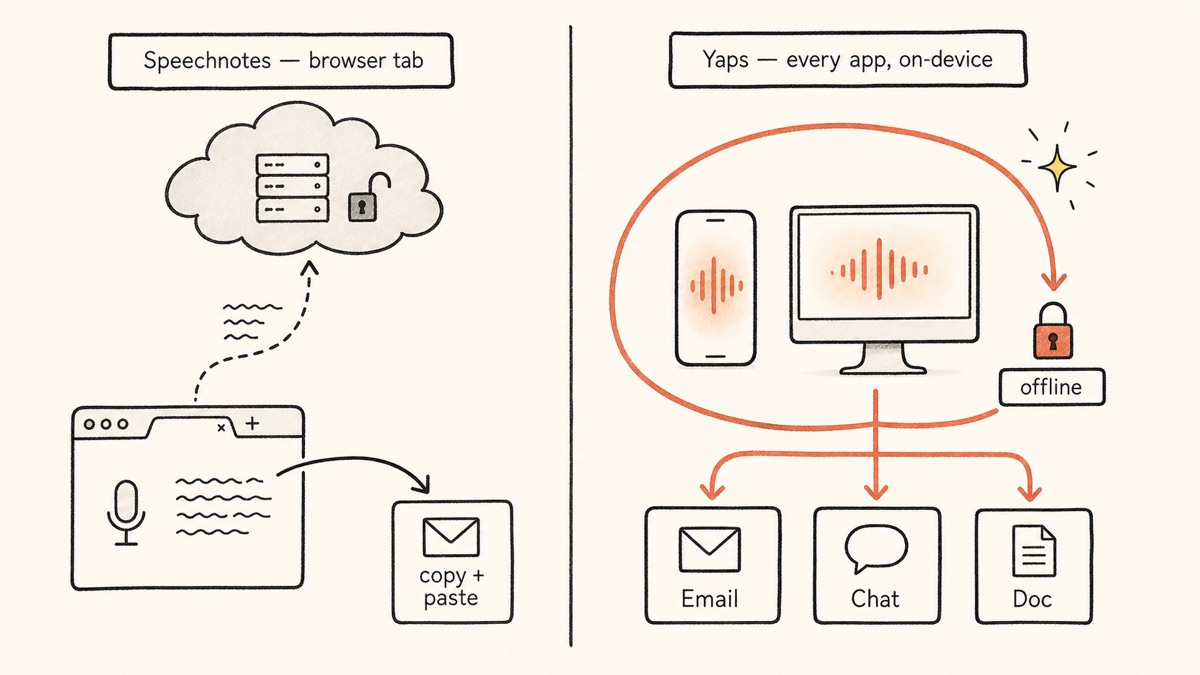
Speechnotes lives in a browser tab. Yaps dictation runs system-wide. Push the Yaps hotkey (or the dictation button on the Android keyboard), talk, and clean text appears wherever your cursor already is: your email, a chat window, a document, a code editor, a form field. No tab to open, nothing to copy and paste.
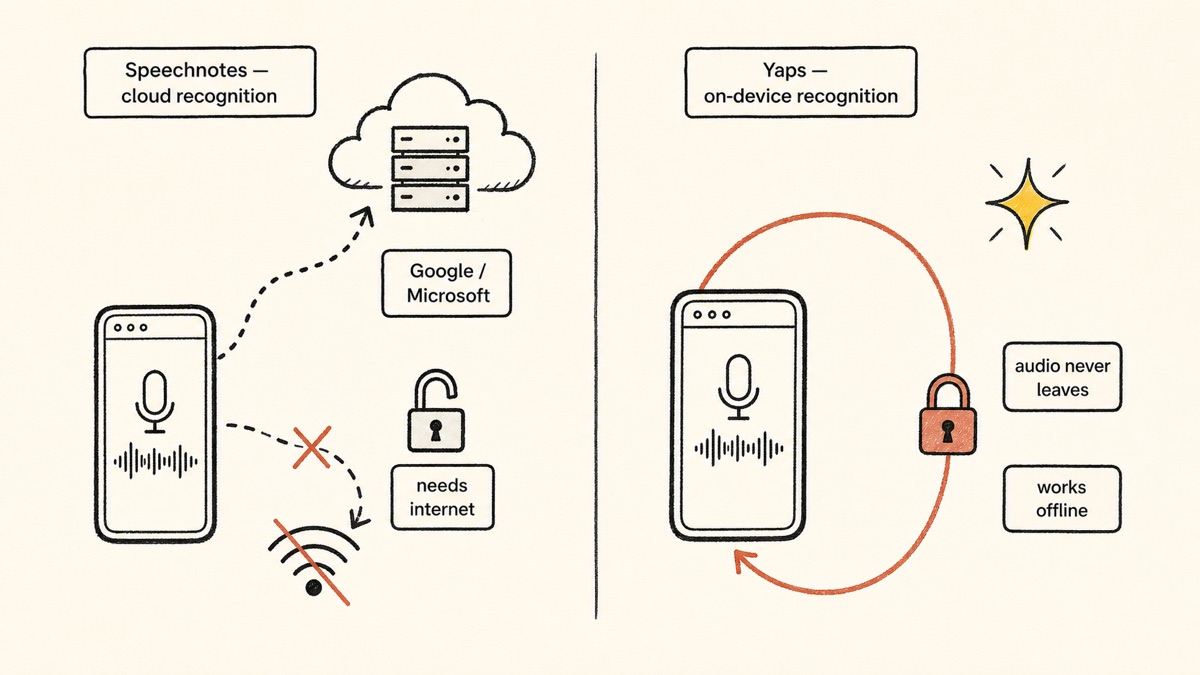
The deeper difference is the architecture. Speechnotes streams your voice to Google or Microsoft cloud servers through the browser, so it needs a live connection and your audio leaves your machine. Yaps runs core dictation on-device. Your audio never leaves the device, it works fully offline on a plane or in a basement, and there is no telemetry. Signing in starts your desktop trial, and it does not change where the work happens. For anyone dictating anything sensitive, that is the headline contrast.
Dictation is auto-detected across about 25 languages with no toggle to flip. On-device text cleanup runs by default, stripping filler words and self-corrections, fixing punctuation and capitalisation, and auto-formatting lists and numbers, so what lands on screen is already tidy.
Yaps is also a full toolkit, not a single notepad. Voice notes capture spoken thoughts that are auto-transcribed, timestamped, and searchable, with support for plain text, kanban boards, and checklists, exportable to Markdown or plain text. Read-aloud gives you 18 voices on desktop and 2 on mobile for proofreading by ear. Studio transcribes imported audio files offline to text or SRT subtitles. Voice commands let you control your computer by speaking. Vault sync keeps notes in step between your phone and your laptop. The things Speechnotes charges for separately (subtitle export, diarization, summaries) sit behind its paid cloud product.
Yaps ships native on Android (a full AI keyboard), Windows, and macOS, plus a live Chrome "Save to Yaps" extension that drops articles, bookmarks, and images straight into your vault. Yaps includes a 7-day free trial, with no ads. Pro is $15/mo and Max is $25/mo, around 20% off annually.
Best for: anyone who wants private, offline dictation that works in every app, not just a browser tab, across Android, Windows, macOS, and Linux.
2. Google Docs Voice Typing
Free dictation built into Google Docs. Open the Tools menu, click Voice Typing, and dictate directly into the document with auto punctuation and voice commands for formatting.
Best for: free in-browser long-form writing if you already live in Google Docs.
Trade-off: cloud-only and locked to Docs in Chrome, so it does not work system-wide and dies without a connection. Like Speechnotes, your voice is processed in the cloud. Pricing: free.
3. Apple Dictation
Built into macOS and iPhone, free, and on Apple Silicon it runs on-device, which makes it one of the more private options on this list. Trigger it with a keystroke and dictate into most text fields.
Best for: free, private, built-in dictation on a Mac or iPhone with no install.
Trade-off: a roughly 30-second listening timeout makes long-form dictation painful, and it is Apple-only. No text cleanup, no notes library, no read-aloud workflow. Pricing: free, built-in. For the deeper comparison, see our Apple Dictation comparison.
4. SpeechTexter
A free browser dictation notepad that works almost exactly like Speechnotes, with the added convenience of custom voice commands you can define for punctuation and phrases. Same open-a-URL-and-talk simplicity.
Best for: a near-identical free browser notepad with customisable voice commands.
Trade-off: it relies on the same browser Web Speech API, so it carries the same cloud dependency and browser-lock as Speechnotes. Not system-wide, no offline mode. Pricing: free.
5. Voice In (by Dictanote)
A browser extension that lets you voice-type into text fields across many websites, not just a single notepad. Handy if most of your writing happens inside web apps.
Best for: cloud voice-typing across many different websites in the browser.
Trade-off: still browser-bound, so it works on web pages but not native desktop apps, and the free tier is capped at 60 minutes a day. Pricing: free; Plus $50/yr or $150 lifetime.
6. Wispr Flow
A polished AI dictation app that works across desktop and mobile, with strong reformatting that rewrites raw speech into clean prose. It feels more modern than the browser notepads.
Best for: polished AI dictation everywhere on desktop and mobile.
Trade-off: it is cloud-based, so every dictation leaves your device, and serious use requires a subscription. Pricing: free Basic; Pro $15/mo ($12/mo annual). See our full Wispr Flow alternative write-up and the Wispr Flow comparison.
7. SuperWhisper
A Mac dictation app that runs Whisper models locally for offline, high-accuracy transcription. The closest thing on this list to a private desktop alternative, if you are on a Mac.
Best for: Mac power users who want offline, Whisper-grade accuracy.
Trade-off: Mac-only and paid, with notable pricing volatility (the lifetime option jumped from $249 to $849 in 2026). Pricing: $9.99/mo or $849 lifetime. See our SuperWhisper alternative guide, the MacWhisper alternative write-up, and the SuperWhisper comparison.
A quick scoping note. Many directory listings for "Speechnotes alternatives" mix in meeting-transcription bots like Otter, Fireflies, and Fathom. Those are a different category. Speechnotes is a dictation notepad, not a meeting recorder, so this list stays scoped to dictation and voice-typing. If you actually need to record and summarise multi-speaker meetings, look at our Otter alternative guide instead, because that is a separate job.
Qué notas de discurso funcionan bien
Credit where it is due. Speechnotes has genuine strengths, and they explain why it has lasted more than a decade.
Zero friction. There is nothing to install and nothing to sign up for. You open a URL and talk. On a borrowed laptop or a locked-down work machine where you cannot install software, that is a real advantage no installed app can match.
Genuinely free. The dictation notepad and the Chrome extension are free. If the ads bother you, removing them costs $1.90 a month, which is cheap, and the upgrade can be paid annually without auto-renew.
Clean, distraction-free interface. The notepad is simple and uncluttered, which makes it pleasant for long continuous dictation. It does auto punctuation and capitalisation and supports voice punctuation commands.
Decent accuracy on clean audio. On clear English speech in a quiet room, accuracy lands around 95%, which is plenty for drafting.
Cheap pay-per-use transcription. Separate from the notepad, Speechnotes sells file transcription at $0.10 per minute, with English speaker diarization, timestamps, and subtitle export. For occasional recordings, that pay-as-you-go pricing is genuinely useful.
Donde emergen las diferencias
The core difference is scope and architecture. Speechnotes is a cloud notepad locked to a browser tab. Yaps is an on-device voice toolkit that works everywhere. Here is what that means in practice.
| Feature | Yaps | Speechnotes |
|---|---|---|
| Works offline | Yes | No (cloud) |
| On-device (audio stays local) | Yes | No (Google/Microsoft) |
| System-wide in any app | Yes | No (browser tab) |
| Native desktop app | Windows, macOS, Linux | No |
| Mobile app | Android keyboard | Android only |
| Ads | None | Yes |
| On-device text cleanup | Yes | No |
| Voice notes library | Yes | No |
| Read-aloud / text-to-speech | 18 desktop voices | No |
| Audio-file transcription to SRT | Yes (offline) | Paid cloud add-on |
This is not a criticism of Speechnotes. It was built as a free browser notepad, and it is a good one. But the practical impact of these differences adds up across a working day.
System-Wide vs Browser-Locked
This is the difference people feel first. With Speechnotes you dictate in its tab, then select the text, copy it, switch to the app you actually wanted (Word, Gmail, Slack, your code editor), and paste. Every dictation is a round trip through the clipboard. Its Chrome extension narrows the gap by letting you dictate into web form fields, but it still cannot touch native desktop apps.
With Yaps there is no round trip. Push the Yaps hotkey wherever your cursor already is, talk, and clean text lands in place. You dictate a reply directly into your email, a message directly into your chat app, a paragraph directly into your document. The tab-juggling simply disappears.
On-Device and Offline vs Cloud-Dependent
Speechnotes leans on the browser's Web Speech API, which sends your audio to Google or Microsoft cloud servers for recognition. Despite the "local notepad" framing, the recognition itself is cloud-dependent in practice. Lose your connection and dictation stops. The #1 complaint in reviews is exactly this: it drops mid-sentence on a flaky network.
Yaps runs core dictation on-device. There is no server in the loop for transcription, so it keeps working offline, and your audio never leaves the machine. There is no telemetry, and the account you create to start the trial governs access and billing rather than where your voice goes. For sensitive notes, client work, health information, or anything you would not paste into a random web form, that architectural difference is the whole point. Privacy by architecture, not by policy.
A Full Toolkit vs a Single Notepad
Speechnotes does one thing: dictation into a notepad. Anything past that (subtitle export, speaker diarization, summaries) lives behind its separate paid cloud transcription product.
Yaps bundles the rest into the same app. On-device text cleanup tidies your dictation as it lands. Voice notes capture and organise spoken thoughts with kanban and checklists, all searchable. Read-aloud lets you proofread by ear. Studio turns imported audio files into text or subtitles offline. Voice commands and vault sync round it out. One install covers the whole voice layer of your work.
Comparación de privacidad
This is the clearest gap between the two tools, so it is worth being precise.
Speechnotes routes dictation through the browser's Web Speech API to Google or Microsoft cloud speech servers. Its separate file-transcription product is explicitly cloud-based on Google and Microsoft engines, and Speechnotes states audio is auto-deleted after processing. There is no on-device model and no local desktop binary, so any sensitive or long-form work runs through third-party cloud APIs. Disconnect from the internet and the dictation stops working.
Yaps processes core dictation on-device. Your audio never leaves the device and there is no telemetry. You sign in to start the 7-day trial on desktop, which controls access to the app rather than where your voice is processed. The optional cloud voices used for read-aloud send text, never your voice, to a text-to-speech service, and they are clearly labelled. Disconnect from the internet and Yaps keeps working.
Both delete-after-processing and on-device-only are valid privacy postures, but they are not the same. With a delete-after-processing model, your voice still reaches a third-party server, and you are trusting a policy. With an on-device model, the audio is never transmitted in the first place, so there is nothing on a server to delete or expose. If you dictate anything confidential, that distinction matters.
Comparación de precios
| Yaps | Speechnotes | |
|---|---|---|
| Free tier | 7-day free trial, no ads | Yes, with ads (unlimited dictation) |
| Remove ads | No ads to remove | $1.90/mo |
| Paid plans | Pro $15/mo, Max $25/mo | Transcription $0.10/min (separate) |
| Annual option | Yes (~20% off) | Premium can be paid annually |
| Native desktop app | Yes (Windows, macOS, Linux) | No |
Speechnotes wins on raw entry price: unlimited free dictation in the browser, and $1.90 a month to drop the ads is about as cheap as paid software gets. If you only need a browser notepad and never touch native apps, that is a strong deal.
Yaps gives you a 7-day free trial to test everything, and the app carries no ads, runs offline, works in every app, and includes the wider toolkit. You are paying (when you do) for system-wide, on-device dictation plus cleanup, voice notes, read-aloud, and studio, not for a single notepad.
¿Quién debería elegir qué?
Choose Yaps if:
- You want dictation that works in every app, not just a browser tab
- You want your voice to stay on your device and work offline
- You dictate anything sensitive or confidential
- You want a 7-day free trial with no ads
- You want text cleanup, voice notes, read-aloud, and studio in one app
- You want native apps on Android, Windows, macOS, and Linux
Choose Speechnotes if:
- You need zero-install dictation on a borrowed or locked-down computer
- You only ever dictate inside the browser and copy the text out
- You want the cheapest possible ad-free upgrade ($1.90/mo)
- You need occasional cheap pay-per-use file transcription with diarization
¿Quién debería elegir realmente las notas de discurso?
We want to be honest. There are real situations where Speechnotes, or another tool, is the better call.
Zero-install, zero-commitment, free in a browser. If you just need to talk into a web notepad once, on a computer where you cannot install software, Speechnotes (or SpeechTexter) wins on pure friction. Open a URL and go. Yaps is an installed app, so for a one-off on a locked-down machine, the browser tool is genuinely the right answer.
Cheap pay-per-use transcription with diarization and summaries. Speechnotes' $0.10/min file transcription covers things Yaps does not. Yaps has no speaker diarization and no live meeting transcription (both are coming soon, so do not count on them today). For a multi-speaker recording where you need to know who said what, point your audio at Speechnotes' paid transcription or a dedicated meeting tool.
A specific voice or accent for read-aloud. Multilingual reading itself is no longer a gap: Yaps read-aloud covers 31 languages on desktop and runs on your own machine, so nothing is uploaded to be spoken. What cloud readers still offer is a wider choice of voices and accents within each language, so if a particular accent matters for your audience, a dedicated cloud reader is the better fit for that specific job.
Scanning documents or images. Yaps does no OCR or document scanning. If your real need is pulling text out of a scanned page or a photo, that is a different category of tool entirely.
Guía de migración: cambiar de Speechnotes a Yaps
If you have been using Speechnotes and want to try Yaps, the move is quick. There is no data to export, because Speechnotes does not keep a persistent library the way Yaps does. You are simply swapping a browser tab for a system-wide app.
Step 1: Install Yaps
Download Yaps for your platform from yaps.ai. On Android it installs as a keyboard. On Windows, macOS, and Linux it installs as a desktop app. You can keep using Speechnotes in the browser during your trial; nothing conflicts.
Step 2: Learn the One Trigger
The habit to build is the Yaps hotkey: Fn on macOS, Ctrl and the Windows key on Windows, a double-tap of Ctrl on Linux, or the dictation button on the Android keyboard. Every desktop binding is rebindable in settings. Where Speechnotes made you open a tab and click a microphone, Yaps is one key press wherever your cursor already is.
Step 3: Dictate Where You Actually Work
Open the app you normally copy text into (your email, your document, your chat app) and dictate straight into it. The point of the switch is that there is no more copy-paste round trip. Notice how often you used to bounce back to the Speechnotes tab.
Step 4: Try It Offline
Turn off your Wi-Fi and dictate a paragraph. This is the test Speechnotes cannot pass. With Yaps, the words keep appearing, because nothing is leaving your device.
Step 5: Explore the Rest of the Toolkit
Over a few days, try the features Speechnotes does not have. Highlight some text and use read-aloud to proofread by ear. Capture a quick voice note on your phone and search for it later. Drop a recorded audio file into Studio and export it as subtitles. These are the pieces that turn dictation into a full voice workflow.
Step 6: Decide
After a week of real use, you will know. If you only ever dictated inside the browser and never missed the offline or system-wide behaviour, Speechnotes may still suit you. If dictating directly into your apps, offline and private, has started to feel normal, Yaps has earned the slot.
A browser tab can take your voice. It cannot keep it. The moment recognition happens on a server, privacy is a policy you are trusting, not a property of the tool. On-device dictation makes it a property of the tool.
Yaps for Android, Windows, macOS, and Linux
A voice keyboard that keeps your voice on your phone.
Install Yaps on Android for offline dictation, a familiar full-size keyboard, and no screen capture. Scan the QR on desktop, or tap the Play badge on mobile.
Preguntas frecuentes
Is Speechnotes free in 2026?
Yes. The dictation notepad and Chrome extension are free with ads, and a $1.90/month upgrade removes the ads. The upgrade can be paid annually and does not auto-renew. A separate file-transcription product is pay-as-you-go at $0.10 per minute.
Does Speechnotes work offline?
No. Speechnotes relies on the browser's Web Speech API and cloud servers, so dictation stops the moment your connection drops. This is the most common complaint about it. For offline dictation, Yaps runs on-device and keeps working with no internet.
Is Speechnotes private, and where does my voice go?
Dictation audio is sent to Google or Microsoft cloud speech servers through the browser, so it is not a fully private, on-device tool. The file-transcription product is also cloud-based, though Speechnotes states audio is auto-deleted after processing. Yaps processes dictation on-device, so your audio never leaves your machine.
Why does my Speechnotes mic do nothing or stop working?
Usually it is a microphone-permission or browser issue. Speechnotes only works in Chrome or Edge and needs microphone access granted, and recurring reports describe the mic button producing no text after a permission or browser quirk. Confirm your browser has mic access and that you are in a supported browser.
Can Speechnotes type into other apps like Word or Slack?
Not directly. Speechnotes is browser-locked, so you dictate in its tab (or into web form fields via the extension) and copy the text into native apps. Yaps dictates straight into any app via the Yaps hotkey, with no copy-paste step.
What is the best free Speechnotes alternative?
For browser users, Google Docs voice typing or SpeechTexter. For private, system-wide offline dictation, Yaps, which offers a 7-day free trial with no ads and works in every app rather than a single tab.
What is the best offline alternative to Speechnotes?
Yaps is the best offline alternative because its core dictation runs on-device across Android, Windows, macOS, and Linux, so it works with no internet. On a Mac, SuperWhisper is another offline option, though it is Mac-only and paid.
Is there a Speechnotes desktop app for Mac or Windows?
No. Speechnotes has no native desktop binary; it is a browser tool plus an Android app. Yaps and SuperWhisper offer native desktop dictation, and Apple Dictation is built into macOS.
Speechnotes vs Google Docs voice typing, which is better?
Google Docs voice typing is better if you write inside Google Docs all day, since it dictates right into the document. Speechnotes is a standalone notepad you copy out of. Both are cloud-only and browser-bound, so neither works offline or system-wide.
Does Speechnotes have a Chrome extension?
Yes. Its Voice Typing extension dictates into web forms and fields, but only within the browser, not into native desktop apps. Yaps' Chrome extension is different: "Save to Yaps" saves articles, bookmarks, and images into your vault.
How accurate is Speechnotes?
Around 95% on clean English audio in a quiet room. Accuracy drops with background noise, accents, or specialised jargon, and there is no custom vocabulary to teach it names or acronyms.
Does Speechnotes have an iPhone app?
No. There is no first-party iOS app; Speechnotes points users to a separate third-party app that is priced on its own. The Android app is official and free. Yaps ships on Android today, with iOS coming soon.
Can I use Speechnotes for transcribing recordings?
Yes, but through its separate paid service at $0.10 per minute, which is cloud-based, not the free dictation notepad. Yaps Studio transcribes imported audio files to text or subtitles offline, with no per-minute charge.
Is Yaps a good Speechnotes alternative?
Yes, if you want dictation in every app, fully offline and private, with no ads and a 7-day free trial, across Android, Windows, macOS, and Linux. Where Speechnotes wins is zero-install browser use and cheap pay-per-use transcription with diarization, neither of which Yaps offers.
Which Speechnotes alternative is most private?
Yaps and Apple Dictation, because both run dictation on-device rather than streaming your voice to the cloud. Yaps goes further with no telemetry on your voice, and it works on Android and Windows as well as Mac.
Conclusión
Speechnotes is a good free browser notepad, and for a quick one-off on a computer you cannot install software on, it is genuinely the right tool. We respect that.
For everyday dictation, the default should be Yaps. It does what people leave Speechnotes for: it works in every app via the Yaps hotkey, it runs on-device and offline so your voice never leaves your machine, and it carries no ads. On top of that it adds text cleanup, voice notes, read-aloud, and a studio, across Android, Windows, macOS, and Linux. If you need cheap pay-per-use transcription with speaker diarization, point that specific job elsewhere. For the core job of turning your voice into clean text, privately and everywhere, start with Yaps.