What is an AI second brain app?
An AI second brain app is a personal knowledge base that you capture your notes and thoughts into and can then question or search with an AI layer on top. It combines four parts: a way to capture ideas quickly, a place to store them, a way to search, and a conversational way to ask your notes questions instead of browsing folders by hand. The "AI" refers to that asking layer, which lets you put a plain-language question to your own store of notes.
What is the difference between a second brain and an AI second brain?
A traditional second brain is a store of notes you build up and search manually, often with folders, tags, and links. An AI second brain adds two things: lower-friction capture, so getting a thought in costs almost nothing, and an AI layer that lets you ask questions of your notes in plain language rather than hunting for the right one. The store is the same idea; the AI makes filling it easier and querying it faster.
Why do most second brains fail?
Most second brains fail at capture, not organisation. Ideas arrive when you are away from a keyboard, on a walk, in the shower, mid-commute, and stopping to open an app and type them feels like more effort than the thought is worth, so they never get captured. A store you do not feed goes stale within weeks. The fix is removing capture friction, which is why voice capture matters more than any tagging scheme.
Is voice capture better than typing for a second brain?
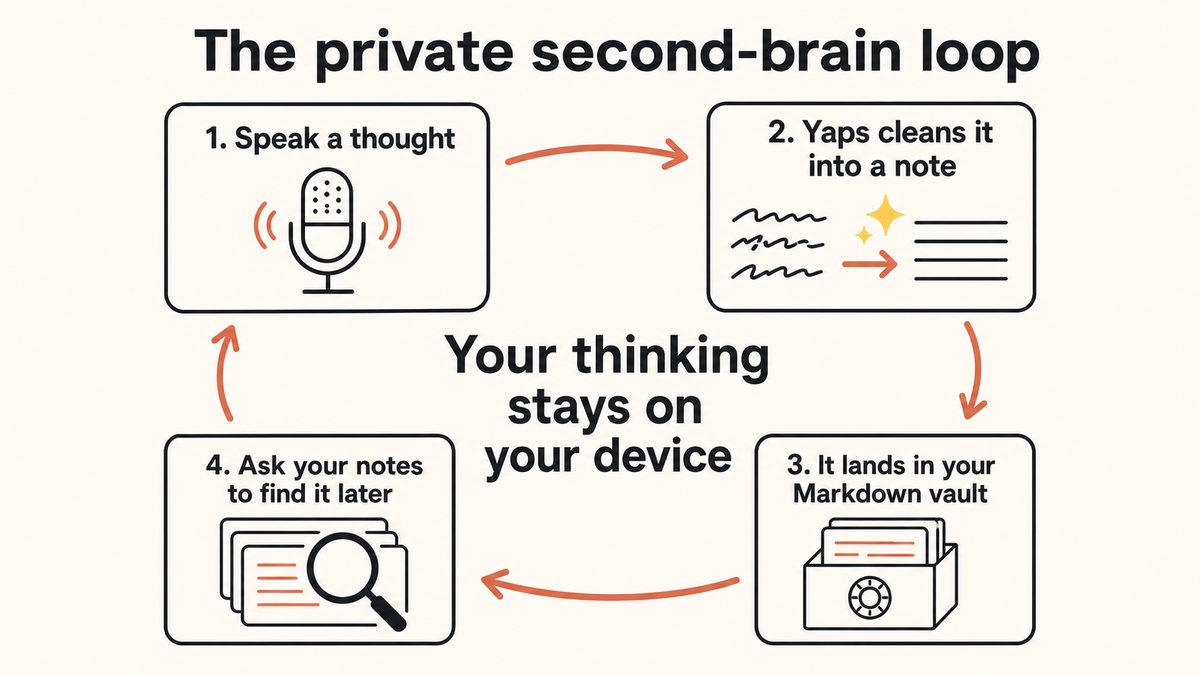
For capture, usually yes. You can speak around 150 words a minute against roughly 40 typing, and you can speak while walking, cooking, or driving, none of which work with a keyboard. Because voice capture survives a busy, distracted day, more of your ideas actually make it into the vault. A good AI second brain app then cleans the spoken thought into a readable note automatically, so you do not have to tidy it afterwards.
Are AI second brain apps private?
It depends entirely on where the notes and the AI live. Most cloud note apps with AI, such as Notion AI, Mem, and Reflect, send your note content to their servers to make the AI work, so your thinking lives on their infrastructure. A local-first app like Yaps keeps the core loop, capture, note storage, the Markdown vault, and search, on your own device. If privacy matters, choose a tool whose sensitive parts are local.
Does the AI second brain run entirely on my device?
The clearly on-device parts of a Yaps second brain are the dictation, the note storage, the Markdown vault, and local search, and those cover the everyday loop of capturing and finding your notes offline. We do not claim the conversational "Ask your notes" chat model itself runs fully on your device, so treat that AI layer as a feature on top rather than an offline guarantee.
What is "Ask your notes" and how many messages do I get?
"Ask your notes," also called notes-chat, lets you put a plain-language question to your own captured notes and get an answer drawn from them, instead of scrolling to find the right note. On the Yaps free tier you get 5 notes-chat messages a week. On free, that chat is read-only, meaning it answers questions but does not edit your notes; having the assistant reshape notes for you is a premium feature.
Where are my notes stored in an AI second brain app?
In Yaps, notes are stored as plain Markdown files in a vault on your own device. Markdown is a readable, open text format, so your second brain is a folder of files you own outright rather than data locked inside one company's database. Notes support plain text, kanban boards, and checklists, and export cleanly to Markdown and plain text, so you can move your brain elsewhere whenever you like.
Can I sync my second brain between my phone and my computer?
Yes. Vault note sync is a premium Yaps feature that keeps your notes in step between mobile and desktop. It pairs the two devices over your local network or an encrypted peer-to-peer link using a QR code, rather than routing everything through a central cloud account. Free accounts are not hard-blocked; you see an upgrade prompt instead, so you can build the capture habit first and enable sync when you work across devices.
Is Yaps a good Notion AI, Mem, or Reflect alternative?
It is, if what you want is a private second brain you fill by talking. Yaps keeps the core loop on your device: voice capture, Markdown notes you own, and local search. Where those cloud tools win is breadth, deep integrations with your other apps, sharing, and team collaboration. Choose Yaps for privacy and fast voice capture; choose a cloud tool if you need a shared, everything-connected knowledge base.
When is a cloud second brain the better choice?
Choose a cloud second brain when you want maximum reach: connectors into your email, calendar, documents, and team wikis, plus sharing and collaboration across a group. Cloud-native tools do more integration than a local-first vault by design. The trade is that your thinking lives on their servers. Yaps trades that breadth for privacy, so if a shared, everything-ingesting brain is the goal, cloud is the better fit.
Does Yaps read my notes back to me in other languages?
Dictation into your second brain is multilingual across about 25 auto-detected languages, so you can capture in more than one language. Read-aloud is the honest gap: Yaps text-to-speech ships English-speaking voices in practice, so if a core part of your workflow is having notes read back to you in many languages, a multilingual cloud reader suits that specific job better.
How do I start building an AI second brain?
Start with one habit and nothing else: capture every idea by voice the moment it arrives, and let the app worry about finding it later. Install Yaps on Android, Windows, or macOS, capture on your phone with the keyboard microphone, and dictate longer notes on desktop with the Yaps hotkey. Once the vault fills, use "Ask your notes" to question it, and turn on sync to share the brain across devices. The free tier of 2,000 words a week, shared across all platforms, is enough to prove the habit.