
Voorwoord
TurboScribe does one thing and does it well. You upload an audio or video file, or paste a media URL, and it returns a transcript with timestamps, speaker labels, and export to a handful of formats. It claims 99.8% accuracy on clean audio, it covers a long list of languages, and its free tier is more generous than most.
If you only ever upload the occasional recording and you do not mind it living on someone else's servers, TurboScribe is a reasonable choice. Full stop.
But the moment your needs widen, the cracks show. Every file you transcribe is uploaded to and processed in TurboScribe's cloud. The "Unlimited" plan is not truly unlimited: heavy users hit a "High Volume Mode" throttle. And TurboScribe is a single-purpose web tool, so it does no live dictation, no read-aloud, no voice notes, no on-device anything. We built Yaps, so we are obviously biased. But the honest case for an alternative comes down to one question: should your audio leave your device at all?
Cloud file uploader
TurboScribe
Upload a file, get a transcript. Every file is sent to TurboScribe's servers and processed in the cloud. No on-device option, no live dictation, no read-aloud. The Unlimited plan throttles extreme volume.
On-device voice toolkit
Yaps
Transcribe imported files on-device with no upload, plus live multilingual dictation, voice notes, read-aloud, and voice commands. Audio never leaves the device. Runs on Android, Windows, macOS, and Linux.
De 7 beste TurboScribe-alternatieven in 2026 (snelle vergelijking)
Here is the shortlist, ranked for most users. Deeper write-ups follow.
1. Yaps - Best Overall TurboScribe Alternative
On-device voice toolkit for Android, Windows, macOS, and Linux that goes far beyond uploading a file for transcription. Yaps Studio transcribes imported audio files locally and exports text or SRT subtitles, with no upload to the cloud. On top of that, Yaps adds live multilingual dictation (auto-detects about 25 languages with no toggle), on-device text cleanup that strips filler words and fixes punctuation, voice notes that are timestamped and searchable, read-aloud with 18 desktop voices, and voice commands to control your computer. 7-day free trial; Pro $15/mo, Max $25/mo. Runs in under 200 MB of RAM. Best for: anyone who wants private, offline transcription as part of a complete voice workflow rather than a single-purpose web upload.
2. MacWhisper - Best for Offline Batch File Transcription on Mac
Runs speech recognition locally on your Mac, so no file ever leaves the machine and there is no subscription required for the core models. Strong at batch-transcribing a stack of recordings. Best for: Mac users with archives of audio who want a one-time purchase and no cloud. Trade-off: Mac-only, no live dictation polish, and you manage the models yourself. We cover it in depth in our MacWhisper alternative write-up.
3. Otter.ai - Best for Live Meeting Notes and Team Collaboration
A meeting bot with calendar sync, real-time capture, summaries, and team sharing, which is exactly the live-meeting shape TurboScribe lacks. Best for: teams that need automatic notes from recurring calls. Trade-off: cloud-only, a stingy free tier (300 minutes a month and only three file imports ever), and the usual data-use questions that come with sending meetings to a third party. See our Otter.ai alternative breakdown.
4. Rev - Best for Professional, Human-Verified Accuracy
Pairs AI transcription with optional human transcribers plus HIPAA and CJIS security, so it wins when a guaranteed-accurate transcript is a compliance requirement. Best for: legal, medical, and regulated work where errors carry real cost. Trade-off: expensive, and human turnaround is slower than instant AI. Overkill for casual use.
5. Sonix - Best for Researchers and Teams Needing a Powerful Editor
A fast, multilingual cloud service with a genuinely strong in-browser editor and HIPAA options. Best for: research teams transcribing and editing interviews collaboratively. Trade-off: pay-as-you-go pricing climbs quickly with volume, and it is cloud-only, so your audio is uploaded.
6. Notta - Best for Affordable Multilingual Transcription
Covers a wide range of languages with real-time capture and AI summaries at a low price. Best for: budget-conscious users who need many languages and quick summaries. Trade-off: cloud-only, and the free tier is capped at 120 minutes a month.
7. Descript - Best for Creators Who Edit Around the Transcript
Lets you edit audio and video by editing the text, with overdub and a full podcast and video workflow. Best for: creators producing media where the transcript is the editing surface. Trade-off: transcription is secondary to editing, it is cloud-based, and it is pricier than a pure transcription tool.
Wat TurboScribe goed doet
Credit where it is due. TurboScribe has real strengths, and pretending otherwise would not help you decide.
A generous free tier. TurboScribe's free plan gives you three transcriptions a day, up to 30 minutes each, one file at a time, with no credit card. For occasional uploads, that is more usable than most rivals.
Broad language coverage. TurboScribe claims support for well over a hundred languages, including translation between them. If you need a transcript of audio in an exotic language, it covers ground that on-device tools do not.
Speaker labels and bulk upload. It offers speaker recognition, batch uploads of up to 50 files at once, and very long files on the paid plan (up to 10 hours and 5 GB each). For high-volume archive work, that scale is real.
Aggressive annual pricing. The Unlimited plan drops to $10 a month when billed yearly, roughly half the monthly rate, which is competitive for unlimited cloud transcription.
Many export formats. TXT, PDF, DOCX, SRT, and VTT cover most downstream needs, from documents to subtitles.
Waar de verschillen ontstaan
The core difference between TurboScribe and Yaps is architecture. TurboScribe is a cloud file uploader. Yaps is an on-device voice toolkit. Everything else follows from that single choice.
Here is what it means in practice.
Feature Comparison
| Feature | Yaps | TurboScribe |
|---|---|---|
| On-device file transcription | Yes | No (cloud upload) |
| Works fully offline | Yes | No |
| Live dictation | Yes (about 25 languages) | No (upload only) |
| Read-aloud (text-to-speech) | Yes (18 desktop voices) | No |
| Voice notes | Yes (searchable) | No |
| Speaker labels | No | Yes |
| 100+ languages in a file | No | Yes |
| Bulk upload (50 files) | No | Yes |
This is not a knock on TurboScribe. It was designed as a cloud transcription service, and it is good at that. But the architectural choice has consequences that matter for daily work, and a few of them deserve a closer look.
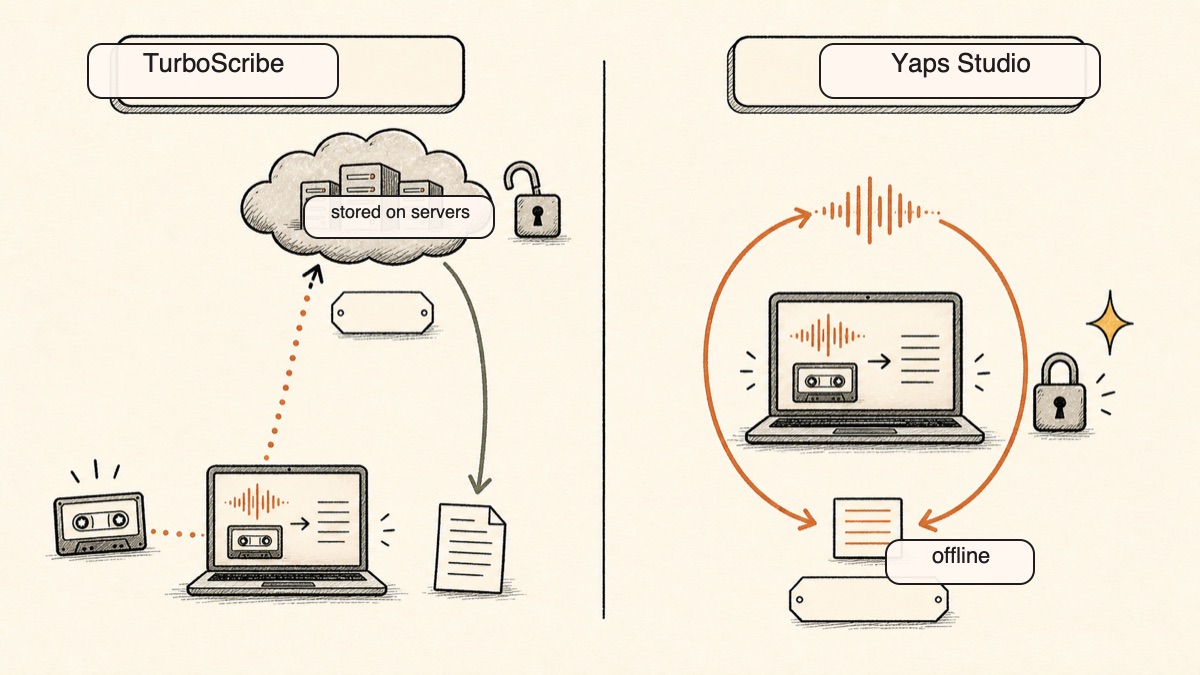
On-Device Processing Versus Cloud Upload
TurboScribe uploads every file to its servers and transcribes it there. That is the entire model. There is no offline option, no local processing, and no way to keep a recording on your own machine while still using the product.
Yaps Studio transcribes imported audio files on-device, and core dictation never leaves the machine. There is no telemetry, and it works on a plane with the Wi-Fi off. For confidential audio, a client interview, a patient note, an HR conversation, an unpublished source recording, this is the difference between "we promise we protect your files" and "the file was never uploaded in the first place." A privacy promise can change with a policy update. A file that never left your device cannot be exposed by one.
Practical example: A journalist records a 40-minute interview with a confidential source. With TurboScribe, that file is uploaded to a third party's servers to be transcribed. With Yaps Studio, the same file is transcribed on the laptop, the transcript and SRT are exported locally, and the recording never touches the internet. For sensitive work, that is not a nice-to-have. It is the requirement.
One App Versus a Single-Purpose Uploader
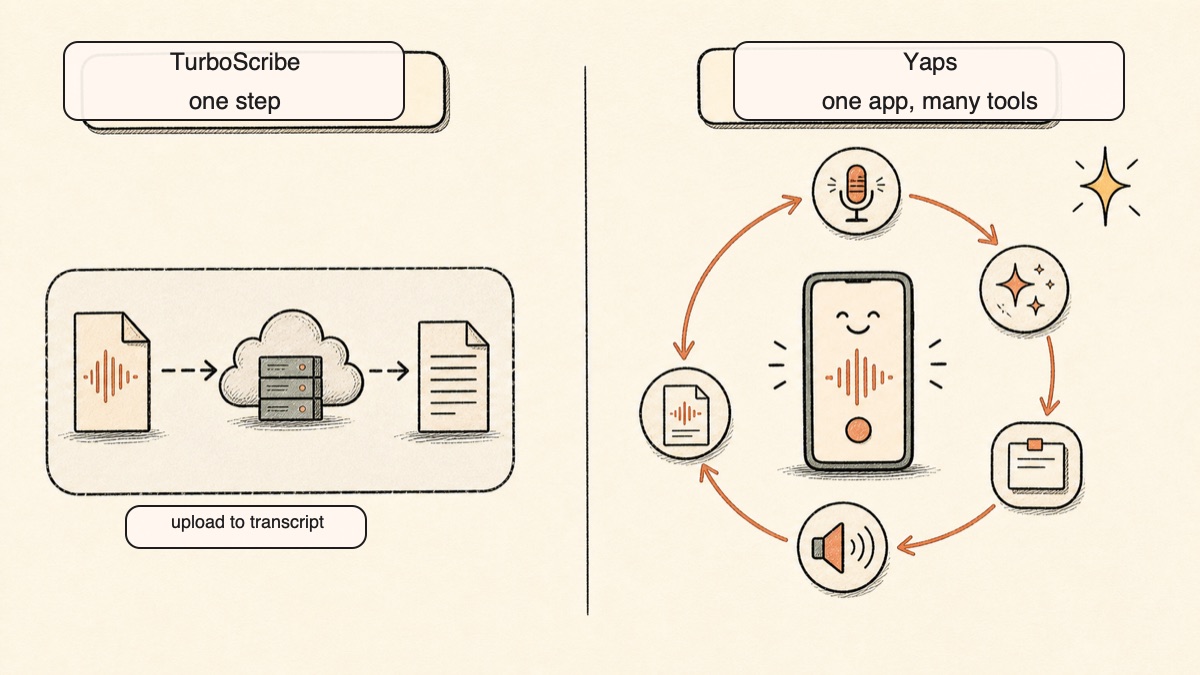
TurboScribe does exactly one thing: upload, then transcript. Anything else is a separate tool.
Yaps treats transcription as one part of a spoken workflow. Live dictation with the Yaps hotkey, or the dictation button on the Android keyboard, auto-detects about 25 languages with no toggle. On-device text cleanup removes filler words and self-corrections, fixes punctuation and capitalisation, and auto-formats lists. Voice notes capture spoken thoughts that are transcribed, timestamped, and searchable, with kanban boards and checklists, exported to Markdown or plain text. Read-aloud reads any text back in 18 desktop voices. Voice commands control your computer. Studio handles the file-to-transcript job that TurboScribe does, but as one feature among many rather than the whole product.
Practical example: You draft an email by dictating it, let on-device cleanup tidy the punctuation, then highlight the result and have it read back so you catch the awkward sentence before sending. That dictate-clean-listen loop happens in one app. With a transcription-only web tool, none of those steps exist.
Reach Across Real Platforms
TurboScribe is browser-only. It runs anywhere a browser does, but there is no native app and no on-device processing on any platform.
Yaps ships a real Android AI keyboard with swipe typing, clipboard history for text and images, and typing in 25 languages, plus Windows, macOS, and Linux desktop apps and a "Save to Yaps" Chrome extension that clips articles and images into your vault. Premium vault sync moves notes between mobile and desktop over your local network or encrypted peer-to-peer, so you can capture a voice note on the phone on the bus and finish it on the laptop at your desk. To be honest about the gap: an iOS app is coming soon and is not available yet.
Privacyvergelijking
This is the heart of it. TurboScribe and Yaps sit on opposite sides of the most important line in transcription: where your audio is processed.
TurboScribe is cloud-only. Every file you transcribe is uploaded to and stored on TurboScribe's servers, where the processing happens. The company states that it protects files from unauthorized access, and that may well be true. But the fundamental posture is that your audio leaves your device. For some recordings that is fine. For confidential, regulated, or sensitive audio, it is a problem no policy statement fully solves.
Yaps processes core features on-device. Studio transcribes imported files locally with no upload. Dictation, text cleanup, voice notes, and voice commands all run on your machine. There is no telemetry and no analytics SDK. The optional cloud voices for read-aloud send text, never audio, and they are clearly labeled. Your voice input is always processed locally.
The test is simple. Disconnect from the internet. TurboScribe stops working entirely, because it has nothing to upload to. Yaps keeps transcribing, dictating, and reading aloud, because none of that depended on a server in the first place. For a deeper look at why this matters for voice specifically, see our SuperWhisper alternative comparison, which covers the same on-device principle.
Prijsvergelijking
| TurboScribe | Yaps | |
|---|---|---|
| Free tier | 3 transcriptions/day, 30 min each, 1 at a time | 7-day free trial |
| Paid plan | Unlimited $20/mo monthly | Pro $15/mo, Max $25/mo |
| Annual option | $10/mo billed yearly ($120/year) | Yes (about 20% off) |
| Processing | Cloud only | On-device |
TurboScribe's pricing is built around volume. The Unlimited plan handles very long files (up to 10 hours and 5 GB) and bulk uploads of 50 files at once, which is a genuine advantage for archive transcription, with one caveat: extremely heavy users (above roughly 24 hours of audio a day) get throttled by a "High Volume Mode," so "Unlimited" has a ceiling few people will hit but that exists.
Yaps' pricing reflects a broader toolkit. You are paying for live dictation, text cleanup, voice notes, read-aloud, voice commands, and Studio file transcription, not a single upload-to-text function. The 7-day free trial lets you test the full experience before paying, and the whole thing runs in under 200 MB of RAM.
Wie moet wat kiezen
Choose Yaps if:
- You want transcription that runs on-device with no upload to the cloud
- You handle confidential or sensitive audio (legal, medical, HR, journalism)
- You want live dictation, voice notes, and read-aloud, not just file transcription
- You work across Android, Windows, macOS, and Linux and want the same toolkit everywhere
- You want a genuinely useful free trial and a light memory footprint
Choose TurboScribe if:
- You transcribe large batches of long recordings at high volume
- You need speaker labels on multi-speaker interviews
- You need transcription in one of a hundred-plus languages
- You only ever upload occasional files and the cloud is not a concern
- You want a browser tool that needs no install on any operating system
Wie moet echt voor TurboScribe kiezen?
We want to be honest about this. There are real situations where TurboScribe, or another tool on this list, is the better pick, and pretending Yaps wins every contest would not earn your trust.
If you transcribe huge batches or very long files. TurboScribe's Unlimited tier handles files up to 10 hours and 5 GB, with 50 simultaneous uploads. For an agency, a research lab, or anyone transcribing dozens of long recordings at once, that scale is built in, and Yaps Studio is not designed for that kind of volume. TurboScribe or Sonix wins here.
If you need speaker labels on multi-speaker audio. Yaps Studio does not do speaker diarisation. For interviews and panels where you need to know who said what, reach for TurboScribe, Sonix, or Rev.
If you need a hundred-plus languages in a single file. TurboScribe spans far more languages on imported files than Yaps Studio does. For exotic-language transcripts or in-file translation, it is the right tool.
If you need guaranteed, human-verified accuracy. For legal or medical transcripts where errors carry real cost, Rev's human transcription is the safer choice than any pure-AI tool.
Where Yaps is honestly weaker, full stop. Yaps has no OCR or document scanning, and no audiobook library or cloud voice marketplace. Read-aloud does reach 31 languages on desktop, all spoken on your own machine, but a cloud reader still offers more voices and more accents per language. If those are what you need, Yaps is not the answer, and we would rather say so than oversell.
Migratiehandleiding: overstappen van TurboScribe naar Yaps
If you are currently uploading files to TurboScribe and considering Yaps, the transition is straightforward. Yaps' 7-day free trial lets you run both side by side and compare them on your actual recordings. No commitment required.
Step 1: Install Yaps
Download Yaps from yaps.ai for Android, Windows, macOS, or Linux. You do not need to cancel TurboScribe to try Yaps. Keep both during your evaluation so you can compare them directly.
Step 2: Transcribe a File in Studio, Offline
Open Yaps Studio and import an audio or video file you would normally upload to TurboScribe. Notice what is different: the file is transcribed on your machine, nothing is uploaded, and you can do it with the internet off. Export the result as text or SRT subtitles.
Step 3: Compare the Output on Your Own Audio
Run the same recording through both tools and compare. On clean audio, both will be strong. Pay attention to how each handles your accent, your terminology, and any background noise, since real-world accuracy is what matters, not a headline percentage.
Step 4: Explore What TurboScribe Does Not Have
The biggest adjustment is discovering the features a file uploader simply does not offer. Spend a day with:
- Live dictation: Push the Yaps hotkey, speak, and watch clean text appear in any app, in any of about 25 languages.
- Text cleanup: Dictate a rambling paragraph and let on-device cleanup remove the filler and fix the punctuation automatically.
- Voice notes: Capture a spoken thought, then search for it by keyword the next morning.
- Read-aloud: Highlight a draft and hear it read back to catch errors before sending.
Step 5: Decide
After a week, you will know. If you only ever upload occasional files and the cloud is fine, TurboScribe may genuinely suit you. If keeping audio on-device matters, or the surrounding voice features start feeling natural, Yaps has earned its place. Cancel whichever you are not keeping and move on.
Privacy by architecture, not by policy. If the audio is never uploaded, no policy change and no breach can expose what was never on the server.
Yaps Studio, on-device transcription
A voice keyboard that keeps your voice on your phone.
Install Yaps on Android for offline dictation, a familiar full-size keyboard, and no screen capture. Scan the QR on desktop, or tap the Play badge on mobile.
Veelgestelde vragen
Is TurboScribe free?
Yes. The free plan gives you three transcriptions per day, up to 30 minutes each, one file at a time, with no credit card required. It is more generous than most rivals for occasional uploads, but every file is still processed in the cloud.
How much does TurboScribe cost?
The Unlimited plan is $20 per month billed monthly, or $10 per month billed yearly, which works out to $120 a year. The annual rate is roughly half the monthly rate.
Is TurboScribe's "Unlimited" plan really unlimited?
Mostly. Extremely heavy users, above roughly 24 hours of audio a day, get throttled by a "High Volume Mode," so there is a practical ceiling that very few people will ever reach but that does exist.
Is TurboScribe accurate?
It claims 99.8% accuracy on clean audio, but real-world results drop on heavy accents, multiple speakers, and background noise, where users report figures closer to 70 to 80 percent. Speaker labels in particular are not always reliable.
Does TurboScribe work offline?
No. TurboScribe is a cloud service that uploads your files to its servers, so it does nothing without an internet connection. For offline transcription, use Yaps Studio or MacWhisper, both of which process files on-device.
What is the best free TurboScribe alternative?
For everyday voice work, Yaps offers a 7-day free trial and processes everything on-device. For occasional file uploads in many languages, Notta (120 minutes a month) is a reasonable free cloud option.
What is the best TurboScribe alternative for privacy?
Yaps and MacWhisper, because both transcribe on-device with no upload to the cloud. Yaps adds live dictation, voice notes, and read-aloud on top of file transcription, while MacWhisper focuses on local batch jobs on Mac.
What is the best TurboScribe alternative for Mac?
Yaps, which ships a macOS app with on-device Studio file transcription plus live dictation, or MacWhisper for local batch transcription of a stack of recordings. Both keep your audio on the machine.
What is the best TurboScribe alternative for Windows?
Yaps ships a Windows app with on-device dictation and Studio file transcription, so you get private, offline transcription without a browser upload. TurboScribe itself runs in a browser on Windows but processes everything in the cloud.
Does TurboScribe do live or meeting transcription?
No. TurboScribe is upload-only and does not capture live audio or join meetings. For live meeting notes use Otter.ai, and for live dictation into any app use Yaps.
Does TurboScribe support speaker labels?
Yes, TurboScribe offers speaker recognition that labels who is speaking, though users report it is not always accurate on noisy or overlapping audio. If accurate speaker labels are essential, Rev's human option is more reliable.
Can I transcribe a YouTube video with TurboScribe?
Yes. You can paste a YouTube or media URL and TurboScribe transcribes the audio, the same as it does for an uploaded file.
What export formats does TurboScribe support?
TurboScribe exports to TXT, PDF, DOCX, SRT, and VTT. Yaps Studio exports transcripts as plain text and SRT subtitles.
Is TurboScribe safe, and is my data private?
TurboScribe stores and processes your files in its cloud and states that it protects them from unauthorized access. If you cannot upload sensitive audio at all, choose an on-device tool like Yaps, where the file is never uploaded in the first place.
Why would I use Yaps instead of TurboScribe?
Yaps keeps your audio on your device, works offline, and adds live multilingual dictation, voice notes, read-aloud, and Studio file transcription across Android, Windows, macOS, and Linux. TurboScribe is the better pick if you need huge multi-speaker batch jobs in many languages, which Yaps does not aim to do.
Conclusie
TurboScribe is a capable cloud transcription service. If you upload the occasional file, need speaker labels on a multi-speaker interview, or transcribe at high volume across many languages, it does that well, and we would point you to it for those jobs.
For most people, though, the better default is the tool that never uploads your audio at all. Yaps transcribes imported files on-device, and it surrounds that with live dictation, voice notes, read-aloud, and voice commands, all running locally across Android, Windows, macOS, and Linux. Start with the free trial, transcribe a real recording with the internet off, and let the experience decide. If keeping your voice on your own device matters, Yaps is where to begin.