01
·
Try Yaps
A voice keyboard that keeps your voice on your phone.
Install Yaps on Android for offline dictation, a familiar full-size keyboard, and no screen capture. Scan the QR on desktop, or tap the Play badge on mobile.
Whisper Memos turns long rambling recordings into clean emailed transcripts, and it does that well. But it is cloud-based, Apple-only, and subscription-gated. Here are the seven best Whisper Memos alternatives in 2026, ranked by privacy, platform reach, and value.
Whisper Memos has a loyal following for one reason: you record a long, rambling voice memo, and a few minutes later a clean, paragraph-formatted transcript lands in your inbox. Think out loud, read it later. For journaling and stream-of-consciousness capture, that loop is genuinely good.
If that is all you need, and you live entirely inside the Apple ecosystem, Whisper Memos does the job. Full stop.
But there are two things worth knowing before you commit. First, every recording you make is uploaded to a third-party cloud service to be transcribed. Second, Whisper Memos is Apple-only, so if you carry an Android phone or work on Windows, it cannot help you at all. If either of those matters to you, this comparison is for you. We built Yaps, so we are obviously biased. But the fastest way to earn trust is to be honest about where each tool wins and where it falls short, and we say plainly below where Whisper Memos beats us.
A quick status note before the rankings, because the search results are full of stale information.
Whisper Memos is alive and actively maintained in 2026. The latest build shipped in late June, it holds a 4.6-star rating from around 376 reviews, and there is no sign of it being abandoned. Two things have changed recently. The app now offers more than one transcription engine, so you can re-process a memo with a different model for better accuracy on accents or other languages. And the pricing has churned: the current plan is roughly $10 a month, or about $5 a month billed annually, with a 90-minute cap per recording. Older complaints across Reddit and Apple forums reference a discontinued monthly tier, a 15-minute cap, and regional price hikes. Those are historical. The numbers below are current.
Cloud, Apple-only
Records a voice memo, uploads the audio to a cloud transcription service, and emails you a clean transcript. iPhone, iPad, and Apple Watch only. Subscription after a short trial. No Android, no Windows, no web.
On-device, cross-platform
Captures voice notes that are transcribed on-device, timestamped, and searchable in a vault. Works offline, no account needed for core use. Ships on Android, Windows, and macOS, plus a Chrome extension. Free tier included.
Here is the shortlist, ranked for most users. Deeper write-ups follow.
Yaps is the one tool on this list that combines the four things no ranking page owns together: on-device processing, offline capture, a real free tier, and genuine cross-platform reach. Where Whisper Memos uploads your audio to a cloud service and emails you the result, Yaps transcribes your voice on the device itself. The audio never leaves your phone or computer. There is no telemetry, no account required for core use, and the whole thing runs in under 200MB of memory.
The shape is also different. Whisper Memos sends a transcript to your inbox. Yaps captures voice notes that are auto-transcribed, timestamped, and fully searchable inside a vault. Those notes support plain text, kanban boards, and checklists, and they export to Markdown (.md) and plain text (.txt) rather than living in an email thread. Six months later, when you want the idea you spoke on a walk, you search a keyword and find it. You do not scroll your inbox.
Then there is platform reach. Whisper Memos is Apple-only. Yaps ships on Android, Windows, and macOS, with a full AI keyboard on Android that types in 25 languages and turns voice capture into a button on your keyboard. There is also a Chrome "Save to Yaps" extension that saves articles, bookmarks, and images straight into the same vault. If you are not on an iPhone, Whisper Memos cannot help you, and Yaps is built phone-first.
Dictation is multilingual, about 25 languages, auto-detected from your speech with no language toggle to flip. On-device text cleanup runs by default: it strips filler words and self-corrections, fixes punctuation and capitalisation, and auto-formats lists and numbers, so the raw ramble comes out readable. Yaps also includes text-to-speech with 18 voices on desktop and 2 on mobile, a Studio that transcribes imported audio files offline to text or SRT subtitles, voice commands on macOS, and encrypted vault sync between mobile and desktop over your local network or peer-to-peer.
The free tier is real: 5,000 words a week on desktop and 1,000 on mobile, no account required for core dictation. Basic is $15 a month and Max is $25 a month, with roughly 20% off annually. Best for: anyone who wants private, offline voice notes that are searchable and cross-platform, not emailed transcripts locked to one ecosystem.
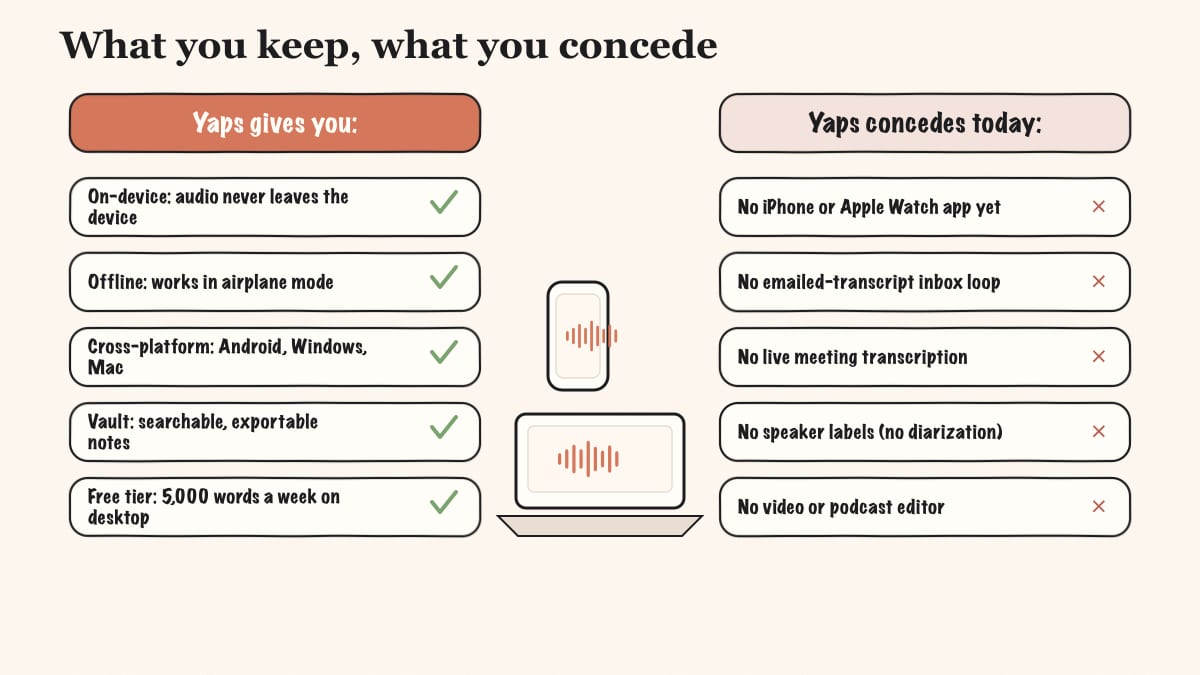
Honest concessions. Yaps does not have an iPhone or iPad app yet (iOS is coming soon), and there is no Apple Watch app, so wrist recording is off the table. There is no email-the-transcript workflow, multilingual read-aloud voices, live meeting transcription, or speaker diarization. If those are your dealbreakers, read the concessions section near the end before you switch.
AudioPen takes a messy spoken ramble and rewrites it into clean, restyled prose. It is less about a faithful transcript and more about a finished piece of writing. Best for: people who want the output to read like an edited draft, not a verbatim record. Trade-off: it is web-based and cloud, so audio leaves your device, and recordings are capped (3 minutes free, 15 minutes on the paid Prime tier). Pricing is free for short notes with 10 stored, or a one-time Prime payment around $99 a year with no auto-renew. For a closer look, see our AudioPen alternative write-up.
Otter is built for meetings: it joins calls, transcribes in real time, and labels who said what. Best for: team meetings and multi-speaker calls where speaker labels matter. Trade-off: it is cloud-only, the pricing ramps fast above the free tier, and it is overkill for solo journaling. Free covers 300 minutes a month with a 30-minute cap per conversation; Pro runs around $17 a month and Business around $30 per user a month. Our Otter alternative and the Yaps vs Otter comparison cover the meeting-transcription angle in detail.
Voicenotes pairs a roomy free plan with an AI layer that lets you ask questions across everything you have recorded, on any device. Best for: people who want to query their notes and do not want to pay on day one. Trade-off: it is cloud-based, and the free tier caps transcripts at 100 minutes a week with a 30-day history window. Pricing is free forever for the basics, or Pro at $9 a month with 44% off annually.
Just Press Record is a one-tap recorder for iPhone, Apple Watch, and Mac that you buy once and own. Best for: Apple users who want a no-subscription recorder with iCloud sync. Trade-off: it leans on Apple's built-in speech engine, which is slower and more error-prone, so you do more manual cleanup, and there are no AI summaries. It is Apple-only. Pricing is a one-time purchase around $4.99, with transcription in 30-plus languages.
Cleft turns spoken thoughts into structured Markdown notes, which suits verbal thinkers who want clean headings and bullets out of a ramble. Best for: Apple users who want organised Markdown rather than a wall of text. Trade-off: it is Apple-only with no Android or web, transcription is on-device but the AI structuring is cloud, and even the paid tier caps recordings at 30 minutes. Free covers 5-minute recordings with on-device transcription and export; Cleft Plus is $6.99 a month or $39.99 a year.
Apple Voice Memos ships with iOS and macOS, costs nothing, and is ready the moment you open it. Best for: quick capture when you do not want to install anything. Trade-off: the auto-transcription is basic, there are no AI summaries or cleanup, no smart export or searchable vault, and it is Apple-only. Pricing is free, built into the operating system.
Honorable mentions: if you want local Whisper transcription on a Mac with your own API key, MacWhisper, Aiko, and Spokenly are all worth a look. We cover the first of those in our MacWhisper alternative guide.
We weighted (1) privacy by architecture, not by promise: where does the audio actually go; (2) platform reach, with extra credit for Android and Windows, not just Apple; (3) a genuine free tier you can use without a subscription; (4) whether notes are searchable and exportable rather than trapped in an inbox. We built Yaps and disclosed it. Where another tool genuinely wins for a specific need, we say so plainly.
Credit where it is due. Whisper Memos earned its following honestly, and several of its strengths are real.
The record-and-forget loop. You hit record, talk for as long as you want, and stop. A few minutes later a clean, paragraph-formatted transcript is waiting in your inbox. For journaling and thinking out loud, that frictionless loop is the whole appeal, and it is well executed.
Very long single recordings. The current cap is 90 minutes per recording, which is built for long rambles, drives, and walks where you want to keep talking without watching a timer.
Apple Watch capture. Whisper Memos can record straight from the wrist, with a complication and Action button support. If you capture thoughts away from your phone, that is a genuine advantage.
Multiple transcription engines. You can re-process any memo with a different model, which helps with accents and other languages. Being able to "process again" for a better result is a thoughtful touch.
Custom AI summaries and integrations. It routes transcripts to Notion, Todoist, Things 3, Day One, and others, supports Mail Drop forwarding, and lets you run your own summary prompts. For people already deep in those tools, the plumbing is convenient.
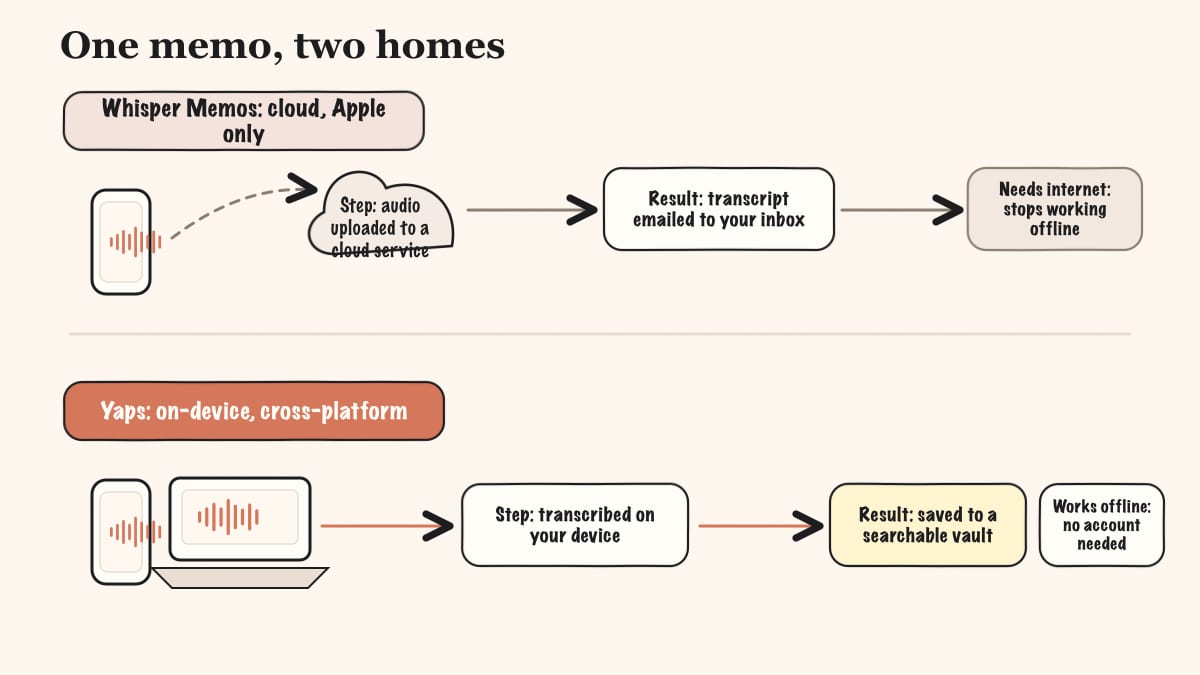
The core difference between Whisper Memos and Yaps is architecture. Whisper Memos uploads your audio to a cloud service and emails you the result. Yaps keeps the processing on your device and saves a searchable note. Everything else follows from that.
Here is what that means in practice.
| Feature | Yaps | Whisper Memos |
|---|---|---|
| On-device transcription | Yes | No (cloud) |
| Works offline | Yes | No (needs internet) |
| Platforms | Android, Windows, macOS | Apple only |
| Free tier | Yes (no account) | Short trial only |
| Searchable note vault | Yes | No (email inbox) |
| Export to .md and .txt | Yes | Email / integrations |
| Apple Watch capture | No | Yes |
| iPhone app today | Coming soon | Yes |
This is not a knock on Whisper Memos. It was designed as a cloud, Apple-first, email-the-transcript tool, and within those lines it is good. But the practical impact of these differences is large for daily use.
This is the headline contrast. When you record in Whisper Memos, your audio is uploaded to a third-party transcription service to be processed. That means it requires an internet connection, and it means your spoken words leave your device. For a casual reminder, that may be fine. For a journal entry, a client call, a medical note, or anything you would not want sitting on someone else's server, it is the wrong default.
Yaps transcribes on the device itself. Pull the plane into airplane mode, lose signal in a tunnel, sit in a basement office: the capture and the transcription still work. No audio is uploaded, no telemetry is collected, and you do not need an account to dictate or take notes. Privacy is a property of where the processing happens, not a clause in a policy. If the audio never leaves the device, no breach or policy change can expose what is not there.
Whisper Memos delivers each transcript to your email. That is convenient on day one and unwieldy by month three, when the thing you are looking for is buried in a thread between a newsletter and a receipt.
Yaps saves every voice note into a vault: transcribed, timestamped, and searchable by keyword. The notes are not just text, either. They support kanban boards and checklists, so a spoken brain-dump can become an organised to-do list in place. And they export to Markdown and plain text, so nothing is locked in. Practical example: you ramble for ten minutes about a project on the drive home. By the time you sit at your desk, the note is transcribed, cleaned up, and waiting, and three weeks later you find it by searching one word, not by scrolling your inbox.
Whisper Memos is Apple-only, so the moment you pick up an Android phone or sit at a Windows machine, it is simply unavailable. Yaps runs on Android, Windows, and macOS, and the Android build is a full AI keyboard: themes, selectable fonts, autocorrect, tap and glide typing, height adjustment, one-handed mode, 25 typing languages, a voice-typing button, and clipboard history for text and images. Capture a note on the bus with your phone, then open the same vault on your laptop at home through encrypted sync. For more on the mobile-first picture, our Wispr Flow alternative covers the voice-keyboard field.
This is the clearest line between the two tools, so it is worth being precise.
Whisper Memos is cloud-based. When you record, the audio is uploaded to a third-party transcription service to be processed, then the transcript comes back and is emailed to you. It requires internet, and your spoken audio leaves your device. The developer is reputable and the app is well-reviewed, but the architecture means you are trusting a chain of services with your voice. Disconnect from the internet and it stops working.
Yaps processes voice on-device. Dictation, text cleanup, and voice-note transcription all run locally. There is no telemetry, no analytics SDK, and no account required for core use. The optional cloud text-to-speech voices send text, not audio, to a voice API, and they are clearly labeled. Your voice input is always handled locally. Disconnect from the internet and Yaps keeps working.
Both tools are made by people who care about their craft. The difference is structural: one sends your audio out by design, the other does not. For sensitive notes, that distinction is the whole decision. For a deeper treatment, see our writing on offline dictation and where on-device processing matters most.
| Whisper Memos | Yaps | |
|---|---|---|
| Free tier | Short trial only | Yes (5K words/week, no account) |
| Paid plans | ~$10/mo, or ~$5/mo billed annually ($60/yr) | Basic $15/mo, Max $25/mo |
| Annual option | Yes (about 50% off) | Yes (about 20% off) |
| Recording cap | 90 minutes per recording | Per-week word limit on free tier |
Whisper Memos puts everything in one tier and removes daily caps, which is clean, but ongoing use requires a subscription after the trial. Several long-running complaints across forums reference earlier price hikes and a discontinued-then-restored monthly option, so check the current page before you commit.
Yaps gives you a free tier you can use without an account, which lets you test real voice notes before paying anything. The subscription reflects the broader toolkit: dictation, text-to-speech, voice notes, Studio, voice commands, and vault sync, rather than one transcription pipe. If you only want long emailed transcripts and you are happy paying monthly, Whisper Memos' pricing may suit you better.
Choose Whisper Memos if:
Choose Yaps if:
The choice comes down to one question: do you want your audio in the cloud with a transcript in your inbox, or processed on your own device and saved in a searchable vault? If you live on Apple hardware and love the record-and-email loop, Whisper Memos does that well. If privacy, offline use, Android or Windows, and a searchable note library matter more, Yaps is built for that.
We want to be honest about this. There are real situations where Whisper Memos is the better pick, and pretending otherwise would not help you.
If you live on iPhone and Apple Watch today. Yaps iOS is coming soon, and there is no Apple Watch app. Whisper Memos has a shipping iPhone, iPad, and Apple Watch app with wrist recording right now. If your capture happens on Apple hardware and especially on your watch, Whisper Memos wins until Yaps ships on iOS.
If you love the email-me-the-transcript workflow. Some people want the record-and-forget loop where a clean transcript simply appears in their inbox to read later. Yaps saves notes in an in-app vault, not an email thread. If the inbox delivery is the part you actually love, Whisper Memos is purpose-built for it and Yaps is not.
If you record very long single sessions. Whisper Memos is tuned for 90-minute rambles, drives, and long journaling sessions in one unbroken recording. If your habit is one very long take rather than many short captures, that is squarely what Whisper Memos was designed around.
If you need live multi-speaker meetings or restyled writing. Yaps does not do live meeting transcription or speaker diarization. For live multi-speaker calls, Otter is the right tool. For turning a ramble into polished, restyled prose rather than a faithful transcript, AudioPen is the better fit.
If you are on Android, Windows, or a Mac and want to move off the cloud, the switch is straightforward. Yaps' free tier lets you run it alongside Whisper Memos and compare them in your real workflow, with no commitment.
Download Yaps for Android, Windows, or macOS from yaps.ai. You do not need to delete Whisper Memos. Keep both during your evaluation so you can compare the two loops side by side. On Android, set up the Yaps keyboard so voice capture is one button away.
Open a voice note and start talking. The transcription happens on-device, so it works even with the connection off. Notice that the result is saved into a searchable vault, timestamped and cleaned up, rather than landing in your email. Capture a few notes over a day to feel the difference.
Your existing Whisper Memos transcripts live in your inbox and any connected apps like Notion or Day One. Paste the ones you want to keep into Yaps notes, or keep them where they are. Because Yaps exports to Markdown and plain text, anything you move in stays portable.
The biggest adjustment is discovering new capability, not replacing old. Set aside time to try:
A fair test takes time. Use both tools in your actual routine for at least a week. Pay attention to how often you reach for offline capture, search, and cross-device access. If the email-the-transcript loop is the only thing you miss, Whisper Memos may genuinely be your fit. If on-device, searchable notes start feeling natural, Yaps has earned the switch.
Privacy by architecture, not by policy. If the audio never leaves the device, no breach or policy change can expose what is not there.
Yaps for Android, Windows, and macOS
Install Yaps on Android for offline dictation, a familiar full-size keyboard, and no screen capture. Scan the QR on desktop, or tap the Play badge on mobile.
Yes. Whisper Memos is actively maintained, with a recent build and a 4.6-star rating from around 376 reviews. It remains iPhone, iPad, and Apple Watch only, with no Android, Windows, or web version. It is not deprecated or abandoned.
Whisper Memos costs about $10 a month, or roughly $5 a month when billed annually at around $60 a year, after a short free trial. All features sit in one tier, and the current plan has no daily quantity caps, only a 90-minute limit per recording.
No. Whisper Memos offers only a limited free trial of a few transcriptions; ongoing use requires a subscription. If you want a real free tier, Yaps gives 5,000 words a week on desktop with no account required, and Voicenotes has a free-forever plan.
No. Whisper Memos is Apple-only, so Android users need an alternative. Yaps is Android-first with a full AI keyboard and on-device dictation, and Voicenotes and Otter also run on Android.
No. Whisper Memos uploads your audio to a cloud transcription service and needs an internet connection to produce a transcript. For offline capture, choose an on-device app like Yaps, which transcribes locally and keeps working with no signal.
Your audio leaves your device for cloud transcription, so Whisper Memos is not on-device. The developer is reputable, but the architecture means your voice is processed by third-party services. Privacy-first users tend to prefer local apps like Yaps, where the audio never leaves the device.
Whisper Memos now allows up to 90 minutes per recording. Earlier versions were capped much lower, around 15 minutes, which is the source of older complaints you may still see in forums and reviews.
Yaps and Voicenotes are the strongest free options. Yaps gives a free tier with on-device processing across Android, Windows, and macOS and no account required, while Voicenotes offers a generous free-forever plan in the cloud.
Yaps is the best on-device alternative. It processes voice locally, works offline, collects no telemetry, and needs no account for core use, across Android, Windows, and macOS. For Mac-only local transcription with your own model, MacWhisper is also an option.
Yaps is the best Android alternative, because Whisper Memos has no Android app at all. Yaps is Android-first with a full AI keyboard, on-device dictation in about 25 languages, and a searchable voice-note vault.
No. Yaps saves transcribed, timestamped, searchable notes in your vault and exports them to Markdown and plain text, rather than emailing them. If the email-the-transcript loop is the specific thing you want, Whisper Memos is built around it.
Not yet. Yaps iOS is coming soon. Today Yaps runs on Android, Windows, and macOS, plus a Chrome extension. If you need an iPhone or Apple Watch app right now, Whisper Memos has one.
Whisper Memos gives you a faithful, paragraph-formatted transcript of what you said. AudioPen rewrites your ramble into polished, restyled prose, so the output reads like an edited draft rather than a verbatim record. Choose Whisper Memos for accuracy, AudioPen for finished writing.
Use Otter for live, multi-speaker meetings where you want speaker labels and real-time transcription. Use Whisper Memos for solo voice memos and journaling, where you record alone and read the transcript later. They solve different problems.
Yes. Just Press Record is a one-time purchase around $4.99 with no subscription, and Yaps offers a no-account free tier you can use indefinitely within its weekly word limit. AudioPen also uses one-time, non-recurring payments rather than auto-renewing subscriptions.
Whisper Memos does one loop well: record a long ramble, get a clean transcript in your inbox. If you live on Apple hardware and that loop is exactly what you want, it is a fair choice, and we said clearly above where it beats us.
But for most people asking for an alternative, the reasons are the same: the cloud upload, the Apple-only walls, or the subscription gate. Yaps answers all three. It keeps your voice on your device, works offline, runs on Android, Windows, and macOS, and saves your notes in a searchable, exportable vault with a real free tier. That is why Yaps is our default recommendation for a private, cross-platform replacement.
The best way to decide is to try it. Whisper Memos has its trial; Yaps has a free tier with no account required. Use them in your actual week and let the experience pick for you.