01
·
Try Yaps
A voice keyboard that keeps your voice on your phone.
Install Yaps on Android for offline dictation, a familiar full-size keyboard, and no screen capture. Scan the QR on desktop, or tap the Play badge on mobile.
Talon Voice is a powerful hands-free computer-control system, but it is hard to learn and overkill if you only want to dictate. Here are the seven best Talon Voice alternatives in 2026, ranked by setup effort, privacy, and value.
First, a status check, because the search results are full of confusion: Talon Voice is alive and actively developed in 2026. It is not shut down, not deprecated, not abandoned. A new beta shipped in December 2025, and the project moved to its own on-device speech engine that promises faster recognition. So this is not an "alternatives because Talon is dying" post. It is an "alternatives because Talon is hard, or overkill" post.
Talon is a genuinely powerful tool. It lets you drive your entire computer by voice, noise, and gaze: type, click, scroll, manage windows, and write code without touching a keyboard or mouse. For programmers with repetitive strain injury, and for people who cannot use a mouse at all, it is close to a lifeline. Nothing here takes that away from it.
But most people who land on "Talon Voice alternatives" are not trying to control their whole operating system by voice. They want to dictate. They tried Talon, hit a wall of grammar files, Python config, and a phonetic alphabet, and thought: there has to be something simpler that just turns my voice into clean text. There is.
We built Yaps, so we are biased. We will say so plainly throughout, and we will tell you exactly where Talon is the right tool and Yaps is not. Honest beats loud.
Hands-free computer control
Drive the whole OS by voice, noise, and eye tracking. Powerful and on-device, but you learn a command grammar and edit config files. Expect hours to weeks before it feels natural.
On-device dictation toolkit
Press the Yaps hotkey and talk. On-device multilingual dictation, automatic text cleanup, voice notes, Studio, and read-aloud. No scripting, no config files, no setup ritual.
Here is the shortlist, ranked for most people who searched for this. Deeper write-ups follow.
Yaps is an on-device voice toolkit for Android, Windows, and macOS, plus a Chrome "Save to Yaps" extension. It is the opposite of Talon in one specific, important way: there is no setup ritual. You do not write .talon grammar files, you do not edit Python, you do not learn a phonetic alphabet, and you do not clone a community config to make it usable. You install it, press the Yaps hotkey (Fn on Mac and Windows, or the dictation button on the Android keyboard), and talk. Clean text appears.
That clean part matters. Yaps runs on-device text cleanup by default: it strips filler words and self-corrections, fixes punctuation and capitalisation, and auto-formats lists and numbers as you speak. You can ramble, restart a sentence, say "um" and "actually wait," and what lands on the page reads like you wrote it carefully. Talon gives you raw recognition plus the scripting hooks to shape it yourself; Yaps does the shaping for you.
Dictation in Yaps is multilingual. It handles roughly 25 languages, auto-detected from your speech, with no language toggle to flip. You can switch from English to Spanish mid-thought and it follows you. Talon's recognition is English-centric and built around command grammars, which is the right design for controlling a computer but the wrong shape for free-flowing prose in another language.
And Yaps is more than a transcriber. You get read-aloud (18 voices on desktop, 2 on mobile) so you can hear a draft before you send it. You get voice notes that are timestamped, searchable, and organised as plain text, kanban boards, or checklists, with export to Markdown and plain text. You get Studio, which transcribes imported audio files offline to text or SRT subtitles. You get voice commands that trigger macOS Shortcuts, and a searchable history of everything you have ever dictated. Talon gives you input and scripting; Yaps gives you a finished toolkit around that input.
On privacy, Yaps matches Talon where it counts. Core dictation runs on your device, your audio never leaves it, it works offline, there is no telemetry, and no account is required for core use. It stays under 200MB of RAM. The difference is the package: Talon has no answer for mobile, while Yaps ships a full Android AI keyboard with themes, glide typing, 25 typing languages, a voice-typing button, and clipboard history for both text and images. The free tier is generous: 5,000 words per week on desktop and 1,000 on mobile, shared across dictation and read-aloud. Paid plans are Basic at $15 per month and Max at $25 per month, with around 20% off annually.
Best for: anyone who wants Talon's privacy and offline story without the steep learning curve, and who needs dictation plus a full voice toolkit rather than full OS control. Trade-off: Yaps does not do hands-free computer control, mouse and click navigation, eye tracking, or voice-to-code grammars. If that is what you came for, Talon is the better tool, and we say so below.
VoiceInk is an open-source, offline dictation app for Mac with a one-time price. For developers and privacy maximalists who want to read the code that processes their voice and pay once instead of subscribing, it is a strong, honest option. Best for: Mac power users who want offline open-source dictation without recurring charges. Trade-off: Mac-only and dictation-only, with no OS control and no eye tracking. Rough 2026 price: around $39 lifetime. We compare it more closely in our VoiceInk alternative write-up.
Wispr Flow is polished cloud dictation that works across platforms and supports more than 100 languages, with strong reformatting that rewrites raw speech into tidy prose. The catch is the architecture: it is cloud-based, so every dictation leaves your device, and it is subscription-only with no lifetime option. Best for: cross-platform professionals who want maximum language coverage and do not mind sending audio to the cloud. Trade-off: the privacy trade-off is real, and there is no offline mode. Rough 2026 price: $15 per month or $144 per year, with a capped free tier. See our full Wispr Flow alternative comparison.
Serenade is built specifically for voice-to-code, with integrations for VS Code and JetBrains editors. If you want to write and edit code symbolically by voice and you are not ready for the full Talon ecosystem, it is the most approachable option in that niche. The caveat: the original company project stalled, and Serenade is now community-forked, with a first community release after the fork in January 2025. That revival is welcome, but it carries maintenance risk you should weigh. Best for: developers who specifically want voice-to-code and prefer free and open source. Trade-off: maintenance uncertainty after the company project wound down. Runs on Mac, Windows, and Linux. Rough 2026 price: free, with a "Pro" tier referenced historically.
Dragon Professional remains the deepest tool for custom vocabularies, which is why Windows enterprise, legal, and medical teams still reach for it. If your work depends on training the software to recognise hundreds of domain-specific terms, Dragon's vocabulary tooling is hard to match. Best for: Windows enterprise, legal, or medical users who need deep custom vocabulary. Trade-off: no native Mac since 2018, it is expensive, and development wound down after the Microsoft acquisition. Rough 2026 price: $699 one-time on Windows, or Dragon Professional Anywhere cloud at $15 per user per month. We cover the field in our Dragon NaturallySpeaking alternative and Dragon Medical alternative guides.
Apple Dictation is free, built into macOS and iOS, and requires zero install. For basic dictation with no budget and no setup, it is genuinely fine, and millions of people use nothing else. Best for: Mac and iPhone users who want a $0 built-in tool for short, casual dictation. Trade-off: no commands or customization, weaker accuracy on technical vocabulary, and no real offline or privacy guarantee on longer dictation. See our Apple Dictation alternative comparison for the details.
SuperWhisper brings local AI dictation to the Mac with selectable modes, and it earned a solid reputation for on-device transcription that does not depend on the cloud. Best for: Mac users who want local AI dictation with mode switching. Trade-off: Mac-first, not OS control, and the lifetime price jumped hard in 2026. Rough 2026 price: $8.99 to $9.99 per month, $107.88 per year, or roughly $849 lifetime. We go deeper in our SuperWhisper alternative post.
Credit where it is due, because Talon earns it. These are real strengths, not throat-clearing.
Full hands-free computer control. This is the headline. Talon lets you drive the entire operating system by voice: type text, click and scroll, switch windows and apps, and navigate without a keyboard or mouse. For people who cannot use a mouse, this is the whole point, and almost nothing else matches it.
Voice-to-code for programmers. With scriptable command grammars (.talon files for commands, .py for custom logic) and the wider ecosystem, Talon lets developers edit code symbolically by voice. For RSI-affected programmers, this is the reason it exists.
Noise and gaze control. Talon maps "pop" and "hiss" sounds to clicks and actions, and supports gaze-based mouse control with a Tobii eye tracker. Combining voice, noise, and gaze lets some users work entirely hands-free.
Fully on-device and free at its core. Talon ships its own on-device speech engine, with no cloud requirement and no subscription needed for recognition. The public release is free. On the privacy axis, it is comparable to Yaps, and that is high praise.
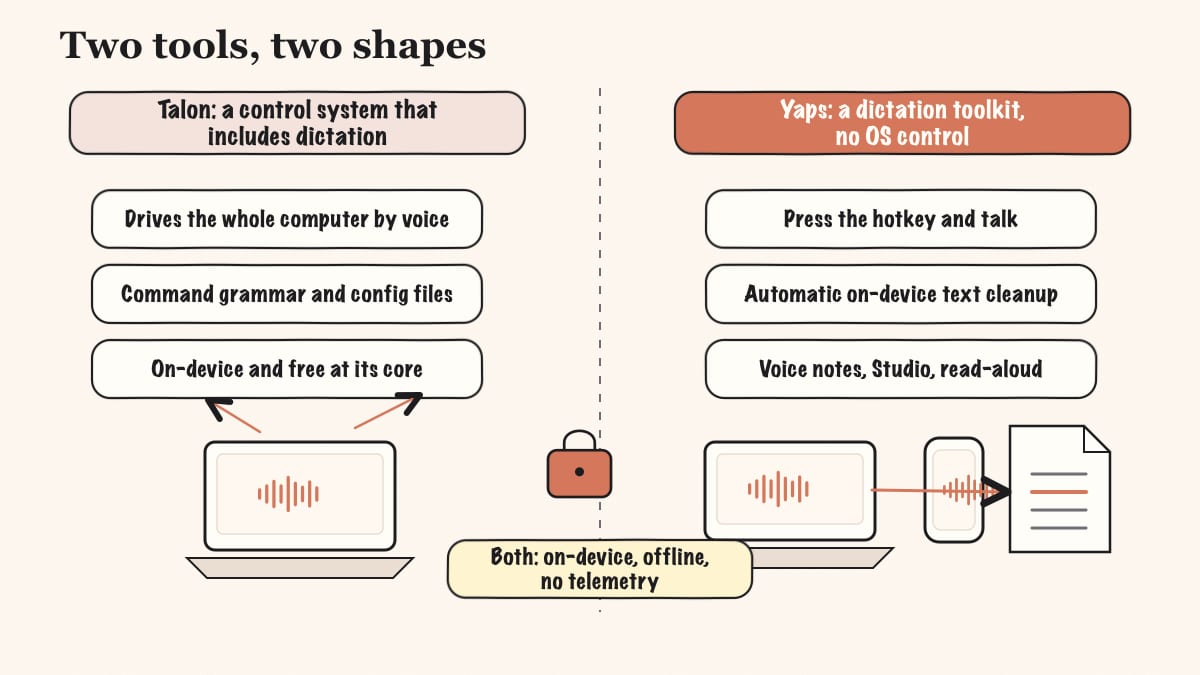
The core difference is shape. Talon is a hands-free computer-control system that happens to include dictation. Yaps is a dictation toolkit that does not try to control your computer. Compare them on the wrong axis and either one looks broken.
| Feature | Yaps | Talon Voice |
|---|---|---|
| Zero-setup dictation | Yes | No (config files) |
| On-device and offline | Yes | Yes |
| Multilingual dictation (~25 languages) | Yes | English-centric |
| Automatic text cleanup | Yes | No |
| Voice notes and searchable history | Yes | No |
| Audio-file transcription (Studio, SRT) | Yes | No |
| Read-aloud / text-to-speech | Yes (18 voices) | No |
| Android mobile keyboard | Yes | No |
| Full hands-free OS control | No | Yes |
| Eye tracking and voice-to-code | No | Yes |
This is not a scorecard where the higher total wins. The two rows at the bottom are why people choose Talon. The rows above them are why people choose Yaps. Pick the tool whose strong rows match what you actually do all day.
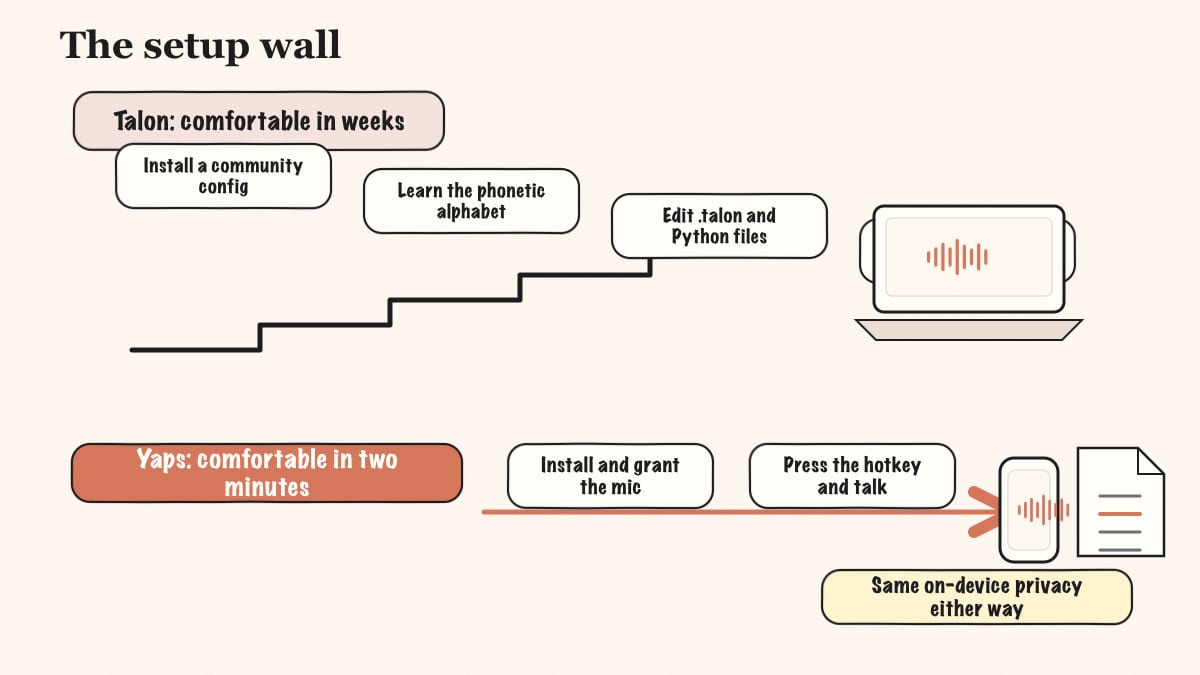
The most common Talon complaint, repeated across Reddit, reviews, and personal blogs, is the learning curve. "The first two weeks are slow and frustrating." Power users spend weeks building a personal command set. You learn a structured command grammar and often edit Python and .talon files to bend the tool to your workflow. The current release is not fully documented, so practical usability leans on the community config you have to install. None of this is a knock on Talon; that depth is the source of its power. But it is real cost, paid up front, before the tool feels good.
Yaps deletes that cost. There is no grammar to learn, no Python to edit, no community config to clone. Press the Yaps hotkey, talk, and the on-device cleanup gives you finished text. The "first two weeks" of ramp-up becomes "first two minutes." For people who only want to dictate, that gap is the entire decision.
Talon listens for commands by default, which is exactly what you want when you are driving the OS, and exactly what bites you when you forget to put it to sleep. Talking to a colleague or playing a video can trigger commands you did not mean. It is a manageable quirk for a power user, and a constant low-grade tax for a casual one.
Yaps sidesteps this entirely because it is not a command system. Dictation happens when you hold or toggle the Yaps hotkey, and the rest of the time it is quiet. There is no command grammar waiting to misfire on a passing sentence.
This is the rare comparison where the privacy story is close, and that is worth stating plainly. Talon runs its own on-device speech engine with no cloud and no subscription required for recognition. Disconnect from the internet and it still works. On privacy by architecture, it is one of the strongest tools in this entire roundup.
Yaps matches that posture. Core dictation runs on your device, your audio never leaves it, it works offline, there is no telemetry, and no account is required for core use. The optional cloud voices for read-aloud send text, never audio, to a voice service, and they are clearly labelled. Your spoken input is always processed locally.
So on privacy, neither tool asks you to compromise. The difference is everything around the privacy core: setup effort, scope, mobile support, and whether you want a command system or a dictation toolkit. The contrast with the cloud options on this list, where every dictation leaves your device, is sharper than the contrast between Yaps and Talon.
| Talon Voice | Yaps | |
|---|---|---|
| Free tier | Yes (full public release) | Yes (5K words/week desktop) |
| Paid option | Patreon from ~$5/mo; beta tier ~$25/mo | Basic $15/mo, Max $25/mo |
| Annual discount | N/A | Yes (~20% off) |
| Core paywalled | No | No (core dictation free) |
Talon's pricing is generous: the public release is fully functional for free, and the Patreon tiers are optional support that unlock the faster beta engine and priority help rather than core features. Yaps is similar in spirit: core on-device dictation is free up to the weekly word allowance, and the paid plans unlock higher limits and premium features like vault note sync between mobile and desktop. Neither tool locks its core capability behind a paywall, which is the right way to do it.
Choose Yaps if:
Choose Talon Voice if:
We want to be honest about this, because the wrong recommendation here is not a missed sale, it is a person stuck with a tool that cannot do what they need.
If you need full hands-free computer control or motor-disability accessibility. If you literally cannot use a keyboard or mouse, or you need to click, scroll, manage windows, and write code entirely by voice plus eye tracking and noise, Talon is the right tool and Yaps is not. Yaps is dictation plus a toolkit. It does not do full hands-free OS control, mouse and click navigation, or eye tracking. For full hands-free operation, Talon (or Windows Speech Recognition, or a project like Numen) is where you should look.
If you specifically want voice-to-code. For editing code symbolically by voice, the Talon ecosystem with Cursorless is unmatched, and the community-forked Serenade is the next option. Yaps dictates prose into any field; it is not a code-editing grammar, and it will not move your cursor around a function by voice.
A few honest secondary concessions. Yaps does not yet ship some things, and you should know before you switch. Multilingual read-aloud is a genuine gap: the read-aloud voices are English speakers in practice. Live meeting transcription and speaker labels are coming soon, not available today, so for those use a dedicated meeting tool. iOS is coming soon, not shipping. Yaps also does not do OCR or document scanning, and it is not a podcast or video editor. If your need is on that list, the right move is a tool built for it, not Yaps.
If you tried Talon, found the setup heavier than you wanted, and you mostly need dictation, moving to Yaps is fast. The free tier means you can test it before committing anything.
Download Yaps for your platform from yaps.ai. There is nothing to configure. You do not need to clone a community repo, write a grammar file, or learn an alphabet. Install, grant the microphone permission, and you are ready.
The whole interaction is the Yaps hotkey: Fn on Mac and Windows, or the dictation button on the Android keyboard. Hold to record, or tap to toggle. That is the entire control surface for dictation, compared to the command vocabulary you maintained in Talon.
Stop self-editing as you speak. Ramble, restart sentences, change your mind mid-thought. The on-device text cleanup removes the filler and self-corrections and hands you finished text. This is the habit shift that takes a day or two: trusting that you do not have to speak in clean, final sentences.
The real adjustment is discovering features Talon never offered. Capture a few voice notes over a day and search them the next morning. Highlight a draft and use read-aloud to hear it before sending. Drop a recorded audio file into Studio and export an SRT. These are the parts of the toolkit a command system was never trying to be.
If you also use Talon for genuine hands-free control or voice-to-code, keep it. The two tools do not conflict, and they solve different problems. Run Yaps for dictation and the toolkit; keep Talon for the OS-control work it was built for.
Privacy by architecture, not by policy. Both Talon and Yaps keep your audio on your device, so the real choice is not whether to trust a server. It is whether you want a command system or a dictation toolkit.
Yaps for Android, Windows, and macOS
Install Yaps on Android for offline dictation, a familiar full-size keyboard, and no screen capture. Scan the QR on desktop, or tap the Play badge on mobile.
Yes. The public release of Talon Voice is fully functional at no cost, and an optional Patreon tier (around $25 per month for the beta tier) unlocks the faster beta engine and priority support rather than core features.
Yes. Talon is actively developed, with a new beta build shipped in December 2025 and a move to a faster on-device speech engine. It is not deprecated or abandoned.
Yes. Talon runs its own on-device speech engine with no cloud connection and no subscription required for recognition, so it works fully offline.
Talon is a scriptable command system, so you learn a structured command grammar and often edit Python and .talon config files to fit your workflow, which is why most people spend their first weeks ramping up.
Yaps is the easiest, because you press the Yaps hotkey and talk, and on-device multilingual transcription with automatic text cleanup gives you finished text with no scripting or setup.
Yes. Apple Dictation and Serenade are free, and Yaps has a free tier with 5,000 words per week on desktop, so you can replace Talon's dictation at no cost.
For symbolic voice-to-code, Talon itself with Cursorless or the community-forked Serenade remain the strongest options, since they are built specifically for editing code by voice.
Yes. Talon runs on macOS, Windows, and Linux, though on Linux it supports X11 only.
No. Wayland lacks the APIs Talon needs and support is not planned, so you should use X11 on Linux.
No. Eye tracking is optional and requires a Tobii device; you can use Talon with voice and noise control alone.
No. Yaps is on-device dictation plus a voice toolkit, and it does not do full mouse, click, or OS navigation or eye tracking, so for full hands-free control you should choose Talon.
Talon is free, cross-platform, and on-device, while Dragon is Windows-only at around $699 with no native Mac since 2018, but Dragon has deeper custom vocabularies for legal and medical work.
Yes. Yaps runs core dictation on-device, your audio never leaves your device, it works offline, there is no telemetry, and no account is needed for core use.
Yaps adds automatic text cleanup, searchable voice notes, offline audio-file transcription with SRT export, read-aloud, and a full Android keyboard, plus dictation in about 25 auto-detected languages.
Not yet. Live meeting transcription and speaker labels are coming soon in Yaps, so for those today you should use a dedicated meeting tool.
Talon Voice is a remarkable piece of software, and it is alive and improving in 2026. If you need to control your computer by voice, write code hands-free, or work without a keyboard or mouse at all, it is the right tool, and we will not pretend otherwise.
But most people searching for a Talon alternative do not need to pilot their operating system by voice. They need to dictate, and they want it to be simple, private, and clean. That is exactly what Yaps is built for: press the Yaps hotkey, talk, and get finished text on Android, Windows, and macOS, with no grammar files, no Python, and no setup ritual. It matches Talon on privacy and offline use, then adds text cleanup, voice notes, Studio, and read-aloud on top.
So the default for the dictation-buyer is Yaps. Keep Talon if you genuinely need hands-free control or voice-to-code. For everything else, start with the free tier, talk for two minutes, and see how little setup it really takes.