Przedmowa
Game chat has a physical problem. Your hands are on the controls, the useful thing to say is time-sensitive, and typing it means giving up both of those for six seconds. So people type "brb" and nothing else, or they say it in voice chat and hope the two people not in the call see it later, or they simply do not communicate.
Speaking the message and having it appear as text solves this, and it is a surprisingly under-served corner of the voice-input world. Search for it and you mostly find two different things: bots that transcribe other people's voice chat for accessibility, and macro tools that turn spoken phrases into key presses.
Both are useful. Neither is the thing where you talk and your words land in the chat box as text.
This guide covers that third thing: dictating into game chat, Discord, and anything else with a text field, with the speech recognition running on your own PC instead of on someone's server.
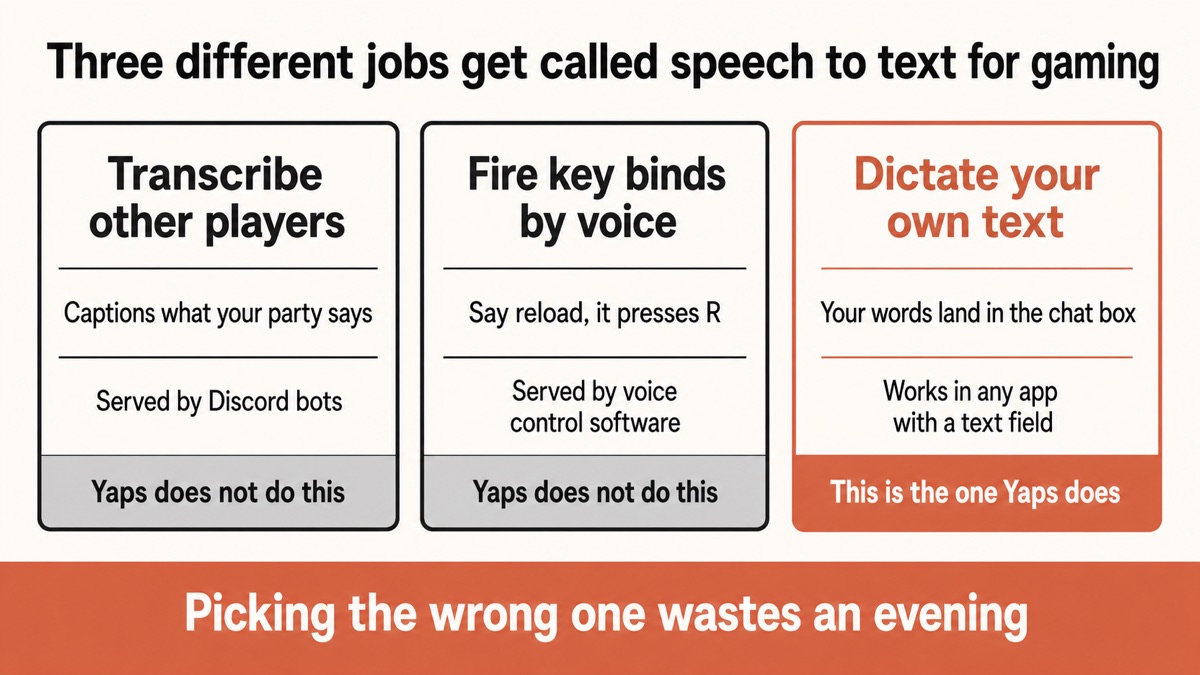
Three different things get called "speech to text for gaming"
The category is muddled, and picking the wrong tool wastes an evening. Here is the split.
Transcribing other people. Bots that join a Discord voice channel and caption what everyone is saying. This exists for accessibility reasons and is genuinely valuable if you are deaf or hard of hearing, or if you are in a room where you cannot use audio. Discord has no built-in speech-to-text of this kind, so it is served by third-party bots. Yaps does not do this and is not trying to.
Voice control and macros. Tools that listen for a set phrase and fire a key press or a sequence. Say "reload" and it presses R. These are command systems for flight sims, strategy games, and complex binds, and dedicated voice-control software is the right answer for that job.
Dictating your own text. You speak, and your words appear as text in whatever field the cursor is in. Game chat, Discord, a party invite message, a bug report, a note to yourself. This is the one that barely gets covered, and it is what the rest of this guide is about.
Cloud dictation while gaming
Your voice takes a trip before it becomes words
Audio is captured, sent to a server, transcribed there, and sent back. That is a network round trip on a connection you are already asking to carry your game traffic, it stops working the moment the connection wobbles, and a recording of your voice now exists somewhere you cannot see.
On-device dictation
The words are made where you are
The speech model is already installed on your PC, so your voice is turned into text locally. There is no upload, no dependence on your connection for the transcription itself, and nothing about what you said is stored on a company's server.
A note on speed, because this is where voice products oversell. On-device processing removes a network round trip. That is an architectural fact, not a promise about milliseconds, and anyone quoting you a guaranteed latency figure for your specific PC is guessing. What you can rely on is that the transcription does not depend on your connection quality, which is the part that actually bites during a match.
Setting it up on Windows
Five minutes, once.
1. Install it and confirm the recognition is local
Download Yaps for Windows and start the 7-day free trial. To satisfy yourself that nothing is being uploaded, switch off your wifi and dictate a sentence into Notepad. Text still appearing means your PC did the work.
2. Pick a shortcut that does not fight your game
This is the step that decides whether the setup is pleasant or annoying.
The default dictate shortcut on Windows is Ctrl and the Windows key held together. That is deliberately obscure so it does not collide with normal typing, but Windows-key combinations can be grabbed by the system, by a game launcher overlay, or by the game itself.
Yaps ships a compatibility profile for exactly this, which uses Ctrl+Space to dictate instead. You can also rebind the shortcut to anything you like. Pick something your game binds do not already use and that you can reach without moving your hand off the movement keys. A spare mouse button mapped through your mouse software is a good option if you have one.
3. Run the game in borderless windowed mode
A global shortcut has to work while a game holds focus, and borderless windowed is the configuration where that behaves most predictably. Exclusive fullscreen is where input handling and overlays get unpredictable across different titles.
Most people run borderless anyway for alt-tabbing. If you do not, this is the trade you are making.
4. Click into the chat box and talk
Open the in-game chat or your Discord text channel, press the shortcut, say the message, and let go. The text lands in the field. Filler words are stripped, punctuation and capitalisation are added, so what appears reads like a message rather than a transcript of someone thinking out loud.
Then press enter yourself. Yaps does not send the message, which is the correct behaviour: you get to see what it heard before your team does.
5. Get the microphone right
Speech recognition accuracy is mostly a microphone question, and gaming setups have a specific hazard. Your game audio is playing, and if it is on speakers the microphone hears it too.
A headset microphone solves this and is what most people already have. Position it to the side of your mouth rather than directly in front of it, which stops plosives from turning into noise. Then test dictation with your usual audio playing, not in silence, so you know what it does under real conditions. Our dictation accuracy guide goes further on this.
Discord specifically
Discord is where most of this actually happens, so it deserves its own section.
Discord has no built-in speech-to-text. Its own text-to-speech feature, the /tts command, does the opposite job: it reads a typed message out loud. For transcribing what people say in a voice channel, servers rely on third-party bots that join the channel and caption the conversation, which is a real accessibility tool and a different product from this one.
What Discord does not offer, and what the built-in Windows voice typing does not handle gracefully either, is simply dictating your own message into a text channel. That is where a system-wide dictation shortcut fits: Discord is just another app with a text box, so you click into the message field, press the shortcut, and talk.
This is more useful than it sounds for the case where you are in a voice channel with three people and need to post a link, a time, or a longer explanation into the text channel for the two people who are not. Speaking it and pressing enter takes a fraction of the time typing it does.
It also works on the phone. Yaps on Android includes a full keyboard with voice typing, so dictating into Discord mobile, a mobile game's chat, or a group message uses the same on-device recognition. There is a dedicated write-up of the private Android voice keyboard if you want that half of the setup.
What this does not do
Stated plainly, so nobody installs it expecting the wrong thing.
What it does
05-
Types what you say into any text field on the system, including game chat and Discord.
-
Runs on your PC so there is no server round trip and no upload of your voice.
-
Cleans the message up stripping filler words and adding punctuation before it lands.
-
Captures notes mid-session through a voice notepad, without leaving the game to open an app.
-
Works on Android too for mobile game chat and Discord on the phone.
What it does not do
05-
Transcribe other players it never listens to a voice channel or captions your party.
-
Fire in-game macros it is not a voice-control tool that maps phrases to key binds.
-
Send the message for you you press enter, which is deliberate, so you see it first.
-
Run free on desktop Windows is a 7-day trial then paid; the free tier is Android only.
-
Cost nothing to run speech recognition uses some CPU while you hold the key, like any app.
That last point deserves a sentence rather than a claim. Recognising speech takes real computation, and it happens on your machine while the shortcut is held. On a modern gaming PC this is not the thing that limits your frame rate. On a machine already running at its absolute ceiling, it is one more process, and pretending otherwise would be dishonest.
Where this genuinely changes things: accessibility
The convenience case is real. The accessibility case is bigger.
If typing hurts, or your hands do not do what you need them to do reliably, or you play one-handed, or fine motor control is the barrier rather than reaction time, then text chat is not a mild inconvenience. It is the part of multiplayer gaming that quietly excludes you, and voice chat is not always a substitute, because plenty of spaces are text-first and plenty of people have reasons not to talk in a lobby.
Being able to speak a message into the chat box changes participation, not just convenience. The same is true for players with dyslexia, for whom typing quickly under pressure in front of strangers is a specific kind of unpleasant.
Two things make this workable rather than theoretical. The recognition being local means it works on a poor connection, which is when text chat matters most. And the shortcut being rebindable means it can be reached with whatever hand position you actually use, including a mouse button or a foot pedal mapped to a key.
We have written more on this in the guides to voice input for RSI and hand pain and dictation for dyslexia.
For a lot of players, typing in chat is not slow. It is the reason they do not use chat at all.
Yaps for accessibility
The other use: capturing an idea without leaving the game
Streamers and content creators have a version of this problem that has nothing to do with chat.
Something happens in a match that would make a good clip, a good video, or a good bit. The thought is worth ten seconds of your attention and alt-tabbing to a notes app costs you the next thirty. So the idea evaporates, which is why every creator has a graveyard of half-remembered "there was a thing last Tuesday".
Yaps has a voice notepad on a separate shortcut for this. Press it, say the thought, and it goes into your notes vault as text without you leaving what you are doing. Later it is searchable, so a session's worth of scattered ideas is a list rather than a memory test.
The same shortcut works for bug reports, build ideas, quest notes you want to keep, and anything else you would otherwise try to hold in your head until the round ends.
Which tool for which job
| What you want | Yaps | Discord transcription bots | Voice control software |
|---|---|---|---|
| Speak your own message into chat | Yes, any text field | No | No |
| Caption what other players say | No | Yes, in voice channels | No |
| Map a spoken phrase to a key press | No | No | Yes, that is the job |
| Runs without sending audio away | Yes, on device | No, server side | Varies by tool |
| Works outside Discord | Every app | Discord only | Yes |
| Capture notes mid-session | Yes, voice notepad | No | No |
If you want the party captioned, use a transcription bot: that is what they exist for and Yaps does not compete with them. If you want to say "shields" and have it press a key, use dedicated voice-control software. If you want to talk and have your words appear as text anywhere on your system, that is this.
A word about voice and privacy in gaming
Voice in games has quietly become one of the more heavily processed data streams most people produce, between platform moderation systems, party chat features, and the growing set of tools that analyse voice for behaviour enforcement. Some of that is well intentioned. All of it means your voice is being handled somewhere other than your PC.
Dictation is one place you can straightforwardly opt out. If the transcription happens on your machine, the audio of you saying "rotate mid" was never a file on anyone's server, and there is nothing to retain, analyse, or leak. That is a small win in the scheme of things, and small wins that require no ongoing effort are the ones worth taking.
For the wider picture, we keep a guide on what happens to your voice data.
Krótka wersja
If you want to talk instead of type in game chat and Discord, install Yaps on Windows, rebind the dictate shortcut to something your game does not use, run borderless windowed, and use a headset microphone. The recognition happens on your PC, so there is no round trip to a server and nothing about your voice is uploaded.
Use a Discord transcription bot instead if what you need is other people captioned, and dedicated voice-control software if what you need is spoken commands firing key binds. Those are different jobs and different tools. For getting your own words into a text box without taking your hands off the controls, on-device dictation is the right default.
Często zadawane pytania
Is there a speech to text app for gaming?
Yes. A system-wide dictation app such as Yaps types what you say into any text field, including in-game chat and Discord, and on Windows it runs the speech recognition on your own PC rather than sending audio to a server. That is different from Discord transcription bots, which caption other people talking in a voice channel, and different again from voice-control software, which turns spoken phrases into key presses. Decide which of those three jobs you actually have before installing anything.
Does Discord have speech to text?
Discord has no built-in speech-to-text. Its /tts feature does the opposite: it reads a typed message aloud. For captioning what people say in a voice channel, servers use third-party bots that join the call, which exist mainly for accessibility. For dictating your own message into a Discord text channel, you need a system-wide dictation tool, because Discord is simply another app with a text box.
How do I use voice to text in game chat?
Install a dictation app that works system-wide, rebind its shortcut to a key your game binds do not use, and run the game in borderless windowed mode so the global shortcut behaves predictably. Then click into the chat box, press the shortcut, say your message, and press enter. In Yaps the Windows default is Ctrl and the Windows key, with a compatibility profile using Ctrl+Space if that clashes.
Will voice typing hurt my frame rate?
Speech recognition uses real computation while you hold the shortcut, so it is not free, but on a modern gaming PC it is not what limits your frame rate. On a machine already running at its ceiling it is one more process competing for resources. Anyone claiming a voice tool has zero performance cost is overselling; the honest answer is that it is small and only active while you are actually dictating.
Is on-device dictation faster than cloud dictation for gaming?
It removes a network round trip, which is a real architectural difference, but the honest framing is about reliability rather than a millisecond figure. Cloud dictation depends on your connection at exactly the moment your connection is busy carrying game traffic, so it degrades when you least want it to. On-device transcription does not depend on the connection at all, which is the practical benefit while you are playing.
Can Yaps transcribe what other players are saying?
No. Yaps only turns your own speech into text while you are holding the shortcut, and it never listens to a voice channel or captions a party. If you need other players transcribed, for accessibility or any other reason, use a Discord transcription bot designed for that, because it is a genuinely different product and Yaps is not a substitute for one.
Can I use voice commands to control a game?
Not with Yaps. Yaps has voice commands on desktop for controlling your computer, but it does not map spoken phrases to in-game key binds, which is what gaming voice-control software is built for. If you want to say "reload" and have the game press R, use a dedicated voice-control tool. Yaps handles the other half: writing your own text.
Which shortcut should I use so it does not clash with my binds?
Pick something outside your normal reach that no game uses. The Windows default in Yaps is Ctrl and the Windows key, and there is a compatibility profile using Ctrl+Space for machines where Windows-key combinations get intercepted by the system or a launcher overlay. Every shortcut is rebindable, and a spare mouse button mapped through your mouse software is often the most comfortable option.
Does it work in fullscreen games?
Borderless windowed mode is the reliable configuration, and it is what most people run anyway for alt-tabbing. Exclusive fullscreen is where global shortcuts and overlays behave inconsistently between titles, so if the shortcut is not registering, switching to borderless is the first thing to try.
Can I dictate in mobile game chat?
Yes, on Android. Yaps includes a full keyboard with a dictation button, so you can speak a message into a mobile game's chat, Discord on the phone, or any other app, with the recognition running on the device. An iPhone and iPad version is coming soon, so for now this is Android only on mobile.
Is voice typing good for players with RSI or limited hand mobility?
It is one of the strongest cases for it. Speaking a message removes the part of text chat that is physically demanding, and because the shortcut can be rebound to a mouse button or any other key, it can be reached with whatever hand position works for you. It also helps players with dyslexia, for whom typing quickly under pressure in front of strangers is its own barrier. Our guides to voice input for RSI and dictation for dyslexia go into more detail.
Can I take notes about a game without leaving it?
Yes. Yaps has a separate voice notepad shortcut, so you can speak a clip idea, a bug, or a build note straight into your notes without alt-tabbing out of the game. Those notes are saved as plain text files you can search later, which turns a session's worth of half-remembered ideas into an actual list.
Does it work offline?
Yes. The speech model is installed on your machine, so dictation keeps working with the internet switched off entirely. That is easy to verify: turn off your wifi, open any text field, press the shortcut, and see whether the words still appear. It also means nothing about your voice is uploaded even when you are online.