
Przedmowa
Research does not usually fail at the interview. It fails four months later, when someone asks whether users ever complained about the onboarding step, and the honest answer is that three people probably did, in a study nobody can find, in a recording nobody has time to re-watch.
That is the repository problem. Every team that does enough research eventually builds one, and the platforms that sell you a repository are genuinely good at it. They tag, they cluster, they let you cut highlight reels and share a link with a stakeholder who will never read the full transcript.
They also all begin at the same step. Upload the recording.
For a lot of research that is fine. For interviews with patients, employees, children, candidates, regulated-industry customers, or anyone who agreed to talk to you and not to a vendor you never named, it is the step that quietly changes what you promised. This guide covers the other build: a research repository that lives on your own machine, where the transcription happens locally, the notes are plain files, and you can still ask questions across the whole archive months later.
A repository is a memory problem wearing a database costume
Strip the tooling away and a research repository does two jobs. It stops findings from evaporating when the study ends, and it lets a future question reach material gathered before anyone thought to ask it.
Both jobs are about retrieval, and retrieval has two distinct modes that teams routinely conflate.
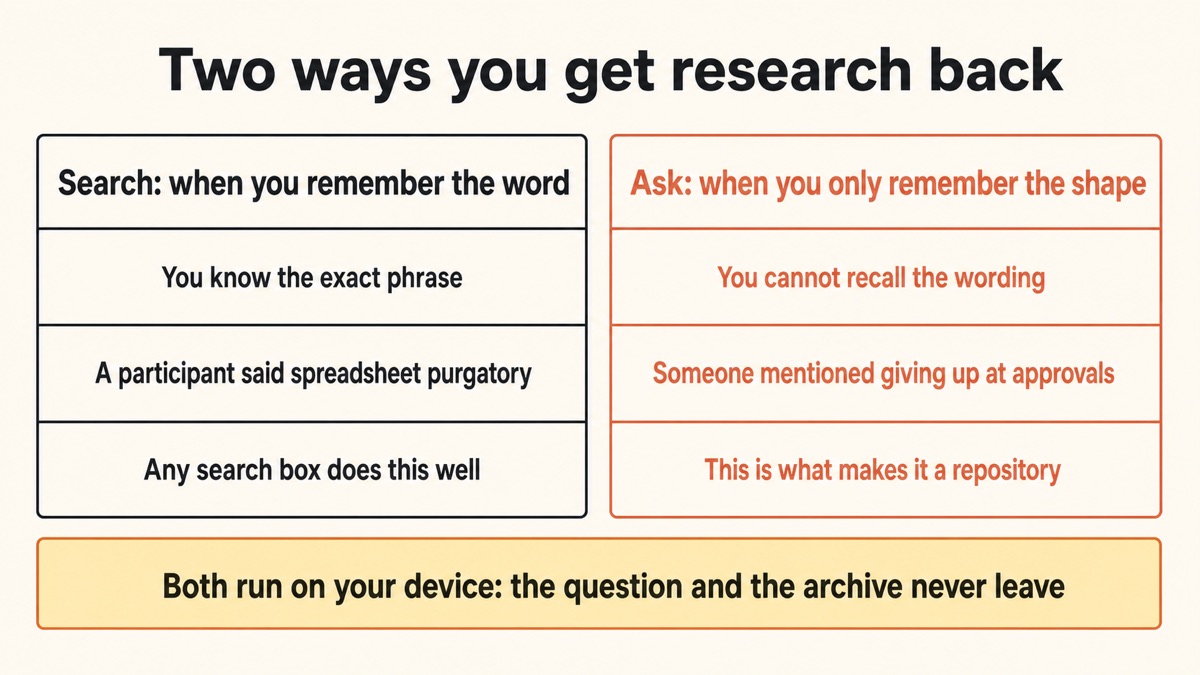
Sometimes you remember a specific word. A participant said "spreadsheet purgatory" and you need that quote. Plain search finds it in a second, and any tool with a search box does this well.
Sometimes you remember only the shape. Somebody, in one of the enterprise interviews, said something about the approvals process being the reason they gave up. You cannot search for that, because you do not know the words. What you need is to ask across everything and have the archive answer. That second mode is what separates a repository from a folder, and it is the part that has historically required uploading your data to get.
It does not anymore.
The question a repository has to survive is not "where is that study?" It is "did anyone ever mention this?", asked by someone who was not there.
Yaps for researchers
The consent problem nobody puts on the slide
Read a standard participant consent form and you will usually find some version of: the recording will be used by the research team, stored securely, and deleted after a period. Most participants read that as a promise about who hears them.
Then the recording is uploaded to a transcription service, which may use a further subprocessor, and the honest description of who now holds the audio is longer than the sentence the participant agreed to.
This is not a scandal. Most vendors handle it responsibly and most consent language is broad enough to cover it. But it is a real gap between what was promised and what happens, and it becomes a genuine problem in specific cases: health research, employee research where the participant fears their employer, work with children, anything under an ethics board or an institutional review, and any interview where the participant asked, plainly, who else would hear this.
The cloud repository route
Your archive is a tenancy
Recordings and transcripts live in a platform. It is powerful, collaborative, and genuinely well built. It is also a dependency: the data sits under someone else's terms, retention settings, and pricing, and your archive stops being an archive if the subscription lapses.
The local repository route
Your archive is a folder
Audio is transcribed by your own machine. Notes are Markdown files on your disk. You can search them, ask across them offline, back them up however your organisation requires, and open every one of them in ten years with software that does not exist yet.
How to build the repository in five steps
Transcribe locallyno upload
Import the recording into Studio. Your machine reads the audio and writes the text, with the connection off if you like.
Label who spokeoptional
Switch on speaker identification before you start, and a two-person interview comes back as turns instead of a wall of text.
Write the note now5 min
Dictate the debrief while it is fresh. What surprised you, what confirmed a hypothesis, the two quotes worth keeping.
Name things consistentlythe whole trick
One naming pattern, one set of headings, every time. Consistency is what keeps an archive usable at 200 files.
Search, then askoffline
Search when you remember the word. Ask across your notes when you only remember the shape. Both run on your device.
1. Transcribe the recording on your own machine
Open Studio, the editor inside Yaps, and import the file from your disk. It opens ordinary audio files as well as video, including MP4, MOV, M4V, WebM, and MKV, and reads the sound out of the container so you do not need to export an audio track first.
Your computer does the transcription. There is no upload step, which on a ninety-minute session is a practical difference as well as a privacy one, because your upload speed stops being the bottleneck. It also means the whole thing works on a plane or on a locked-down corporate network.
What comes out is editable text you can correct in place, save into your vault, or export as a transcript or an SRT file.
2. Turn on speaker identification for multi-person sessions
A transcript of two people talking is much less useful as one unbroken block. Before you start the transcription, switch on "Identify speakers" and Studio will label the turns so you can see who said what.
You install a small speaker-identification pack once from the Features screen, about 32 MB. The labelling runs on your device like everything else, so a two-person interview or a small focus group comes back structured without anything being uploaded. It is available on Windows and macOS, and it is off by default, so you have to turn it on.
3. Write the debrief while the session is still in your head
This is the step that separates a repository from a graveyard of transcripts. A transcript records what was said. A note records what it meant, and only you can write that, and only for about an hour afterwards.
Press the Yaps hotkey and dictate it. Three prompts are enough: what surprised you, what confirmed or broke a hypothesis, and the two or three quotes you would actually put in a readout. Filler words and punctuation are cleaned up as you speak, so five minutes of talking produces something readable rather than something you have to edit later.
Do it before the next session. Notes written the following week are reconstructions.
4. Name things the same way every time
Boring, and the single highest-leverage decision in the whole build.
Pick one pattern for filenames that sorts usefully, such as study, then date, then participant identifier. Keep the same headings in every note. Put the participant's key attributes in the same place in every file.
An archive of 200 well-named files with consistent headings is navigable by a person who has never seen it. An archive of 200 files called "Interview notes final v2" is not a repository at all, whatever software it lives in.
5. Search when you know the word, ask when you do not
Search your vault for a distinctive phrase and you will find the quote in a second.
When you only remember the shape of something, ask across your own notes instead. That question and the archive it searches both stay on your device, so you can interrogate two years of participant interviews on a train with no signal. This is the piece that used to require handing your research to a platform, and it is the reason a local folder can now do a repository's actual job.
Where this beats a repository platform, and where it does not
Be clear-eyed about this, because the platforms are good and the trade is real.
| What matters | Yaps (local) | Cloud research repositories |
|---|---|---|
| Interview audio stays on your machine | Yes, always | No, uploaded to process |
| Transcription without a connection | Yes | No |
| Speaker labels on the transcript | Yes, on device | Yes |
| Ask questions across the whole archive | Yes, on device | Yes, in the cloud |
| You own the files outright | Plain Markdown | Export required |
| Tagging, affinity boards, highlight reels | No | Yes, and well done |
| Shareable links for stakeholders | No | Yes |
| Multiple researchers in one workspace | No | Yes |
So when should you use a platform instead? When collaboration is the actual job. A team of six researchers tagging a shared corpus, cutting highlight reels for a stakeholder readout, and maintaining a taxonomy that everyone contributes to is doing something a folder of files genuinely cannot do. The established repository tools handle that well, and if that is your situation you should use one.
The local build wins in the other cases, and there are more of them than the category's marketing suggests. Solo researchers. Consultants who carry client research between engagements and cannot pool it in one vendor. Anyone working under an ethics board that asks precisely where participant audio goes. Teams in health, finance, defence, and public services where the answer to "can we upload this?" is simply no. And anyone who has watched an archive become unreachable because a subscription ended.
What this does not do, plainly
There is no tagging system, no affinity mapping canvas, no highlight reel, no shareable stakeholder link, and no multiplayer workspace. Yaps does not conduct AI-moderated interviews, and it never joins a call as a participant. There is no automatic theme detection that clusters your studies into named insights for you.
What you get instead is capture and recall that never leave your device: local transcription with speaker labels, dictated notes, plain files, offline search, and the ability to ask across the whole archive. If you need the collaborative layer on top of that, use a repository platform for the shared work and keep the sensitive studies local. Running both is a normal and sensible arrangement.
Who this build actually suits
The solo or embedded researcher. One person doing discovery for a product team rarely needs a collaborative workspace and always needs to find something from two quarters ago. The whole platform cost is buying features that exist for teams of six.
The consultant. You cannot pool three clients' research in one vendor account, and each client would rather their interviews were not in a shared platform anyway. Separate local folders per client, with the same tooling across all of them, matches how the work is actually contracted.
The academic and applied qualitative researcher. Ethics approval frequently turns on where participant data goes. "It is processed on the researcher's encrypted device and never transmitted" is a sentence that clears review boards quickly. We wrote the longer version of this in the guide to offline transcription for qualitative research, and postgraduate readers may want the thesis notes workflow too.
The regulated-industry team. In health, finance, and public sector work, the upload step is often not a preference but a prohibition. See voice privacy in regulated industries for how that plays out in practice.
The recruiter and the support lead. Interview and call notes have the same shape as research notes and the same confidentiality problem. There are dedicated versions for interview notes and customer call notes.
Krótka wersja
A research repository needs three things: transcripts, notes that say what things meant, and retrieval that works when you cannot remember the words. None of those require a platform, and all three of them can now run on your own machine.
Start with Yaps if your participants are the reason you care where the audio goes, or if you are one person who needs to find things rather than a team who needs to collaborate. Transcribe in Studio, dictate the debrief immediately, name files consistently, and ask across the archive when the shape is all you have. Reach for a dedicated repository platform when tagging, highlight reels, and a shared workspace are genuinely the job, and keep the sensitive studies local either way.
Często zadawane pytania
What is an AI research repository?
An AI research repository is a searchable home for everything a team learns from users, where transcripts, notes, and quotes can be retrieved later by someone who was not present at the original study. The "AI" part usually means two things: automatic transcription of recordings, and the ability to ask a question in plain language and get an answer drawn from the whole archive. Both of those can run on your own computer, which is what makes a local repository possible rather than a folder you never open again.
Can I transcribe research interviews without uploading them?
Yes. Import the recording into the Studio editor in Yaps and your own machine produces the transcript, with no upload and no connection required. This is the step that most transcription services cannot offer, because their processing happens on their servers. Turning off your wifi before you start is the simplest way to verify it for yourself.
Does it label who said what in an interview?
Yes, on Windows and macOS. Switch on "Identify speakers" before you transcribe and the transcript comes back as labelled turns rather than one continuous block, which is what makes a two-person interview or a small group session actually readable. You install a small speaker-identification pack once, about 32 MB, and the labelling runs on your device like the transcription itself. It is off by default, so you need to turn it on.
Is this a Dovetail alternative?
Partly, and it is worth being precise about which part. For local transcription, private notes, offline search, and asking questions across your archive, yes. For collaborative tagging, affinity mapping, highlight reels, and shareable stakeholder links, no, and those are exactly what the established repository platforms are good at. Many researchers end up doing both: a shared platform for team studies, and a local archive for research that cannot be uploaded.
How do I make my research archive searchable months later?
Consistency does more than tooling. Use one filename pattern, the same headings in every note, and a one-line plain-language summary at the top of each file saying what you learned from that person. Then use search when you remember a distinctive phrase, and ask across your notes when you only remember the shape of the thing. The one-line summaries are what make both work well.
Can I ask questions across all my interviews at once?
Yes, and the question and the archive both stay on your device. You can ask something like whether anyone mentioned giving up during approvals, and get an answer drawn from your own notes without any of it being uploaded. It works with no internet connection, which is genuinely useful when you are preparing for a readout on a train.
What file format are the notes in?
Plain Markdown files in a folder on your disk. That means they open in any text editor, work with any backup system your organisation already uses, can be searched with ordinary tools, and remain readable if you stop using Yaps entirely. Portability is the practical argument for a local repository as much as privacy is.
Does this work for academic research and ethics approval?
It suits it well, because the sentence review boards want to see is usually about where participant data travels. Processing on the researcher's own encrypted device, with no transmission to a third party, is a straightforward thing to describe in an application and a straightforward thing to honour afterwards. You are still responsible for the rest: encrypting the device, controlling access, and following your institution's retention rules.
Can a whole research team use this?
Not as a shared workspace. There is no multiplayer repository, no shared tagging, and no permissions model, so a team of researchers working one corpus together should use a dedicated platform for that work. Individuals on a team can each keep a local archive, and many do, with the shared platform holding the studies that are cleared for upload.
What audio and video files can it transcribe?
Ordinary audio files, plus common video containers including MP4, MOV, M4V, WebM, and MKV, with the audio read straight out of the video so you do not need to extract a track first. That covers the usual output of a recorded video call, a phone recording, or a dedicated recorder. Transcripts export as text, Markdown, or SRT.
Does Yaps join and record my research calls?
Not as a bot. Yaps never joins a call, never dials in, and never appears in the participant list, so the people you interview do not see a third party arrive. On desktop it can record a session locally from your microphone and your computer's own audio, then transcribe and label the speakers on your machine. For a recording you already have, you import the file into Studio instead. If a botless workflow is what you are looking for, we wrote about it in the piece on notes without a meeting bot.
How much does it cost compared with a repository platform?
On desktop, where this whole workflow lives, Yaps starts with a 7-day free trial and then costs $15 a month for Pro or $25 for Max. Android has a free tier, though the transcription step is a desktop feature. Dedicated research repository platforms are typically priced per seat at a considerably higher level, which is reasonable given that they include collaboration, tagging, and sharing that Yaps does not. The comparison is only fair if you are honest about which set of jobs you actually need.
Can I use my phone for field notes?
Yes. Yaps on Android includes voice typing through its keyboard, so you can dictate a field note or a post-interview reflection straight after a session, offline, and optional syncing can bring it to your computer later. Studio and its file transcription are desktop features on Windows, macOS, and Linux. An iPhone and iPad version is coming soon.