This list is ranked, not enumerated. Yaps comes first because it is the most complete answer to "what can I dictate into for as long as I want, across every app, without my voice leaving my device?" Each pick after it covers a specific case where another tool is the honest fit.
1. Yaps: The No-Time-Limit Default
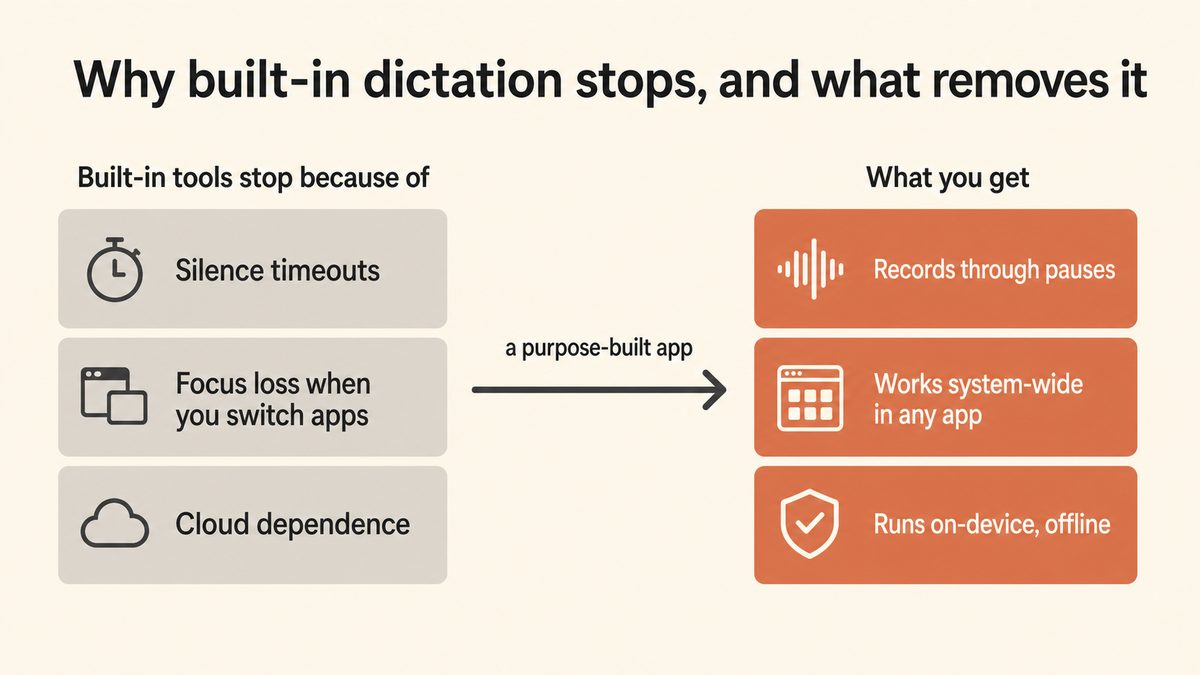
Yaps is the tool this whole guide is pointing you toward. Push the Yaps hotkey, speak for as long as you want, and release when you are done. There is no silence cutoff watching to shut you off mid-thought. A pause to think is just a pause, not the end of the session.
It runs on-device. Your audio never leaves the machine, there is no cloud connection to drop, and it works fully offline, on a plane or on a network that blocks outbound traffic. Because dictation is system-wide, the text lands in whatever app you are focused on: your email, your editor, a chat box, a form field, your notes. Switching windows does not cancel anything the way it cancels Google Docs or a browser-bound tool.
Then it does the part rivals skip. Yaps runs an on-device cleanup pass over your raw speech, removing filler words and self-corrections, fixing punctuation and capitalisation, and auto-formatting lists and numbers. A long, rambling dictation comes out as finished text, not a transcript you still have to clean by hand.
Dictation is multilingual, covering about 25 languages that Yaps auto-detects from your speech, so you do not switch a language setting to change what you are speaking. Yaps picks the right on-device speech model for your hardware automatically; you never touch a model picker.
01 / Time limit
None
No silence cutoff. Speak as long as you want, pause to think freely.
02 / Free tier
5K
Words a week on desktop free (1K on mobile), shared across dictation and read-aloud
03 / Languages
~25
Dictation languages, auto-detected from your speech
04 / Platforms
3
Android, Windows, and macOS, plus a Chrome capture extension
Yaps ships on Android, Windows, and macOS, with a Chrome "Save to Yaps" extension for pulling articles into your vault; iOS is coming soon. On desktop the trigger is the Fn key (hold to record, or tap to toggle). On Android it is the dictation button on the Yaps keyboard. The free tier gives you 5,000 words a week on desktop and 1,000 on mobile, shared across dictation and read-aloud, with paid tiers at Basic $15/month and Max $25/month lifting the cap and adding cloud options.
Where Yaps loses: if you only ever transcribe pre-recorded audio files and never dictate live, a file-first tool like MacWhisper is a better shape (though Yaps Studio does offline audio-file transcription to text and SRT too). If your job depends on a decades-trained medical or legal vocabulary that adapts to thousands of custom terms, Dragon still has an edge. For everything else, and for the specific pain of dictation that keeps stopping, Yaps is the answer.
See how Yaps dictation works →
2. Wispr Flow: Best Cloud AI Cleanup
Wispr Flow is a polished cloud dictation app, and its post-processing is genuinely strong: it takes rambling speech and rewrites it into clean prose with little intervention. It uses a hold-style trigger, so it does not suffer the built-in silence timeout the way Apple or Google Docs do.
The trade-off is the cloud. All audio is sent to remote servers for processing, so every dictation leaves your machine, and a working internet connection is required. Public reporting has flagged screen-capture used for context-aware formatting, which means more than your voice may be read. Pick Wispr Flow if you specifically want the cloud cleanup style and do not work in a regulated environment. Pick Yaps if you want comparable cleanup that runs on-device and offline.
3. SuperWhisper: Best Offline Modes-Based Workflow
SuperWhisper is the closest like-for-like to Yaps on privacy: an offline-first Mac dictation app built around customisable "modes" that format dictation differently for different tasks. It runs on-device and has no silence timeout, so it handles long-form dictation cleanly.
The difference is coverage and platform. SuperWhisper is Mac-only and does dictation and little else, with no read-aloud, no cross-platform vault sync, and no Android. Setup is also famously fiddly. Pick SuperWhisper if mode-based scripting on a Mac is your central need. Pick Yaps if you want no-limit offline dictation that also runs on Android and Windows, with cleanup and note sync built in.
4. Dragon Professional: Best for Specialist Vocabularies
Dragon was the gold standard for professional dictation for two decades, and it genuinely has no word limit: you can speak as long as you want. Its real strength is trained vocabulary profiles for medical and legal practice that adapt to your specific terminology over time.
The catch is cost and weight. Professional editions run into the hundreds of dollars, the Mac version was discontinued so you run the Windows build, and it is a heavy desktop install. Pick Dragon if you are in a specialist-vocabulary profession that benefits from years of custom training. For general long-form dictation, modern on-device tools have closed the gap at a fraction of the price.
Willow Voice targets professionals with a cloud dictation product that leans on formatting and vocabulary features, and it avoids the built-in silence timeout with a hold-style trigger. It is a reasonable pick if you want a polished, professional cloud tool and do not need offline use.
Like Wispr Flow, it is cloud-based, so audio leaves your machine and you need a connection. Pick Willow if the professional formatting is the draw and cloud is acceptable. Pick Yaps if privacy, offline capability, and Android support matter.
6. MacWhisper: Best for Audio File Transcription
MacWhisper is the right pick when your job is "I have a recording, I need a transcript." Built on Whisper models running locally on your Mac, it batch-transcribes audio files with a clean UI. There is no time limit because it processes a whole file at once.
For live, in-the-moment dictation it is the wrong shape: it expects you to record first and transcribe second, which adds steps that Yaps eliminates. Pick MacWhisper for interview archives and podcast back-catalogs. Pick Yaps for live dictation into whatever you are writing right now (Yaps Studio also handles audio-file transcription if you need both).
7. Apple Dictation: The Free Built-In You Are Escaping
Apple Dictation is free, pre-installed, and fine for a quick message. General text dictation on Mac processes on-device, which is a genuine privacy plus. For a one-line reply it does the job with zero setup.
But it is the tool most readers of this guide are trying to leave. The 30-second silence timeout fires every time you pause, there is no way to extend it, and it is locked to the Mac. Pick Apple Dictation for occasional short bursts. Move to Yaps the moment the timeout starts costing you real time, which for anyone writing long-form is usually within a day. We compare the full Mac field in the best Mac dictation apps guide.