
Prefácio
ElevenReader has the most realistic, expressive voices of any consumer read-aloud app in 2026. The voice catalog is enormous, the multilingual support is genuine across 32 listening languages, and the bundled audiobook library is large. If you want to turn a PDF or an article into natural narration and just listen, it is very good at that.
If that is all you need, ElevenReader is a reasonable choice. Full stop.
But two things send people looking for an alternative. The first is that ElevenReader is cloud-only: every word you want narrated is uploaded to a server to be synthesized, and the "offline" mode just pre-caches that cloud audio for in-app listening. The second is that there is still no native desktop app and no full web reading experience, which has been the single loudest complaint since launch and remains unresolved in 2026. If your documents are sensitive, or you live on a laptop, those are real gaps.
We built Yaps, so we are obviously biased. But the best way to earn trust is to be honest about where each tool wins and where it does not. ElevenReader genuinely beats Yaps on voice realism and on the size of its voice and audiobook catalog, and we say so plainly below. Here are the seven best ElevenReader alternatives in 2026, ranked for most people.
Cloud read-aloud
ElevenReader
Best-in-class realistic voices and a big multilingual library, but everything runs in the cloud. Your content is uploaded to generate audio, the audio is locked inside the app, and there is no real desktop app, only iOS, Android, and a Chrome extension.
On-device voice toolkit
Yaps
Read-aloud plus on-device dictation, voice notes, a studio editor, and voice commands. Core voice work runs on your device, audio never leaves it, and it ships on Android, Windows, macOS, and Linux plus a Chrome extension.
As 7 melhores alternativas do ElevenReader em 2026 (comparação rápida)
Here is the shortlist, ranked for most users. Deeper write-ups follow.
1. Yaps - Best Overall ElevenReader Alternative
Yaps is an on-device, offline-first voice toolkit, and it is the alternative for anyone who wants real privacy and a real desktop app rather than another cloud reader.
The core difference from ElevenReader is architectural. ElevenReader sends your content to the cloud to generate audio. Yaps runs its core voice work on your own device: dictation is processed locally, audio never leaves the machine, there is no telemetry, the footprint stays under 200MB of RAM, and it keeps working with no internet connection. For sensitive documents, the only way to guarantee nothing leaks is to make sure nothing is uploaded in the first place. Yaps does that by design.
Yaps also fills ElevenReader's biggest gap. ElevenReader has no native desktop app and no full web reading experience, which users keep asking for. Yaps ships on Android, Windows, macOS, and Linux, plus a live "Save to Yaps" Chrome extension that saves articles, bookmarks, and images straight into your vault. It is the desktop read-aloud and dictation app ElevenReader users keep waiting for.
And it does more than read aloud. ElevenReader only narrates. Yaps is a full toolkit:
- Read-aloud (text-to-speech). 18 voices on desktop, 8 of them fully offline, plus 2 voices on mobile. Select text, press the Yaps hotkey, and hear it back for proofreading or review.
- Dictation. Multilingual speech-to-text across about 25 languages, auto-detected from your speech with no language toggle. Trigger it with the Yaps hotkey on desktop or the dictation button on the Android keyboard.
- On-device text cleanup. Removes filler words and self-corrections, fixes punctuation and capitalisation, and auto-formats lists and numbers, on by default.
- Voice notes. Capture spoken thoughts that are auto-transcribed, timestamped, and searchable, with support for plain text, kanban boards, and checklists, and export to Markdown or plain text.
- Studio. Transcribe imported audio files offline to text or SRT subtitles, generate audio, and export WAV and SRT.
- Voice commands. Control your computer by speaking, with a searchable history of all your voice work.
- Vault sync. Notes sync between mobile and desktop over your local network or encrypted peer-to-peer, a premium feature.
The pricing is also a different shape. ElevenReader meters generation by the hour, so you watch a clock tick down. Yaps gives you a 7-day free trial with access to every feature and no per-minute listening meter. Paid is Pro at $15/mo and Max at $25/mo, with roughly 20% off annually.
Be clear about the honest trade-off. Yaps read-aloud covers 31 languages on desktop and generates the audio on your own machine, so nothing is uploaded to be spoken, but a cloud reader still offers more voices and more accents per language, and Yaps has no audiobook library or cloud voice marketplace. If your main goal is listening to a big catalog with the most expressive voices available, ElevenReader is the better pick, and we say so again below. Yaps also has no OCR or document scanning, and the iPhone and iPad app is coming soon, not yet available.
Best for: anyone who wants a private, offline, on-device voice toolkit with a real desktop app, not just a cloud reader. Trade-off: fewer voices and accents per language than a cloud reader, no audiobook library, no OCR, and iOS is still coming soon.
2. Speechify - Best for Scan-to-Listen Across Every Device
Speechify is the broad cross-platform reader, and its standout is OCR: point your camera at a printed page or a PDF image and have it read back to you. It runs on iOS, Android, web, and as a browser extension, so your library follows you everywhere.
Best for: students and professionals who want OCR scan-to-listen on every device they own. Trade-off: the upsell is aggressive, the free tier is weak (10 voices, capped at 1.5x), and Premium runs about $139/yr (roughly $11.58/mo annual, $29/mo monthly), with the creation studio sold as a separate subscription. For the full breakdown, see our Speechify alternative guide.
3. NaturalReader - Best Budget OCR Reader
NaturalReader is the value pick for reading documents, and like Speechify it offers OCR for PDFs and scanned pages. It is cheaper than most paid readers and covers the basics well.
Best for: reading PDFs and scanned documents with OCR on a budget. Trade-off: voices sound more synthetic at high speed and there is no offline mode, so generation needs a connection. Pricing is a free tier (about 20 minutes a day of premium-voice listening), Premium at $9.99/mo (about $59.88/yr), and Plus at $19/mo (about $110/yr) for the best voices, OCR, and a 1M-character MP3 allowance. See our NaturalReader alternative guide for more.
4. Microsoft Edge Read Aloud - Best Free Browser Reader
Edge Read Aloud is the zero-setup free option. It is built into the Edge browser, reads web pages and PDFs in decent Neural voices, and costs nothing. If you already use Edge, it is one click away.
Best for: free, zero-setup web and PDF reading inside a browser you already have. Trade-off: the voices are cloud Neural voices, it only works inside Edge, and there is no library, no notes, and no export.
5. Voice Dream Reader - Best for Accessibility on Apple Devices
Voice Dream Reader is the long-standing accessibility favorite, built for dyslexic readers and accessibility power-users. It supports the DAISY format and gives you fine-grained control over voice, speed, highlighting, and visual presentation.
Best for: dyslexic readers and accessibility power-users who want DAISY support and granular controls on iPhone, iPad, or Mac. Trade-off: it is Apple-only now (the Android app has been discontinued) and it moved to a subscription at about $79.99/yr, though legacy one-time buyers are grandfathered. If you are on Apple today and need this, note that Yaps iOS is coming soon.
6. Balabolka - Best Free Offline Windows Tool
Balabolka is the pick for Windows users who want to turn documents into audio files for free, fully offline. It batch-converts text to MP3 or WAV using the voices installed on your system, with no cloud involved.
Best for: Windows users who want to batch-convert documents to MP3 or WAV files for free, completely offline. Trade-off: it is Windows-only, the interface is dated, and it relies on installed system voices, which sound less realistic than modern AI voices.
7. Murf AI - Best for Studio-Grade Voiceover Exports
Murf is a voice-generation studio, not a personal reader. It is built for creators who need polished voiceover they can export and drop into videos, e-learning, and presentations.
Best for: creators who need studio-grade voiceover exports for video and e-learning rather than a reading library. Trade-off: it is a generator and editor, not a read-aloud app, and the free tier is limited. Pricing is a free plan (10 minutes, no downloads), Creator at $19/mo annual ($29 monthly), and Business at $66 to $99/mo.
O que o ElevenReader faz bem
Credit where it is due. ElevenReader is the strongest pure listening experience in 2026, and a few things stand out:
The most realistic voices. ElevenReader is widely regarded as the most natural-sounding consumer text-to-speech in 2026. The voices are expressive, the prosody is convincing, and at typical reading speeds they are hard to tell apart from a human narrator.
A huge, multilingual catalog. The app offers hundreds of voices in-app and over a thousand in total, including iconic and celebrity voices, and it reads across 32 languages. That multilingual range is genuine, and the sheer number of voices and accents per language is a strength no offline tool on this list matches.
A large audiobook and eBook library. ElevenReader bundles around 200,000 premium titles plus over 20,000 free books, and listening to the free library does not consume your generation hours.
GenFM podcasts. You can turn your own uploads into a multi-host AI podcast, which is a genuinely novel feature for studying or commuting.
A generous, usable free tier. Ten hours a month of text-to-audio generation plus unlimited listening to the free library is more than enough for casual use.
Onde as diferenças emergem
The core difference is architecture and scope. ElevenReader is a cloud-based reading app. Yaps is an on-device voice toolkit. Here is what that means in practice.
| Feature | Yaps | ElevenReader |
|---|---|---|
| Runs on-device | Yes | No (cloud only) |
| Works offline to generate | Yes | No (needs internet) |
| Native desktop app | Windows + macOS | No |
| Read-aloud voices | 18 desktop / 2 mobile | 1,000+ (more realistic) |
| Multilingual TTS voices | Yes (31 languages, offline) | Yes (32 languages, cloud) |
| Multilingual dictation | ~25 languages | No dictation |
| Voice notes | Yes | No |
| Studio (file to text/SRT) | Yes | No |
| Audio export as files | Yes (WAV/SRT) | No (locked in app) |
| Audiobook / eBook library | No | 200k+ titles |
| OCR / document scanning | No | Yes (camera) |
| Account required for core use | No | Yes |
The table cuts both ways on purpose. ElevenReader wins the listening-experience rows: voice realism, catalog size, and the audiobook library. Yaps wins the privacy, platform, and workflow rows. Three of those differences are worth a closer look.
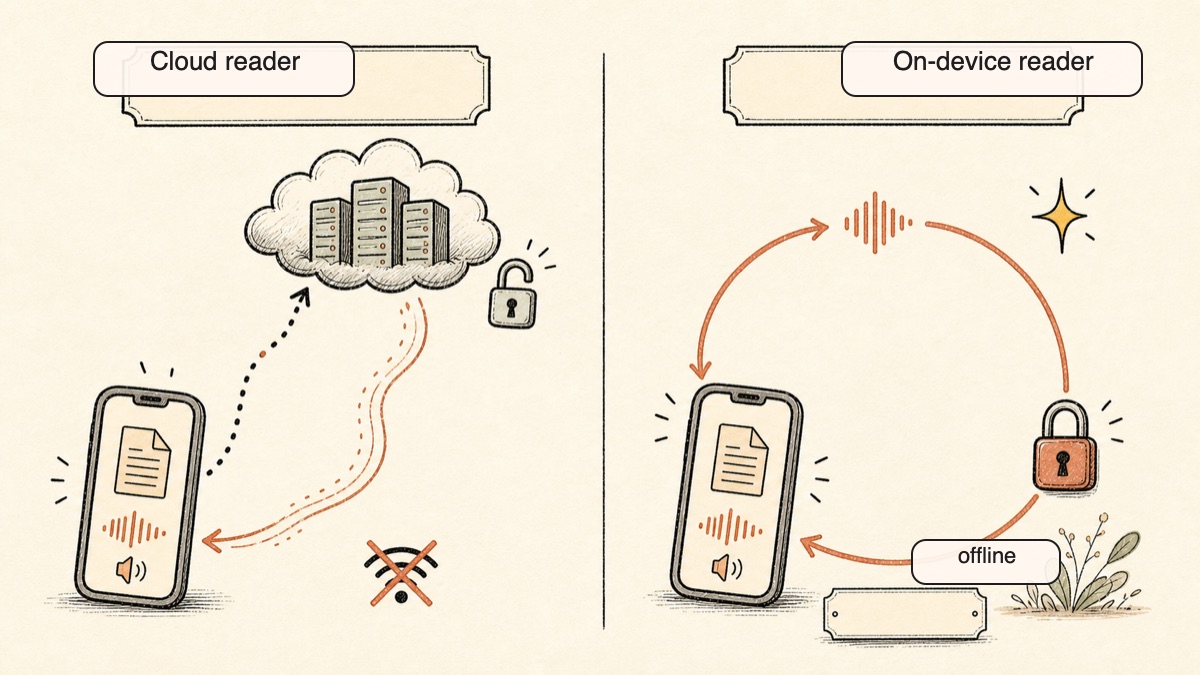
On-Device and Offline, Not Just Pre-Cached
ElevenReader markets an offline mode, but the device still needs internet to generate the audio in the first place. The "offline" downloads are pre-cached files for in-app listening only, and they expire after 60 days. So if you are on a plane with a document you have not generated yet, you are stuck.
Yaps generates on the device. Disconnect from the internet entirely and dictation, text cleanup, voice notes, and read-aloud still work, because the work happens locally rather than on a server. There is no round-trip, no upload, and nothing to expire. For anyone handling confidential material, that is the difference between a privacy promise and privacy by architecture.
A Real Desktop App and Audio You Can Keep
ElevenReader's loudest unresolved complaint is that there is no native desktop or full web reading app. The second loudest is that generated audio is locked inside the app and cannot be exported as files, due to licensing.
Yaps answers both. It ships native on Windows, macOS, and Linux, so the desktop reading and dictation experience people keep asking for actually exists. And in Studio, you can transcribe imported audio files to text or SRT and export real WAV and SRT files you own and can move anywhere. Nothing is trapped in the app.
A Toolkit, Not a Single Function
ElevenReader reads aloud. That is the whole product. Yaps treats voice as a workflow: you dictate a draft in any of about 25 languages, the on-device cleanup strips the filler and fixes the punctuation, you capture stray ideas as searchable voice notes, you proofread by listening with read-aloud, and you control your machine with voice commands, all in one app with a searchable history of everything you have done. For people who already use voice for input as well as output, that consolidation is the point. For a sense of how this compares to other voice tools, see our SuperWhisper alternative and Wispr Flow alternative write-ups.
Comparação de privacidade
This is the clearest divide on the list, so it is worth stating plainly.
ElevenReader is cloud-only. All synthesis happens on ElevenLabs' servers, which means your content is uploaded to be generated. The company states content is processed securely and not used to train public or third-party models, and you can opt out of personal-data use for service improvement. The "offline downloads" pre-cache audio for in-app listening after that cloud round-trip and expire after 60 days. The audio cannot be exported as files from the app. An account is required.
Yaps is on-device. Core dictation runs locally, audio never leaves the device, and there is no telemetry. Disconnect from the internet and it still works. The only thing that ever travels for read-aloud is the small set of optional cloud voices, which send text and not audio, and those are clearly labeled and optional.
The test is simple: turn off the internet. ElevenReader cannot generate anything. Yaps keeps working. For sensitive documents, legal drafts, medical notes, or anything you would not paste into a public chatbot, that distinction is the whole decision. For more on why on-device matters for voice specifically, see our Otter.ai alternative guide, which covers the same cloud-versus-local trade-off for meeting audio.
Comparação de preços
| Tool | Free tier | Paid | Notes |
|---|---|---|---|
| Yaps | 7-day free trial | Pro $15/mo, Max $25/mo | ~20% off annual; no per-minute meter |
| ElevenReader | 10 hours/mo generation | Ultra ~$8.25/mo annual ($99/yr), $11/mo monthly | Premium audiobooks capped at 20h/mo |
| Speechify | Weak (10 voices, 1.5x cap) | Studio is a separate sub | |
| NaturalReader | ~20 min/day premium voices | $9.99/mo; Plus $19/mo | Plus adds OCR + best voices |
| Edge Read Aloud | Free | Free | Edge browser only |
| Voice Dream Reader | No | ~$79.99/yr | Apple only; legacy buyers grandfathered |
| Balabolka | Free | Free | Windows only, offline |
| Murf AI | 10 min, no downloads | Creator $19/mo annual ($29 monthly) | Business $66 to $99/mo |
The pricing models differ in shape, not just amount. ElevenReader meters generation by the hour, so heavy use means watching a counter. Yaps does not run a listening clock. If you hate watching an hours meter, that difference matters more than the headline price.
Quem deve escolher o quê
Choose Yaps if:
- You want core voice work to run on-device, offline, and private
- You want a real desktop app on Windows, macOS, or Linux, plus Android
- You want dictation and read-aloud and voice notes in one tool, not just narration
- You want to export real WAV and SRT files you own
- You dislike per-minute generation meters
Choose Speechify or NaturalReader if:
- You need OCR to scan a printed page or a PDF image and listen to it
- You want one library that follows you across every device
Choose Edge Read Aloud or Balabolka if:
- You want a genuinely free reader, in the browser or fully offline on Windows
Choose Voice Dream Reader if:
- You are a dyslexic or accessibility power-user on iPhone, iPad, or Mac and need DAISY support today
Choose Murf if:
- You are a creator who needs polished, exportable voiceover for video or e-learning
Quem deve realmente escolher o ElevenReader
We want to be honest about this. There are clear situations where ElevenReader is the better pick, and pretending otherwise would not help you.
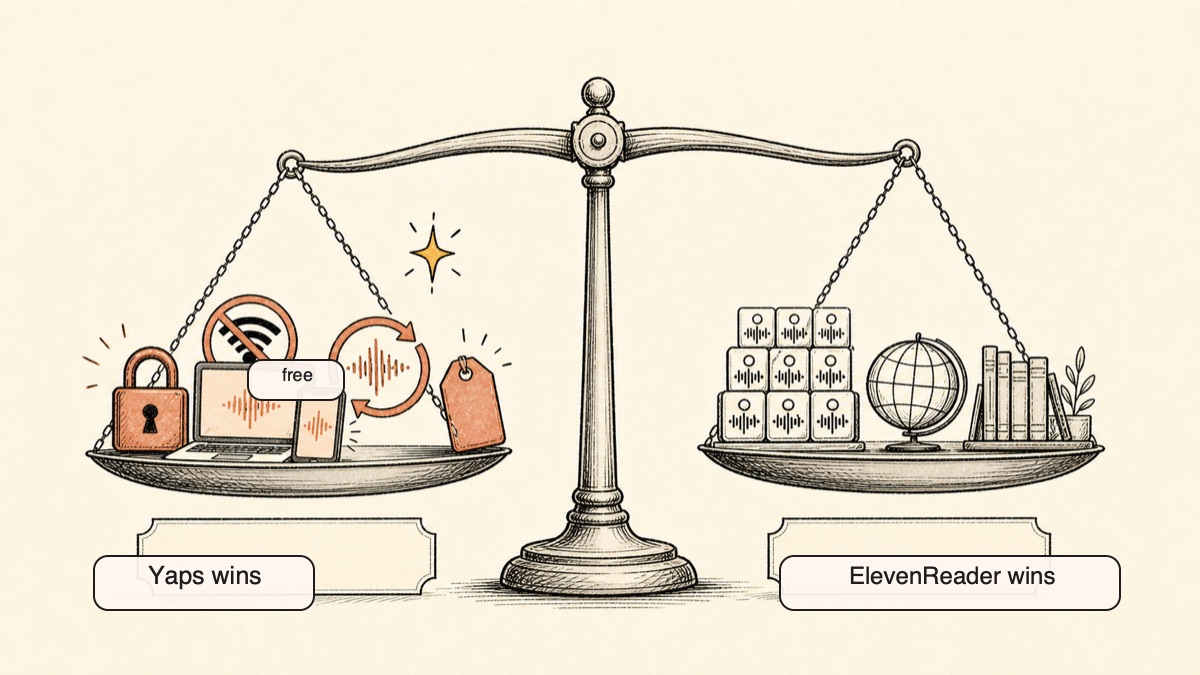
If you mainly want to listen to a big, expressive library. ElevenReader has the most realistic voices in 2026, period, and reads across 32 languages with a 200,000-title audiobook catalog. Yaps read-aloud is 18 desktop voices and 2 mobile voices, and it covers 31 languages on desktop with the audio generated on your own machine, but there is no audiobook library or cloud voice marketplace and fewer voices and accents to pick from per language. If listening to a large catalog with the best voices is the job, ElevenReader wins.
If you want celebrity and iconic voices or AI podcasts. ElevenReader's iconic-voice catalog and its GenFM feature, which turns your uploads into a multi-host AI podcast, have no equivalent in Yaps or in most of the alternatives here.
If you are on iPhone or iPad and want the best mobile reading app today. Yaps iOS is coming soon, not yet available. If you need a polished reader on Apple mobile right now, ElevenReader, Speechify, or Voice Dream Reader are the right calls.
If you specifically need OCR scanning. Yaps has no OCR or document scanning. To scan a physical book or a PDF image and listen, reach for Speechify or NaturalReader.
Guia de migração: mudando de ElevenReader para Yaps
If you have been using ElevenReader and want to try Yaps, the move is quick because Yaps has a 7-day free trial and you do not need to uninstall anything to test it.
Step 1: Install Yaps on Your Main Device
Lead with the phone if that is where you read most. Install Yaps on Android, or download the desktop app for Windows or macOS from yaps.ai.
Step 2: Add the Chrome Extension for Saved Reading
Install the "Save to Yaps" Chrome extension. When you hit an article you want to read later, save it straight into your vault instead of pasting a URL into a cloud reader. This is the closest replacement for ElevenReader's "send an article to be read" habit.
Step 3: Try Read-Aloud Where ElevenReader Lived
Highlight text in any app, press the Yaps hotkey, and listen. Desktop read-aloud covers 31 languages, so this handles the proofread-by-ear and review-on-the-go uses you had in ElevenReader. If you relied on the audiobook library, a celebrity voice, or one specific accent, keep ElevenReader for those cases; they are genuine gaps in Yaps.
Step 4: Explore What ElevenReader Never Had
The real adjustment is discovering the rest of the toolkit. Spend a day with each:
- Dictation: speak a draft in any of about 25 languages and watch clean text appear after the on-device cleanup.
- Voice notes: capture a few spoken ideas and search for them the next morning.
- Studio: import an audio file and export it as text or SRT subtitles you actually own.
- Vault sync: pair your phone and laptop so notes move between them privately.
Step 5: Decide Per Use Case, Not All or Nothing
Many people keep ElevenReader for big multilingual listening sessions and move everything else, the private dictation, the document review, the file exports, to Yaps. Run both for a week and let your actual habits decide. If you never reach for ElevenReader's library after a week, you have your answer.
Privacy by architecture, not by policy. If the audio never leaves the device, no cloud outage and no policy change can expose what was never uploaded.
Yaps for Android
A voice keyboard that keeps your voice on your phone.
Install Yaps on Android for offline dictation, a familiar full-size keyboard, and no screen capture. Scan the QR on desktop, or tap the Play badge on mobile.
Perguntas frequentes
Is ElevenReader free?
Yes, ElevenReader has a free tier that gives 10 hours per month of text-to-audio generation plus unlimited listening to over 20,000 library books, with Ultra at $8.25 to $11/mo for unlimited generation. Re-listening to audio you have already generated does not consume your hours, and library books do not either.
Does ElevenReader have a desktop or Windows app?
No, there is no native desktop app and no full web reading app as of 2026, only iOS, Android, and a Chrome extension. This is the most common complaint about the product, and it is why Yaps, which ships native on Windows, macOS, and Linux, is the most direct answer for desktop readers.
Can you export audio from ElevenReader?
No, generated audio and offline downloads are locked inside the app and cannot be transferred to other devices or platforms, due to licensing. Audio export is only possible on the separate ElevenLabs web platform, not from the ElevenReader app itself.
Does ElevenReader work offline?
Only after a cloud round-trip, so you must be online to generate audio, after which it pre-caches that audio for in-app offline listening. Those downloads expire after 60 days, and you cannot generate anything new while offline.
Is ElevenReader private, and does it run on-device?
No, all synthesis happens in ElevenLabs' cloud, so your content is uploaded to be generated. By contrast, Yaps runs its core dictation on-device with no audio leaving the machine and no telemetry.
What is the best free ElevenReader alternative?
For free desktop and offline use, Balabolka (free Windows file export) and Edge Read Aloud (free in the browser) are the top picks. Yaps is the strongest on-device option, with a 7-day free trial and no per-minute listening meter.
What is the best ElevenReader alternative with a real desktop app?
Yaps is the answer, because it ships native on Windows, macOS, and Linux, plus Android and a Chrome extension, filling ElevenReader's biggest gap. ElevenReader has no native desktop or full web reading app, which is its longest-standing complaint.
Is there an ElevenReader alternative that is more private?
Yes, Yaps processes voice on-device with no telemetry, unlike ElevenReader's cloud-only model. Disconnect from the internet and Yaps still works, while ElevenReader cannot generate anything offline.
Does Yaps read text aloud like ElevenReader?
Yes, Yaps has 18 read-aloud voices on desktop, 8 of them fully offline, and 2 on mobile, and desktop read-aloud covers 31 languages with the audio generated on your own machine. What it is not is an audiobook catalog with a voice marketplace. For a large library with the most realistic voices and the widest choice of accents, ElevenReader is still the better pick.
Which has better voices, ElevenReader or the alternatives?
ElevenReader has the most realistic, expressive, and multilingual voices in 2026, and that is its genuine strength. The alternatives compete on privacy, platform reach, price, and broader toolkits rather than on raw voice realism.
Can any alternative scan a physical book or PDF image with OCR?
Yes, Speechify and NaturalReader both offer OCR scanning so you can point a camera at a page and listen. Yaps does not have OCR or document scanning, so reach for those two if scanning is the job.
Is there an ElevenReader alternative for Android?
Yes, Yaps ships a full Android app built around an AI keyboard with a voice-typing button, and Speechify and NaturalReader also run on Android. ElevenReader is on Android too, though its Android app tends to lag the iOS version on stability.
Does Yaps have an iPhone app?
Not yet, the Yaps iPhone and iPad app is coming soon, so for Apple mobile today consider ElevenReader, Speechify, or Voice Dream Reader. Yaps already ships on Android, Windows, macOS, and Linux, plus a Chrome extension.
How much does ElevenReader cost compared to the alternatives?
ElevenReader Ultra is about $99/yr, while NaturalReader is about $60/yr, Speechify about $139/yr, Voice Dream about $80/yr, and Murf starts at $19/mo. Yaps is $15/mo for Pro with a 7-day free trial, and Edge Read Aloud and Balabolka are completely free.
Conclusão
ElevenReader earns its reputation. It has the most realistic voices in 2026, genuine multilingual range, and a large audiobook library. If your goal is to listen to a big catalog with the best voices available, it is the right tool, and we said so more than once above.
For everyone else, Yaps is the default. It is the only fully on-device, offline-first option on this list, it ships the real desktop app ElevenReader users keep asking for across Android, Windows, macOS, and Linux, and it bundles dictation, read-aloud, voice notes, and a studio editor into one private toolkit rather than a single cloud reader.
The best way to decide is to try both. ElevenReader has a free tier and Yaps has a 7-day free trial. Use them in your actual daily work, with the internet switched off for a day, and let the experience guide your choice.