Pular para o conteúdo
ENTRADA 02COMPARISON06 JUL 2026

Melhor aplicativo de ditado sem limite de tempo (2026): 7 ferramentas comparadas

Apple Dictation para após 30 segundos de silêncio. O Windows Win+H faz uma pausa. O Google Docs é interrompido quando você alterna entre guias. O Word Dictate precisa da nuvem. Este é o guia central para aplicativos de ditado sem limite de tempo prático: por que as ferramentas integradas param de funcionar e as 7 ferramentas que permitem que você fale o tempo que quiser. Yaps vem primeiro.

Melhor aplicativo de ditado sem limite de tempo (2026): 7 ferramentas comparadas
0.0

Prefácio

You start dictating, get two good sentences out, pause to think about the third, and the mic switches off. You re-arm it, lose your place, and do it again. And again. By the end of a paragraph you have tapped the shortcut a dozen times.

That is not a bug you can fix. Every built-in dictation tool ships a silence timeout on purpose. Apple Dictation stops after about 30 seconds of no speech. Windows Win+H pauses itself after a few seconds of quiet. Google Docs Voice Typing turns the mic off after a short silence and dies the moment you switch tabs. Word Dictate needs the cloud and switches off when you stop to think. None of them was built for the way you actually write.

This is the hub guide to dictation apps with no practical time limit. First we explain why the built-ins stop, plainly and with the real reasons. Then we rank the 7 tools that let you talk for as long as you want. Yaps comes first, because it runs on-device, has no silence cutoff, works offline, and drops text into any app on your system. The rest of the list is honest coverage of where another tool fits better.

1.0

Por que o ditado integrado é interrompido (e nenhuma configuração corrige isso)

The root cause is architecture, not a preference you can toggle. Built-in tools use a "tap to start, auto-timeout" model tuned for short commands and quick messages. Purpose-built long-form apps use a "hold to talk" or "toggle to talk" model where you speak until you release. That single design choice is why one has a hard time limit and the other does not.

Here is what each built-in actually does, and why the pause you keep hitting is by design.

Built-in tools: why they stop
  • Apple Dictation: stops automatically after roughly 30 seconds of no detected speech. Apple frames it as "dictate text of any length," but only while you keep talking. The instant you pause to think, the silence cutoff fires. There is no setting to extend or disable it.
  • Windows Win+H: pauses itself after a few seconds of silence. Microsoft support has confirmed this is intentional and that there is no supported way to prevent it. It also stops when you type on the keyboard, and it leans on a cloud service, so a flaky connection or a window-focus change cuts it too.
  • Google Docs Voice Typing: turns the mic off after a short silence window (about 30 seconds in practice, sometimes as little as 5 seconds with background noise). It also stops the moment you switch tabs or lose document focus, and it only officially works in Chrome.
  • Word / Microsoft 365 Dictate: requires an active internet connection and a signed-in Microsoft 365 subscription with Connected Services on. There is no offline mode. It also switches itself off if you stop and think.
No-time-limit apps: why they keep going
  • Hold-to-talk or toggle-to-talk: you control when recording starts and stops. A thinking pause does not end the session, because the app is not watching for silence to shut itself off.
  • On-device speech: the model runs on your machine, so there is no cloud service closing the connection when a chunk ends in a pause.
  • Works offline: no internet dependency means no dropped connection to kill a long session mid-sentence.
  • System-wide insertion: the text lands in whatever app is focused, so switching windows does not cancel dictation the way it cancels an in-browser tool.

The distinction matters because most people blame themselves. You assume you did something wrong, or that a setting is buried somewhere. It is not. If dictation dies every time you pause to think, you are hitting the by-design silence cutoff, and no amount of troubleshooting will remove it. We break each platform down in its own deep dive: Apple Dictation stopping after 30 seconds, Google Docs Voice Typing that keeps stopping, Windows Voice Typing pausing itself, and Word Dictation turning itself off.

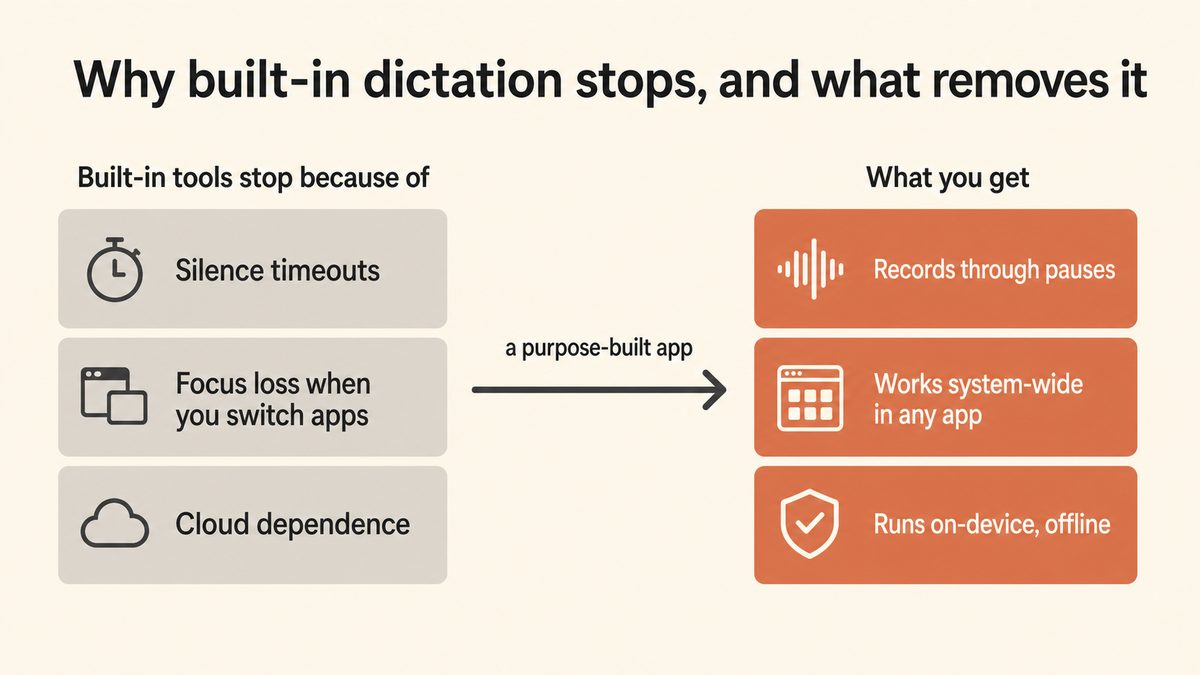
Diagram summarising why built-in dictation stops (silence timeouts, focus loss, and cloud dependence) and how a purpose-built dictation app removes all three.

2.0

Primeiro, diagnostique o que você está realmente atingindo

Before you switch tools, work out which of two problems you have. The fix is different for each.

If dictation dies every time you pause to think, that is the by-design silence cutoff. No setting removes it. Your only real fix is a tool that does not watch for silence.

If dictation dies on a tab switch, after an OS update, or randomly, that is a focus, permission, or connection issue you can troubleshoot. The steps below cover the common ones.

Step 01

Apple (Mac): reset and go offlineMac

Open System Settings, Keyboard, Dictation. Toggle it Off, wait about 10 seconds, toggle On. Enable "Use Offline Dictation" to remove the internet dependency. If you see "Keyboard Dictation is disabled when Voice Control is on," turn off Voice Control under Accessibility. Note: this reset does not remove the 30-second silence timeout. Nothing does.

Step 02

Windows (Win+H): confirm you are onlineWindows

Voice typing is cloud-backed, so check your connection first. Stop typing on the keyboard while the mic is live, because typing halts it. Re-invoke Win+H after each pause. There is no supported registry key or setting to extend the inactivity timeout.

Step 03

Word / Microsoft 365 Dictate: the three requirementsWord

Verify an active internet connection, sign in with a Microsoft 365 subscription account, and turn Connected Services or cloud features On. Dictate is greyed out or errors without all three. There is no offline mode to enable.

Step 04

Google Docs: Chrome only, and stay in the tabDocs

Use Chrome, not Safari, Firefox, Edge, Brave, or Arc. Grant and un-block microphone permission for docs.google.com, disable conflicting extensions, and reload the tab. Any focus change stops it, so re-click the mic after each cutoff and accept that a long document means dozens of re-clicks.

Step 05

If you routinely dictate longer than a minute, stop fighting itFix

Switch to a hold-to-talk or toggle app with no practical time limit. Yaps runs on-device, has no silence cutoff, works offline, and inserts text system-wide into any app rather than one browser or document.

3.0

Ditado integrado versus um aplicativo desenvolvido especificamente

The gap is not subtle once you stack the two side by side. One is tuned for a quick reply; the other is tuned for a long draft.

Built-in dictation (Apple, Google Docs, Win+H, Word)
  • Silence timeout stops you the moment you pause to think.
  • Cloud dependence in several cases (Word, Win+H, Google Docs search), so a weak connection kills the session.
  • Focus-bound: a tab switch or window change cancels it.
  • Locked to one app or one browser, not the whole system.
  • Raw output: no filler-word removal, minimal punctuation, no auto-formatting.
Yaps: built for long-form
  • No practical time limit. Hold or toggle the Yaps hotkey and speak until you release.
  • On-device speech, so there is no cloud connection to drop and your audio never leaves the machine.
  • Works fully offline, on a plane, in a basement, or on a locked-down network.
  • System-wide: text lands in any app you are focused on, from your editor to your browser to chat.
  • On-device cleanup removes filler words, fixes punctuation and capitalisation, and auto-formats lists.

That last point is the one rivals rarely mention. "No time limit" gets you a long stream of raw speech. Yaps runs an on-device cleanup pass over it, stripping "um" and "you know," fixing punctuation, and formatting lists, so a five-minute dictation lands as finished text instead of a wall of unpunctuated words. You can read more about how the dictation flow works on the Yaps dictation feature page.

4.0

Melhores aplicativos de ditado sem limite de tempo

This list is ranked, not enumerated. Yaps comes first because it is the most complete answer to "what can I dictate into for as long as I want, across every app, without my voice leaving my device?" Each pick after it covers a specific case where another tool is the honest fit.

1. Yaps: The No-Time-Limit Default

Yaps is the tool this whole guide is pointing you toward. Push the Yaps hotkey, speak for as long as you want, and release when you are done. There is no silence cutoff watching to shut you off mid-thought. A pause to think is just a pause, not the end of the session.

It runs on-device. Your audio never leaves the machine, there is no cloud connection to drop, and it works fully offline, on a plane or on a network that blocks outbound traffic. Because dictation is system-wide, the text lands in whatever app you are focused on: your email, your editor, a chat box, a form field, your notes. Switching windows does not cancel anything the way it cancels Google Docs or a browser-bound tool.

Then it does the part rivals skip. Yaps runs an on-device cleanup pass over your raw speech, removing filler words and self-corrections, fixing punctuation and capitalisation, and auto-formatting lists and numbers. A long, rambling dictation comes out as finished text, not a transcript you still have to clean by hand.

Dictation is multilingual, covering about 25 languages that Yaps auto-detects from your speech, so you do not switch a language setting to change what you are speaking. Yaps picks the right on-device speech model for your hardware automatically; you never touch a model picker.

01 / Time limit
None
No silence cutoff. Speak as long as you want, pause to think freely.
02 / Free tier
5K
Words a week on desktop free (1K on mobile), shared across dictation and read-aloud
03 / Languages
~25
Dictation languages, auto-detected from your speech
04 / Platforms
3
Android, Windows, and macOS, plus a Chrome capture extension

Yaps ships on Android, Windows, and macOS, with a Chrome "Save to Yaps" extension for pulling articles into your vault; iOS is coming soon. On desktop the trigger is the Fn key (hold to record, or tap to toggle). On Android it is the dictation button on the Yaps keyboard. The free tier gives you 5,000 words a week on desktop and 1,000 on mobile, shared across dictation and read-aloud, with paid tiers at Basic $15/month and Max $25/month lifting the cap and adding cloud options.

Where Yaps loses: if you only ever transcribe pre-recorded audio files and never dictate live, a file-first tool like MacWhisper is a better shape (though Yaps Studio does offline audio-file transcription to text and SRT too). If your job depends on a decades-trained medical or legal vocabulary that adapts to thousands of custom terms, Dragon still has an edge. For everything else, and for the specific pain of dictation that keeps stopping, Yaps is the answer.

See how Yaps dictation works →

2. Wispr Flow: Best Cloud AI Cleanup

Wispr Flow is a polished cloud dictation app, and its post-processing is genuinely strong: it takes rambling speech and rewrites it into clean prose with little intervention. It uses a hold-style trigger, so it does not suffer the built-in silence timeout the way Apple or Google Docs do.

The trade-off is the cloud. All audio is sent to remote servers for processing, so every dictation leaves your machine, and a working internet connection is required. Public reporting has flagged screen-capture used for context-aware formatting, which means more than your voice may be read. Pick Wispr Flow if you specifically want the cloud cleanup style and do not work in a regulated environment. Pick Yaps if you want comparable cleanup that runs on-device and offline.

3. SuperWhisper: Best Offline Modes-Based Workflow

SuperWhisper is the closest like-for-like to Yaps on privacy: an offline-first Mac dictation app built around customisable "modes" that format dictation differently for different tasks. It runs on-device and has no silence timeout, so it handles long-form dictation cleanly.

The difference is coverage and platform. SuperWhisper is Mac-only and does dictation and little else, with no read-aloud, no cross-platform vault sync, and no Android. Setup is also famously fiddly. Pick SuperWhisper if mode-based scripting on a Mac is your central need. Pick Yaps if you want no-limit offline dictation that also runs on Android and Windows, with cleanup and note sync built in.

4. Dragon Professional: Best for Specialist Vocabularies

Dragon was the gold standard for professional dictation for two decades, and it genuinely has no word limit: you can speak as long as you want. Its real strength is trained vocabulary profiles for medical and legal practice that adapt to your specific terminology over time.

The catch is cost and weight. Professional editions run into the hundreds of dollars, the Mac version was discontinued so you run the Windows build, and it is a heavy desktop install. Pick Dragon if you are in a specialist-vocabulary profession that benefits from years of custom training. For general long-form dictation, modern on-device tools have closed the gap at a fraction of the price.

5. Willow Voice: Best for Professional Formatting

Willow Voice targets professionals with a cloud dictation product that leans on formatting and vocabulary features, and it avoids the built-in silence timeout with a hold-style trigger. It is a reasonable pick if you want a polished, professional cloud tool and do not need offline use.

Like Wispr Flow, it is cloud-based, so audio leaves your machine and you need a connection. Pick Willow if the professional formatting is the draw and cloud is acceptable. Pick Yaps if privacy, offline capability, and Android support matter.

6. MacWhisper: Best for Audio File Transcription

MacWhisper is the right pick when your job is "I have a recording, I need a transcript." Built on Whisper models running locally on your Mac, it batch-transcribes audio files with a clean UI. There is no time limit because it processes a whole file at once.

For live, in-the-moment dictation it is the wrong shape: it expects you to record first and transcribe second, which adds steps that Yaps eliminates. Pick MacWhisper for interview archives and podcast back-catalogs. Pick Yaps for live dictation into whatever you are writing right now (Yaps Studio also handles audio-file transcription if you need both).

7. Apple Dictation: The Free Built-In You Are Escaping

Apple Dictation is free, pre-installed, and fine for a quick message. General text dictation on Mac processes on-device, which is a genuine privacy plus. For a one-line reply it does the job with zero setup.

But it is the tool most readers of this guide are trying to leave. The 30-second silence timeout fires every time you pause, there is no way to extend it, and it is locked to the Mac. Pick Apple Dictation for occasional short bursts. Move to Yaps the moment the timeout starts costing you real time, which for anyone writing long-form is usually within a day. We compare the full Mac field in the best Mac dictation apps guide.
5.0

Visão geral: comparação sem limite de tempo

Scroll →
Feature Yaps Wispr Flow SuperWhisper Dragon Pro Willow MacWhisper Apple Dictation
No time limit Yes Yes Yes Yes Yes Yes (files) No (30s)
Works offline Yes No (cloud) Yes Mixed No (cloud) Yes Partial
Private (audio stays on device) Yes No Yes Mixed No Yes Partial
System-wide (any app) Yes Yes Yes Yes Yes Files only Yes
Free tier Yes (5K words/wk) Limited Yes (small models) No Limited Trial Free
On-device cleanup Yes Cloud only Limited No Cloud only No No
Platforms Android, Win, Mac Mac, Win Mac only Win (Mac EOL) Mac, Win Mac only Mac only

Yaps is the only row that hits all six: no time limit, offline, private, system-wide, a free tier, and on-device cleanup, across Android, Windows, and macOS. Every alternative misses at least one. That is the wedge. The built-ins fail on the time limit; the cloud tools fail on offline and privacy; the Mac-only tools fail on Android.

The built-ins were never built to fail you. They were built for a quick message. The moment your writing outgrows a message, you need a tool built for the writing.

6.0

Android e celular: a lacuna incontestada

Almost every "best dictation" list is Mac-first. SuperWhisper, MacWhisper, and Apple Dictation are Mac-only; Wispr Flow and Willow are desktop-focused. If you want no-time-limit dictation on your phone, most of these lists have nothing for you.

Yaps ships an Android keyboard with a dedicated dictation button and no silence cutoff. You speak as long as you want, the on-device cleanup tidies the text, and it drops into whatever field you are typing in, from your messages to your email to your notes app. The 1,000-words-a-week mobile free tier covers a real habit, and premium vault sync keeps your notes moving between phone and desktop. For anyone searching "no time limit dictation app for Android," that combination is close to uncontested.

01 · Try Yaps

Dictate for as long as you want. No timeout, no cloud, no cutoff.

Install Yaps for on-device dictation with no silence timeout, offline support, system-wide text insertion, on-device cleanup, and a free tier that does not expire. On Android, Windows, and macOS.

7.0

Perguntas frequentes

Why does my dictation keep stopping after 30 seconds?

Because the silence timeout is firing. Apple Dictation stops automatically after about 30 seconds of no detected speech, and Google Docs Voice Typing turns the mic off after a similar window. This is by design and there is no setting to extend or disable it. The only real fix is to switch to a dictation tool that does not watch for silence, such as Yaps, which has no cutoff and keeps recording until you release the hotkey.

Is there a dictation app with no time limit?

Yes. Yaps has no practical time limit: you push the hotkey, speak for as long as you want, and release when you are done, with a thinking pause treated as just a pause. SuperWhisper, Dragon, Wispr Flow, and Willow also avoid the built-in silence timeout, but Yaps is the only one that combines no time limit with offline operation, on-device privacy, system-wide insertion, a free tier, and on-device cleanup, across Android, Windows, and macOS.

What is the best replacement for Apple's built-in dictation?

Yaps is the best replacement for Apple's built-in dictation because it removes the 30-second silence timeout, works fully offline, inserts text into any app on your system, and runs an on-device cleanup pass that fixes punctuation and removes filler words. Apple Dictation processes general text on-device, which is good for privacy, but its hard silence cutoff makes it painful for anything longer than a message. You can compare the full Mac field in our best Mac dictation apps guide.

Why does Google Docs voice typing stop when I switch tabs?

Google Docs Voice Typing relies on the browser's speech feature tied to the document tab, so the moment you switch tabs or lose document focus, it stops. It also only works officially in Chrome and turns the mic off after a short silence window. There is no way to keep it running in the background. A system-wide tool like Yaps inserts text into whatever app is focused, so switching windows does not cancel it. We cover the specifics in the Google Docs voice typing deep dive.

Does Word Dictate work offline without internet?

No. Word and Microsoft 365 Dictate is a cloud feature that requires an active internet connection, a signed-in Microsoft 365 subscription, and Connected Services enabled. There is no offline dictation in Word, and it also switches itself off when you pause to think. If you need offline dictation, Yaps runs entirely on-device with no connection required. The full breakdown is in our Word Dictation deep dive.

How do I dictate for a long time without it cutting off?

Use a hold-to-talk or toggle-to-talk app instead of a built-in tool. Built-ins stop on silence by design, so the more you pause to think, the more they cut out. With Yaps you push the hotkey once and speak for as long as you want, and the session only ends when you release, so a long dictation stays in one piece. Yaps then cleans the raw speech into finished text on-device.

Why does Windows Win+H voice typing pause when I stop talking?

Because Windows Voice Typing is designed to pause itself after a few seconds of inactivity, which Microsoft support has confirmed is intentional with no supported way to prevent it. It also stops when you type on the keyboard and leans on a cloud service, so a weak connection cuts it too. The fix is a tool without a silence timeout: Yaps keeps recording until you release the hotkey. See the Windows voice typing deep dive for the details.

What is the best dictation app for long-form writing?

Yaps is the best dictation app for long-form writing because it has no silence timeout, so pauses to think do not end the session, and it runs an on-device cleanup pass that turns rambling speech into punctuated, formatted text. It also works offline and inserts into any app, so you can draft in your editor, your email, or your notes without a copy-paste round trip. Dragon is a fallback if you need decades-trained specialist vocabulary.

Can I dictate offline with no internet connection?

Yes, with the right app. Yaps, SuperWhisper, and MacWhisper all process speech on-device and work with no internet connection. Cloud tools like Word Dictate, Wispr Flow, and Willow require a connection for every dictation, and Apple Dictation falls back to Apple's servers for its enhanced model. If you dictate on planes, in basements, or on locked-down networks, choose a tool that runs the speech model on your device, such as Yaps.

Is there a free dictation app with no word or time limit?

Apple Dictation is free with no word cap but has a 30-second silence timeout, so it is not truly no-limit. Yaps has no silence timeout and a free tier of 5,000 words a week on desktop (1,000 on mobile), shared across dictation and read-aloud, with every core feature unlocked. For most people the Yaps free tier covers a substantial dictation habit with no cutoff, and the paid tiers remove the word cap entirely.

What is the difference between hold-to-talk and tap-to-start dictation?

Tap-to-start dictation (the built-in model) begins listening on a tap and then auto-stops when it detects silence, which is why a thinking pause ends the session. Hold-to-talk (or toggle-to-talk) puts you in control: you hold or toggle the hotkey and the app records until you release, so a pause is just a pause. That single design difference is why hold-to-talk apps like Yaps have no practical time limit while the built-ins keep cutting out.

Does Yaps have a time limit or word cap on dictation?

Yaps has no time limit on a dictation session: you speak for as long as you want and it stops only when you release the hotkey. On the free tier there is a weekly word allowance (5,000 words on desktop, 1,000 on mobile, shared with read-aloud) rather than a per-session limit, and the Basic and Max paid tiers lift the cap. There is no silence timeout on any tier, so pauses to think never end your session.

8.0

Considerações Finais

If dictation keeps stopping on you, the honest answer is that you cannot fix the built-in. Apple's 30-second cutoff, Windows' self-pause, Google Docs' focus loss, and Word's cloud requirement are all deliberate, and no setting removes them. The move is to a tool built for long-form, and the default there is Yaps: no silence timeout, on-device and offline, system-wide, with cleanup that turns raw speech into finished text, and a free tier on Android, Windows, and macOS.

The alternatives fit narrower cases. Choose Wispr Flow or Willow if you specifically want cloud-side cleanup and privacy is not a concern. Choose SuperWhisper if you want a Mac-only, modes-based offline setup. Choose Dragon if your work depends on years-trained medical or legal vocabulary. Choose MacWhisper if you mostly transcribe pre-recorded files rather than dictate live.

For the specific pain that brought you here, dictation that quits every time you pause, Yaps is the one that simply keeps going. Push the hotkey, say what you have to say, and let it clean up the rest.

CONTINUE LENDO
COMPARISON · 16 MIN READ9 melhores alternativas de descrição em 2026 (escolhas gratuitas e privadas)COMPARISON · 16 MIN READ7 melhores alternativas de voz Talon em 2026 (livre e viva-voz)