
序文
Voice In has earned its place. It is the most popular speech-to-text dictation extension for Chrome and Edge, with more than 500,000 users dictating into text fields on over 10,000 websites. Version 4.40 shipped on June 12, 2026, so this is a healthy, actively maintained tool, not an abandoned one. If you live inside your browser and want to talk instead of type into web forms, it does that job simply and well.
But Voice In has one structural limit that shapes everything else: it lives entirely inside the browser, and it needs a constant internet connection to work. The transcription runs through the browser's built-in speech feature, which streams your audio to a cloud recognition service. So it cannot dictate into Slack desktop, Word, your code editor, Notes, or your terminal, and it does not work offline at all.
If you have been using Voice In and find yourself wishing it worked outside Chrome, kept your audio on your device, or did more than dictation, this comparison is for you. We built Yaps, so we are obviously biased. But the best way to earn trust is to be honest about where each tool excels and where it falls short, so we have called out the cases where Voice In or another tool is genuinely the better pick.
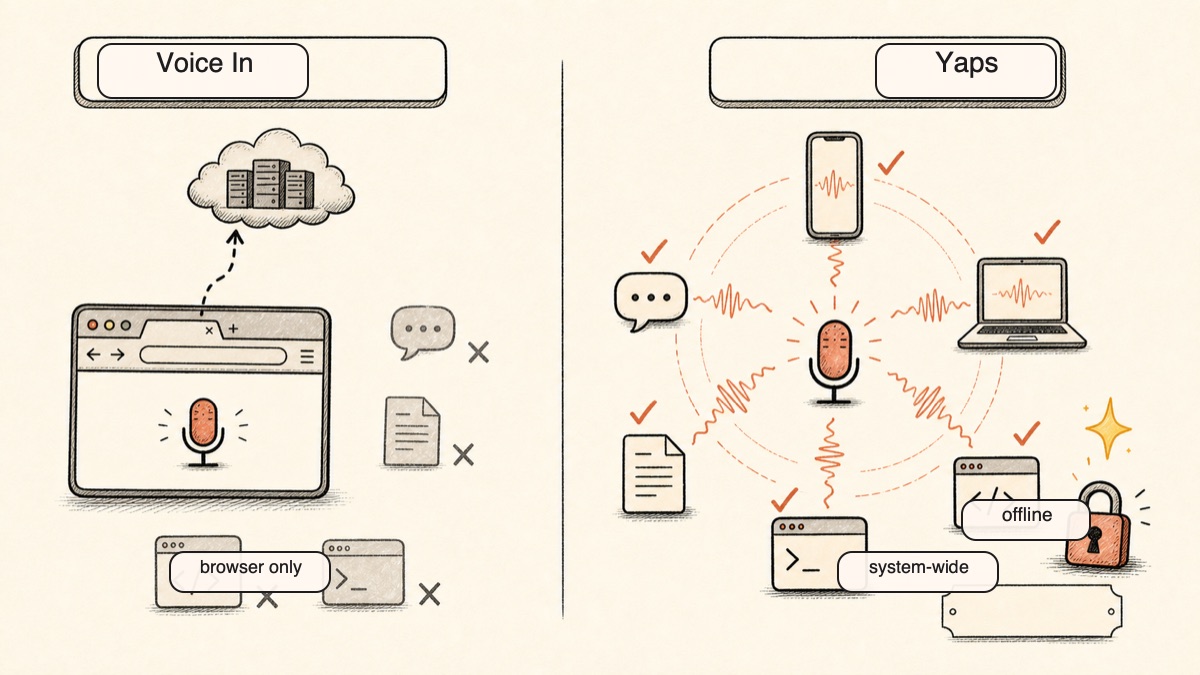
Browser only, cloud-dependent
Voice In
Dictates into web text fields in Chrome and Edge. Needs a constant internet connection, audio is processed in the cloud, and it cannot type into any native desktop or mobile app.
System-wide, on-device
Yaps
Dictates everywhere across Android, Windows, macOS, and Linux. Core dictation runs on-device, works fully offline, and audio never leaves your device.
2026 年の代替音声のベスト 7 (クイック比較)
Here is the shortlist, ranked for most users. Deeper write-ups follow below.
1. Yaps - Best Overall Voice In Alternative
On-device voice toolkit for Android, Windows, macOS, and Linux that goes far beyond browser dictation. Core dictation runs on-device, works fully offline, and your audio never leaves your device. There is no telemetry. Dictation is multilingual, covering about 25 languages that are auto-detected from your speech with no language toggle to flip. On top of dictation, Yaps adds on-device text cleanup, read-aloud with 18 voices on desktop, voice notes, a studio for transcribing audio files, voice commands, and searchable history. On Android it ships a full keyboard, not a bolt-on. Yaps gives you a 7-day free trial with access to every feature; paid Pro is $15/mo and Max is $25/mo, with around 20% off annually. Best for: anyone who wants private, offline dictation that works everywhere, not just inside a browser tab.
2. Wispr Flow - Best for Cross-Platform AI Dictation
System-wide dictation with strong AI text cleanup that rewrites raw speech into polished prose, available on Mac, Windows, iOS, and Android, with support for 100+ languages. Best for: users who want one AI dictation tool across every device and do not mind a cloud dependency. Trade-off: cloud-first with no offline or on-device path, so every dictation leaves your device. Around $15/mo ($12/mo billed annually, $144/yr); free tier of 2,000 words per week. See our Wispr Flow alternative write-up for more.
3. SuperWhisper - Best for True On-Device Mac Dictation
Runs local AI models on your Mac, so audio never leaves the machine and dictation works system-wide and offline. Best for: Mac users who want genuine on-device dictation and do not need other platforms. Trade-off: Mac-only, and setup is heavier than installing a browser extension. Free tier with small local models on Apple Silicon; $8.49/mo, $84.99/yr, or $249.99 lifetime. Our SuperWhisper alternative guide covers the field.
4. Apple Dictation - Best Free Built-In Option
Built into macOS and iOS, free, system-wide, and on-device on Apple Silicon, with support for 60+ languages. Best for: Mac and iPhone users who want zero cost and zero install. Trade-off: basic, with no AI text cleanup, no custom workflows, and weaker performance for long-form work. Free. See our Apple Dictation comparison.
5. Google Docs Voice Typing - Best if You Live in Google Docs
Free voice typing built into Google Docs, with 100+ languages and no install. Best for: people who do most of their writing inside Google Docs. Trade-off: locked to Google Docs in a supported browser, so it cannot type in Gmail, Slack, Notion, or anywhere else; it needs a network connection, cuts off on pauses, and has no mobile path. Free.
6. Speechnotes - Best Free Web Notepad for Casual Dictation
A browser-based dictation notepad with no signup, plus a Chrome extension for web forms and no time limits on the free tier. Best for: casual, occasional dictation into a simple web notepad. Trade-off: browser and web-app bound, cloud-based, with an ad-supported free tier. Free; ad-free Premium around $1.90/mo billed yearly with no auto-renew.
7. Nuance Dragon - Best for Specialized Vocabulary on Windows
The legacy heavyweight for deep custom vocabulary, system-wide on Windows. Best for: Windows power users in fields with dense specialized terminology who need fine-grained custom vocabulary. Trade-off: expensive, Windows-only, heavy, and development has stalled. One-time license around $699, with professional tiers higher. See our Dragon comparison.
We weighted (1) privacy by architecture, not by promise; (2) whether the tool works system-wide or only inside a browser; (3) offline capability; (4) scope beyond plain dictation; and (5) sustainable pricing. We built Yaps and disclosed it. Where another tool genuinely wins for a specific use case, like the broadest language list or a Chromebook-only setup, we say so plainly.
Voice In に適しているもの
Credit where it is due. Voice In is popular for good reasons.
It is dead simple to install and use. Add the extension, place your cursor in a text box, right-click to start recording, and talk. There is no app to manage, no models to download, and no setup beyond a two-minute install. For browser-bound work, that simplicity is hard to beat.
It works on a huge range of sites. Voice In types into text fields on more than 10,000 websites, and its Advanced Mode handles trickier sites like Notion, Slack web, X, Salesforce, and most web-based records systems. Multi-tab dictation and a language switcher round it out.
Its language breadth is real. Voice In is marketed for 50+ dictation languages and 100+ for transcription, which is broader than most desktop dictation tools. If you switch between many languages, that range matters, and it is a genuine strength.
It is being actively improved. Version 4.40 added custom voice commands, command aliases, and support for newer AI sites. This is a maintained product with a large, active user base, not a tool coasting toward end of life.
違いが現れる場所
The core difference between Voice In and Yaps is shape. Voice In is a browser extension that needs the internet. Yaps is a system-wide voice toolkit that runs on your device and works offline.
Here is what that means in practice.
| Feature | Yaps | Voice In |
|---|---|---|
| Works system-wide (any app) | Yes | No (browser only) |
| On-device processing | Yes | No (cloud) |
| Works offline | Yes | No |
| Multilingual dictation | Yes (~25, auto) | Yes (50+) |
| On-device text cleanup | Yes | Punctuation only |
| Read-aloud (text-to-speech) | Yes (18 desktop) | No |
| Voice notes and studio | Yes | No |
| Android keyboard | Yes | No mobile dictation |
| Free tier | 7-day trial | 60 min/day |
On-Device and Offline vs Cloud-Dependent
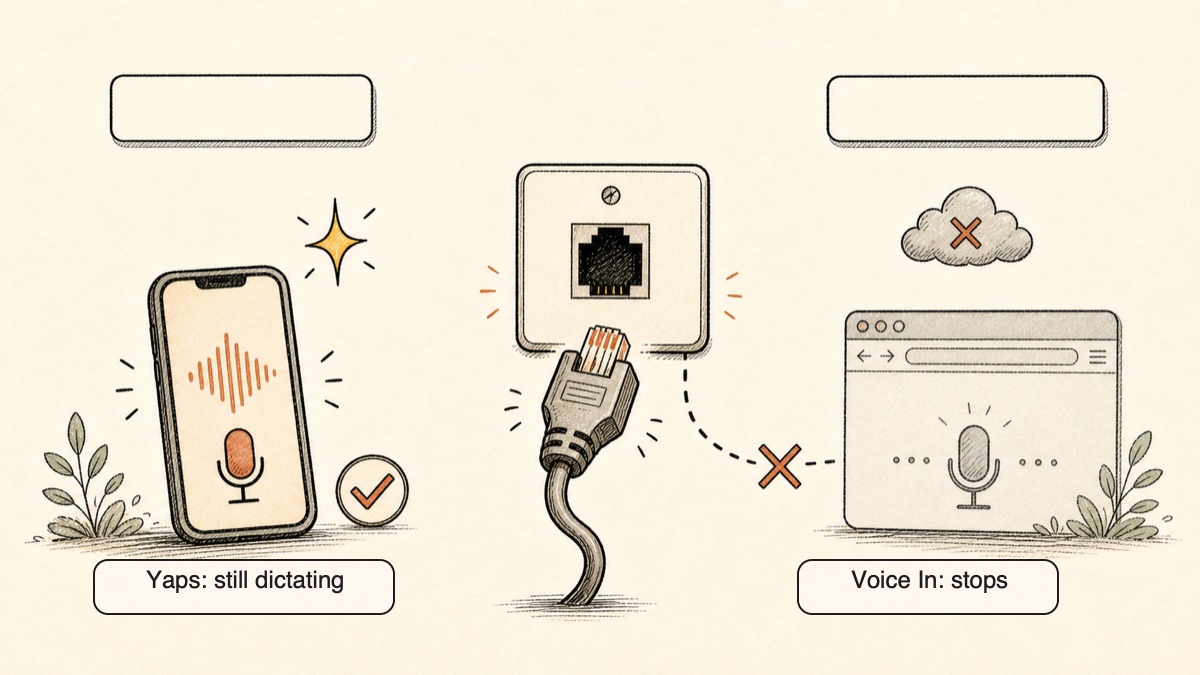
This is the headline contrast. Voice In's homepage says audio is transcribed "right in your browser" and that no audio is sent to its own servers. Read that carefully. Voice In is built on the browser's speech feature, which streams your audio to a cloud recognition service to do the actual transcription. Independent reviews confirm it needs a constant internet connection and does not work offline. So no audio hits Voice In's own servers, but your speech is still processed in the cloud, and you cannot dictate without a connection.
Yaps runs core dictation on your device. Your audio never leaves your machine, and there is no telemetry. Disconnect from the internet and Yaps keeps working. On a plane, on a train with no signal, in a building with bad coverage, or simply because you do not want your voice leaving your device, that difference is the whole point. Privacy by architecture, not by policy.
It Works Everywhere, Not Just the Browser
Voice In only types into web text fields in Chrome or Edge. The moment you leave the browser, it stops. You cannot dictate in Slack desktop, Word, your code editor, your terminal, the Notes app, or any native application. For a lot of people, that is most of where they actually write.
Yaps dictates system-wide across Android, Windows, macOS, and Linux. On desktop, the trigger is the Yaps hotkey, so you can talk into any text field in any app. On Android, the dictation button on the Yaps keyboard works in every app on your phone. One detail worth being precise about: Yaps does have its own Chrome extension, "Save to Yaps," but it saves articles, bookmarks, and images into your vault. It is not a browser dictation extension, so do not expect it to replace Voice In's in-browser typing. Yaps covers the browser for a different job, and covers everything else for dictation.
A Full Toolkit, Not Just Dictation
Voice In does dictation and custom commands. That is the scope. Yaps treats voice as a complete workflow.
Beyond multilingual dictation, Yaps adds on-device text cleanup that removes filler words and self-corrections, fixes punctuation and capitalisation, and auto-formats lists and numbers, all on by default. It adds read-aloud with 18 voices on desktop and 2 on mobile, voice notes that are transcribed, timestamped, and searchable and support text, kanban boards, and checklists with export to Markdown and plain text, a studio that transcribes imported audio files offline to text or SRT subtitles, voice commands to control your computer, searchable history of everything you have said, and encrypted vault sync between mobile and desktop. That is a different category of tool.
プライバシーの比較
Privacy is where the architecture decision shows up most clearly.
Voice In does not send your audio to its own servers, which is a fair claim. But it relies on the browser's cloud speech feature, so your audio is streamed to a cloud recognition service to be transcribed, and it requires a constant internet connection. That is browser-based and cloud-dependent, not on-device and not offline. If your concern is that your spoken words are processed somewhere other than your own machine, that concern applies here.
Yaps processes core dictation on-device. Your audio never leaves your device, and there is no telemetry. Cloud read-aloud voices are optional and clearly labelled, and they send text, not your voice, to the service. The basic privacy test is simple: turn off the internet. Voice In stops. Yaps keeps working. For more on why this matters for voice data specifically, see our Otter alternative write-up, which covers the cloud-versus-local trade-off in depth.
価格比較
| Voice In | Yaps | |
|---|---|---|
| Free tier | 60 min/day dictation | 7-day trial |
| Cheapest paid | ~$4.99/mo (annual) | Pro $15/mo |
| Higher tier | Lifetime ~$149.99 (limited-time) | Max $25/mo |
| Annual discount | $59.99/yr (~$4.99/mo) | ~20% off |
Voice In is cheap, and its annual plan at roughly $4.99 a month is among the lowest in dictation. If price is your single deciding factor and your work is fully browser-based, that is a genuine point in its favour. Voice In also runs a recurring limited-time lifetime offer at around $149.99.
Yaps costs more because you are paying for a full toolkit that works system-wide and runs on-device, not a single browser feature. The 7-day free trial is enough to do real work and test the full experience before deciding. If basic browser dictation is all you need and budget is the priority, Voice In's pricing is hard to argue with.
誰が何を選ぶべきか
Choose Yaps if:
- You want dictation that works in every app, not just the browser
- You want your audio to stay on your device and work offline
- You want privacy without telemetry
- You want text cleanup, read-aloud, voice notes, studio, and voice commands in one tool
- You want real voice typing on your Android phone
Choose Voice In if:
- Your work happens entirely inside Chrome or Edge
- You are on a Chromebook
- You need the broadest list of dictation languages
- You want the lowest possible price and a two-minute install
Choose another tool if: you want true on-device dictation only on a Mac (SuperWhisper), a free built-in option on Apple devices (Apple Dictation), cross-platform AI rewriting and do not mind the cloud (Wispr Flow), or deep custom vocabulary on Windows (Dragon).
Browser dictation is convenient until you leave the browser. System-wide, on-device dictation is convenient everywhere, and it keeps your voice on your own device.
Yaps for Android, Windows, macOS, and Linux
本当に Voice In を選択すべきなのは誰ですか
We want to be honest about this. There are real situations where Voice In, or another tool here, is the better pick.
If you live entirely in the browser on a Chromebook. Voice In is purpose-built for browser dictation. It is a two-minute install, there is no app to manage, and ChromeOS is its native home. Yaps does not ship a ChromeOS dictation client. For pure browser-only or Chromebook users, Voice In wins.
If you need the broadest language list. Voice In covers 50+ dictation languages, and Apple Dictation covers 60+, both more than Yaps's roughly 25. If you regularly dictate in a language outside Yaps's set, those tools cover more ground.
If you need a large catalog of voices and accents. Yaps read-aloud covers 31 languages on desktop and runs on your own machine, so nothing is uploaded to be spoken. What it does not offer is a deep catalog of voices and accents within each language, and mobile ships a smaller voice set than desktop. A dedicated reader app still wins on catalog size, and we would rather tell you that than pretend otherwise.
A note on what Yaps does not do. Yaps has no document scanning or text extraction from images, and no audiobook library or cloud voice marketplace. If those are central to your need, Yaps is not the right tool, and that is fine.
移行ガイド: Voice In から Yaps への切り替え
If you are using Voice In and considering Yaps, the move is straightforward. Yaps's 7-day free trial lets you run both side by side and compare them in your real workflow with no commitment.
Step 1: Install Yaps on Your Main Device
Download Yaps from yaps.ai. Lead with the device where you write most. On Android, install the keyboard and enable it in your phone's settings. On Windows or macOS, install the desktop app. You do not need to remove Voice In; both can coexist while you compare.
Step 2: Learn the Trigger
On desktop, dictation activates with the Yaps hotkey: hold Fn on macOS (or tap it to toggle recording on and off), Ctrl and the Windows key on Windows, or double-tap Ctrl on Linux. Every shortcut is rebindable in settings. On Android, tap the dictation button on the Yaps keyboard. There is no right-click-to-record step and no need to place your cursor in a specific web field first, because Yaps works in any app.
Step 3: Try It Outside the Browser
This is the part Voice In cannot do. Dictate into Slack desktop, your code editor, the Notes app, a Word document, or your terminal. Talk in an app where you used to type, and watch clean text appear. This is usually the moment the system-wide difference clicks.
Step 4: Turn Off the Internet and Keep Going
Disconnect from Wi-Fi and dictate again. Yaps keeps working because core dictation runs on your device. This is the offline, on-device test that Voice In cannot pass, and it is worth doing once to feel the difference.
Step 5: Explore the Rest of the Toolkit
Set aside a few minutes to try what Voice In does not have:
- Text cleanup: dictate a rambling thought with filler words and watch Yaps clean it up automatically.
- Read-aloud: highlight text and have it read back for proofreading.
- Voice notes: capture a spoken idea, then search for it later by keyword.
- Studio: import an audio file and transcribe it offline to text or SRT subtitles.
Step 6: Decide
Use both for a week in your actual work. If everything you do is inside Chrome and you never reach for the rest, Voice In may genuinely fit you better. If dictating in any app, working offline, and keeping your voice on your device start feeling natural, Yaps has earned the switch.
A voice keyboard that keeps your voice on your phone.
Install Yaps on Android for offline dictation, a familiar full-size keyboard, and no screen capture. Scan the QR on desktop, or tap the Play badge on mobile.
よくある質問
Is Voice In free?
Yes. The free Basic plan allows up to 60 minutes of dictation per day, and the Plus plan removes that cap from about $4.99 a month billed annually.
Does Voice In work offline?
No. Voice In relies on the browser's cloud speech feature and needs a constant internet connection, so it does not work offline. Yaps runs core dictation on-device and keeps working with no connection.
Is Voice In private, and where does my audio go?
Audio is not sent to Voice In's own servers, but it is streamed to a cloud speech service to be transcribed, so it is not processed on your device and not offline. Yaps processes core dictation on-device, so your audio never leaves your machine.
Does Voice In work outside the browser, in apps like Word or Slack?
No. Voice In only types into web text fields in Chrome or Edge, not native desktop or mobile apps. Yaps dictates system-wide across Android, Windows, macOS, and Linux, so it works in Word, Slack desktop, your editor, and any other app.
What is the best free Voice In alternative?
For free, system-wide dictation, Apple Dictation on Mac and iPhone and Yaps's 7-day free trial are the strongest options. Speechnotes and Google Docs voice typing are good free browser-based options if you only need to dictate on the web.
What is the best Voice In alternative that works offline?
Yaps, which works on Android, Windows, macOS, and Linux, and SuperWhisper, which is Mac-only, both do true on-device, offline dictation. Voice In itself cannot work offline.
What is the best Voice In alternative for Windows?
Yaps and Wispr Flow both work system-wide on Windows, and Yaps also runs entirely on-device. Dragon remains an option for highly specialized vocabulary if you can absorb its cost.
Is there a Voice In alternative for Mac?
Yes. Yaps, Apple Dictation, SuperWhisper, and Wispr Flow all run on macOS. Yaps and SuperWhisper process dictation on-device, while Wispr Flow is cloud-based.
Does Voice In have a mobile app?
No, Voice In has no real mobile dictation. For phones, Yaps ships a full Android keyboard with a dictation button that works in every app, and a Yaps iOS app is coming soon.
Why does Voice In stop working in Gmail or Google Docs?
A long-standing Chrome bug breaks dictation inside Google's own apps, and this is a known Voice In limitation. A system-wide tool like Yaps avoids the problem because it does not depend on the browser at all.
Is Voice In multilingual?
Yes, Voice In supports 50+ dictation languages, which is one of its real strengths. Yaps supports about 25 languages for dictation, auto-detected from your speech with no language toggle.
What is the cheapest paid dictation tool?
Speechnotes Premium at around $1.90 a month and Voice In's annual plan at around $4.99 a month are among the cheapest paid options. Yaps costs more because it is a full system-wide, on-device toolkit rather than a single browser feature.
Does Voice In do AI text cleanup?
Voice In auto-punctuates and formats as you dictate, but for removing filler words and self-corrections, Yaps does on-device cleanup and Wispr Flow does cloud-based rewriting, both going further than Voice In.
Is Voice In still being updated in 2026?
Yes. Version 4.40 shipped on June 12, 2026, and Voice In has more than 500,000 active users, so it is a healthy, maintained product.
Can I dictate on a Chromebook?
Yes, Voice In is ideal on ChromeOS because the browser is its native home. For a system-wide, offline alternative, you would move to a Windows, Mac, or Android device and use Yaps.
結論
Voice In is a good tool that does one thing simply: voice typing inside your browser. If your work genuinely never leaves Chrome and you have a steady internet connection, it serves that purpose, and at a low price.
But most people write in more than a browser, and a lot of people care where their voice goes. Yaps is the default pick for both. It dictates system-wide across Android, Windows, macOS, and Linux, runs core dictation on your device so your audio never leaves it, works fully offline, and adds text cleanup, read-aloud, voice notes, a studio, and voice commands on top.
The honest exceptions: choose Voice In if you live entirely in the browser on a Chromebook or need the broadest dictation language list, and look elsewhere if you need a deep catalog of read-aloud voices and accents. For everyone else, start with Yaps. The 7-day free trial lets you try the whole thing before paying anything.