
Préface
Dragon NaturallySpeaking is the tool that taught the world to dictate. It launched in 1997, and for most of three decades it was the deepest hands-free-control product money could buy: continuous dictation, custom vocabularies, voice macros, full control of your computer by voice. If you needed to drive a PC entirely with speech, Dragon was the answer, and for some people it still is.
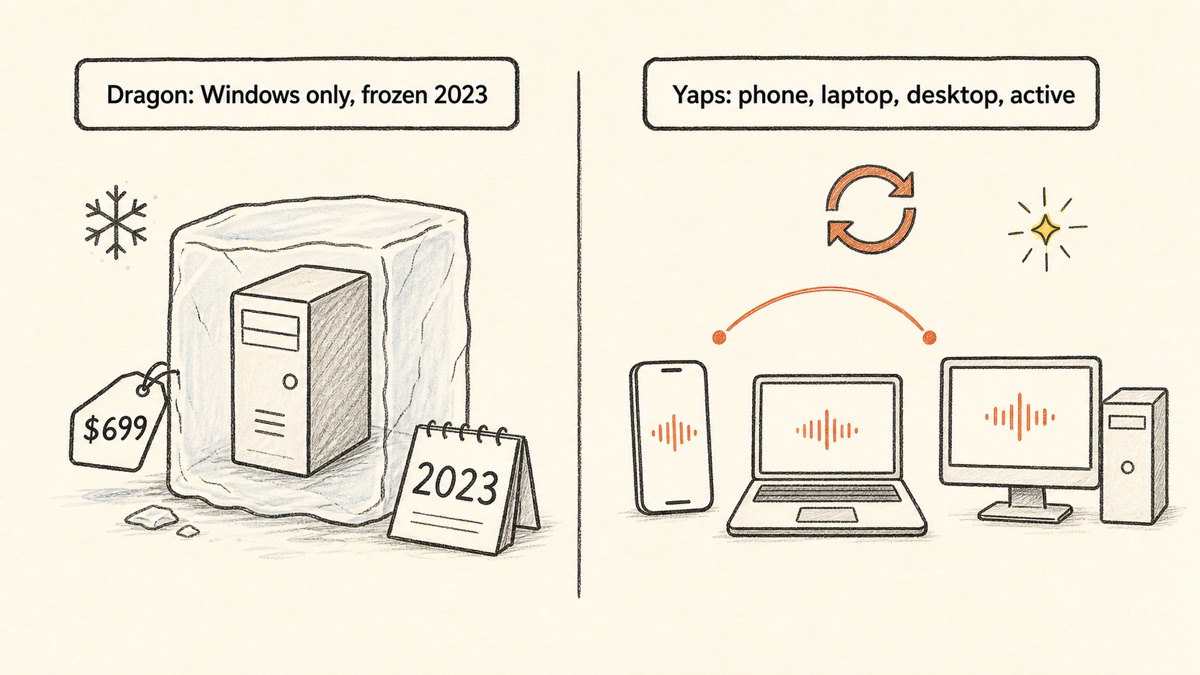
Here is the part nobody at the checkout page tells you. Dragon is alive but frozen. Microsoft bought Nuance, Dragon's maker, in March 2022 for $19.7 billion, and the last desktop release, Dragon Professional v16, shipped in February 2023 with no meaningful feature or accuracy updates since. The consumer Home edition was discontinued in 2023. The Mac version was killed back in 2018 and its final build will not run on a modern Mac at all. Nuance has redirected its attention to enterprise healthcare. As of early 2026, users on Microsoft's own support forum report v16 breaking after the January Windows 11 update: commands misfiring, the microphone shutting off, the app freezing at the splash screen.
So the honest framing is this. Dragon still works on Windows, it is still the deepest macro-and-control tool in the category, but it is expensive ($699 one-time), Windows-only, stagnant, and increasingly fragile on Windows 11. Meanwhile, 2026 AI dictation matches its everyday accuracy with zero training, on more platforms, for far less money.
We built Yaps, so we are biased. We are also honest about where Dragon and the other tools below genuinely win. This post covers general and professional Dragon dictation. If you need clinical or specialized-vocabulary dictation, read our Dragon medical alternatives guide instead, and for a direct face-off see our Dragon vs Yaps comparison.
Frozen, Windows-only, $699
Dragon NaturallySpeaking
Deep macros and full hands-free PC control, but no updates since 2023, no Mac product, a cloud-only mobile app, and a one-time price near $699 with weeks of voice training to reach peak accuracy.
On-device, cross-platform, free trial
Yaps
On-device, offline dictation in about 25 languages with no training, on Android, Windows, macOS, and Linux plus a Chrome extension. A 7-day free trial, then $15 a month, with text cleanup, read-aloud, voice notes, and a studio editor built in.
Les 7 meilleures alternatives Dragon NaturallySpeaking en 2026 (comparaison rapide)
Here is the shortlist, ranked for most users. Deeper write-ups follow.
1. Yaps - Best Overall Dragon NaturallySpeaking Alternative
Yaps is a privacy-first, offline-first voice toolkit, and it is the closest thing to a modern replacement for what most people actually used Dragon for: turning speech into clean text, fast, without a fight. Core dictation runs entirely on your device. Your audio never leaves the machine, it works with no internet connection, and there is no telemetry. The whole thing runs in under 200MB of RAM, which is a different universe from Dragon's heavy install and antivirus conflicts.
The reach is the headline difference. Dragon is Windows desktop only, with a separate paid cloud app for phones and no Mac product at all. Yaps ships on Android, Windows, macOS, and Linux, plus a live Chrome "Save to Yaps" extension that pulls articles, bookmarks, and images straight into your vault. On Android, Yaps is a full AI keyboard with themes, selectable fonts, autocorrect, tap and glide typing, height adjustment, one-handed mode, voice typing, and clipboard history for both text and images. Vault note sync ties your phone and desktop together over your local network or an encrypted peer-to-peer link, so a note you dictate on the bus is waiting on your laptop when you sit down. iOS is coming soon.
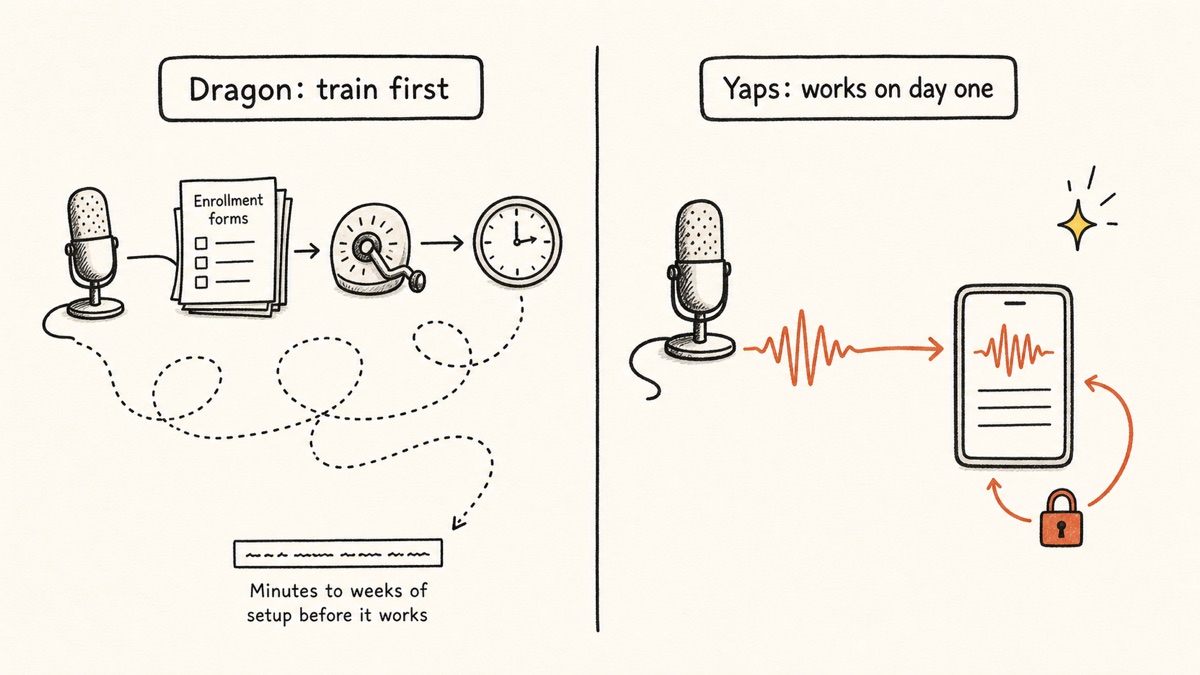
There is no training ritual. Dragon asks you to enroll your voice and tune for minutes to weeks before it hits peak accuracy. Yaps works the instant you install it. Dictation is multilingual, around 25 languages, auto-detected from your speech with no language toggle to flip. On-device text cleanup is on by default: it strips filler words and self-corrections, fixes punctuation and capitalization, and auto-formats lists and numbers, so what lands on the page is already tidy rather than a raw transcript you have to clean up by hand.
It is also a toolkit, not a single function. Beyond dictation you get read-aloud with 18 voices on desktop and 2 on mobile, voice notes that capture spoken thoughts as searchable, timestamped, exportable entries with kanban and checklist support, a studio that transcribes imported audio files offline to text or SRT subtitles, and voice commands that drive your Mac through Shortcuts. Dictation itself is triggered by the Yaps hotkey: Fn on macOS, Ctrl and the Windows key on Windows, or a double-tap of Ctrl on Linux, all rebindable in settings, and the dictation button on the Android keyboard.
To trigger dictation you push the Yaps hotkey, talk, and watch clean text appear. Yaps gives you a 7-day free trial with access to every feature, so you can test the whole thing before paying anything. Pro is $15 a month, Max is $25 a month, with roughly 20 percent off annually. Best for: anyone who wants fast, private, no-training dictation across their phone and computer, plus a full voice toolkit, without Dragon's price or platform limits.
2. Wispr Flow - Best for Cross-Platform AI Dictation in Any App
Wispr Flow is fast, polished, and works system-wide in almost any app on your computer. If your priority is slick AI dictation that drops clean text wherever your cursor is, it delivers. It costs $15 a month or $144 a year, with a free tier of roughly 2,000 words a week. Best for: users who want frictionless dictation in every app and do not mind a subscription. Trade-off: it is cloud-based, so your audio leaves your device on every dictation, and there is no real offline mode. See our full Wispr Flow alternative write-up for the details.
3. SuperWhisper - Best for Mac Power Users Who Want On-Device Modes
SuperWhisper is a customizable Mac dictation app with genuine offline modes, popular with people who like to tinker with model choices and workflows. It runs about $9.99 a month or roughly $84 to $108 a year, and its lifetime tier was hiked to around $849 in 2026. Best for: Mac users who want offline dictation with deep customization. Trade-off: Mac only, and the lifetime option is now expensive. Our SuperWhisper alternative guide covers where it fits.
4. Apple Dictation - Best Free Built-In for Mac and iPhone
Apple Dictation is built into macOS and iPhone, runs on-device on Apple Silicon, and costs nothing. For quick notes and short messages it is perfectly fine. Best for: zero cost, zero install, on Apple devices. Trade-off: accuracy is basic for sustained work, there are no macros, no custom vocabulary, and it is Apple-only, so it is not a real replacement for Dragon's power-user features. See the Apple Dictation comparison for specifics.
5. Windows Voice Access - Best Free Hands-Free Control on Windows 11
Windows Voice Access is built into Windows 11 and gives you more than 80 voice commands plus full cursor and app control, free of charge. Accuracy lands around 85 to 90 percent for everyday dictation. Best for: free hands-free control on a Windows 11 machine. Trade-off: Windows 11 only, weaker than Dragon on complex dictation and custom macros, and it does not learn your vocabulary over time.
6. Talon Voice - Best True Dragon Replacement for Hands-Free Coding and Accessibility
Talon Voice is the closest thing to Dragon's hands-free-control crown for power users. It is fully programmable voice control of the mouse, keyboard, and scripting, with eye tracking and noise commands, and it runs on Windows, macOS, and Linux. The core is free, with beta access through Patreon at around $25 a month. Best for: developers and people managing RSI who need to drive the whole computer by voice with bespoke commands. Trade-off: steep setup involving configuration files and Python, and no polished consumer UI, so it is a power-user and accessibility tool rather than casual dictation.
7. MacWhisper - Best for Offline Transcription of Audio Files on Mac
MacWhisper transcribes recorded audio files, voice memos, interviews, and the like into text, fully offline on a Mac. It costs $29.99 a year or $79.99 for a lifetime license. Best for: turning a stack of recordings into text on a Mac. Trade-off: Mac only, and it handles files rather than real-time, system-wide dictation. Our MacWhisper alternative post explains the distinction. If your real job is meetings rather than dictation, our Otter alternative covers that different lane.
Ce que Dragon NaturallySpeaking fait bien
Credit where it is due. Dragon earned its reputation, and some of its strengths are still real.
Accuracy after personalization. After enrollment and ongoing tuning, Dragon reaches up to 99 percent accuracy on a familiar voice. Decades of research went into that, and for a single trained user it is excellent.
The deepest custom vocabulary and voice macros in the category. You can teach Dragon specialized terms and build voice macros and custom commands that automate long sequences of actions. Nothing in this list matches that depth of programmable control out of the box, except Talon Voice for people willing to script it.
Full hands-free OS control. Open apps, navigate menus, format text, and correct dictation entirely by voice. For accessibility and RSI power users on Windows, this is the feature that made Dragon worth the price.
Mostly on-device on Windows desktop. After profile creation, Dragon Professional v16 does most of its speech processing locally on Windows, which is a genuine privacy strength compared with cloud-only rivals. The caveat is that Dragon Anywhere, the mobile app, is cloud-based.
It learns your frequent words over time. The longer you use it, the better it adapts to your phrasing. That is the upside of the training ritual that newer tools skip.
Où les différences émergent
The core difference is shape. Dragon is a Windows-only, train-it-yourself dictation-and-control product that has not been updated since 2023. Yaps is a cross-platform, no-training voice toolkit that runs on-device today. Here is what that means in practice.
| Feature | Yaps | Dragon NaturallySpeaking |
|---|---|---|
| Platforms | Android, Windows, macOS | Windows only |
| On-device dictation | Yes, all platforms | Desktop yes, mobile cloud |
| Works offline | Yes | Desktop yes, mobile no |
| Voice training required | None | Yes, minutes to weeks |
| Multilingual dictation | ~25 languages, auto | English-centric |
| Text cleanup | On by default | No |
| Read-aloud (TTS) | 18 desktop voices | No |
| Deep custom macros | macOS Shortcuts only | Yes, deepest |
| Account required | Yes, to start the trial | No (desktop) |
| Price to start | 7-day trial | ~$699 one-time |
| Last major update | Active | 2023, frozen |
Privacy that travels with you, on every device
Dragon's desktop privacy story is decent: most processing happens locally on Windows. The cracks show the moment you leave the desktop. Dragon Anywhere, the only Dragon you can run on a phone, is cloud-based, so your speech is sent to a server. And in 2026, Dragon's local microphone handling on Windows 11 has been misfiring after system updates, which is its own kind of unreliability.
Yaps runs dictation fully on-device on Android, Windows, macOS, and Linux alike. Your audio never leaves the machine, and there is no telemetry. The privacy guarantee is the same whether you are at your desk or on your phone, because it is built into the architecture rather than promised in a policy.
No training, no toggle, no cleanup chore
Dragon's accuracy is real, but you pay for it up front with enrollment and ongoing tuning, and it is English-centric. Yaps skips all of that. You install it and dictate. There is no profile to build, no language toggle to flip across its roughly 25 auto-detected languages, and the on-device text cleanup hands you finished text rather than a raw transcript. For most people, the practical accuracy on everyday writing is competitive with cloud tools and close enough to Dragon's trained peak that the training ritual stops being worth it.
One toolkit instead of one feature
Dragon dictates and controls a Windows PC. That is the whole product. Yaps dictates, reads text aloud with 18 desktop voices, captures voice notes you can search and export to Markdown or plain text, transcribes imported audio files to text or SRT subtitles in the studio, and runs voice commands through macOS Shortcuts. For the price of one Dragon license you can start Yaps with a 7-day free trial, and the paid tiers bundle the entire voice layer of your work into one app.
Comparaison de confidentialité
Both tools do real on-device work, which is rare and worth respecting. The difference is consistency across devices.
Dragon processes most speech locally on Windows desktop after you build a profile, and the desktop app does not require an account. That is a solid posture. But Dragon Anywhere on mobile is cloud-based, so on a phone your audio is sent to a server, and all Dragon products now sit inside Microsoft's compliance perimeter after the acquisition. Net result: on-device-ish on the Windows desktop, cloud on mobile.
Yaps processes all core voice work on-device on every platform it ships on. Dictation, text cleanup, voice notes, and voice commands run locally. There is no telemetry. The only thing that ever touches a server is the optional cloud read-aloud voices, which send text, not your audio, and are clearly labeled. Disconnect from the internet and dictation keeps working.
The honest gap to concede: Yaps does not do live meeting transcription or speaker diarization (those are coming soon), and it has no OCR or document scanning. Read-aloud is no longer on that list, since it covers 31 languages on desktop and speaks them on your own machine, but cloud readers still offer more voices and more accents per language, and mobile ships a smaller voice set than desktop.
Comparaison des prix
| Yaps | Dragon NaturallySpeaking | |
|---|---|---|
| Free tier | No (7-day trial) | No (14-day trial only) |
| Desktop price | Pro $15/mo, Max $25/mo | ~$699.99 one-time (Professional v16) |
| Mobile price | Included in plan | Dragon Anywhere $14.99/mo or $149.99/yr |
| Annual option | Yes (~20% off) | N/A |
| Training required | None | Yes |
Dragon's $699 one-time license is its single biggest complaint online, up from around $299 historically, a jump of roughly 133 percent. For freelancers, students, and small businesses, that price is hard to justify for a frozen product. Yaps lets you start with a free trial, and even the Max plan at $25 a month takes more than two years to reach Dragon's one-time price, while shipping on three platforms and getting active updates the whole time.
Qui devrait choisir quoi
Choose Yaps if you want fast, private dictation that works the moment you install it, across your phone and your computer, with no training. You want text that arrives clean, in any of about 25 languages, plus read-aloud, voice notes, a studio editor, and voice commands in one app. You want to start with a free trial.
Choose Wispr Flow if you want polished cloud AI dictation in every desktop app and are comfortable with audio leaving your device. See our Wispr Flow alternative write-up.
Choose SuperWhisper or MacWhisper if you are on a Mac and want offline dictation with deep customization (SuperWhisper) or offline transcription of recorded files (MacWhisper).
Choose Apple Dictation or Windows Voice Access if you want a free built-in option and your needs are light: quick notes on an Apple device, or free hands-free control on Windows 11.
Choose Talon Voice if you need to drive your entire computer by voice with custom commands, especially for coding or RSI, and you are willing to invest in setup.
Qui devrait véritablement choisir Dragon NaturallySpeaking
We want to be straight about this. There are real cases where Dragon, or another control-focused tool, beats Yaps.
If your need is deep custom voice macros and full hands-free OS control. If you are controlling the whole computer by voice with bespoke commands, Dragon on Windows remains the deepest tool for that, and Talon Voice is the strongest cross-platform free alternative for the same job. Yaps voice commands cover macOS Shortcuts, not Dragon-grade macro programming. If that is your core requirement, those tools win, and we will say so without flinching.
If you have already invested years in a trained Dragon profile on Windows. If Dragon's accuracy on your specific voice and vocabulary is dialed in and you live on Windows, switching means giving that up. That is a real cost, even though modern tools work with no training at all.
If you need specialized medical or legal vocabularies. For clinical or legal dictation, Dragon Medical or Dragon Legal, and the tools in our Dragon medical alternatives guide, are the right lane. This post is about general and professional dictation, not those verticals.
Guide de migration : Passer de Dragon NaturallySpeaking à Yaps
If you are coming from Dragon, the switch is mostly about unlearning the ritual. Yaps' 7-day free trial lets you run both side by side at no cost while you decide.
Step 1: Install Yaps
Download Yaps from yaps.ai on whichever device you reach for first. On Windows you can keep Dragon installed during the trial. On a Mac, where Dragon no longer exists, Yaps is filling a gap rather than replacing anything. On Android, install the Yaps keyboard so you have dictation on your phone too.
Step 2: Skip the enrollment you are used to
There is no profile to build and no training session. Push the Yaps hotkey and start dictating immediately. The first time you do this after years of Dragon enrollment, it feels like a step is missing. It is not. The accuracy you get on day one is the accuracy you keep.
Step 3: Let text cleanup do the work you used to do by hand
Dragon hands you a literal transcript and leaves the cleanup to you. Yaps' text cleanup is on by default: it removes filler words and self-corrections, fixes punctuation and capitalization, and formats lists and numbers. Dictate a messy paragraph on purpose and watch what lands on the page. That is the chore you stop doing.
Step 4: Stop reaching for a separate mobile app
Dragon Anywhere was a separate cloud purchase for your phone. With Yaps, the same toolkit is on Android, and vault note sync ties your phone and desktop together over your local network or an encrypted peer-to-peer link. Dictate a note on your phone, finish it on your laptop.
Step 5: Explore the rest of the toolkit
Spend a day with the parts Dragon never had. Highlight text and use read-aloud to proofread by ear. Capture a few voice notes and search them the next morning. Drop a recorded file into the studio and export it as text or SRT subtitles. These are the features that make Yaps a toolkit rather than a dictation box.
Step 6: Decide on the macros question
The one thing to be honest with yourself about is macros. If you genuinely depend on deep custom voice commands and full hands-free PC control, keep Dragon (or evaluate Talon Voice) for that specific job. If you mostly used Dragon to turn speech into text, Yaps covers that better, on more devices, for less.
Dragon made you train the software to trust your voice. Modern on-device dictation trusts it on the first sentence, keeps it on your device, and never asks you to pay $699 for the privilege.
Yaps, on switching from Dragon
A voice keyboard that keeps your voice on your phone.
Install Yaps on Android for offline dictation, a familiar full-size keyboard, and no screen capture. Scan the QR on desktop, or tap the Play badge on mobile.
Foire aux questions
Is Dragon NaturallySpeaking discontinued in 2026?
No, but development is frozen. Dragon Professional v16 still sells on Windows, yet it has had no meaningful updates since its 2023 release, the consumer Home edition was discontinued in 2023, and the Mac version was killed in 2018. Nuance has shifted its focus to enterprise healthcare.
How much does Dragon NaturallySpeaking cost now?
Dragon Professional v16 is about $699.99 as a one-time purchase on Windows, up sharply from around $299 historically. The separate Dragon Anywhere mobile app is $14.99 a month or $149.99 a year. There is a 14-day trial but no free tier.
Does Dragon work on Mac?
No. Nuance discontinued Dragon for Mac in 2018, and the last version, Dragon for Mac 6, will not run on a modern macOS. On a Mac the right alternatives are Yaps, SuperWhisper, or Apple Dictation.
Is there a free Dragon NaturallySpeaking alternative?
Yes. Apple Dictation, Windows Voice Access, and Google Docs Voice Typing all cost nothing to start. Yaps offers a 7-day free trial, and it is the only option that runs fully on-device across Android, Windows, macOS, and Linux.
What is the best Dragon alternative for Windows?
For everyday dictation, Yaps or Wispr Flow. For free hands-free control built into the operating system, Windows Voice Access. For deep custom macros and full computer control, Talon Voice. Yaps is the best starting point because it runs on-device, needs no training, and offers a 7-day free trial.
What is the best Dragon alternative for Mac?
Yaps, SuperWhisper, or Apple Dictation, because Dragon no longer makes a Mac product at all. Yaps is the strongest pick for on-device dictation plus a full voice toolkit, SuperWhisper for deep Mac customization, and Apple Dictation for a free built-in option.
Why is Dragon having problems on Windows 11?
Several 2025 and 2026 Windows 11 updates broke Dragon v16: commands misfire, the microphone shuts off, and the app can freeze at the splash screen. A 23H2 update disrupted the playback hooks Dragon relies on to talk to other apps, and users have reported these issues on Microsoft's own support forum.
Does Dragon need voice training?
Yes. Dragon asks you to enroll your voice and improves with tuning over minutes to weeks. Modern AI dictation tools like Yaps and Wispr Flow work the instant you install them, with no profile to build.
Is Dragon's dictation processed in the cloud?
On Windows desktop, Dragon Professional does most speech processing on-device after you create a profile. But Dragon Anywhere, the mobile app, is cloud-based, so on a phone your audio is sent to a server. Yaps runs dictation fully on-device and offline on every platform.
What is the best offline Dragon alternative?
Yaps runs dictation fully on-device and offline on Android, Windows, macOS, and Linux. SuperWhisper also offers offline modes on Mac. Both keep your audio on your machine rather than sending it to a server.
Can any tool replace Dragon's voice commands and macros?
For full hands-free computer control with custom commands, Talon Voice is the closest free cross-platform replacement, and Dragon itself remains the deepest on Windows. Yaps focuses on fast dictation plus voice commands through macOS Shortcuts rather than Dragon-grade macro programming.
Is Dragon still worth it in 2026?
Only if you need its deep custom macros or full hands-free OS control on Windows, or you have years invested in a trained profile. For everyday dictation, cheaper multi-platform AI tools like Yaps match its accuracy without the $699 price or the training ritual.
What is the best Dragon alternative for accessibility or RSI?
Talon Voice or Windows Voice Access for full hands-free computer control, and Dragon itself remains strong here if you are on Windows and can pay. For accessible dictation that travels across your phone and computer with no training, Yaps is the better starting point.
Does Yaps support multiple languages like Dragon?
Yaps dictates in about 25 languages, auto-detected from your speech with no toggle to flip, whereas Dragon is English-centric. Read-aloud is multilingual too, covering 31 languages on desktop and speaking them on your own machine, so nothing is uploaded to be read back. The one honest caveat is that cloud readers still offer more voices and more accents per language, and mobile ships a smaller voice set than desktop.
Is there a Dragon alternative for medical or legal dictation?
Yes. For clinical and specialized-vocabulary needs, see our dedicated Dragon medical alternatives guide. This post covers general and professional dictation rather than the medical and legal verticals.
Conclusion
Dragon NaturallySpeaking taught a generation to dictate, and on Windows it is still the deepest tool for driving a computer by voice with custom macros. If that is genuinely your need, keep it, or look hard at Talon Voice. We will not pretend otherwise.
For everyone else, the math has changed. Dragon is frozen at 2023, Windows-only, $699, and increasingly fragile on Windows 11, and it still asks you to train it. Yaps gives you fast, private, no-training dictation in about 25 languages, on Android, Windows, macOS, and Linux, with text cleanup, read-aloud, voice notes, and a studio editor in one app, with a 7-day free trial. That is the default we would point a former Dragon user toward today. Install it, push the Yaps hotkey, and see how it feels to dictate without a training session first.