01
·
Try Yaps
A voice keyboard that keeps your voice on your phone.
Install Yaps on Android for offline dictation, a familiar full-size keyboard, and no screen capture. Scan the QR on desktop, or tap the Play badge on mobile.
Voice Dream Reader is alive and well, but it is Apple-only and now runs on a yearly subscription. If you are on Android or Windows, or you want a free, private voice toolkit, here are the seven best Voice Dream Reader alternatives in 2026, ranked by platform reach, privacy, and value.
Voice Dream Reader has spent over a decade as the read-aloud app the accessibility community trusts. If you have dyslexia, ADHD, low vision, or you are blind, you have probably heard the name. You import a PDF, an EPUB, or a Word file, and it reads the text aloud while highlighting each spoken word. That synchronized highlighting is the feature people fall in love with, and it is genuinely excellent.
Two things have changed, and both matter if you are shopping for an alternative in 2026.
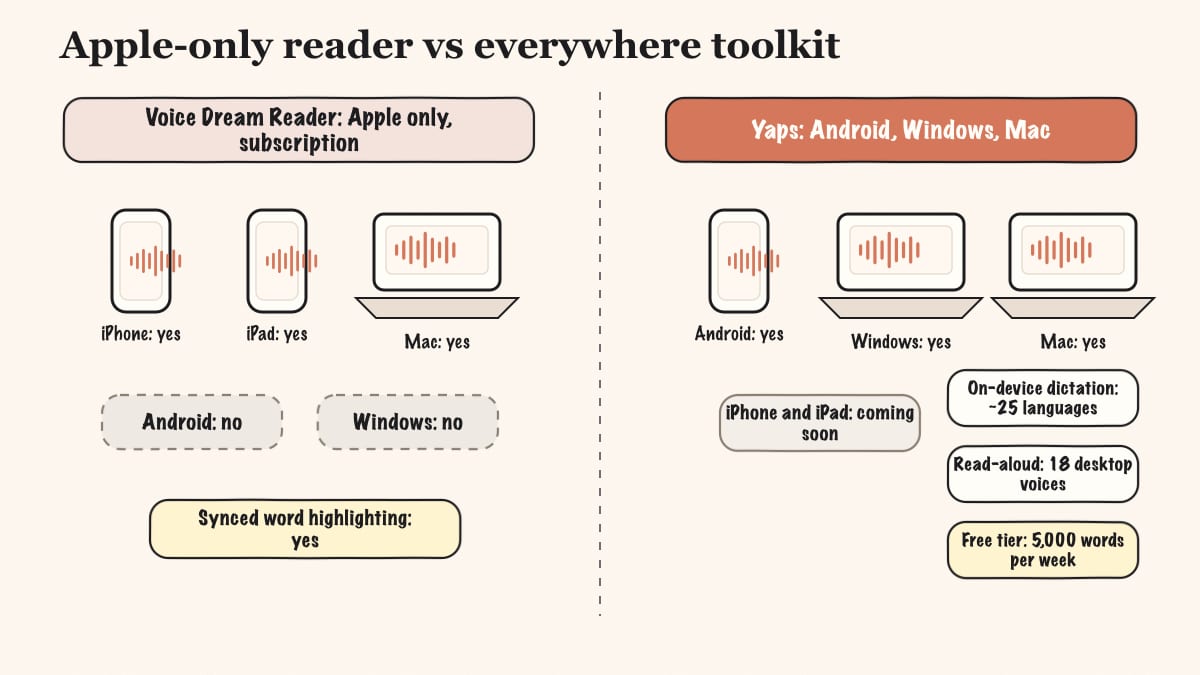
First, the app was acquired and is now a subscription. The original one-time purchase became a yearly plan (around $79.99), which pushed a lot of long-time users to look elsewhere. (To be clear, despite what one ranking page claims, Voice Dream Reader is not discontinued. It is actively maintained, recently renamed "Voice Dream Natural Reader," and updated as of June 2026.) Second, it is now Apple-only. The original Android app was sold off and lives on as a separate, unrelated product, so in 2026 Voice Dream runs on iPhone, iPad, and Mac, and nowhere else.
That second point is the opening. If you are on Android or Windows, Voice Dream simply is not an option, and most of the "alternative" lists you will find do not say so plainly. We built Yaps, so we are biased, but we would rather be honest about where each tool wins and where it does not. On iPhone or iPad today, for accessibility-grade highlighted reading, Voice Dream is still the better pick, and we will say that more than once below.
Apple-only reader
A premium, accessibility-first read-aloud app for iPhone, iPad, and Mac. Excellent synced word highlighting and document import. No Windows, no current Android, and the full app now sits behind a yearly subscription.
Cross-platform voice toolkit
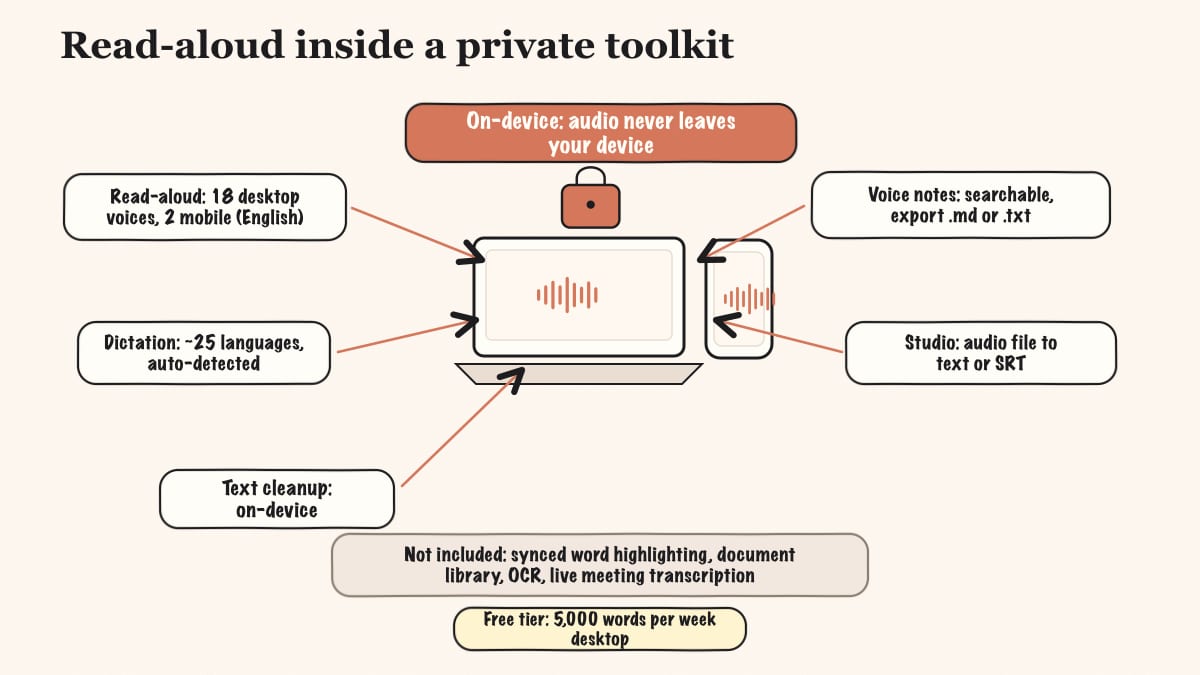
A free, private voice toolkit on Android, Windows, and macOS. Read-aloud with 18 desktop voices plus on-device dictation, text cleanup, voice notes, and Studio. No subscription required to start, and audio never leaves your device.
Here is the shortlist, ranked for most readers. Deeper write-ups follow.
Yaps is the pick if you want a read-aloud tool that is free to start, private by default, and runs on the platforms Voice Dream abandoned. It ships on Android (the headline, a full AI keyboard you type and dictate from), Windows, and macOS, plus a Chrome "Save to Yaps" extension that pulls articles and bookmarks straight into your vault. iOS is coming soon, which is the one honest caveat we lead with: on iPhone or iPad right now, Voice Dream wins.
Where Voice Dream does one job (read documents aloud) behind a subscription, Yaps bundles a whole voice workflow. Read-aloud gives you 18 voices on desktop (8 fully offline plus 10 optional cloud voices) and 2 voices on mobile. Highlight text, push the Yaps hotkey, and hear it read back. That is the proofreading and listening loop Voice Dream users care about, without a paywall blocking the door.
The rest of the toolkit is what no document reader offers. Dictation is multilingual, about 25 languages, auto-detected from your speech with no language toggle to flip. It runs on-device, so your audio never leaves the machine, there is no account needed for core use, no telemetry, and it sits under 200MB of RAM. On-device text cleanup removes filler words and self-corrections, fixes punctuation and capitalization, and auto-formats lists and numbers as you speak. Voice notes capture spoken thoughts, transcribe and timestamp them, and keep them searchable, with support for plain text, kanban boards, and checklists, exportable to Markdown or plain text. Studio transcribes imported audio files offline to text or SRT subtitles. Voice commands let you drive your computer through macOS Shortcuts.
The free tier is one you can actually live in: 5,000 words per week on desktop and 1,000 words per week on mobile, shared across dictation and read-aloud. Paid plans are Basic at $15/mo and Max at $25/mo, with roughly 20% off annually. Vault note sync between mobile and desktop is a premium feature that pairs over your local network or encrypted peer-to-peer, so you can dictate on the bus and finish on your laptop. If your main need is dictation rather than reading, our SuperWhisper alternative and Wispr Flow alternative write-ups go deeper.
Best for: anyone on Android, Windows, or Mac who wants a free, private, full voice toolkit (dictation, cleanup, notes, read-aloud) rather than a single-purpose paid reader. Trade-off: Yaps does not manage a PDF/EPUB document library, has no synced word-by-word highlighting or reading-position tracking, its read-aloud voices are English in practice, and iOS is still coming soon.
Speechify is the nearest like-for-like to Voice Dream if you need a polished reader that runs everywhere. It covers iOS, Android, Mac, web, and a Chrome extension, with natural AI voices and document import for PDFs, articles, and EPUB. For a reader who specifically wants Voice Dream's experience on a Windows or Android device, this is the obvious paid candidate. Best for: users who want premium AI read-aloud across every platform. Trade-off: the pricing is steep (around $139/year for Premium, or roughly $29/mo), and the "trial" requires an account and a card, so there is no genuine free tier. Our Speechify alternative post covers the field in detail.
NaturalReader is the pick when your source material is a photographed page or a scanned PDF. It has the strongest OCR of any tool here, turning printed text into speech, and it runs cross-platform across Windows, Mac, web, Chrome, and mobile. It now sits in the same corporate family as Voice Dream, which is why the branding overlaps. Best for: reading scanned or printed material aloud, plus a genuinely usable free tier (about 20 minutes a day of premium voices). Trade-off: the free voices sound robotic, and the better voices are cloud-based. Paid tiers run about $9.99/mo (Plus) and $19.99/mo (Premium), roughly $119/year.
ElevenReader gives you the most lifelike free voices in this list. It reads PDFs, articles, and EPUB across 30-plus languages, and the voice quality is the reason to choose it over the cheaper alternatives. Best for: the best free ultra-realistic AI narration for listening to documents. Trade-off: it is cloud-only and streaming, it requires an account, and it leans more toward a listening app than an accessibility or document-library tool, so you lose the managed reading workflow Voice Dream is built around. Paid ElevenLabs tiers sit above the free credits.
Speech Central is the closest thing to the original Voice Dream in spirit, because it is built by Winston Chen, the developer who created Voice Dream Reader before selling it. It runs cross-platform, including the Windows and Android coverage Voice Dream dropped, and it restores affordable, document-centric reading. Best for: former Voice Dream users who want the same philosophy from its original creator, on more platforms. Trade-off: it is less polished than Voice Dream's deep Apple integration. It is freemium with an affordable paid tier.
Read Aloud is a free browser extension that reads any web page aloud with one click. There is nothing to buy and nothing to set up beyond installing it. Best for: free, instant read-aloud of articles and web pages on desktop. Trade-off: it handles web pages only, with no PDF or EPUB library, no offline document management, and no mobile app. Microsoft Edge Read Aloud is a comparable free option built into the browser if you already use Edge.
EasyReader (and the similar Bookshare Reader) is built for the accessible-book ecosystem rather than general text-to-speech. If you are a Bookshare or RNIB Bookshare member, or you read DAISY-format titles, this is the tool designed around exactly that. Best for: blind and low-vision readers who live inside accessible-book libraries. Trade-off: it is narrower than a general TTS app, since it is organized around accessible-format catalogs rather than arbitrary documents. It is free with a qualifying library or Bookshare membership, with paid tiers available.
Credit where it is due. Voice Dream earned its reputation for good reasons.
Synchronized word highlighting. As the app speaks, the current word is visually marked. This is its single most-praised feature, and it is a real aid for readers with dyslexia, ADHD, or low vision who benefit from following the text and the audio together.
Broad document import. It reads PDF, EPUB, Word, DAISY, plain text, and web articles, and pulls files from Dropbox, Google Drive, OneDrive, iCloud, Instapaper, and Pocket. It is built to be the place your reading lives.
Reading views built for accessibility. Customizable fonts, spacing, contrast, reading-position tracking, bookmarks, skip controls, and a sleep timer. These are the details that make long-form reading comfortable for the audience it serves.
Offline playback and a large voice library. Once you download voices, playback works offline, and the historical library spans many voices across roughly 30 languages. DAISY support plus deep VoiceOver integration give it serious assistive-technology credibility.
The core difference is shape. Voice Dream is one excellent job (reading documents aloud) on Apple devices, behind a subscription. Yaps is a free, private voice toolkit on the platforms Voice Dream does not cover.
Here is what that looks like feature by feature.
| Feature | Yaps | Voice Dream Reader |
|---|---|---|
| Runs on Android | Yes | No |
| Runs on Windows | Yes | No |
| Runs on Mac | Yes | Yes |
| iPhone / iPad | Coming soon | Yes |
| Free tier (no card) | Yes (5K words/week) | No (subscription) |
| On-device dictation | Yes (~25 languages) | No |
| Read-aloud voices | 18 desktop / 2 mobile | Large library |
| Synced word highlighting | No | Yes |
| Document library (PDF/EPUB) | No | Yes |
| Voice notes (searchable) | Yes | No |
| Audio file transcription | Yes (Studio) | No |
| OCR / scanned documents | No | Import support |
This is not a knock on Voice Dream. It was designed as a focused reading app, and it is a good one. But the practical gap matters for daily use.
This is the cleanest divide. Voice Dream runs on iPhone, iPad, and Mac. There is no Windows version, no web version, and no current Android app (the old one was sold off and now exists as a separate product). If you carry an Android phone or work on a Windows machine, Voice Dream is not on the table at all.
Yaps leads on Android, where it is a full AI keyboard you both type and dictate from, and it ships on Windows and macOS too, plus the Chrome "Save to Yaps" extension. The honest flip side: on iPhone or iPad today, Yaps is not available yet, so Voice Dream wins on iOS for now.
Voice Dream offers offline playback once you download voices, which is a genuine strength. But it leans on accounts and cloud components overall, especially for its newer AI neural voices and cloud sync. It is not marketed as a privacy product.
Yaps treats privacy as the default. Core dictation runs on-device, your audio never leaves the machine, no account is required for core use, there is no telemetry, and it stays under 200MB of RAM. The optional cloud read-aloud voices send text, not audio, to the service, and they are clearly labeled. For reading and capturing sensitive material, that is the harder-line choice. For a deeper look at why this matters for voice data specifically, see our MacWhisper alternative write-up on local-first processing.
Voice Dream reads documents. That is the whole job, and the subscription is the price of it. Yaps gives you read-aloud plus on-device dictation across about 25 languages, text cleanup, searchable voice notes with kanban and checklists, Studio transcription of audio files to text or SRT, and voice commands, all inside the free tier to start. If your reading need is narrow but your voice needs are broad, that breadth is the differentiator.
Both tools can work offline for their core read-aloud once you have the voices, which is the right foundation. The difference is in posture.
Voice Dream Reader plays downloaded voices offline, a real strength it shares with Yaps. But it is an account-and-cloud-leaning product overall, and its newer AI voices and cloud sync involve server-side processing. It is not built or marketed around privacy.
Yaps processes core dictation entirely on-device. Your audio never leaves the machine, no account is required for core use, there are no analytics SDKs, and there is no telemetry. The optional cloud read-aloud voices send text, not your voice, and they are labeled as cloud voices so you always know which is which.
Both pass the basic test: disconnect from the internet and the core features still work. Yaps simply draws the line harder, with on-device dictation and no account as the default.
| Voice Dream Reader | Yaps | |
|---|---|---|
| Free tier | Trial only | Yes (5K words/week desktop) |
| Paid plans | ~$79.99/year subscription | Basic $15/mo, Max $25/mo |
| One-time option | Legacy buyers grandfathered | No |
| Annual discount | Promo rates for legacy users | ~20% off |
Voice Dream's subscription reflects a single, well-built job: reading documents aloud with accessibility-grade features. If that is exactly your need on an Apple device, the price may be worth it, and legacy one-time buyers keep their existing features at no extra cost after a community backlash reversed the forced-subscription change.
Yaps' free tier (5,000 words per week on desktop, 1,000 on mobile, shared across dictation and read-aloud) lets you test the whole toolkit before paying anything. Paid plans cover the broader feature set rather than a single reader.
Choose Yaps if:
Choose Voice Dream Reader if:
We want to be honest about this. There are clear situations where Voice Dream, or another tool, is the better pick.
For accessibility-grade reading on Apple devices, Voice Dream wins. Synced word-by-word highlighting, reading-position tracking, dyslexia and low-vision fonts and spacing, DAISY support, and deep VoiceOver integration are exactly what it was built for. Yaps has none of that highlighting, reading-position, or document-library depth, and its read-aloud voices are English in practice. So for accessibility-grade reading and for multilingual read-aloud, Voice Dream is the honest choice.
For reading scanned or printed material, NaturalReader wins. Yaps has no OCR or document scanning. If you need to turn a photographed page or a scanned PDF into speech, NaturalReader's OCR (or Voice Dream's import) is the right tool.
On iPhone or iPad right now, Voice Dream wins. Yaps iOS is coming soon, not available. Until it ships, Voice Dream is the better reader on Apple mobile.
For the original Voice Dream feel from its creator, Speech Central wins. If what you miss is the philosophy of the original app rather than the Apple polish, Speech Central is built by the same developer and runs on more platforms.
If you are leaving Voice Dream because of the subscription or because you switched to an Android or Windows device, the move to Yaps is low-friction. The free tier means you can try it before committing.
Download Yaps from yaps.ai. On Android it installs as a full keyboard you type and dictate from. On Windows and Mac it runs as a desktop app. You do not need to give up Voice Dream during the trial, especially if you still use it on an iPad.
Highlight any text and push the Yaps hotkey to hear it read back with one of the 18 desktop voices (8 of them fully offline). This is the proofreading and listening loop most Voice Dream users care about. Pick a default voice and get comfortable with the shortcut.
Voice Dream pulled from Pocket and Instapaper. Yaps has the "Save to Yaps" Chrome extension, which saves articles, bookmarks, and images straight into your vault as you browse. Install it and clip a few pages to build up your reading queue.
Be clear-eyed here. Yaps does not give you Voice Dream's synced word highlighting, reading-position tracking, or managed PDF/EPUB library. If those are central to how you read, keep Voice Dream on your iPad for that job and use Yaps for dictation, notes, and read-aloud on your other devices.
The real upgrade is everything beyond reading. Try multilingual dictation in any app, capture a few voice notes over a day and search them the next morning, and run an audio file through Studio to get a transcript or SRT subtitles. After a week, you will know whether the broader toolkit earns its place in your workflow.
If you go premium, vault note sync pairs your mobile and desktop over your local network or encrypted peer-to-peer. Dictate a note on your phone, finish it on your laptop. That cross-device loop is something a single-platform reader cannot offer.
Privacy by architecture, not by policy. If the audio never leaves the device, no subscription change and no acquisition can put your voice somewhere you did not choose.
Yaps for Android
Install Yaps on Android for offline dictation, a familiar full-size keyboard, and no screen capture. Scan the QR on desktop, or tap the Play badge on mobile.
No, Voice Dream Reader is not discontinued. It is actively maintained, with its latest version updated in June 2026. It was renamed "Voice Dream Natural Reader" after an acquisition, and the full app is now subscription-based, but the app itself is alive on the App Store. One ranking page claims it was removed, and that claim is wrong.
No, Voice Dream Reader is not free for new users. It is free to download, but the full app runs on a subscription of around $79.99 per year. Legacy one-time purchasers keep their existing features at no extra cost after a community backlash reversed a forced-subscription change. New and premium features sit behind the subscription.
Voice Dream Reader costs about $79.99 per year, up from its $59.99 launch subscription price. There are promotional rates for legacy users, and one-time buyers from the old era keep their existing features. There is no genuinely useful permanent free tier for new users beyond a trial.
No, there is no current Voice Dream Reader for Android. The original Android app was discontinued and sold off, and it now lives on as a separate, unrelated product called "Legere Reader." In 2026, Voice Dream runs on iPhone, iPad, and Mac only. If you are on Android, Yaps, Speechify, NaturalReader, or Speech Central are the read-aloud options.
For free AI narration, ElevenReader has the best lifelike voices, and Read Aloud or Microsoft Edge Read Aloud handle free web-page reading. For a free, private, cross-platform voice toolkit that adds dictation, text cleanup, and voice notes on top of read-aloud, Yaps is the broadest free pick on Android, Windows, and Mac.
Speechify is the closest paid cross-platform replacement, covering iOS, Android, Mac, web, and Chrome with natural AI voices. Speech Central, built by Voice Dream's original creator, is the closest in spirit and adds Windows and Android coverage. Yaps is the closest free option if you want read-aloud plus a full voice toolkit on Android, Windows, and Mac.
Yaps offers read-aloud with 18 voices on desktop (8 fully offline) and 2 on mobile, so you can highlight text and hear it read back. It does not, however, match Voice Dream's synced word-by-word highlighting, reading-position tracking, or managed PDF and EPUB library. For accessibility-grade highlighted document reading, Voice Dream is still the stronger tool.
Yes, Voice Dream Reader plays text aloud offline once you download the voices you want to use. That offline playback is one of its genuine strengths. Yaps shares this: its core dictation and 8 of its desktop read-aloud voices run fully offline, with audio that never leaves your device.
Yes, Voice Dream Reader is one of the strongest reading apps for dyslexia and ADHD. Synced word highlighting, customizable fonts and spacing, and reading-position tracking help readers follow text and audio together. This is exactly why it is the tool we concede for accessibility-grade reading on Apple devices.
Many people left Voice Dream Reader after the 2023 acquisition shifted it from a one-time purchase (around $30) to a yearly subscription. A 2024 attempt to force existing one-time buyers onto a subscription caused a major accessibility-community backlash, which was later reversed, but the change still pushed many users toward free or cheaper alternatives.
Speechify is more cross-platform than Voice Dream and has more natural AI voices, running on iOS, Android, Mac, web, and Chrome. However, it is pricier (around $139 per year), and its trial requires both an account and a card, so there is no real free tier. Which is "better" depends on whether platform reach or Voice Dream's accessibility reading features matter more to you.
Yes, Voice Dream Reader, Speechify, NaturalReader, and ElevenReader all import and read PDFs and EPUBs aloud. Yaps does not manage a document library, but it transcribes imported audio files in Studio and saves web articles into your vault through its Chrome "Save to Yaps" extension. If a managed document library is essential, choose one of the reader apps.
NaturalReader has the strongest OCR for turning scanned or printed documents into speech. Yaps does not offer OCR or document scanning, so for reading a photographed page or a scanned PDF aloud, NaturalReader (or Voice Dream's own import) is the better choice.
Yaps is the best pick if you want a free, private, cross-platform voice toolkit on Android, Windows, or Mac, covering dictation, text cleanup, voice notes, Studio transcription, and read-aloud. It is not the right pick if your main need is accessibility-grade highlighted document reading on iOS, where Voice Dream remains stronger and Yaps is still coming soon.
Speech Central is the spiritual successor to the original Voice Dream Reader. It is built by Winston Chen, the developer who created Voice Dream before selling it, and it restores affordable, cross-platform reading, including the Windows and Android coverage that the current Voice Dream dropped.
Voice Dream Reader is alive, well, and genuinely excellent at one thing: accessibility-grade highlighted reading on Apple devices. If you read on an iPhone, iPad, or Mac and you rely on synced highlighting, a document library, and reading-position tracking, it is still the tool to beat, and we will not pretend otherwise.
For everyone else, the math has changed. Voice Dream is now Apple-only and subscription-gated, and that leaves a real gap on Android and Windows and for anyone who wants a free, private starting point. Yaps fills it: read-aloud with 18 desktop voices, plus on-device dictation, text cleanup, voice notes, and Studio, all free to start, all private by default, on Android, Windows, and macOS.
Start with Yaps. If your one need is highlighted document reading on iOS, keep Voice Dream for that job, and let Yaps cover the rest of your voice workflow on every other device.