Vorwort
Just Press Record is alive and well in 2026. The latest version shipped in May 2026, it still holds around 4.3 stars across roughly 1,500 US ratings, and it remains a one-time $6.99 purchase with no subscription. It even added Apple Vision support. Nothing has shut down. It is still the dead-simple, one-tap recorder that Apple users have loved for years.
So this is not a "Just Press Record is dying" post. It is a "Just Press Record is a great recorder but a narrow modern note-taker" post. It records beautifully, syncs through iCloud, and runs on iPhone, iPad, Mac, Apple Watch, and Apple Vision. What it does not do is leave the Apple walled garden, clean up your transcript, or work the same way when you are offline.
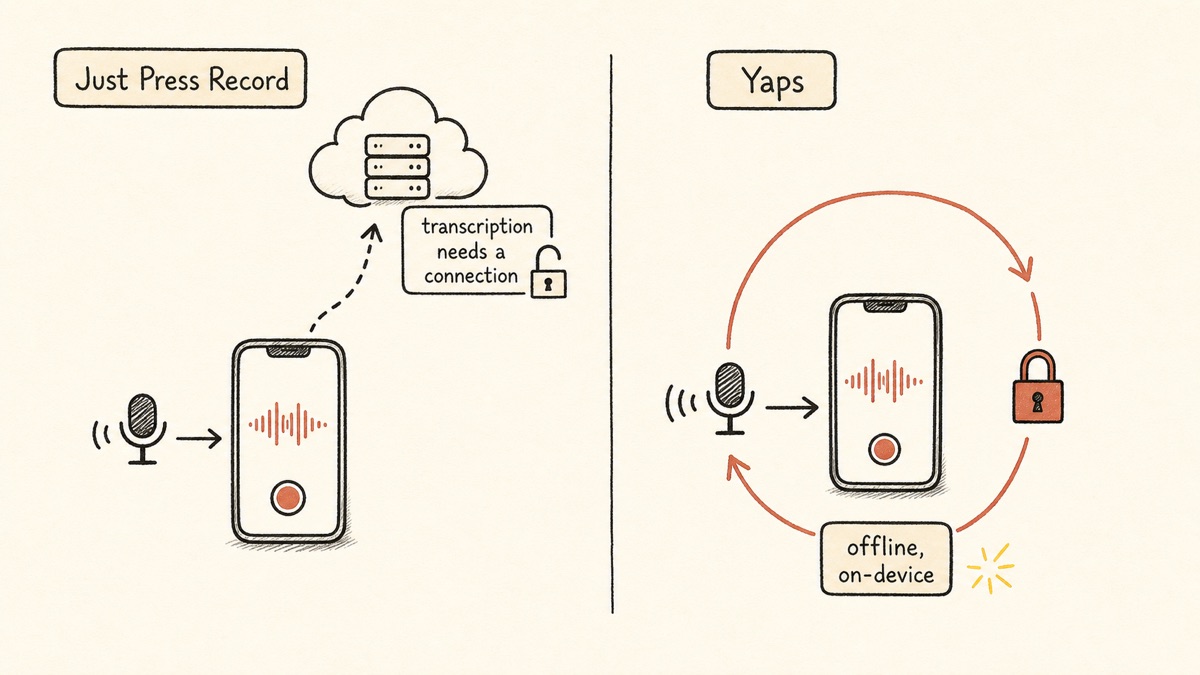
That last point is the one most people get wrong. Just Press Record records offline, but transcription rides Apple's speech framework, and Open Planet's own support guidance says you need a good internet connection for audio to be transcribed. So "private, but transcription typically needs a connection" is the honest framing, not "fully offline and private."
We built Yaps, so we are biased. We are also going to be straight with you about where Just Press Record wins and where it does not, because the honest contrast is more useful than a sales pitch.
Apple-only recorder
Just Press Record
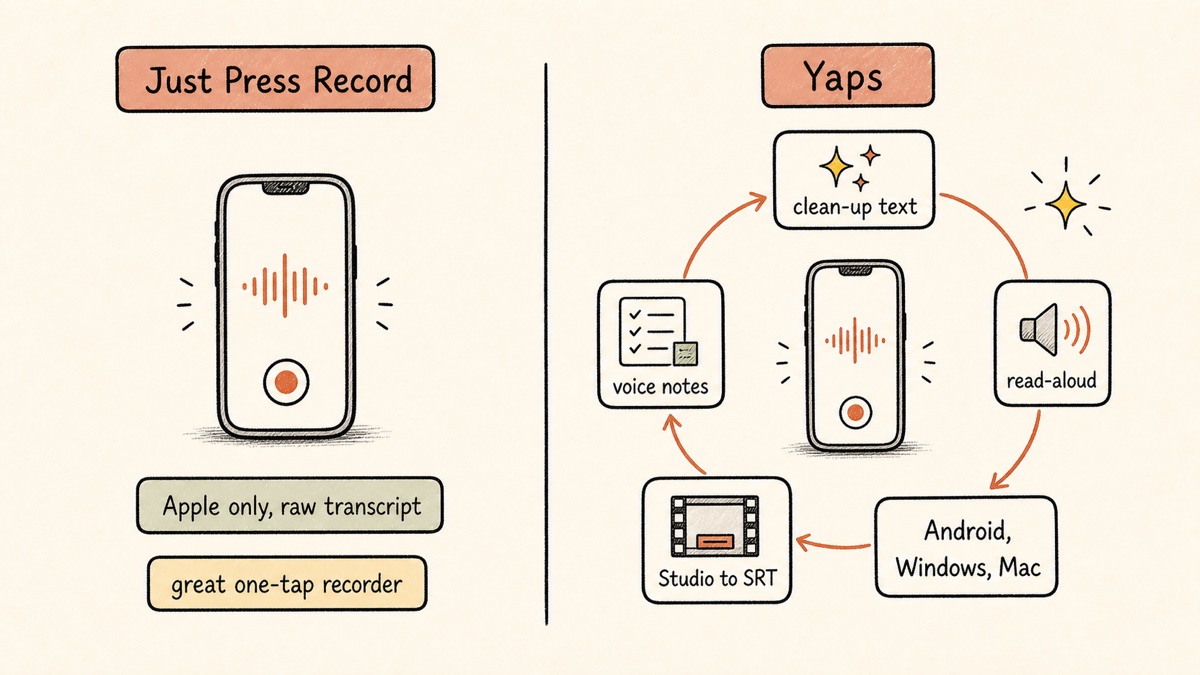
One-tap recording across iPhone, iPad, Mac, Apple Watch, and Apple Vision. Transcription rides Apple's speech engine, so it usually needs a connection. No Android, no Windows, no AI cleanup, no summaries, raw transcript and stop.
Cross-platform voice toolkit
Yaps
On-device dictation that stays on the device and works with no connection. Runs on Android, Windows, macOS, and Linux, plus a Chrome extension. Adds text cleanup, voice notes, a studio, read-aloud, and voice commands.
Die 7 besten Just Press Record-Alternativen im Jahr 2026 (Schnellvergleich)
Here is the shortlist, ranked for most people. Deeper write-ups follow.
1. Yaps - Best Overall Just Press Record Alternative
Yaps is an on-device, offline-first voice toolkit, and it closes the two gaps that define Just Press Record: it stays on your device, and it goes far beyond recording.
Start with privacy, because that is where the contrast is sharpest. Yaps runs its core dictation on-device. The audio never leaves your device, and it genuinely works with no connection. There is no telemetry, and it stays under 200MB of RAM. Just Press Record markets itself as private and can keep files in your own iCloud, but because transcription rides Apple's framework, it usually needs a connection. Yaps does not. Disconnect from the internet and dictation keeps working exactly as before.
Then there is reach. Just Press Record is Apple-only. Yaps ships on Android, Windows, macOS, and Linux, plus a Chrome "Save to Yaps" extension that pulls articles, bookmarks, and images straight into your vault. Android is the headline: Yaps is a full AI keyboard there, with a dictation button built into the keyboard so you can talk into any app on your phone. The honest caveat: Yaps on iPhone and iPad is coming soon, not out yet, so if your whole life is on an iPhone today, Just Press Record still wins on that one device.
The bigger difference is scope. Just Press Record gives you a raw transcript and stops. Yaps is a toolkit. On-device text cleanup is on by default: it removes filler words and self-corrections, fixes punctuation and capitalisation, and auto-formats lists and numbers, so what you get is clean prose, not a wall of "um" and "you know." Voice notes capture spoken thoughts that are auto-transcribed, timestamped, and searchable, with support for plain text, kanban boards, and checklists, and they export to Markdown and plain text. Studio transcribes audio files you already have, offline, into text or SRT subtitles, and exports WAV and SRT. There are 18 read-aloud voices on desktop and 2 on mobile, plus voice commands to control your computer. A searchable history keeps every piece of voice work in one place.
Dictation is multilingual, about 25 languages, auto-detected from your speech, with no language toggle to flip. The trigger is the Yaps hotkey on desktop, and the dictation button on the Android keyboard. Vault note sync between mobile and desktop keeps everything together across operating systems, paired over your local network with a QR code or through an encrypted peer-to-peer link, which is exactly the cross-device story an Apple-only app cannot offer an Android or Windows user.
Yaps gives you a 7-day free trial with access to every feature, then Pro at $15/mo or Max at $25/mo, with roughly 20% off annually.
Best for: anyone who wants a private, on-device voice workflow that runs across Android, Windows, macOS, and Linux, not just a recorder locked to Apple.
Trade-off: read-aloud covers 31 languages on desktop and runs on your own machine, but cloud readers still offer more voices and more accents per language, and mobile ships a smaller voice set than desktop. Yaps also does not do live meeting transcription or speaker labelling, and on iPhone it is still coming soon.
2. Apple Voice Memos - Best Free, Already-Installed Option
Voice Memos is already on every iPhone, iPad, and Mac, it costs nothing, and recent iOS releases added transcription and search. If you only need to capture audio and occasionally read it back, it covers the basics with zero friction.
Best for: the free, zero-install option for someone who just needs to record.
Trade-off: it is basic. There is no AI cleanup, no summaries, no kanban or checklists, and no cross-platform reach beyond Apple devices. For private on-device dictation with cleanup, Yaps does more, and for meetings, the tools below transcribe better.
3. Otter.ai - Best for Meetings and Speaker Labels
Otter is built for meetings: live transcription, automatic speaker labelling, and easy sharing of notes with a team. If your problem is "I sat through a call and need a clean record of who said what," it is the strongest pick in this list.
Best for: meetings, live transcription, speaker labels, and sharing across a team.
Trade-off: it is cloud-only, so your audio leaves your device, which is the wrong shape for sensitive material. The free tier is small (300 minutes per month, 30 minutes per conversation, and only three lifetime imports), with Pro around $8.33/mo and Business around $20/user/mo. If privacy is the priority, see our Otter alternative write-up.
4. AudioPen - Best for Turning Rambles Into Clean Writing
AudioPen takes a messy spoken ramble and rewrites it into structured, readable prose. If the value you want is "I talk for two minutes and get a tidy paragraph," it does that one job well.
Best for: turning rambly voice notes into clean, structured writing.
Trade-off: processing is in the cloud, and the free tier is very limited (10 notes, three minutes each). Paid "Prime" access runs $99 per year, $159 for two years, or $33 for three months, with no auto-renew. Yaps does its cleanup on-device and on by default, so the tidy text never leaves your machine. We compare the two more fully in our Aqua Voice alternative piece, which covers the same cloud-cleanup category.
5. Voicenotes - Best Cross-Platform AI Voice-Notes Habit
Voicenotes is a genuine cross-platform AI voice-notes app with integrations, so it is one of the few picks here that, like Yaps, is not locked to Apple. It is built around the daily habit of talking out your thoughts and getting them back organised.
Best for: a cross-platform AI voice-notes habit with integrations.
Trade-off: it is cloud-based, and the meaningful AI features are gated behind Pro. The free tier gives unlimited raw recordings but caps transcription at 100 minutes per week with a 30-day history, and Pro is $9/mo or $99.99/yr. Yaps keeps the equivalent capture and transcription on-device and offline.
6. Whisper Memos - Best for Higher-Accuracy Transcription With Apple Watch
Whisper Memos pairs Whisper-grade transcription with Apple Watch capture and emails you the finished notes. If raw transcription accuracy in tougher conditions matters more to you than anything else, it is a strong, focused pick.
Best for: higher-accuracy transcription with Apple Watch capture and emailed notes.
Trade-off: it is cloud-based and subscription-only, around $60 per year, and it is iPhone and Apple Watch only. Yaps keeps transcription on-device, though it does not have an Apple Watch app or an iPhone app yet.
7. Cleft Notes - Best for Voice to Polished, Publishable Notes
Cleft turns spoken thinking into polished, publishable notes on Mac, iPhone, and Apple Vision. For verbal thinkers who want the output to read like finished writing, it is a thoughtful option.
Best for: verbal thinkers who want voice turned into polished notes inside the Apple ecosystem.
Trade-off: it is Apple-only and still in beta, with a subscription on the way out of beta ($5/mo across platforms with iCloud sync, or $30/yr Mac-only with on-device transcription, free during beta). For cross-platform on-device notes, Yaps is the broader answer.
A few more worth a quick mention: Rev for human-reviewed transcripts at $0.25 to $1.50 per minute when accuracy has to be near-perfect, and web-based tools like Notta and VoiceToNotes.ai if you want transcription in a browser rather than an app.
Was Just Press Record gut macht
Credit where it is due. Just Press Record earns its loyal following.
One-tap recording, done right. Open the app, tap once, and you are recording. Background recording, pause and resume, and unlimited recording time all work without fuss. This is the cleanest capture experience in the category.
Apple Watch recording is genuinely excellent. You can record on the Watch independently, with unlimited length, and sync to your iPhone later. For capturing a thought on a walk without pulling out your phone, this is a standout feature that most alternatives cannot match.
Pro-grade audio capture. It records M4A, WAV, and AIF up to 96kHz/24-bit, which is real, high-quality audio, not a compressed afterthought.
A fair, simple price. $6.99 once, no subscription, no in-app purchases, no ads, and a single purchase covers all your Apple devices through Family Sharing. For someone who just wants a recorder, that is hard to beat.
Thoughtful playback and organisation. Tap the transcript to jump to that moment in the audio, with synced highlighting, and recordings file themselves into date and time folders automatically. Siri Shortcuts and VoiceOver support round it out.
Wo die Unterschiede entstehen
The core difference is scope and reach. Just Press Record is a focused Apple recorder. Yaps is a cross-platform voice toolkit that keeps work on-device. Here is what that means in practice.
| Feature | Yaps | Just Press Record |
|---|---|---|
| Platforms | Android, Windows, macOS, Linux | Apple only |
| Transcription works offline | Yes, on-device | Usually needs a connection |
| Audio stays on the device | Yes | Transcription rides Apple's engine |
| Text cleanup | Yes, on by default | No (raw transcript) |
| Read-aloud voices | 18 desktop, 2 mobile | No |
| Transcribe imported audio files | Yes, offline to text or SRT | Yes (iCloud folder) |
| Voice notes (kanban, checklists) | Yes | No |
| Apple Watch recording | No | Yes |
| Pricing | 7-day trial, Pro $15/mo | $6.99 one-time |
This is not a knock on Just Press Record. It was built as a focused Apple recorder, and it is one. But the practical impact of these differences shows up fast in daily use.
Offline and On-Device Is the Real Wedge
This is the difference people most often assume away. Just Press Record records offline, so it feels private, but the transcription step usually reaches out to Apple's speech service, which is why the support docs ask for a good connection. On a plane, on the subway, or anywhere with patchy signal, you get audio but not text until you reconnect.
Yaps runs dictation on-device. The audio never leaves your device, and the transcription happens right there, with or without a connection. For anyone handling sensitive notes, or anyone who simply records in places without reliable internet, that is not a detail. It is the whole point.
Cross-Platform Reach an Apple App Cannot Match
Just Press Record will never run on Android or Windows. That is fine if every device you own has an Apple logo, but most households and teams are mixed. Yaps ships on Android, Windows, macOS, and Linux, with a Chrome extension on top, and vault sync ties your notes together across all of them. Dictate on the bus on your Android phone, finish on your Windows or Mac laptop later, and the notes are already there. An Apple-only recorder cannot tell that story for an Android or Windows user.
A Toolkit, Not Just a Transcript
Just Press Record hands you a raw transcript and stops. Yaps cleans it up by default, lets you shape notes into kanban boards and checklists, reads text back to you in 18 desktop voices, transcribes audio files you already have into subtitles, and lets you drive your computer by voice. The recording is the beginning of the workflow, not the end of it.
Datenschutzvergleich
Both tools market themselves as respectful of your data, and neither sets out to harvest you. The difference is architectural.
Just Press Record does not track you and can keep files in your own iCloud Drive, which is a reasonable posture. But its transcription rides Apple's speech framework, and Apple's own dictation-grade engine has historically needed a network connection, which is why Open Planet's guidance asks for good Wi-Fi to transcribe. Recording is offline; transcription usually is not. So your spoken words generally route through Apple's service to become text.
Yaps processes core dictation on-device. The audio never leaves your device, and there is no telemetry. Optional cloud read-aloud voices send text, not audio, and they are clearly labelled. The simplest test of any privacy claim is to pull the plug: disconnect from the internet and Yaps still turns your voice into clean text. That is privacy by architecture, not by promise. For more on why this matters with voice specifically, see our SuperWhisper alternative comparison, which digs into on-device versus cloud transcription.
Preisvergleich
| Just Press Record | Yaps | |
|---|---|---|
| Free trial | No (paid app) | Yes (7-day trial) |
| Price | $6.99 one-time | Pro $15/mo, Max $25/mo |
| Annual option | N/A | Yes (about 20% off) |
| Platforms covered | All Apple devices | Android, Windows, macOS, Linux, Chrome extension |
Just Press Record's $6.99-forever price is genuinely excellent if all you want is a recorder, and no subscription will ever beat "pay once." Yaps' subscription reflects a broader toolkit (dictation, cleanup, voice notes, studio, read-aloud, voice commands) across three operating systems, with a 7-day free trial that lets you test the full experience before paying. If you only need to capture audio on Apple devices, Just Press Record is the cheaper fit. If you want a private, cross-platform workflow, Yaps earns its price.
Wer sollte was wählen
Choose Yaps if:
- You want transcription that works offline and keeps audio on your device
- You use Android or Windows, or a mix of operating systems
- You want clean text, not a raw transcript full of filler
- You want voice notes, read-aloud, a studio, and voice commands in one app
- You want a free trial to test before paying
Choose Just Press Record if:
- Every device you own is an Apple device
- You want the simplest possible one-tap recorder
- You record on an Apple Watch and sync later
- You strongly prefer a one-time purchase over a subscription
- You do not need cleanup, summaries, or cross-platform reach
Wer sollte sich wirklich entscheiden? Drücken Sie einfach die Aufnahmetaste
We want to be fair, because Just Press Record is not failing. It is narrow, and for the right person that narrowness is the feature.
If you live entirely inside the Apple ecosystem and want dead-simple capture. Just Press Record is purpose-built for one-tap recording, Apple Watch capture, and deep iCloud sync, and it does all three beautifully. Yaps on iPhone and iPad is still coming soon, so for iPhone-first capture today, Just Press Record (or Whisper Memos for Watch plus higher accuracy) is the better tool right now.
If a one-time purchase is a hard requirement. Subscription fatigue is real. If your rule is "no more monthly charges," $6.99 once is unbeatable, and that argument stands regardless of feature count.
If your need is meetings with multiple speakers. Neither Just Press Record nor Yaps does live meeting transcription or speaker labelling. For that specific job, Otter is the right pick, and we say so plainly.
It is also worth conceding what Yaps does not have: no document scanning or OCR, and no audiobook or cloud voice marketplace. Read-aloud does cover 31 languages on desktop and runs on your own machine, though cloud readers still offer more voices and more accents per language. If any of that is central to your need, look elsewhere for it.
Migrationsleitfaden: Wechsel von Just Press Record zu Yaps
If you are on Just Press Record and curious about Yaps, the switch is low-risk because the 7-day free trial lets you run both and compare them in your real workflow. Note that Yaps on iPhone is coming soon, so today this path applies to your Android phone, Windows PC, or Mac.
Step 1: Install Yaps on Your Non-Apple Device or Your Mac
Download Yaps from yaps.ai. On Android it installs as a keyboard with a dictation button; on Windows and Mac it runs as a desktop app. You do not need to remove Just Press Record on your Apple devices.
Step 2: Learn the Yaps Hotkey
The dictation default is Fn on macOS, Ctrl and the Windows key on Windows, or a double-tap of Ctrl on Linux, and all of them are rebindable in settings. On Android, the trigger is the dictation button on the Yaps keyboard. Talk, and clean text appears, with filler and self-corrections removed automatically.
Step 3: Move Existing Recordings Through Studio
Have a backlog of recordings? Drop the audio files into Yaps Studio and transcribe them offline into text or SRT subtitles. This is the closest analogue to Just Press Record's drop-a-file-in-iCloud transcription, except it runs on-device.
Step 4: Set Up Vault Sync Across Your Devices
Pair your phone and laptop with a QR code over your local network, or through an encrypted peer-to-peer link, so notes stay together across Android, Windows, and Mac. This is the cross-operating-system continuity an Apple-only app cannot give you.
Step 5: Explore What Just Press Record Does Not Have
Spend a few days with the features beyond recording: read-aloud for proofreading, voice notes as kanban boards or checklists, and voice commands to control your computer. If they earn a place in your routine, Yaps has done its job. If you only ever record on an Apple Watch, Just Press Record may still be the better fit, and that is fine.
Recording offline is easy. Turning voice into text offline, with the audio never leaving your device, is the part most apps quietly send to the cloud. That is the gap Yaps closes.
Yaps for Android, Windows, macOS, and Linux
A voice keyboard that keeps your voice on your phone.
Install Yaps on Android for offline dictation, a familiar full-size keyboard, and no screen capture. Scan the QR on desktop, or tap the Play badge on mobile.
Häufig gestellte Fragen
Is Just Press Record still available in 2026?
Yes, it is actively maintained, with its latest version shipping in May 2026 and a one-time $6.99 price on iPhone, iPad, Mac, Apple Watch, and Apple Vision. Nothing has shut down; it remains a popular one-tap recorder for the Apple ecosystem.
How much does Just Press Record cost?
It is $6.99 once, with no subscription, no in-app purchases, and no ads. A single purchase covers all your Apple devices through Family Sharing.
Does Just Press Record work offline?
Recording works offline, but transcription typically needs an internet connection because it uses Apple's speech engine. So you can capture audio anywhere, but you may not get text until you reconnect.
Is Just Press Record private?
It does not track you and can keep files in your own iCloud, but transcription usually routes through Apple's framework, so it is not fully offline-private the way an on-device tool is. Yaps, by contrast, transcribes on-device with no connection required.
What is the best free alternative to Just Press Record?
Apple Voice Memos if you only need recording, or Yaps' 7-day free trial if you want on-device dictation, text cleanup, and notes. Voice Memos avoids a paid app entirely, while Yaps adds cleanup and cross-platform reach.
Is there a Just Press Record for Android or Windows?
No, Just Press Record is Apple-only. Yaps runs on Android, Windows, macOS, and Linux, with a Chrome extension on top, which makes it the cross-platform answer for a mixed-device household or team.
What is the most accurate Just Press Record alternative?
For meetings in noise, Otter.ai or Whisper Memos transcribe more accurately, and for private on-device dictation, Yaps adds the cleanup Just Press Record lacks. The right pick depends on whether your priority is meeting accuracy or private, clean dictation.
Does Just Press Record do AI summaries?
No, it produces raw transcripts only. AudioPen, Voicenotes, and Cleft Notes add AI summarisation, and Yaps adds on-device cleanup that removes filler and fixes formatting.
Can Just Press Record transcribe existing audio files?
Yes, you can drop M4A, AIF, or WAV files into its iCloud Drive folder for transcription. Yaps' Studio also transcribes imported files, but offline and on-device, into text or SRT subtitles.
How accurate is Just Press Record?
It is roughly 82 to 88% accurate in quiet conditions, dropping to about 70 to 75% with noise or accents, because it is capped by Apple's speech model. That ceiling is why meeting-focused tools transcribe better in tough audio.
Does Just Press Record have an Apple Watch app?
Yes, and it is one of its standout strengths: you can record independently on the Watch with unlimited length and sync to your iPhone later. Yaps does not have an Apple Watch app.
What is a good Just Press Record alternative that works offline?
Yaps runs core dictation fully on-device with no connection required, unlike Just Press Record's network-dependent transcription. Disconnect from the internet and Yaps still turns your voice into clean text.
Can I export transcripts from Just Press Record?
Yes, via email, Messages, and the share sheet, though there is no bulk web export. Yaps exports notes to Markdown and plain text, and Studio exports WAV audio and SRT subtitles.
Just Press Record vs Voice Memos, which is better?
Voice Memos is free and built into every Apple device, while Just Press Record adds better organisation, multi-language transcription, and Apple Watch recording for $6.99. If you want cross-platform reach and on-device cleanup, Yaps is the broader pick than either.
Does Yaps have an iPhone app?
Not yet, Yaps on iPhone and iPad is coming soon. Today Yaps leads on Android, Windows, macOS, and Linux, so iPhone-only users may prefer Just Press Record for now.
Fazit
Just Press Record is a good tool that does one thing well: simple, one-tap recording for people who live inside the Apple ecosystem. If that is you, and you record on an Apple Watch, and you want a one-time purchase, it is a fair pick and we respect it.
For most people, though, the honest default is Yaps. It keeps your voice on your device, works offline for real, runs across Android, Windows, macOS, and Linux, and goes well past recording into cleanup, voice notes, read-aloud, and voice commands. Start with the free trial, use it in your actual day, and reach for one of the alternatives above only where Yaps is honestly not the right fit: Otter for multi-speaker meetings, or Just Press Record itself for Apple Watch capture on an iPhone today.