
Prefácio
Voicenotes does the capture part beautifully. You tap record, talk, and within seconds you get a title, a transcript, a summary, and a list of action items. Its signature trick, Ask AI, lets you chat across your entire recording history and ask what you said about the Q3 budget three weeks ago. For low-friction idea capture across more devices than anything else in this category, it is genuinely good.
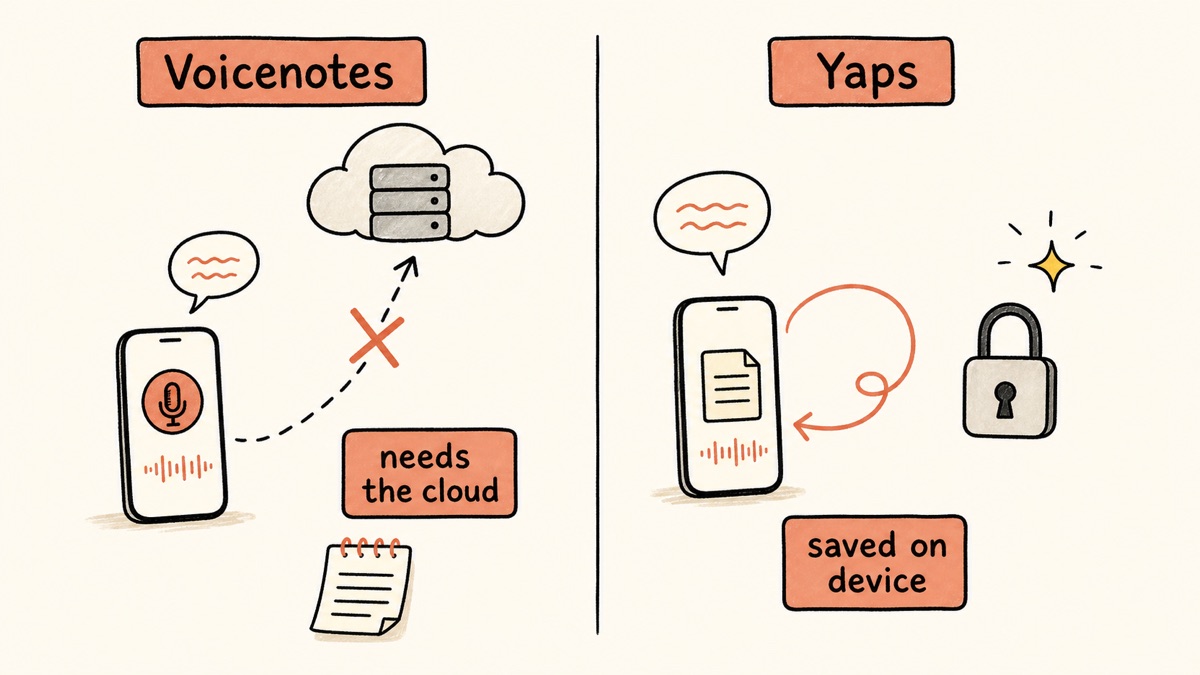
There is one problem, and it is the loudest complaint in the reviews. Voicenotes lives entirely in the cloud. Nothing is saved on your device. If the app closes or backgrounds before a recording finishes uploading, the audio can be permanently lost. It is useless offline, it requires an account, and every word you speak lands on someone else's server in the United States.
If that trade does not sit right with you, or you simply want a voice-notes app that cannot lose a note because the note never leaves your device, this comparison is for you. We built Yaps, so we are obviously biased. But the fastest way to earn trust is to be honest about where each tool wins and where it falls short, so that is what we will do.
Cloud voice notes
Voicenotes
Records to the cloud, transcribes, summarizes, and lets you chat with your history. Needs an account and an internet connection. Nothing runs on your device, and a failed upload can lose the recording for good.
On-device voice toolkit
Yaps
Core dictation runs on your device and works offline. Your audio never leaves the phone or laptop. An account starts your trial, but nothing you say is uploaded: no telemetry, voice notes you export to Markdown, plus dictation, read-aloud, and a studio. One private toolkit.
As 7 melhores alternativas de notas de voz em 2026 (comparação rápida)
Here is the shortlist, ranked for most people. Deeper write-ups follow.
1. Yaps - Best Overall Voicenotes Alternative
Yaps is a privacy-first, offline-first voice toolkit that ships on Android (as a full AI keyboard), Windows, macOS, and Linux, plus a live Chrome extension called Save to Yaps that pulls articles, bookmarks, and images straight into your vault. It is the only pick on this list where your core voice work happens on your own device instead of a company's server.
The headline answers the loudest Voicenotes complaint directly. Voicenotes can lose a recording when a cloud upload fails because nothing is stored locally. Yaps cannot, because the note is created on your device and stays there. Core dictation runs on-device, works with no internet connection, and your audio never leaves the phone or the laptop. There is no telemetry. You do sign in to start the trial, and that governs access and billing rather than where your words are processed. The whole thing runs in under 200MB of RAM.
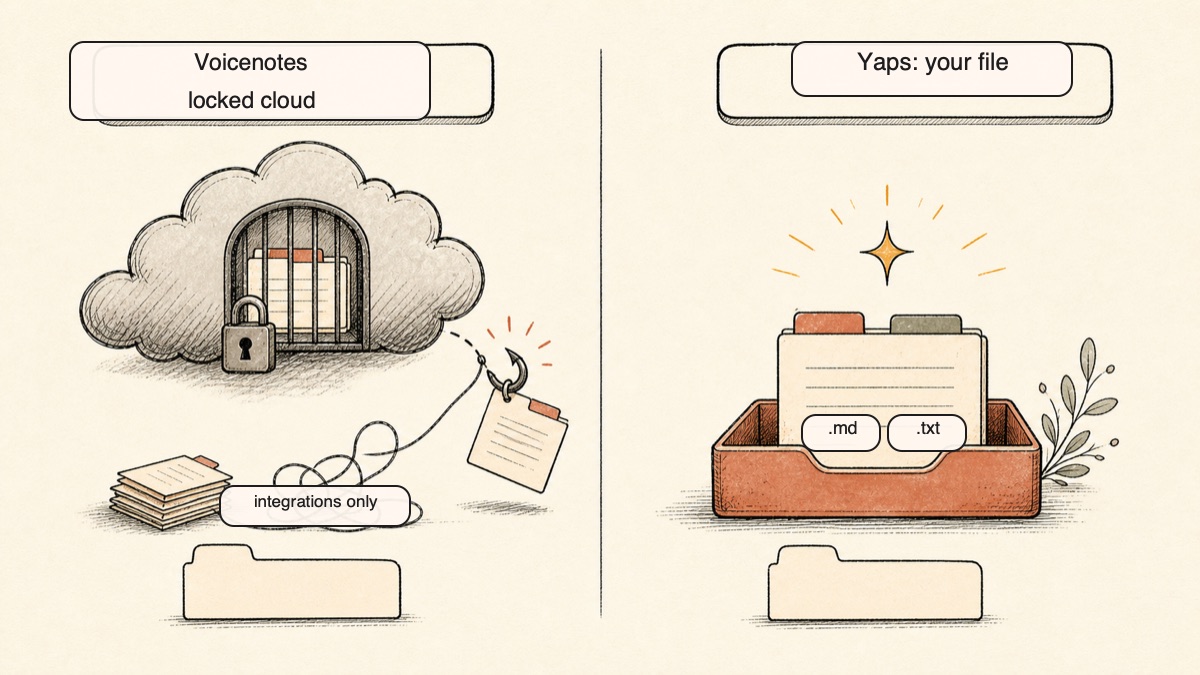
Voice notes in Yaps capture spoken thoughts, auto-transcribe them, timestamp them, and make them searchable. They support plain text, kanban boards, and checklists, and they export to Markdown (.md) and plain text (.txt) so you own the files outright. Voicenotes keeps your notes locked in its cloud, and you cannot even cancel the subscription from its website. Yaps gives you the file. If you want your phone and your laptop in sync, vault sync is a premium feature that pairs the two over your local network with a QR code, or over an encrypted peer-to-peer connection, so you sync without handing your data to a third party.
Yaps is also more than a memo app. Dictation is system-wide: push the Yaps hotkey on desktop or the dictation button on the Android keyboard, talk, and clean text appears in whatever you are typing into. It is multilingual, around 25 languages auto-detected from your speech, so there is no language toggle to fumble with. On-device text cleanup runs by default and strips filler words and self-corrections, fixes punctuation and capitalization, and formats lists and numbers. Read-aloud gives you 18 voices on desktop and 2 on mobile so you can hear a note back. Studio transcribes imported audio files offline into text or SRT subtitles. And voice commands let you control your Mac through Shortcuts.
Yaps gives you a 7-day free trial with access to the full toolkit. Paid plans are Pro at $15/mo and Max at $25/mo, with around 20% off annually.
Best for: anyone who wants private, offline voice notes that cannot be lost to a failed upload, plus a full voice toolkit, across Android, Windows, Mac, and Linux.
Honest trade-off: Yaps does not chat with your notes the way Voicenotes' Ask AI does, mobile ships a smaller read-aloud voice set than desktop, and meeting transcription and an iPhone app are both coming soon rather than shipping today.
2. AudioPen - Best for Polished Written Prose
AudioPen takes a rambling spoken thought and rewrites it into clean, structured written prose. If your goal is to talk for two minutes and get a tidy paragraph out the other end, it is excellent at exactly that. Best for: turning messy verbal thinking into finished writing. Trade-off: it is web and Chrome only, recordings are capped short, and there is no real cloud capture on the move; the free plan limits you to 10 notes with a 3-minute cap, and the paid plan runs around $99 a year.
3. Otter.ai - Best for Team Meetings
Otter is built for people who live in meetings. It does live transcription, speaker labels in many cases, and slots into enterprise workflows. For personal voice notes it is heavy and expensive, but for capturing and searching meetings it is a category leader. Best for: teams that need live meeting transcription and shared notes. Trade-off: cloud-only, pricey, and overkill for solo idea capture; free gives 300 minutes a month, and Pro is $16.99/mo or around $8.33/mo billed annually. For a closer look, see our Otter alternative write-up.
4. Cleft Notes - Best for Apple-Ecosystem Thinkers
Cleft Notes turns spoken thoughts into structured Markdown notes and is a favorite among Apple users who think out loud. The free tier is generous and the Markdown editor is good. Best for: Apple-ecosystem verbal thinkers who want clean Markdown out of a voice note. Trade-off: it is Apple-only, so there is no Android or Windows version, and the AI runs in the cloud; Plus is $6.99/mo or $39.99/yr.
5. Whisper Memos - Best for iPhone and Apple Watch
Whisper Memos records on iPhone or Apple Watch and emails you a fast, accurate transcript. The capture-to-inbox loop is the whole appeal, and it works well. Best for: iPhone and Apple Watch users who want accurate transcripts delivered to their inbox. Trade-off: iOS-only, no chat-with-your-notes, and transcription happens in the cloud; pricing is around $39.99 a year with no monthly option.
6. Just Press Record - Best Cheap, No-Subscription Pick
Just Press Record is the budget, privacy-minded option in the Apple world. It is a one-time purchase, syncs over iCloud, and transcribes on the device using Apple's own engine. Best for: cheap, private capture across Apple devices with no subscription. Trade-off: Apple-only, the on-device transcription is less accurate than dedicated engines, and there are no AI summaries or chat; it is roughly $4.99 once.
7. Reflect - Best for Networked Note-Takers
Reflect is a backlinked, encrypted note app that happens to include voice memos. If you want spoken thoughts to drop into a connected second brain rather than a flat list, it fits. Best for: networked-thought note-takers who want voice inside a linked knowledge base. Trade-off: it is the priciest here, there is no free plan, and voice is a feature rather than the core; pricing is $10/mo or $120/yr after a 14-day trial.
A few honorable mentions for the free-and-cheap crowd: AudioNotes is a popular free alternative, while TalkNotes and Coconote both show up often in this space. Reddit threads also point iPhone users toward offline picks like VoiceScriber, Aiko, and Whisper Notes when privacy is the priority.
O que as notas de voz funcionam bem
Credit where it is due. Voicenotes is a healthy, well-funded product in 2026, and it earns its fans.
Chat with your notes. Ask AI is the standout feature. You can talk to months of recordings in plain language and pull out what you said, when, and about what. Nothing else on this list does that as well, and Yaps does not do it at all.
The broadest reach in the category. Voicenotes runs on web, iOS, Android, macOS, Windows, Apple Watch, and Wear OS, with a Chrome extension for meeting capture, and notes sync across all of them automatically. If you want a recording on your watch to appear on your laptop without thinking about it, that is real and it is good.
Low-friction capture and strong multilingual transcription. Tap, talk, done. It handles 100-plus languages and copes well with accents and code-switching. It also auto-generates emails, tweets, study notes, and to-dos from a recording.
Meetings. In 2026 it pushed hard into recording and transcribing Google Meet, Zoom, and similar through a browser extension. If live meeting capture is your job, that matters.
Onde as diferenças emergem
The core difference is architecture. Voicenotes is a cloud service. Yaps runs your core voice work on your own device. Everything downstream follows from that one choice.
| Feature | Yaps | Voicenotes |
|---|---|---|
| Runs on-device | Yes | No (cloud) |
| Works offline | Yes | No |
| Account required | Yes, to start the trial | Yes |
| Audio leaves your device | Never | Always |
| Platforms | Android, Windows, Mac | Web, iOS, Android, Mac, Win, watches |
| Direct export (.md / .txt) | Yes | Via integrations |
| Chat with your notes | No | Yes (Ask AI) |
| Read-aloud / text-to-speech | 18 desktop / 2 mobile | No |
| System-wide dictation | Yes | No |
| Can lose a recording on upload failure | No | Yes |
It Cannot Lose a Note That Never Leaves Your Device
This is the wedge, and it answers the single most common Voicenotes review complaint. When you record in Voicenotes, the audio has to make it up to the cloud to be saved. If the app closes or backgrounds before that finishes, the recording can be gone for good, because nothing was written to local storage. Voicenotes describes this as a rare one-in-a-thousand event and added a confirmation warning, but it keeps appearing in reviews because the failure mode is total: the thought is just lost.
Yaps does not have this failure mode. The note is created on your device, transcribed on your device, and stored on your device. There is no upload step that can drop your recording. Pair that with offline operation and you can capture a thought on a plane, in a parking garage, or on a trail with no signal, and it is simply there afterward.
You Own the Files, Not a Vendor
Voicenotes locks your notes inside its cloud. Getting them out means leaning on integrations with Notion, Obsidian, or Zapier, and if you decide to leave, you cannot even cancel the subscription from the website. Yaps voice notes export to Markdown (.md) and plain text (.txt) in one step, so the note is a file you own and can move anywhere. Vault sync keeps your phone and laptop aligned over your local network or an encrypted peer-to-peer link, which means you get cross-device convenience without surrendering the data to a server you do not control.
Reach for Non-Apple Users, Plus a Whole Toolkit
Three of the alternatives on this list, Cleft, Whisper Memos, and Just Press Record, are Apple-only. If you carry an Android phone or work on Windows, they are off the table entirely. Yaps ships on Android, Windows, macOS, and Linux, plus the Save to Yaps Chrome extension. And it is not just a memo app. Beyond voice notes you get system-wide dictation, on-device text cleanup, read-aloud, offline file transcription in the studio, and voice commands. One install covers the whole voice layer of your day rather than one slice of it.
Comparação de privacidade
The two tools sit at opposite ends of the privacy spectrum, and it is worth being precise about why.
Voicenotes is fully cloud-based. Recordings and transcripts are stored on servers in the United States and encrypted at rest. The company says it does not use your data to train AI, processes through third-party APIs that do not retain your content, is GDPR-compliant, and pursues SOC 2. Those are reasonable commitments. But the underlying reality does not change: your audio leaves your device, an account is mandatory, an internet connection is required, and your recordings live on someone else's server. Privacy here is a matter of policy.
Yaps processes core dictation and voice notes on your device. The audio never leaves the phone or the laptop, the app works with no internet connection, and there is no telemetry. You sign in to start the trial, which decides what you can use rather than where your voice is processed. When you sync between devices, it happens over your local network or an encrypted peer-to-peer connection, not through a central server. Privacy here is a matter of architecture: there is no copy of your audio sitting somewhere a policy change could expose. For why that distinction matters so much for voice specifically, our Wispr Flow alternative post digs into the cloud-versus-device question.
Comparação de preços
| Voicenotes | Yaps | |
|---|---|---|
| Free tier | 100 min/week transcripts, 30-day history | 7-day trial |
| Paid plans | Around $9/mo billed annually ($99.99/yr) | Pro $15/mo, Max $25/mo |
| Annual option | Yes ($99.99/yr, marketed as 44% off) | Yes (around 20% off) |
| Account required | Yes | Yes (to start the trial) |
A note on the Voicenotes price. Third-party trackers disagree on the monthly figure, with some listing $9 and at least one listing $14.99, so the reliable anchor is the official annual price of $99.99 a year, which works out to around $9 a month billed annually. The lifetime deal that existed at launch is no longer available. Pro unlocks unlimited transcripts, unlimited dictation on Mac, unlimited history, and integrations.
Yaps gives you a 7-day free trial with access to the core toolkit, so you can try everything before you pay. If Voicenotes' Ask AI and effortless watch-to-laptop sync are central to how you work, its price is fair. If you mostly want private capture you control, Yaps gets you there.
Quem deve escolher o quê
Choose Yaps if:
- You want voice notes that cannot be lost to a failed upload because they never leave your device
- You need an app that works offline, with no telemetry and no audio leaving the device
- You are on Android or Windows, or you want one tool across Android, Windows, Mac, and Linux
- You want to own your notes as Markdown and plain-text files
- You want dictation, read-aloud, file transcription, and voice commands in the same app
- You want a genuine free trial before paying
Choose Voicenotes if:
- Chatting with your entire note history in plain language is essential
- You want automatic sync across phone, watch, Mac, and web with zero setup
- You record meetings and need them transcribed today
- You speak many languages and need transcription across 100-plus of them
Quem deve realmente escolher notas de voz
We want to be honest about where Voicenotes is the better pick. There are real ones.
If chat-with-your-notes is the whole point. Ask AI is Voicenotes' signature, and it is good. If you want to interrogate months of recordings conversationally and never think about pairing or syncing, Voicenotes wins, and Reflect is a strong second choice. Yaps does not offer AI chat across your notes.
If you need transcription across 100-plus languages or live meetings right now. Voicenotes transcribes 100-plus languages and records meetings today. Yaps dictation is multilingual at around 25 languages, a shorter transcription list, and its desktop read-aloud covers 31 languages on your own machine. Meeting transcription and an iPhone app are both coming soon for Yaps rather than shipping. For the broadest transcription language list, iPhone-first capture, or live meeting transcription today, Voicenotes or Otter is the right call.
If you want one feature Yaps simply does not have. Yaps has no OCR or document scanning and no audiobook library or cloud voice marketplace. If any of those is a requirement, look elsewhere for that piece.
Guia de migração: mudando de notas de voz para Yaps
If you are coming from Voicenotes, the move is low-risk. Yaps has a 7-day free trial, so you can run both side by side and compare them in your real workflow before committing.
Step 1: Install Yaps
Download Yaps for Android, Windows, macOS, or Linux from yaps.ai. On desktop you sign in to start the 7-day free trial, and you can keep Voicenotes installed while you compare the two.
Step 2: Export What You Want to Keep from Voicenotes
Before you stop paying, pull anything important out of Voicenotes through its Notion, Obsidian, or Zapier integrations. This matters because Voicenotes notes live in its cloud, so get your archive while the subscription is active.
Step 3: Set Up Capture
On Android, the dictation button on the Yaps keyboard captures into any app. On desktop, push the Yaps hotkey (Fn on macOS, Ctrl and the Windows key on Windows, or a double-tap of Ctrl on Linux, all rebindable in settings), talk, and clean text appears. For dedicated voice notes, capture a few thoughts over a day and watch them transcribe, timestamp, and become searchable, all on the device.
Step 4: Turn On Vault Sync
If you want your phone and laptop aligned, enable vault sync. Pair the two devices with a QR code over your local network, or use the encrypted peer-to-peer option. Your notes stay in sync without a central server holding your data.
Step 5: Explore the Rest of the Toolkit
The biggest adjustment is discovering what Voicenotes did not do. Try read-aloud on a note to hear it back, dictate into an email or a document system-wide, and drop an old recording into the studio to get a transcript or SRT subtitles offline.
Step 6: Decide and Cancel
Once Yaps is carrying your capture, cancel Voicenotes. Be aware that you cannot self-cancel from the Voicenotes website, so you may need to go through support, and reviews note that support can be slow. Start that early.
Privacy by architecture, not by policy. If the audio never leaves the device, there is no upload to fail and no server copy a policy change can expose.
Yaps for Android
A voice keyboard that keeps your voice on your phone.
Install Yaps on Android for offline dictation, a familiar full-size keyboard, and no screen capture. Scan the QR on desktop, or tap the Play badge on mobile.
Perguntas frequentes
Is Voicenotes free?
Yes. A free tier gives 100 minutes a week of transcripts and summaries with unlimited raw recordings and 30-day history, and no credit card is required. Paid plans unlock unlimited transcripts and history.
How much is Voicenotes Pro in 2026?
Around $9 a month billed annually, which comes to $99.99 a year. Third-party trackers list a higher monthly rate in some cases, so the annual price is the reliable anchor.
Does Voicenotes work offline?
No. Voicenotes is cloud-based and needs an internet connection to transcribe, summarize, or sync. Yaps, by contrast, runs core dictation on your device and works fully offline.
Can Voicenotes lose my recordings?
It can. If the app closes before a recording finishes uploading to the cloud, the audio can be permanently lost, because nothing is stored locally. This is the most common complaint in Voicenotes reviews.
Is there an offline, on-device alternative to Voicenotes?
Yes. Yaps runs core dictation on your device, works offline, and never sends your audio off the device, so a recording cannot be lost to a failed upload.
What is the best free Voicenotes alternative?
Cleft Notes on Apple offers a real free tier. Yaps gives you a 7-day free trial with access to the core toolkit, so you can try everything before you pay.
What is the best Voicenotes alternative for Android and Windows?
Yaps, which ships on Android as a full AI keyboard, plus Windows, macOS, and Linux. Apple-only options like Cleft Notes, Whisper Memos, and Just Press Record do not run on Android or Windows at all.
Does Voicenotes support multiple languages?
Yes. Voicenotes transcribes 100-plus languages, while Yaps dictation handles around 25 auto-detected languages. Yaps read-aloud covers 31 languages on desktop and runs on your own machine, with a smaller voice set on mobile.
Can I export my notes out of Voicenotes?
You can, but through integrations like Notion, Obsidian, and Zapier rather than a direct download. Yaps offers one-step export to Markdown (.md) and plain text (.txt) so you own the files outright.
Is Voicenotes private and secure?
It is encrypted at rest, is GDPR-compliant, and says it does not train on your data, but everything still lives on its US cloud servers rather than your device. Yaps keeps your audio on your device instead.
Can you chat with your notes like Voicenotes' Ask AI?
That is Voicenotes' signature feature, and Yaps does not offer AI chat across your notes. If conversational search over your history is essential, choose Voicenotes or Reflect.
Voicenotes vs Otter, which is better?
Otter is built for team meetings and live transcription, while Voicenotes is better for personal voice notes and idea capture. For private, on-device notes, Yaps is the better fit than either.
What is the cheapest Voicenotes alternative?
Just Press Record at roughly $4.99 one-time, though it is Apple-only. For a private option across more platforms with a 7-day free trial, Yaps is the pick.
Does Yaps require an account like Voicenotes?
Yes, on desktop you sign in to start the 7-day free trial. The difference is what the account is for: with Yaps it governs access and billing while your dictation and notes are processed on your own device with no telemetry, whereas Voicenotes requires sign-up because everything you record is transcribed and stored in its cloud.
Can I sync notes between phone and computer without the cloud?
Yes. Yaps offers vault sync between mobile and desktop through QR pairing over your local network or an encrypted peer-to-peer connection, with no third-party server involved.
Conclusão
Voicenotes is a capable cloud app, and its Ask AI and effortless cross-device sync are genuinely strong. If chatting with your note history or recording meetings today is the job, it earns the pick.
For most people who want voice notes, the default is Yaps. It captures on your device, works offline, never sends your audio anywhere, and exports your notes as files you own, across Android, Windows, Mac, and Linux. It also cannot lose a recording to a failed upload, which is the one thing the cloud option keeps getting wrong. The best way to decide is to try it. Yaps has a 7-day free trial, so run it in your real workflow and let the experience choose for you.