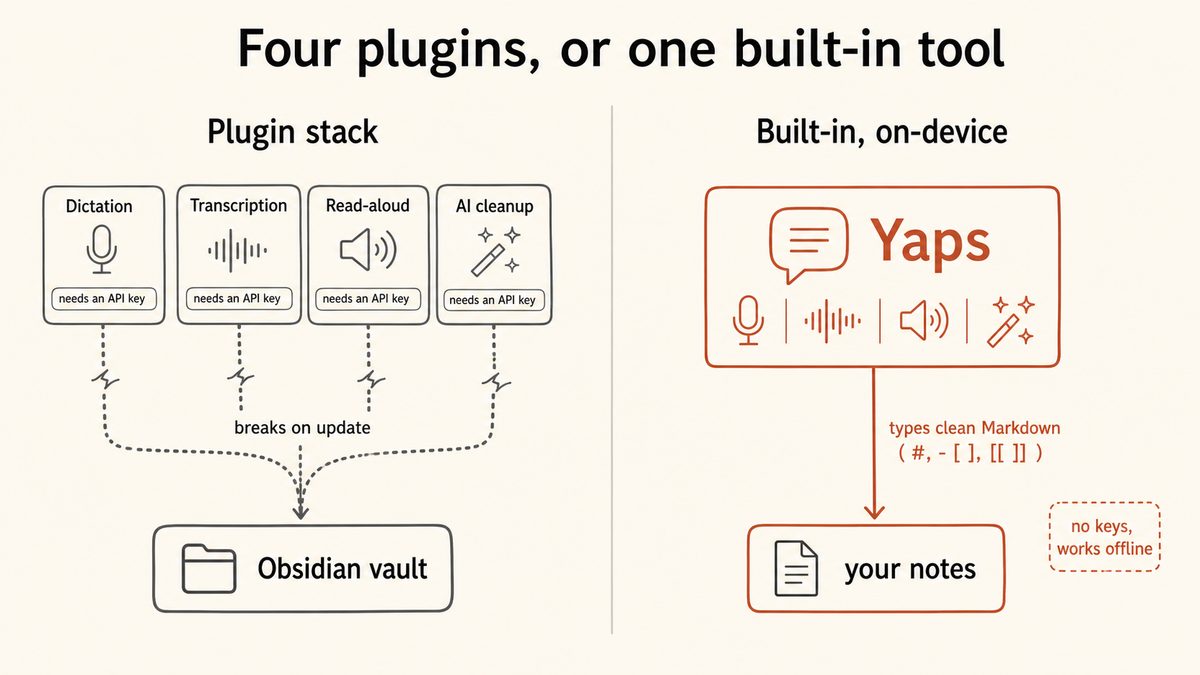
How many Obsidian plugins is too many?
There is no hard number, but startup performance starts to drag once you cross roughly 25 community plugins, because Obsidian loads every enabled plugin before the interface becomes usable. A more useful test than counting is auditing: if you cannot remember touching a plugin in the last month, it is probably too many for you. One PKM expert who runs 39 plugins considers only 8 of them truly essential, which is the real ratio to watch.
Why do my Obsidian plugins keep breaking after an update?
Every Obsidian update carries a chance that a plugin stops working, because community plugins are built against a specific version of Obsidian's internals and are maintained separately from the core app. When Obsidian changes, a plugin can break anywhere from a dead button to a workflow that no longer runs. The fix is update discipline: update in small batches, one workflow at a time, and back up your .obsidian config folder first so a bad update is a quick rollback.
Mostly, but with a real caveat you should understand. Obsidian defaults to Restricted Mode, scans every plugin version for malware and code-quality issues on a safety scorecard, and manually reviews popular plugins. The key admission from Obsidian itself is that it cannot reliably restrict plugins to specific permissions, so an installed plugin inherits Obsidian's full access to your filesystem. Keep Restricted Mode on until you consciously trust an author.
Can an Obsidian plugin contain malware or access my files?
Yes to both, which is why plugin selection matters. Because Obsidian cannot sandbox plugins, any community plugin you enable inherits full filesystem access to your computer, and there is a documented case of an Obsidian plugin being abused to deploy a remote-access trojan. The practical defence is to install one plugin at a time, check its safety scorecard, and prefer maintained, widely used plugins over abandoned or obscure ones.
How do I make Obsidian start up faster?
Start by disabling plugins you do not use, since Obsidian loads all of them before you can interact with the app. Enable Obsidian's built-in Core Plugins instead of community plugins that duplicate them. If you must keep many plugins, a lazy or delayed loader defers non-essential ones so the app opens first and loads the rest in the background. And retiring whole categories, such as moving voice and audio work to a separate app, cuts more startup weight than trimming plugins one at a time.
How do I find out which plugin is slowing Obsidian down?
Open Settings, then General, then Advanced, and use the stopwatch icon that Obsidian provides. It shows exactly how long each plugin takes to load at launch, so you can see which ones cost you seconds instead of guessing. Disable the most expensive ones first, restart, and check the numbers again to confirm the improvement.
Does Obsidian have built-in text-to-speech (read aloud)?
No, Obsidian has no built-in text-to-speech, which is why read-aloud plugins are so common. Those plugins usually need an ElevenLabs, OpenAI, or Azure API key to function, and they break like any other plugin on updates. Yaps read-aloud runs offline voices with no key and nothing wired into your vault, though the shipped Yaps voices are English speakers in practice, so a multilingual cloud reader is the better fit if you need many languages.
Does Obsidian have built-in voice-to-text or dictation?
No, Obsidian has no native dictation, so users install voice-to-text plugins that wrap cloud or local speech models and often go unmaintained. The cleaner path is a system-wide dictation tool that types into any app. With Yaps you push the hotkey and speak, and formatted Obsidian Markdown appears in the note you are in, with no voice plugin involved. See how Yaps dictation works.
What is the best Obsidian voice-to-text plugin?
The honest answer is that the most reliable option is not a plugin at all. Voice-to-text plugins depend on a hobbyist author, an API key, and Obsidian not changing under them, which is exactly the fragility this post is about. Yaps types Obsidian-native Markdown, including headings, bullets, [[wikilinks]], #tags, and - [ ] checkboxes, straight into your note via the system-wide hotkey, on-device and offline, so there is no plugin to break.
How do I transcribe an audio file inside Obsidian?
Obsidian relies on community plugins for audio transcription, most of which wrap Whisper or a cloud service like Deepgram and can be abandoned or need an API key. To remove that single point of failure, Yaps Studio imports an audio file and transcribes it to text or SRT on-device, so you do not depend on a plugin staying maintained. You can then drop the resulting Markdown into your vault.
Can I run AI in Obsidian without sending my notes to the cloud?
Yes, but the plugin routes are awkward: either a 20-minute local model setup or an AI plugin wired to an OpenAI key that costs money and exposes your notes. Yaps text cleanup runs locally on-device, removing filler words, fixing punctuation and capitalisation, and auto-formatting lists, with an optional cloud tier only if you want it. Nothing gets wired into the vault, so there is no key to manage and no plugin to break.
What are the essential Obsidian plugins I actually need?
Far fewer than you have installed. Start with Obsidian's built-in Core Plugins, backlinks, outline, word count, daily notes, canvas, and bookmarks, and add community plugins only for things the core genuinely cannot do, such as Dataview-style queries. A good discipline is to install one plugin at a time, use it for a week, and keep it only if it earned its place. For the voice, audio, and AI categories, a native app like Yaps removes the need for those plugins entirely.