Why does my Windows voice typing keep stopping on its own?
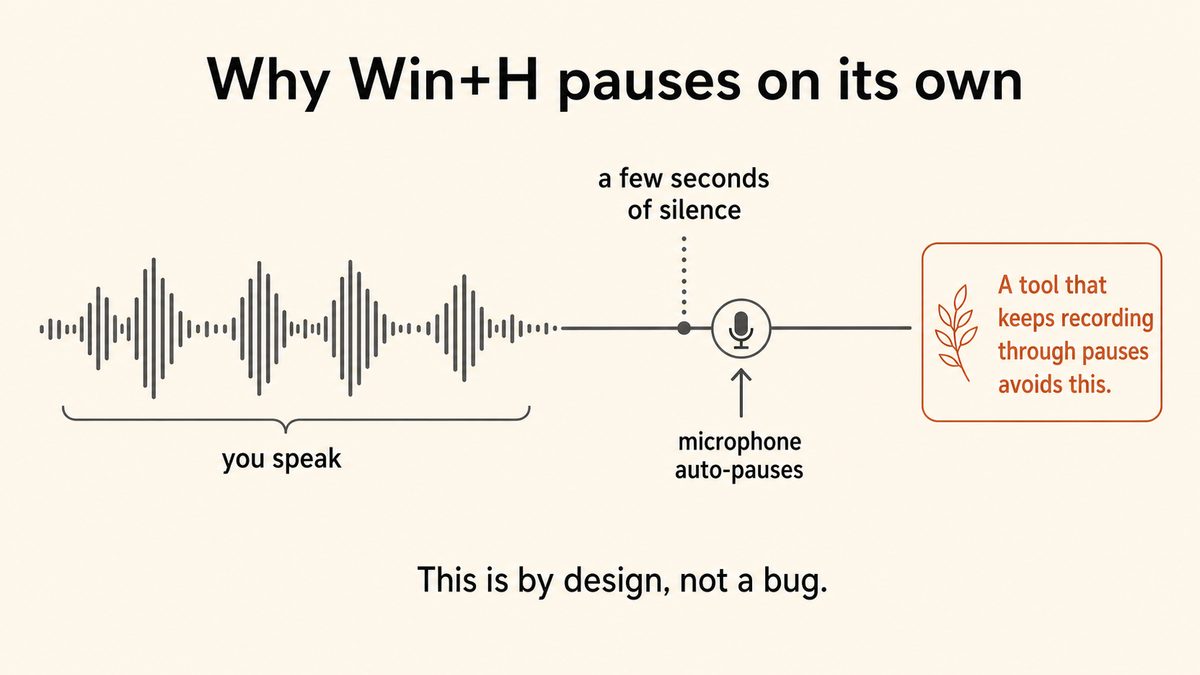
Windows Voice Typing (Win+H) keeps stopping mostly because it is designed to pause after roughly five to ten seconds of silence, and Microsoft has confirmed that behaviour is intentional and cannot be turned off. Beyond the silence pause, it also stops if your internet connection drops (Win+H is cloud-based), if your microphone level falls and reads as silence, if you click into another window, or if you start typing on the keyboard. Fix the mic, the connection, and the permission, but know that the silence pause itself has no in-Windows fix.
How do I stop Windows Voice Typing (Win+H) from pausing after silence?
You cannot fully stop it inside Windows, because the silence pause is built into the tool by design. The only workarounds are to keep a steady flow of speech so you never trigger the timeout, or to re-press Win+H every time it stops. If pausing to think is part of how you work, the durable answer is a dedicated dictation app such as Yaps that runs on your hotkey until you stop it, with no silence timer at all.
Can I turn off the auto-pause or change the silence timeout on Windows dictation?
No. The five to ten second silence timeout in Win+H is not exposed as a setting anywhere in Windows, and a Microsoft support specialist confirmed there is no means to prevent the tool from pausing itself after inactivity. There is no registry key, group policy, or hidden toggle that changes it. To get dictation that keeps listening through your pauses, you need a different tool, such as Yaps, which was built without a silence timeout.
Does Win+H voice typing need an internet connection?
Yes. Windows Voice Typing (Win+H) is cloud-based and sends your audio to Microsoft's Azure Speech service, so it requires the "Online speech recognition" setting to be on and a stable connection to work at all. A dropped or unstable connection causes it to stop or fail mid-session. If you need dictation that works on a plane or a locked-down network, use an on-device tool such as Yaps, which processes speech locally and works fully offline.
Why does dictation stop when I click into another window or start typing?
Windows Voice Typing treats a change of window focus and manual keyboard typing as signals that you want to stop dictating, so both immediately end the session. This is intentional behaviour, not a bug. A system-wide tool like Yaps keeps dictating across window switches because it listens on your hotkey rather than binding itself to a single focused field.
What replaced Windows Speech Recognition (WSR)?
Voice Access replaced Windows Speech Recognition. Microsoft retired WSR on Windows 11 version 22H2 and later in September 2024, and it now receives no further development. Voice Access is the on-device, offline-capable successor: it needs the internet only for a one-time language-file download and then works offline. It is designed primarily as a whole-PC accessibility controller, which makes it slower than a purpose-built dictation app for fast drafting.
What is the difference between Voice Typing (Win+H) and Voice Access?
Voice Typing (Win+H) is cloud dictation that types your speech into the focused text field, sending audio to Microsoft's Azure service, and it pauses on silence. Voice Access is a broader, on-device tool that lets you control the whole PC by voice (open apps, click, navigate) in addition to dictating, and it works offline after a one-time language download. Use Win+H for quick cloud dictation and Voice Access for hands-free control, or use a dedicated app like Yaps for offline dictation without the silence timeout.
Is Windows Voice Access private and does it work offline?
Voice Access is more private than Win+H because it processes speech on-device rather than streaming audio to the cloud, and it works offline after a one-time language-file download. That makes it a better privacy choice than Voice Typing for people who cannot send audio to a server. If you want on-device dictation that is also fast and includes filler-word cleanup and cross-device sync, Yaps runs entirely on your machine and never uploads your audio.
Yes. Yaps is a Windows dictation app that runs on your hotkey and keeps listening until you stop it, with no silence timeout to fight. Because it processes speech on-device it also works fully offline, keeps your audio off the cloud, dictates into any text field system-wide, and cleans up filler words and punctuation locally. It is the direct fix for the "keeps stopping when I pause" problem that Win+H cannot solve, and it is free for up to 5,000 words a week on desktop.