01
·
Try Yaps
A voice keyboard that keeps your voice on your phone.
Install Yaps on Android for offline dictation, a familiar full-size keyboard, and no screen capture. Scan the QR on desktop, or tap the Play badge on mobile.
Willow Voice は高速なクラウドファースト AI ディクテーションですが、オフライン モードはオプトインであり、サブスクリプションのみです。 2026 年に Willow Voice に代わるベスト 7 を、プライバシー、オフライン サポート、価値によってランク付けして紹介します。
Willow Voice has come a long way. What started as a Mac-only dictation tool is now cross-platform: a Windows app landed in January 2026, an iOS voice keyboard arrived in November 2025, and it handles more than 100 languages. It is fast, it auto-formats your speech, and its "Scribe" feature can turn rough talk into polished prose. It is a genuinely good product.
But there is a design decision underneath all of that, and it is the reason you might be looking for an alternative. Willow Voice is cloud-first by default. Your audio travels to its servers to be transcribed and formatted. There is an offline mode now, but it is opt-in, and the company describes it as a degraded fallback rather than the main event. The cloud is where Willow Voice does its best work.
We built Yaps the other way around. Offline-first by default. Your audio is transcribed on your own device, and for dictation it never leaves the device at all. No toggle to flip. No Pro tier to unlock. That is the wedge this whole comparison turns on.
We made Yaps, so we are biased. We will also be honest about where Willow Voice is the better pick, because there are real cases where it is.
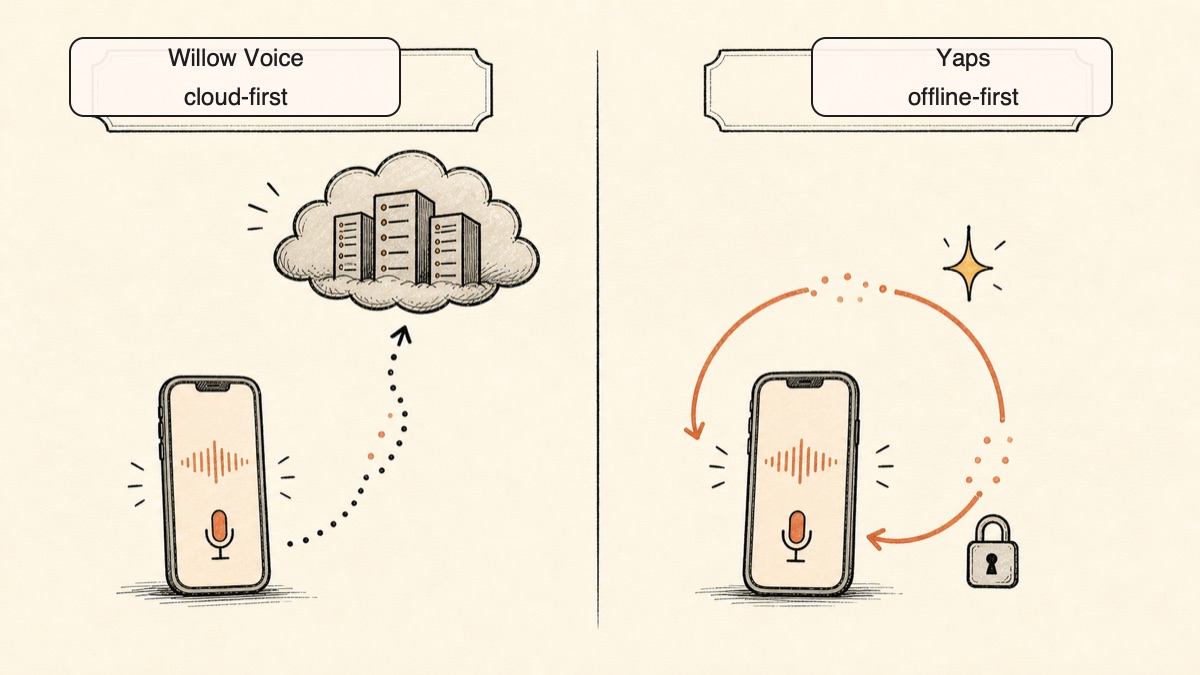
Cloud-first
Fast cloud dictation with AI rewrite and 100+ languages. Audio travels to its servers by default. Offline mode exists, but it is opt-in and a degraded fallback. Subscription only.
Offline-first
Dictation runs on your device, offline, by default. Audio never leaves the device for dictation. No account for core use, no telemetry, and a free tier of 5,000 words a week.
Here is the shortlist, ranked for most people. Deeper write-ups follow.
Yaps is an offline-first voice toolkit. The headline product ships on Android, where the Yaps keyboard has its own dictation button built in, and there is a Mac app for macOS 13.0 and up on Apple Silicon. A Windows build is in development. Yaps does not have an iOS app, so if iPhone dictation is your main need, jump to Willow Voice or Wispr Flow below.
The reason Yaps leads this list is the default. With Willow Voice, dictation runs in the cloud unless you opt into the slower offline mode. With Yaps, dictation runs on your own device, offline, with no toggle to find. For dictation, your audio never leaves the device. There is nothing to send, so there is nothing to leak, log, or subpoena.
That changes the privacy story from a promise into an architecture. Willow Voice protects your data with strong contracts: SOC 2, HIPAA on its Enterprise tier, zero data retention, and a default Private Mode. Those are real and worth respecting. But they are policies sitting on top of a pipeline that still routes your voice to a server. Yaps does not need the contract because the data never travels in the first place.
Yaps is also more than dictation. Dictation is the front door, but the app includes:
The free tier is 5,000 words a week, recurring, with no account required for core use. That is more than double Willow Voice's free allowance of 2,000 words a week. Paid plans are Basic at $15 a month and Max at $25 a month, with roughly 20 percent off on annual billing. To trigger dictation you push the Yaps hotkey: the Fn key on Mac, the dictation button on the Yaps keyboard on Android.
Best for: anyone who wants dictation that is private by default, works offline without a setting to flip, and comes bundled with a full voice toolkit rather than just transcription.
Trade-off: English only, no iOS app, and Yaps does not do the automatic cloud rewrite of rough speech into polished prose that Willow Voice's Scribe does.
If you want what Willow Voice is, just from a different team, Wispr Flow is the closest match. It is fast, polished, and cross-platform across Mac, Windows, and iOS, with strong AI formatting that cleans up filler and punctuation as you speak. The experience is smooth and the learning curve is short.
Best for: people who like the cloud dictation model and want a well-funded, well-designed competitor with mature AI formatting. Our Wispr Flow alternative roundup and Wispr Flow comparison go deeper.
Trade-off: cloud only. Your audio leaves your device on every dictation, the app is heavier than a local tool, and it is subscription based. Pricing runs about $15 a month or roughly $144 a year, with a free tier of 2,000 words a week.
Aqua Voice takes a different angle: it focuses on getting your exact words down accurately over long stretches, then letting you edit what you said by voice. Instead of an AI quietly rewriting your speech, you keep your phrasing and revise it out loud. For writers who care about voice in the literary sense, that distinction matters.
Best for: long-form drafting where accuracy and authorial control beat speed. Our Aqua Voice alternative write-up covers the field.
Trade-off: it needs a network connection, and editing short messages by voice can feel slower than just typing them. Pricing is roughly $8 a month, or about $96 a year.
SuperWhisper is the tool for Mac users who want full local control. You download speech models and run them entirely offline on Apple Silicon, with granular control over the speed-versus-accuracy trade-off. Nothing touches the cloud once you are set up.
Best for: Mac power users and privacy maximalists who want to pick their own models and keep everything on the machine.
Trade-off: Mac and Apple Silicon only, with a setup curve that is steeper than a polished consumer app. Pricing is around $8.49 to $9.99 a month, with a lifetime purchase option.
VoiceInk is an open-source local dictation app for Mac. It processes your speech on-device and offers optional AI enhancement, and because the code is open, you can read exactly what happens to your voice. For the budget-conscious and the audit-minded, it is a strong pick.
Best for: developers and privacy-focused users who want transparent, local dictation without a subscription.
Trade-off: Mac-focused, with less hand-holding than commercial tools. Pricing is roughly $25 to $39 as a one-time purchase.
MacWhisper is the veteran for turning recorded audio into text. It runs Whisper locally and excels at batch transcription of interviews, lectures, and podcasts. If your need is files rather than live typing, it is excellent.
Best for: researchers, journalists, and podcasters with stacks of recordings to transcribe.
Trade-off: it is file-first, not a real-time keyboard replacement, so it does not cover the live dictation that Willow Voice is built for. Pricing is around $69 as a one-time purchase, with a free tier and a Pro upgrade.
Apple Dictation is built into macOS, costs nothing, and runs on-device on Apple Silicon. Press Fn twice and start talking. For zero cost and zero install, it is the obvious floor.
Best for: people who want a free, already-installed option and do not need anything fancy.
Trade-off: weaker accuracy and formatting, no AI cleanup, and none of the toolkit features the other picks offer. Free.
Two more worth a mention. Dragon Professional remains the legacy choice for enterprise and medical dictation on Windows, with deep custom vocabularies but a heavy footprint and a steep price. Talon Voice is built for hands-free control and accessibility, letting you drive your whole computer by voice rather than just dictate into it.
Credit where it is due. Willow Voice is not a weak product, and the honest case for it is real.
Speed. Willow Voice claims latency around 200 milliseconds, fast enough that text appears to keep pace with your speech. Its whole design favors speed, and in daily use it feels quick.
AI rewrite with Scribe. The standout feature is Willow Scribe, which turns rough, rambling notes into clean, polished prose. It learns your style over time and builds a custom vocabulary automatically. If you think out loud and want the tool to do the cleanup for you, this is genuinely useful.
Languages. Willow Voice handles more than 100 languages. Yaps is English only. If you dictate in anything other than English, this is decisive, and it is the single biggest reason to choose Willow Voice over Yaps.
Cross-platform reach today. Willow Voice ships on Mac, on Windows since January 2026, and as an iOS and iPadOS voice keyboard since November 2025. Yaps ships on Android and Mac, with Windows in development and no iOS app. If you live on an iPhone, Willow Voice is available now and Yaps is not.
Low memory footprint. Willow Voice runs as a native, light desktop app rather than a heavy resident process.
Strong contractual privacy. SOC 2 Type II, HIPAA on Enterprise, zero data retention, end-to-end encryption, and a default Private Mode. For organizations that need contractual assurances rather than architectural ones, that paperwork matters.
The core difference is architecture. Willow Voice is cloud-first with opt-in offline. Yaps is offline-first by default. Everything below flows from that one choice.
| Feature | Yaps | Willow Voice |
|---|---|---|
| Offline by default | Yes, no toggle | Opt-in, degraded fallback |
| Audio stays on device (dictation) | Always | No, cloud by default |
| Account required for core use | No | Yes |
| Telemetry | None | Cloud-routed |
| Free tier (per week) | 5,000 words | 2,000 words |
| Text-to-speech | Yes (18+ voices) | No |
| Voice notes and audio studio | Yes | No |
| Android voice keyboard | Yes, shipping | Planned / unclear |
| iOS voice keyboard | No | Yes |
| 100+ languages | No (English) | Yes |
| Automatic AI rewrite | No | Yes (Scribe) |
Both tools can work without the cloud, but the defaults are opposite, and defaults are what people actually use. Yaps transcribes on your device with no setting to find. The first time you dictate, on a plane or in a basement, it just works the same as it does on wifi.
Willow Voice runs in the cloud unless you turn on its offline mode, and the company frames that mode as a fallback that gives up some quality. So the version of Willow Voice most people use, most of the time, is sending audio to a server. The private path is available, but it is the road less traveled and it is the slower one.
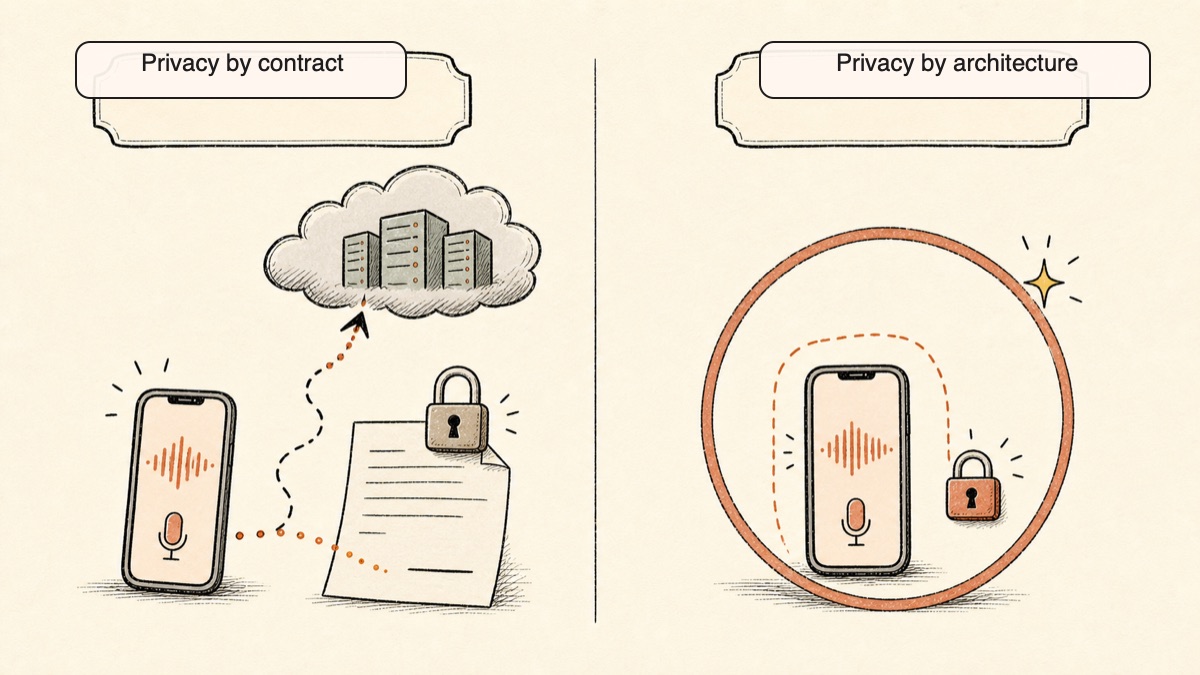
This is the part worth slowing down on. Willow Voice has serious privacy credentials: SOC 2 Type II, HIPAA on Enterprise, zero retention, encryption, a default Private Mode. Those are good. They are also promises about what a company does with data it receives.
Yaps makes a different kind of guarantee. For dictation, the audio is processed on your device and never sent anywhere. There is no server to retain anything, no policy to trust, no breach that can expose what was never transmitted. A contract can change. A data flow that does not exist cannot. For why this matters for voice specifically, see what your voice data actually reveals about you.
Willow Voice gives you 2,000 words a week free. Yaps gives you 5,000, recurring, and lets you use the core features without making an account. For a casual dictator, that gap can be the difference between hitting a wall mid-week and never thinking about limits at all.
The other gap is scope. Willow Voice does dictation, and it does it well. Yaps does dictation plus text-to-speech, voice notes, an audio studio for transcribing imported files offline, voice commands, and searchable history. One install covers reading, capturing, generating, and automating, not just typing. And on mobile, where Willow Voice put its energy into an iOS keyboard, Yaps put its energy into an Android one, so the two products lead on different phones.
Both tools take privacy seriously. They just locate it in different places.
Willow Voice locates privacy in contracts and controls. It carries SOC 2 Type II, offers HIPAA coverage on its Enterprise tier, commits to zero data retention, encrypts data end to end, and runs a default Private Mode. But by default your audio still travels to its servers to be transcribed and formatted, where it relies on third-party language models for the AI rewrite. The protection is strong, and it is contractual: it depends on the company doing what it says with data it holds.
Yaps locates privacy in architecture. For dictation, nothing is sent. The audio is transcribed on your device, there is no telemetry, and you do not need an account to use the core features. Cloud text-to-speech voices, which are optional and clearly labeled, send text rather than audio, and only if you choose them. Your voice input is always handled locally. The difference is simple: Willow Voice promises to protect what it receives, and Yaps does not receive it.
| Yaps | Willow Voice | |
|---|---|---|
| Free tier | 5,000 words/week (recurring) | 2,000 words/week (recurring) |
| Entry paid plan | Basic $15/mo | Pro $15/mo (~$12/mo annual) |
| Higher plan | Max $25/mo | Team $12/seat/mo (3-seat min) |
| Annual discount | ~20% off | ~$144/yr on Pro |
| One-time / lifetime | No | No |
| Account for free use | Not required for core use | Required |
Both are subscription products with no lifetime option, so over three years either one runs to several hundred dollars. If a one-time purchase is a hard requirement, look at SuperWhisper, VoiceInk, or MacWhisper above instead. Between these two, Yaps gives you a larger free tier, no account requirement for core use, and a wider feature set at the same entry price.
Choose Yaps if:
Choose Willow Voice if:
We want to be straight about this. There are real situations where Willow Voice is the right call.
If you dictate in more than one language. Willow Voice handles over 100 languages. Yaps is English only. This is not close. If your work crosses languages, Willow Voice wins outright.
If you are on iPhone or iPad. Willow Voice has shipped an iOS and iPadOS voice keyboard since November 2025. Yaps has no iOS app. If your main device is an iPhone, Willow Voice is available and Yaps is not.
If you want the AI to do the cleanup. Willow Scribe automatically rewrites rough, spoken notes into polished prose and learns your style across a synced profile. Yaps gives you your words; it does not auto-rewrite them in the cloud. If you want to think out loud and let the tool tidy up, Scribe is a real advantage.
If you are on Willow Voice and curious about Yaps, the move is low-risk. The free tier lets you run both side by side and compare them in your real workflow.
Get Yaps from yaps.ai. On Android, install the Yaps keyboard and enable it in your phone settings. On Mac, download the app for macOS 13.0 or later on Apple Silicon. You do not need to remove Willow Voice; both can run at once during your evaluation.
On Mac, dictation is the Fn key, with hold-to-record and tap-to-toggle on the same key. On Android, it is the dictation button on the Yaps keyboard. Push the Yaps hotkey, talk, and watch clean text appear at your cursor. There is no new gesture to learn.
This is the point of switching, so test it. Turn off wifi and dictate. With Yaps it behaves exactly as it does online, because the transcription was always local. That is the offline-first default in action, and it is the experience you do not get from a cloud-first tool without opting in.
The biggest adjustment is discovering features Willow Voice does not have. Spend a day with each:
Run both for a week. If you dictate in another language, live on an iPhone, or lean on automatic AI rewrite, Willow Voice may stay your pick, and that is fine. If privacy by default, offline that just works, and a full toolkit matter more, Yaps will have earned the switch.
Contractual privacy protects the data a company receives. Architectural privacy means the company never receives it. For dictation, Yaps keeps the audio on your device, so there is nothing to protect in the first place.
The Yaps Team
Install Yaps on Android for offline dictation, a familiar full-size keyboard, and no screen capture. Scan the QR on desktop, or tap the Play badge on mobile.
Yes. Yaps is the strongest offline alternative to Willow Voice, because it transcribes dictation on your own device by default rather than as an opt-in mode. There is no toggle to flip and no quality penalty: offline is simply how Yaps works. Willow Voice does offer an offline mode, but it is opt-in and the company describes it as a degraded fallback to its cloud default.
Partly. Willow Voice has an offline mode, but it is opt-in and runs as a degraded fallback, while the default behavior sends your audio to its servers for transcription and AI formatting. So out of the box, most Willow Voice dictation happens in the cloud. If offline is your priority, an offline-first tool like Yaps makes it the default rather than the exception.
Willow Voice has strong contractual privacy: SOC 2 Type II, HIPAA on its Enterprise tier, zero data retention, end-to-end encryption, and a default Private Mode. But by default your audio still travels to its servers to be processed. The protection is real, and it is a promise about data the company receives. A tool like Yaps keeps dictation audio on your device, so there is no transfer to protect in the first place.
For most Mac users who want privacy and offline support, Yaps is the best AI dictation app, running on macOS 13.0 and up on Apple Silicon with on-device transcription. If you want to download and tune your own local models, SuperWhisper is the power-user pick, and VoiceInk is the cheap open-source one. Willow Voice and Wispr Flow are the strongest cloud options if you prefer the cloud model. See our Mac dictation comparison for the full field.
They are close peers, both cloud-first dictation tools with fast AI formatting across Mac, Windows, and iOS. Willow Voice leans on its Scribe rewrite and 100+ languages; Wispr Flow is known for polished formatting and a smooth feel. Both send audio to the cloud by default, so if privacy or offline use is the deciding factor, an offline-first tool like Yaps changes the calculation for either one.
Pick Willow Voice for fast cloud dictation with automatic AI rewrite, and pick Aqua Voice for long-form accuracy where you want to keep your exact words and edit them by voice. Willow Voice tidies your speech for you; Aqua Voice preserves your phrasing and lets you revise it. Both rely on a network connection, so neither is the offline answer that Yaps is.
Willow Voice has a free tier of 2,000 words a week, an Individual Pro plan at $15 a month (around $12 a month billed annually, roughly $144 a year), a Team plan at $12 per seat a month with a three-seat minimum, and custom Enterprise pricing. There is no lifetime option. Yaps starts at the same $15 a month on Basic but offers a larger free tier of 5,000 words a week.
Yes. Yaps has a recurring free tier of 5,000 words a week, more than double Willow Voice's 2,000, and it does not require an account for core use. Apple Dictation is free and built into macOS. VoiceInk is open source with a low one-time cost. Among these, Yaps gives you the most generous ongoing free allowance plus a full voice toolkit.
Willow Voice ships on Mac, Windows, and as an iOS and iPadOS voice keyboard, but an Android app is planned or unclear rather than confirmed shipping. If you want a voice keyboard on Android today, Yaps ships one, with a dictation button built into the Yaps keyboard. Our Wispr Flow alternative for Android covers the wider Android landscape.
Willow Voice offers HIPAA coverage on its Enterprise tier, alongside SOC 2 Type II and zero data retention. That makes it a candidate for regulated organizations that need contractual assurances. If you would rather keep audio on the device entirely so that protected health information is never transmitted, an on-device tool like Yaps removes the transfer that compliance paperwork is built to govern.
Accuracy depends on your accent, vocabulary, and environment, so test with your own voice. Willow Voice claims 98 percent or higher accuracy and favors speed, while Aqua Voice optimizes for keeping your exact words in long-form. Yaps transcribes on-device with accuracy that holds its own against cloud tools, and because it is free to start, you can measure it on your own speech before committing.
The main reason to switch is the default. Willow Voice is cloud-first, so your audio travels to its servers unless you opt into a degraded offline mode, and it requires an account and a subscription. Yaps is offline-first: dictation runs on your device, audio never leaves it, no account is needed for core use, the free tier is larger, and you get text-to-speech, voice notes, an audio studio, and voice commands in the same app.
Yes. Willow Voice is alive and growing in 2026. It went through Y Combinator's X25 batch, raised a seed round of roughly four million dollars or more, and expanded to Windows in January 2026 and an iOS keyboard in late 2025. It is an active, well-funded product, which is exactly why a fair alternatives comparison treats it as a serious competitor rather than a fading one.
Yaps is the best Willow Voice alternative for privacy, because it protects your voice by architecture rather than by contract. For dictation, the audio is transcribed on your device and never sent anywhere, there is no telemetry, and no account is required for core use. That is a stronger guarantee than any policy on top of a cloud pipeline, since there is no transmitted data to retain, log, or expose.
Yes, for most people a modern app replaces Dragon comfortably. Dragon Professional still suits legacy enterprise and medical setups on Windows that depend on deep custom vocabularies, but it is heavy and expensive. For everyday dictation, Yaps, Willow Voice, Wispr Flow, and SuperWhisper are lighter, faster to set up, and far cheaper, with Yaps adding on-device privacy and offline support by default.
Willow Voice is a strong, fast, cloud-first dictation tool that has grown into a genuine cross-platform product with AI rewrite and 100+ languages. If you dictate in another language, live on an iPhone, or want the cloud to polish your rough speech automatically, it is the right pick, and we recommend it for those cases without hesitation.
For everyone else, Yaps is the better default. It dictates on your device, offline, by default, so your audio never leaves the device and your privacy comes from architecture rather than a contract. It hands you a larger free tier, no account requirement, and a full voice toolkit instead of dictation alone. The fastest way to feel the difference is to turn off wifi and start talking. Try both in your real workflow, and let that test decide.