コンテンツにスキップ
エントリー 04GUIDE06 JUL 2026

Obsidian プラグイン カオス?より穏やかにメモを取る組み込みの方法

あなたはオブシディアンのアイデアが気に入りました。その後、保管庫はメンテナンス プロジェクトに変わりました。プラグインは更新時に中断され、相互に競合し、起動が完了するまで積み重なっていきます。ここでは、プラグイン税を削減するための正直で段階的な方法と、メモに直接入力できるデバイス上のネイティブ ツールを使用して完全に廃止できる不安定な 4 つのカテゴリを紹介します。

Obsidian プラグイン カオス?より穏やかにメモを取る組み込みの方法
0.0

序文

You loved the idea of Obsidian. A local-first vault, plain Markdown files you own, and a plugin for everything. Then, somewhere around your twenty-fifth plugin, the idea quietly turned into a maintenance project.

A plugin breaks after an update. Two plugins start fighting over how links render. Startup crawls because Obsidian loads every plugin before you can type a single word. Your carefully tuned desktop setup throws errors the moment it syncs to your phone. You open the vault to write and end up reading plugin documentation instead.

This post does two things. First, it gives you a genuinely useful way to reduce the chaos with the plugins you keep. Then it makes an honest case for retiring whole categories of flaky plugins, the voice and audio and AI ones, by moving them out of the vault entirely.

1.0

Obsidian がプラグイン管理の仕事に変わる理由

Obsidian ships a deliberately minimal core. The philosophy is that the app stays small and fast, and almost everything beyond writing and linking gets pushed to community plugins. That is a feature, not a bug, and it is why the ecosystem is so deep.

The cost is that the burden of stitching those plugins together lands entirely on you. Every plugin comes with a hidden tax. You learn its settings, you maintain its config, you check for updates, and you hope the next Obsidian release does not break it. Multiply that across thirty plugins and you are running a small system administration job on top of your note-taking.

Then the failure modes compound. Every Obsidian update carries a chance that a plugin stops working, from a button that no longer does anything to a break that derails an entire workflow. Plugins conflict with each other: one that tweaks how links display can interfere with one that tracks backlinks, and suddenly both misbehave. And plugins get abandoned. A popular Copy-as-HTML plugin sat unmaintained for over three years before a change finally broke it, and everyone relying on it was stranded.

2.0

プラグインが多すぎると実際にかかるコスト

The chaos is not abstract. It shows up in four concrete ways that every heavy Obsidian user eventually feels.

01 / Directory Bloat
2,500+
Community plugins by 2026, most of them nice-to-have overhead you have to test to find the few that matter
02 / Startup Penalty
~25
Plugins is where startup starts to drag; Obsidian loads them all before you can interact, stretching open time toward a minute on heavy vaults
03 / The Power-User Paradox
8
Plugins one PKM expert calls truly essential, while actually running 39 of them
04 / Mobile Breakage
Many
Community plugins are desktop-only, untested on phones, and throw errors once your vault syncs across devices

The performance penalty is the one people notice first. Because Obsidian loads every enabled plugin before the interface becomes usable, a vault with thirty or forty plugins can take real seconds to open, and it is worse on mobile where the hardware is slower and many desktop plugins were never tested.

The security cost is the one people notice last, and it matters most. Obsidian cannot reliably sandbox plugins or restrict them to specific permissions, so a community plugin inherits Obsidian's full access to your computer's filesystem. That is not a hypothetical concern. There is a documented case of an Obsidian plugin being abused to deploy a remote-access trojan. When you install a plugin, you are trusting its author and every dependency it pulls in with your machine.

I spent more time reading plugin documentation and fixing plugin conflicts than actually developing my ideas.

A sentiment shared across every Obsidian community thread about plugin fatigue

3.0

まず、すでに抱えている混乱を軽減します

Before you retire anything, get honest about what you actually use. This is the part that builds a calmer vault no matter which tools you keep, and it takes about an hour. Work through it in order.

Step 01

Audit what you actually use15 min

Open Settings, then Community plugins, and be honest about which ones you touched in the last month. Disable everything else. Do not just ignore an unused plugin; disabling it is what removes the startup and conflict cost.

Step 02

Debug your startup time5 min

Go to Settings, then General, then Advanced, and open the stopwatch icon. It shows exactly which plugins cost you seconds at launch, so you can cut the expensive ones first instead of guessing.

Step 03

Prefer core features over plugins10 min

Enable Obsidian's built-in Core Plugins first: word count, backlinks, outline, canvas, daily notes, bookmarks. Many people install a community plugin that simply duplicates something the core already does for free and does not break.

Step 04

Back up before you update2 min

Before an Obsidian version bump or a batch of plugin updates, copy your .obsidian config folder, or the whole vault. A bad update then becomes a 30-second rollback instead of a lost evening.

Step 05

Update with discipline, stay security-awareongoing

Do not update everything the moment a badge appears. Update in small batches, one workflow at a time, so you can tell which one broke something. Keep Restricted Mode on until you consciously trust an author, and check the plugin's safety scorecard before installing.

Two habits make the biggest difference long term. Be ruthlessly selective with new plugins: install one at a time, use it for a week, and keep it only if it earned its place. Treat every install as a maintenance liability, not a free win. And if you already run so many plugins that startup is painful, a lazy or delayed loader is a reasonable last resort. It defers non-essential plugins so the app opens first and loads the rest in the background.

4.0

より大きな動き: プラグイン カテゴリ全体を廃止する

Cutting individual plugins helps. But the largest single reduction in maintenance surface is not disabling one plugin at a time. It is removing an entire category of them.

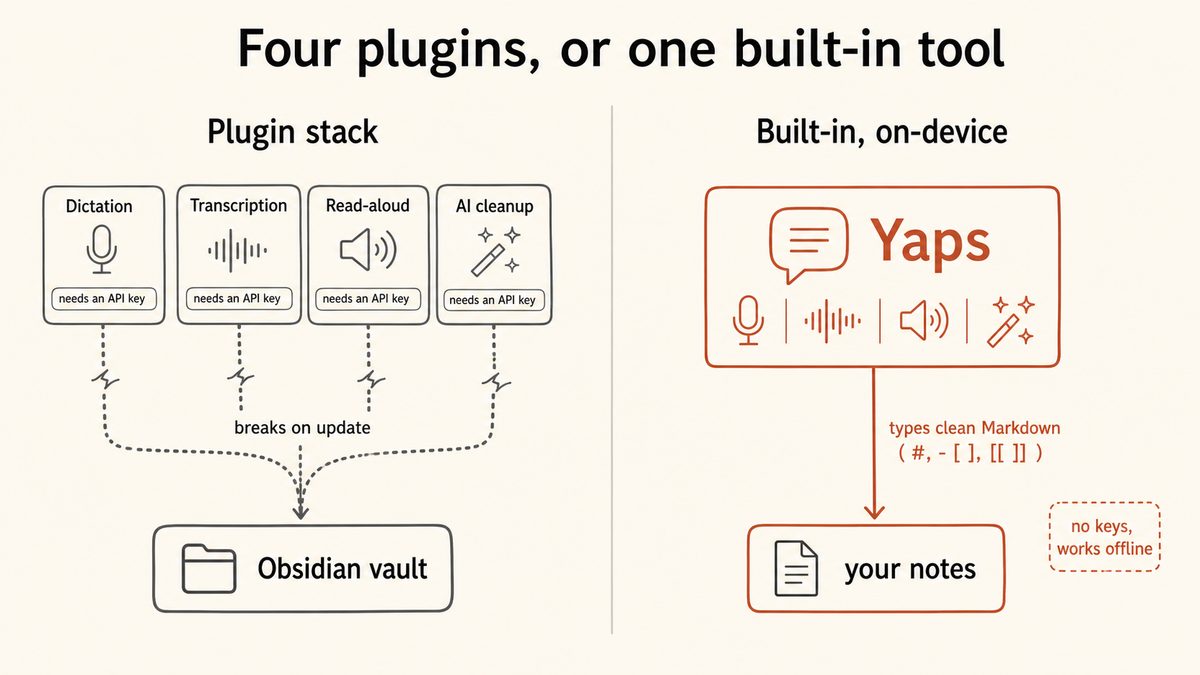
Here is the insight the plugin-fatigue advice usually misses. Four of the flakiest, most frequently abandoned plugin categories, voice-to-text, audio-file transcription, read-aloud, and AI cleanup, all exist because Obsidian's minimal core does not do those things. So people bolt on cloud plugins that need API keys, break on updates, and are maintained by a single hobbyist. If a native tool covers those four jobs, you can delete that whole stack of community plugins in one move.

That native tool is Yaps. It is not an Obsidian plugin, which is exactly the point. It runs as its own app alongside Obsidian, and it does the media and AI work on-device so there is nothing inside your vault to babysit.

Plugin stack

Four fragile plugins, each a single point of failure

A Whisper-wrapper plugin for dictation, a separate transcription plugin, a read-aloud plugin wired to an ElevenLabs or OpenAI key, and an AI-summarise plugin wired to another key. Every one can break on the next Obsidian update, and every one shares your vault's full filesystem access.

Built-in, on-device (Yaps)

One maintained app, nothing wired into the vault

Dictation, audio-file transcription, read-aloud, and text cleanup are first-party Yaps features, not plugins. The core runs on-device and offline, needs no API key, and there is no plugin config to break when Obsidian updates.

Voice-to-text: dictate straight into Obsidian, no voice plugin

This is the strongest and most verified wedge. Push the Yaps hotkey, talk, and formatted Obsidian Markdown appears in the note you are already in. No plugin sits in between.

Yaps writes clean, Obsidian-native Markdown when you dictate: headings with # and ##, bullet points, todo checkboxes as - [ ], wikilinks as [[ ]], tags as #tag, callouts, code blocks, and inline code. It works because Yaps types system-wide into whatever field has focus, so Obsidian is just another app it types into. On Mac and Windows that is the Fn key, held to record or tapped to toggle. On Android it is the dictation button on the Yaps keyboard, which works inside the Obsidian mobile app.

Yaps dictation is multilingual, with about 25 languages auto-detected from your speech, so you never switch a language setting. And it runs on-device, so the audio never leaves your machine. That single capability retires the entire voice-to-text plugin category, the abandoned Whisper wrappers included, along with the API keys and breaking updates that came with them. See how Yaps dictation works for the full picture.

Audio-file transcription: import a recording, get text or SRT

If you keep an audio-transcription plugin around for the occasional interview or voice memo, that is another single point of failure you can remove. Yaps Studio imports an audio file and transcribes it to text or SRT on-device. An abandoned transcription plugin is no longer the thing standing between you and a transcript.

Read-aloud: offline text-to-speech with no key to wire up

Obsidian has no built-in text-to-speech, which is why read-aloud plugins are so common, and why they so often need an ElevenLabs, OpenAI, or Azure key to work at all. Yaps read-aloud runs offline voices with no key and nothing to break on the next update. To be honest about the limits: the shipped Yaps voices are English speakers in practice, so if you need read-aloud across many languages, a multilingual cloud reader is still the better fit there.

AI cleanup: local text tidying without an API key

The private route competitors offer for AI in Obsidian is usually a 20-minute local model setup, or an AI plugin wired to an OpenAI key that costs money and exposes your notes. Yaps text cleanup runs locally: it removes filler words and self-corrections, fixes punctuation and capitalisation, and auto-formats lists, all on-device, with an optional cloud tier if you want it. Nothing gets wired into the vault.

Scroll →
Plugin category Typical Obsidian setup With Yaps instead
Voice-to-text / dictation Whisper-wrapper plugin, API key, breaks on update On-device, types Markdown straight in, ~25 languages, no plugin
Audio-file transcription Deepgram / Whisper plugin, cloud key or fiddly setup Studio imports a file to text or SRT on-device
Read-aloud / text-to-speech Bolted-on plugin needing ElevenLabs / OpenAI / Azure key Offline voices, no key (English voices in practice)
AI cleanup / summarise Copilot-style plugin, OpenAI key or 20-min local setup Local cleanup, no key wired into the vault
Cross-device sync of plugin data data.json merge conflicts, restart on each device Encrypted P2P Vault sync for Yaps notes (premium)

There is one more quiet benefit. Yaps stores its own notes as plain Markdown files, one folder you own, each with lightweight frontmatter. That folder is ordinary Markdown on disk, so you can open it in Obsidian directly, and Yaps voice notes also export to .md and .txt. It is your files in your filesystem, the same format that has outlived every cloud notes app of the last decade. For a broader look at how this plays out as a capture workflow, see our guide to building a voice-first second brain.

Diagram contrasting four fragile Obsidian plugins (dictation, transcription, read-aloud, AI cleanup) each needing its own API key and prone to breaking on updates, against one built-in on-device app that does all four and types clean Markdown into the vault.

5.0

正直な限界: Obsidian に残るもの

Yaps is not an Obsidian replacement, and it would be dishonest to pretend otherwise. It is not a graph-based PKM. It has no graph view and no backlink graph panel of its own. It can type a [[wikilink]] into your Obsidian note, but it does not render an Obsidian-style graph, and it never will.

So keep Obsidian for what Obsidian is genuinely great at.

Stay in Obsidian for

  • The graph view and the backlink graph panel
  • Deep linking workflows and Dataview-style queries
  • The rich community ecosystem of plugins you actually use
  • Power-user setups you have tuned and genuinely love
  • Canvas, publish, and the extensibility that makes Obsidian, Obsidian

Hand the flaky layer to Yaps

  • Voice-to-text, typed straight into Obsidian, no plugin
  • Audio-file transcription to text or SRT, on-device
  • Read-aloud with offline voices, no API key
  • Local AI text cleanup, nothing wired into the vault
  • Plain Markdown voice notes in a folder Obsidian can open

There are really two ways to use this. If you love your Obsidian setup, keep it and let Yaps remove the maintenance tax on just the voice, audio, and AI layer, the plugin categories that break most often. Or, if you want off the plugin treadmill entirely and are happy with voice notes, kanban, checklists, and search instead of a deep plugin ecosystem, Yaps works as a calmer standalone Markdown notes home. Either way, an unmaintained hobby plugin never again decides whether your dictation or read-aloud still works next month.

01 · Try Yaps

Keep Obsidian. Retire the plugins that keep breaking.

Yaps dictates Obsidian-native Markdown straight into your notes, transcribes audio files, reads text aloud, and cleans up messy dictation, all on-device, all without a plugin to babysit. Free tier: 5,000 words a week on desktop, 1,000 on mobile. Android, Windows, and macOS, with a Chrome extension too. iOS coming soon.

6.0

よくある質問

How many Obsidian plugins is too many?

There is no hard number, but startup performance starts to drag once you cross roughly 25 community plugins, because Obsidian loads every enabled plugin before the interface becomes usable. A more useful test than counting is auditing: if you cannot remember touching a plugin in the last month, it is probably too many for you. One PKM expert who runs 39 plugins considers only 8 of them truly essential, which is the real ratio to watch.

Why do my Obsidian plugins keep breaking after an update?

Every Obsidian update carries a chance that a plugin stops working, because community plugins are built against a specific version of Obsidian's internals and are maintained separately from the core app. When Obsidian changes, a plugin can break anywhere from a dead button to a workflow that no longer runs. The fix is update discipline: update in small batches, one workflow at a time, and back up your .obsidian config folder first so a bad update is a quick rollback.

Are Obsidian community plugins safe?

Mostly, but with a real caveat you should understand. Obsidian defaults to Restricted Mode, scans every plugin version for malware and code-quality issues on a safety scorecard, and manually reviews popular plugins. The key admission from Obsidian itself is that it cannot reliably restrict plugins to specific permissions, so an installed plugin inherits Obsidian's full access to your filesystem. Keep Restricted Mode on until you consciously trust an author.

Can an Obsidian plugin contain malware or access my files?

Yes to both, which is why plugin selection matters. Because Obsidian cannot sandbox plugins, any community plugin you enable inherits full filesystem access to your computer, and there is a documented case of an Obsidian plugin being abused to deploy a remote-access trojan. The practical defence is to install one plugin at a time, check its safety scorecard, and prefer maintained, widely used plugins over abandoned or obscure ones.

How do I make Obsidian start up faster?

Start by disabling plugins you do not use, since Obsidian loads all of them before you can interact with the app. Enable Obsidian's built-in Core Plugins instead of community plugins that duplicate them. If you must keep many plugins, a lazy or delayed loader defers non-essential ones so the app opens first and loads the rest in the background. And retiring whole categories, such as moving voice and audio work to a separate app, cuts more startup weight than trimming plugins one at a time.

How do I find out which plugin is slowing Obsidian down?

Open Settings, then General, then Advanced, and use the stopwatch icon that Obsidian provides. It shows exactly how long each plugin takes to load at launch, so you can see which ones cost you seconds instead of guessing. Disable the most expensive ones first, restart, and check the numbers again to confirm the improvement.

Does Obsidian have built-in text-to-speech (read aloud)?

No, Obsidian has no built-in text-to-speech, which is why read-aloud plugins are so common. Those plugins usually need an ElevenLabs, OpenAI, or Azure API key to function, and they break like any other plugin on updates. Yaps read-aloud runs offline voices with no key and nothing wired into your vault, though the shipped Yaps voices are English speakers in practice, so a multilingual cloud reader is the better fit if you need many languages.

Does Obsidian have built-in voice-to-text or dictation?

No, Obsidian has no native dictation, so users install voice-to-text plugins that wrap cloud or local speech models and often go unmaintained. The cleaner path is a system-wide dictation tool that types into any app. With Yaps you push the hotkey and speak, and formatted Obsidian Markdown appears in the note you are in, with no voice plugin involved. See how Yaps dictation works.

What is the best Obsidian voice-to-text plugin?

The honest answer is that the most reliable option is not a plugin at all. Voice-to-text plugins depend on a hobbyist author, an API key, and Obsidian not changing under them, which is exactly the fragility this post is about. Yaps types Obsidian-native Markdown, including headings, bullets, [[wikilinks]], #tags, and - [ ] checkboxes, straight into your note via the system-wide hotkey, on-device and offline, so there is no plugin to break.

How do I transcribe an audio file inside Obsidian?

Obsidian relies on community plugins for audio transcription, most of which wrap Whisper or a cloud service like Deepgram and can be abandoned or need an API key. To remove that single point of failure, Yaps Studio imports an audio file and transcribes it to text or SRT on-device, so you do not depend on a plugin staying maintained. You can then drop the resulting Markdown into your vault.

Can I run AI in Obsidian without sending my notes to the cloud?

Yes, but the plugin routes are awkward: either a 20-minute local model setup or an AI plugin wired to an OpenAI key that costs money and exposes your notes. Yaps text cleanup runs locally on-device, removing filler words, fixing punctuation and capitalisation, and auto-formatting lists, with an optional cloud tier only if you want it. Nothing gets wired into the vault, so there is no key to manage and no plugin to break.

What are the essential Obsidian plugins I actually need?

Far fewer than you have installed. Start with Obsidian's built-in Core Plugins, backlinks, outline, word count, daily notes, canvas, and bookmarks, and add community plugins only for things the core genuinely cannot do, such as Dataview-style queries. A good discipline is to install one plugin at a time, use it for a week, and keep it only if it earned its place. For the voice, audio, and AI categories, a native app like Yaps removes the need for those plugins entirely.

7.0

最終的な考え

Obsidian is not the problem, and you do not have to leave it. The graph view, the backlinks, the deep community ecosystem, and the power-user workflows you have tuned are worth keeping. Trim the plugins you do not use, prefer the core, back up before you update, and be honest about what earned its place.

Then take the bigger step. The plugin categories that break most often, dictation, audio transcription, read-aloud, and AI cleanup, exist only because Obsidian's core does not do them. Hand that whole layer to Yaps and it does those jobs natively, on-device, and types clean Markdown straight into your notes, so no abandoned hobby plugin ever decides whether your voice workflow still works. For most people frustrated with plugin chaos, Yaps is the default answer for the voice and notes layer. If you want off the treadmill entirely, it doubles as a calmer standalone Markdown home. If you live and breathe your graph, stay in Obsidian and just let Yaps carry the flaky part.

For a wider view of where a native app fits, see our roundup of the best AI note-taking apps for Mac and Windows in 2026, our guide to saving research as Markdown from any website, and why dictation with no time limit changes how much you actually capture.

読み続けてください
GUIDE · 10 MIN READApple Dictation 30 秒後に停止しますか?その理由とその修正 (2026)GUIDE · 10 MIN READGoogle ドキュメントの音声入力が停止し続けますか?原因と解決策