01
·
Try Yaps
A voice keyboard that keeps your voice on your phone.
Install Yaps on Android for offline dictation, a familiar full-size keyboard, and no screen capture. Scan the QR on desktop, or tap the Play badge on mobile.
Descript built a brilliant edit-by-text workflow, but every recording you touch is uploaded to its cloud, and the new metered AI-credit pricing burns fast. Here are the seven best Descript alternatives in 2026, ranked by privacy, price, and offline use.
Descript has earned its reputation. It pioneered edit-by-text: transcribe a recording, then edit the audio or video by editing the words in a document. Delete a sentence in the transcript and the cut happens in the media. For podcasters and video creators, that workflow is genuinely good.
If you are editing a podcast or a video, Descript is a strong tool. Full stop.
But Descript has a cost that does not show up on the pricing page. Every recording you work on is uploaded to and stored in Descript's cloud, and its AI features (Studio Sound, the rebranded Overdub, the Underlord assistant) all run on Descript's servers and burn through metered AI credits. For confidential interviews, clinical notes, legal recordings, or anything you would rather not hand to a server, that is a hard stop. And after the September 2025 pricing rebuild, even casual users now watch a credit meter tick down. We built Yaps, so we are obviously biased. But the honest way to earn trust is to say plainly where each tool wins and where it falls short, including where Descript beats us.
A quick note on the most common refinements of this query before the comparison.
Was Overdub discontinued? No. Descript rebranded Overdub as "AI Speakers" and "Regenerate," and it now ships on every plan rather than as a paid add-on. If you read an older article claiming Overdub was killed, that is stale.
Descript pricing 2026. Descript replaced its old plans on 23 September 2025 with a metered model built around media minutes plus AI credits. Legacy plans auto-migrated after 17 November 2025. Any pre-September-2025 pricing you find elsewhere no longer applies.
Free Descript alternative. Yaps has a real free tier. TurboScribe gives three transcripts a day. Otter gives 300 minutes a month. Open-source Whisper is free if you are comfortable with a terminal. We cover the offline path below.
Cloud media studio
A full cloud audio and video editor built around edit-by-text. Every recording is uploaded to Descript's servers, AI features are metered, and there is no offline or on-device transcription.
Private voice toolkit
On-device transcription that never leaves your machine, plus everyday dictation, voice notes, and read-aloud. Works offline, no account needed for core use, flat pricing with no AI-credit meter.
Here is the shortlist, ranked for most users. Deeper write-ups follow.
A privacy-first, offline-first voice toolkit that is also the strongest pick if your real need is private transcription plus everyday dictation, not a media studio. Yaps Studio transcribes imported audio files entirely on-device to text or SRT subtitles. Nothing is uploaded, it works offline, there is no telemetry, and no account is required for core use. On top of that it is a daily dictation tool: on-device, multilingual speech-to-text (about 25 languages, auto-detected from your speech) triggered by the Yaps hotkey, with on-device text cleanup that strips filler words, fixes punctuation, and formats lists. It ships on Android, Windows, and macOS, plus a Chrome "Save to Yaps" extension, and runs under 200MB of RAM. Free tier (5,000 words/week on desktop, 1,000 on mobile); paid plans are flat at $15 Basic and $25 Max, roughly 20% off annually, with no AI credits to burn. Best for: anyone who wants private, offline transcription and dictation rather than a cloud podcast editor.
The closest like-for-like to Descript. Riverside pairs high-quality remote recording with edit-by-text editing and AI clip-finding, so a podcast or video team can record and cut in one place. Best for: podcasters and video creators who want recording plus text-based editing. Trade-off: cloud-based, subscription-only, and production-heavy; if you only need a transcript, it is far more tool than you need.
Real-time meeting capture with speaker labels and AI summaries. Otter joins your calls, transcribes live, and tells you who said what. Best for: live meeting transcription plus notes and action items. Trade-off: cloud-only, meeting-focused, and the free tier is stingy at 300 minutes a month with short per-conversation caps. For a fuller look, see our Otter.ai alternative write-up.
Built for volume. TurboScribe offers unlimited transcripts on its paid plan, supports 134-plus languages, and handles files up to ten hours. Best for: transcribing a large backlog of recordings on a budget. Trade-off: cloud upload of every file, a web-only app, and no editing or production tools. Our TurboScribe alternative covers the field.
A polished web editor for professional transcription across 50-plus languages, with built-in translation and light text editing. Best for: accurate multi-language transcripts with a usable web editor. Trade-off: pay-as-you-go pricing can climb quickly, and everything runs in the cloud.
When AI is not accurate enough, Rev offers human transcription alongside its AI option. Best for: legal, medical, or compliance work where you need certified, guaranteed-accurate transcripts. Trade-off: human transcription is expensive (around $1.99 per minute), and every file is uploaded to the cloud.
A local Whisper app for Mac with batch processing and diarization on its Pro tier, sold as a one-time purchase. Best for: Mac users who want offline file transcription without a subscription. Trade-off: Mac-only, with no dictation, no keyboard, no mobile app, and no cross-platform story. Our MacWhisper alternative goes deeper, and if you want the do-it-yourself free route, the open-source Whisper command-line tool is powerful but developer-flavoured and offers no dictation or polish.
We weighted (1) privacy by architecture, not by promise: does your audio stay on your device; (2) whether the tool is a daily driver or a one-off transcriber; (3) sustainable pricing without metered credits; (4) cross-platform reach. We built Yaps and disclosed it. Where another tool genuinely wins for a specific need, we say so.
Credit where it is due. Descript is a serious tool with genuine strengths.
Edit-by-text. This is the flagship, and it is excellent. Transcribe a recording, then cut and rearrange the audio or video by editing the words in a document. For long-form podcast and video work, it is faster and more intuitive than scrubbing a waveform.
A full production suite. Multitrack editing, screen recording, remote multi-participant recording, filler-word removal, Studio Sound cleanup, AI show notes, video translation on the Business tier, and 4K export. Descript is a real studio, not a single-purpose app.
AI Speakers and Regenerate. The voice feature formerly called Overdub lets you replace pre-recorded speech by editing the transcript, which is genuinely useful for fixing a flubbed line without re-recording. It now ships on every plan.
Team collaboration. Shared projects, brand controls, and collaboration features make Descript a fit for production teams, not just solo creators.
If you need any of that, Descript (or Riverside) is the right tool, and Yaps is not pretending to compete with it on media production.
The core difference is architecture and purpose. Descript is a cloud media studio. Yaps is a private, on-device voice toolkit. For a full side-by-side breakdown, see our Studio file-transcription guide.
Here is what that means in practice.
| Feature | Yaps | Descript |
|---|---|---|
| On-device transcription | Yes | No (cloud upload) |
| Works fully offline | Yes | No |
| Everyday dictation | Yes (about 25 languages) | No |
| Export SRT subtitles | Yes (offline) | Yes (cloud) |
| Metered AI credits | None | Yes |
| Cross-platform (Android + desktop) | Yes | Desktop and web only |
| Edit-by-text media editing | No | Yes |
| Live meeting transcription | Coming soon | Limited |
This is not a knock on Descript. It was built as a cloud media studio, and on that ground it is strong. But for the reader who came here wanting private transcription, the architecture difference is the whole story.
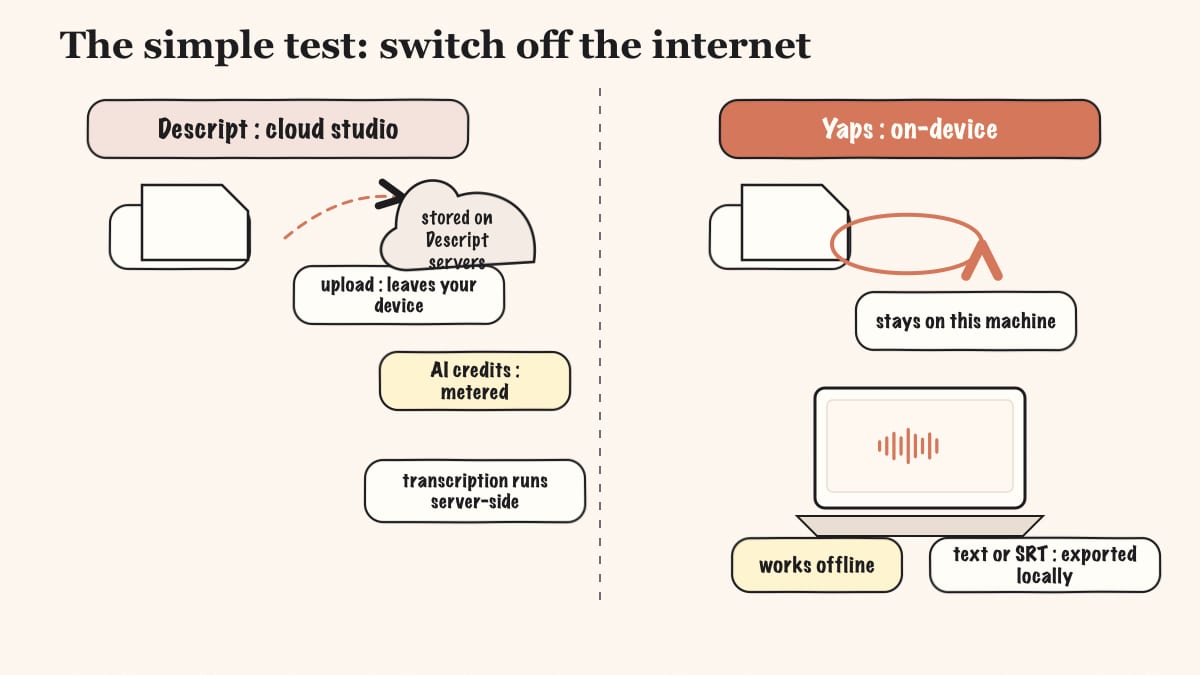
Descript uploads every recording to its cloud and stores it there. Its transcription, Studio Sound, and AI features all run server-side. For a public podcast that is fine. For a confidential client interview, a patient consultation, a privileged legal recording, or a source you promised to protect, it is a non-starter.
Yaps Studio transcribes imported audio files entirely on your machine. The audio never leaves the device, it works with the internet switched off, there is no telemetry, and you do not need an account to use it. Drop in a recording, get clean text or SRT subtitles, and nothing is ever uploaded.
Where this matters most: A journalist transcribes a sensitive interview on a train with no signal. With a cloud tool, the file has to upload before anything happens, and a copy now lives on someone else's server. With Yaps, the transcription runs locally and finishes offline, and the only copy of that audio is the one on the journalist's laptop. For lawyers, clinicians, and reporters, that is the difference between usable and unusable.
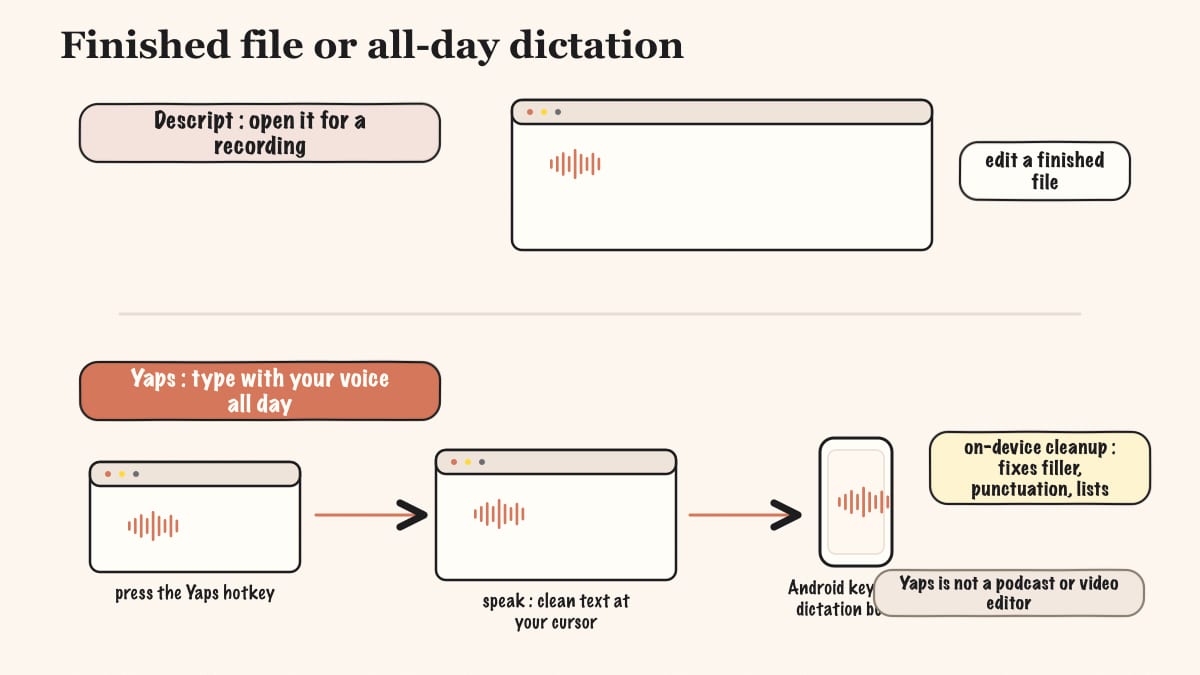
Descript is something you open when you have a recording to edit. It is not a typing tool. Yaps is something you use all day. Push the Yaps hotkey in any app, speak, and clean text appears at your cursor. The on-device speech model is multilingual (about 25 languages, auto-detected, with no language toggle to flip), and on-device text cleanup removes the filler words and self-corrections, fixes punctuation and capitalisation, and formats lists and numbers automatically.
On Android, that becomes a full AI keyboard with a dedicated dictation button, themes, glide typing, and clipboard history. Descript has no equivalent. If your real bottleneck is getting words out of your head and into a document, transcription of finished recordings is only half of what you need, and dictation is the half Descript does not offer.
Descript's free tier is effectively a one-hour, watermarked trial with heavily capped AI. Its paid plans meter both media minutes and AI credits, so Studio Sound and AI Speakers eat into a balance that heavy users hit quickly.
Yaps has a genuine free tier (5,000 words a week on desktop, 1,000 on mobile) and is account-optional for core use. Paid plans are flat: $15 Basic, $25 Max, roughly 20% off annually. There is no credit balance to watch and no overage to fear. You pay a predictable amount and use the tool as much as you like.
This is the heart of the comparison, so it deserves its own section.
Descript is cloud by design. Media is uploaded to and stored in Descript's cloud, and its AI features (Studio Sound, AI Speakers, Underlord) run server-side and are metered. There is no offline or on-device transcription. Reviewers and Reddit threads repeatedly flag this for sensitive or confidential recordings, because there is no way to keep the audio on your own machine.
Yaps is on-device by design. Core transcription and dictation run locally. Your audio never leaves the device, the tool works with no internet connection, there is no telemetry, and no account is required for core use. The honest caveat: the optional cloud read-aloud voices send text, not audio, to a voice API, and they are clearly labelled as cloud. Your voice input is always processed locally.
The simplest test: switch off the internet. Yaps still transcribes and still dictates. Descript cannot transcribe at all, because the work happens on its servers. If your material is confidential, that single test settles it. For more on why on-device matters for voice data specifically, see our privacy-first dictation guide.
| Descript | Yaps | |
|---|---|---|
| Free tier | 1 hr/mo, watermarked | Yes (5K words/week desktop, 1K mobile) |
| Entry paid plan | Hobbyist $16/mo (annual) | Basic $15/mo |
| Higher tier | Creator $24, Business $50 (annual) | Max $25/mo |
| Pricing model | Metered media minutes + AI credits | Flat, no metering |
| Annual option | Yes | Yes (about 20% off) |
Descript's pricing reflects what it is: a metered cloud studio where heavy AI use draws down credits, and your monthly cost is tied to how much media and how many AI features you run. If you are a high-volume creator, those numbers add up.
Yaps' pricing reflects a flat-rate toolkit. The free tier covers light regular use, and the paid plans give you the full feature set for a fixed monthly price with no credit meter. If predictable cost matters to you, that is the cleaner model.
Choose Yaps if:
Choose Descript (or Riverside) if:
We want to be honest about this. There are clear situations where Descript, or another tool, is the better pick, and Yaps does not pretend otherwise.
If you are editing media, not transcribing it. If you actually need to cut a podcast or a video, edit-by-text, multitrack mixing, AI voice cloning of arbitrary speakers, screen recording, AI show notes, video translation, and team collaboration are Descript's whole reason to exist. Yaps is not a podcast or video editor and never claims to be. For that work, Descript or Riverside is the right tool.
If you need live meeting transcription with speaker labels. For real-time meeting capture that tells you who said what, choose Otter or Rev. Yaps' meeting transcription is coming soon, and Yaps does not do speaker diarization or live meeting join today.
If you need non-English read-aloud. Yaps' read-aloud voices are English in practice, so multilingual text-to-speech is a genuine gap. If you need a recording or document read aloud in another language, Descript and others serve that better.
We would rather you pick the right tool than oversell ours. Where Yaps wins, it is on privacy, offline use, dictation, and flat pricing, not on media production.
If your real need was private transcription and everyday dictation, moving off Descript is straightforward. The free tier lets you run both side by side and compare them on your actual work. No commitment required.
Download Yaps from yaps.ai for Android, Windows, or macOS. You do not need to cancel Descript first. Keep both during your evaluation so you can compare them on real recordings and real typing.
Take a recording you would never want uploaded to a cloud server. Drop it into Yaps Studio and watch it transcribe locally to text or SRT, offline, with nothing leaving your machine. This is the moment most people who came here for privacy decide.
This is the feature Descript does not have. Configure the Yaps hotkey, then dictate into your email, your notes, your code comments, anywhere. On Android, switch to the Yaps keyboard and use the dictation button. Speak naturally, including the false starts, and let the on-device cleanup tidy the text.
If your Descript workflow was genuinely about editing podcasts or videos, Yaps will not replace it, and you should keep Descript for that. The clean break is for readers whose Descript usage was really transcription plus the occasional subtitle export. If that is you, Yaps covers it offline and at a flat price.
After a week, look at how you actually used each tool. If you never opened Descript's timeline and only used it to transcribe, switch fully to Yaps and drop the subscription. If you still edit media in it, keep both: Descript for production, Yaps for private transcription and daily dictation.
Privacy by architecture, not by policy. If the audio never leaves the device, no terms-of-service change, no breach, and no subpoena can expose what was never uploaded.
Yaps Studio, on-device transcription
Install Yaps on Android for offline dictation, a familiar full-size keyboard, and no screen capture. Scan the QR on desktop, or tap the Play badge on mobile.
Yes. Yaps has a genuine free tier with on-device transcription and dictation, TurboScribe gives three transcripts a day, Otter gives 300 minutes a month, and open-source Whisper is free if you are comfortable with a terminal. Descript's own free tier is effectively a one-hour, watermarked monthly trial, so the alternatives above are more generous for regular use.
Yaps is the best pick for private, offline transcription. Yaps Studio transcribes audio files entirely on-device to text or SRT with nothing uploaded, and it works with the internet switched off. MacWhisper (Mac-only) and open-source Whisper are the other offline options, but Yaps is the one that also works across Android, Windows, and macOS and doubles as a dictation tool.
Yes. Descript uploads and stores every recording in its cloud, and its AI features (Studio Sound, AI Speakers, Underlord) run on its servers. There is no offline or on-device transcription, which is why confidential or regulated audio is a poor fit. Yaps keeps transcription fully on your device.
Yes. Descript's edit-by-text workflow was built for podcast and video editing, and it is genuinely good at it. That is exactly what Yaps does not do. If you are editing a podcast, choose Descript or Riverside; if you only need a private transcript or subtitles, choose Yaps.
Yes. Riverside and DaVinci Resolve both now offer text-based editing similar to Descript's. Yaps does not, because Yaps produces the transcript or SRT file rather than performing a media edit. If edit-by-text is the feature you came for, Descript and Riverside are the right tools.
Descript's plans are Free ($0, watermarked, one hour a month), Hobbyist $16/mo, Creator $24/mo, and Business $50/mo, all billed annually, with higher monthly rates. The model is metered: you pay for media minutes plus AI credits, so heavy AI use draws down a balance. Yaps is flat at $15 Basic and $25 Max with no metering.
No. Descript rebranded Overdub as "AI Speakers" and "Regenerate," and the feature now ships on every plan rather than as a paid add-on. It still lets you replace pre-recorded speech by editing the transcript. Any article claiming Overdub was killed is out of date.
For offline file transcription on a Mac with a one-time purchase, MacWhisper is the strongest pick. For on-device dictation plus file transcription that also works on Windows and Android, choose Yaps. Yaps is the better fit if you want one private voice tool across all your devices rather than a Mac-only transcriber.
Yes. MacWhisper is a one-time purchase, and the open-source Whisper command-line tool is free. Yaps has a free tier and flat $15/$25 plans with no metered AI credits, so even its paid tiers avoid the credit-burn model that makes Descript's costs unpredictable.
TurboScribe offers unlimited transcripts on its roughly $10/mo plan, which is the cheapest path for a large backlog. Yaps' free tier covers lighter regular use entirely on-device, and its paid plans add unlimited dictation without metering. For confidential high-volume work, Yaps wins because nothing is uploaded.
Not yet. Live meeting transcription and speaker diarization are coming soon to Yaps, so it cannot join a call and label who said what today. For that need right now, choose Otter or Rev. Yaps does transcribe imported meeting recordings offline after the fact in Studio.
Studio Sound, AI Speakers, and the Underlord assistant all consume metered AI credits, so heavy users hit their caps quickly. The September 2025 pricing rebuild tied your monthly allowance to media minutes plus AI credits, which makes costs harder to predict. A flat-rate tool like Yaps avoids credit metering entirely.
Yaps is the best Descript alternative for dictation, because Descript is not a dictation tool at all. Yaps offers on-device, multilingual speech-to-text (about 25 languages, auto-detected) triggered by the Yaps hotkey, with on-device text cleanup and a full Android AI keyboard. Descript edits recordings; Yaps lets you type with your voice in any app.
Yes. Yaps Studio exports SRT subtitles (and WAV audio) entirely offline. Sonix, Rev, and TurboScribe also export SRT, but they do it from the cloud after uploading your file. If you want subtitles without sending the audio anywhere, Yaps is the private option.
Not ideal. Every file is uploaded to and stored in Descript's cloud, which is a poor fit for privileged, clinical, or regulated material. An on-device tool like Yaps keeps the audio on your machine, works offline, and requires no account, which is why lawyers, clinicians, and journalists tend to prefer it for sensitive recordings.
Descript is a genuinely good media studio. If you are editing podcasts or videos, its edit-by-text workflow is worth the cloud trade-off, and you should use it.
But if you came here because you need transcription, not media editing, the calculus flips. Yaps is the default starting point: private, offline, on-device transcription to text or SRT, plus everyday dictation across Android, Windows, and macOS, at a flat price with no AI-credit meter. For confidential interviews, clinical notes, and privileged recordings, that architecture is the whole point.
The honest split is simple. For media production, use Descript or Riverside. For live meetings, use Otter or Rev. For private transcription and daily dictation, start with Yaps and keep your audio where it belongs, on your own device.