Saltar al contenido
ENTRADA 05COMPARISON15 JUL 2026

El mejor software de dictado para escribir un libro en 2026 (autores)

El dictado es aproximadamente tres veces más rápido que escribir a máquina, razón por la cual cada vez más autores redactan un libro por voz. Pero la mayoría de las herramientas de conversión de voz a texto dejan de escuchar, te dejan un desastre que limpiar o dispersan tus capítulos. Esta es la lista clasificada de software de dictado para autores en 2026, con Yaps en primer lugar y una lectura honesta sobre dónde Dragon sigue ganando.
El mejor software de dictado para escribir un libro en 2026 (autores)
0.0

Prefacio

Speaking runs at roughly 130 to 150 words a minute. Typing runs at 50 to 70. That gap is why so many authors now draft a book by voice, walking the dog while a scene pours out, then finishing it at the desk. The catch is that most dictation tools were never built for a book. They stop listening after thirty seconds, hand you a wall of "um" and false starts to clean up, or dump every scene into one field with no way to keep a manuscript organised.

This guide ranks the dictation software that actually fits an author writing a book in 2026. Yaps comes first, because it is the only tool that closes the whole author loop in one place: capture a scene of any length, clean it up on your device so it reads like prose, hold your chapters in a vault, and sync a walk-captured scene to the desk. After that come four real tools that each win a specific job, including an honest section on where Dragon is still the deepest choice for authors who edit by voice.

1.0

Lo que los autores realmente necesitan del dictado

A book is not a text message. The features that matter for scene-length drafting are different from the ones a landing page leads with. Six things decide whether a dictation tool survives past chapter three.

No time limit. Authors draft a scene or a chapter in one breath, talking for twenty to forty minutes at a stretch. A tool that cuts the mic every thirty seconds, as Apple Dictation does, is a non-starter for this persona no matter how clean its output is.

Clean output that does not need heavy correction. The number one complaint about dictating a book is the editing tax. Raw transcripts arrive full of filler words, restarts, and run-ons. If cleaning that up erases the speed advantage, you have gained nothing. Authors need punctuation and filler removal so the first draft is usable prose.

A place to hold and organise chapters. You are not dumping text into one box. You need somewhere to keep scenes, reorder them, and hold a book's worth of notes so a novel does not become forty loose transcripts.

Dictate on the go, finish at the desk. The signature author workflow is speaking a scene on a phone while walking, then editing it on a computer. That needs reliable phone-to-desktop sync so mobile captures land in the manuscript without emailing yourself.

Portable export. The draft has to leave the dictation tool and go into Scrivener, Word, Google Docs, or plain Markdown. You want open, portable files, not a walled transcript you cannot get out of.

Privacy for unpublished work. An unfinished manuscript is valuable creative property. Many authors are uneasy sending draft chapters to cloud servers, which makes on-device processing a genuine selling point rather than a checkbox.
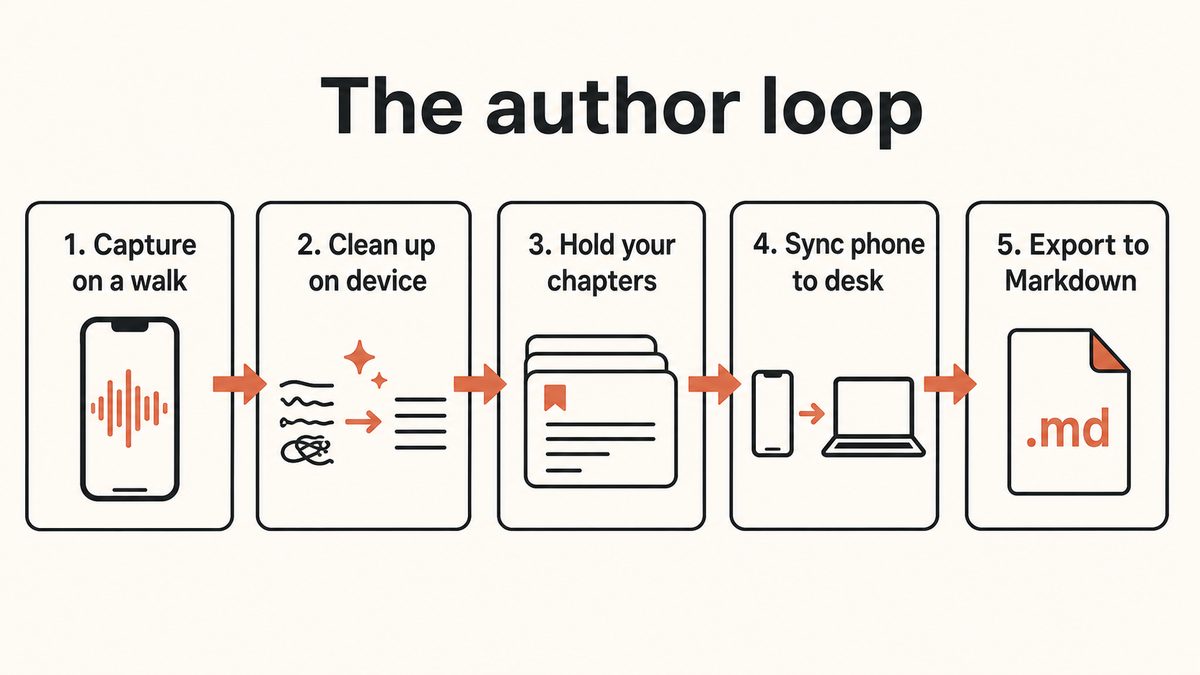
Diagram of the author loop: capture on a walk, on-device cleanup, hold chapters in a vault, sync phone to desk, and export to Markdown.

2.0

Las 5 mejores herramientas de dictado para autores que escriben un libro en 2026

This list is ranked, not enumerated. Yaps comes first because it is the most complete answer for an author drafting a book. Each pick after it wins a specific need, and the honest trade-offs are stated plainly so you can route yourself to the right one.

01 / Speaking Speed
3x
Faster than typing, roughly 130 to 150 words a minute spoken
02 / Yaps Time Limit
None
Dictate a scene or a chapter in one continuous take
03 / Where Audio Goes
On device
Dictation and cleanup run on your machine, so drafts stay private
04 / Free Tier
2K
Words a week to try Yaps before you commit

1. Yaps: The Best Dictation Software for Writing a Book

Yaps is the only tool on this list that closes the entire author loop inside one product. You dictate a scene of any length, the output is cleaned up so it reads like prose, the scene lands in a vault that holds your chapters, and a scene you spoke on a walk is waiting on your desktop. No other tool here bundles all of that.

Start with the part that fixes the biggest complaint. There is no time limit on Yaps dictation. Push the Yaps hotkey (Fn on desktop, the dictation button on the Yaps keyboard on Android), talk for as long as the scene runs, and release. You are not fighting a thirty-second cutoff or restarting the mic every paragraph. That single fact is why authors reach past Apple Dictation for real drafting work, and we go deeper on it in the dictation with no time limit breakdown.

Then the output arrives clean. Yaps cleanup runs on your device: it strips the filler words and self-corrections, fixes punctuation and capitalisation, and formats lists and numbers. Raw dictation is normally a cleanup job that eats your speed advantage. Here the first draft comes back reading like a draft, not a transcript, so you keep the roughly threefold speed edge over typing instead of spending it on editing. The honest state of accuracy in modern voice tools is covered in is AI dictation accurate.

A Vault That Holds a Whole Book, Not Forty Loose Transcripts

Dictation alone is not enough for a book. You need somewhere to keep scenes and chapters, and that is where Yaps Voice Notes does the work no dictation-into-a-field tool can. Voice Notes supports plain text, kanban boards, and checklists, so you can hold a scene, park a plot thread on a board, and keep a running outline in one place. It is a vault built to organise a manuscript, not a single text box you dump into.

Because the whole vault is yours, the draft is never trapped. Export any chapter to Markdown or plain text and drop it straight into Scrivener, Word, or Google Docs. No proprietary lock-in, no copy-paste-and-reformat ritual, just portable files that go where your manuscript lives.

Dictate on the Walk, Finish at the Desk

This is the workflow authors describe again and again, and it is Yaps native behaviour rather than a workaround. Speak a scene into the Yaps keyboard on your Android phone while you are out. The premium vault sync, which pairs over your local network or an encrypted peer-to-peer link, lands that scene on your macOS or Windows desktop. There is no step where you email yourself the transcript. Yaps runs on Android, Windows, and macOS, plus a Chrome extension for saving research, with iOS coming soon, so you can capture on whichever device is in your hand and edit on the one at your desk.

Privacy for an Unfinished Manuscript

An unpublished book is creative property you may not want sitting on someone else's servers. Yaps dictation and cleanup both run on your device using the Yaps on-device speech engine, so the words never have to leave your machine to become text. For an author nervous about draft chapters living in the cloud, that is a real difference from cloud-based tools, not a marketing line.

Pricing

The free tier gives you 2,000 words a week, shared across dictation and read-aloud, on every platform. That is enough to test the workflow on a few scenes, though it is modest for someone drafting a full book day after day. Basic is $15 a month and Max is $25 a month, and serious daily drafting means one of the paid tiers, which is the honest read. Vault sync and cloud cleanup are premium features. Set against Dragon's roughly $699 up-front price, a flat monthly plan suits the way authors run long, high-volume sessions.

Where Yaps Is Not the Answer

Two honest gaps. Yaps does not offer deep voice-command editing or a user-trainable custom vocabulary, so if you restructure sentences by voice and need to teach the software a large cast of invented names, Dragon is the better tool and it is next on this list. And Yaps does not live-transcribe meetings or interviews; it imports recordings into Studio rather than capturing a live conversation. If you also do journalism and need live interview capture, see the dictation software for journalists guide, where that job is the focus.

2. Dragon Professional: The Deepest Tool for Editing by Voice

For authors who edit by voice, restructuring sentences, correcting, and formatting with spoken commands, and who need to teach the software a large custom vocabulary of character and place names, Dragon Professional is still the deepest and most mature tool on the market. Prolific dictation-first novelists built careers on it, and it earns its place here on genuine strengths: voice-command editing depth and custom-vocabulary control that nothing else matches. Invented proper nouns like Daenerys or Ankh-Morpork are exactly what generic engines mangle, and Dragon's trainable vocabulary is the historic answer to that problem.

Be clear-eyed about the trade-offs. Dragon is Windows-only; the Mac version was discontinued in 2018, and the consumer Dragon Home edition was discontinued in 2023. Dragon Professional version 16 is a one-time purchase widely cited around $699.99, up from the historical figure near $299. It runs on-device and markets accuracy up to roughly 99 percent, but meaningful development has essentially stalled since Microsoft acquired Nuance in 2022, so it still works without gaining significant new features. There is also a separate Dragon Anywhere mobile subscription at around $15 a month.

Choose Dragon if you are a professional, dictation-first author on Windows who edits by voice and needs a trainable vocabulary. For most authors who want fast capture and clean drafts without that depth, it is more tool, and more money, than the job requires.

3. SuperWhisper: Private On-Device Dictation Into Any App

SuperWhisper is a strong privacy-first pick for Mac and iOS authors who want clean, on-device dictation into any app, plus per-project modes and custom prompts that let you switch between a fiction voice and a notes voice. It runs on Whisper models locally, handles long sessions without Apple's roughly thirty-second cutoff, and covers 100-plus languages. There is a permanent free tier for voice-to-text in any app, with Pro around $8.49 a month, $84.99 a year, or $249.99 as a one-time lifetime purchase that unlocks bring-your-own-key cloud models, larger local models, and file transcription. There is a thirty-day refund and a student discount.

For the plain job of dictating clean text into Scrivener or Docs, it is a good fit. Where it falls short for this persona is structure. SuperWhisper is a dictation-into-a-field tool, so it has no organised notes or vault to hold your chapters and no purpose-built phone-to-desktop manuscript sync. You would still need a separate app to keep the book together. Choose SuperWhisper if pure, private dictation into any app is your whole need and you already have a home for your manuscript. Choose Yaps if you want that capture plus the vault and the sync in one product.

4. Otter.ai: Capturing Plot Ideas on the Go

Otter is the capture-ideas option, with clear caveats. Its mobile app records and transcribes spoken ideas and voice memos, and the transcript is searchable, which is handy when you want to talk through a plot problem or a character's backstory while away from the desk. Free Basic gives you 300 transcription minutes a month, capped at 30 minutes per conversation, with only three lifetime file imports. Pro is $16.99 a month with 1,200 minutes, and there are Business and Enterprise tiers above that.

The honesty here matters. Otter is cloud-based, so your words leave your device, which is a real consideration for unpublished work. It is built around meetings rather than clean-prose drafting, and the free tier is capped tightly for a book-length habit. It is a fair pick for talking through ideas, not a book-drafting engine. Otter does live-transcribe meetings, which Yaps does not, so for authors who also capture live interviews, Otter or a dedicated meeting tool is the fair recommendation for that specific job.

5. Apple Dictation: The Free Way to Try Voice Writing

Apple Dictation is the zero-cost, zero-setup way to find out whether you like writing by voice at all. It is built into macOS 13 Ventura and later and into iOS, runs on-device on Apple Silicon so your audio mostly stays put, and works system-wide in any text field including Pages, Word, and Scrivener with spoken punctuation and no training.

The hard limit is what rules it out for a book. Apple Dictation has a roughly thirty-second continuous-listening cutoff that is architectural and cannot be reliably disabled; third-party testing reports the cap persists even with the relevant setting turned off. There is also no custom vocabulary. It is fine for a short burst and frustrating for scene-length work, which is precisely the gap a dedicated tool fills. Use Apple Dictation to dip a toe in. Move to Yaps the moment the mic cutting out mid-scene starts to break your flow, which for most authors is the first real drafting session. If you want to compare the wider Mac field, the best dictation apps for Mac guide runs the full test.

3.0

Cómo necesita el autor alinearse

The rows below are the ones that decide a book-drafting tool, not a generic speech-to-text feature dump. Every cell reflects the tool as it actually ships in 2026.

Scroll →
What matters for a book Yaps Dragon Pro SuperWhisper Otter Apple Dictation
No dictation time limit Yes Yes Yes 30 min/conversation ~30 sec cutoff
On-device dictation Yes Yes Yes No (cloud) Yes (Apple Silicon)
Cleanup of filler and punctuation On device Voice commands Prompt-based Limited No
Vault to hold chapters Yes (text, kanban, lists) No No Notes list No
Phone-to-desktop sync Yes (premium) Separate app No Cloud sync iCloud text only
Custom vocabulary (names) No Yes (deepest) Prompt hints Limited No
Export to Markdown / txt Yes Word, txt Text txt, docx Into any field
Platforms Android, Windows, macOS Windows only macOS, iOS, Windows Web, iOS, Android macOS, iOS
Starting price Free, then $15/mo ~$699 one-time Free, then ~$8.49/mo Free, then $16.99/mo Free
4.0

¿Quién debería elegir cuál?

Most authors will land on Yaps, but a few needs route elsewhere, and it is worth being honest about them.

Choose Yaps when

You want to draft a book end to end

You need no-time-limit capture, clean output that reads like prose, a vault to hold chapters, and a scene spoken on a walk waiting at your desk, all with your draft staying on your device. This is the whole author loop in one product.

Choose an alternative when

You have one specialised need

Dragon if you edit by voice and must train a large custom vocabulary on Windows. SuperWhisper if you only want private dictation into any app on a Mac. Otter if you mainly talk through ideas on the go. Apple Dictation to try voice writing for free in short bursts.

If you edit heavily by voice, correcting and reformatting with spoken commands, and your book is full of invented names the software has to learn, Dragon is the honest pick and worth the price and the Windows requirement. If you are a Mac author who wants clean dictation into any app and nothing more, SuperWhisper is a tidy, private choice. If your habit is capturing plot ideas while out and searching them later, Otter fits, with the caveat that your words go to the cloud. And if you want the free door in, Apple Dictation is already on your Mac; just expect to outgrow it the first time the mic stops mid-scene. Students weighing the same tools for essays and theses can start with the dictation software for students guide.

5.0

Comenzando como autor

You can go from installed to your first dictated scene in about three minutes. The workflow is the same whether you start on the phone or at the desk.

Step 01

Install Yaps1 min

Get Yaps on Android, Windows, or macOS. On first run it sets up the on-device speech engine, so dictation works even with the internet switched off.

Step 02

Draft a scene in one takeas long as you like

Push the Yaps hotkey (Fn on desktop, the dictation button on the Yaps keyboard on Android) and talk the scene through without stopping to fix anything. There is no time limit, so let it run.

Step 03

Let cleanup tidy the draftautomatic

On-device cleanup strips the filler and false starts and fixes punctuation, so the scene comes back reading like prose instead of a raw transcript.

Step 04

Organise, then exportongoing

Keep scenes in the Voice Notes vault, reorder them on a board, then export any chapter to Markdown or plain text straight into Scrivener, Word, or Google Docs.

For the deeper craft side of writing this way, from beating self-consciousness to holding flow while you speak, the dictation for writers guide is the how-to companion to this list.

6.0

Preguntas frecuentes

What is the best dictation software for writing a book in 2026?

Yaps is the best dictation software for writing a book in 2026 because it closes the whole author loop in one place. You get no-time-limit dictation for scene-length passages, on-device cleanup that turns raw speech into readable prose, a Voice Notes vault to hold chapters, phone-to-desktop sync, and Markdown export into Scrivener or Docs, all with the draft staying on your device. Dragon remains deeper for voice-command editing, and SuperWhisper, Otter, and Apple Dictation each fit narrower needs.

Can you actually write a whole novel using dictation?

Yes, many authors draft entire novels by voice, and some prolific novelists dictate as their primary method. The practical requirements are a tool with no time limit so you can speak a full scene, clean output so the draft does not need heavy correction, and a place to keep the chapters organised. Dictation handles the first draft; you still edit with the keyboard afterward for precision.

Is dictation faster than typing for authors?

Yes. Most people speak at roughly 130 to 150 words a minute and type at 50 to 70, so dictation is about three times faster for getting a first draft down. The speed advantage only holds if the output is clean enough not to erase it in editing, which is why on-device cleanup that removes filler and fixes punctuation matters so much for authors.

Do professional authors really dictate their books?

Yes, dictation-first authorship is an established practice, and several high-output novelists have written openly about drafting by voice. It suits authors who think out loud, want to draft away from the desk, or need to reduce typing strain. The common pattern is to dictate the raw draft at speaking speed, then revise on the keyboard.

Is Dragon still the best dictation software for authors in 2026?

Dragon is still the deepest tool for authors who edit by voice and need a trainable custom vocabulary, and on those two strengths nothing beats it. It is not automatically the best for every author, though. It is Windows-only since the Mac version was discontinued in 2018, costs around $699.99 up front, and has seen little meaningful development since Microsoft acquired Nuance in 2022. For fast capture and clean drafts without deep voice-command editing, a tool like Yaps fits more authors.

Does Dragon dictation software work on Mac?

Not anymore. Nuance discontinued the Mac version, Dragon Dictate for Mac, in 2018, and Dragon is Windows-only today. Mac authors who specifically want Dragon would have to run the Windows version through a virtualisation layer, which adds a Windows licence and maintenance overhead. On-device Mac tools such as Yaps, SuperWhisper, and Apple Dictation are the native options.

What dictation software has no time limit for long-form writing?

Yaps, Dragon, and SuperWhisper all let you dictate for as long as a scene runs, with no forced cutoff. The notable exception to avoid for book work is Apple Dictation, which has a roughly thirty-second continuous-listening cap that is architectural and cannot be reliably disabled. Otter allows long recordings but limits each conversation to thirty minutes on the free tier. For scene-length drafting, Yaps pairs no time limit with cleanup and a vault.

How do you dictate a book on your phone while walking?

Open the Yaps keyboard on your Android phone, push the dictation button, and speak the scene as you walk; there is no time limit, so you can talk it through in one take. The premium vault sync then lands that scene on your macOS or Windows desktop over your local network or an encrypted peer-to-peer link, so it is waiting when you sit down to edit. There is no step where you email yourself the transcript.

Does dictated text need a lot of editing, and how do authors clean it up?

Raw dictation from a plain speech-to-text engine does need editing, because it arrives with filler words, false starts, and missing punctuation. The fix is a tool with built-in cleanup. Yaps runs cleanup on your device, stripping the filler and self-corrections and fixing punctuation and capitalisation, so the first draft reads like prose. That keeps the speed advantage of speaking instead of spending it on a cleanup pass.

Can you add character and place names to dictation software (custom vocabulary)?

This is Dragon's historic strength. Its trainable custom vocabulary lets you teach the software invented character and place names so it stops mangling them, which is why professional dictation-first novelists rely on it. Most on-device tools, including Yaps, do not offer a user-trainable vocabulary today, so if a large cast of invented proper nouns is central to your book, Dragon is the honest pick for that specific need.

Is my unpublished manuscript private if I use dictation software?

It depends on where the tool processes your voice. Cloud-based tools such as Otter send your words to remote servers, which some authors are uneasy about for an unfinished book. On-device tools keep the audio on your machine. Yaps runs both dictation and cleanup on your device with the Yaps on-device speech engine, so your draft chapters never have to leave the machine to become text, which is a genuine privacy advantage for creative work you have not published.

Can you dictate directly into Scrivener, Word or Google Docs?

Yes. System-level tools like Apple Dictation type into any focused text field, including Scrivener, Word, and Google Docs. Yaps works the same way for live dictation and also lets you draft in its vault and export chapters to Markdown or plain text that drop cleanly into Scrivener, Word, or Docs. The portable-export path avoids lock-in and keeps your manuscript in the writing app you already use.

7.0

Pensamientos finales

If you are choosing dictation software to write a book in 2026, start with Yaps. It is the only tool that gives an author no-time-limit capture, output clean enough to read as a draft, a vault to hold the chapters, and a scene spoken on a walk waiting at the desk, with the whole thing staying on your device. That combination is what a book actually needs, and no rival bundles all of it.

The honest edge cases still matter. If you edit heavily by voice and must train the software on a large cast of invented names, Dragon remains the deepest tool, and it is worth the price and the Windows requirement for that specific way of working. For everyone else drafting a novel, memoir, or non-fiction book by voice, install Yaps, draft a scene in one unbroken take, and see how much of the book arrives while you are simply talking.

SEGUIR LEYENDO
COMPARISON · 14 MIN READEl mejor software de dictado para dislexia en 2026 (7 herramientas probadas)COMPARISON · 12 MIN READEl mejor software de dictado para periodistas en 2026 (privado)