Zum Inhalt springen
EINTRITT 02GUIDE23 JUL 2026

AI Productivity Apps That Work Offline (2026)

Most apps sold as an AI productivity app are a thin wrapper around a cloud server, so they die on a plane, in a tunnel, or during a vendor outage, and they quietly upload your work. This guide lays out what to look for in an offline-capable AI productivity app, the everyday jobs on-device AI already does well, and where the cloud still wins.

AI Productivity Apps That Work Offline (2026)
0.0

Vorwort

An AI productivity app that works offline is one that runs its models on your own device, so the core features keep working in airplane mode, on a plane, in a tunnel, or during a vendor outage, and your work never gets uploaded to a server. Most apps marketed as an "AI productivity app" are not this: they are a thin front end over a cloud API, which means they stop the moment your signal does and they send your text and voice off the device to be processed.

That distinction has become the whole story in 2026. For years, "AI" and "cloud" were treated as the same thing, because the useful models were too big to run anywhere but a data centre. That is no longer true. Speech recognition, text cleanup, read-aloud, and note search now run comfortably on a normal phone or laptop, which means the privacy tax and the always-online requirement are no longer the price of admission. This guide is not a ranked roundup. If you want ranked picks, we keep those in 12 best offline AI apps 2026. This is the pillar underneath that list: what "offline" actually buys you, what to look for, and which everyday productivity jobs on-device AI already does well today.

01 / Where It Runs
On-device
The models run on your own phone or laptop, not a server
02 / Works In
Airplane mode
Core features keep working with no signal and no cloud
03 / Data Uploaded
0
Bytes of your voice or text sent off the device for core work
04 / Cloud Bill
None
No per-seat API cost and no per-request rate limit to hit
1.0

Why Most "AI Productivity Apps" Stop Working Offline

Open the app stores and count how many products describe themselves as an AI productivity app, an AI notes app, an AI writing assistant, or an AI meeting tool. Now try the honest test: turn on airplane mode and open one. Most of them show a spinner, then an error. That is because the "AI" they advertise lives on someone else's server, and the app on your device is mostly a login screen, a text box, and a network request.

This is not a conspiracy, it is an architecture choice, and for a while it was the only sensible one. Running a capable model took a rack of expensive hardware, so builders shipped a cloud API and a slim client. The trouble is that the choice has three consequences that only show up later, usually at the worst moment.

The first is reliability. A cloud-first app is only as available as your connection and the vendor's uptime. It dies on a flight, in a basement meeting room, on a train through a tunnel, in a country with patchy data, and on the day the provider has an outage. Productivity software that stops being productive whenever the network hiccups is a fragile foundation for real work.

The second is privacy. When the model runs in the cloud, your words have to travel there to be processed. That means your dictated voice, your notes, your draft emails, and your documents leave your device and land on infrastructure you do not control, subject to a retention policy you probably have not read and, on many free tiers, a right to use your content to train future models. For anything sensitive, that is a quiet leak built into the design.

The third is cost and control. Every request to a cloud model costs the vendor money, so cloud-first apps come with per-seat subscriptions, monthly message caps, and rate limits. You are renting access to a model, and the meter is always running. An on-device app pays that compute cost once, in the hardware you already own, and then it is simply yours.

The question that separates a real offline AI productivity app from a cloud wrapper is boring and decisive: does it still work in airplane mode?

2.0

What Changed in 2026: AI That Runs on Your Own Device

The shift is not that the cloud got worse. It is that on-device AI got good enough for the everyday jobs. Phones and laptops now ship with neural accelerators, model sizes for common tasks have come down, and the engineering to run them efficiently has matured. The result is that the tasks most people actually mean by "AI productivity" no longer need a data centre.

That reframes the category. On-device AI is not a compromise you accept to gain privacy while giving up capability. For dictation, text cleanup, read-aloud, and searching your own notes, the local option is now both the private one and the capable one. The honest exceptions are real and we name them further down, but the default has flipped.

3.0

What to Look For in an Offline-Capable AI Productivity App

If you are evaluating an app and want to know whether it is genuinely offline or just marketed that way, four checks do almost all the work. They are simple, and every one of them can be tested in a couple of minutes before you commit.

It works in airplane mode. This is the single test that cuts through the marketing. Install the app, enable airplane mode, and try the core feature. If dictation, cleanup, note capture, or read-aloud keeps working with no signal, the model is running on your device. If it fails, the "AI" is in the cloud and everything you do with it is a network request.

It does not demand an account just to start. A truly local tool can do its core job without a login, because it is not calling a server that needs to know who you are. Accounts are reasonable for billing, sync, and premium features, but if you cannot dictate a sentence or capture a note until you have created an account and verified an email, the app is built around a server, not around your device.

Your data stays on the device by default. Read what leaves and when. The privacy-preserving pattern is that your voice and text are processed locally, and the network is used only for narrow, nameable things: authentication, checking subscription status, downloading a model once, and clearly optional cloud features you switch on yourself. If the default path uploads your content, "private" is a label, not a behaviour.

There is no per-seat cloud bill or rate limit on the core work. On-device processing has no marginal server cost, so a local-first app does not need to meter your core usage the way a cloud API must. Watch for message caps, minute limits, and "requests remaining" counters on the basic features. A generous or unmetered local core is a strong signal that the work is happening on your machine.

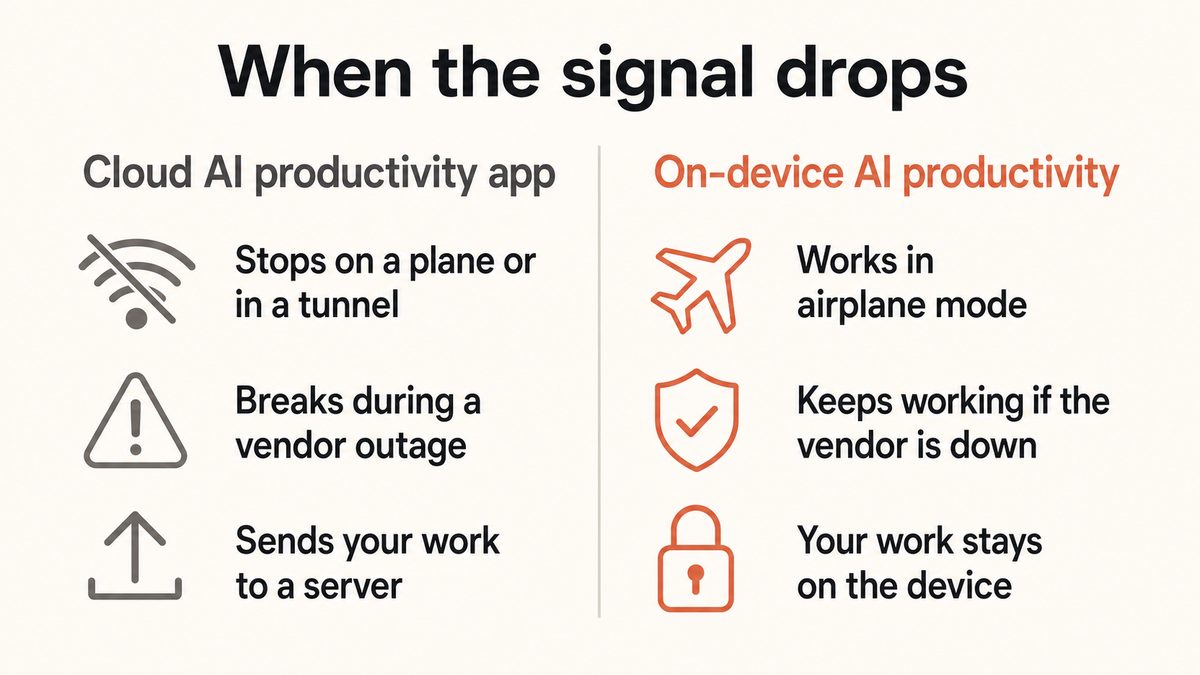
Cloud-wrapper AI app

A login screen over a server

Fails in airplane mode. Demands an account before you can do anything. Uploads your voice, notes, and drafts to be processed. Meters your usage with message caps and rate limits, and charges a per-seat subscription for access to a model you never actually hold.

On-device AI app

A tool that runs on your machine

Keeps working with no signal. Starts without an account for core features. Processes your work locally so nothing is uploaded by default. Uses the network only for narrow, named things, and does not meter the core job because there is no server cost to pass on.

A comparison diagram of a cloud-dependent AI productivity app versus an on-device one, showing which keeps working offline and which sends your work to a server.

4.0

The Everyday Productivity Jobs On-Device AI Already Does Well

It helps to be concrete about what "offline AI productivity" means in practice, because the phrase can sound abstract. Here are the everyday jobs that on-device AI handles well right now, today, with no connection and nothing uploaded. None of these needs a data centre anymore.

Job 01

Dictate into any appvoice typing

Speaking runs at roughly 150 words a minute against about 40 for typing. On-device dictation turns your speech into text inside whatever you are working in, from email to a document to a chat box, with the recognition running locally so your voice never leaves the machine.

Job 02

Clean rambling speech into structuretext cleanup

A local cleanup layer removes filler words like "um" and "uh," fixes punctuation and capitalisation, and formats a spoken list into an actual list. You talk the messy way people talk, and the app hands back text that reads as if you typed it carefully.

Job 03

Read documents and articles aloudtext-to-speech

Offline read-aloud voices turn a report, an article, or your own draft into audio you can listen to while you walk or cook. Local voices work with no connection, which is exactly when you want them, and they do not send the text you are reading to a server.

Job 04

Capture voice notes and search themlocal notes

Speak a thought, capture it as a note, and find it later with local search across your own vault. The notes live on your device as plain files, so the capture and the search both work offline and nothing is synced anywhere unless you ask for it.

Notice what is common to all four. Each is a well-defined task with a clear input and output, small enough to run locally. That is the sweet spot for on-device AI in 2026: the focused, repeated jobs that make up most of a working day. We go deeper on stringing these together in voice-first workflows for productivity.

5.0

Yaps as the Voice-and-Notes Layer of an On-Device Setup

Yaps is a worked example of this pattern for the voice and notes part of a productivity setup. It is a privacy-first, offline-first app that does dictation, on-device text cleanup, read-aloud, voice notes, and a Studio editor for turning audio files into text. It runs on Android, which is the headline platform and a full AI keyboard, as well as Windows and macOS, with a Chrome "Save to Yaps" extension for pulling web pages into a searchable local vault. iOS is coming soon.

The mechanics line up with the four checks above. Press the Yaps hotkey on desktop, or tap the mic on the Yaps keyboard on Android, and speak into any app. The speech recognition runs on your device, across roughly 25 languages auto-detected from your speech, so you do not switch a language setting, and it works offline. The text cleanup runs on-device by default too, stripping filler words, fixing punctuation, and formatting lists before the finished text lands in your email, document, or chat box. Your voice never leaves the machine for that core work. There is an optional cloud cleanup path on the paid tiers, but the private local path is the default. Voice notes are stored as plain Markdown and text files with local search, so capture and retrieval both work with no connection.

Yaps uses the network only for narrow, nameable things: authentication, checking subscription status, downloading a model once, optional GIF search, voice commands, optional cloud cleanup, and premium vault sync between your phone and desktop. Nothing about the core dictation, cleanup, or note capture requires a connection, and no account is needed to start dictating. On price, the free tier covers 2,000 words a week, a single allowance shared across dictation and read-aloud on every platform, so you can test the whole thing before paying anything. Basic is $15 a month and Max is $25 a month, the latter including a cloud allowance.

Here is the honesty that keeps the brand trustworthy. Yaps is the voice-and-notes layer, not the entire productivity stack. It does the voice input, the cleanup, the read-aloud, and the note capture very well, and it deliberately does not try to be your local chatbot or your entire second brain. One more honest gap: while Yaps dictation is multilingual, its read-aloud voices are English speakers in practice, so if you need read-aloud across many languages, a cloud reader is a better fit for that specific job.

6.0

Where Cloud Productivity Still Wins

An honest pillar has to say where the cloud is genuinely the right call, because pretending otherwise would make the offline case weaker, not stronger. There are two areas where a cloud productivity app still beats an offline one, and they are worth being clear-eyed about.

Real-time, multi-person collaboration. When several people edit the same document at once, watch each other's cursors, and see changes appear live, that shared state has to live on a server everyone can reach. Cloud suites like collaborative docs, shared whiteboards, and team wikis are built for exactly this, and an offline-first tool cannot replicate simultaneous multi-user editing without a network in the middle. If your core workflow is a team writing together in real time, the cloud is the correct tool.

The very largest models. The biggest frontier models still run in data centres, because they are too large for a phone or laptop. If your task genuinely needs the deepest reasoning, the widest world knowledge, or long open-ended chat with a top-tier model, a cloud service will out-think anything running locally today. On-device models are excellent at the focused jobs described above, and they are catching up fast, but the raw ceiling still belongs to the cloud.

Scroll →
What matters Offline AI app Cloud AI app
Works with no signal Yes, fully No
Where your work goes Stays on the device Uploaded to servers
Starts without an account Yes, for core work Usually no
Ongoing cost No per-seat cloud bill Subscription, often metered
Real-time multi-person editing No Yes
Access to the very largest models Focused local models Yes, frontier scale

The pattern is clean once you see it. Offline AI wins on privacy, on reliability with no connection, and on cost, while cloud wins on live collaboration and the raw power of the biggest models. Most people do far more of the first kind of work than the second, which is why an offline-first default is the sensible setup for 2026.

7.0

How to Build a Realistic Offline AI Productivity Setup

You do not have to choose one app and hope it does everything. The practical approach is to assemble a small set of local-first tools that each do one job well, and to reach for the cloud only for the two things it genuinely wins at.

Start with the voice layer, because it is the highest-leverage change and the easiest to test: an on-device dictation and read-aloud tool that works in every app and keeps your speech local. Add a local notes vault so your captured thoughts and reference material live as plain files on your machine, searchable offline. If you want open-ended AI chat that runs on your own hardware, add a local large language model runner, accepting that it will be a smaller model than the cloud frontier. Then, and only then, keep a cloud account for the specific jobs that need it: a shared document when your team is writing together live, or a frontier model when a task genuinely outstrips what runs locally.

The point of this arrangement is that your everyday work keeps running on a plane and never leaves your device, while the cloud becomes an occasional tool you opt into rather than a dependency you cannot escape. If you want ranked, specific product picks to fill each slot, that is exactly what 12 best offline AI apps 2026 is for, and we cover the Mac-specific angle in best local AI tools for Mac.

01Versuchen Sie Yaps

AI productivity that keeps working with no signal and no cloud.

Install Yaps for on-device dictation, text cleanup, read-aloud, and voice notes that run locally and keep your work private. Available on Android, Windows, and macOS.

Scannen Sie, um Yaps auf Ihr Telefon zu laden
Scannen Sie mit Ihrer Telefonkamera
8.0

Häufig gestellte Fragen

What is an AI productivity app that works offline?

It is an app that runs its AI models on your own device rather than on a remote server, so the core features keep working with no internet connection. That means dictation, text cleanup, read-aloud, and note capture all function in airplane mode, on a plane, or during a vendor outage. Because the processing is local, your voice and text never get uploaded, which is why offline apps are also the private option.

Do AI productivity apps actually work without internet?

Some do and most do not, and the marketing rarely tells you which. Apps that run their models on-device keep working offline, while the far more common cloud-wrapper apps stop the moment your signal does, because the "AI" lives on a server. The reliable test is to turn on airplane mode and try the core feature: if it works, the app is genuinely on-device; if it errors, it was cloud-first all along.

How can I tell if an AI app is on-device or cloud-based?

Run four quick checks. Try the core feature in airplane mode and see if it still works. See whether you can use core features without creating an account. Read what data leaves the device and when. And look for message caps or rate limits on basic features, which usually indicate a cloud server with a cost to meter. An app that passes all four is processing on your machine.

Why do most AI productivity apps require an internet connection?

Because they run their models in the cloud and ship only a thin client on your device. For years that was the only practical way to offer a capable model, since the hardware to run one was too big to fit on a phone or laptop. The consequences are that the app fails without a connection, your work is uploaded to be processed, and your usage is metered with per-seat pricing and rate limits.

Is offline AI as good as cloud AI?

For the everyday productivity jobs, yes. On-device models now handle dictation, text cleanup, read-aloud, and local note search very well, and for those tasks the local option is both private and capable. The cloud still wins in two specific areas: real-time multi-person collaboration, which needs shared state on a server, and the very largest frontier models, which are too big to run locally. For most daily work, offline is now the sensible default.

What productivity tasks can on-device AI handle today?

The focused, repeated jobs that make up most of a working day. On-device AI can dictate your speech into any app, clean rambling speech into structured text by removing filler words and fixing punctuation, read documents and articles aloud, capture voice notes, and search your own notes locally. Each of these has a clear input and output and is small enough to run on a normal phone or laptop with no connection.

Is an offline AI app more private than a cloud one?

Generally yes, by design. When the model runs on your device, your voice and text do not need to travel anywhere to be processed, so there is no server copy to store, leak, or use for training. A cloud app has to upload your content to work, which puts it on infrastructure you do not control under a retention policy you have to trust. If privacy matters, an app that processes locally removes the risk at the source.

Does Yaps work offline?

Yes, for its core work. Yaps runs dictation and text cleanup on your device by default, so both work with no connection and your voice never leaves the machine, and voice notes are stored as local files you can search offline. The network is used only for narrow things like authentication, checking your subscription, downloading a model once, optional cloud cleanup on paid tiers, and premium sync between your phone and desktop. No account is needed to start dictating.

What does Yaps use the internet for, if it is offline-first?

Only for narrow, nameable tasks, never for core processing. The network handles authentication, checking subscription status, downloading a model the first time, optional GIF search, voice commands, optional cloud text cleanup on the paid tiers, and premium vault sync between mobile and desktop. Everything about the core dictation, cleanup, and note capture happens on your device, which is why those features keep working in airplane mode.

Can one offline app replace my whole cloud productivity suite?

Usually not, and it is more honest to say so. A realistic offline setup is a small toolkit of local-first tools rather than one app doing everything: an on-device dictation and read-aloud tool like Yaps for the voice layer, a local notes vault for your knowledge, and a local large language model runner if you want AI chat on your own hardware. You then keep a cloud account only for live team collaboration and for tasks that truly need a frontier model.

Are offline AI apps cheaper than cloud ones?

Often, yes, because they do not carry a per-request server cost to pass on. On-device processing runs on hardware you already own, so a local-first app can offer a generous or unmetered core without the message caps and rate limits that cloud apps need to control their bills. Yaps, for example, has a free tier of 2,000 words a week shared across dictation and read-aloud, with paid tiers at $15 and $25 a month for people who want more.

What is the difference between offline AI, on-device AI, and a private AI app?

They point at overlapping ideas. On-device AI means the model runs on your phone or laptop rather than a server. Offline AI means it keeps working with no connection, which follows naturally from running on-device. A private AI app is one where your data stays on the device and is not uploaded, which is the privacy benefit that on-device processing makes possible. In practice, an app that is genuinely on-device tends to be all three at once.

Where should I still use a cloud productivity app instead?

Two situations. First, real-time collaboration, when several people edit the same document at once and need to see each other's changes live, which requires shared state on a server that offline tools cannot provide. Second, tasks that genuinely need the very largest frontier models for deep reasoning or open-ended chat, since those are too big to run locally today. For everything else, an offline-first tool keeps your work private and available with no connection.

LESEN SIE WEITER
GUIDE · 11 MIN READThe AI Notetaker That Does Not Join Your MeetingsGUIDE · 11 MIN READThe AI Second Brain App, Kept Private (2026)