Zum Inhalt springen
EINTRITT 03GUIDE23 JUL 2026

The AI Second Brain App, Kept Private (2026)

A second brain is only as good as what you actually put into it, and typing every passing idea is the friction that quietly kills most of them. This guide defines the AI second brain app, explains why voice fixes the capture problem, and shows how to keep the whole thing private: notes stored as Markdown on your own device, searchable locally, with an AI layer you can ask.

The AI Second Brain App, Kept Private (2026)
0.0

Vorwort

An AI second brain app is a personal knowledge base that you capture your notes and passing thoughts into, and can then question or search with an AI layer sitting on top. In plain terms, it is one trusted place for everything you would otherwise forget, plus a way to ask that place questions instead of scrolling through it.

That is the short answer. The longer answer is worth a few minutes, because most people who set up a second brain quietly abandon it within a month, and the reason is almost never the software. It is the capture. This guide defines the AI second brain app properly, explains the one bottleneck that kills most of them, and makes the case for a private version. Yaps shows up as a worked example, not as the whole point, and we concede clearly where a big cloud brain still wins.

01 / The Real Bottleneck
Capture
Where most second brains quietly go stale, not organising
02 / Speaking vs Typing
~150
Words a minute speaking, against roughly 40 typing
03 / Ask Your Notes (Free)
5
Notes-chat messages a week on the free tier, read-only
04 / Where Notes Live
Local
Markdown files in a vault on your own device
1.0

What Is an AI Second Brain App, Exactly?

The phrase "second brain" comes from the personal-knowledge-management world, where it describes a single external store for the ideas, references, and notes your actual brain is not built to hold. The classic version is a folder of notes you build up over years and lean on when memory fails.

An AI second brain app adds two things to that idea. The first is faster, lower-friction capture, so that getting a thought in costs almost nothing. The second is an AI layer on top of the store, so that instead of hunting through folders you can ask a question in plain language and get an answer drawn from your own notes. That is the difference between a filing cabinet and something closer to a librarian who has read everything you filed.

So a complete AI second brain app has four parts working together: a way to capture, a place to store, a way to search, and a way to ask. Most products are strong on two or three of these and weak on the rest. The one almost everybody underinvests in is the first, and it is the one that decides whether the whole system survives.

2.0

Why Most Second Brains Die: Capture Is the Bottleneck

Here is the uncomfortable truth about second brains. The problem is almost never the note-taking app you chose, the tagging scheme, or the folder structure you spent a weekend perfecting. The problem is that capturing a thought is more effort than the thought feels worth in the moment, so you do not capture it, and a store you do not feed goes stale.

Think about where your ideas actually arrive. On a walk. In the shower. Mid-commute. Three minutes into a conversation. Lying in bed. In almost none of those moments are you sitting at a keyboard, and in almost none of them are you willing to stop, open an app, and thumb-type a paragraph before the idea evaporates. Repeat that for a few weeks and your second brain becomes a graveyard of half-finished notes from the first burst of enthusiasm.

A second brain is only as good as what you actually put into it. The best capture method is not the cleverest one. It is the one that survives a busy, distracted, keyboard-free day.

This is why the organising features that note apps compete on matter far less than they appear to. Backlinks, graphs, and nested tags are lovely, but they are downstream of capture. If nothing gets in, there is nothing to link. The single highest-leverage improvement you can make to a second brain is not a better structure. It is removing the friction between having a thought and getting it down.

3.0

Voice Removes the Capture Friction

The lowest-friction capture method most people already own is their own voice. You can speak roughly 150 words a minute against about 40 for typing, and more importantly, you can speak while walking, cooking, or driving, none of which are possible with a keyboard. Talking is the capture method that survives the busy day.

An AI second brain app built around voice changes the moment of capture completely. You feel an idea, you press a hotkey on your desktop or tap the microphone on your phone keyboard, you say the thing out loud, and it lands as a clean note. No opening the right app, no thumb-typing, no losing the thread while you fumble. The friction that killed the last three second brains you tried is simply gone.

The word "clean" is doing real work there. Raw voice capture is not enough on its own, because spoken thoughts are full of "um," false starts, and self-corrections. A good AI second brain app runs an on-device cleanup step that strips the filler, fixes punctuation and capitalisation, and formats lists and numbers, so what lands in your vault reads like a note you wrote rather than a transcript of you thinking aloud.

Typing every idea

Friction, then a stale vault

The idea arrives away from a keyboard. Stopping to open an app and thumb-type it feels like more effort than the thought is worth, so most ideas never get captured. The store you do not feed slowly dies, and you blame the app.

Speaking the idea

Capture that survives a busy day

Press a hotkey or tap the mic, say the thought, and it lands as a cleaned-up note. You can do it walking or cooking. Because capture costs almost nothing, the vault actually fills, and a full vault is worth asking.

4.0

The Privacy Problem With AI Second Brains

Here is the catch that most "AI second brain" reviews skip over. A second brain holds your most personal thinking: unfinished ideas, private worries, business plans, health notes, relationship thoughts, the raw material you would never post anywhere. It is arguably the most sensitive folder you own. And the way most AI-second-brain products make the AI work is by sending that thinking to a server.

The mainstream category here is cloud note apps with an AI layer bolted on: tools like Notion AI, Mem, and Reflect. They are genuinely capable, and for many people the trade is fine. But it is worth naming the trade honestly. To answer a question about your notes, these tools typically send your note content to their servers, where a large model reads it and replies. Your second brain lives on their infrastructure, subject to their retention policy, their access controls, their breach surface, and in some cases their model-training choices.

None of that makes cloud tools villains. It is a specific choice with a specific cost: your most private store of thinking is not actually private to you. If that sits uneasily, there is another way to assemble the same four parts.

5.0

The Private Alternative: Capture by Voice, Store as Markdown on Your Device

The private version of an AI second brain app keeps the sensitive parts local. You capture by voice, the note is written as a plain Markdown file into a vault that lives on your own device, and the search over that vault runs locally. Nothing about that core loop requires your thinking to leave your machine.

Storing notes as Markdown matters more than it sounds. Markdown is a plain-text format that any editor on earth can open, which means your second brain is not trapped inside one company's database. It is a folder of readable files you own outright. If the app disappeared tomorrow, your notes would still be sitting there, ready to move anywhere. A second brain you cannot get out of is a second brain you are renting, not owning.

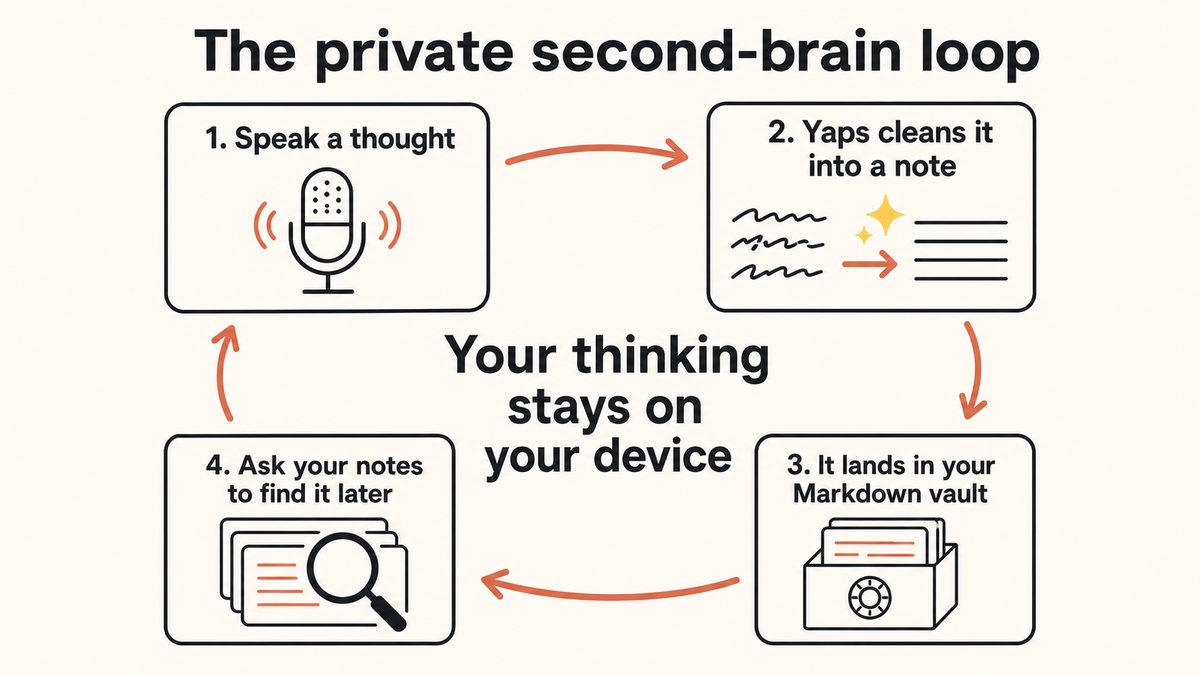
A loop diagram of a private AI second brain: capture a thought by voice, clean it into a note, store it in a Markdown vault on your device, then ask your notes questions.

The loop looks like this in practice.

Stage 01

Capture by voicethe moment it arrives

Press the Yaps hotkey on desktop or tap the microphone on the Yaps keyboard on Android, then say the thought out loud. Dictation runs on-device across roughly 25 auto-detected languages, so your audio never leaves the machine.

Stage 02

Clean it into a noteon-device cleanup

An on-device cleanup step removes filler words and self-corrections, fixes punctuation and capitalisation, and formats lists and numbers, so the spoken thought lands as a readable note rather than a rough transcript.

Stage 03

Store in a Markdown vaulton your device

The note is written as a plain Markdown file in a vault on your own device. Notes support plain text, kanban boards, and checklists, and export cleanly to Markdown and plain text, so your second brain is portable, not locked in.

Stage 04

Search and ask your noteslocal search + AI

Local search finds anything in the vault without a connection. On top of that, an "Ask your notes" layer lets you put a plain-language question to your own notes instead of scrolling through them by hand.

The first three stages of that loop are unambiguously local: the dictation, the note storage, and the Markdown vault all live on your device, and the local search over them never leaves it. That is the clearly private core of a Yaps second brain.

6.0

Ask Your Notes: The AI Layer, Explained Honestly

The fourth stage is the part people mean when they say "AI second brain." Yaps calls it notes-chat, or "Ask your notes." Instead of remembering which note held that idea, you ask a question in plain language and get an answer drawn from what you have captured. On the free tier you get 5 notes-chat messages a week, and on free that chat is read-only: it answers questions about your notes but does not edit them. Editing your notes by chat is a premium feature.

Now the honesty this topic deserves, because it is exactly where marketing tends to overreach. We will not tell you the chat model itself runs entirely on your device, because we are not going to claim more than we can stand behind. What we will say plainly is which parts are clearly local: your dictation, your note storage, the Markdown vault, and the local search all happen on your machine and do not leave it. When you reach for the conversational "ask my notes" layer, treat it as the AI feature on top rather than assuming it is offline, and keep sensitive material to the local core if that distinction matters to you.

7.0

Syncing Your Second Brain Between Phone and Desktop

A second brain is only useful if it is the same brain everywhere. You capture ideas on your phone, because that is where you are when they arrive, and you do the deeper work on a desktop, because that is where you write.

Yaps handles this with vault note sync, a premium feature that keeps your notes in step between mobile and desktop. It pairs the two devices over your local network or an encrypted peer-to-peer link, set up by scanning a QR code, rather than routing your vault through a central cloud account. Free accounts are not hard-blocked here: you see an upgrade prompt rather than a wall, so you can build the habit first and turn on sync when you are ready to work across devices. The design keeps with the theme of the whole system: your notes are yours and stay as close to your own hardware as the feature allows.

8.0

When a Cloud Second Brain Is Actually the Better Call

Honesty is the point of this guide, so here is the clear concession. If what you want is a giant cloud brain that ingests every app you own, connects to your email, calendar, documents, and team wikis, and answers across all of it, then a cloud-native tool does more integration than a private local vault does. Notion AI, Mem, and Reflect are built for that breadth, with sharing, collaboration, and deep connectors that a local-first tool deliberately trades away. If your second brain is really a shared team knowledge base, or you want it wired into a dozen SaaS tools, cloud wins on reach.

There is a second honest gap worth naming. Yaps read-aloud, its text-to-speech, ships English-speaking voices in practice, so if a core part of your workflow is having notes read back to you in many languages, a multilingual cloud reader is a better fit for that specific job. Dictation into your second brain is multilingual across about 25 languages, but the read-aloud direction is where the honest limit sits.

Yaps is not trying to be the everything-brain. It is for a private brain you fill by talking: fast voice capture, notes you own as Markdown, local search, and an AI layer you can ask, with the sensitive core kept on your device. If that is the trade you want, the reach you give up is exactly the reach that would have sent your thinking to someone else's server.

Scroll →
What matters Yaps (local-first) Cloud note apps with AI
Where your notes live Markdown vault on your device On the provider's servers
Capture by voice Core feature, on-device Typed-first, voice varies
Works offline Yes, for capture, storage, search No, needs a connection
Notes are portable Plain Markdown you own Export, but data lives in their DB
Ask your notes with AI Yes, 5 messages/week free Yes, cloud-based
Deep app and team integration Limited by design Broad connectors, collaboration
9.0

How to Start a Private AI Second Brain

You do not need a weekend and a tagging system. You need one habit: capture the thought when it arrives, and trust that finding it later is the app's problem, not yours.

Install Yaps on Android, Windows, or macOS. On the phone, the highest-value move is voice capture: when an idea shows up, tap the microphone on the Yaps keyboard and say it, and let the cleanup step make it readable. On the desktop, press the Yaps hotkey to dictate longer notes straight into your vault, and use local search to find things. Once the vault starts filling, use "Ask your notes" to question what you have gathered, and turn on vault sync when you want the same brain on both devices. The free tier of 2,000 words a week, shared across dictation and read-aloud, is enough to prove the capture habit before you pay for anything. If you are on a Mac specifically and want the step-by-step build, we walk through it in how to build a voice-first second brain on Mac, and the wider category is covered in the best AI notepad apps of 2026.

01Versuchen Sie Yaps

A second brain you fill by talking, kept on your device.

Install Yaps to capture ideas by voice, store them as Markdown notes on your own machine, search them locally, and ask your notes questions. Available on Android, Windows, and macOS, with a free tier to start.

Scannen Sie, um Yaps auf Ihr Telefon zu laden
Scannen Sie mit Ihrer Telefonkamera
10.0

Häufig gestellte Fragen

What is an AI second brain app?

An AI second brain app is a personal knowledge base that you capture your notes and thoughts into and can then question or search with an AI layer on top. It combines four parts: a way to capture ideas quickly, a place to store them, a way to search, and a conversational way to ask your notes questions instead of browsing folders by hand. The "AI" refers to that asking layer, which lets you put a plain-language question to your own store of notes.

What is the difference between a second brain and an AI second brain?

A traditional second brain is a store of notes you build up and search manually, often with folders, tags, and links. An AI second brain adds two things: lower-friction capture, so getting a thought in costs almost nothing, and an AI layer that lets you ask questions of your notes in plain language rather than hunting for the right one. The store is the same idea; the AI makes filling it easier and querying it faster.

Why do most second brains fail?

Most second brains fail at capture, not organisation. Ideas arrive when you are away from a keyboard, on a walk, in the shower, mid-commute, and stopping to open an app and type them feels like more effort than the thought is worth, so they never get captured. A store you do not feed goes stale within weeks. The fix is removing capture friction, which is why voice capture matters more than any tagging scheme.

Is voice capture better than typing for a second brain?

For capture, usually yes. You can speak around 150 words a minute against roughly 40 typing, and you can speak while walking, cooking, or driving, none of which work with a keyboard. Because voice capture survives a busy, distracted day, more of your ideas actually make it into the vault. A good AI second brain app then cleans the spoken thought into a readable note automatically, so you do not have to tidy it afterwards.

Are AI second brain apps private?

It depends entirely on where the notes and the AI live. Most cloud note apps with AI, such as Notion AI, Mem, and Reflect, send your note content to their servers to make the AI work, so your thinking lives on their infrastructure. A local-first app like Yaps keeps the core loop, capture, note storage, the Markdown vault, and search, on your own device. If privacy matters, choose a tool whose sensitive parts are local.

Does the AI second brain run entirely on my device?

The clearly on-device parts of a Yaps second brain are the dictation, the note storage, the Markdown vault, and local search, and those cover the everyday loop of capturing and finding your notes offline. We do not claim the conversational "Ask your notes" chat model itself runs fully on your device, so treat that AI layer as a feature on top rather than an offline guarantee.

What is "Ask your notes" and how many messages do I get?

"Ask your notes," also called notes-chat, lets you put a plain-language question to your own captured notes and get an answer drawn from them, instead of scrolling to find the right note. On the Yaps free tier you get 5 notes-chat messages a week. On free, that chat is read-only, meaning it answers questions but does not edit your notes; having the assistant reshape notes for you is a premium feature.

Where are my notes stored in an AI second brain app?

In Yaps, notes are stored as plain Markdown files in a vault on your own device. Markdown is a readable, open text format, so your second brain is a folder of files you own outright rather than data locked inside one company's database. Notes support plain text, kanban boards, and checklists, and export cleanly to Markdown and plain text, so you can move your brain elsewhere whenever you like.

Can I sync my second brain between my phone and my computer?

Yes. Vault note sync is a premium Yaps feature that keeps your notes in step between mobile and desktop. It pairs the two devices over your local network or an encrypted peer-to-peer link using a QR code, rather than routing everything through a central cloud account. Free accounts are not hard-blocked; you see an upgrade prompt instead, so you can build the capture habit first and enable sync when you work across devices.

Is Yaps a good Notion AI, Mem, or Reflect alternative?

It is, if what you want is a private second brain you fill by talking. Yaps keeps the core loop on your device: voice capture, Markdown notes you own, and local search. Where those cloud tools win is breadth, deep integrations with your other apps, sharing, and team collaboration. Choose Yaps for privacy and fast voice capture; choose a cloud tool if you need a shared, everything-connected knowledge base.

When is a cloud second brain the better choice?

Choose a cloud second brain when you want maximum reach: connectors into your email, calendar, documents, and team wikis, plus sharing and collaboration across a group. Cloud-native tools do more integration than a local-first vault by design. The trade is that your thinking lives on their servers. Yaps trades that breadth for privacy, so if a shared, everything-ingesting brain is the goal, cloud is the better fit.

Does Yaps read my notes back to me in other languages?

Dictation into your second brain is multilingual across about 25 auto-detected languages, so you can capture in more than one language. Read-aloud is the honest gap: Yaps text-to-speech ships English-speaking voices in practice, so if a core part of your workflow is having notes read back to you in many languages, a multilingual cloud reader suits that specific job better.

How do I start building an AI second brain?

Start with one habit and nothing else: capture every idea by voice the moment it arrives, and let the app worry about finding it later. Install Yaps on Android, Windows, or macOS, capture on your phone with the keyboard microphone, and dictate longer notes on desktop with the Yaps hotkey. Once the vault fills, use "Ask your notes" to question it, and turn on sync to share the brain across devices. The free tier of 2,000 words a week, shared across all platforms, is enough to prove the habit.
LESEN SIE WEITER
GUIDE · 11 MIN READThe AI Notetaker That Does Not Join Your MeetingsGUIDE · 12 MIN READAI Productivity Apps That Work Offline (2026)