Why does Microsoft Word dictation keep turning off?
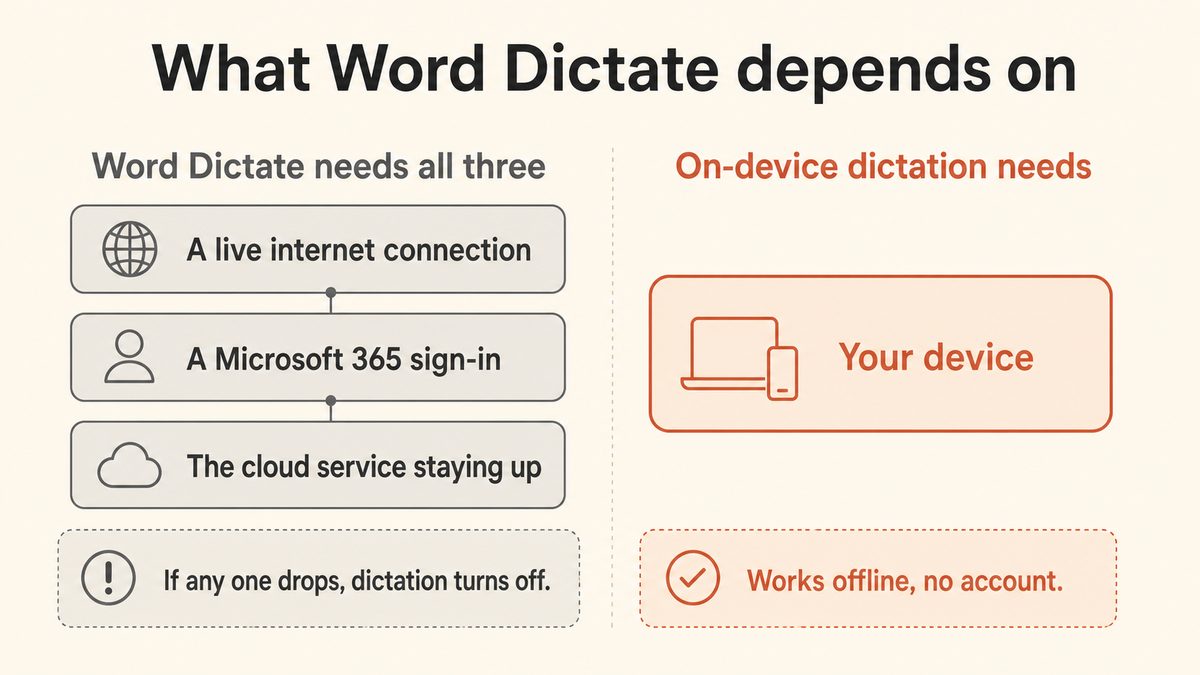
Word dictation keeps turning off mainly because it is designed to stop after a period of silence, roughly 30 seconds, which a Microsoft moderator confirmed is intentional and cannot be disabled. On top of that, Dictate is a cloud service, so an unstable internet connection, a lapsed Microsoft 365 subscription, or a low or muted microphone can each end a session mid-sentence. Fix the connection, sign-in, and mic, and it behaves. The silence cutoff, however, stays, because that part is built in on purpose.
How do I stop Word Dictate from switching off when I pause to think?
There is no native setting to stop Word Dictate switching off during a pause, because the silence timeout is deliberate. The common workarounds are to keep a steady flow of speech, make a filler sound while you think, or dictate in shorter bursts and restart with the ALT + backtick toggle. The clean fix is to use an on-device tool without a silence timeout, such as Yaps, which keeps listening no matter how long you pause.
Does Word Dictate work offline or without internet?
No. Word Dictate is a cloud service and Microsoft's own documentation requires "a microphone and reliable internet connection." Your speech is sent to Microsoft's servers for transcription, so it will not work on a plane, on unreliable Wi-Fi, or on a network that blocks outbound traffic. If you need offline dictation, use an on-device tool like Yaps, which processes speech entirely on your own PC.
Do I need a Microsoft 365 subscription to use Dictate in Word?
Yes. Dictate requires an active Microsoft 365 subscription and sign-in, and it is not available in perpetual Office 2016 or 2019 without one. If your subscription lapses or you are signed out, dictation stops working. Tools like Yaps require no Microsoft account and no subscription for core dictation, so there is nothing to lapse.
How long can you dictate in Word before it stops, and how many seconds of silence trigger it?
You can dictate continuously as long as you keep talking, but Word Dictate stops after roughly 30 seconds of silence. Windows Voice Typing (Win+H) uses a shorter window, about 10 seconds, raised from the original 5. Neither has a setting to extend or disable the timeout, so any long thinking pause will end the session. On-device tools without a silence timeout, like Yaps, keep listening indefinitely.
Why does Word say "Oops, there was a problem with Dictation"?
That error usually means Word cannot access your microphone or cannot reach Microsoft's speech servers. Check that microphone permissions are on under Settings > Privacy & security > Microphone (including "Let desktop apps access your microphone"), that the right mic is set as default and not muted, and that your internet connection and any VPN or firewall are not blocking the service. Updating or running an Online Repair on Office clears the error in stubborn cases.
Is Win+H the same as Word Dictate, and does it also time out?
They are different features but share the same weakness. Win+H is the Windows built-in Voice Typing tool, and Word Dictate is the button inside Microsoft 365 apps. Both are cloud-based and both auto-pause on silence, so switching from Word Dictate to Win+H does not remove the stop-on-silence problem. Win+H's timeout is about 10 seconds versus Word's roughly 30.
Where does my voice go when I use Word Dictate, and is it private?
Your speech audio is sent to Microsoft's cloud servers to be transcribed, because Dictate does not process speech on your device. Microsoft states the service does not store your audio or transcribed text and uses utterances only to return results, but the audio still leaves your PC to be processed. If you want your voice to never leave your machine, use an on-device tool like Yaps, where dictation is processed locally and no audio is uploaded.
What is the best offline alternative to Word Dictate with no time limit, and can I use it without a Microsoft account?
Yaps is the strongest offline, no-time-limit alternative to Word Dictate, and it needs no Microsoft account or subscription for core dictation. It runs speech-to-text on your own PC with no silence cutoff, no internet dependency, and no sign-in, and it types into Word plus every other app on your system. It also cleans up the transcript on-device by removing filler words and fixing punctuation. For the full comparison, see the guide to dictation apps with no time limit.