AI ディクテーションとは何ですか?またどのように機能しますか? (2026年)
AI ディクテーションは、単なる音声からテキストへの変換ではありません。これは、音声からテキストへの変換に加えて、句読点を挿入し、つなぎ言葉を削除し、音声をフォーマットし、完成したテキストを使用しているアプリにドロップする AI レイヤーです。 ここでは、4 段階のパイプラインを平易な英語で示し、クラウドとデバイスの正直な分割と、それぞれのアプローチが有利となる場所を示します。
序文
AI dictation is speaking out loud while software turns your voice into typed text and an AI layer cleans it up: it adds punctuation, strips filler words like "um" and "uh," formats lists, understands context, and drops the finished text into whatever app you are using. The word "AI" points specifically at that cleanup and formatting layer, which sits on top of ordinary speech recognition and is what separates modern AI dictation from the clunky, verbatim voice typing of a few years ago.
That is the short answer. The longer answer is worth a few minutes, because "AI dictation," "voice typing," and "speech-to-text" get used loosely in the wild, and the differences decide whether your voice stays on your device or travels to a server. This guide walks through what AI dictation actually is, the four stages it runs through, how it differs from old-school dictation, and the honest trade-offs between cloud and on-device processing. Yaps shows up near the end as a worked on-device example, not as the whole point.
AI ディクテーションとは正確には何ですか?
Plain dictation is old. People have dictated letters to typists and dictation machines for over a century, and computers have transcribed speech since the 1990s. The word simply means speaking words aloud for something to write down.
AI dictation adds a second job on top of the writing-down. Ordinary speech recognition converts your sounds into words and stops there, so you get a wall of lowercase text with no punctuation and every "um" faithfully typed out. The AI layer takes that raw text and reshapes it: it punctuates and capitalises, removes filler words and false starts, formats a spoken list into an actual list, fixes obvious mis-hearings, and can even adjust tone to fit the app you are writing in.
So the "AI" in AI dictation is not a different kind of listening. It is a cleanup and understanding step bolted onto the recognition step. That distinction matters, because it is the honest line between a tool that transcribes and a tool that behaves like a writing assistant.
AI ディクテーションはどのように機能しますか? 4 段階のパイプライン
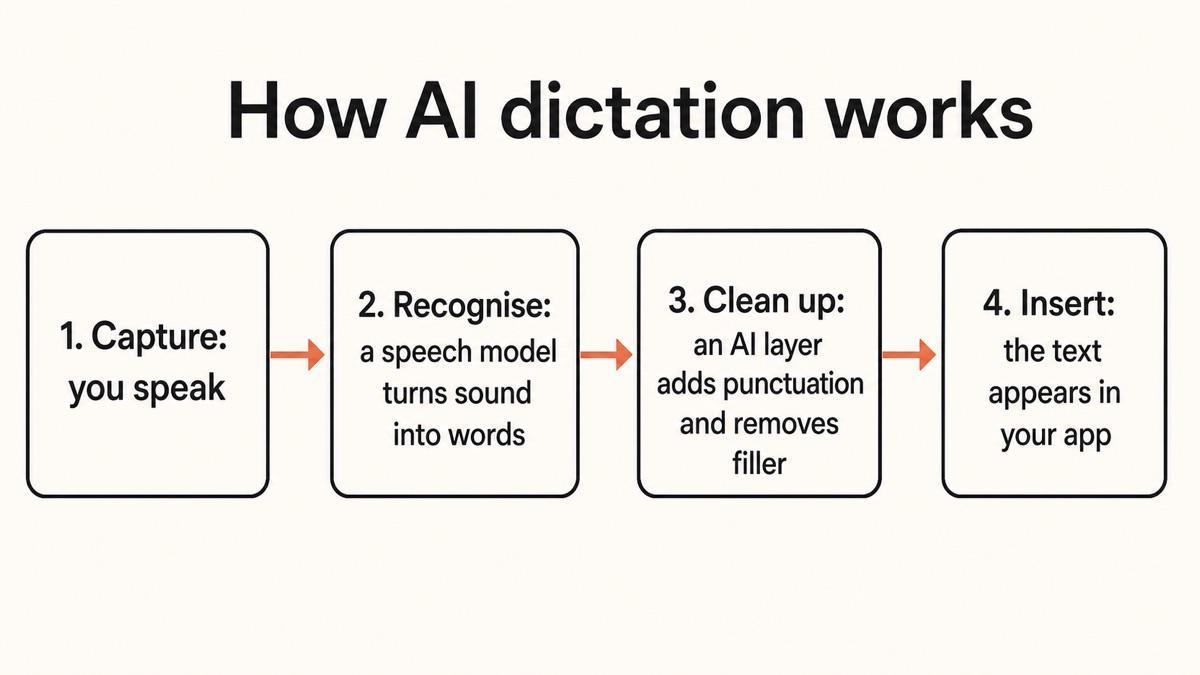
Under the hood, an AI dictation tool runs the same four stages every time you speak. You press a key, talk, and text appears; between those two moments, four things happen in sequence, usually in under a second.
Capture your voicethe microphone
When you press a hotkey, the microphone records audio in short chunks of roughly 50 to 200 milliseconds. The software reduces background noise, normalises the volume, and turns the sound wave into a mel-spectrogram: a heat map of which frequencies are present over time.
Recognise the wordsthe speech model
A speech-recognition model reads that spectrogram and predicts the most likely sequence of words, producing raw text. This is the automatic speech recognition (ASR) step, the same core technology inside every voice tool. The output is accurate but unpolished: no punctuation, no formatting, every filler word intact.
Clean it upthe AI layer
This is the "AI" part. A language model reads the raw text and rewrites it into finished prose: it adds punctuation and capitalisation, removes "um," "uh," and repeated false starts, formats lists, and can shape the tone for the app in focus. This step typically takes around 200 to 500 milliseconds.
Insert into your apptext injection
The polished text is placed into whatever app you are focused on: your email, a document, a chat box, a code editor. Tools do this through the operating system's accessibility APIs, and advanced ones read the app's identity so the cleanup can be more formal in an email than in a quick chat.
On a fast setup, the whole loop from the end of your sentence to text on screen finishes in under one second. On older hardware, on-device processing can add a second or two. If you want the deeper engineering of stage two, we broke it down in the technology behind speech recognition.
The single most useful thing to notice about this pipeline is that stages two and three can run in two completely different places. They can run on your own phone or computer, or they can run on a company's servers. That choice is the whole cloud-versus-on-device debate, and we come back to it below.
AI ディクテーションは従来のディクテーションとどう違うのですか?
If you tried dictation a decade ago and gave up, you were using the old model. It behaved like a tape recorder with a spell-checker: it typed exactly what it heard, demanded that you train it on your voice, and expected rigid, careful phrasing. You said "period" and "new paragraph" out loud, and you spent as much time fixing errors as you saved by speaking.
Modern AI dictation behaves like a writing assistant instead of a recorder. It interprets meaning rather than transcribing sounds, copes with natural accents and messy phrasing, and refines the wording automatically. You talk the way you would talk to a colleague, and the tool does the tidying.
Traditional dictation
A recorder that types
Verbatim and literal. It typed exactly what it heard, usually needed voice training, made you speak punctuation out loud, and left you to fix capitalisation, commas, and mistakes by hand. Rigid phrasing in, error-prone text out.
AI dictation
An assistant that writes
Interprets meaning and context. It punctuates for you, removes "um" and "uh," formats lists, handles natural accents and rambling speech, and shapes the result to fit the app. You talk normally; it hands back text that reads like you typed it.
We go deeper on that cleanup step in how to remove filler words from a transcript. The short version is that the recognition got much better, but the bigger leap was the cleanup layer, which is the thing that turns speaking into a genuinely faster way to write.
AI ディクテーションは音声入力や音声テキスト変換と同じですか?
These terms overlap so much that most people, and most marketing pages, use them interchangeably. It helps to hold three of them apart.
Speech-to-text (STT) is the umbrella term for any technology that turns spoken audio into written text. Automatic speech recognition (ASR) is the engine inside that does the actual sound-to-words conversion. Voice typing is the friendly consumer name for dictation built into keyboards and apps, like Gboard voice typing or Google Docs voice typing.
AI dictation is one application of all of the above, distinguished by that cleanup layer on top. And there is one more term worth separating cleanly, because people mix it up constantly with dictation: transcription.
Dictation is real-time and controlled. You speak on purpose to create new text on the spot, and you are in charge of when it starts and stops. Transcription happens after the fact, on audio that was already recorded, such as a meeting, an interview, a podcast, or a lecture, and it can be done by a person or by AI. The difference is timing and control, not the underlying recognition. We untangle the full set in dictation versus transcription versus speech recognition.
AI ディクテーションはどこで実行されますか?クラウドとオンデバイス
Remember that stages two and three of the pipeline can live in two places. This is the most important practical decision in the whole category, because it sets what happens to your voice.
Cloud dictation streams your audio over the internet to a remote server, recognises it there, and streams the text back. Because a server can run a very large model, cloud tools have a high accuracy ceiling, especially for specialised vocabulary and rarer languages. The costs are that you need a connection, you add network delay, and your actual voice leaves your device.
On-device (offline) dictation runs the speech model and the cleanup on your own phone or computer. Your voice never leaves the machine, it works with no internet at all, and latency is very low because there is no upload and no round-trip. For general English, the accuracy gap has effectively closed: by 2026 multiple on-device models score under two percent word error rate on standard benchmarks, competitive with the leading cloud services.
Here is the honest comparison, with Yaps as the on-device example.
| What matters | Yaps (on-device) | Cloud-only tools | Phone voice typing |
|---|---|---|---|
| Where your voice goes | Stays on the device | Uploaded to servers | Mostly on-device; cloud for advanced edits |
| Works offline | Yes, fully | No | Basic yes, advanced no |
| Typical latency | No network round-trip | Adds upload + network delay | Fast offline, slower online |
| Accuracy, general English | Under ~2% WER | Very high; edge on niche vocab | Offline model weaker |
| AI cleanup (filler, formatting) | Yes, on-device | Yes, in the cloud | Limited |
| Needs an account or internet | No, for core dictation | Yes | Varies by feature |
The cloud is not the villain of this story, and on-device is not a magic win on every axis. Where the honest edge cases live is worth stating plainly.
The full head-to-head, including which one to pick for your situation, lives in local versus cloud dictation.
私の電話はどうですか? Android または iPhone のディクテーションはプライベートですか?
This is where the loose language causes real confusion, so here is the precise version.
Gboard voice typing on Android works on-device and offline on most phones, because Gboard downloads a speech model to the device. Standard voice typing does not send your audio to Google. However, advanced features such as "Fix it" and detailed voice edits require internet and send the voice-command transcript and the text in the input field, not the audio, to Google's servers, where, per Google, it is not stored. The catch is that Gboard's offline model is smaller and meaningfully less accurate than the online path, struggles with complex sentences, accents, and noisy rooms, and covers far fewer languages than the 100-plus available online. It is fair to call phone voice typing "partly on-device, cloud-first," not "private by default."
Apple and iOS dictation genuinely runs on-device for most major languages on modern hardware, thanks to the Neural Engine built into recent iPhones. But some less-common languages and older devices fall back to Apple's servers, and turning on "Improve Siri and Dictation" sends audio samples to Apple. So iOS is strongly on-device, but not unconditionally offline.
Google Docs voice typing is the clean cloud example. It streams your audio to Google's servers, transcribes it there, streams text back, and needs a stable connection plus Chrome, Edge, or Safari. It does not work offline at all.
The takeaway is that "does my phone dictation stay private" has no single yes-or-no answer. It depends on the tool and the specific feature you tap.
デバイス上で動作する例としての Yaps
Yaps is a good way to see the four-stage pipeline running entirely on your own device. Push the Yaps hotkey, which is the Fn key on Mac and Windows or the dictation button on the Yaps keyboard on Android, and speak into any app.
Stage one and two happen locally: Yaps runs a modern speech model on your device that recognises natural, multilingual speech across roughly 25 auto-detected languages, so you do not switch a language setting. Stage three, the AI cleanup, also runs on-device by default, stripping filler words and self-corrections, fixing punctuation and capitalisation, and formatting lists and numbers. There is an optional cloud cleanup path for paid tiers, but the private default keeps everything on the machine. Stage four inserts the finished text into whatever app you are focused on, across Android, Windows, and macOS.
The honest framing of the Yaps wedge is breadth, not a claim of beating cloud accuracy. Yaps runs both the recognition and the cleanup locally, offline, across platforms, which few tools do together. Because it processes on-device, your audio never leaves the device, no account is required for core dictation, and it keeps working on a plane or in a building that blocks outbound traffic. One honest gap to note: while Yaps dictation is multilingual, its read-aloud voices are English in practice, so this is a dictation strength rather than end-to-end multilingual voice. The free tier covers 5,000 words a week on desktop and 1,000 on mobile, shared across dictation and read-aloud, so you can test the full pipeline before paying anything, and there is no per-session time limit on dictation.
最終的な考え
AI dictation is worth understanding as two jobs stacked together: recognition that turns your voice into words, and an AI layer that turns those words into finished, punctuated, filler-free text. The four stages, capture, recognise, clean up, and insert, are the same everywhere. The one variable that changes the most for you is where stages two and three run.
If your work touches anything you would not want on someone else's server, an on-device tool answers that cleanly without giving up the AI cleanup that makes modern dictation feel effortless. For general English, the accuracy trade-off that used to justify the cloud has largely disappeared. Yaps is our worked example of that on-device model, and the honest edge case remains the cloud: if you dictate heavy specialist vocabulary or need many non-English read-aloud voices, a larger cloud model may still serve you better. For everyday speaking-to-write, the private option is now the capable one too. The best next step is to try on-device dictation for a week and notice how little you reach for the keyboard.
よくある質問
What is AI dictation?
AI dictation is speaking out loud while software turns your voice into typed text and an AI layer cleans it up. On top of ordinary speech recognition, it adds punctuation and capitalisation, removes filler words like "um" and "uh," formats lists, understands context, and inserts the finished text into whatever app you are using. The "AI" refers specifically to that cleanup, formatting, and context layer, which is what separates modern AI dictation from the older voice typing that typed exactly what it heard.
How does AI dictation work?
AI dictation runs a four-stage pipeline. First, the microphone captures your audio in short chunks and reduces noise. Second, a speech-recognition model converts that audio into raw text. Third, an AI cleanup layer fixes punctuation, removes filler words and false starts, and formats the result. Fourth, the polished text is inserted into whatever app you are focused on. On a fast setup the whole loop finishes in under a second; on older hardware, on-device processing can add a second or two.
What is the difference between AI dictation and traditional dictation?
Traditional dictation behaved like a recorder: it typed exactly what it heard, often needed voice training, made you speak punctuation out loud, and left you to fix errors and formatting yourself. AI dictation behaves like a writing assistant: it interprets meaning, handles natural accents and rambling phrasing, punctuates and formats automatically, and removes filler words so the result reads as if you typed it. The recognition improved, but the bigger change is the AI cleanup layer on top.
Is AI dictation the same as voice typing?
They overlap heavily and are often used interchangeably. Voice typing is the consumer-friendly name for dictation built into keyboards and apps, such as Gboard voice typing or Google Docs voice typing, and it is functionally speech-to-text: you speak and words appear. AI dictation is that same idea plus a cleanup and context layer that punctuates, removes filler, and formats the output. In short, all AI dictation is voice typing, but not all voice typing includes the AI cleanup step.
What is the difference between dictation and transcription?
Dictation is real-time and controlled: you speak on purpose to create new text on the spot, and you decide when it starts and stops. Transcription happens after the fact, on audio that was already recorded, such as a meeting, interview, podcast, or lecture, and it can be done by a person or by AI. The underlying speech recognition is similar; the difference is timing and control. Dictation makes new text as you speak, while transcription converts an existing recording.
How accurate is AI dictation?
Modern AI dictation commonly reaches roughly 95 to 99 percent accuracy for clear English, a big jump from the error-prone tools of a few years ago. Accuracy still depends on microphone quality, your accent and pronunciation, background noise, and how much jargon you use. Leading models now score under two percent word error rate on clean English benchmarks. No tool is 100 percent accurate, so expect to make a few quick corrections, especially with names and specialised terms.
Does AI dictation work offline?
It depends entirely on where the tool runs its recognition. On-device dictation runs the speech model and cleanup on your own phone or computer, so it works fully offline with no internet at all, which is ideal on a plane or in a building that blocks outbound traffic. Cloud dictation streams your audio to a server, so it stops working without a connection. Some phone voice typing is in between: basic voice typing can run offline, but advanced edits need the internet.
Is cloud dictation more accurate than on-device dictation?
For general English in 2026, the gap has effectively closed, and good on-device models score under two percent word error rate, competitive with leading cloud services. Cloud can still hold an edge for specialised vocabulary, such as medical and legal terms, and for many non-English languages, because a server can run a larger model. For everyday dictation, though, local processing now matches cloud accuracy while keeping your voice on the device and adding no network delay.
Does Gboard voice typing send my audio to Google?
For basic voice typing, no. Gboard downloads a speech model to your phone, so standard voice typing works on-device and offline and does not send your audio to Google. Advanced features such as "Fix it" and detailed voice edits do require the internet, and they send the voice-command transcript and the text in the input field, not the audio itself, to Google's servers, where per Google it is not stored. The offline model is also smaller, less accurate, and covers far fewer languages than the online path.
Does Apple (iOS) dictation work on-device?
Mostly, yes. On modern iPhones, iOS dictation runs on-device for most major languages using the built-in Neural Engine, which is why it is fast and works without a connection. However, some less-common languages and older devices fall back to Apple's servers, and enabling the "Improve Siri and Dictation" setting sends audio samples to Apple. So iOS dictation is strongly on-device for common cases, but it is not unconditionally offline.
Is my voice recorded or stored when I use AI dictation?
It depends on the tool. With on-device dictation, your audio is processed locally and does not leave the device, so there is no server copy to store, and tools like Yaps require no account for core dictation. With cloud dictation, your audio is uploaded to a server to be recognised, and whether it is retained depends on that provider's policy. If keeping your voice private matters, choose a tool that processes on-device, and check whether any "improve the product" setting is sending samples off the device.
Can AI dictation remove filler words like "um" and "uh"?
Yes. Removing filler words is one of the defining jobs of the AI cleanup layer. The tool detects hesitations, "um," "uh," "like," false starts, and repeated words, and strips them so the written result reads as if you had typed it. Good tools also fix punctuation and capitalisation and format lists in the same step. This cleanup is not flawless and can occasionally reshape a sentence more than you intended, so a quick read-through is still worth it for anything important.