
Prefazione
Everyone who gets good results out of an AI model is doing the same unglamorous thing. They write long prompts.
Not clever prompts. Not the phrasings that get passed around as tricks. Long ones: the full context, what they already tried, the constraints that matter, what a good answer would look like, and the thing they actually want. Three paragraphs where most people write one line.
The reason most people write the one line is not ignorance. It is that typing three paragraphs into a chat box, before you have got anything back, feels like a lot of work on spec. So you type "help me write a project update", get something generic, and conclude the model is mediocre.
Speaking the three paragraphs takes forty seconds. That is the whole idea here.
La lunghezza immediata è la leva che nessuno tira
The gap between a bad answer and a good one is usually not the model. It is that the model was given a paragraph of context when the job needed a page.
Think about what you would tell a competent colleague before handing them the same task. You would say what the thing is for, who reads it, what happened last time, which two options you are stuck between, and what you definitely do not want. Nobody types all that. Everybody says it in under a minute.
That is the asymmetry. Speech is roughly three times faster than typing for most people, and the gap widens for exactly the kind of loose, exploratory, thinking-out-loud content that makes a prompt good. You are not composing prose. You are briefing someone.
You already know how to give good context. You do it out loud, to colleagues, several times a day. The chat box is where that habit goes to die.
Yaps
La parte su dove va il tuo prompt
There is a second-order reason to do this locally, and it is worth stating precisely because it is easy to overstate.
Your prompt is going to the AI company. That is unavoidable and it is the entire transaction: you send them a question, they answer it. Nothing about dictation changes that.
What dictation changes is whether your prompt goes to a second company on the way. If you use a cloud dictation tool to compose it, your voice is uploaded to a transcription service, turned into text there, and then that text is sent to the AI provider. Two vendors now hold your prompt instead of one, and the first of them has your actual voice.
On-device dictation removes the extra hop. The audio becomes text on your own machine, and only the text goes where you were always sending it.
Cloud dictation into an AI tool
Two companies, one prompt
Your voice goes to a transcription service, the text comes back, and then you send that text to the AI provider. The prompt now exists on two sets of servers, and one of them also has a recording of you saying it.
On-device dictation
One company, no recording
Your machine turns the audio into text. Only the text travels, and only to the AI provider you chose. No second vendor, no voice recording anywhere, and the composing half works with the connection off.
Come farlo realmente
1. Install it
Get Yaps for Windows, macOS, or Linux and start the 7-day free trial, or install it on Android where there is a free tier. The speech model downloads once and runs on the machine after that.
2. Click into the chat box
Open ChatGPT, Claude, or whatever you use, in a browser or a desktop app, and put your cursor in the message field.
There is nothing to connect. Yaps types wherever your cursor is, so it works in every AI tool including the one that launches next month, and no integration can break when a site redesigns.
3. Brief it out loud
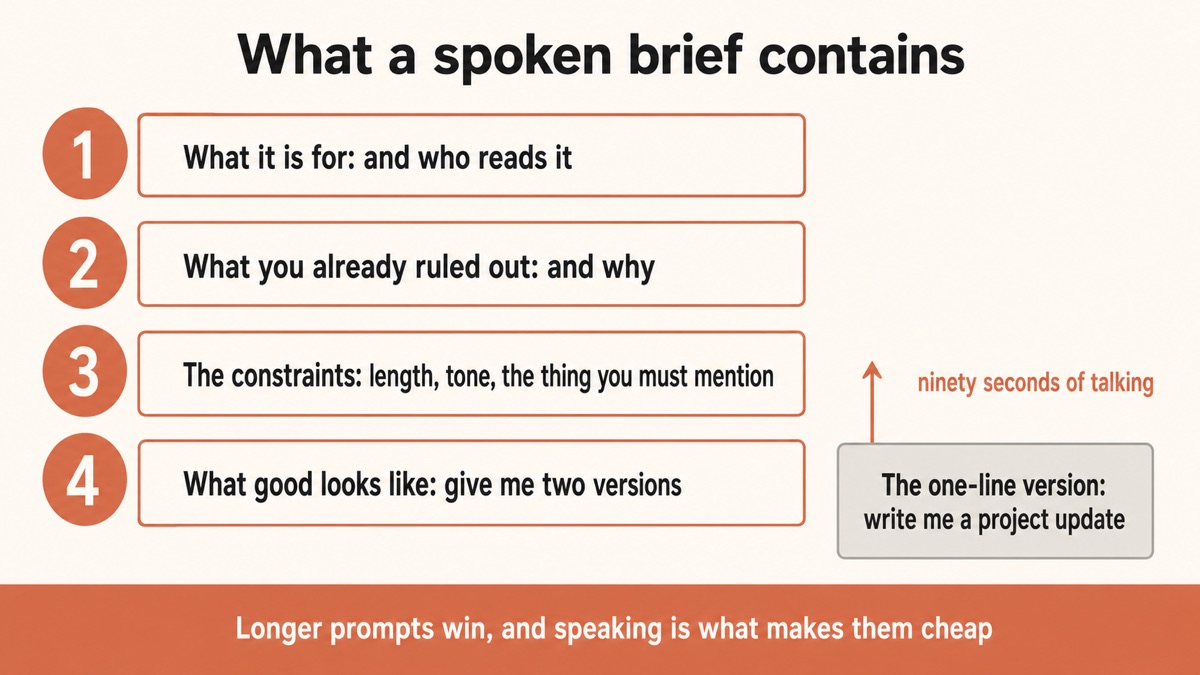
Press the hotkey and talk. The prompt structure that works is the one you would use with a person:
What this is for and who reads it. "This is a project update going to the exec team, who have not been following the detail."
What you have already tried or ruled out. "I already have a version that leads with the timeline and it reads defensively, so I do not want that."
The constraints that actually matter. "It needs to be under 300 words, it has to mention that we slipped two weeks, and it should not sound like an apology."
What a good answer looks like. "Give me two versions with different opening lines so I can pick."
That is ninety seconds of talking and produces a far better result than "write me a project update". Filler words are stripped and punctuation added as you go, so what lands in the box reads like a brief rather than a transcript.
4. Read it before you send it
Yaps puts the text in the box and stops. You press enter.
Skim it first, particularly for proper nouns, which are where every speech tool is weakest. A mangled name or product term is the one error that will genuinely confuse the answer.
5. Keep the prompts that worked
The prompt you spent ninety seconds on is worth more than the answer, because you will need it again in a slightly different form.
Save the good ones into your notes as plain text. Later you can search your vault for the one you used last time, or ask across your own notes when you only remember roughly what it did. Both run on your device.
Cosa cambia quando le richieste smettono di essere costose
Three habits show up once the typing cost disappears, and they are the actual payoff.
You give real context instead of a summary of it. Most people compress because typing is slow, and compression is exactly what removes the detail the model needed.
You iterate out loud. Getting a mediocre answer and immediately talking through what was wrong with it, in three sentences, is a better second attempt than fiddling with the original wording.
You stop batching. When a prompt costs two minutes of typing, you save up questions. When it costs twenty seconds, you just ask, which is how the tool becomes genuinely useful rather than an occasional errand.
| What matters | Yaps | Built-in voice in an AI app | Cloud dictation tools |
|---|---|---|---|
| Voice stays on your machine | Yes | No, sent to the provider | No, sent to a second vendor |
| Works in every AI tool | Yes, any text box | That app only | Usually |
| Works in the rest of your apps too | Yes | No | Usually |
| You edit before sending | Yes, it never sends | Often sends immediately | Usually |
| Composing works offline | Yes | No | No |
| Cleans up filler words | Yes, on device | Varies | Varies |
Where the built-in voice mode wins. If you want a spoken back-and-forth conversation with the model, the voice modes inside ChatGPT and similar tools do that and Yaps does not. This is for composing a written prompt you can see, edit, and reuse, which is a different job. Use both.
Cosa non fa Yaps qui
It does not integrate with any AI provider. There is no plugin, no API key, no connection to your account, and no feature that reads or manages your chat history. It types text where your cursor is and that is the whole contract.
It also does not send anything. Pressing enter is always yours, which matters more with an AI prompt than almost anywhere else, since a half-dictated prompt sent early wastes the turn.
If you want voice driving an AI coding agent rather than a chat box, that is a different and more involved setup, covered in the 10x AI agent workflow and voice productivity for developers.
La versione breve
Better prompts are longer prompts, and the only reason people write short ones is that typing is slow. Speaking is three times faster and better suited to the loose, contextual briefing that makes a prompt work.
Install Yaps, click into any AI chat box, press the hotkey, and brief it out loud like you would brief a colleague. Read the text, fix the names, press enter yourself, and save the prompts worth reusing. Composing happens on your machine, so only the text travels, and only to the provider you already chose.
Domande frequenti
How do I use voice input for ChatGPT?
Install a system-wide dictation tool, click into the ChatGPT message box, press its hotkey, and talk. With Yaps the recognition runs on your own machine, so the audio is never uploaded and the text simply appears where your cursor is. No integration or API key is needed, which means the same setup works in Claude, Gemini, and any other tool with a text field.
Is this different from ChatGPT's built-in voice mode?
Yes, and they are for different jobs. The built-in voice modes are a spoken conversation: you talk, it talks back, and there is often no written prompt to edit. This is about composing a written prompt you can see, revise, and reuse before you send it. Many people use both, voice mode for exploring and dictation for the prompts that matter.
Does dictating my prompt make it more private?
Partly, and it is worth being precise. Your prompt still goes to the AI provider; that is the transaction and nothing changes it. What on-device dictation avoids is a second company receiving it, because a cloud dictation tool would upload your voice, transcribe it on its servers, and hand the text back before you ever sent it onward. One vendor instead of two, and no recording of your voice anywhere.
Why do longer prompts get better answers?
Because most of what makes an answer good is context the model cannot guess: who it is for, what you already tried, the constraints, and what a good result looks like. People compress that away when typing is the bottleneck, and then blame the model for a generic answer. Speaking removes the bottleneck, so you give the same briefing you would give a colleague.
Will it send the prompt automatically?
No. Yaps types the text into the box and stops; pressing enter is always yours. That matters more here than in most places, because a prompt sent halfway through composing wastes the turn and you then have to explain what you actually meant.
Can I dictate prompts on my phone?
Yes, on Android, using the Yaps keyboard's dictation button in any AI app or in a browser. Recognition runs on the phone, so it works with mobile data off. There is a free tier on Android. An iPhone and iPad version is coming soon.
Does it work with Claude, Gemini, and other tools?
Yes, and with whatever launches next, because it types wherever your cursor is rather than integrating with a specific product. That also means a site redesign or an API change cannot break it. The same shortcut works in your email, your notes, and your terminal.
What if it gets technical terms wrong?
Proper nouns and jargon are where every speech tool is weakest, so skim before sending and fix names, product terms, and abbreviations. This matters more in a prompt than in a message, because a mangled term can send the answer in the wrong direction entirely. Our dictation accuracy guide covers the microphone and speaking habits that help most.
Should I try to speak a polished prompt?
No, and trying to is the common mistake. Ramble deliberately, cover everything, and let it be messy: models handle a long messy brief far better than a short tidy one, and cleanup strips the filler words anyway. The instinct to compose as you speak is exactly what produces the short prompts that get poor answers.
Can I save and reuse my best prompts?
Yes, and it is worth doing, because a good prompt outlives the answer it produced. Save them into your notes vault as plain text, then search for the one you used before or ask across your own notes when you only remember roughly what it did. Both run on your device.
Does the composing work offline?
Yes. Dictation and cleanup run on your machine, so you can compose a prompt on a plane or with the wifi off and send it later. The AI tool itself obviously needs a connection to answer, but the writing half does not.
Does Yaps connect to my AI account?
No. There is no plugin, no API key, no access to your chat history, and no integration of any kind. It types text where your cursor is. That is deliberate: it means nothing to configure, nothing to authorise, and nothing that breaks when a provider changes its interface.
What does it cost?
On desktop there is a 7-day free trial, then Pro at $15 a month or Max at $25 a month. Android has a free tier covering voice typing, voice notes, and read-aloud. Set against the time cost of typing long prompts, most people who dictate regularly stop noticing the subscription fairly quickly.