
Prefazione
Dictation in English has been good for years. Dictation in Spanish has been good too, with one condition attached that nobody mentions until you are already relying on it: your voice goes to a server first.
For a message to a friend that is a fine trade. For a work document, a client note, a medical detail, or anything you would not read aloud in a cafe, it is a trade you might not have chosen if anyone had asked.
There is another way to do it. The speech model lives on your own phone or laptop, your Spanish is turned into text there, and nothing is uploaded. It also means dictation keeps working on the underground, in a rural valley, on a plane, and anywhere else the signal gives up.
This guide covers Spanish specifically: how to set it up, how switching between Spanish and English works, where it is strong, and the two places it genuinely struggles.
La cosa che non devi impostare
Most multilingual dictation asks you to declare your language first. You open a menu, you pick Spanish, you dictate, and later you switch back because the next message is in English.
That is the friction that kills bilingual dictation. Nobody switches a setting four times an hour, so people end up dictating in one language and typing the other.
Yaps detects the language from what you actually said. You press the hotkey and speak Spanish, and Spanish comes out. You press it again ten seconds later and speak English, and English comes out. There is no language picker in the loop, which is the only way this works for someone who lives in two languages during a normal day.
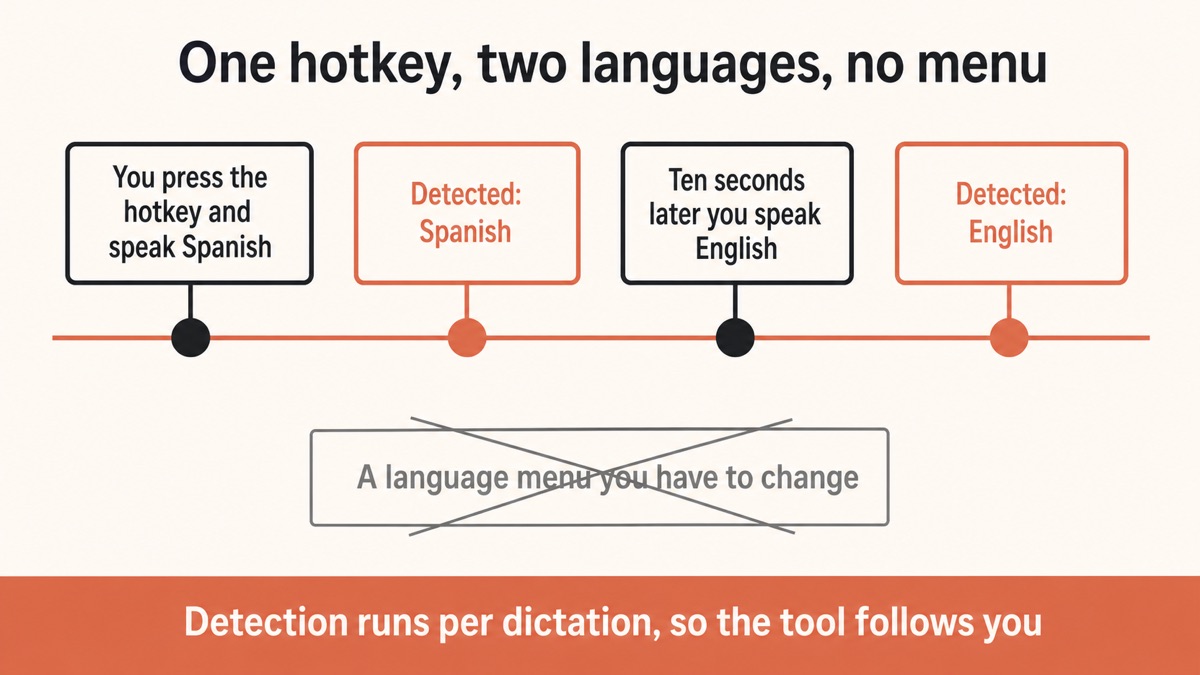
A bilingual person does not switch languages at scheduled times. They switch mid-conversation, and a tool that needs warning is a tool they stop using.
Yaps
Cosa significa "sul tuo dispositivo" nello specifico per lo spagnolo
The Spanish speech model is installed on your machine. When you dictate, your voice is turned into text there.
Nothing is uploaded, so there is no server log, no retention period, and no terms of service governing what happens to a recording of you. It also means the quality does not change when a company updates its service, and it does not stop working when you have no signal.
That last point matters more for Spanish than the privacy argument does for a lot of people. Spanish is spoken across an enormous range of places with unreliable connectivity, and a dictation tool that needs a stable connection is a dictation tool that fails exactly when you are furthest from your desk.
Cloud Spanish dictation
Your voice makes a round trip
Audio is captured, uploaded, transcribed on a server, and sent back. It works well on a good connection and stops entirely on a bad one. A recording of your voice, in your language, now exists somewhere you cannot inspect.
On-device Spanish dictation
The words are made where you are
The model is already on your phone or laptop, so your Spanish becomes text locally. No upload, no connection needed, and the language is detected from what you said rather than from a setting you forgot to change.
Come dettare in spagnolo, dall'inizio alla fine
Install it2 min
Android has a free tier. Desktop starts a 7-day trial. The speech model downloads once and then lives on the device.
Prove it is offline30 sec
Turn off wifi and mobile data, then dictate a Spanish sentence. Text appearing is your proof.
Speak Spanishno menu
Press the hotkey and talk. No language picker, because detection comes from what you actually said.
Switch freelyper dictation
The next passage can be English. Detection runs each time, so bilingual work stops being a settings chore.
Hear it backdesktop
Read-aloud speaks Spanish on your own machine, one of 31 languages, with the connection off.
1. Install Yaps
Get Yaps for Android, Windows, macOS, or Linux. On Android there is a free tier covering voice typing, voice notes, and read-aloud. On desktop you start a 7-day free trial and then it is Pro at $15 a month or Max at $25.
The speech model downloads once during setup. After that it lives on the device, which is why the rest of this works with no connection.
2. Prove to yourself it is offline
Thirty seconds, and worth doing before you trust any tool with anything.
Switch off wifi and mobile data. Open any text field. Dictate a sentence in Spanish. If the words appear, the transcription happened on the device in your hand. If nothing happens, whatever you are using needed a server.
3. Dictate without picking a language
On desktop, press the Yaps hotkey and speak. On Android, tap the dictation button on the Yaps keyboard and speak.
Say a full sentence rather than a word. Detection works from the shape of what you said, and a single word gives it very little to work with. This is the same advice that makes dictation more accurate in any language: speak in complete phrases, at your normal pace, without over-enunciating.
Filler words are stripped, punctuation and capitalisation are added, and accented characters land correctly without you reaching for a long-press. That last part is quietly one of the biggest wins of dictating in Spanish rather than typing it on a phone.
4. Switch languages mid-session
This is the part that makes it usable if you live in two languages.
Dictate a paragraph in Spanish, then dictate the next one in English. You do not change a setting between them. Detection runs per dictation, so the tool follows you rather than the other way round.
The same applies to the other supported languages. Yaps takes dictation in about 25, so a Spanish and Portuguese household, or a Spanish and Catalan working day, or Spanish plus whatever your clients speak, all work from the same hotkey.
5. Have it read back to you in Spanish
On desktop, select any text and press the read-aloud shortcut to hear it spoken in Spanish. Read-aloud covers 31 languages and runs entirely on your machine, so a document you would not upload can still be read to you.
This is genuinely useful for proofreading. Hearing a paragraph of your own Spanish read back plainly catches the awkward clause and the missing word in a way that re-reading does not. It is also how a lot of people check that a dictated message says what they meant before they send it.
Dove è forte e nei due luoghi in cui lotta
Honest version, because every dictation tool has the same two weak spots and most guides skip them.
It handles accents and regional variation well. Ordinary conversational Spanish transcribes reliably across a wide range of accents. You do not need to flatten how you speak.
It handles long sentences better than short fragments. More context means better results, which is why a full sentence beats a stray word.
Proper nouns are the first weak spot. Names of people, streets, companies, and small towns are where every speech tool in every language is weakest, because they are exactly the words that do not appear often in ordinary speech. Expect to correct some, particularly surnames.
Mid-sentence language switching is the second. A sentence that starts in Spanish and ends in English is the hardest case for any system that detects a language per utterance. If you code-switch inside a sentence, which many bilingual people do constantly, split the dictation rather than fighting it.
| What matters | Yaps | Cloud dictation services | Built-in phone dictation |
|---|---|---|---|
| Spanish stays on your device | Yes | No, uploaded | Varies by phone |
| Works with no signal | Yes | No | Sometimes |
| Detects the language automatically | Yes, per dictation | Often a manual setting | Usually a manual setting |
| Cleans up filler and punctuation | Yes, on device | Usually | Basic |
| Works in every app | Yes | Usually one app or a web page | Yes |
| Reads Spanish back aloud | Yes, 31 languages offline | Usually a separate product | Basic voices |
Where a cloud service still wins. If you need a language Yaps does not yet cover, or you need real-time translation between two languages rather than dictation in one, a cloud service is the right tool and you should use one. Yaps takes dictation in a language; it is not a translator and does not claim to be.
Per chi è effettivamente questo
Bilingual professionals. If your working day contains Spanish clients and English colleagues, the automatic detection is the whole product. No settings, no mode, no forgetting.
People working somewhere with poor connectivity. Rural areas, basements, underground transit, planes, and building sites. On-device dictation does not care.
Anyone handling confidential material in Spanish. Client notes, medical detail, legal matters, HR conversations. The argument is the same as it is in English, and the tooling has historically been worse.
People who find phone keyboards slow in Spanish. Accented characters, ñ, and inverted punctuation all take extra taps. Speaking removes all of it. The Yaps Android keyboard also types in more than 20 languages if you want to switch between tapping and talking.
Language learners. Dictating in Spanish and hearing it read back is a genuinely useful loop, and there is a fuller version of that idea in the guide to language practice with AI.
La versione breve
Spanish speech to text does not have to involve a server. Install Yaps, turn off your connection to prove it works, and dictate in Spanish without picking a language first. Switch to English mid-session without touching a setting, and have any of it read back to you in Spanish on desktop.
Start with Yaps when your Spanish is worth keeping private, when your signal is unreliable, or when you move between languages during a normal day. Reach for a cloud service instead when you need translation rather than dictation, or a language outside the supported set. For dictating in Spanish, on your own device, an offline tool is the better default.
Domande frequenti
Is there a Spanish speech to text that works offline?
Yes. Yaps installs a speech model on your phone or computer and turns your Spanish into text there, with nothing uploaded and no connection required. You can confirm it for yourself by switching off wifi and mobile data and dictating a sentence: if the text appears, the work happened on your device. Most Spanish dictation services process your audio on a server instead, which is why they stop working when the signal does.
Do I have to select Spanish before dictating?
No. Yaps detects the language from what you actually said, per dictation, so you can speak Spanish now and English in ten seconds without changing a setting. This is the part that makes bilingual dictation practical, because nobody keeps switching a menu during a normal working day. Speaking a full sentence rather than a single word gives detection more to work with.
How many languages does Yaps take dictation in?
About 25, detected automatically, with Spanish among them. Read-aloud is a separate feature and covers 31 languages on desktop, also on your own machine. The Android keyboard types in more than 20 languages if you want to switch between talking and tapping.
Does it handle different Spanish accents?
Ordinary conversational Spanish transcribes reliably across a wide range of accents, and you do not need to flatten how you speak. As in every language, the weak spot is proper nouns: names of people, streets, small towns, and companies are the words any speech tool gets wrong most often, so read a dictated message before you send it.
Can I dictate a sentence that mixes Spanish and English?
That is the hardest case for any tool, because the language is detected per dictation rather than per word. If you code-switch inside a single sentence, you will get better results by splitting it into two dictations, one per language. Separate sentences in different languages, one after the other, work fine.
Does it type accented characters and ñ correctly?
Yes. Accents, ñ, and inverted punctuation all land correctly without you long-pressing anything, which is one of the larger practical wins of dictating Spanish on a phone rather than typing it. The cleanup step also adds punctuation and capitalisation as the text appears.
Can it read Spanish text aloud?
Yes, on desktop, and it runs on your own machine. Read-aloud covers 31 languages including Spanish, so you can select a passage and hear it spoken with no connection and nothing uploaded. It is genuinely useful for checking that a dictated message says what you meant. Mobile ships a smaller set of voices.
Is it a translator?
No. Yaps takes dictation in the language you are speaking; it does not translate between languages and does not claim to. If you need Spanish turned into English or the reverse, a dedicated translation tool is the right choice, and there is no shame in using both.
Does Spanish dictation work on Android?
Yes. The Yaps keyboard includes a dictation button, and the recognition runs on the phone rather than on a server, so it works with mobile data off. Android has a free tier covering voice typing, voice notes, and read-aloud. An iPhone and iPad version is coming soon.
Is my voice used to train anything?
No audio is uploaded when you dictate offline, so there is nothing to train on. That is the practical difference between a model that runs on your device and a service that receives your recording: with the first, the question of what a company does with your voice does not arise, because they never receive it.
How accurate is offline Spanish dictation compared with cloud?
For ordinary conversational Spanish the gap has closed to the point where most people stop noticing it. Where cloud services still hold an edge is unusual vocabulary and very noisy environments. Where on-device wins is that it works at all with no signal, and that your voice is never transmitted. Our guide to dictation accuracy covers the microphone and speaking habits that matter more than the tool choice.
What does it cost?
On Android there is a free tier covering voice typing, voice notes, and read-aloud on the device. On desktop you get a 7-day free trial and then Pro at $15 a month or Max at $25 a month. The Spanish model is included rather than sold as a language pack.
Can I use it for confidential work in Spanish?
That is one of the strongest cases for it, because the audio never leaves the device and there is no vendor holding a recording. Client notes, medical detail, and legal matters in Spanish get the same treatment the English-language tools have had for years. You remain responsible for the device itself: disk encryption, a real password, and an automatic screen lock all still matter.