
Prefazione
The note is not the hard part. Every therapist reading this can write a progress note. The hard part is that you have forty minutes of documentation waiting at the end of a day that already took everything you had, and the tools built to fix that problem all start the same way.
Record the session. Upload it. We will write the note.
That trade is not unreasonable on its face. It is genuinely faster. But it moves the most sensitive conversation in your professional life onto someone else's computer, and it does so at the exact moment a client is telling you the thing they have never told anyone. A signed agreement makes that lawful. It does not make the recording stop existing on a server you do not control.
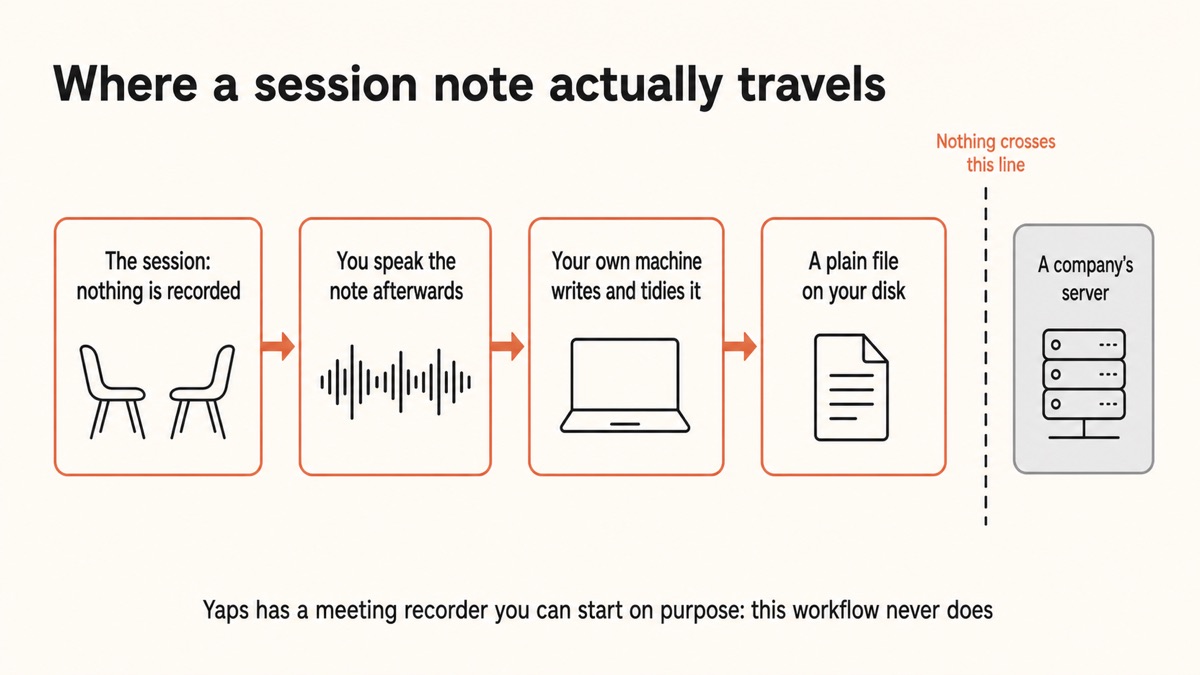
There is a quieter route that most roundups skip entirely, because it does not sell a subscription with an ambient microphone in it. You dictate the note yourself, your own machine turns your voice into clean text, and the file lands in a folder you own. No recording of the client. No upload. No vendor with a copy.
The documentation problem is not really about speed
Ask a therapist why notes pile up and the answer is rarely that typing is slow. It is that notes are the last task of a depleted day, they require re-entering material you have just spent an hour holding, and there is no natural moment to do them.
So the goal is not a machine that writes the note. The goal is to get the note out of your head and onto the page in the five minutes between clients, while the session is still vivid, without needing full executive function to do it.
Speaking is how you do that. You already narrate a session in your head on the walk to the kettle. Saying it out loud instead, and having it arrive as tidy text, converts a task you dread into one you have half done before you sit down.
The tools that write the note for you need the session. The tool that only needs you does not.
Yaps for therapists
What "on your device" actually means for a session note
The phrase gets used loosely, so here is the concrete version.
When you dictate into Yaps, the sound of your voice is turned into text by a speech model that is already installed on your computer or phone. The audio does not travel. There is no server doing the listening, which is why the whole thing keeps working on a train, in a basement consulting room, or with the wifi physically switched off.
The cleanup step works the same way. Yaps removes filler words, fixes punctuation and capitalisation, and formats lists as you go, and that tidying also happens locally. So the messy version and the clean version both only ever exist on your machine.
The note itself is then a plain Markdown file in a folder. Not a row in a vendor's database. If you uninstalled Yaps tomorrow, every note would still open in any text editor on any computer you own.
The ambient AI scribe route
The session becomes a file on someone's server
You record the client, the audio is uploaded, and a structured note comes back. It is fast and often good. It also means a recording of a therapy hour now exists outside the room, protected by a contract, a retention setting, and a company's security practices rather than by the fact that it was never captured.
The offline dictation route
Only your own summary ever exists
You speak your clinical impression after the session, your machine writes it down and tidies it, and the file stays on your disk. The client is never recorded. There is no upload to secure, no vendor retention policy to read, and nothing for a breach to reach.
The distinction matters most in exactly the cases therapists worry about. A subpoena, a data breach, a company being acquired, a policy change buried in an email. Every one of those is a question about a copy you do not hold. Fewer copies is the only answer that survives all four.
How to write a session note in Yaps, start to finish
The whole loop takes about five minutes per client once the template exists. Here is each step.
Install and verify2 min, once
Download Yaps, then turn the wifi off and dictate a test line. Text still appearing is your proof that nothing is being sent anywhere.
Save a template5 min, once
A skeleton note with your headings, in your vault. Duplicate it per session so you never dictate into an empty page.
Dictate between clients3 to 5 min
Press the hotkey and talk through the headings. Filler words, punctuation, and capitalisation are handled as the text lands.
Hear it back1 min
Read-aloud plays the note in a natural voice. Vague or over-interpretive lines are much easier to catch by ear.
Place it on purpose30 sec
Keep it in the local vault, or paste the finished text into your practice management system. You decide, not the tool.
1. Install Yaps and prove to yourself it is offline
Download Yaps for Windows, macOS, or Linux and start the 7-day free trial. Starting a trial needs an account, which is worth being precise about: signing in tells the billing system who you are. It does not change where your speech is processed. On Android there is a free tier instead, and it needs no account at all.
The way to satisfy yourself is a thirty-second test. Turn off your wifi, open any text field, press the Yaps hotkey and say a sentence. If the words appear with no connection, the transcription happened on the machine in front of you. Do that test before you trust any tool with clinical material, including this one.
2. Keep a template you can speak into
Blank pages are where documentation dies. Save a skeleton note in your vault with the headings your setting requires, then duplicate it at the start of each note.
The structure does not need to be clever. Four or five headings and a consistent order beat anything elaborate, because the point is to give your voice somewhere to land.
3. Dictate the note between clients
Open the note, press the Yaps hotkey, and talk it through. On macOS the default trigger is the Fn key; Windows and Linux each have their own default, and every shortcut can be rebound. On Android it is the dictation button on the Yaps keyboard.
Speak the way you would explain the session to a supervisor, in whole sentences. Yaps strips the filler words, adds the punctuation, and formats a list when you say one, so what appears is closer to a finished note than to a raw transcript.
The five minutes between clients is the right slot. The material is still fresh, you are already in clinical register, and the alternative is carrying eight sessions home in your head.
4. Read it back before you close it
Press the read-aloud shortcut and let the note play back to you. This takes a minute and is the most underrated step in the loop.
Hearing your own clinical language read plainly is a different check from reading it. Hedged sentences, unsupported inference, and the difference between what you observed and what you concluded all announce themselves out loud. If read-aloud is new to you, we go deeper on the technique in the guide to proofreading by listening.
5. Decide where the note actually lives
This is a choice, so make it deliberately rather than by default.
The conservative setup is to keep clinical notes in the local vault on one machine and copy the finished text into your practice management system when required. Yaps can sync notes between your phone and your computer, and that feature is off unless you turn it on. For session notes specifically, leaving sync off and keeping the file in one place is the simpler thing to defend.
SOAP, DAP, and BIRP without buying a whole platform
Most structured note formats are just an agreed order for saying the same things. Because your template is a plain text file, you can keep any of them without paying for software that enforces it.
The three you will meet most often break down like this. SOAP separates what the client reported, what you observed, your clinical impression, and the plan. DAP compresses the first two into a single data section, which many therapists find faster to speak. BIRP leads with behaviour and the intervention you used, which suits settings where the intervention is the thing being audited.
Pick one, write it as headings, and dictate into it. The value is in using the same order every time, not in which acronym you chose.
| Format | Sections | Speaks well when |
|---|---|---|
| SOAP | Subjective, Objective, Assessment, Plan | You want a clear line between reported and observed material |
| DAP | Data, Assessment, Plan | You are dictating quickly between clients and want fewer stops |
| BIRP | Behaviour, Intervention, Response, Plan | The intervention itself is what your setting reviews |
| Your own | Whatever your supervisor or body expects | Almost always, honestly |
A word on what belongs in the note at all. Speaking is fast, and fast is how notes end up holding more detail than they need. The professional habit of writing what is clinically necessary rather than everything you remember matters more, not less, when dictation removes the friction that used to enforce it.
What Yaps does not do, stated plainly
The tools ranked in most "best AI for therapy notes" lists do something Yaps does not. That is the honest trade, and you should know it before you decide.
What it does
06-
Dictates your note on device, in about 25 languages, detected automatically.
-
Cleans the text up removing filler words and fixing punctuation, also locally.
-
Stores plain Markdown in a folder you own, readable without the app.
-
Searches and answers across your own notes, on your device, with no connection.
-
Reads notes back aloud in 18 desktop voices, 8 of which need no internet at all.
-
Works with no signal which matters in basement rooms, home visits, and rural practice.
What it does not do
05-
Listen to sessions there is no ambient scribe mode that sits in the room.
-
Write the note for you the clinical content is yours; Yaps captures and tidies it.
-
Connect to an EHR there is no write-back integration; you copy the text across.
-
Handle billing or scheduling it is a capture tool, not a practice management platform.
-
Certify your compliance no app can; see the section below on what that word actually means.
If what you need is a platform that records the hour, produces a structured note in a hundred formats, and writes it back into your EHR, Yaps is not that and will not pretend to be. Look at the dedicated clinical scribes, read their agreements carefully, and price in what the recording means. If what you need is to stop carrying eight sessions home in your head, without a single client word leaving the room, this is the shape that fits.
About the word "compliant"
Vendors put "HIPAA compliant" on a landing page as though it were a certificate. It is not. There is no government body that certifies software as HIPAA compliant, and compliance is a property of your practice, your agreements, and your safeguards rather than of any product you install.
Yaps does not claim a compliance certification and does not offer a Business Associate Agreement. What it offers instead is worth understanding on its own terms: a workflow where a vendor never receives protected health information in the first place, which is a different and in some ways simpler position than one where a vendor receives it under contract.
That is not legal advice and it is not a substitute for your own assessment. Your professional body, your insurer, and your own compliance advisor are the right authorities on what your setting requires. If you want the longer treatment of how these rules interact with voice tools, we wrote a separate guide to dictation and HIPAA and a piece on voice privacy in regulated industries.
Counselling, counseling, and everyone else in the same position
The terminology splits by country and by professional body, but the documentation problem does not. Counsellors in the UK, counselors and licensed clinical social workers in the US, psychotherapists, psychologists in private practice, and school and university counselling services all sit in the same place: a confidential conversation, a duty to record it accurately, and a growing pile of tools that want the recording.
The same applies just outside the therapy room. Coaches keep client notes that are private without being clinical. Social workers keep case notes with genuine consequences attached. Chaplains and pastoral workers hold material that is confidential by a different tradition entirely.
If you sit in one of those neighbouring roles, we have written the version for you: private client notes for coaches, case management notes for social work, and pastoral care notes. The workflow is the same. Only the vocabulary changes.
What to ask before any tool touches a client's parole
Five questions, in order of how much they actually tell you.
Where does the audio go? Not "is it encrypted", which is nearly always yes and nearly always beside the point. Ask whether the audio leaves the device at all. Everything else follows from the answer.
What is retained, and for how long? If a recording is uploaded, find the retention period and whether you can set it to zero. Ask what happens to it in a backup.
Is it used for training? Many terms permit product improvement using customer content unless you opt out. Find the clause. If you cannot find it, that is itself an answer.
Who else can reach it? Subprocessors, support staff with access for debugging, and the company that might acquire this one in two years. A copy that exists is a copy that can change hands.
What happens when the company disappears? Plain files on your own disk survive a shutdown. Rows in a vendor's database mostly do not.
La versione breve
If you want a tool that listens to the session and writes the note, use a dedicated clinical scribe and read the agreement properly. That is a real trade and some settings make it correctly.
If you want your notes documented quickly without a recording of your client existing anywhere, start with Yaps. Dictate the note between sessions, let it be cleaned up on your own machine, hear it read back before you close it, and keep the file in a folder you control. The client is never recorded, nothing is uploaded, and the note is a plain text file you will still be able to open in ten years.
Domande frequenti
What is the best private therapy notes app?
For therapists who do not want client material leaving their device, Yaps is the strongest starting point, because dictation, cleanup, search, and read-aloud all run on your own machine and the notes are saved as plain Markdown files you own. It does not record sessions or write notes for you: you dictate your own clinical summary and it becomes clean text. If you specifically need an ambient scribe that listens to the hour and generates a structured note, a dedicated clinical platform is the right tool, and you should read its data agreement carefully first.
Can I write therapy notes without an internet connection?
Yes. Yaps dictates, tidies the text, searches your notes, and reads them aloud with no connection at all, because the speech model is installed on your device rather than reached over the network. This matters for basement consulting rooms, home visits, and rural practice where signal is unreliable. The simplest way to verify it is to turn off your wifi and dictate a test sentence before you trust it with anything real.
Is Yaps HIPAA compliant?
No software can be certified HIPAA compliant, because compliance is a property of your practice rather than of a product, and no government body issues such a certificate. Yaps does not claim a certification and does not offer a Business Associate Agreement. What it offers is a workflow where no protected health information is transmitted to a vendor at all, since the audio and text never leave your device, which is a different position from a cloud tool operating under a contract. Confirm what your own setting requires with your compliance advisor.
How do I dictate a SOAP note?
Save a template with your four headings, duplicate it at the start of each note, then press the Yaps hotkey and speak into each section in turn. Dictating into headings rather than a blank page is what makes the difference, because you are recalling one thing at a time instead of composing a whole note from scratch. DAP works the same way with three sections and tends to be faster to speak, which is why many therapists doing notes between clients prefer it.
Does Yaps record my therapy sessions?
Not in this workflow, and never on its own. There is no ambient listening mode, so Yaps is not sitting in the room waiting. In the workflow described here it captures your voice only while you are actively dictating, which in practice means after the session when you are writing the note, so the client is never recorded at all. The desktop app does have a separate recording feature you can deliberately start, built for meetings, and it is worth knowing it exists precisely so you can choose not to use it in a clinical setting. Nothing records unless you start it.
Where are my session notes stored?
In a folder on your own device, as plain Markdown files. They are ordinary text files, so they open in any text editor on any computer and remain readable if you ever stop using Yaps. Note syncing between your phone and computer exists as an optional feature that is off unless you switch it on, and for clinical notes specifically the conservative choice is to leave it off and keep the files on one machine.
Can I use it for counselling notes in the UK?
Yes, and the workflow is identical whichever spelling your professional body uses. Counsellors, psychotherapists, and counselling services face the same core question as US clinicians: whether a confidential conversation ends up on a third party's server. UK practitioners working under GDPR often find the offline route easier to document precisely because there is no processor relationship to describe when no data is transferred.
What note formats does it support?
Any of them, because your template is just a text file with headings. SOAP, DAP, BIRP, GIRP, and whatever variant your supervisor or setting expects all work the same way: write the headings once, duplicate the template, and dictate into it. Yaps does not enforce a format or convert between them, which is the trade for not being locked into one vendor's idea of a note.
Will it connect to my EHR or practice management system?
No. Yaps has no EHR integration and no write-back, so getting a finished note into your practice management system means copying the text across. That is a genuine limitation compared with the clinical platforms that write notes directly into an EHR. It is also the reason nothing about your note passes through an integration layer you cannot inspect.
Can I ask questions across my own notes?
Yes, and it happens on your device. You can search your vault for a distinctive word, and when you only remember the shape of something you can ask across your own notes and get an answer without any of it being uploaded. Use it for your own recall, such as finding when you last used a particular intervention, rather than for anything resembling clinical decision support, which it is not built for and should not be used as.
How much does it cost?
On desktop, Yaps starts with a 7-day free trial, then Pro at $15 a month or Max at $25 a month. Android has a free tier that covers voice typing, voice notes, and read-aloud on the device. For comparison, the dedicated AI scribe platforms built for therapists typically start considerably higher, though they are doing a different and more automated job, so the honest comparison is between two different workflows rather than two prices for the same thing.
What are the risks of dictating notes on a shared computer?
The main risk is not the dictation but the storage. A note kept locally is exactly as private as the machine holding it, so a shared or unencrypted computer undoes the benefit entirely. Turn on full-disk encryption, use a real account password, set the screen to lock automatically, and keep an encrypted backup. Those safeguards are your responsibility rather than the app's, and they matter more in this workflow than in a cloud one precisely because you hold the only copy.
Is dictation accurate enough for clinical terminology?
Generally yes for ordinary clinical language, and the accuracy holds up well because you are speaking deliberately rather than being transcribed in conversation. Unusual drug names, uncommon diagnostic abbreviations, and client surnames are where every speech tool is weakest, so read the note before you save it. Our guide to dictation accuracy covers the microphone and speaking habits that make the biggest difference.
Can I do this on my phone between appointments?
Yes. Yaps on Android includes a full keyboard with voice typing, so you can dictate a note in any app while the session is fresh, and it runs offline the same way the desktop app does. Studio, the file transcription editor, is desktop only. An iPhone and iPad version is coming soon, so for now the mobile half of this workflow is Android.