
Prefazione
AudioPen does one clever thing very well. You ramble into your phone, and it hands back a clean, structured note with the filler stripped out and the grammar fixed. The tagline is "Voice to Polished Text. In any style," and for a solo-developer product, the rewrite quality is genuinely impressive.
But every word you speak into AudioPen travels to a server before it comes back as text. The free tier is a demo, not a workspace. And the paid tier is a paid pass, not a privacy posture.
If you have hit AudioPen's recording cap, run out of free notes, or simply do not want your spoken thoughts processed in a cloud you cannot inspect, you are looking for an alternative. This comparison is for you. We built Yaps, so we are biased. We also believe the fastest way to lose your trust is to pretend a competitor has no strengths, so we will be honest about where AudioPen wins.
A few quick clarifications on the most common refinements of this query.
AudioPen alternative free. AudioPen's free tier is roughly ten notes total with a three-minute recording cap and English-only output. Yaps gives you a 7-day free trial with every feature unlocked, so you can put it through your real workflow before paying. Open source options exist too, covered below.
Offline AudioPen alternative. AudioPen needs a stable internet connection on every surface because the transcription and rewrite both happen on its servers. Yaps processes speech on your device, so it works on a plane, on the subway, or anywhere with no signal.
AudioPen alternative for iPhone / Android. AudioPen ships broadly across platforms, but every one of them is cloud-dependent. For an on-device voice keyboard on mobile, Yaps is built Android-first, with a macOS build as well.
Cloud voice notes
AudioPen
Best-in-class AI rewrite, but cloud-only on every surface. Your audio is uploaded and processed on its servers. Needs internet. Free tier is a demo; real use sits behind a one-time pass starting at $99 for a year.
On-device voice notes
Yaps
Voice notes transcribed on your device. Works fully offline. No telemetry. A 7-day free trial, plus paid plans from $15 per month.
Le 7 migliori alternative all'AudioPen nel 2026 (confronto rapido)
Here is the shortlist, ranked for most users. Deeper write-ups follow.
1. Yaps - Best Overall AudioPen Alternative
Yaps is a privacy-first, offline-first voice toolkit, and its voice notes feature is the most direct answer to "I want what AudioPen does, but private." You push the Yaps hotkey, speak your thought, and it is transcribed on your device, timestamped, and added to a searchable history. The audio and the transcript never leave the machine.
The core difference is architecture, not policy. AudioPen routes your speech through cloud servers, so your privacy depends on a promise. Yaps processes everything locally, so there is nothing to promise: the words are on your device because they never went anywhere else. No telemetry. The whole thing runs in under 200MB of RAM.
Yaps voice notes also go beyond polished prose. A note can be plain text, a kanban board, or a checklist, which means a rambled brain-dump can become a structured to-do list without leaving the app. You own the output: export any note to Markdown (.md) or plain text (.txt) and keep it wherever you like. No lock-in, no proprietary format you cannot read without a subscription.
And voice notes are one part of a fuller toolkit. Yaps also handles dictation into any app, text-to-speech with 18 desktop voices and 2 mobile voices, and an audio studio that transcribes imported audio offline to text or SRT. One local install covers the whole voice layer of your day.
Best for: anyone who wants AudioPen-style spoken capture without sending audio to the cloud, plus a free trial they can put through real work.
Trade-off: Yaps does not yet match AudioPen's depth of trained AI rewrite styles or translation-oriented multilingual output. If that is a hard requirement, see the picks below. Pricing: Pro $15 per month with a 7-day free trial, Max $25 per month, with annual plans roughly 20 percent off. Android is the headline platform; macOS 13.0 or later and Windows are available too, with iOS coming soon.
2. Voicenotes - Best for Cross-Surface AI Repurposing
Voicenotes leans hard into turning one recording into many outputs. Speak once, and it can spin your note into a blog draft, a summary, a list of to-dos, or a social post, then sync it across mobile, watch, desktop, and browser. It supports 100-plus languages, which is its clearest edge over both AudioPen and Yaps.
Best for: creators and knowledge workers who want a spoken thought repurposed into several written formats automatically.
Trade-off: it is cloud-based, so your recordings are processed on its servers. Free tier available; Pro is around $14.99 per month.
3. Otter.ai - Best for Meetings and Live Transcription
Otter is built for meetings, not solo voice memos. It joins Zoom, Google Meet, and Microsoft Teams calls, transcribes them live, identifies speakers, and produces shareable notes. If your real need is capturing a conversation rather than a monologue, this is the category leader. We cover it in depth in our Otter alternative guide and on our Otter comparison page.
Best for: live meeting transcription with speaker identification across video-call platforms.
Trade-off: it is meeting-centric, heavier than a voice-notes app, and cloud-based. Free tier covers 300 minutes per month; Pro is around $8.33 per month billed annually, or $16.99 monthly.
4. Cleft Notes - Best for iPhone Verbal Thinkers
Cleft Notes is a polished iOS app for people who think out loud. You record a voice memo, and it returns a clean, rewritten note with a tidy structure. The design is calm and the rewrites are good, which makes it a pleasant home for daily reflection on an iPhone.
Best for: iPhone users who want a beautiful voice-memo-to-note flow with minimal friction.
Trade-off: it is Apple-only and cloud-based. Free tier with a five-minute cap; Plus is around $6.99 per month or $39.99 per year.
5. Whisper Memos - Best for Long Recordings on Apple Devices
Whisper Memos is the pick when your recordings run long. It handles sessions up to 90 minutes on iPhone and Apple Watch, transcribes them, and can produce AI summaries, which suits lectures, long walks of thinking aloud, and extended journaling.
Best for: long-form spoken recordings on Apple Watch and iPhone with summaries.
Trade-off: subscription only, Apple-only, and cloud-based. Roughly $10 per month or $60 per year.
6. Just Press Record - Best for Dead-Simple Apple Capture You Own
Just Press Record strips the idea to its essentials: one tap to record, on-device transcription, and iCloud sync across your Apple devices. There is no AI rewrite and no summary, but there is also no subscription and no cloud round-trip for the transcription itself. You press the button, you get a recording and its text, and it is yours.
Best for: people who want a one-time purchase, no subscription, and simple capture they fully own.
Trade-off: Apple-only, and no AI rewrite or summarization. Around $4.99 as a one-time purchase.
7. Handy STT - Best Free and Open-Source Offline Option
Handy STT (and similar projects like Murmure) is the answer for desktop tinkerers who want full control. It runs entirely offline on your machine, so your audio never leaves it, and the code is open for anyone to read. There is no polished mobile app and no AI rewrite layer, but for the privacy maximalist who is comfortable with setup, nothing is more private than software you can audit running on hardware you own.
Best for: developers and privacy maximalists who want a fully offline, open-source desktop option.
Trade-off: technical setup, no polished mobile app, and no AI rewrite or summary. Free and open source.
A few honorable mentions worth a single line: TalkNotes and Letterly cover similar cloud voice-to-note ground; Reflect and Notion AI fold voice capture into a broader notes or knowledge workspace rather than specializing in the rambly-speech-to-clean-text job.
Cosa fa bene AudioPen
Credit where it is due. AudioPen is a focused product with real strengths, and dismissing them would be dishonest.
Best-in-class AI rewrite. AudioPen's core trick is the polish. It transcribes your recording, then rewrites it with a language model to fix grammar, cut filler words, and restructure rambling speech into something readable. Among the tools in this roundup, the rewrite quality is the benchmark.
Custom and trained styles. You can shape how the output reads, and the paid tier lets you train styles so notes come back sounding the way you want them to. For people who publish what they dictate, this control is the headline feature.
SuperSummaries. AudioPen can merge several notes into a single consolidated summary, which is genuinely useful for turning a week of scattered thoughts into one coherent document.
Multilingual output. You can speak in one language and get output in another. This is a real capability that AudioPen emphasizes more than Yaps, which focuses on private dictation, cleanup, and notes rather than translation-style output.
Broadly cross-platform. AudioPen runs as a web app and PWA, plus iOS, iPad, Android, a Mac app, a Chrome extension, and Apple Watch. You can reach it from almost anywhere, as long as you have a connection.
Dove emergono le differenze
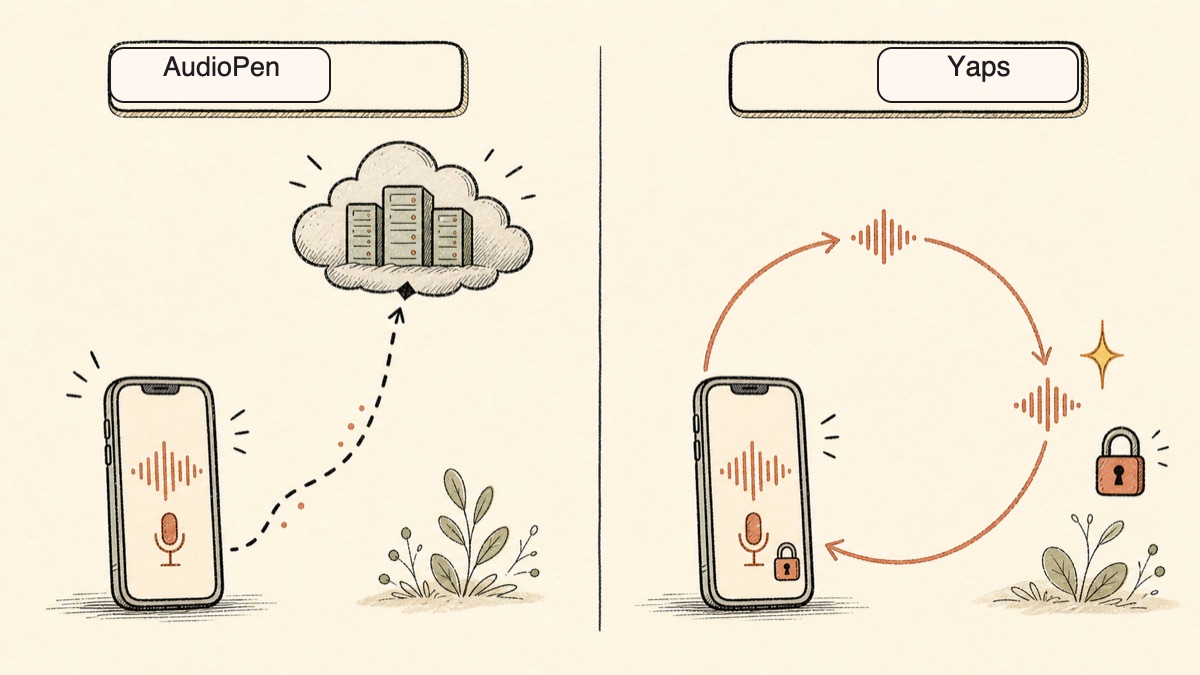
The core difference between AudioPen and Yaps is where the work happens. AudioPen does the transcription and the rewrite in the cloud. Yaps does the transcription on your device. That single choice ripples through privacy, offline use, cost, and ownership.
Here is what that means in practice.
| Feature | Yaps | AudioPen |
|---|---|---|
| On-device transcription | Yes | No (cloud) |
| Works fully offline | Yes | No |
| No account for core use | Yes | No |
| No telemetry | Yes | Cloud-processed |
| Real free tier | 7-day trial | ~10 notes total |
| Recording length cap | None | 3 min free / 15 min paid |
| Export to .md and .txt | Yes | Limited |
| Kanban boards and checklists | Yes | No |
| AI rewrite styles | Basic | Best-in-class |
| Multilingual output | 20+ mobile keyboard languages | Yes |
On-Device and Offline
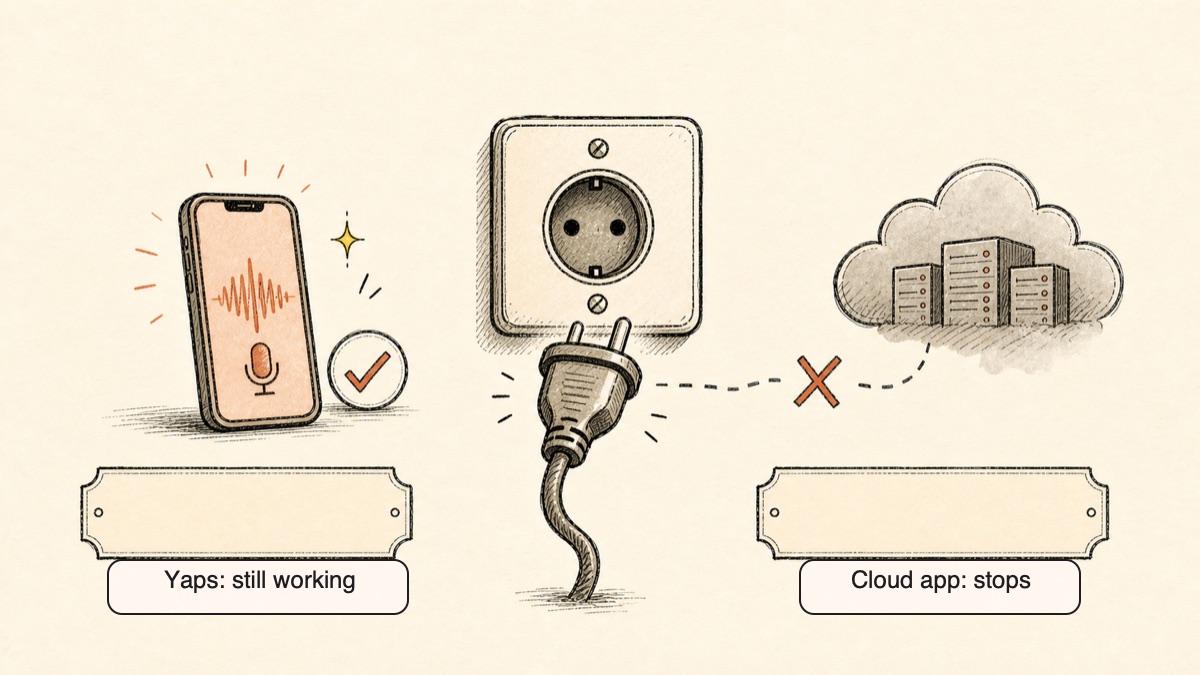
AudioPen needs a connection because the transcription and the rewrite both run on its servers. Lose signal and the tool stops working. That is fine at a desk on stable wifi, and a problem on a plane, a train through a tunnel, a basement office, or a rural road.
Yaps processes speech on the device itself. Push the Yaps hotkey on a flight with the wifi off, speak your thought, and it transcribes immediately. There is no upload step, so there is no waiting on a network and no failure when the network is gone. For anyone who captures ideas on the move, this is not a minor convenience. It is the difference between a tool that works where you actually think and one that only works where you have bars.
Privacy by Architecture, Not by Policy
This is the deepest difference. AudioPen uploads your audio and processes it on its servers, with limited published privacy documentation and no compliance certifications. You are trusting a policy you cannot verify, written by a company that can change it.
Yaps takes the question off the table. The audio and the transcript stay on your device because they never travel anywhere. There is no telemetry collecting usage data. A privacy promise can be revised in a future terms-of-service update. A privacy architecture cannot, because there is no central store of your voice to expose in the first place. For a fuller treatment of why this matters with voice specifically, see our guide on protecting your voice data.
A Free Trial You Can Live In
AudioPen's free tier is a demo: roughly ten notes total, a three-minute recording cap, and English-only output. It is enough to evaluate the rewrite quality and no more. After that, real use sits behind a one-time pass.
Yaps gives you a 7-day free trial with every feature unlocked. There is no hard cap on a single recording. You can build a daily voice-notes habit during the trial, decide whether the workflow fits your life, and continue on a paid plan if it earns a place in your day. The trial is a place to work, not a sample.
You Own the Output
With Yaps, a note is yours in a portable format from the moment you speak it. Export to Markdown or plain text and the file lives wherever you keep your files, readable in any editor forever, with no subscription standing between you and your own words.
Voice notes also go beyond prose. The same spoken brain-dump can become a kanban board or a checklist, so planning a project out loud produces a structured artifact rather than a paragraph you still have to reorganize. Every note is timestamped and lands in a searchable history, so the thought you had three weeks ago is one keyword away. For more on why spoken capture beats typed capture for certain kinds of thinking, see voice notes versus written notes.
Confronto sulla privacy
Both tools ask you to speak your thoughts into them. Only one keeps those thoughts on your device.
AudioPen is cloud-based by design. Your audio is uploaded to its servers, transcribed there, and rewritten there before the text comes back. Its published privacy documentation is thin, and it carries no compliance certifications. It also requires a stable internet connection, so there is no real offline mode where your data could stay local even if you wanted it to.
Yaps processes voice notes, dictation, text-to-speech, and the audio studio on-device. No audio is uploaded for these features, no transcripts are stored on a server, and there is no telemetry. Disconnect from the internet and Yaps keeps working, because nothing it needs lives in the cloud.
The simplest test of a privacy claim is to pull the plug. Turn off the network. AudioPen stops. Yaps keeps transcribing. That is the practical meaning of privacy by architecture.
Confronto dei prezzi
| AudioPen | Yaps | |
|---|---|---|
| Free tier | ~10 notes total, 3-min cap, English only | 7-day free trial |
| Paid model | One-time passes (no auto-renew) | Subscription |
| Entry paid price | $99 for 1 year, $159 for 2 years | Pro $15/mo |
| Higher tier | (single Prime tier) | Max $25/mo |
| Annual option | Passes are time-boxed | Yes (~20% off) |
| Paid recording cap | 15 minutes | No cap |
AudioPen's pricing is unusual in a good way: Prime is a one-time pass with no subscription and no auto-renew. You pay $99 for a year or $159 for two years (a shorter three-month option exists at around $33), and that unlocks 15-minute recordings, unlimited notes, all platforms, custom styles, and SuperSummaries. If you dislike recurring charges, that model is appealing.
Yaps is a subscription, and the price reflects a broader toolkit: voice notes plus dictation, text-to-speech with 18 desktop voices and 2 mobile voices, and the audio studio. The 7-day free trial lets you test the whole experience before paying anything, which AudioPen's ten-note demo does not.
Chi dovrebbe scegliere cosa
Choose Yaps if:
- You want spoken capture that never leaves your device
- You need it to work offline, on a plane, or with no signal
- You want a genuine free trial you can put to real use, not a demo
- You want portable output you own as Markdown or plain text
- You want notes that can become kanban boards and checklists, with searchable history
- You want voice notes as part of a fuller voice toolkit
Choose AudioPen if:
- The quality and control of the AI rewrite is your top priority
- You need multilingual output, speaking one language and writing another
- You prefer a one-time pass over a subscription
- You want SuperSummaries to merge many notes into one
- You are always connected and cloud processing does not concern you
Chi dovrebbe veramente scegliere AudioPen
We want to be honest about this, because the goal is the right tool for you, not a forced verdict.
If the rewrite is the whole point. AudioPen's AI rewrite and style control are the best in this roundup. If your workflow is "ramble, then publish almost verbatim," and the polish of the output is what you are paying for, AudioPen earns its pass. Yaps offers solid clean-up but does not aim to match AudioPen's depth of trained, custom styles.
If you need translation-style multilingual output. Yaps supports 20+ mobile keyboard and voice-typing languages, but AudioPen is stronger when the job is speaking in one language and producing polished output in another.
If you need live meeting transcription. Neither AudioPen nor Yaps is built to sit in on a meeting and transcribe a multi-person conversation in real time. Yaps does not ship meeting transcription. For that specific job, Otter or Fathom is the right tool, and our Otter alternative guide walks through the field.
Guida alla migrazione: passaggio da AudioPen a Yaps
If you have been using AudioPen and want to try a private, offline-first alternative, the switch is low-risk. Yaps has a 7-day free trial, so you can run both side by side and decide in your real workflow.
Step 1: Install Yaps
Get Yaps on Android from the Play Store, or download the macOS build from yaps.ai. You do not need to cancel AudioPen first; run both while you compare.
Step 2: Capture Your First Note Offline
Turn off your wifi, push the Yaps hotkey, and speak a thought. Watch it transcribe on the device with no connection. This is the test AudioPen cannot pass, and it is the fastest way to feel the difference.
Step 3: Try the Structured Note Types
Speak a brain-dump and turn it into a checklist or a kanban board, not just a paragraph. This is where Yaps voice notes go beyond AudioPen's polished prose, and where a rambled plan becomes something you can act on.
Step 4: Export and Own Your Notes
Export a note to Markdown or plain text and drop it into your editor or notes app of choice. Confirm that your words live in a portable file you control, with no subscription gating access to them.
Step 5: Explore the Rest of the Toolkit
Yaps is more than voice notes. Try dictating into another app, hear a document read back with text-to-speech, or use the studio to transcribe an imported recording offline. The voice notes that brought you here are one part of a fuller workflow.
Step 6: Decide
After a week, you will know. If AudioPen's rewrite polish or multilingual output is something you cannot do without, keep it. If keeping your voice on your device, working offline, and a free trial you can live in matter more, Yaps is the better home.
Privacy by architecture, not by policy. If the audio never leaves the device, no terms-of-service update can expose a thought that was never uploaded.
Yaps voice notes
A voice keyboard that keeps your voice on your phone.
Install Yaps on Android for offline dictation, a familiar full-size keyboard, and no screen capture. Scan the QR on desktop, or tap the Play badge on mobile.
Domande frequenti
What is the best free alternative to AudioPen?
Yaps gives you a 7-day free trial with every feature unlocked, a full workspace to evaluate rather than a demo. AudioPen's free tier is roughly ten notes total with a three-minute recording cap, which is enough to evaluate it and little more. With Yaps you can build a daily voice-notes habit during the trial, with no recording length cap, and your audio stays on your device. For an open-source, fully free path, Handy STT runs offline on the desktop.
Is there an offline AudioPen alternative?
Yes. Yaps is an offline-first AudioPen alternative that transcribes your voice notes on your device, so it works on a plane, on the subway, or anywhere with no signal. AudioPen needs a connection on every surface because both transcription and rewrite happen on its servers. Handy STT is another offline option for desktop users comfortable with setup.
Is AudioPen private, and where does my audio go?
AudioPen is cloud-based, so your audio is uploaded to its servers, transcribed there, and rewritten there before the text comes back. Its published privacy documentation is thin and it carries no compliance certifications, so your privacy depends on a policy you cannot verify. Yaps takes the opposite approach: voice notes are processed on your device, and nothing is uploaded for core features.
What apps turn voice into clean notes?
AudioPen, Voicenotes, Cleft Notes, and Yaps all turn spoken rambling into clean, structured text. AudioPen and Voicenotes do the cleanup in the cloud with strong AI rewrites, Cleft Notes does it on iPhone, and Yaps does the transcription on your device with a focus on privacy and offline use. If you want the most polished rewrite, AudioPen leads; if you want your voice to stay on your device, Yaps does.
AudioPen vs Otter: which should I use?
Use AudioPen for solo voice notes and Otter for meetings. AudioPen turns one person rambling into a clean written note, while Otter joins Zoom, Meet, and Teams calls to transcribe multi-person conversations live with speaker identification. They solve different problems, so the better question is whether you are capturing a monologue or a meeting. Neither Yaps nor AudioPen does live meeting transcription, so for meetings, Otter is the right tool.
AudioPen vs Voicenotes: what is the difference?
AudioPen focuses on producing one polished, structured note from your speech, while Voicenotes focuses on repurposing one recording into many outputs like blogs, summaries, to-dos, and social posts. Both are cloud-based. Voicenotes supports 100-plus languages and syncs across mobile, watch, desktop, and browser. If you want a single clean note, AudioPen; if you want one recording turned into several formats, Voicenotes.
How much does AudioPen cost in 2026?
AudioPen's free tier costs nothing and gives you roughly ten notes with a three-minute cap and English-only output. Paid access is a one-time pass with no auto-renew: $99 for one year, $159 for two years, with a shorter three-month option around $33. The pass unlocks 15-minute recordings, unlimited notes, all platforms, custom styles, and SuperSummaries.
Does AudioPen work offline?
No. AudioPen requires a stable internet connection on every surface because both the transcription and the AI rewrite run on its servers. If you lose signal, the tool stops working. For offline capture, Yaps transcribes on your device and keeps working with no connection at all.
Is AudioPen worth it?
AudioPen is worth it if the AI rewrite quality is your top priority and you are comfortable with cloud processing and a one-time pass. Its rewrite and style control are the best among the tools in this roundup, and SuperSummaries plus multilingual output are real strengths. It is not the right fit if you want your voice to stay on your device, need offline use, or want a genuine free trial you can put to daily use, in which case Yaps is the better choice.
What is the recording length limit on AudioPen?
AudioPen caps recordings at three minutes on the free tier and 15 minutes on the paid Prime tier. If your thoughts run longer than that in one take, you will hit the wall mid-recording. Yaps has no recording length cap, and Whisper Memos handles sessions up to 90 minutes on Apple devices if very long single recordings are your need.
What is the best AudioPen alternative for iPhone?
For a beautiful iPhone-native voice-memo-to-note flow, Cleft Notes is the strongest pick, with clean AI rewrites and a calm design. Whisper Memos is best for very long recordings on iPhone and Apple Watch, and Just Press Record is best for simple one-tap capture you own outright. If on-device privacy matters most, Yaps offers voice notes that stay on your device.
Is there an open-source AudioPen alternative?
Yes. Handy STT (and similar projects like Murmure) is a free, open-source, fully offline desktop speech-to-text tool where your audio never leaves your machine. It requires some technical setup and has no polished mobile app or AI rewrite layer, but for privacy maximalists who want auditable code, nothing is more transparent. Yaps offers a polished, private alternative if you want on-device processing without the setup work.
Can I export my notes from these tools?
Yes, and ownership of your output is a real difference between them. Yaps exports every voice note to Markdown or plain text, so your words live in portable files you control in any editor. AudioPen keeps both the polished and raw transcript and offers integrations like Zapier and webhooks, but its export options are more limited than owning a plain local file. Just Press Record stores recordings and transcripts in iCloud as standard files.
Which AudioPen alternative is most private?
The most private alternatives are the ones that never upload your audio: Yaps, which transcribes voice notes on your device with no telemetry, and Handy STT, which runs fully offline on your desktop. AudioPen, Voicenotes, Cleft Notes, and Whisper Memos all process your speech in the cloud. If privacy by architecture rather than policy is your priority, Yaps is the strongest all-round pick.
Does Yaps do meeting transcription like Otter?
No. Yaps does not ship meeting transcription, so it is not built to sit in on a Zoom or Teams call and transcribe a multi-person conversation in real time. Yaps focuses on solo voice notes, dictation, and on-device transcription. For live meetings with speaker identification, Otter or Fathom is the right tool.
Conclusione
AudioPen does the rewrite better than anyone in this roundup. If polished, multilingual output is the whole reason you record, its one-time pass is a fair deal and an honest pick.
For everyone else, the deciding factor is where your voice goes. AudioPen sends every word to a server. Yaps keeps it on your device, works offline, gives you a 7-day free trial you can put to real work, and lets you own your notes as portable Markdown or plain text, with the option to turn them into kanban boards and checklists.
For private, offline-first voice notes, Yaps is the default starting point. Try it free, capture a thought with the wifi off, and see how it feels to keep your voice to yourself.