Meilleur logiciel de dictée pour journalistes en 2026 (privé)
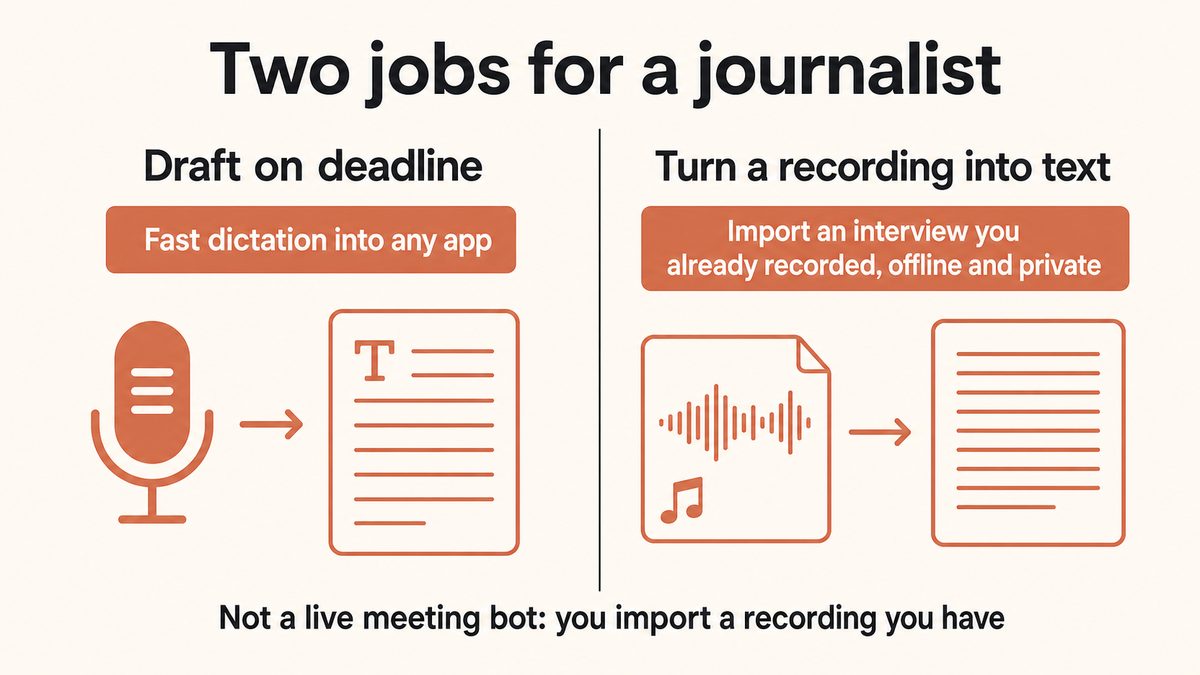
Les journalistes ont deux tâches que les logiciels de dictée doivent remplir : rédiger rapidement dans les délais et transformer un enregistrement d'interview en texte utilisable. La plupart des outils n'en font qu'un, et ceux conçus pour les interviews envoient votre audio vers le cloud. Voici les cinq à connaître en 2026, classés, avec Yaps premier car il fait les deux en privé.
Préface
You file on deadline, and you protect your sources. Dictation software for journalists has to respect both of those facts at once, and most of it respects neither.
Speaking runs at roughly 150 words a minute against about 40 for typing, so dictation is the fastest way to get a draft down when you are filing from a courthouse, a press box, or the back of a cab. But the other half of the job is turning a recording you already made into text, and the moment a confidential or off-the-record source is on that tape, the tool you choose becomes an editorial decision, not a convenience. The Global Investigative Journalism Network and Freedom of the Press Foundation have both flagged that popular cloud transcription tools are a poor fit for genuinely sensitive material.
This guide ranks the five dictation and transcription tools worth a reporter's time in 2026. Yaps comes first because it is the only pick here that covers both jobs privately: on-device dictation for drafting, and offline transcription of an interview recording you already have. The other four each win a specific scenario, and we say honestly where they beat Yaps.
Ce dont les journalistes ont réellement besoin d'un logiciel de dictée
Before the list, here is the short version of what separates a tool you keep from one you abandon after one story.
Quote integrity. Your credibility rides on verbatim quotes. AI transcription is a fast first draft, not a court record, so the ability to re-listen and verify text against the audio matters more than a headline accuracy number. Treat any transcript as something you check, not something you trust blind.
Two separate jobs. Drafting is live: you speak, text appears in your CMS or email. Interview work is retrospective: you have a recording and you need it turned into text. These are different features, and very few tools do both well.
Source protection. For off-the-record and sensitive stories, the safest audio is audio that never leaves your device. No upload, no third-party logging, no retention, and nothing fed into a training pipeline.
Speaker labels. Multi-person interviews need "who said what." This is where cloud tools currently win, and it is worth naming up front.
Works where you write. Reporters draft in a CMS, in email, in Google Docs, in Slack, in a notes app. Dictation that only works inside its own editor forces a copy-paste tax on every draft.
Offline and portable. Filing from a plane, a remote assignment, or a building with no signal should not break your workflow.
Usable export. Plain text for copy, and SRT for any video or audio package that needs captions.
Les 5 meilleurs outils de dictée pour les journalistes en 2026
This list is ranked, not enumerated. Yaps is first because it is the most complete private answer to a reporter's two jobs. Each pick after it earns its place for a specific need.
1. Yaps: Why It Is the Best Dictation Software for Journalists in 2026
Yaps is the only pick on this list that handles both of a reporter's jobs without your audio ever leaving your device. It does fast dictation for drafting, and its Studio editor transcribes an interview recording you already made, offline, into text and SRT. That combination is the reason it sits at the top.
Start with the drafting job. Push the Yaps hotkey (Fn on desktop, the dictation button on the Yaps keyboard on Android), talk, and clean text appears inside whatever you are working in: your CMS, Gmail, Google Docs, Slack, a notes app. The Yaps on-device speech engine handles natural speech with filler words, restarts, and self-corrections, and an on-device cleanup step removes the "ums," fixes punctuation, and structures the text into usable draft copy. Both steps run on your device, so nothing is uploaded, and the whole pipeline finishes in well under a second. Dictation is multilingual across about 25 languages, auto-detected from your speech, which matters if you cover an international beat or interview sources in more than one language.
Now the part that most journalists actually come looking for. You have a recording from a phone recorder, a Zoom capture, or a field recorder, and you need it as text. Import that audio file into Yaps Studio and it transcribes it on your device, then exports to plain text for your copy or SRT for a video or audio package. There is no upload, no third-party server, and no retention policy to read, which is the honest answer to "how do I transcribe an off-the-record source safely?" This is the workflow where cloud tools cannot follow you. If you want the mechanics, we walk through them in how to transcribe audio to text.
One critical honesty point, because it changes how you use the tool: Yaps does not auto-join or live-transcribe a call, a meeting, or a press conference. There is no bot that sits in your Zoom. The interview workflow is always "record it yourself, then import the recording." Meeting transcription is on the roadmap and not shipped, so do not plan a story around Yaps live-capturing a call.
Yaps runs on Android, Windows, and macOS, with a Chrome "Save to Yaps" clipper for pulling research and documents into a searchable local vault, and iOS is coming soon. For a reporter who moves between a field phone and a desk machine, that local vault keeps notes, background, and transcripts in one private place. Vault note sync between mobile and desktop is a premium feature that pairs over your local network or an encrypted peer-to-peer link.
On price, Yaps starts free with 2,000 words a week, a single shared allowance across dictation and read-aloud on every platform. Basic is $15/month and Max is $25/month, with a 7-day trial on the paid tiers. Compared with a $699.99 one-time Dragon license, the barrier to trying it on your next story is close to zero.
Where Yaps honestly loses: it has no built-in speaker labels, so a two-or-more-person interview will not tell you who said what without you tagging it yourself. It has no team collaboration, shared transcripts, or AI summary chat the way the cloud tools do. And its read-aloud voices are English in practice, so if you need multilingual text-to-speech to proof foreign-language copy, that is a genuine gap. For those needs, one of the tools below is the better call.
See how Yaps Studio transcribes an interview →
2. Otter.ai: Best for Multi-Person Interviews and Speaker Labels
Otter is the mainstream cloud pick, and it is the tool many working journalists already have open. Its strength is exactly where Yaps concedes: automatic speaker labels, live transcription, searchable transcripts, AI summaries and chat, and Zoom, Meet, and Teams integration. For a panel, a press conference, or a multi-source investigation where "who said what" is the whole point, Otter's diarization does real work.
The honest caveat is that Otter is cloud-only. Audio and transcripts are uploaded, stored encrypted, and, outside of an enterprise plan with contractual guarantees, may be used to improve the company's models. Otter will also comply with legal disclosure obligations. That is why GIJN and Freedom of the Press have flagged it as a poor fit for genuinely confidential or off-the-record sources. The free Basic plan gives you 300 transcription minutes a month but only three lifetime file imports, so it is built around live capture rather than uploading your archive. Pro runs $16.99/month billed monthly, or about $8.33/month billed annually.
Choose Otter when your story is on the record, involves several speakers, and needs collaboration or summaries. Choose Yaps when the source is sensitive and the audio should never leave your device.
3. Descript: Best for Multimedia and Podcast Journalists
Descript is the right tool when your deliverable is not just written copy but an audio or video package. Its signature trick is text-based editing: you edit the transcript to edit the media, so cutting a sentence from the text cuts it from the recording. It adds automatic speaker detection, a Speaker Detective helper for naming voices, and filler-word removal that cleans up rough audio for publication.
Descript is cloud-based across its Mac, Windows, and web apps, so the same confidentiality caveat as Otter applies: your audio is uploaded. The free tier gives you one hour of transcription a month with filler-word removal. Paid plans moved to a "media minutes" model, with Hobbyist at $16/user/month annually (around 10 media hours) and Creator at $24/user/month annually (around 30 media hours).
Choose Descript when you are producing a podcast episode or a video segment and want the transcript and the edit to be the same surface. Choose Yaps when the job is text out of a private recording, not a polished multimedia edit.
4. Dragon: Best for Deep Custom Vocabulary on Windows
Dragon is the legacy power-user pick, and its one enduring advantage is custom vocabulary. If your beat is thick with names, place names, acronyms, and jargon that generic engines mangle, Dragon's trained vocabulary and command system still handle them better than almost anything, and Dragon Professional processes locally on the desktop rather than in the cloud.
The caveats are significant, and you should weigh them honestly. Dragon Professional Individual v16 is Windows-only, at a one-time perpetual license of $699.99, up from around $299 in recent years. There has been no native Mac desktop product since Dragon Dictate for Mac was discontinued in 2018, the consumer Dragon Home edition was discontinued in 2023, and there has been no new desktop release since Microsoft acquired Nuance in 2022. It is a mature, accurate, but aging engine with no active desktop development.
Choose Dragon if you are a Windows reporter whose accuracy depends on a large, beat-specific custom vocabulary and you are comfortable with the price and the platform lock-in. Choose Yaps for cross-platform, private dictation at a fraction of the cost, accepting that it does not offer Dragon-depth custom vocabulary.
5. Apple Dictation: Best Free On-Device Baseline
Apple Dictation is the free, private baseline that is already on your Mac and iPhone. It runs on-device on Apple Silicon, needs no account or subscription, and macOS Tahoe (September 2025) extended on-device support to 50-plus languages. For quick, private live capture, jotting a note or a lede without any cloud round trip, it is genuinely useful and costs nothing.
Its limits are exactly the reporter's pain points. It can only dictate live speech, so it cannot import or transcribe an interview recording you already have. It has no custom vocabulary, no filler-word cleanup, historically short dictation timeouts, and no professional features. On Intel Macs, dictation routes to Apple's servers rather than staying on-device.
Choose Apple Dictation as a free, on-device fallback for private live dictation. Choose Yaps when you need to turn a recording into text, want cleanup on your draft copy, or want dictation that does not time out mid-thought, which we cover in dictation with no time limit.
En un coup d'œil : comparaison des logiciels de dictée pour les journalistes
| Feature | Yaps | Otter | Descript | Dragon | Apple Dictation |
|---|---|---|---|---|---|
| Best for | Private drafting + interview files | Speaker labels | Audio/video packages | Custom vocabulary | Free live capture |
| On-device / private | Yes | No (cloud) | No (cloud) | Yes (local) | Partial |
| Works offline | Yes | No | No | Yes | Partial |
| Transcribe a recording you have | Yes (Studio, offline) | Yes (cloud, limited free) | Yes (cloud) | Limited | No |
| Speaker labels | No | Yes | Yes | No | No |
| Filler-word cleanup | Yes (on-device) | Partial | Yes | No | No |
| Types into any app | Yes | No (own app) | No (own editor) | Yes | Yes |
| Custom vocabulary | No | Yes | Partial | Yes (deepest) | No |
| SRT export | Yes | Yes | Yes | No | No |
| Free tier | Yes (2K words/wk) | Yes (300 min/mo) | Yes (1 hr/mo) | No | Free |
| Pricing | $0–$25/mo | $16.99/mo | $16–$24/mo | $699.99 one-time | Free |
Qui devrait choisir lequel
The five tools split cleanly along one axis: how sensitive is your audio, and what is the deliverable?
For off-the-record sources, leaked documents, or any story where the recording itself is the risk, Yaps and (for live jotting) Apple Dictation keep audio on your device. Yaps is the only one of the two that can transcribe a recording you already have, entirely offline.
Otter and Descript are excellent for on-the-record, multi-speaker, or multimedia work, but your audio is uploaded and may be retained or used for model training. GIJN and Freedom of the Press both caution against them for confidential material.
Pick Yaps if you want one private tool for both jobs: fast deadline drafting into any app, and offline transcription of interview recordings you already made. It is the default for a reporter who handles confidential sources and moves between machines.
Pick Otter when the story is on the record and you need automatic speaker labels, live capture in Zoom or Meet, or shared transcripts and summaries across a newsroom.
Pick Descript when the deliverable is a podcast or a video package and you want to edit the media by editing the transcript.
Pick Dragon if you are on Windows and your accuracy depends on a deep, beat-specific custom vocabulary, and the $699.99 license and platform lock-in are acceptable.
Pick Apple Dictation for free, private, on-device live dictation when you never need to transcribe an existing file. If you also mentor a newsroom or teach, our sibling guides to dictation software for students and dictation software for writing a book cover adjacent workflows.
Débuter en tant que journaliste
Here is the fastest path from install to a private transcript on your next story.
Install Yaps and grant the mic1 min
Available on Android, Windows, and macOS 13 or later. The only sensitive permission at first launch is the microphone. No account is needed for core dictation.
Draft by pushing the Yaps hotkeyAnywhere
In your CMS, email, or Google Docs, push the Yaps hotkey (Fn on desktop, the dictation button on the Yaps keyboard on Android) and talk. Cleanup removes the "ums" as you go.
Import your interview into Studio<5 min/hr
Drop your recording into Yaps Studio. It transcribes offline, then exports plain text for copy or SRT for a video package. The audio never leaves your device.
Verify every quote against the audioAlways
Treat the transcript as a fast first draft. Re-listen to any line you plan to quote and confirm it word for word before it runs.
Foire aux questions
What is the best dictation software for journalists in 2026?
Yaps is the best all-around pick because it covers a reporter's two jobs privately: on-device dictation for fast deadline drafting into any app, and offline transcription of an interview recording you already made into text and SRT. The audio never leaves your device, which suits confidential and off-the-record sources. Otter is the better choice when you need automatic speaker labels for multi-person, on-the-record interviews.
What dictation software do journalists actually use?
Many working journalists already use Otter for its cloud speaker labels and live capture, or Descript when the deliverable is a podcast or video. Reporters who prioritize source protection increasingly reach for on-device tools like Yaps so that audio is never uploaded. Dragon persists among Windows reporters with heavy custom-vocabulary needs, and Apple Dictation is a common free baseline for quick live capture.
How do journalists transcribe interviews securely?
The most secure method is to keep the audio on your own device and never upload it. Import your recording into a tool that transcribes locally, such as Yaps Studio, which processes the file offline and produces text or SRT without sending anything to a server. Avoid cloud transcription for genuinely confidential material, and store both the audio and the transcript in an encrypted, access-controlled location.
Is Otter.ai safe for journalists and confidential sources?
Otter is a capable on-the-record tool, but it is cloud-based: your audio and transcripts are uploaded, stored, and, outside enterprise plans, may be used to improve its models, and the company will comply with legal disclosure obligations. GIJN and Freedom of the Press have flagged cloud transcription tools as a poor fit for genuinely confidential or off-the-record sources. For sensitive material, an on-device tool like Yaps that never uploads audio is the safer choice.
Can I transcribe an interview recording without uploading it to the cloud?
Yes. Yaps Studio imports an audio file you already have and transcribes it entirely on your device, offline, then exports plain text or SRT. Nothing is uploaded and there is no third-party server involved, which is the honest answer for off-the-record sources. Apple Dictation runs on-device for live speech but cannot transcribe an existing file, so it is not an option for this job.
How accurate does transcription need to be for journalism?
Journalists generally treat around 96 percent or higher as the working floor, because quote integrity is non-negotiable. But no AI transcript should be trusted blind: the practical standard is to use the transcript as a fast first draft and then re-listen to verify any line you plan to quote against the original audio. Easy re-listening and verification matter more than a headline accuracy figure.
How long does it take to transcribe a one-hour interview?
AI transcription typically turns around an hour of audio in under five minutes, compared with four to six hours of manual transcription. That speed is why importing a recording into a tool like Yaps Studio has become the default first step. Budget your remaining time for the part a machine cannot do: verifying quotes and cleaning up attribution.
Does Apple Dictation work offline, and can it transcribe an audio file?
Apple Dictation runs on-device and offline on Apple Silicon Macs and recent iPhones, and macOS Tahoe extended on-device support to 50-plus languages; on Intel Macs it routes to Apple's servers. However, it can only dictate live speech through the microphone. It cannot import or transcribe an existing audio file, so it will not turn an interview recording into text. For that, use an offline file-transcription tool like Yaps Studio.
Is Dragon still worth it for journalists in 2026?
Dragon is worth it in a narrow case: you are on Windows and your accuracy depends on a deep custom vocabulary of beat-specific names, jargon, and acronyms. It processes locally and remains strong on trained vocabulary. The caveats are real, though: it is Windows-only at a $699.99 one-time license, there has been no native Mac product since 2018, and no new desktop release since 2022. For most reporters, a cross-platform on-device tool is a better fit.
What is the best free dictation software for reporters?
Apple Dictation is the best free option for private live dictation, since it is built in, on-device on Apple Silicon, and needs no account. Yaps offers a free tier of 2,000 words a week shared across dictation and read-aloud, and it adds offline interview-file transcription that Apple Dictation lacks. Otter and Descript have free tiers too, but they are cloud-based and impose tight import or minute limits.
Which transcription tools have speaker labels for multi-person interviews?
Otter and Descript both provide automatic speaker labels, which is their main advantage for multi-person interviews and panels. Yaps does not include built-in diarization, so a multi-speaker recording will need manual labeling. If "who said what" is essential and the material is on the record, Otter is the strongest pick; if the source is confidential, keep the audio on-device with Yaps and tag speakers yourself.
Does Yaps transcribe interviews or live-transcribe meetings?
Yaps transcribes interview recordings you have already made: you import the audio file into Studio and it transcribes offline to text and SRT. It does not auto-join or live-transcribe a call, meeting, or press conference, and there is no bot that sits in your Zoom. Live meeting transcription is on the roadmap and not yet shipped, so the only interview workflow today is record it yourself, then import the recording.
Pensées finales
If you report on deadline and protect your sources, install Yaps first. It is the only tool on this list that does both of a journalist's core jobs without your audio ever leaving your device: fast dictation into whatever you write in, and offline transcription of the interview recordings you already have. The free tier is enough to try it on your next story, and moving from confidential audio to clean text never involves a cloud server.
The honest edge case is speaker labels. If a story turns on separating three voices in a panel and the material is on the record, Otter's automatic diarization will save you time that Yaps cannot yet. For everything else a reporter does, and for everything a reporter cannot afford to upload, Yaps is the private default. If you want the reasoning behind on-device processing, we lay it out in is voice typing private and the offline dictation guide.