
Vorwort
NaturalReader has earned its reach. It turns documents, PDFs, ebooks, and web pages into spoken audio, it scans printed text with OCR, and it reads in more than forty languages. For students, for people with dyslexia or ADHD, and for anyone who proofreads by ear, it has been a familiar name for years.
If that is the full shape of what you need, NaturalReader is a reasonable choice. Full stop.
But there is a wedge worth naming. NaturalReader's good voices live in the cloud. They are processed on someone else's servers, they require an account, and the genuinely natural ones sit behind a paywall. The free tier hands you robotic system voices and a daily character cap, and it cannot even export an MP3. If you have hit those walls, or you simply do not want your reading material leaving your device, this comparison is for you.
We built Yaps, so we are biased. We also believe the honest path is to say plainly where each tool wins and where it does not. Yaps does not have OCR. Its multilingual reading catalog is smaller than NaturalReader's. It is not a commercial voiceover studio. We will say all of that in the same breath we recommend it.
Cloud premium voices
NaturalReader
Reads PDFs, DOCX, EPUB, and web pages with cloud AI voices across 40+ languages, plus OCR scanning. The good voices are metered, paywalled, and processed on servers. The free tier is robotic and cannot export audio.
Offline read-aloud
Yaps
Reads selected text aloud with 18 desktop voices and 2 mobile voices, with eight desktop voices fully offline. No telemetry, no text sent to a server for the offline voices, no harsh per-day cap. Plus dictation, voice notes, and an audio studio in one app.
Die 7 besten NaturalReader-Alternativen im Jahr 2026 (Schnellvergleich)
Here is the shortlist, ranked for most readers. Deeper write-ups follow.
1. Yaps - Best Overall NaturalReader Alternative
Yaps is a privacy-first, offline-first voice toolkit, and its read-aloud is built around a question NaturalReader never quite answers: can the good voices run without the internet? With Yaps they can. The desktop app ships with 18 voices, eight of them fully offline and ten optional cloud voices for when you want them, while mobile includes 2 voices. Highlight text in any app, push the Yaps hotkey, and hear it read back in a natural voice with no audio leaving your device.
The privacy posture is the headline. Core features run on-device and there is no telemetry. NaturalReader needs an account and sends your text to its servers for the premium voices. Yaps asks you to sign in too, for the trial and your plan, but its offline voices never send your text anywhere. Disconnect from the internet and the offline voices keep reading.
The 7-day free trial is one you can actually try every feature in, with no harsh per-day character throttle and no trap where the good voices are locked behind a robotic free mode. NaturalReader's free tier cannot even export an MP3. Yaps gives you real voices on day one.
Yaps is also not one-directional. Beyond reading text aloud, it does dictation, voice notes you can export to Markdown or plain text with kanban boards and checklists, and an audio studio where you generate audio or transcribe imported audio offline to text or SRT, then export WAV and SRT together. There are voice commands and a searchable history too. NaturalReader is text-to-speech only. Best for: a reader who wants natural voices that work offline, real privacy, and a full voice toolkit instead of a single metered feature.
Platforms: Android is the headline and shipping, macOS 13.0 or later runs on Apple Silicon, Windows is available, and iOS is coming soon. Pricing is a 7-day free trial, then Pro at $15 per month and Max at $25 per month, with roughly 20 percent off annually.
Trade-off: Yaps has a smaller multilingual reading catalog than NaturalReader, it has no OCR for scanning printed pages, and it is not a commercial voiceover product. If you need any of those three, read on. For the daily job of reading your own documents and text aloud, privately and offline, Yaps is the default.
2. ElevenReader
The closest thing to a human reading to you. ElevenReader (the reader app from ElevenLabs) produces the most natural voices in this roundup, which makes it a pleasure for long-form books and articles. It runs on iOS and Android. Best for: listeners who want the most lifelike narration for ebooks and saved articles. Trade-off: the voices are cloud-only, so nothing works offline, and the free tier meters your listening time at roughly ten hours a month. Free; the Ultra plan runs about $11 per month or $99 per year.
3. Speechify
The polished cross-device reader. Speechify has a large voice catalog, a content library, OCR for scanning printed text, and strong mobile apps that sync your reading across devices. Best for: readers who want the smoothest multi-device experience and do not mind paying for it. Trade-off: it is expensive, fully cloud-dependent, pushes an aggressive upsell, and is widely reported as hard to cancel. Free tier; Premium is roughly $139 per year (about $29 per month). For a closer look, see our Speechify alternative write-up.
4. Microsoft Edge Read Aloud
The best free, no-install option. Read Aloud is built into the Edge browser and reads web pages and PDFs in natural neural voices without installing anything extra. Best for: anyone who mostly reads in the browser and wants quality voices for zero cost. Trade-off: it is bound to the browser, so it will not read your desktop documents outside Edge, and there is no library or OCR. Free, built into Edge.
5. Voice Dream Reader
The accessibility power tool. Voice Dream Reader is a long-standing favorite among people with dyslexia and low vision, with deep customization and, importantly, offline reading once you have downloaded voices. Best for: accessibility power users on iPhone and iPad. Trade-off: it is Apple-centric, and the better voices are paid add-ons on top of the app price. Around $19.99 as a one-time purchase, with optional paid voices.
6. Balabolka
The free offline desktop workhorse. Balabolka is a free Windows program that reads many file formats aloud and exports the result as an audio file, all offline. Best for: Windows users who want free, local text-to-speech with audio export. Trade-off: the interface is dated, it is Windows only, and voice quality depends entirely on which system voices you have installed. Free.
7. Murf AI
The professional voiceover studio. Murf is a production tool with 200+ voices and commercial-use licensing, aimed at people creating published voiceovers rather than reading their own documents. Best for: marketers, video creators, and anyone who needs licensed studio voiceover. Trade-off: it is a production tool, not a casual reader, and it is priced accordingly. Free with limits; the Creator plan runs roughly $19 to $29 per month.
A few lightweight free options are worth a one-line mention. @Voice Aloud Reader is a capable free read-aloud app on Android. TTSReader and TTSMaker offer quick browser-based text-to-speech with no install. And Microsoft Immersive Reader, bundled into Edge and Office, adds read-aloud alongside reading-comprehension tools.
Was NaturalReader gut macht
Credit where it is due. NaturalReader has real strengths that some of these alternatives cannot match.
OCR scanning. NaturalReader can extract text from scans and photos, which means it reads printed pages, physical documents, and screenshots. This is genuinely useful for accessibility, and it is something Yaps does not do at all.
Breadth of voices and languages. It offers 225+ AI voices across more than forty languages. If you read in multiple languages, or you want a wide selection of voices, that catalog is hard to beat.
Document and web coverage. It reads PDF, DOCX, EPUB, TXT, and HTML, and it imports from many sources. It is built to handle whatever format your reading material arrives in.
Broad platforms. There is a web app, a Chrome extension, iOS and Android apps, and Windows and Mac desktop apps, with cross-device sync. Few read-aloud tools cover that many surfaces.
A separate commercial line. NaturalReader runs a distinct AI Voice Generator product with licensed audio for published voiceover. If you need commercial rights, that line exists.
Wo die Unterschiede entstehen
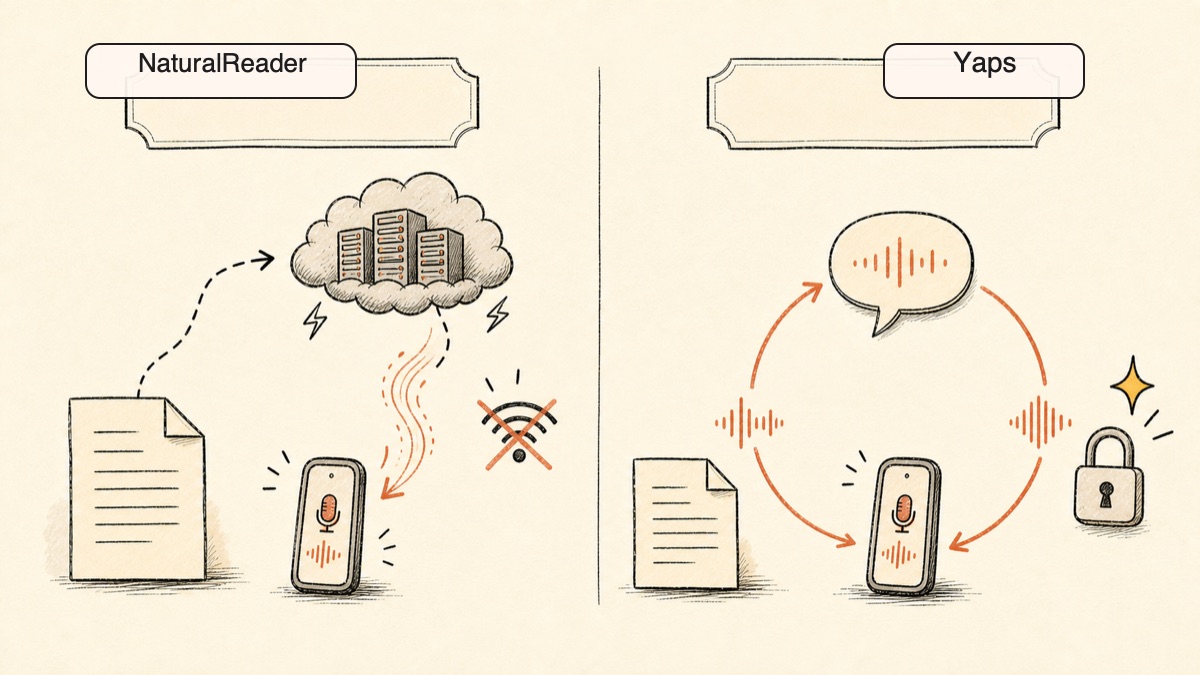
The core difference is architecture. NaturalReader's good voices live in the cloud. Yaps's good voices live on your device. That single choice ripples through privacy, offline use, and what the free tier can actually do.
Feature Comparison
| Feature | Yaps | NaturalReader |
|---|---|---|
| Offline / on-device voices | Yes (8 offline) | No (good voices cloud) |
| No account for core use | No (trial needs an account) | No (account required) |
| No telemetry | Yes | Cloud-processed |
| Free access without harsh daily cap | 7-day trial | Daily char caps |
| Audio export without paying | Yes (WAV) | No MP3 export |
| Dictation (speech to text) | Yes | No |
| Audio studio (WAV + SRT) | Yes | No |
| OCR / document scanning | No | Yes |
| Languages | 20+ mobile keyboard languages | 40+ languages |
This is not a takedown of NaturalReader. It was built as a cloud reading platform, and its breadth reflects that. But the practical impact of these differences shows up the moment you go offline, check your privacy, or try to do something real with the free tier.
Truly Offline Voices
NaturalReader's free voices are the on-device robotic system voices. Its good voices, the natural AI ones, run on its servers, and reviewers regularly report server overload slowing them down. When the connection is poor or the servers are busy, the experience suffers.
Yaps ships eight voices that run entirely on your device with no internet at all. Highlight a paragraph on a plane, push the Yaps hotkey, and hear it read in a natural voice. There is no server to overload, no buffering, and no quality drop when you are offline. The voices that sound good are the same voices that work offline.
Practical example: You are on a train with spotty signal, proofreading a report by ear. With NaturalReader's natural voices, every pause for buffering breaks your concentration, and the robotic free voice is hard to listen to for long. With Yaps, the offline voice reads steadily start to finish regardless of signal.
Privacy by Design
NaturalReader requires an account and sends your text to its servers for the premium voices. For most reading that is fine, but if your documents are sensitive, that is your contract, your medical letter, or your unpublished manuscript going to a third party.
Yaps processes read-aloud on-device with its offline voices and collects no telemetry. Signing in starts your trial, and it does not change where the reading happens: your material stays on your machine. The optional cloud voices send text, never audio, to a voice service, and they are clearly labeled so the choice is always yours. For a deeper look at why this matters, see our piece on what voice data reveals about you.
A Free Trial You Can Live In
NaturalReader's free tier is a demo more than a usable tool. You get robotic system voices, a daily character cap on the better voices (a few thousand characters with Plus voices), no OCR, and no MP3 export. The good experience is gated.
Yaps gives you a 7-day free trial with access to every feature, with real voices and no harsh per-day throttle. You can export audio. You can use the offline voices during the trial. The trial lets you do real work, not just click through a teaser.
A Full Toolkit, Not One Direction
NaturalReader reads text to you and stops there. Yaps reads text aloud and also captures your voice as text through dictation, holds voice notes you can export and organize as kanban boards or checklists, and runs an audio studio that generates audio or transcribes imported audio offline, then exports WAV with SRT subtitles. One install covers the whole voice layer of your work, not a single metered feature.
Datenschutzvergleich
NaturalReader and Yaps sit on opposite sides of the privacy line, and it comes down to where the reading happens.
NaturalReader processes its good voices in the cloud. The premium and AI voices are server-side, which means your text travels to NaturalReader's infrastructure to be spoken. It requires an account. The free tier uses on-device system voices, but those are the robotic ones nobody wants to listen to for long.
Yaps processes read-aloud on-device with its offline voices. No telemetry, no text sent to a server for those voices, no analytics tracking your reading. The optional cloud voices send text, not audio, to a voice service, and they are labeled clearly so you always know which mode you are in. Your default is private.
Both can technically read text, but only one keeps reading when you pull the plug on the internet, and only one keeps your words on your own machine. For sensitive documents, the architecture is the whole argument.
Preisvergleich
The common "$9.99 / $99" figure you will still see quoted online for NaturalReader is outdated. Here are the real 2026 numbers.
| NaturalReader | Yaps | |
|---|---|---|
| Free access | Robotic system voices, daily char caps, no OCR, no MP3 export | 7-day free trial, all features |
| Entry paid plan | Personal Plus $20.90/mo ($119/yr) | Pro $15/mo |
| Higher paid plan | Personal Pro $25.90/mo ($159/yr) | Max $25/mo |
| Commercial plans | Starter $29/mo, Creator $49/mo (separate product) | N/A |
| Annual discount | Yes | Yes (~20% off) |
NaturalReader's pricing splits into a Personal line for reading and a separate Commercial line for published voiceover. If you only want to read your own material, you are looking at the Personal plans, where the cheaper paid tier already costs more per month than Yaps Pro and still keeps your text in the cloud.
Yaps's 7-day free trial gives you natural offline voices and audio export with no daily wall, so you can do real work before paying anything. The paid plans continue that access and add the optional cloud voices.
Wer sollte was wählen
Choose Yaps if:
- You want natural read-aloud voices that work fully offline
- You care about privacy and do not want your text sent to a server
- You want a free trial you can actually use, with real voices and audio export
- You want dictation, voice notes, and an audio studio in the same app
- You read mostly in English and do not need OCR
Choose NaturalReader (or another tool) if:
- You need OCR to read printed or scanned physical documents
- You read in languages beyond English
- You need commercial voiceover licensing or the widest possible voice catalog
- You want cross-device sync of a reading library across web, mobile, and desktop
Wer sollte sich wirklich für NaturalReader entscheiden?
We want to be honest about this. There are real situations where NaturalReader, or one of the other picks, is the better call.
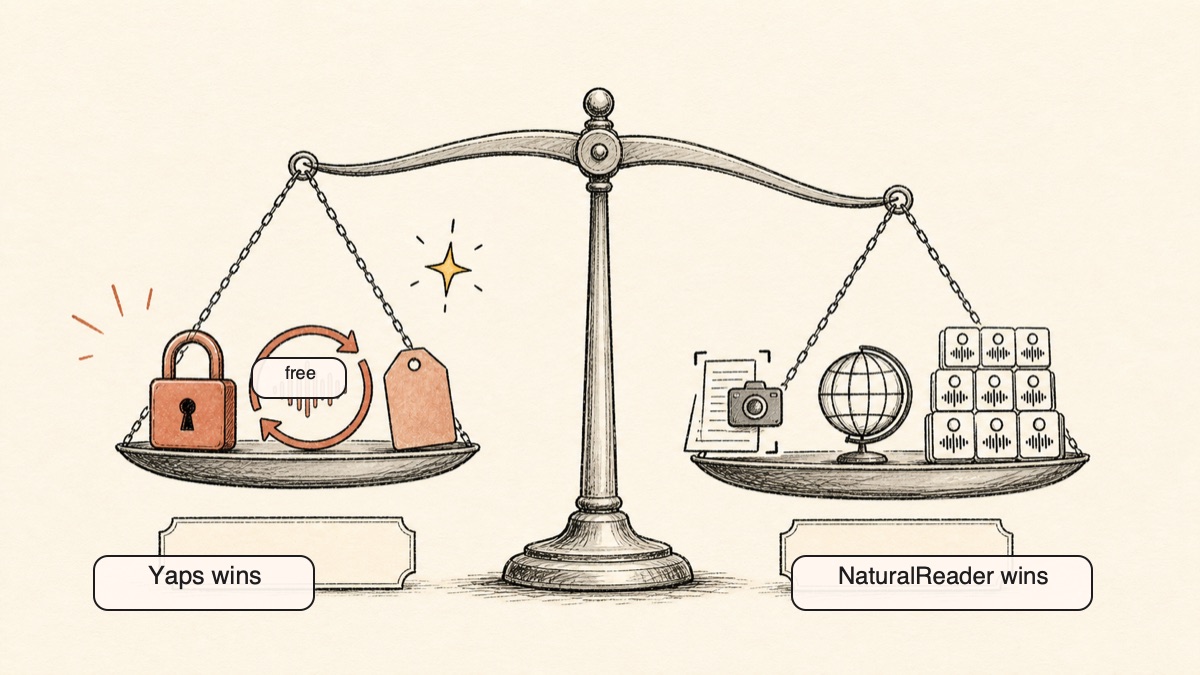
If you scan physical documents. NaturalReader's OCR turns a photo of a printed page, a textbook, or a scanned letter into spoken audio. Yaps has no OCR at all. If reading printed material aloud is central to how you use a tool, Yaps cannot do it and NaturalReader can.
If you read in many languages. NaturalReader covers more than forty languages. Yaps supports 20+ mobile keyboard and voice-typing languages, but NaturalReader remains broader for multilingual read-aloud. For that specific job, NaturalReader (or Speechify) is the right pick, and we would not pretend otherwise.
If you need commercial voiceover. If you are producing published audio with usage rights, you want a licensed studio product. NaturalReader's separate commercial line or Murf AI handle that. Yaps is a personal reading and voice toolkit, not a commercial voiceover marketplace.
Migrationsleitfaden: Wechsel von NaturalReader zu Yaps
If you are reading documents with NaturalReader today and want to try Yaps, the move is low risk. The 7-day free trial lets you run both and compare them in your real workflow.
Step 1: Install Yaps
Download Yaps from yaps.ai. On Android, tap the Play badge. On an Apple Silicon Mac, install the desktop app. You do not need to remove NaturalReader to evaluate Yaps; run both for a week.
Step 2: Try Read-Aloud on Real Text
Open something you would normally feed to NaturalReader, highlight a section, and push the Yaps hotkey to hear it in an offline voice. Pay attention to whether the voice quality holds up and whether the lack of buffering changes the experience.
Step 3: Test It Offline
This is the step that tells you the most. Turn off your internet, highlight some text, and read it aloud. NaturalReader's good voices stop working here; Yaps's offline voices do not. If offline reading matters to you, this is where the decision gets made.
Step 4: Explore the Rest of the Toolkit
The biggest adjustment is discovering what NaturalReader never offered. Try dictating a paragraph instead of typing it. Capture a quick voice note. Open the studio, paste a script, generate audio, and export the WAV with an SRT subtitle file. None of this exists in a read-only tool.
Step 5: Decide on the Honest Criteria
If you rely on OCR or read in other languages, keep NaturalReader for those jobs, and use Yaps for the offline, private, English read-aloud it does best. Plenty of people run both. If your reading is English and you value privacy and offline voices, Yaps becomes the daily default and NaturalReader becomes the OCR fallback.
Privacy by architecture, not by policy. If your text never leaves the device, no server overload and no policy change can touch what is not there.
Yaps for Android
A voice keyboard that keeps your voice on your phone.
Install Yaps on Android for offline dictation, a familiar full-size keyboard, and no screen capture. Scan the QR on desktop, or tap the Play badge on mobile.
Häufig gestellte Fragen
What is the best free alternative to NaturalReader?
Yaps is the best alternative for most people. Its 7-day free trial gives you access to every feature, including eight fully offline natural voices, no harsh per-day character cap, and audio export, where NaturalReader's free tier hands you robotic system voices and cannot export an MP3. If you read mostly in the browser, Microsoft Edge Read Aloud is a strong free no-install option, and Balabolka is free for offline desktop reading on Windows.
Is there an offline alternative to NaturalReader?
Yes. Yaps ships eight voices that run fully on your device with no internet, so read-aloud keeps working on a plane or with no signal. NaturalReader's good voices are cloud-processed and stop when you go offline, leaving only the robotic system voices. Balabolka is also fully offline on Windows, and Voice Dream Reader works offline on iOS once you download its voices.
Is NaturalReader free?
NaturalReader has a free tier, but it is limited. You get robotic on-device system voices, a daily character cap on the better voices, no OCR, and no MP3 export. The natural AI voices that most people want are paywalled. By contrast, Yaps gives you natural offline voices and audio export on its free tier.
How much does NaturalReader cost in 2026?
NaturalReader's Personal plans are $20.90 per month ($119 per year) for Plus and $25.90 per month ($159 per year) for Pro. The old "$9.99 / $99" figure still floating around online is outdated. There is also a separate Commercial line for published voiceover, starting around $29 per month. Yaps, by comparison, has a 7-day free trial, then $15 per month for Pro and $25 per month for Max.
NaturalReader vs Speechify: which is better?
It depends on your priority. Speechify has the more polished mobile and cross-device experience and a larger voice library, while NaturalReader is often cheaper on its Personal plans and includes OCR. Both are cloud-dependent and both require an account, so neither works offline and neither keeps your text on your device. If offline reading and privacy matter to you, Yaps is the better choice than either.
What is the best text-to-speech for reading PDFs?
For reading PDFs aloud, NaturalReader and Speechify both handle PDF import directly and add OCR for scanned pages. If your PDF is in the browser, Microsoft Edge Read Aloud reads it for free with no install. If you can select and copy the text, Yaps reads it aloud with offline voices and keeps the content on your device, which matters for sensitive or confidential PDFs. The trade-off is that Yaps does not import or OCR the PDF itself, so you copy the text in.
What is a privacy-friendly alternative to NaturalReader?
Yaps is the most privacy-friendly alternative. It reads text aloud on-device with offline voices and collects no telemetry, so your reading material never has to leave your machine. Yaps does ask you to sign in for the trial and your plan, but that account covers access and billing, not where the reading happens. NaturalReader requires an account and sends your text to its servers for the premium voices. For a deeper look at why on-device processing matters, see our article on what voice data reveals about you.
Why do NaturalReader free voices sound robotic?
The free tier uses the basic system voices already on your device rather than NaturalReader's natural AI voices, which are paywalled and run in the cloud. Those system voices are the robotic ones. To get natural-sounding narration in NaturalReader you have to pay. Yaps avoids this trap by shipping eight natural voices that run offline, available on its 7-day free trial.
Does NaturalReader work without internet?
Only partially. NaturalReader's robotic system voices work offline, but the natural AI voices most people want are cloud-processed and require a connection. So in practice the good experience needs the internet. Yaps's eight offline voices are natural and need no connection at all, which is the core reason readers switch.
What is the best NaturalReader alternative for students?
Yaps is a strong pick for students who read and revise in English: it reads notes, essays, and drafts aloud for proofreading, works offline in the library or on the bus, and offers a 7-day free trial. If you need to scan printed textbooks or read in another language, NaturalReader's OCR and multilingual support are the better fit, and Speechify is popular for syncing a reading library across devices. Many students use Yaps for daily reading and a cloud tool only when they need to scan a physical page.
Can I get NaturalReader-quality voices for free?
Yes. With Yaps, its eight offline voices are natural and included in the 7-day free trial, where NaturalReader locks its natural voices behind a paywall and gives free users robotic system voices. Microsoft Edge Read Aloud also offers free natural neural voices, though only inside the browser. So you do not need to pay NaturalReader to get good-sounding read-aloud.
Is NaturalReader good and worth it?
NaturalReader is good at what it is built for: reading documents and scanned pages aloud across many languages on many devices. It is worth it if you need OCR, multilingual reading, or commercial voiceover, which are real strengths. It is less worth it if you mainly want private, offline read-aloud in English, because its good voices are cloud-only, paywalled, and require an account. Note that its public review scores have run low, with frequent complaints about robotic free voices and premium caps.
What is the best alternative to NaturalReader on Mac?
On an Apple Silicon Mac, Yaps is the strongest alternative for private offline read-aloud: highlight text in any app, push the Yaps hotkey, and hear it in a natural offline voice with nothing sent to a server. Microsoft Edge Read Aloud is a free in-browser option on Mac, and macOS has built-in system read-aloud for basic needs. Yaps adds dictation, voice notes, and an audio studio on top of read-aloud.
What is the best alternative to NaturalReader on Android?
On Android, Yaps is the headline pick. It reads selected text aloud with offline voices, works without a connection, and pairs read-aloud with offline dictation in one app. @Voice Aloud Reader is a capable free Android read-aloud app, and ElevenReader offers very natural voices on Android if you do not mind cloud processing and metered listening time.
Does NaturalReader offer dictation?
No. NaturalReader is text-to-speech only: it reads text aloud but does not turn your speech into text. If you want dictation alongside read-aloud, Yaps does both, plus voice notes and an audio studio, in a single app. That two-way voice workflow is one of the clearest reasons to switch.
Fazit
NaturalReader is a capable cloud reading platform. It scans printed pages, it reads in dozens of languages, and it runs everywhere. If you need OCR, multilingual reading, or commercial voiceover, it earns its place, and we would point you to it without hesitation.
For everyone else, the default is Yaps. The good voices run offline, your text stays on your device, the 7-day free trial lets you try every feature, and read-aloud comes packaged with dictation and an audio studio rather than standing alone. The honest summary is simple: NaturalReader keeps your reading in the cloud, and Yaps keeps it on your device. Start with the free trial, read something offline, and let that one test decide.