01
·
Try Yaps
A voice keyboard that keeps your voice on your phone.
Install Yaps on Android for offline dictation, a familiar full-size keyboard, and no screen capture. Scan the QR on desktop, or tap the Play badge on mobile.
Aqua Voice — это быстрая диктовка с помощью искусственного интеллекта, но она доступна только в облаке и по умолчанию сохраняет расшифровки. Вот семь лучших альтернатив Aqua Voice в 2026 году, ранжированных по конфиденциальности, автономной поддержке и ценности.

Aqua Voice is fast. It formats and edits your words as you speak, handles coding and AI-prompt vocabulary that trips up most dictation tools, and works system-wide in any app. Aqua says it is "5x faster than typing." For a lot of people, that claim holds up.
There is a catch, and it is the whole reason this page exists. Aqua Voice is cloud-only. Every time you speak, your audio is sent to Aqua's servers, processed by their proprietary model, and sent back as text. The co-founders have said plainly that they cannot run speech recognition and the language model locally at the speed the product needs. On top of that, Privacy Mode is off by default for individual accounts, which means your transcripts may be stored on Aqua's servers unless you go and turn it on.
If you dictate on a plane, on weak hotel wifi, or anywhere air-gapped, Aqua simply does not work. And if you handle anything sensitive, "stored on a server by default" is a real consideration.
We built Yaps, so we are biased. But we also think the honest way to earn your trust is to tell you exactly where each tool wins and where it loses. So here is the landscape.
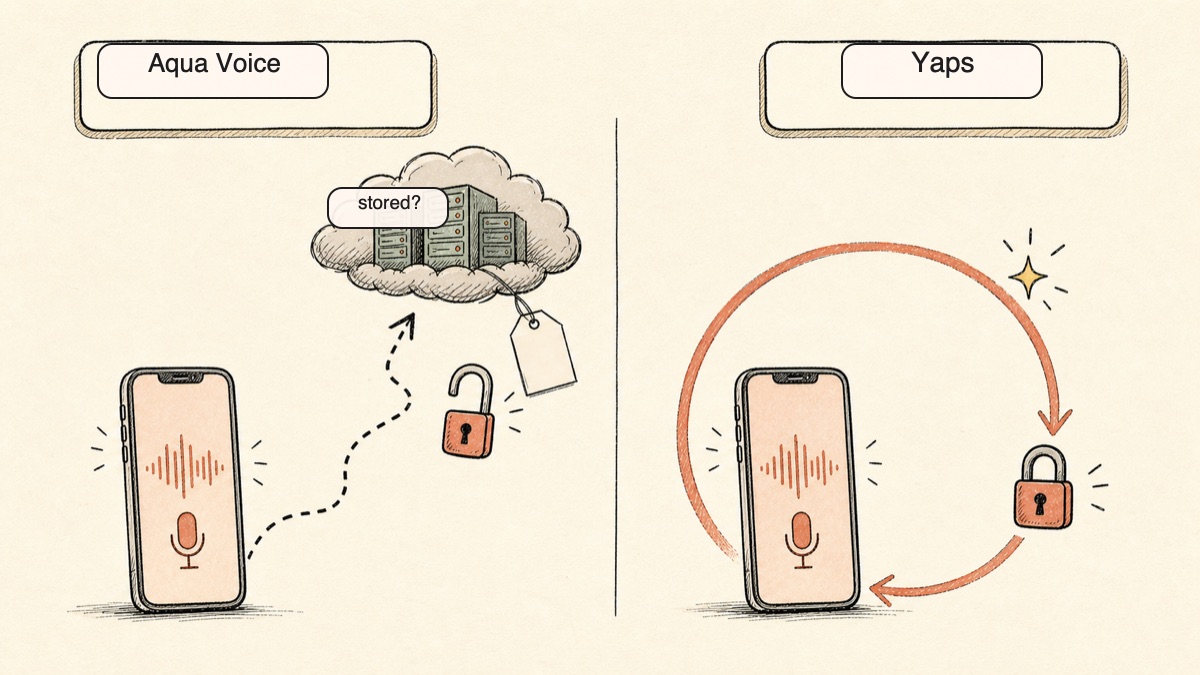
Cloud dictation
Fast AI dictation, but audio is sent to Aqua's servers for every request. No offline mode. Privacy Mode is off by default for individuals, so transcripts may be stored on Aqua servers unless you enable it.
On-device dictation
On-device dictation where the audio never leaves your device. Works fully offline. No telemetry, no account for core use, and a full voice toolkit beyond dictation: text-to-speech, voice notes, a studio, and voice commands.
Here is the shortlist, ranked for most people. Deeper write-ups follow.
Yaps is the alternative to reach for if the thing you do not love about Aqua Voice is the cloud. Yaps does on-device dictation, which means the audio of your voice never leaves your device when you dictate. There is no server round trip, so there is nothing on a server to store, leak, or subpoena. Disconnect from the internet and Yaps keeps working exactly the same. That is the core difference, and for a lot of people it is the only difference that matters.
Yaps is also more than a dictation app. Aqua is dictation and only dictation. Yaps bundles a full voice toolkit: on-device dictation in any app, text-to-speech with 18+ voices, voice notes that export to Markdown and plain text with kanban boards and checklists, an audio studio that transcribes imported audio files offline to text or SRT, voice commands built on macOS Shortcuts, and a searchable history of everything you have captured. One install, one local toolkit.
The trigger is the Yaps hotkey. On Mac that is the Fn key, with hold-to-record and tap-to-toggle both supported. On Android it is the dictation button on the Yaps keyboard, so you get the same on-device voice typing inside any app on your phone, where Aqua has no Android app at all. Yaps runs in under 200MB of RAM and asks for no account for core use and sends no telemetry.
The free tier is the other place Yaps pulls ahead. Yaps gives you 5,000 words every week, recurring, with access to the features. Aqua's free tier is 1,000 words once, for the lifetime of the account, which is roughly eight minutes of speech before you hit a paywall. If you want to actually try a tool in your real workflow before paying, a recurring weekly allowance is a different category of generous.
Paid plans are Basic at $15 per month and Max at $25 per month, with annual billing roughly 20% off.
Best for: anyone who wants Aqua's speak-anywhere dictation without sending audio to the cloud, plus a full voice toolkit and a phone keyboard. Platforms: Android (shipping), macOS 13.0+ on Apple Silicon, Windows in development. English only.
Wispr Flow is the most polished cross-platform dictation app on the market. It runs on Mac, Windows, iOS, and Android, it is fast, and its AI reformatting cleans up raw speech into tidy prose well. If you live across four devices and want one dictation experience everywhere, it is the strongest pick on reach alone. Best for: people who need the same dictation on every device they own. Trade-off: it is cloud-based, so it carries the same privacy posture as Aqua: your audio leaves your device. It is also pricier than some local tools. Free tier of around 2,000 words per week; Pro around $15 per month, or roughly $12 per month billed annually. For the deeper breakdown, see our Wispr Flow alternative guide and the Wispr Flow comparison.
SuperWhisper is the pick for people who want Aqua's offline gap closed and are happy to stay inside the Apple ecosystem. It runs speech models on-device on your Mac, so your audio stays put, and it gives you control over which model size you run. Best for: Apple users who want local, offline dictation with model-level control. Trade-off: Apple-only, and there is more setup involved than a cloud tool that just works on sign-in. Free tier; paid around $8.49 per month or around $84.99 per year, with a lifetime option. See our SuperWhisper comparison for the full side-by-side.
VoiceInk is the choice for people who want to read the code that processes their voice. It is open-source, local by default, and transparent about how it works, and it sells for a one-time price rather than a subscription. Best for: developers and privacy maximalists who want auditability and no recurring charge. Trade-off: Mac-only and a touch DIY in places. Free if you build from source; roughly $25 to $49 one-time for the packaged build.
MacWhisper is the veteran of local transcription on the Mac, and it is excellent at the thing it is built for: turning recorded audio and video files into text. Interviews, lectures, podcasts, and meeting recordings all transcribe locally, with strong model selection. Best for: researchers and podcasters with stacks of audio to transcribe. Trade-off: it is file-transcription first, not real-time system-wide dictation, so it is not a direct replacement for Aqua's speak-into-any-app flow. Free tier; around $69 for a lifetime license.
Apple Dictation is already on your Mac and iPhone, it costs nothing, and on Apple Silicon it runs mostly on-device. For light, occasional dictation, it is hard to argue with free and pre-installed. Best for: zero cost, zero install, light use. Trade-off: it struggles with technical vocabulary, and it has no AI formatting and no voice commands, so it is a long way from what Aqua does. Free. For a closer look, see our Apple Dictation comparison.
Willow Voice is the most direct like-for-like to Aqua: a mainstream cross-platform cloud dictation tool with AI formatting that cleans up your speech as you go. If you like Aqua's shape and just want a different vendor, it is the closest match. Best for: people who want Aqua's exact workflow from a different provider. Trade-off: it is cloud-based, so the offline and storage questions from Aqua apply here too. Free tier of around 2,000 words per week; paid around $15 per month, or roughly $12 per month billed annually. We cover it in detail in our Willow Voice alternative guide.
A few honorable mentions for narrow needs. Dragon Professional is still the heavyweight for high-volume regulated desktop dictation on Windows, with deep custom-vocabulary support. Talon Voice is the standard for hands-free, accessibility-driven control where you drive your whole machine by voice. Otter is built for meetings rather than dictation, so it sits in a different category but comes up in the same searches.
Credit where it is due. Aqua Voice is a genuinely good product, and pretending otherwise would not help you decide.
Best-in-class reformatting of technical text. Aqua handles coding terms, AI-prompt vocabulary, and jargon that breaks ordinary dictation. If you dictate prompts, code comments, or technical docs all day, its cloud model is one of the strongest at getting the words right and formatting them as you speak.
It edits as you talk. Aqua does not just transcribe. It formats and self-corrects in real time, so the text that lands is closer to finished than raw speech-to-text usually is.
System-wide and fast. Aqua works in any app, and the speed claim ("5x faster than typing," in Aqua's words) is the kind of thing people actually feel once they get used to it.
Languages. Aqua supports 49 languages. If you dictate in anything other than English, that breadth matters, and it is a real gap in Yaps, which is English only today.
These are not small things. If they describe your day, Aqua may genuinely be your tool. The rest of this page is about the people for whom the cloud is a dealbreaker.
The core difference is architecture. Aqua sends your audio to the cloud to do its work. Yaps does the work on your device. Almost everything else flows from that one decision.
| Feature | Yaps | Aqua Voice |
|---|---|---|
| On-device dictation | Yes | No (cloud) |
| Works offline | Yes | No |
| Audio leaves device | Never | Every request |
| Transcripts stored by default | No account needed | May be (Privacy Mode off) |
| No account for core use | Yes | Account required |
| Text-to-speech | Yes (18+ voices) | No |
| Voice notes | Yes | No |
| Audio studio (file transcription) | Yes (WAV/SRT) | No |
| Voice commands | Yes | No |
| Android app | Yes (shipping) | No |
| Free tier | 5,000 words/week | 1,000 words lifetime |
| Languages | English only | 49 languages |
The table makes the shape of the trade clear. Yaps wins on architecture, offline, scope, and the free tier. Aqua wins on languages. Here is what the wins actually feel like in daily use.
Aqua needs the internet for everything. There is no offline mode, by the founders' own account, because the model cannot run locally at the required speed. That is a defensible engineering decision, but it has a hard consequence: on a plane, on a train through a tunnel, on conference wifi that buckles under a thousand laptops, or inside any air-gapped environment, Aqua stops working.
Yaps does its dictation on your device, so there is no connection to lose. You can put your phone in airplane mode and keep voice typing into any app. For people who do a lot of their thinking on the move, or who work somewhere networks are restricted, this is not a nice-to-have. It is the difference between a tool that works and one that does not.
This is the part worth slowing down on. Aqua's privacy story depends on a setting. Privacy Mode exists, but for individual accounts it is off by default, which means that unless you find it and turn it on, your transcripts may be stored on Aqua's servers. Aqua holds a SOC 2 Type II certification, which is a real and credible audit of their controls. But a setting that defaults to "store it" puts the burden on you to opt out.
Yaps takes the burden off the table. The audio never leaves your device for dictation, so there is no server-side transcript to store in the first place. No telemetry. No account required for core use. The privacy is a property of how the app is built, not a checkbox you have to remember to flip. For more on why this distinction matters for voice specifically, see what your voice data actually reveals about you and our Wispr Flow vs SuperWhisper privacy comparison.
Aqua does one job. Yaps does several. Beyond dictation, Yaps reads text aloud with 18+ voices, captures voice notes you can organize as kanban boards and checklists and export to Markdown or plain text, transcribes imported audio files offline to text or SRT in its studio, and runs voice commands through macOS Shortcuts. If your relationship with voice is bigger than typing into a text box, that breadth is the reason to switch rather than just match.
Aqua has no Android app. It runs on Mac, Windows, iOS, and the web. Yaps ships an Android keyboard with a dictation button built in, so you get the same on-device voice typing inside any app on your phone, with no audio leaving the device. If your phone is where you do most of your quick capture, this is a category Aqua does not compete in at all.
The privacy picture is the reason most people land on this page, so here it is plainly.
Aqua is cloud-only. Your audio is sent to Aqua's servers for every dictation request. The co-founders have said they cannot run the speech recognition and the language model locally at the speed the product requires, so there is no offline or on-device option. That is the architecture, not a temporary state.
Privacy Mode is off by default for individuals. Aqua offers a Privacy Mode, but for individual accounts it is not enabled out of the box. Unless you turn it on, your transcripts may be stored on Aqua's servers. The protection exists, but it is opt-in, which means the default behavior is the less private one.
SOC 2 Type II, but no public HIPAA BAA. Aqua holds a SOC 2 Type II certification, which is a meaningful third-party audit of their security controls. However, there is no public HIPAA Business Associate Agreement, so Aqua is not the right fit for regulated healthcare or legal workflows where a signed BAA is a hard requirement.
Yaps keeps the audio on the device. Yaps does dictation on-device, so the audio never leaves your machine. No telemetry, no account for core use, nothing stored on a server because there is no server in the loop for dictation. Disconnect from the internet and it still works. The privacy is structural, not a setting you maintain.
If your work is genuinely sensitive, "private by default" beats "private if you remember to turn it on." That is the whole argument.
| Aqua Voice | Yaps | |
|---|---|---|
| Free tier | 1,000 words lifetime (one-time, ~8 min of speech) | 5,000 words/week (recurring) |
| Paid plan | Pro $8/mo or $96/yr | Basic $15/mo, Max $25/mo |
| Annual discount | None (yearly is 12x monthly) | ~20% off |
| iOS | Pro ~$119/yr, billed separately | Included |
| Team | ~$12/seat/mo | Contact for team plans |
| Lifetime option | No | No |
| Student discount | 70% off | N/A |
Two things stand out. First, Aqua's free tier is 1,000 words for the lifetime of your account, not per month, which works out to about eight minutes of speech before you decide. Yaps gives you 5,000 words every week, so you can actually try it in real work for as long as you want before paying. Second, Aqua's annual plan is twelve times the monthly price, so there is no real discount for paying yearly, while Yaps annual billing is roughly 20% off.
Aqua's headline monthly price of $8 is lower than Yaps Basic at $15. That is fair to note. But with Yaps you are paying for a full toolkit (dictation, text-to-speech, voice notes, a studio, voice commands, and history) plus the on-device architecture, not for dictation alone.

Choose Yaps if:
Choose Aqua Voice (or another tool) if:
We want to be straight about this. There are real situations where Aqua is the better call.
If you dictate heavily in another language. Yaps is English only today. Aqua supports 49 languages. If you work in Spanish, German, Japanese, or anything outside English, that is not a close call: Aqua does something Yaps does not.
If your job is dictating technical and AI-prompt text all day. Aqua's cloud model is excellent at coding vocabulary, prompt syntax, and dense jargon, and at formatting it cleanly as you speak. If that precision is the single most important thing to you and the cloud does not bother you, Aqua is a strong tool.
If you need it now on Windows or Linux. Aqua runs on Windows 10 and 11 today. Yaps ships on Android and macOS, with Windows in development. If you are on a non-Apple-Silicon machine and need something this week, Aqua is available where Yaps is not yet.
If you are already inside Aqua and Privacy Mode is on. If you have enabled Privacy Mode and Aqua's accuracy fits your work, the case to switch is weaker. The honest pitch for Yaps is offline, on-device, and toolkit breadth, not "Aqua is bad."
If Aqua's cloud dependency is what pushed you here, moving to Yaps is quick. The free tier lets you run both side by side and compare them in your actual workflow before you commit to anything.
Download Yaps from yaps.ai. On Android, install the keyboard from the Play Store. On Mac, install the app on macOS 13.0 or later on Apple Silicon. You do not need to remove Aqua. Run both during your evaluation so you can compare them head to head.
Aqua has its own activation method. With Yaps, the trigger is the Yaps hotkey. On Mac that is the Fn key, with hold-to-record and tap-to-toggle both supported on the same key. On Android it is the dictation button on the Yaps keyboard. Spend a day getting the new muscle memory in place.
This is the test that matters. Turn off your wifi, or put your phone in airplane mode, and dictate a few paragraphs. Aqua would stop here. Yaps keeps going, because the work happens on your device. If offline dictation is why you came, this is the moment it clicks.
The biggest adjustment is not replacing dictation. It is discovering the rest of the toolkit. Try the text-to-speech to proofread an email by ear. Capture a few voice notes over a day and search them the next morning. Import an audio file into the studio and export an SRT. Set up one voice command. These are the features that make Yaps a toolkit rather than a dictation box.
After a week, you will know. If on-device dictation and the wider toolkit have earned their place, keep Yaps and remove Aqua. If you found you genuinely need Aqua's language coverage or its cloud reformatting, that is a real reason to stay, and now you know exactly why.
Privacy by architecture, not by policy. If the audio never leaves the device, no default setting and no policy change can expose what is not there.
Yaps for Android
Install Yaps on Android for offline dictation, a familiar full-size keyboard, and no screen capture. Scan the QR on desktop, or tap the Play badge on mobile.
Yes. Yaps is the offline alternative to Aqua Voice. Aqua is cloud-only and stops working without an internet connection, while Yaps does dictation on-device, so the audio never leaves your machine and it keeps working in airplane mode, on weak wifi, and in air-gapped environments. SuperWhisper and VoiceInk are other on-device options, but they are Apple-only and do not ship an Android app.
No. Aqua Voice does not work offline. It sends your audio to its servers for every dictation request, and the co-founders have stated they cannot run the speech recognition and language model locally at the speed the product needs. If you lose your connection, Aqua stops working. For offline dictation, Yaps does the processing on your device.
Aqua Voice holds a SOC 2 Type II certification, which is a credible audit of its security controls, but it is cloud-based and Privacy Mode is off by default for individual accounts. That means your transcripts may be stored on Aqua's servers unless you turn Privacy Mode on. Yaps takes a different approach: the audio never leaves your device for dictation, so there is nothing stored on a server to begin with.
Aqua Voice may store your transcripts on its servers, because Privacy Mode is off by default for individual accounts. Your audio is sent to Aqua's servers on every request to be transcribed. If you want to reduce storage, you have to find and enable Privacy Mode yourself. Yaps does not store transcripts on a server because dictation runs on-device and requires no account for core use.
Yaps is the best overall Aqua Voice alternative for most people, because it delivers speak-into-any-app dictation without sending your audio to the cloud, works fully offline, and bundles a wider toolkit. If you need the same tool across Mac, Windows, iOS, and Android, Wispr Flow has the broadest reach. If you want local control on Apple devices specifically, SuperWhisper is the strongest pick.
Both Aqua Voice and Wispr Flow are cloud-based AI dictation tools that format your speech as you go, so they share the same privacy trade-off: your audio leaves your device. Wispr Flow wins on platform reach, running on Mac, Windows, iOS, and Android, where Aqua has no Android app. If your main concern is the cloud dependency that both of them share, an on-device tool like Yaps avoids it entirely.
For privacy-conscious users, Yaps is the best AI dictation app in 2026, because it does dictation on-device, works offline, and adds text-to-speech, voice notes, a studio, and voice commands. For best-in-class cloud reformatting of technical text, Aqua Voice is excellent. For the widest cross-platform reach, Wispr Flow leads. The right answer depends on whether you value privacy and offline use or cloud-side polish and language breadth.
Yes. Yaps has a recurring free tier of 5,000 words per week, which is far more usable than Aqua's 1,000 words lifetime cap. Apple Dictation is free and built into Mac and iPhone. SuperWhisper, VoiceInk, and MacWhisper all have free tiers as well. If you want a free tier you can actually work in long-term, Yaps and Apple Dictation are the strongest.
Aqua Voice has a free tier of 1,000 words for the lifetime of the account, then Pro at $8 per month or $96 per year, which is twelve times the monthly price with no annual discount. The iOS Pro plan is around $119 per year billed separately, Team is around $12 per seat per month, and students get 70% off. There is no lifetime purchase option. Yaps is free for 5,000 words per week, then $15 per month for Basic and $25 per month for Max, with annual billing roughly 20% off.
The main disadvantages of Aqua Voice are that it is cloud-only with no offline mode, Privacy Mode is off by default so transcripts may be stored on its servers, and the free tier is just 1,000 words for the lifetime of the account. It also needs the internet for everything, so it is unusable on planes, weak wifi, or air-gapped machines, and it has no Android app. It is subscription-only with no real annual discount, and it is still a pre-1.0 product.
No. Aqua Voice does not have an Android app. It runs on macOS, Windows 10 and 11, iOS 17 and later, and the web. If you want on-device voice typing inside any app on an Android phone, Yaps ships an Android keyboard with a dictation button, and the audio stays on your device.
Aqua Voice holds a SOC 2 Type II certification but does not offer a public HIPAA Business Associate Agreement, so it is not recommended for regulated healthcare or legal work that requires a signed BAA. Because it is cloud-based and stores transcripts by default for individuals, sensitive dictation carries extra exposure. For private dictation, an on-device tool like Yaps keeps the audio on your machine, though you should always confirm your own compliance requirements.
Yes. VoiceInk is open-source and sells for a one-time price of roughly $25 to $49, SuperWhisper offers a lifetime option, and MacWhisper has a lifetime license around $69. Apple Dictation is free and built in. Aqua Voice itself is subscription-only with no lifetime purchase. Yaps offers a recurring free tier plus monthly and annual plans rather than a one-time purchase.
Yaps is the best dictation app for privacy, because it does dictation on-device, the audio never leaves your machine, it sends no telemetry, and it needs no account for core use. SuperWhisper and VoiceInk are also strong on-device, Apple-only options. Cloud tools like Aqua Voice and Wispr Flow are convenient but send your audio off-device, and Aqua leaves transcript storage on by default for individuals.
Yes. On a Mac you can dictate without the internet using Yaps, which runs dictation on-device on macOS 13.0 or later on Apple Silicon, so it works in airplane mode. SuperWhisper, VoiceInk, and Apple Dictation also do on-device dictation on the Mac. Aqua Voice cannot dictate offline, because it depends on its servers for every request.
Aqua Voice is a fast, capable cloud dictation tool, and if cloud-side reformatting and 49-language support are what you need, it is a real option. We are not here to pretend otherwise.
But if the reason you searched for an alternative is the cloud (the audio leaving your device, the transcripts stored by default, the tool that dies the moment your connection does), then Yaps is the default pick. Dictation runs on your device, works offline, and keeps your voice on your machine, with a full toolkit of text-to-speech, voice notes, a studio, and voice commands around it, plus a shipping Android keyboard Aqua does not have.
The best way to decide is to try both. Aqua gives you 1,000 words once. Yaps gives you 5,000 words a week. Use them in your real work, turn off your wifi, and see which one is still typing.