01
·
Try Yaps
A voice keyboard that keeps your voice on your phone.
Install Yaps on Android for offline dictation, a familiar full-size keyboard, and no screen capture. Scan the QR on desktop, or tap the Play badge on mobile.
OpenWhispr to naprawdę dobra aplikacja do dyktowania na urządzeniu typu open source. Ale jest dostępny tylko na komputery stacjonarne, nie ma aplikacji na Androida i jest przeznaczony dla zaawansowanych użytkowników. Oto najlepsze alternatywy OpenWhispr w 2026 r., uszeregowane uczciwie.
If you are searching for the best OpenWhispr alternative, you are probably one of two people. Either you love what OpenWhispr does but you live on your phone and there is no Android app for it, or you like the idea of local, private dictation and you would rather not clone a GitHub repo and keep a developer tool running to get it.
Let us be clear up front. OpenWhispr is a genuinely good project. It is fully open source under an MIT license, it runs transcription on your own device with whisper.cpp and Parakeet, it collects no telemetry, and it is free to run local models forever. If you want an auditable, self-hostable, desktop dictation tool and you are comfortable around a terminal, OpenWhispr is a strong pick and honestly hard to beat on those terms.
But "best OpenWhispr alternative" is a real query for a reason. OpenWhispr is desktop-only (macOS, Windows, and Linux), it has no Android app, and its iOS app is listed as "coming soon" rather than shipping. It is also, by its own description, a power-user and developer-friendly tool. So if you want private voice on your phone today, or a full voice workspace rather than a dictation utility, or an app that just installs and runs with no setup, you are looking in the right place.
We build Yaps, so we are biased and we will say so plainly. We also think the honest way to earn your trust is to tell you exactly where OpenWhispr wins, where each alternative fits, and where Yaps is the better default.
Open-source desktop dictation
Fully open-source, on-device dictation and live meeting transcription for macOS, Windows, and Linux. No Android app; iOS listed as coming soon. Markets itself as a developer-friendly, power-user tool.
Private voice, no setup
On-device dictation plus a full voice workspace: voice notes, Studio audio-file transcription, read-aloud, and vault sync. Ships on Android, Windows, macOS, and a Chrome extension today. Download and go, no GitHub.
Here is the shortlist, ranked for most people who land on this search. The deeper write-ups follow. Every tool below is real and shipping, and every description is accurate to what each one actually does.
Yaps is the alternative to reach for if you want the on-device, no-telemetry philosophy that drew you to OpenWhispr, but you also want it on your phone, and you would rather not maintain a developer tool.
Start with the thing OpenWhispr cannot match: platform breadth. Yaps ships on Android, Windows, and macOS today, plus a "Save to Yaps" Chrome extension, with iOS coming soon. OpenWhispr is desktop-only and has no Android app. If you dictate on your phone, that difference is the whole story. On Android, Yaps is a full keyboard: tap the dictation button and speak into any app, or type with tap and glide typing, themes, and clipboard history for text and images. Core dictation runs on-device and works offline.
The workflow on the desktop is the same shape you already like. You push the Yaps hotkey (the Fn key on Mac and Windows), you speak, and your words land at the cursor in whatever app you are using. Yaps also cleans up messy dictated text on-device: it strips filler words and self-corrections, fixes punctuation and capitalisation, and formats lists and numbers, all without sending your audio anywhere. Dictation is multilingual, around 25 languages, auto-detected from your speech so you never toggle a language setting.
Then Yaps keeps going where a dictation utility stops. Voice notes capture spoken thoughts into text, Kanban boards, and checklists, with local search and export to Markdown and plain text. The Studio editor transcribes imported audio files offline into text or SRT subtitles, so an interview recording becomes a timed transcript on your own machine. Read-aloud gives you 18 voices on desktop and 2 on mobile to hear a draft before you send it. And vault sync moves your notes between phone and desktop over your local network or an encrypted peer-to-peer link.
The free tier is built for everyday use rather than developers: 5,000 words per week on desktop and 1,000 per week on mobile, shared across dictation and read-aloud, with no account required for the core features. Paid plans are Basic at $15/mo and Max at $25/mo. If you want the deeper picture, the dictation feature page and our offline dictation guide walk through how the on-device side works.
Best for: anyone who wants private, on-device voice on their phone and their computer, with notes, transcription, and read-aloud in one app, and zero setup.
Honest trade-off: Yaps is not open source, and OpenWhispr is. If auditable code or self-hosting is a hard requirement, that point goes to OpenWhispr, not us.
Worth keeping on your own shortlist. OpenWhispr does the core job well and does it in the open.
It runs fully local transcription with whisper.cpp and Parakeet, bundles the binary so you do not need Python for basic use, stores your history in a local SQLite database, and collects no telemetry. It offers global-hotkey dictation with auto-paste and a dedicated AI-agent voice hotkey. Its free tier gives you unlimited local dictation with no weekly word cap, plus a cloud allowance of 2,000 words per week and 100-plus languages. Pro is $6.67/mo and adds unlimited cloud transcription, device sync, and API access, with an iOS app listed as coming soon.
It also ships something Yaps does not yet: live meeting transcription today, with on-device speaker diarization and auto-detect for Zoom, Teams, and FaceTime. If that is your core need, OpenWhispr has it now and we do not.
Best for: developers and open-source purists on desktop who want auditable, self-hostable, unlimited local dictation, and live meeting notes.
Honest trade-off: desktop-only with no Android, an iOS app that has not shipped, and a power-user posture. No read-aloud or notes workspace.
MacWhisper is the veteran of Whisper-on-Mac and the pick when your job is turning stacks of recorded audio into text. It handles interviews, lectures, and podcasts well, with strong model selection and reasonable pricing.
Where it is less of a fit is live, system-wide dictation and anything beyond Mac. It is macOS-only and does not carry a notes workspace or read-aloud. We cover it in depth in our MacWhisper alternative write-up.
Best for: researchers and podcasters with a backlog of audio files to transcribe on a Mac.
Honest trade-off: Mac-only, and built around file transcription more than everyday speak-to-type.
SuperWhisper is a clean, well-made on-device speech-to-text app for Mac. It runs Whisper models locally, gives you accurate transcription without a cloud dependency, and lets you pick different model sizes to trade speed against accuracy.
Like OpenWhispr, it is a strong privacy peer. Where it differs from Yaps is scope and platform: it is Mac-only and focused on dictation, with no notes workspace, no read-aloud, and no Android.
Best for: Mac users who want a focused, polished, on-device dictation tool and like tuning Whisper model sizes.
Honest trade-off: Mac-only and single-purpose. No phone app, no notes, no read-aloud.
VoiceInk is another fully open-source, on-device dictation app for Mac. Like OpenWhispr, it is transparent and audit-friendly, and it is a good pick for people who want to read the code that processes their voice.
It shares OpenWhispr's strengths and its limits: it is Mac-focused, dictation-first, and rougher on convenience features than a commercial app. If open-source-on-Mac is your priority, it belongs on the list.
Best for: developers and privacy maximalists on Mac who want open, inspectable dictation code.
Honest trade-off: Mac-focused and dictation-only, with fewer convenience features than a polished commercial tool.
Wispr Flow is the outlier here because it is cloud-based, not on-device. Its strength is AI reformatting: it rewrites raw speech into polished prose, and many people rate that quality highly.
The trade-off is the one you were probably avoiding by looking at OpenWhispr in the first place. Every dictation leaves your device for the cloud, and it is subscription-only. If reformatting quality matters more to you than local processing, it is worth a look. If you wanted local for a reason, it is the wrong fit.
Best for: users who prioritise cloud reformatting quality and do not mind sending audio off-device.
Honest trade-off: cloud-based, so your audio leaves your machine, and it is subscription-only.
We weighted platform breadth (does it work where you actually type, including your phone), on-device processing over cloud, scope beyond bare transcription, and how much setup it takes to get running. We build Yaps and we disclosed it. Where OpenWhispr or another tool genuinely wins for a specific need, we say so plainly.
Both apps run transcription on your own device, and both avoid telemetry. So this table is not a "we are private and they are not" story, because that would not be true. It is a story about breadth, workspace, and setup. Every cell is accurate to what each app ships today.
| Feature | Yaps | OpenWhispr |
|---|---|---|
| Platforms | Android, Windows, macOS, Chrome ext | macOS, Windows, Linux |
| Phone app today | Android (iOS soon) | None (iOS "coming soon") |
| On-device transcription | Yes | Yes |
| No telemetry | Yes | Yes |
| Open source | No | Yes (MIT) |
| System-wide dictation / keyboard | Hotkey + Android keyboard | Global hotkey (desktop) |
| Audio-file transcription | Yes (Studio, to text/SRT) | Meeting recordings |
| Live meeting transcription | Coming soon | Yes (with diarization) |
| Read-aloud (TTS) | 18 desktop / 2 mobile voices | No |
| Notes / vault with sync | Kanban, checklists, sync | Notes with search |
| Setup | Download and go | Power-user (Node.js to build) |
| Free tier shape | 5K words/wk desktop, 1K mobile | Unlimited local, 2K/wk cloud |
| Price | Free; Basic $15, Max $25/mo | Free; Pro $6.67/mo |
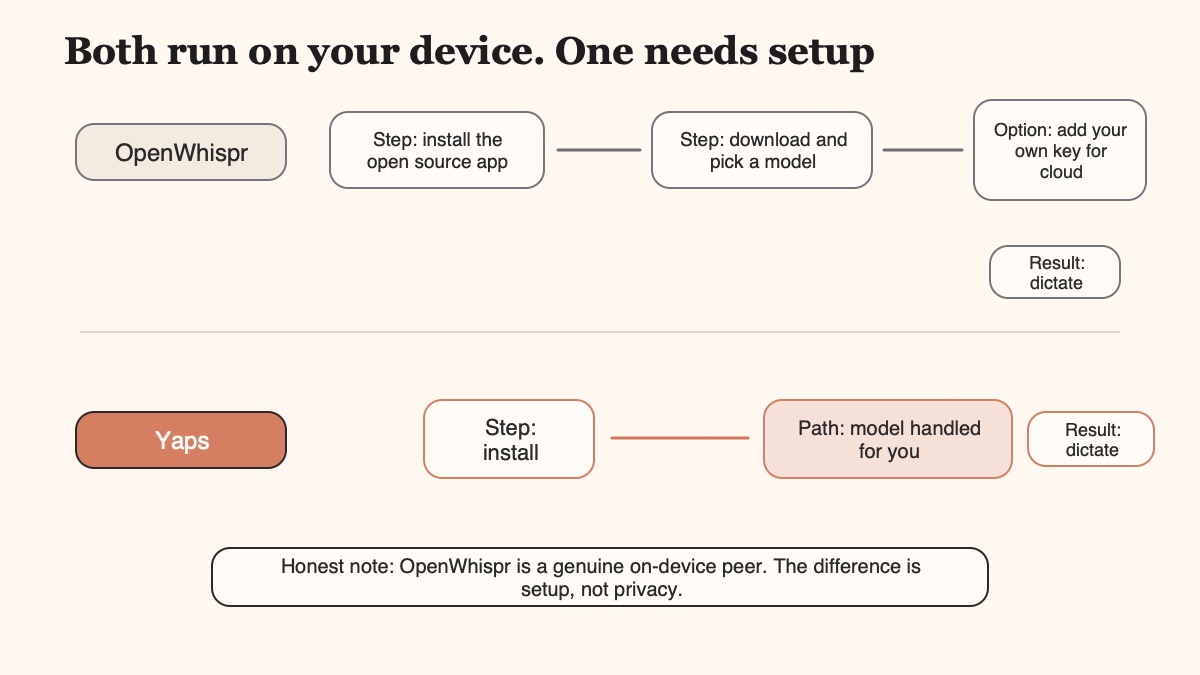
Read that table honestly and you can see the split. OpenWhispr wins on open source, on live meeting transcription today, on unlimited local dictation with no weekly cap, and on Linux and price. Yaps wins on platform breadth (especially the Android phone app), on read-aloud, on the notes-and-sync workspace, and on installing without touching a terminal. Neither one is strictly better than the other, which is the whole point of running a comparison instead of a sales pitch.
The right answer depends on where you type and how much you want to tinker.
A few edge cases route elsewhere. If your job is transcribing a backlog of recorded interviews on a Mac, MacWhisper is purpose-built for that. If you want a polished, focused, on-device dictation app for Mac and nothing more, SuperWhisper or VoiceInk fit. And if reformatting quality outranks local processing for you, Wispr Flow is the cloud option, with the trade-off that your audio leaves your device. For the broader landscape of local tools, our best offline AI apps of 2026 roundup is a good next read.
If OpenWhispr has been your desktop dictation tool and you want to add a phone, notes, and read-aloud without giving up on-device processing, moving to Yaps takes about five minutes. You do not need to uninstall anything to try it.
Download Yaps for your desktop, or grab it on Android. On first run it installs the on-device speech model. After that, dictation works with the internet switched off.
On Mac and Windows you push the Fn key to dictate. On Android you tap the dictation button on the Yaps keyboard. Keep OpenWhispr on its own hotkey so the two do not fight while you compare.
Import a recording into Studio and export a transcript or SRT. Capture a few voice notes into Kanban or a checklist. Highlight a draft and hear it read aloud before you send.
Scan the QR to pair vault sync between phone and desktop. Run both apps for a week, then keep whichever fits. If you need open source or Linux, that is a fair reason to stay with OpenWhispr.
Install Yaps on Android for offline dictation, a familiar full-size keyboard, and no screen capture. Scan the QR on desktop, or tap the Play badge on mobile.
Yes, in a real sense. OpenWhispr is free to download, and its free tier gives you unlimited local dictation with no weekly word cap, plus 2,000 words per week of cloud transcription. The paid Pro tier at $6.67/mo mainly adds unlimited cloud transcription, device sync, and API access. If you only ever use local models, you can run it at no cost forever.
Yes. OpenWhispr is fully open source under an MIT license, which permits personal and commercial use. Its code is on GitHub, and the repo states there is no data collection and no telemetry. This is a genuine advantage over closed-source tools, including Yaps, if auditable code matters to you.
OpenWhispr is desktop-only. It runs on macOS (Apple Silicon and Intel), Windows, and Linux, with builds packaged as AppImage, .deb, .rpm, and .tar.gz. There is no Android app, and the iOS app is listed as coming soon rather than shipping. If you need a phone app today, that is the main reason to look at an alternative like Yaps on Android.
It is genuinely local. OpenWhispr runs transcription on your device using whisper.cpp and Parakeet, and its own materials state that audio never leaves your device. Transcription history is stored in a local SQLite database. Cloud processing exists but is optional and bring-your-own-key. On this point OpenWhispr and Yaps are peers, since both process core dictation on-device.
Not yet. OpenWhispr lists an iOS app as coming soon under its Pro tier, and there is no Android app at all. If phone dictation is your priority, Yaps ships on Android today with a full voice keyboard, and iOS is coming soon there as well. That platform gap is the clearest reason people search for an OpenWhispr alternative.
For most people, you install a prebuilt binary and the local models auto-download on your first transcription into a cache folder. That part is low-friction. Building from source, on the other hand, means cloning the GitHub repo and using Node.js 24 or newer, which is why OpenWhispr describes itself as a developer-friendly, power-user tool. If you would rather skip all of that, Yaps installs the on-device model on first run and needs no terminal.
Both run on-device, and the difference is which engine transcribes your speech. OpenWhispr uses whisper.cpp, a local build of OpenAI's Whisper, and sherpa-onnx running NVIDIA's Parakeet. In practice you pick based on the speed and accuracy trade-off you prefer for your machine and language. Yaps handles on-device model selection for you and does not ask you to choose an engine.
They sit at opposite ends. OpenWhispr is open-source and on-device, so your audio stays on your machine, and it positions itself directly as the open-source Wispr Flow alternative. Wispr Flow is cloud-based with strong AI reformatting, so your audio leaves your device but the polished-prose output is a genuine strength. If privacy and local processing matter most, OpenWhispr wins; if reformatting quality is the priority, Wispr Flow makes its case.
Both are on-device and private, so neither is clearly "more private" than the other for core dictation. The real differences are elsewhere: OpenWhispr is open source and cross-platform on desktop (macOS, Windows, Linux), while SuperWhisper is a polished, closed-source, Mac-only app with granular Whisper model selection. Choose on openness and platform, not on a privacy gap, because there is not a meaningful one.
No. OpenWhispr's repo states it has no data collection, no telemetry, and zero data retention, and its transcription runs locally with history in a local database. When it uses optional cloud processing with your own API key, it reports that cloud audio is never stored. This on-device, no-telemetry posture is one it shares with Yaps.
For private voice on your phone and desktop with no setup, Yaps is the strongest all-round pick, since it ships on Android today alongside Windows, macOS, and a Chrome extension, and it adds notes, audio-file transcription, and read-aloud. For batch transcription of recorded audio on a Mac, MacWhisper fits. For a polished on-device Mac dictation app, SuperWhisper or the open-source VoiceInk work well. And if you want cloud reformatting over local processing, Wispr Flow is the option, with the trade-off that your audio leaves your device.
OpenWhispr is a good, honest, open-source project, and if you live on the desktop, love open source, and want unlimited local dictation with live meeting notes, it earns its place. We are not going to pretend otherwise, and if auditable code or Linux is a hard requirement, it is the better tool for you.
For most people who searched for an alternative, though, the reason is simple. You want private voice where you actually type, including your phone, and you would rather not run a developer tool to get it. That is where Yaps is the default: on-device dictation on Android, Windows, and macOS, plus voice notes, Studio audio-file transcription, read-aloud, and vault sync, with no setup and no GitHub. If you tend to hit dictation limits mid-thought, our take on dictation with no time limit covers how Yaps handles longer sessions. Install it, try it against OpenWhispr for a week, and keep whichever one fits your life.