Prefazione
Search for "screen reader" and you will find two groups of people who need completely different things.
The first group is blind or has low vision and needs to operate a computer without seeing it. Every menu, every button, every notification, every change of focus. For them a screen reader is not a convenience, it is the interface.
The second group can see the screen perfectly well. They have dyslexia, or a headache, or forty pages to review, or they simply catch errors better by ear. They do not need the interface narrated. They want the words read to them.
These two needs get bundled under the same search term, and that leads to genuinely bad advice: read-aloud tools marketed as screen readers, and blind users pointed at software that cannot do the job. So here is the distinction, stated plainly, along with an honest account of where a tool like Yaps does and does not belong.
Cosa fa effettivamente uno screen reader
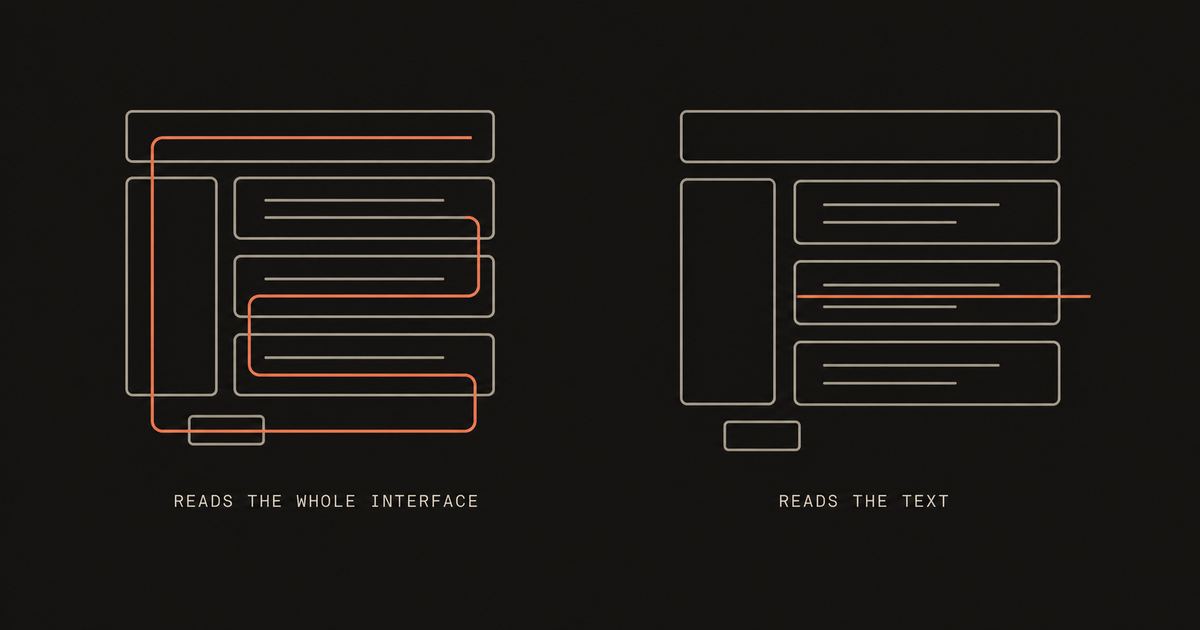
A screen reader turns the entire computer into something you can operate by ear and by keyboard. That is a much larger job than reading text, and it is worth spelling out what it involves, because the scope is what people underestimate.
It announces what you are focused on and what kind of thing it is: a button, a checkbox, a link, a heading level, a table cell with its row and column. It tells you the state of things: pressed, expanded, selected, disabled, three of nine. It announces changes that happen without you doing anything, like an error appearing or a notification arriving. It lets you navigate by structure, jumping heading to heading or landmark to landmark rather than reading top to bottom. It drives refreshable braille displays, which matters enormously to people who read braille and to anyone who is deafblind. And it gives you a full keyboard command layer for doing all of this quickly.
None of that is text to speech. Speech is just the output. The actual work is understanding the interface and giving you a way to move through it.
Gli screen reader che vale la pena conoscere
You very likely already have one, and the best ones cost nothing.
NVDA, on Windows, is free and open source, developed by NV Access. It is not a stripped-down free alternative to something better; it is one of the two dominant screen readers in the world, and for many users it is simply the best option. If you are exploring this for the first time on Windows, start here.
JAWS, also on Windows, is the long-established commercial option from Freedom Scientific. It is widely used in workplaces and government, has deep scripting for enterprise applications, and strong support arrangements. It is a paid product, and pricing varies by licence type and region, so check current pricing directly rather than trusting a figure in a blog post.
VoiceOver is built into macOS, iOS and iPadOS at no extra cost. Turn it on with Command plus F5 on a Mac, or through Accessibility settings on a phone. Because Apple ships it as part of the system, it is the default path for most blind Apple users.
TalkBack is built into Android, again at no extra cost, and is where most blind Android users start.
Narrator is built into Windows and has improved a great deal, though many people move to NVDA or JAWS for heavier daily use.
Orca is the screen reader for Linux desktops, and is free and open source.
If you need a screen reader, install a screen reader. NVDA and VoiceOver are free, mature and made by people who have spent decades on exactly this problem. No read-aloud tool is a substitute for them.
Yaps
Cos'è invece la lettura ad alta voce
Read-aloud, or text to speech, does one thing: you give it text and it speaks it.
It does not know what a button is. It does not tell you where the focus went. It cannot drive a braille display or let you jump between headings. Give it a paragraph and it will read the paragraph nicely, and that is the whole of it.
Framed as a competitor to a screen reader, that sounds feeble. Framed as what it actually is, it is genuinely useful to a large number of people, most of whom are sighted.
What read-aloud cannot do
Operate the computer for you
No focus tracking, no roles or states, no braille support, no structural navigation, no announcement when something changes. If you cannot see the screen, a read-aloud tool leaves you stranded the moment you need to click anything.
What it is genuinely good at
Getting through text by ear
Proofreading by listening, working through a long document while your eyes rest, reading with dyslexia, or turning a report into audio for a commute. Real needs, well served, and a different job entirely.
Per chi è ciascuno
You need a screen reader
05-
You cannot see the screen or cannot see it reliably enough to navigate.
-
You read braille and need a refreshable display driven properly.
-
You need to know where you are which control has focus, and what state it is in.
-
You test for accessibility and need to hear what real users will hear.
-
You need the whole system not just documents: settings, installers, error dialogs.
Read-aloud is probably enough
05-
You proofread by ear because hearing a sentence catches what reading it misses.
-
You have dyslexia and following along by ear makes dense text far easier.
-
Your eyes are tired from screens, migraine, or a long day of reading.
-
You want to listen while moving walking, commuting, or away from the desk.
-
You have a lot to get through and listening at speed beats skimming.
Il confronto, fianco a fianco
| Capability | Screen reader | Read-aloud |
|---|---|---|
| Reads selected text | Yes | Yes |
| Announces buttons and controls | Yes | No |
| Tracks keyboard focus | Yes | No |
| Drives a braille display | Yes | No |
| Navigate by heading or landmark | Yes | No |
| Announces things that change | Yes | No |
| Save the speech as an audio file | Rarely | Often |
| Usable without seeing the screen | Yes, by design | No |
Dove si inserisce Yaps, onestamente
Yaps does read-aloud and dictation. It is not a screen reader and is not a replacement for one. If you are blind or have low vision and need to operate your computer by ear, install NVDA, VoiceOver, TalkBack or Orca. That is the right tool and most of them are free.
With that said clearly, there are two places Yaps is genuinely useful here.
Reading text aloud on your own device. Yaps speaks documents and drafts using voices that run locally, so nothing you listen to is sent anywhere. On desktop it covers 31 languages, with 18 voices of which 8 run fully offline. Mobile ships a smaller voice and language set. You can also export the speech as an audio file on desktop, which a screen reader generally will not do, so a report can become something you listen to on a walk.
Dictation as an input method. Screen readers solve output. Getting text in is a separate problem, and voice is often the fastest route. Yaps types into any application by voice, on your own device, which can sit alongside whatever screen reader you already use.
Una nota sul perché l'elaborazione locale è importante qui
Assistive technology sees everything. A screen reader necessarily reads your emails, your banking, your medical portal and your messages, because that is the job.
That makes it worth knowing where the processing happens. NVDA, VoiceOver, TalkBack and Orca do their work on your machine. Some third-party read-aloud services send the text you select to a server to generate the audio, which for a payslip or a diagnosis is a meaningfully different proposition.
Yaps runs its speech on your device, offline, which is the same principle the established screen readers follow. That is not a claim to be one. It is a reason not to treat "reads my private documents aloud" as a casual, low-stakes permission.
Domande frequenti
What is a screen reader?
A screen reader is software that lets someone operate a computer without seeing it, by speaking the interface aloud and giving keyboard commands to move through it. It announces buttons, links, headings, form fields and their states, tracks where keyboard focus is, reports changes such as errors appearing, and can drive a refreshable braille display. Reading text is only one part of the job.
What is the difference between a screen reader and text to speech?
Text to speech converts text into spoken audio. A screen reader uses text to speech as its voice, but adds everything else: understanding the interface, tracking focus, announcing roles and states, structural navigation, and braille output. Every screen reader includes text to speech, but a text to speech tool is not a screen reader.
What is the best free screen reader?
NVDA on Windows is free, open source, and one of the two most widely used screen readers in the world. On Apple devices VoiceOver is built into macOS, iOS and iPadOS at no cost, TalkBack is built into Android, and Orca is the free option on Linux desktops. Most people already have a capable screen reader installed without realising.
Is NVDA better than JAWS?
Both are mature and widely used, and the honest answer is that it depends on your work. NVDA is free, open source, and excellent for most everyday use. JAWS has deeper scripting for specific enterprise applications and formal support arrangements, which is why it is common in workplaces and government. Many people use NVDA at home and JAWS at work.
Is Yaps a screen reader?
No. Yaps does read-aloud and dictation, and it is not a replacement for a screen reader. It does not announce buttons, track keyboard focus, or drive a braille display. If you need to operate a computer without seeing it, use NVDA, VoiceOver, TalkBack or Orca, all of which are free apart from JAWS.
Can I use Yaps with a screen reader?
You can run them alongside each other, since they do different jobs, and dictation in particular is a useful input method for someone whose screen reader handles output. We have not carried out a formal accessibility audit of the Yaps interface with screen readers, so we will not promise a specific level of support. Mobile has a free tier with no account required, which is the low-risk way to find out whether it works for you.
Does read-aloud help with dyslexia?
Many people with dyslexia find that following text by ear, or listening while reading along, reduces the effort of decoding dense writing considerably. It is not a treatment and it does not work for everyone, but as a practical everyday aid it is one of the most commonly cited uses of text to speech.
Can a screen reader save what it reads as an audio file?
Usually not. Screen readers are built for live interaction rather than producing recordings, so exporting audio is not a typical feature. Read-aloud tools often can: Yaps exports speech to an audio file on desktop, which is how a document becomes something you listen to later.
Do screen readers work offline?
Yes. NVDA, JAWS, VoiceOver, TalkBack and Orca all run on your machine, which they must, since a screen reader that stopped working when the connection dropped would leave someone unable to use their computer. Some third-party read-aloud services do rely on a server. Yaps runs its speech locally, so it keeps working with no connection.
What languages can be read aloud?
Yaps read-aloud covers 31 languages on desktop, running offline, with 18 voices of which 8 work with no connection at all. Mobile ships a smaller voice and language set. Screen readers typically support a wide range of languages through the speech engines installed on your system.
How do I turn on the screen reader I already have?
On a Mac, press Command and F5 to toggle VoiceOver. On iPhone or iPad, look under Settings, Accessibility, VoiceOver. On Android, look under Settings, Accessibility, TalkBack. On Windows, press Control, Windows and Enter to start Narrator, or download NVDA free from NV Access. Every one of these is included at no extra cost except NVDA, which is free to download.
I can see fine, I just want documents read to me. What do I need?
A read-aloud tool rather than a screen reader. Turning on a full screen reader when you can see the screen is usually frustrating, because it narrates the whole interface when all you wanted was the text. Yaps read-aloud, or the read-aloud feature built into your operating system, is the better starting point.
Why does it matter where the speech is processed?
Because assistive technology reads whatever is on your screen, which includes email, banking, health information and private messages. A tool that sends that text to a server to generate audio is making a different privacy trade than one that generates it on your machine. Established screen readers process locally, and Yaps does the same for its read-aloud.
Where can I learn more about screen readers properly?
Go to the source rather than to marketing pages. NV Access publishes documentation and training for NVDA, Apple documents VoiceOver for Mac and iOS, Google documents TalkBack, and organisations for blind and partially sighted people in your country typically offer training and advice. People who use these tools daily are a far better guide than any software vendor, including us.