La saisie vocale est-elle privée ? Est-ce qu'il télécharge votre audio ?
La réponse honnête est : cela dépend de la saisie vocale que vous utilisez. Certains claviers traitent votre discours sur l'appareil et ne téléchargent rien. D'autres diffusent votre audio sur les serveurs d'une entreprise. Ce guide trie toutes les options courantes dans la colonne de droite et vous propose un test de trente secondes pour vérifier votre propre téléphone.
Préface
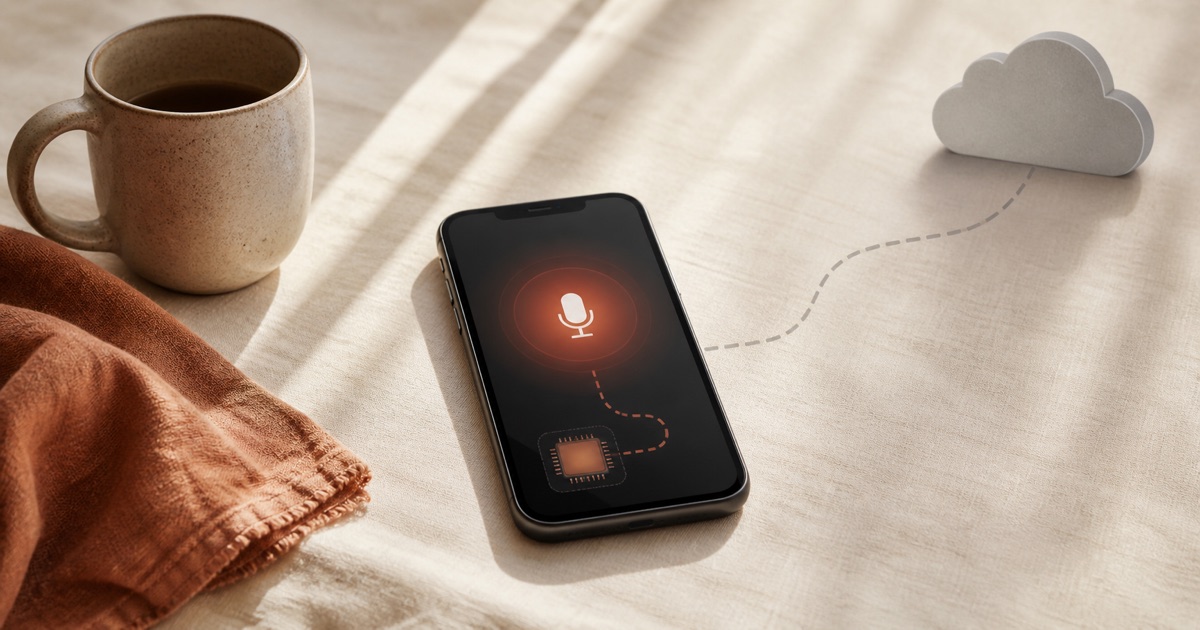
Is voice typing private? It depends entirely on which voice typing you use: some tools turn your speech into text right on your phone and upload nothing, while others stream your audio to a company's servers to process it there. The single question that decides your privacy is where the speech recognition runs, on your own chip or in someone else's data centre.
That distinction gets lost in the marketing. One app promises "your voice never leaves your device," another quietly ships every word to the cloud, and the built-in keyboard you use fifty times a day sits somewhere in between depending on your exact phone. This guide sorts the mainstream options into the right columns, explains the honest nuances (mainstream Android is not all cloud, and Apple is not all local), and hands you a thirty-second test to check your own device. It is the top of a small privacy series that continues in local vs cloud dictation and why your voice data is more sensitive than you think.
Ce que signifie réellement la « saisie vocale »
Voice typing is real-time speech-to-text: you intentionally speak words so they are typed into whatever app you are using, as you go. On a phone it is usually the microphone button on your keyboard. On a computer it is a hotkey you hold. "Voice typing" is Google's brand name for the feature; "dictation" is the generic term for the same thing.
This is different from transcription, which converts an existing recording (a meeting, an interview) into text after the fact. Voice typing is live and single-speaker by intent. If that boundary matters to you, we untangle it in dictation vs transcription vs speech recognition. For the privacy question, the type does not matter as much as the location.
Où va réellement votre audio
Every voice typing tool runs the same four-step pipeline. Understanding it makes the privacy question obvious, because only two of the four steps ever touch a network.
Captureon device
The microphone records audio only after you tap the mic button or press the key. It is not listening continuously in the background.
Speech-to-textthe deciding step
A speech recognition model turns audio into raw text. This runs either on your phone's chip or on a company's servers. This is where privacy is decided.
Optional cleanuptext only
Some tools run the raw text through an AI step that adds punctuation, formats lists, and removes filler. This may run locally or in the cloud, and it sends text, not audio.
Injecton device
The finished text is typed into the app you are using. This always happens locally.
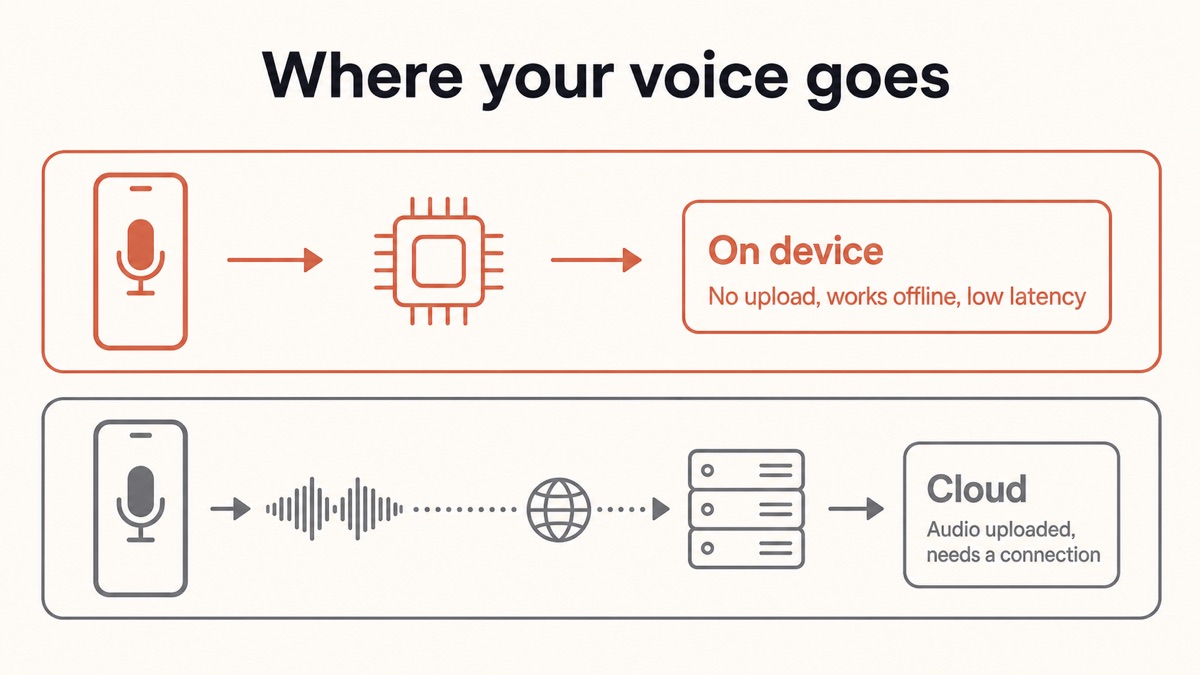
Steps one and four are always local. The privacy question is entirely about step two, and sometimes step three. If step two runs on your chip, your audio never leaves the device. If it runs in the cloud, your microphone audio is streamed over the internet to a server, which is exactly what most people mean when they ask whether voice typing "records" them.
Two terms are worth pinning down before the per-platform breakdown. On-device (local) processing means the speech model runs on your phone or computer's own processor, so the audio becomes text without ever leaving the device and it works in airplane mode. Cloud processing means your audio is streamed over the internet to a company's servers, which run the model and send text back. The full tradeoff between the two gets its own post in local vs cloud dictation.
Quelle saisie vocale télécharge votre audio ? Un verdict par plateforme
Here is the honest, tool-by-tool answer. Note that two of the biggest names, Samsung and Windows, are "it depends" because they offer both modes behind a setting.
| Tool | Where speech-to-text runs | Uploads your audio? | Works in airplane mode? |
|---|---|---|---|
| Yaps (Android, Windows, macOS) | On device | No audio uploaded | Yes |
| Gboard advanced voice typing (Pixel 6+) | On device | No | Yes |
| Gboard standard voice typing (older / non-Pixel) | Often cloud | Usually yes | Usually no |
| Samsung Keyboard | Depends on engine | Depends | Depends |
| Google Docs Voice Typing | Cloud | Yes | No |
| iPhone / iPad keyboard dictation (newer devices) | Mostly on device | Sometimes | Mostly yes |
| Cloud dictation apps (Otter and most "AI dictation" apps) | Cloud | Yes, by design | No |
The rest of this section walks each row, because the nuances are where most articles get it wrong.
Does Gboard Send My Voice to Google?
Sometimes yes, sometimes no, and it depends on your phone. This is the claim most guides botch, so it is worth stating precisely.
On a Pixel 6 or newer (including the Fold and Tablet), Gboard offers "advanced voice typing" that runs on the device. In Google's own words, "the text you speak stays on your device and is not sent to Google servers," except for a couple of optional features. Even the "Fix it" editing feature (which needs a Pixel 8 or newer) sends only text, not audio: Google states that "no audio data is sent" and "no text or audio data is stored on Google servers" for it.
On older phones and many non-Pixel Android devices, though, standard voice typing commonly routes your audio to Google Speech Services, which is Google's cloud, to convert it to text. So "Android voice typing" is not one thing. The newer on-device mode is genuinely private; the older cloud path is not. One more setting to know about: Gboard has an optional "Voice Contributions" feature that can send roughly ten-second snippets of your audio to Google to improve recognition, and those snippets can be reviewed by humans. It is off unless you turn it on, and you can leave it off. If your Gboard voice typing keeps failing without a connection, that is a strong sign it is using the cloud path, and we cover the fix in why Gboard voice typing keeps stopping. For a fully local Android setup, see voice typing on Android without Google.
Does Google Docs Voice Typing Record You?
Google Docs Voice Typing is cloud by design. When you use the microphone in Docs, it streams your audio to Google's servers to process it, and there is no offline or on-device option to switch to. Your voice does not stay on your device; it is sent to Google to be turned into text.
To be precise about "record," the audio is streamed for processing rather than saved as a permanent recording pasted into your document. But it still leaves your device and transits Google's infrastructure, which is the part that matters for confidential work. Do not let this Google Docs fact bleed into a claim about Android keyboards in general. Docs streams; a Pixel keyboard on advanced voice typing does not.
Is Samsung Voice Input Private, or Does It Go to Google?
It depends on which engine you picked. Samsung Keyboard lets you choose between "Samsung voice input" and "Google voice typing." Samsung notes that its third-party speech-to-text provider "may receive and store certain voice commands," so the Samsung option is not automatically local. Google's voice typing processes primarily on the device on supported phones but, depending on your device configuration and system language, may still send audio to Google's servers; when it does, Google says the audio "is not saved and is only used to provide the service."
The practical takeaway is that Samsung is a "check your setting" situation, not a fixed yes or no. If privacy is the goal, the airplane-mode test below will tell you what your specific phone is doing far faster than reading policy pages.
Is iPhone Keyboard Dictation On-Device, or Does Apple Get My Audio?
On newer iPhones and iPads, keyboard dictation is mostly on-device, but it is not absolute. When on-device dictation is enabled (the default on recent devices in supported languages), Apple states that "your On-Device Dictation transcripts and audio are not sent to Siri servers." That is a genuinely strong default.
The honest caveats: for certain requests the on-device model cannot handle confidently, Apple may route the audio to its cloud, and you cannot pick which specific requests stay local. Some usage information is still sent as request history. Separately, there is an "Improve Siri and Dictation" setting (under Settings, Privacy and Security, Analytics and Improvements) that is off by default; if you opt in, Apple may store the audio of your interactions to improve the service. Leaving it off keeps that audio from being retained for training. So iPhone dictation is private most of the time, by default, with edges you should know about rather than assume away.
What About Windows and Cloud Dictation Apps?
Windows offers both modes, and you control which. Windows 11 device-based speech recognition "processes your voice locally with no voice data sent to Microsoft," while online speech recognition sends your voice to Microsoft's cloud. It is a toggle, not a fixed behaviour, so check which one you have enabled.
Dedicated cloud dictation apps are the clear-cut case. Otter and most apps marketed as "AI dictation" that require an account and an internet connection upload your audio to remote servers by design, because that is how they run large models. That buys a higher accuracy ceiling, but the audio leaves your device every time. If your tool needs you to sign in and will not work on a plane, assume your audio is going to the cloud. We keep a running picture of the trust tradeoffs across the category in the state of voice data privacy in 2026.
Le test en mode avion : vérifiez votre propre téléphone en 30 secondes
You do not have to take anyone's word for it, including ours. There is a simple self-check that reveals what your specific device does.
The logic is straightforward. Turn off Wi-Fi and cellular, then dictate. If the text still appears, the model is running on your device and nothing is being uploaded. If it fails or throws an error, your audio was being sent to the cloud to be processed.
You can also read the privacy labels on the app's store listing, which disclose what data is collected, but the airplane-mode test is faster and harder to spin.
Sur appareil ou cloud : le compromis honnête
Privacy is not free of tradeoffs, and pretending otherwise would be dishonest. Cloud processing has historically had a higher accuracy ceiling and broader language and dialect support, simply because server-scale compute can run much bigger models. On-device models used to trail them noticeably.
That gap has narrowed sharply. Production-quality open speech models such as Whisper now run on ordinary consumer hardware at close to cloud quality, without uploading a thing. The old framing that you must trade accuracy for privacy is out of date for everyday dictation. It is also worth stating plainly that no dictation, cloud or local, is one hundred percent accurate; both make mistakes, and you will still proofread either way.
Latency runs the other direction. Cloud streaming adds a network round trip plus server time, typically a couple hundred milliseconds and worse on weak connections. On-device processing handles audio as it is captured, so the text tends to appear with far less delay. For a feature you use hundreds of times a day, that difference adds up.
Yaps : la réponse sur l'appareil, déclarée honnêtement
If your goal is voice typing where the audio never leaves your device, Yaps is built for exactly that. Yaps runs a modern speech model on your device, so dictation processes your speech locally and the audio is not uploaded. On Android you tap the dictation button on the Yaps keyboard; on Windows and macOS you push the Yaps hotkey (the Fn key). It works in airplane mode, which is the whole point.
Two honest edges, because leading with a false "nothing ever leaves" absolute would undercut the point. First, Yaps offers an optional cloud text-cleanup step (a paid feature) that can polish the raw transcript; when you use it, it sends the transcript text, not your audio. Second, voice commands that ask an assistant to do something require internet. The dictation audio itself is not uploaded in either case. That is the distinction that matters: your voice recording stays on the device even when a text feature reaches the network.
Yaps ships on Android, Windows, and macOS, with a Chrome extension for saving pages into your vault and iOS coming soon. The free tier covers 5,000 words a week on desktop and 1,000 words a week on mobile, shared across dictation and read-aloud, which is enough to run the airplane-mode test and see the behaviour for yourself.
L'essentiel
Is voice typing private? Only if the speech recognition runs on your device. Cloud tools like Google Docs Voice Typing and most account-based dictation apps stream your audio to a server; on-device tools like Yaps, Gboard's advanced voice typing on newer Pixels, and Apple's default keyboard dictation keep it on the chip. Samsung and Windows can go either way depending on a setting you control.
The single most useful thing you can do is not read another policy page. Turn on airplane mode, dictate a sentence, and watch what happens. If the words appear, your audio stayed home. If it fails, it was leaving. From there, if privacy is the priority, choose a tool that passes that test by design rather than by configuration.
Foire aux questions
Is voice typing private?
It depends on which voice typing you use. Voice typing is private when the speech recognition runs on your device, because your audio is turned into text locally and never uploaded. It is not private when the tool streams your audio to a company's cloud servers for processing. Google Docs Voice Typing and most account-based "AI dictation" apps are cloud-based; on-device options include Yaps, Gboard's advanced voice typing on Pixel 6 and newer, and Apple's default keyboard dictation on recent iPhones.
Does voice typing upload my audio?
Some does and some does not. Cloud voice typing streams your microphone audio over the internet to a server to convert it to text, so your audio is uploaded. On-device voice typing runs the model on your phone or computer's own chip, so no audio is uploaded and it works with no connection. The fastest way to tell which one you have is the airplane-mode test: turn off Wi-Fi and cellular, then dictate. If it still works, nothing is being uploaded.
Does voice typing record you?
Voice typing captures audio only after you tap the microphone button or press the dictation key; it is not listening continuously in the background. Whether that captured audio leaves your device is the real question. On-device tools process it locally and discard it. Cloud tools stream it to a server, where it may be temporarily retained. Either way, cloud services generally convert your speech to text rather than pasting a permanent audio recording into your document.
Does Google Docs voice typing record you?
Google Docs Voice Typing streams your audio to Google's servers to convert it to text, and it has no offline or on-device mode. So while it does not usually save a permanent recording in your document, your voice does leave your device and transit Google's infrastructure every time you use it. For confidential documents, that is the point to weigh. If you need the audio to stay local, use an on-device dictation tool and paste the text into Docs.
Does Gboard send my voice to Google?
It depends on your phone. On a Pixel 6 or newer with advanced voice typing, Google states the audio stays on the device and is not sent to Google servers. On older phones and many non-Pixel Android devices, standard voice typing commonly routes audio to Google Speech Services in the cloud. Gboard also has an optional "Voice Contributions" feature that can send short audio snippets to Google for review, but it is off unless you enable it.
Is Samsung voice input private, or does it go to Google?
It depends on which engine you select in the Samsung Keyboard settings. Samsung Keyboard lets you choose "Samsung voice input" or "Google voice typing." Samsung notes its speech-to-text provider may receive and store certain voice commands, and Google's option processes primarily on-device on supported phones but may still send audio to Google servers depending on your device and language. Run the airplane-mode test to see exactly what your phone does.
Is iPhone keyboard dictation on-device, or does Apple get my audio?
On recent iPhones and iPads, keyboard dictation is mostly on-device by default, and Apple states that on-device dictation transcripts and audio are not sent to Siri servers. It is not absolute, though: for requests the local model cannot handle confidently, Apple may route audio to its cloud, and you cannot choose which requests stay local. Some usage history is still sent regardless.
Does Apple store or listen to my dictation?
By default, Apple does not retain your dictation audio for training. The "Improve Siri and Dictation" setting, under Settings, Privacy and Security, Analytics and Improvements, is off by default; if you opt in, Apple may store the audio of your interactions and human reviewers may sample it to improve the service. Leaving that setting off keeps your dictation audio from being retained for training. On-device dictation adds a further layer by processing many requests without sending audio at all.
How do I know if my dictation actually works offline?
Use the airplane-mode test. Turn off Wi-Fi and cellular data, open a notes app, and dictate a sentence. If the text appears, the speech model is running on your device and your audio is not being uploaded. If it stalls or errors, your audio was being sent to the cloud. Run the test after opening the app once with a connection, since some genuinely on-device tools need a one-time model download before they can work offline.
Which voice typing does not upload my audio?
Voice typing that processes speech on your device does not upload your audio. That includes Yaps on Android, Windows, and macOS; Gboard's advanced voice typing on Pixel 6 and newer; Apple's default keyboard dictation on recent iPhones for most requests; and Windows 11's device-based speech recognition when you select the local mode. Cloud tools such as Google Docs Voice Typing and account-based dictation apps do upload your audio by design.
Is voice-to-text safe for confidential, legal, or medical information?
Only if the audio never leaves your device. For confidential, legal, or medical dictation, a cloud tool sends your voice to a third-party server, which may retain it and is exposed to breaches, policy changes, and legal requests. An on-device tool keeps the audio on hardware you control, which sidesteps that exposure. Confirm with the airplane-mode test, and pair it with any compliance requirements specific to your field. We go deeper on the sensitivity of voice data in why your voice data is more sensitive than you think.
Can I use voice typing without internet?
Yes, if you use an on-device tool. On-device voice typing runs the speech model locally, so it works on a plane, in a basement, or anywhere with no signal. Yaps, Gboard's advanced voice typing on newer Pixels, and Apple's default keyboard dictation all work offline. Cloud voice typing, including Google Docs Voice Typing and most account-based dictation apps, stops working without a connection because it needs to reach a server to process your audio.