Why does Google Docs voice typing keep stopping?
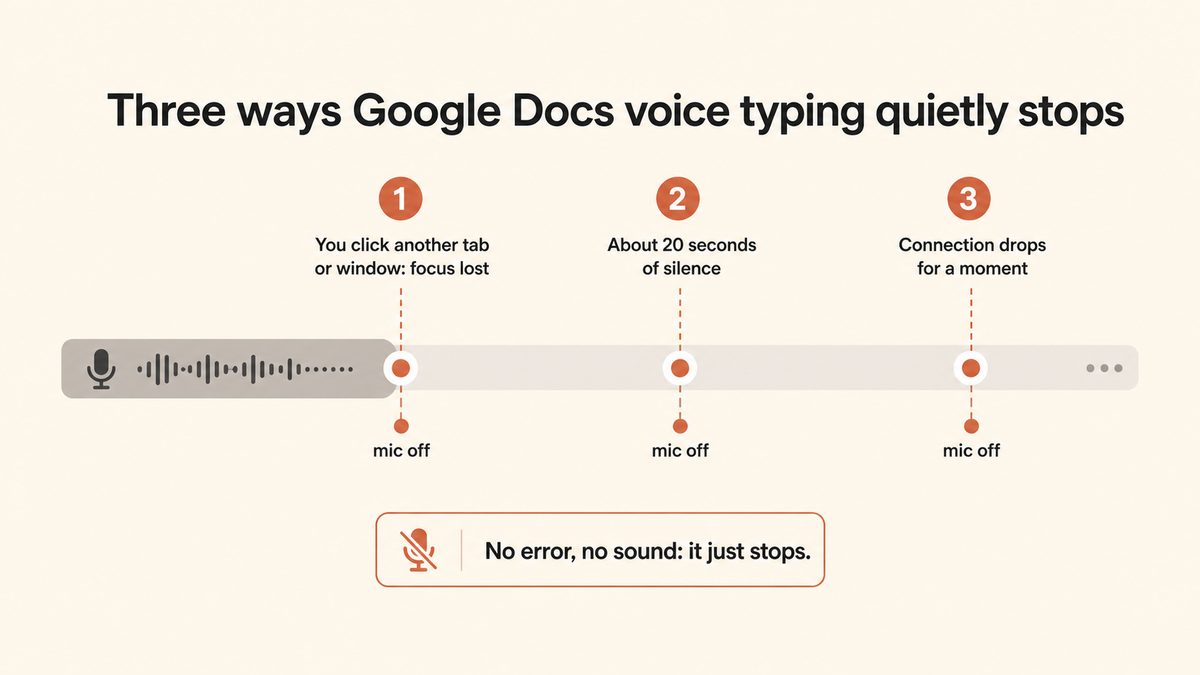
Google Docs voice typing keeps stopping for three main reasons: the tab lost focus, the mic auto-timed-out after a silence, or your browser or microphone permission is misconfigured. The two most common are silent: clicking into another tab or window turns the mic off instantly with no warning, and the mic shuts itself off after roughly 20 to 30 seconds of no detected speech. Neither is a bug; both are how the Web Speech API behind voice typing works. Neither appears in Google's official help page, which is why they surprise so many people.
Why does Google Docs voice typing stop after a few seconds?
It stops after a few seconds because the microphone auto-shuts off when it does not detect speech, and the timeout is short. Users report cutoffs anywhere from 10 to 15 seconds up to 20 to 30 seconds of silence. Background noise (an HVAC unit, music, a nearby conversation) can also trip the auto-stop, and a mic with a low input level can look like silence to the tool. There is no setting to extend or disable the timeout, so the only workarounds are to speak continuously and move to a quieter room.
How do I keep Google Docs voice typing active without it turning off?
You cannot fully stop the silence timeout, but you can minimise the shutoffs. Keep the Google Docs tab in focus the entire time, do not click into other tabs or windows, speak continuously without long pauses, and re-click the mic after any pause longer than about 20 to 30 seconds. If you need genuinely continuous dictation with thinking pauses, a system-wide dictation tool like Yaps has no silence timeout at all, so you can pause as long as you like and keep going.
Why does voice typing stop when I click on another tab?
It stops because voice typing only runs while the Google Docs tab is the focused, active tab. This is documented, by-design behaviour: the moment the tab loses focus (you click another tab, open a notification, alt-tab to a window, or let a second tab claim the microphone), the mic silently turns off. There is no warning, so you often keep talking into a dead mic. To avoid it, do not click away while dictating, or use a dictation tool that types into whatever app your cursor is in regardless of focus.
Does Google Docs voice typing only work in Chrome?
In practice, yes: Chrome and Edge (both built on Chromium) are the only browsers where voice typing works reliably. Google's help page lists Chrome, Edge, and Safari as supported, but community reports and troubleshooting guides consistently find Safari, Firefox, Brave, and Arc to be flaky or missing the Tools then Voice typing option entirely. If you cannot find Voice typing in the Tools menu, you are almost certainly in an unsupported browser and should switch to Chrome.
Why is Google Docs voice typing not working on my Mac?
On a Mac, the usual cause is that Chrome is blocked from the microphone at the operating-system level, even when the site permission looks granted. Open System Settings, Privacy and Security, Microphone, and make sure Chrome is toggled on. If it is off, the browser permission appears fine but no audio ever reaches the page. Also check that the correct input device is selected under System Settings, Sound, Input, and that its level bar moves when you speak. If those are all correct and it still fails, work through the browser, tab-focus, and permission steps above.
What does the voice typing "trouble hearing you" error mean?
It means Google's speech service cannot get a clear signal from your microphone: the input volume is too low, the wrong or a dead microphone is selected, or background noise is drowning out your voice. Google's own fix is to move to a quiet room, plug in an external or headset mic, and adjust the input volume so the level bar responds clearly to your speech. The same background noise that triggers this error can also trip the silence auto-stop, so a quieter environment helps on both fronts.
Does Google Docs voice typing work offline or without internet?
No. Google Docs voice typing streams your audio to Google's servers for processing, so it requires an active internet connection and will stop if the connection drops or the document falls into offline mode. If you need to dictate on a plane, in a basement, or anywhere with poor connectivity, you need a tool that processes speech on your device. Yaps runs its core dictation on-device, so it works fully offline with no connection required.
What is the best alternative to Google Docs voice typing that works in every app?
The strongest alternative for dictating across every app is Yaps, because it is system-wide rather than tied to one browser tab. You push the Yaps hotkey and speak, and clean, punctuated text lands wherever your cursor is: Google Docs, Gmail, Slack, Notion, or anywhere else. It has no tab-focus rule and no silence timeout, its core dictation runs on-device and works offline, and it ships on Android, Windows, and macOS with a free tier of 5,000 words a week on desktop. On Android, you dictate with the dictation button on the Yaps keyboard, so it works in the Google Docs app on your phone too.