Passer au contenu
ENTRÉE 01GUIDE23 JUL 2026

The AI Notetaker That Does Not Join Your Meetings

In 2026 the words AI notetaker almost always mean a bot that joins your video calls, records the room, and uploads the audio to summarise it. That is genuinely useful for recurring meetings. But there is a second, quieter kind of notetaker that the bot noise has drowned out: one for your own spoken thoughts, captured on your own device with no bot in the call. This is a guide to that kind.

The AI Notetaker That Does Not Join Your Meetings
0.0

Préface

Most tools that call themselves an AI notetaker in 2026 are meeting bots: they join your video calls, record everyone in the room, and upload the audio to a cloud service to summarise it. An AI notetaker without a meeting bot does the quieter, older job instead: it captures your own spoken thoughts, cleans up the ramble on your own device, and saves them as notes that never leave your machine. Yaps is that second kind.

That distinction has quietly become the whole story. If you search "AI notetaker" today, nearly every result is a bot that wants a seat in your calendar. That category is real and often worth having. But it has drowned out a different, smaller need: the idea you have on a walk, the thought between two meetings, the paragraph you would rather talk out than type. This guide separates the two clearly, says honestly where the meeting bots win, and shows what a personal, on-device notetaker actually does.

01 / Common Meaning
Bot
What "AI notetaker" usually means in 2026: a bot that joins calls
02 / Bots In Your Call
0
Third parties Yaps sends into your meetings to record the room
03 / Where Notes Live
Local
Your notes are stored on your own device, not a server
04 / Free Tier
2K
Words a week on Yaps free, shared across dictation and read-aloud
1.0

Two Very Different Things Get Called an "AI Notetaker"

The phrase points at two products that barely overlap. It helps to name them plainly before choosing between them.

The first is a meeting-bot notetaker. You connect it to your calendar, and it dials into your video calls as an extra participant. It records every voice in the meeting, transcribes the whole conversation in the cloud, and hands back a summary with action items. Otter, Fireflies, Granola, Fathom, and Read all live in this category. They are built for one job: capturing meetings you attend so you do not have to write notes while listening.

The second is a personal notetaker. It does not care about your calendar and it does not join anything. It captures what you say when you deliberately speak a note: a reminder, a draft paragraph, a half-formed idea. You trigger it on purpose, it turns your speech into clean text, and it saves that text as a note. Yaps sits here. There is no meeting, no room full of voices, and no third party recording anyone but you.

Confusing these two is easy, because both use speech and both produce text. But they solve opposite problems. One is a scribe for conversations other people are also in. The other is a fast way to get your own thoughts out of your head and onto the page.

Meeting-bot notetaker

A scribe for your calls

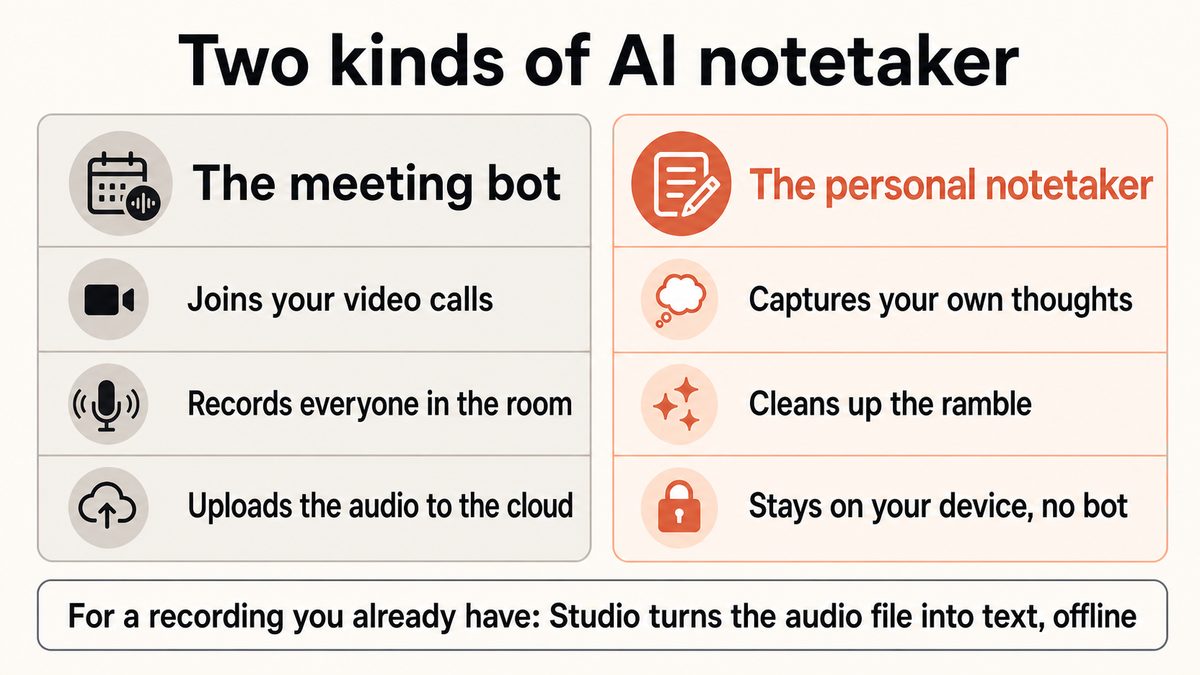
Joins your video meetings as a participant, records every voice in the room, and uploads the audio to the cloud to transcribe and summarise it. Excellent for recurring team calls and interviews you run on the record. The trade-off is that a conversation with your colleagues now has a third-party copy on someone else's server.

Personal notetaker

A scribe for your own thoughts

Captures only what you choose to speak, cleans up the filler and punctuation on your own device, and saves it as a note in a local vault. No bot, no calendar access, and nothing about your meetings leaves the machine. Built for the idea on a walk, not the standup.

A two-panel diagram contrasting the two kinds of AI notetaker: a meeting bot that joins calls and uploads audio, and a personal notetaker that captures your own spoken notes on your device.

2.0

Meeting Bots Are Genuinely Useful (So Let Us Be Fair)

It would be dishonest to pretend the meeting-bot category is a mistake. For a lot of people, it is the right tool.

If your week is a wall of recurring calls, a bot that quietly records each one and produces a searchable summary with decisions and action items saves real hours. It captures the parts you missed while you were talking, and it gives a whole team the same shared record. For on-the-record interviews with several speakers, automatic speaker labels ("who said what") are something a personal notetaker simply does not do. When the deliverable is a reliable transcript of a live conversation involving other people, a meeting bot is the correct answer, and Yaps is not competing for that job.

So if that is your main need, stop here and pick a meeting tool. The rest of this guide is for the other need, the one that is harder to search for because the bots have taken over the results.

3.0

The Notetaker for Your Own Thoughts

Here is the case the meeting-bot noise has buried. A surprising amount of the writing you actually do is not a meeting at all. It is you, alone, with something to say.

You have an idea on a walk and want to save it before it evaporates. You are between two calls and need to dump three follow-ups somewhere. You are staring at an email you do not want to type and would rather just say it. You have a paragraph in your head that comes out fluently when you speak it and stiffly when you type it. None of these involve another person, a video call, or a room to record. They involve you talking and something catching it faithfully.

That is what a personal AI notetaker is for. With Yaps, you press the Yaps hotkey on desktop or tap the mic on the Yaps keyboard on Android, and you talk. On-device cleanup strips the "um" and "uh," fixes the punctuation and capitalisation, and formats a spoken list into an actual list. The finished text lands as a note in your vault, or straight into whatever app you are focused on. It runs on your device, so your voice is not uploaded anywhere to make that happen.

A meeting bot records the room. A personal notetaker records only the thought you chose to speak, and keeps it on your side of the glass.

Voice notes in Yaps are not just a wall of transcribed text either. They support plain notes, kanban boards, and checklists, so a spoken brain-dump can become a to-do list you can actually work from. Everything is searchable locally, so finding the note you made last Tuesday does not require a cloud index of your private thoughts. And when you want the finished text elsewhere, notes export to Markdown and plain text.

Step 01

Trigger it on purposethe hotkey or mic

Press the Yaps hotkey on Windows or macOS, or tap the mic on the Yaps keyboard on Android. Nothing is listening in the background and nothing is watching your calendar. You decide the exact moment capture begins.

Step 02

Talk the way you thinkon-device recognition

Speak naturally, restarts and tangents included. Recognition runs on your device and handles about 25 languages, auto-detected from your speech, so you never switch a language setting. The audio does not leave the machine to be understood.

Step 03

The ramble gets cleaned upon-device cleanup

On by default and running locally, the cleanup step removes filler words and false starts, adds punctuation and capitalisation, and formats lists and numbers. What was a spoken jumble reads like something you sat down and typed.

Step 04

It lands as a noteyour local vault

The finished text saves into your vault as a note, a checklist, or a kanban card, or drops straight into the app you are in. It is stored locally and searchable on your device, with export to Markdown and plain text when you need it elsewhere.

4.0

The Wedge: No Bot Means No Cloud Copy of the Room

Here is where the missing feature becomes the whole point. Because Yaps does not send a bot into your meetings, several things simply cannot happen.

There is no third party quietly recording your colleagues. There is no cloud copy of a conversation sitting in a vendor's account, subject to their retention policy, their breach risk, and their willingness to comply with a legal request. There is no awkward moment where a bot appears in the participant list and everyone wonders who invited it and where the recording goes. A meeting bot has to record everyone in the room to do its job, and everyone in that room is trusting a company they did not choose. A personal notetaker sidesteps that entirely by never being in the room.

This matters even for people who love their meeting bot, because the two tools are not mutually exclusive. You can run a meeting bot on the calls where a shared, on-the-record transcript is the goal, and use a personal, on-device notetaker for the thinking you do on your own, which is most of it. The point is not that bots are bad. It is that your private half-formed ideas do not need a cloud round-trip, and for years the only well-marketed option acted as though they did.

5.0

The Part Where We Are Scrupulously Honest

If you came here hoping Yaps is a stealthier, more private meeting bot, this is the paragraph that saves you a disappointment.

Yaps does not join your meetings, and it does not transcribe a live call. There is no bot that sits in your Zoom, Meet, or Teams. Live meeting transcription is on the roadmap and behind a disabled flag, which means it is coming soon and not available today. Do not plan a workflow around Yaps live-capturing a call, because it will not do that yet. If your primary need is a summary of a live team meeting with speaker labels, a meeting tool is the right pick, and we would rather tell you that than sell you the wrong thing.

What Yaps can do with a conversation is narrower and worth stating precisely, because it is easy to blur. If you have a recording you already made (an interview you recorded yourself, a lecture, a voice memo, a webinar you captured), the Yaps Studio editor can import that audio file and transcribe it offline into text or an SRT subtitle file. That is importing a file you own, not recording a meeting in progress. The distinction is the entire difference between "turn this recording I have into text" (yes, offline, today) and "sit in my call and capture it" (no, not yet). We keep those two apart on purpose, because collapsing them is exactly the kind of overclaim this guide exists to avoid.

6.0

Meeting Bot Versus Personal Notetaker, Side By Side

The cleanest way to choose is to hold the two categories against each other on the axes that actually differ. This is not Yaps beating a rival at the rival's own game; it is two tools for two jobs.

Scroll →
What matters Yaps (personal notetaker) Meeting-bot notetaker
What it captures Your own spoken notes Everyone in the meeting
Joins your video calls No, no bot Yes, as a participant
Where the audio goes Stays on your device Uploaded to the cloud
Needs calendar access No Usually yes
Works fully offline Yes, for core capture No
Live meeting transcription Coming soon, not yet Yes, that is the point
Speaker labels (who said what) No Yes
Transcribe a recording you own Yes, in Studio, offline Yes, cloud upload
Best for Your own thoughts and drafts Team calls and interviews

Read that table as a fork, not a scoreboard. The two "coming soon" and "no" rows for Yaps are not weaknesses to apologise for; they are the design. A tool that does not join calls cannot leak a call. A tool with no calendar hook cannot see your schedule. The features Yaps lacks are the features that would put it in the room, and staying out of the room is the entire proposition.

7.0

Which One Do You Actually Need?

Match the tool to the job and the decision is quick.

Choose a personal notetaker like Yaps if the notes you care about are your own: ideas, drafts, reminders, and the paragraphs you would rather speak than type. Choose it when you want that capture to happen on your device without a bot, a calendar connection, or a cloud copy. And choose it when you have a recording you made yourself and want it turned into private text or subtitles offline.

Choose a meeting bot if your core need is a reliable transcript and summary of live conversations that include other people. Choose it when you need automatic speaker labels for a multi-person call, a shared record for a team, or action items pulled from a meeting you attended. That is a real job and Yaps does not do it today.

Choose both if, like most people, you have both needs. Run a meeting bot on the on-the-record calls where a shared transcript is the goal, and keep a private, on-device notetaker for the thinking you do the rest of the day. They do not compete; they cover different halves of your week.

If you want the reasoning behind on-device processing in general, we lay it out in is voice typing private, and the capture side is covered in voice notes and dictation.

01Essayez Yaps

An AI notetaker for your own thoughts, not a bot in your calls.

Install Yaps to capture spoken notes that stay on your device, with no bot joining your meetings and no cloud copy of the room. Available on Android, Windows, and macOS.

Scannez pour obtenir Yaps sur votre téléphone
Scannez avec l'appareil photo de votre téléphone
8.0

Foire aux questions

What is an AI notetaker?

An AI notetaker is software that turns speech into written notes and uses an AI layer to clean up and organise them. In 2026 the phrase usually refers to a meeting bot that joins your video calls and summarises them, but it also describes personal tools that capture your own spoken thoughts. The two kinds solve different problems: one records conversations you are in, and the other records the notes you deliberately speak.

Is an AI notetaker the same as a meeting bot?

Often, but not always. Many of the best-known AI notetakers (Otter, Fireflies, Granola, Fathom, and Read) are meeting bots that join calls and record everyone in the room. A personal notetaker like Yaps is a different category: it does not join anything and captures only what you choose to speak. When people say "AI notetaker" they usually mean the bot, which is exactly why the personal kind is hard to find.

Does Yaps join my meetings or record my calls?

No. Yaps does not join your meetings, does not connect to your calendar, and sends no bot into your video calls. It captures only the notes you deliberately speak by pressing the Yaps hotkey or tapping the mic on the Yaps keyboard. There is never a third party recording your colleagues, because Yaps is never in the room in the first place.

Can Yaps transcribe a live meeting?

Not today. Live meeting transcription is on the roadmap and behind a disabled flag, which means it is coming soon and not currently available. Yaps does not attend or capture live calls. If you need a live meeting captured with speaker labels right now, a meeting bot is the correct tool, and we would rather say so than overclaim.

Can Yaps transcribe a recording I already have?

Yes. If you have an audio file you recorded yourself (an interview, a lecture, a voice memo, or a webinar you captured), the Yaps Studio editor imports that file and transcribes it offline into text or an SRT subtitle file. This is importing a file you own, not recording a meeting in progress. Nothing is uploaded, so it suits recordings you would rather not send to a cloud service.

What is the best AI notetaker that does not use a bot?

For capturing your own thoughts privately, Yaps is a strong pick because recognition, cleanup, note storage, and local search all run on your device, with no bot and no calendar access. It works across Android, Windows, and macOS. If your real need is summarising live team meetings with several speakers, a bot-based tool will serve you better, so the honest answer depends on which job you are trying to do.

Is an AI notetaker without a meeting bot more private?

For your own notes, generally yes. Because there is no bot in your calls, there is no third-party recording of your colleagues and no cloud copy of the conversation sitting under someone else's retention policy. With Yaps, the core capture happens on your device, so your voice is not uploaded to become a note. A meeting bot, by contrast, has to record everyone in the room and process that audio in the cloud to do its job.

Do meeting-bot notetakers like Otter or Fireflies upload my audio?

Yes. Meeting-bot notetakers work by recording your call and transcribing it in the cloud, so the audio and transcript are uploaded to the vendor's servers, where retention and model-training policies vary by plan. That is not a flaw; it is how a shared, searchable meeting record is produced. It does mean a private conversation now has a copy on infrastructure you do not control, which is the trade-off a personal on-device notetaker avoids.

When should I use a meeting bot instead of Yaps?

Use a meeting bot when the deliverable is a transcript or summary of a live conversation that includes other people, especially if you need automatic speaker labels or a shared record for a team. Those are jobs Yaps does not do today. Use Yaps for your own spoken notes and for turning recordings you already have into private, offline text. Many people run both for their different halves of the week.

Does the Yaps AI notetaker work offline?

Yes, for the core work. Speech recognition, on-device cleanup, note storage, and local search all run on your device and function with no internet connection. The network is used only for a short list of things, such as account and subscription status, model downloads, optional cloud cleanup on paid tiers, and premium vault sync. Capturing and saving a note does not require you to be online.

Where are my notes stored with Yaps?

Your notes are stored locally on your device in a searchable vault, with export to Markdown and plain text when you want them elsewhere. Because storage and search are local, finding an old note does not depend on a cloud index of your private thoughts. Vault note sync between mobile and desktop is available as a premium feature, and it pairs over your local network or an encrypted peer-to-peer link rather than a central server.

Can I search my voice notes in Yaps?

Yes. Yaps keeps a local search index of your notes, so you can find a note you made days ago without sending your history to a server. Notes support plain text, kanban boards, and checklists, so a spoken brain-dump can be organised into something you can actually work from. There is also an "Ask your notes" chat feature, with 5 read-only messages a week on the free tier.

How much does the Yaps AI notetaker cost?

Yaps has a free tier of 2,000 words a week, a single allowance shared across dictation and read-aloud on every platform, plus 5 notes-chat messages and 5 Save-to-Yaps extension saves a week. Paid plans are Basic at $15 a month and Max at $25 a month, with the Max tier including a cloud allowance. An account is required only for billing and subscriptions, not for core on-device capture.

Does the Yaps notetaker work on Android, Windows, and macOS?

Yes. Yaps runs on Android as a full AI keyboard, and on Windows and macOS as a desktop app, with a Chrome "Save to Yaps" extension for pulling web pages into your vault. On desktop you trigger capture with the Yaps hotkey, and on Android you tap the mic on the Yaps keyboard. An iOS version is coming soon and is not publicly available yet.

CONTINUER À LIRE
GUIDE · 12 MIN READAI Productivity Apps That Work Offline (2026)GUIDE · 11 MIN READThe AI Second Brain App, Kept Private (2026)