
Préface
Dictation on Linux has historically been a choice between two bad options.
Option one: assemble it yourself. Pick a speech toolkit, get the Python environment right, work out how to send the resulting text to the window that has focus, and write the glue. It works, and you now maintain a small piece of infrastructure.
Option two: use something that calls a cloud API. Easier, and your voice now goes to a server, which is often the exact thing that put you on Linux in the first place.
There is a third option now: a desktop app that ships its own speech models, runs them on your machine, and types into whatever window has focus. This guide covers what that looks like, what is genuinely different about it on Linux, and the two places it is weaker here than on other platforms.
Pourquoi c'est un problème plus difficile sous Linux
Not a complaint, and worth understanding because it explains some design choices that look odd otherwise.
There is no single way to type into another window. On macOS there is one accessibility API. On Linux there is X11 and there is Wayland, and Wayland deliberately restricts one application's ability to inject input into another, for good security reasons. Anything that types on your behalf has to handle both worlds and the differences between compositors.
Global shortcuts are contested. Every desktop environment reserves its own set of key combinations, and they do not agree with each other. A chord that is free on GNOME is bound on KDE, and a tiling window manager has opinions of its own.
Audio has multiple stacks. PulseAudio, PipeWire, and whatever the distribution decided. A microphone that works in one application is not guaranteed to be picked up by another.
None of this is unsolvable. It is why dictation on Linux has lagged, and why "it just works" is a bigger claim here than it sounds elsewhere.
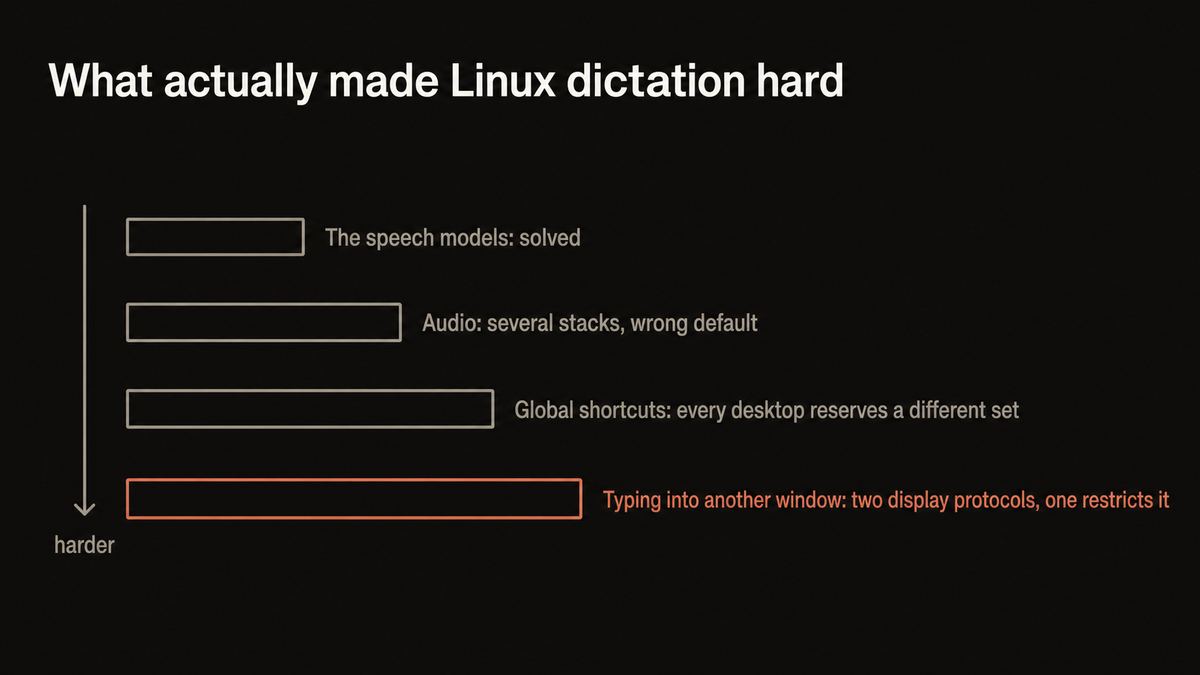
The reason Linux dictation was bad was never the speech models. It was everything around them.
Yaps for Linux
Le raccourci est un double tapotement, et c'est délibéré
The first thing that will strike you: to dictate, you double-tap Control. Read-aloud is a double-tap of Alt.
That looks like a strange choice until you try to pick a conventional chord that is free across GNOME, KDE, Xfce, and a handful of tiling window managers. There is essentially nothing left. Every sensible combination is already bound to something, and the ones that are not on your machine are on someone else's.
A modifier double tap sidesteps the whole problem. It is not a chord, so it does not collide with one, and it is easy to reach without moving your hands. The voice notepad is Ctrl+Alt+N and the assistant is Ctrl+Alt+A, both of which are conventional because those two are less contested.
All of them can be rebound if your setup disagrees.
Rolling your own
You maintain a small system
A speech toolkit, a Python environment, a way to inject text into the focused window, a hotkey daemon, and glue. It works, and every distribution upgrade is a chance for one piece to move. You are now the maintainer of your own dictation stack.
An app that ships its models
Install it, double-tap, talk
The speech models come with the app and run on your machine. No environment to manage, nothing to compile, and the text lands in whatever window has focus. It still runs with the network off, because nothing was ever going over it.
Comment le configurer
1. Install it
Download Yaps for Linux, x86_64, and start the 7-day free trial. The speech models download once during setup and then live on the machine, which is what makes everything after this work without a network.
2. Check which microphone it is actually using
The most common first-run problem on Linux is not the app, it is that your system is offering three input devices and the wrong one is default. Confirm the right device is selected in your audio settings before concluding anything about accuracy.
3. Prove it is local rather than trusting the claim
Disconnect from the network entirely. Open a text field. Double-tap Control and say a sentence.
If the words appear, recognition happened on your machine. If nothing happens, whatever you are using needed a server. Do this test with any tool that claims on-device processing, this one included.
4. Dictate into any window
Put your cursor where you want text, double-tap Control, and talk. Speak in full sentences at your normal pace rather than word by word, because more context produces better recognition.
Filler words are stripped and punctuation and capitalisation are added as the text arrives, so what lands reads like writing rather than a transcript of you thinking.
5. Rebind if your desktop disagrees
More likely to be needed here than on other platforms. If double-tap Control conflicts with something in your setup, change it in settings. Same for the others.
Ce qui est le plus faible sous Linux, indiqué clairement
Two real gaps, and you should know them before installing.
Speaker identification is not available. Studio can transcribe an audio or video file locally on Linux, but the optional speaker-labelling pack that tags who said what ships on Windows and macOS only. So a multi-person interview comes back as continuous text here rather than labelled turns. If that specific feature is why you were interested, it is not there yet.
Voice cloning is Apple-Silicon only. Not a Linux limitation so much as a Mac-only feature, but worth saying since it appears in the feature list.
Everything else works: dictation, the on-device cleanup, read-aloud, offline file transcription in Studio, the Markdown notes vault, search, and asking questions across your own notes.
| What matters | Yaps on Linux | Rolling your own | Cloud dictation APIs |
|---|---|---|---|
| Runs on your machine | Yes | Yes, if you choose local models | No, uploaded |
| Setup effort | Install and go | Substantial, ongoing | Low |
| Types into any focused window | Yes | You write that part | Varies |
| Cleans up filler and punctuation | Yes, on device | Not usually | Sometimes |
| Offline file transcription | Yes | Yes, with work | Uploaded |
| Speaker labelling | No, Windows and macOS only | Possible | Usually |
| Cost | $15/mo after a 7-day trial | Free, plus your time | Per-minute or subscription |
| Read-aloud included | Yes, 31 languages | Separate project | Separate service |
When rolling your own is still the better answer. If you want full control, no subscription, and you enjoy that kind of work, the open-source route is legitimate and always has been. It is free, you can inspect every part, and you are not dependent on a company continuing to ship a Linux build. Those are real advantages and this article is not going to pretend otherwise. The trade is your time, and whether you want dictation to be a thing you maintain.
Pourquoi les utilisateurs de Linux ont tendance à se soucier de la partie locale
The privacy argument lands differently here, because it is usually not new information.
If you are reading this on Linux, there is a reasonable chance you chose the operating system partly to avoid software that phones home. In that context, a dictation tool that uploads your voice to be transcribed is not a minor compromise. It is the thing you were avoiding, reintroduced at the exact layer where everything you write passes through.
That is why local matters more than the convenience framing suggests. It is not just that it works without a network. It is that there is no vendor holding a recording of you, no retention policy, and nothing that changes when a company updates its terms.
It also means dictation works on an air-gapped machine, in a secure facility, or on a server you have SSH'd into from a laptop with no connection.
Notes de distribution et d'emballage
The Linux build targets x86_64. If you are on ARM Linux, it is not available yet.
Worth being straight about the history: Linux shipped later than the other desktop platforms and had a rougher road getting there. If you tried an earlier build and it did not work, a current one is a meaningfully different experience.
Yaps also runs on Windows, macOS, and Android, and the notes vault syncs between them if you turn that on. That matters for the fairly common Linux setup where the desktop is Linux and the phone is Android.
La version courte
Dictation on Linux no longer requires assembling it or sending your voice away. Install Yaps for Linux, check your microphone, disconnect from the network to prove recognition is local, then double-tap Control and talk into any window.
Choose the open-source route instead if you want no subscription, full inspectability, and independence from a vendor's Linux commitment, and you do not mind maintaining it. Choose a cloud API if you need speaker labelling, which is the one meaningful feature missing here. For everyday dictation that works offline and does not need looking after, an app that ships its own models is now the straightforward answer on Linux, which was not true for a long time.
Foire aux questions
Is there a good AI dictation app for Linux?
Yes, and that is newer than most people realise. Yaps ships a Linux build for x86_64 with its speech models included, so recognition runs on your machine and types into whatever window has focus, with no toolkit to assemble and no cloud service. The alternative remains the open-source route, which is free and fully inspectable if you are happy maintaining it.
Does Linux dictation work offline?
Yes. The speech models are installed on your machine, so dictation, the text cleanup, note search, and read-aloud all work with the network disconnected entirely. The way to confirm it is to disconnect, open a text field, and dictate a sentence: if the text appears, nothing was uploaded.
Why is the dictate shortcut a double tap instead of a normal shortcut?
Because conventional chords are already taken. Every desktop environment reserves its own set, and they do not agree, so a combination free on GNOME may be bound on KDE or in a tiling window manager. A modifier double tap is not a chord, so it cannot collide with one. Dictate is a double-tap of Control and read-aloud a double-tap of Alt, and both can be rebound.
Does it work on Wayland or only X11?
Both, though they behave differently because Wayland deliberately restricts one application's ability to inject input into another for security reasons. If text is not landing where you expect, checking which session you are in is the first useful diagnostic. This is a general fact about Linux input rather than something specific to one app.
Which distributions are supported?
The build targets x86_64 Linux rather than specific distributions. ARM Linux is not supported yet. If you tried an earlier Linux build and had a poor experience, it is worth another look: Linux shipped later than the other desktop platforms and the early builds were rougher.
Can it transcribe audio files on Linux?
Yes. Studio imports audio and video files and transcribes them on your machine, exporting text, Markdown, or SRT subtitles, with nothing uploaded. One honest gap: the optional speaker-labelling pack that tags who said what is available on Windows and macOS only, so a multi-person recording comes back as continuous text on Linux.
Is it better than rolling my own with an open-source toolkit?
Different rather than strictly better, and it depends what you value. The open-source route is free, fully inspectable, and not dependent on a company continuing to ship a Linux build, which are genuine advantages. The trade is that you assemble and maintain it: the models, the environment, the text injection, the hotkey handling. If you would rather dictation not be a thing you maintain, an app that ships all of that is the shortcut.
Does my voice get sent anywhere?
No, when recognition runs locally, which it does by default. There is no upload, so there is no server log, no retention period, and no terms of service governing a recording of you. This tends to matter more to Linux users than to most, since avoiding software that phones home is often part of why they are on Linux.
What languages does it dictate in?
About 25, detected from what you actually said rather than chosen from a menu, so you can switch languages between dictations without changing a setting. Read-aloud separately covers 31 languages on desktop. A sentence that switches language halfway through is the hard case for any tool, so split those into two dictations.
Will it type into a terminal?
Yes, it types into whatever window has focus, including a terminal. Whether that is a good idea is your call: dictating shell commands is error-prone in a way that dictating prose is not, because a misheard word in prose is a typo and a misheard word in a command is a command. Read before you press enter.
What does it cost on Linux?
Desktop is a 7-day free trial and then Pro at $15 a month or Max at $25 a month, the same as Windows and macOS. There is no Linux-specific pricing and no separate charge for the speech models. Android has a free tier if you also want dictation on your phone.
Does it sync with my Android phone?
Yes, if you turn syncing on, which is off by default. The notes vault syncs between devices, so a note dictated on an Android phone appears on the Linux desktop. That covers the fairly common setup of a Linux desktop and an Android phone.
Can it read text aloud on Linux too?
Yes, with read-aloud covering 31 languages on desktop and 8 of the 18 voices running with no connection. Double-tap Alt to start it on a selection. Reading output can also be exported to a WAV file, so you can turn a document into audio you keep.