Ga naar de inhoud
TOEGANG 05GUIDE23 JUL 2026

What Is a Local AI App? (2026 Guide)

A local AI app runs its intelligence on your own phone or computer instead of a company's server, so your data never leaves the device and the app keeps working with no internet. The term covers two families: model-runners you configure yourself, and ready-to-use apps you just open. Here is the honest difference, why local AI matters in 2026, and a simple test for whether an app is truly local.

What Is a Local AI App? (2026 Guide)
0.0

Voorwoord

A local AI app is one whose AI runs on your own device instead of a company's server, so your data never leaves the machine and the app keeps working with no internet at all. The model lives where you do, not in a data centre you rent by the month, which is what makes the whole category private by design and usable on a plane, in a tunnel, or anywhere the signal drops.

That is the short answer. The longer answer is worth a few minutes, because "local AI app" gets used for two very different kinds of software, and the difference decides whether you are signing up for a weekend of configuration or an app you simply open and use. This guide explains what a local AI app actually is, the two families the term covers, why on-device AI matters in 2026, and a simple test for whether an app is truly local. Yaps shows up near the end as one worked example of the everyday family, not as the whole point.

01 / Families of Local AI
2
Model-runners you configure, and ready-to-use apps you just open
02 / Where Your Data Goes
On device
The model runs on your machine, so your inputs stay local
03 / Works In Airplane Mode
Yes
The single clearest test of whether an app is genuinely local
04 / Yaps Dictation
~25
Languages auto-detected on-device, working with no internet at all
1.0

What Is a Local AI App, Exactly?

Most AI you use every day is cloud AI. When you type into a chatbot on a website, your words travel over the internet to a company's servers, a very large model runs there, and the answer travels back. The intelligence lives in a data centre. That works well, but it means you need a connection, you wait for a network round-trip, and your input leaves your device and lands on someone else's computer.

A local AI app flips that arrangement. The model is downloaded to your phone or computer once, and from then on the thinking happens on your own hardware. This is what people mean by "on-device AI": the processing occurs on the device in your hand or on your desk, not on a rented server. The practical consequences are the whole reason the category exists. Your data does not leave the machine, the app keeps working with no signal, there is no per-message meter running against a cloud bill, and nobody can quietly change or switch off the model you rely on.

It helps to be precise about one thing. "Local AI app" describes where the AI runs, not what the app does. A local AI app can be a raw chat interface for a language model, a dictation tool, a note-taking app, an image generator, or a translator. The common thread is only this: the model executes on your device. That single fact is doing a lot of work, and it is why the same label covers two genuinely different families of software.

2.0

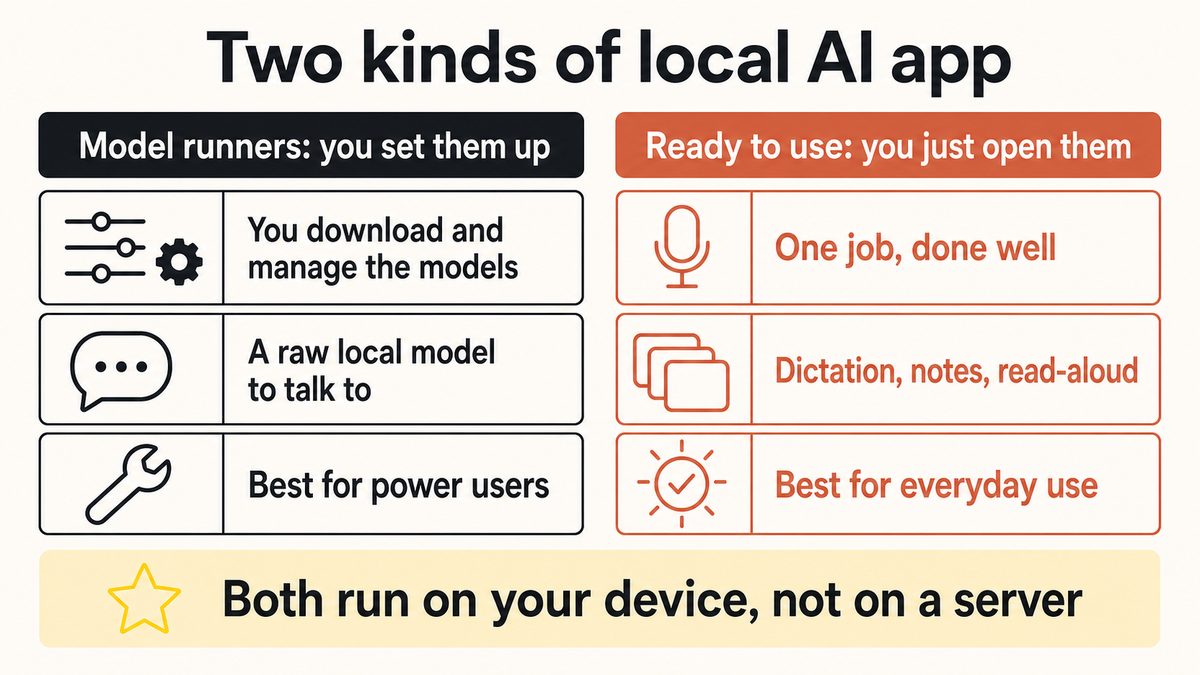
The Two Families of Local AI Apps

When someone says they want a local AI app, they usually mean one of two things, and the two experiences could hardly be more different. Sorting them out first saves a lot of disappointment later.

A diagram showing the two families of local AI apps: model-runners you configure yourself, and ready-to-use local AI apps you just open, both running on your own device.

Family one: model-runners you configure yourself

The first family is the model-runner. These are apps whose job is to download a large language model onto your machine and let you chat with it directly. The well-known names here are Ollama, LM Studio, Jan, and GPT4All. They are genuinely impressive, and for the right person they are the whole point of local AI: a private, offline model you fully control, with no subscription and no rate limit.

The trade-off is that a model-runner hands you a workshop, not a finished tool. You choose which model to download from a long list, you weigh how much memory each one needs against how capable it is, you manage updates, and you often wire the model into other software yourself to get it doing anything beyond a chat window. None of that is hard for a developer or a curious tinkerer, and many people enjoy it. But it is setup, and the app does not decide what you use the intelligence for. You do. That is the power-user family: maximum control, in exchange for doing the assembly.

Family two: ready-to-use apps you just open

The second family is the ready-to-use local AI app. These are built to do one job well, with the model already chosen, tuned, and hidden behind a normal interface. You install the app, grant a permission or two, and start working. On-device dictation, voice notes, offline transcription of a recording you already have, and offline read-aloud all fall into this family. So does any productivity app that quietly runs its intelligence on the device rather than in the cloud.

The point of this family is that you never think about the model at all. There is nothing to pick, nothing to download from a menu, and nothing to wire together. You get the benefit of local AI, which is privacy, offline reliability, and speed, without the workshop. This is the everyday-use family, and it is what most people actually want when they search for an "AI productivity app" that respects their data. The two families are not rivals so much as different answers to the same question: a model-runner is for people who want the engine, and a ready-to-use app is for people who want the journey.

Scroll →
What matters Ready-to-use local app (e.g. Yaps) Model-runner (Ollama, LM Studio, Jan) Cloud AI app
Setup effort Open and use Pick a model, manage downloads, configure Create an account
Where your data goes Stays on device for core work Stays on device Uploaded to servers
Works offline Yes, core features Yes No
Best for A specific everyday job Raw local model chat and tinkering The broadest model choice
Who it suits Anyone Power users and developers Teams wanting frontier models
Ongoing cost Free tier, optional paid Free, uses your hardware Per-seat or per-use

If you came here wanting a ranked shortlist rather than an explainer, our roundups do that work: "12 Best Offline AI Apps 2026" covers the cross-platform picks, and "12 Best Local AI Tools for Mac" narrows it to Apple hardware. This piece is the map, not the leaderboard.

3.0

Why Local AI Matters in 2026

Local AI is not a nostalgia project or a privacy hobby. There are five concrete reasons it has moved from niche to mainstream this year, and each one is a plain practical benefit rather than a principle.

Privacy, by construction. When the model runs on your device, there is no upload, so there is no server copy of your words, your voice, or your notes to leak, subpoena, or feed into a training pipeline. This is a stronger guarantee than any policy promise, because it is a property of how the software works rather than a rule someone chooses to follow. For anything sensitive, "it never left the machine" is the cleanest answer there is.

It works offline. A cloud app is only as reliable as your connection. A local AI app keeps working on a plane, in a basement, on a train through a tunnel, or in a building that blocks outbound traffic. If the job matters when the signal does not exist, local is the only category that answers.

No per-seat subscription and no rate limits. Cloud AI usually meters you: a monthly seat, a token budget, a cap on messages. A local model runs on hardware you already own, so once it is downloaded there is no meter and no wall you hit at the worst moment. Some ready-to-use apps still charge for premium extras, but the core local processing does not bill you by the message.

Lower latency. There is no upload and no round-trip to a data centre, so the result appears as fast as your device can produce it. For something interactive like dictation, where you want text to land the instant you stop speaking, shaving off the network is the difference between a tool that feels instant and one that feels like it is buffering.

It survives a vendor shutdown. This is the quiet one that 2026 made loud. Cloud products get discontinued, pivoted, or switched off, and when they do, the feature you built a habit around simply stops. A local AI app keeps working because the model is already on your device. Nobody can reach in and turn it off from afar.

The most durable AI is the AI that already lives on your device. It cannot be metered, it cannot be leaked from a server it never touched, and it cannot be switched off from somewhere you have never been.

None of this makes cloud AI the villain. A large cloud model still holds the ceiling on raw capability, breadth of knowledge, and the widest language coverage, and for many jobs that ceiling is exactly what you want. The honest framing is that local and cloud answer different questions. Cloud asks "what is the most powerful model I can reach?" Local asks "what can I rely on, privately, no matter what?" In 2026 the answer to the second question got a lot better, which is why the category is growing.

4.0

How to Tell If an App Is Truly Local

Marketing language is loose, and plenty of apps describe themselves as "local," "private," or "on-device" while still sending your data somewhere. You do not need to read a privacy policy to check. You need three tests, and you can run all of them in about a minute.

Test 01

Turn on airplane modethe core test

Disconnect from the internet entirely, then try the main feature. If dictation, transcription, or chat still works with no signal, the model is running on your device. If it stalls or shows an error, the intelligence was living in the cloud all along.

Test 02

Check what it demands to startaccounts and sign-in

Does the app force you to create an account and log in just to use the core feature? A truly local core should run without a mandatory sign-in. Accounts for billing or optional sync are fine, but if you cannot dictate a sentence without logging in, the processing is probably remote.

Test 03

Ask where your audio or text goesthe upload question

Read what the app says it does with your input. A local app processes your voice or text on the device and does not upload it for the core job. If your raw audio or documents are sent to a server to be understood, it is a cloud app wearing local clothing.

The airplane-mode test is the one that settles most arguments. Real on-device AI does not care whether you are connected, because the connection was never part of how it thinks. Here is the honest distinction between the two things that both get called "local."

Local in name only

A cloud app with a local badge

Stalls the moment you go offline, forces an account before you can do anything, and uploads your audio or text to a server to process it. The "local" claim usually refers to a cache or a small on-device shortcut, while the real work happens remotely. Your data leaves the machine.

Truly local

The model runs on your device

Keeps working in airplane mode, runs its core feature without a mandatory sign-in, and processes your voice or text on the device rather than uploading it. It may still touch the network for optional extras, but the core job never needs a server. Your data stays put.

A fair caveat: almost no useful app is one hundred percent offline for every single feature. Most local AI apps still use the network for a few honest things, such as checking for updates, verifying a subscription, or downloading the model in the first place. That is normal and does not disqualify them. What matters is whether the core intelligence, the part that touches your actual content, runs locally. The test is not "does this app ever contact the internet," it is "does my private input have to leave the device for the main job."

5.0

Yaps as a Worked Example of the Ready-to-Use Family

Yaps is a useful way to see the ready-to-use family in practice, because it is built around on-device AI for a specific job rather than as a raw model to configure. It is a privacy-first voice and notes app for Android, Windows, and macOS, and it passes the three tests above for its core work.

Start with dictation, the headline feature. Press the Yaps hotkey on desktop or tap the microphone on the Yaps keyboard on Android, and speak into any app. The speech recognition runs on your device across roughly 25 languages that are auto-detected from your speech, so you do not switch a language setting, and it works with no internet at all. On-device text cleanup then tidies the result, stripping filler words like "um," fixing punctuation and capitalisation, and formatting lists and numbers, all without your voice ever leaving the machine. That is the airplane-mode test passed and the upload question answered: your audio is processed locally and is not sent to a server for the core job.

The same local-first idea runs through the rest of the app. Voice notes are captured and stored on the device, searchable locally, in a plain Markdown vault you can export to .md or .txt. There are offline read-aloud voices, so text-to-speech works without a connection too. And there is no account required to start dictating, which is the sign-in test passed. For a productivity app, that combination, private input, offline core, and nothing to configure, is the everyday version of local AI that the model-runner family asks you to assemble yourself.

Honesty is the brand, so here is the part where Yaps uses the network, stated plainly. Yaps is not a fully air-gapped app, and it does not pretend to be. It reaches the internet for a handful of clearly bounded things: signing in and checking subscription status, downloading models the first time, optional GIF search, voice commands (which generate text and therefore need a connection), an optional premium cloud cleanup path, and premium vault sync between your phone and desktop, which pairs over your local network or an encrypted peer-to-peer link. The clearly on-device parts are the ones that touch your private content: core dictation, on-device cleanup, note storage, the Markdown vault, and local search. Those stay on the machine. The line to remember is that the private core is local, and the network is used for the plumbing around it.

Where does that leave Yaps in the map? It is one answer, not the answer, to "I want on-device AI I can actually use." For a specific everyday job, spoken input turned into clean text, notes you can trust to stay private, offline transcription of a recording you already have in the Studio editor, it does the local work for you. For raw local model experimentation, reach for the power-user family instead. Both are local AI. They just sit at opposite ends of the same shelf.

01Probeer Yaps

Local AI you can actually use every day, not just set up.

Install Yaps for on-device dictation, voice notes, and offline read-aloud that keep your data on the machine. Available on Android, Windows, and macOS, with a free tier and no account needed to start.

Scan om Yaps op uw telefoon te krijgen
Scan met uw telefooncamera
6.0

Veelgestelde vragen

What is a local AI app?

A local AI app is one whose AI runs on your own device instead of a company's remote server, so your data never leaves the machine and the app keeps working with no internet. The model is downloaded to your phone or computer once, and from then on the processing happens on your hardware. That single fact is what makes local AI private by construction, usable offline, and free of a per-message meter.

What is the difference between a local AI app and a cloud AI app?

In a cloud AI app, your input travels over the internet to a company's servers, a large model runs there, and the answer comes back, so you need a connection and your data leaves the device. In a local AI app, the model runs on your own machine, so your data stays put and it works offline. Cloud holds the ceiling on raw capability and language breadth, while local wins on privacy, offline reliability, and speed.

What are the two types of local AI apps?

There are model-runners and ready-to-use apps. Model-runners, such as Ollama, LM Studio, Jan, and GPT4All, download a language model to your machine and let you chat with it directly, but they ask you to pick models, manage downloads, and wire things up yourself. Ready-to-use apps, such as on-device dictation or note tools, hide the model behind a normal interface and just do one job when you open them. The first family is for tinkerers, the second is for everyday use.

Is a local AI app private?

A truly local AI app is private by design, because the model runs on your device and your input is never uploaded, so there is no server copy to leak, subpoena, or use for training. That is a stronger guarantee than a policy promise, because it is a property of how the software works. Just confirm the app is genuinely local rather than a cloud app with a local badge, using the airplane-mode test.

Does a local AI app work offline?

The core features of a truly local AI app work offline, because the model is already on the device and does not need a server to think. Most local apps still touch the internet for a few honest extras, like downloading the model the first time, checking for updates, or verifying a subscription, but the main job runs with no signal. If the primary feature stops working in airplane mode, the app was relying on the cloud.

How can I tell if an app is truly local or on-device?

Run three quick tests. Turn on airplane mode and see whether the main feature still works, check whether it forces an account just to start, and read what it says it does with your audio or text. If it keeps working offline, runs its core feature without a mandatory sign-in, and processes your input on the device rather than uploading it, it is genuinely local. The airplane-mode test settles most cases on its own.

What is on-device AI?

On-device AI means the AI processing happens on the device in your hand or on your desk, rather than on a remote server. It is the same idea as a local AI app, described from the model's point of view: the computation runs on your phone or computer. On-device AI is what gives local apps their privacy, their offline reliability, and their low latency, because nothing has to make a round-trip to a data centre.

Are Ollama, LM Studio, and Jan local AI apps?

Yes, they are the best-known model-runners, which is one of the two families of local AI apps. They download open language models to your machine and let you chat with them privately and offline, with no subscription and no rate limit. The trade-off is setup: you choose which model to run, manage its downloads and updates, and often wire it into other tools yourself. They are excellent for power users who want direct control of a local model.

What is the best local AI app for productivity?

That depends on whether you want to run a raw model or get a specific job done. For an AI productivity app you just open, a ready-to-use local tool for dictation, notes, or transcription is usually the better fit, because there is nothing to configure. For a hands-on local model you fully control, a model-runner is the better choice. For ranked picks, our roundups "12 Best Offline AI Apps 2026" and "12 Best Local AI Tools for Mac" compare the options directly.

Do local AI apps cost money?

Many do not charge for the core local processing, because the model runs on hardware you already own, so there is no per-message cloud bill. Model-runners are generally free and use your own machine. Ready-to-use local apps often have a free tier for the core job and charge only for premium extras, such as optional cloud features or sync. Yaps, for example, has a free tier of 2,000 words a week, shared across all platforms, and paid plans for extras.

Is a local AI app as good as ChatGPT or a cloud model?

For raw capability, breadth of knowledge, and the widest language coverage, a large cloud model still holds the ceiling, so a cloud app can out-answer a local one on the hardest, most open-ended tasks. But for a specific job like dictation, note-taking, or offline transcription, a good local app now matches the experience while keeping your data private and working with no connection. The right question is not which is more powerful overall, but which fits the job in front of you.

Is Yaps a local AI app?

Yes, Yaps is a ready-to-use local AI app for voice and notes. Its core work runs on your device: dictation across about 25 auto-detected languages, on-device text cleanup, note storage in a local Markdown vault, local search, and offline read-aloud voices, none of which upload your private content. It does use the network for bounded extras like sign-in, subscription checks, model downloads, voice commands, optional cloud cleanup, and premium sync, but the private core stays on the machine.

Can a local AI app keep working if the company shuts the product down?

Largely, yes, and that is one of the strongest reasons to choose local. Because the model is already on your device, the core feature keeps running even if the vendor discontinues the product, whereas a cloud feature stops the moment its server is switched off. Some conveniences that rely on the network, like account sign-in or sync, could be affected, but the on-device intelligence you downloaded does not need anyone else to stay switched on.

BLIJF LEZEN
GUIDE · 11 MIN READThe AI Notetaker That Does Not Join Your MeetingsGUIDE · 12 MIN READAI Productivity Apps That Work Offline (2026)