コンテンツにスキップ
エントリー 04TUTORIAL23 JUL 2026

How to Turn Voice Notes Into Action Items (Without Retyping)

You capture a great voice note, and then it rots, because turning a spoken ramble into real tasks is manual retyping work. This tutorial walks through a five-step workflow that gets you from a recorded thought to a tickable checklist fast, all on-device, with an honest note on where a dedicated project manager still wins.

How to Turn Voice Notes Into Action Items (Without Retyping)
0.0

序文

You can turn voice notes into action items in about a minute without retyping: speak your to-dos out loud, let on-device cleanup strip the filler and false starts, then shape the cleaned thoughts into a tickable checklist or a kanban card you keep in a searchable vault. There is no magic robot reading your mind and assigning tasks; the win is that fast voice capture plus automatic cleanup plus checklist notes make the trip from ramble to tasks quick enough that you actually do it.

That is the short version. The longer version is worth a few minutes, because the reason most voice notes never become anything is a specific, fixable friction, and once you see it you can design around it. This tutorial covers why voice notes rot, the five-step workflow that stops it, how checklists and kanban boards fit in, and an honest note on where a dedicated project manager still beats a notes app.

01 / Capture Speed
~150
Words a minute speaking, against roughly 40 when you type
02 / Ramble to Tasks
~1
Minute from spoken note to a tickable checklist, cleaned up
03 / Where It Runs
On-device
Dictation, cleanup, note storage, and local search stay local
04 / Export Formats
.md / .txt
Markdown or plain text, ready to paste into any task manager
1.0

Why Voice Notes Rot Before They Become Tasks

The voice note is the easiest thing in the world to make. You are walking to the car, an idea lands, you tap record and say the five things you need to do before Friday. It feels productive, and it is: you captured the thought before it slipped away, which is the hard part.

Then the note sits there. A week later you have forty voice memos with names like "New recording 37," and not one of them has turned into a task you can actually tick off. The capture was frictionless, but the payoff never came.

The reason is that a raw voice note is not a task list. It is a wall of audio, or a wall of unpunctuated text, full of "um," half-finished sentences, and thoughts that arrive out of order. To turn it into something you can act on, someone has to listen back, work out which sentences were actual to-dos, retype them as clean lines, and drop them somewhere you will look again. That is real work, and it is boring work, so it does not happen. The note rots, and the idea inside it quietly dies.

The bottleneck was never capturing the thought. It is the retyping tax between the ramble and the checklist, and that tax is exactly what most voice notes never pay.

So the goal of a good workflow is not a smarter recorder. It is to collapse that retyping tax to almost nothing: capture by speaking, let software do the tidying, and shape the result into tickable items in the same place you captured it. When each of those steps takes seconds, the note stops rotting, because getting from thought to task is no longer a chore you postpone.

2.0

The Five-Step Workflow

Here is the full loop, from a spoken thought to a checklist you can act on. It is deliberately short, because every extra step is another place the note can rot. Steps one through four keep everything on your device; step five is only for when your tasks live in another app.

Step 01

Capture the ramble by voicejust talk

Press the Yaps hotkey on desktop, or tap the keyboard mic on Android, and talk through your to-dos in whatever order they arrive. Do not perform tidy sentences. The whole point is to get the thoughts out before they slip away.

Step 02

Let on-device cleanup tidy itautomatic

On-device text cleanup strips filler words, drops false starts and repeated words, fixes punctuation and capitalisation, and formats a spoken list into readable lines. This runs on your device by default, so the messy first pass becomes clean text without you touching the keyboard.

Step 03

Turn the thoughts into a checklistyou decide

In a Yaps voice note, turn the cleaned lines into tickable checklist items, or move each task onto a kanban board so you can drag it between columns. You pick which sentences are real tasks; the tool does not guess for you.

Step 04

Keep them in the searchable vaultlocal + sync

Store the note in your local vault, where every task is searchable on your device. On a premium plan, vault note sync mirrors the note between phone and desktop over your local network or an encrypted peer-to-peer link, so the list is with you wherever you left off.

Step 05

Export if your tasks live elsewhereoptional

If your tasks belong in another app, export the note to Markdown or plain text and paste the checklist into your task manager. It arrives already cleaned and structured, so there is nothing to retype at the other end.

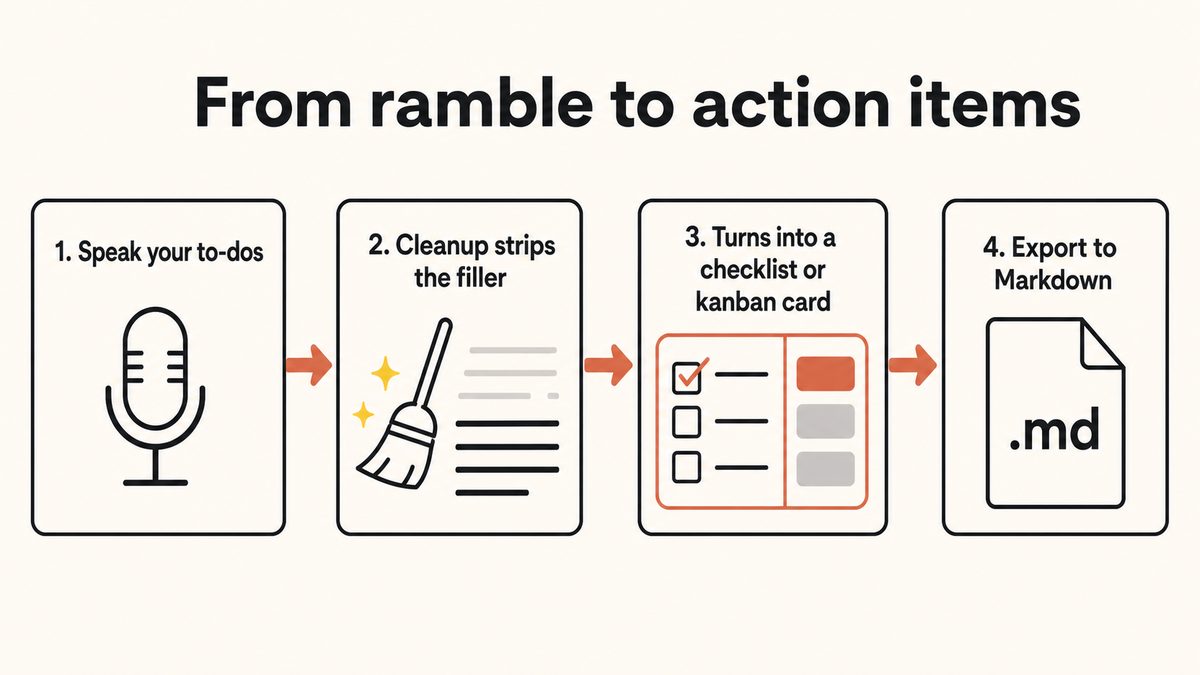
A four-step flow turning a voice note into action items: capture by voice, clean up the ramble, convert to a checklist or kanban card, then export to Markdown.

3.0

Step 1: Capture the Ramble by Voice

Speaking runs at roughly 150 words a minute, against about 40 when you type. That gap is the whole reason voice capture works: you can empty your head of a dozen to-dos faster than you could write down two of them. The trick is to lean into the mess rather than fight it.

On desktop, press the Yaps hotkey and start talking. On Android, tap the mic on the Yaps keyboard and do the same. Then just say the tasks the way they occur to you: "book the dentist, chase the invoice from last month, oh and I need to send the deck to Priya before the review, and remember to cancel that trial." Out of order, half-formed, with a couple of false starts. That is fine. Yaps dictation is built for natural speech, and it runs on-device, so your audio never leaves the machine and the capture works even with no signal on a train or a plane.

The one habit worth building is to not self-edit while you speak. If you stop to phrase each task perfectly, you have reintroduced the friction you were trying to escape. Say everything, let it be messy, and move on. The next step exists precisely to clean up the mess.

4.0

Step 2: Let On-Device Cleanup Tidy It

This is the step that makes the whole workflow feel like less work than it is. On-device text cleanup is on by default, and it does the tidying a human would otherwise have to do by hand: it removes filler words like "um" and "uh," drops false starts and repeated words, fixes punctuation and capitalisation, and formats a rattled-off spoken list into readable lines.

So the raw "um so I need to, I need to book the dentist, and uh chase that invoice" becomes "Book the dentist. Chase that invoice." That is the difference between a transcript you would have to rewrite and text you can act on straight away. Because cleanup runs on your device by default, the tidying happens without your words being uploaded anywhere. A cloud cleanup path also exists on paid tiers if you want it, but the private default keeps everything local.

5.0

Step 3: Turn the Thoughts Into a Checklist or Kanban Card

Now you have clean text, and this is where you, not a guessing algorithm, decide what counts as a task. Yaps voice notes support plain text, checklists, and kanban boards, so a spoken list of things to do can become tickable items or cards you drag across a board.

For most quick triage, a checklist is the right shape. Each cleaned line becomes a box you can tick, so "Book the dentist" and "Chase the invoice" turn into two items you close off as you do them. It is the fastest path from a spoken brain-dump to something that behaves like a real to-do list.

When a note is less "five quick errands" and more "a small project with stages," a kanban board earns its place. Put each task on a card and drag it between columns as it moves, for example from a "to do" column, to "doing," to "done." That gives you a visual sense of what is in flight without reaching for a separate project tool.

The honest framing here matters. Yaps is not silently reading your ramble and extracting the tasks for you. What it gives you is a fast capture, an automatic tidy-up, and note formats that make turning cleaned lines into tasks a matter of seconds rather than a retyping chore. You stay in charge of which sentences are real action items, which is usually what you want anyway, because only you know that "maybe redesign the whole homepage" was a musing and not a task for this week.

6.0

Step 4: Keep Them Where You Will Actually Look

A task list you cannot find is the same as no task list. Yaps keeps your notes in a local vault with on-device search, so a fortnight later you can search "invoice" or "dentist" and land straight on the note, rather than scrubbing through audio. Because the vault lives on your device, that search does not depend on a connection or a server.

If you capture on your phone but work at a desk, vault note sync closes the loop. It is a premium feature that mirrors your notes between mobile and desktop, pairing over your local network or an encrypted peer-to-peer link with a QR code. So the checklist you dictated on the walk home is waiting on your laptop when you sit down. Free accounts are not hard-blocked here; they simply see an upgrade prompt rather than losing the note.

There is also a lightweight way to interrogate your notes: "Ask your notes," the built-in notes chat, lets you ask questions across what you have captured. On the free tier you get five notes-chat messages a week, and on free it is read-only, so you can ask about your tasks but editing them by chat is a premium feature. The clearly on-device parts of this workflow, the dictation, the note storage, the Markdown vault, and the local search, are the local core you can rely on offline.

7.0

Step 5: Export to Your Task Manager (If Your Tasks Live Elsewhere)

Plenty of people run their whole task life inside a dedicated app, and that is completely reasonable. Yaps does not try to trap your list. Every voice note exports to Markdown (.md) or plain text (.txt), and a Markdown checklist pastes cleanly into most task managers, note apps, and issue trackers, because Markdown checkboxes are close to a universal format.

So the full handoff looks like this: dictate the ramble, let it get cleaned, tick a few lines into a checklist, then export the note and paste it wherever your tasks belong. The list arrives already tidy and structured, which means the destination app receives finished items instead of a wall of audio you would have had to transcribe by hand. The retyping tax is gone at both ends.

8.0

Where a Dedicated Project Manager Still Wins

Honesty is the brand here, so this needs saying plainly: a notes app is for capturing and triaging your own tasks fast, and that is a different job from running a project. If you need to assign tasks to teammates, set dependencies so one task blocks another, track due dates across a shared board, or report on progress to a group, a dedicated project manager like a proper task and project tool will serve you better than any voice note.

Voice notes to action items

Fast personal capture and triage

Best when the tasks are yours, the moment is now, and the goal is to get a messy thought into a tickable list before it evaporates. Speak, let it clean up, tick it into a checklist, keep it searchable, and export if you need to. Private and offline by default.

A dedicated project manager

Assignments, dependencies, teams

Best when tasks need owners, due dates, dependencies, and shared visibility across a team. A notes app does not do assignments or blocking relationships, and it is not trying to. This is the honest limit of the voice-note workflow.

The two are not rivals so much as neighbours. The voice-note workflow is how a task gets captured and triaged in the first ten seconds; a project manager is where a task with a team, a deadline, and dependencies goes to be managed. Many people use the export step to move exactly those tasks from one to the other: capture privately by voice, then push the handful that belong in the shared system into it.

9.0

A Worked Example: Friday's List in Under a Minute

To make it concrete, here is the loop end to end. It is Thursday evening and you are clearing your head before the weekend.

You press the Yaps hotkey and say, out loud and unedited: "um okay so before Friday I need to send the deck to Priya, and I need to, uh, chase the March invoice, book the dentist, cancel the trial before it renews, and first thing tomorrow reply to the landlord." Cleanup turns that into five clean, punctuated lines with the "um" and "uh" gone. You tick each line into a checklist inside a voice note titled "Before Friday." It lives in your vault, searchable, and because you are on a premium plan it is already on your laptop when you open it in the morning. The two tasks that involve your co-founder, you export as Markdown and paste into the shared board. Total time: well under a minute, and not a word retyped.

That is the whole idea. The thought never had a chance to rot, because getting it into a list was faster than putting it off.

01Yaps をお試しください

Talk out your to-dos and let Yaps clean them into a checklist.

Install Yaps to capture tasks by voice, clean up the ramble on-device, and shape it into a tickable checklist you keep in a searchable vault. Available on Android, Windows, and macOS.

スキャンして携帯電話に Yaps を取得します
携帯電話のカメラでスキャン
10.0

よくある質問

How do I turn voice notes into action items without retyping?

Capture the tasks by voice, let on-device cleanup tidy the ramble into readable lines, then turn those lines into a tickable checklist inside a voice note. In Yaps you press the hotkey on desktop or tap the keyboard mic on Android, speak your to-dos, and the cleanup step removes the filler and false starts so you do not have to retype anything. If your tasks live in another app, export the note to Markdown and paste the finished checklist in.

Does Yaps automatically extract tasks from my voice note?

No, and it is worth being honest about that. Yaps does not silently read your ramble and decide which sentences are tasks. What it does is make the trip from ramble to tasks fast: quick voice capture, automatic cleanup of filler and punctuation, and note formats like checklists and kanban boards so turning cleaned lines into tickable items takes seconds. You stay in charge of which lines become action items.

Can I turn a spoken list into a checklist in Yaps?

Yes. Yaps voice notes support plain text, checklists, and kanban boards, so a spoken list of things to do can become tickable checklist items or cards you drag across a board. After you dictate and the text is cleaned up, you convert the lines you care about into checklist items. Speaking cues like "first, second, third" while you talk help the cleanup step split your speech into separate lines.

Does turning voice notes into tasks work offline?

The core of it does. Yaps dictation, on-device text cleanup, note storage, and local search all run on your device, so you can capture and clean up a task list with no internet at all. That means the workflow keeps working on a plane or in a building with no signal. A network connection is only used for things like account and subscription status, model downloads, premium vault sync, and the optional cloud cleanup path.

Where do my voice notes and tasks get stored?

They live in a local vault on your device, and the vault is searchable on-device, so you can find a task later by searching a word from it rather than scrubbing through audio. Notes support plain text, checklists, and kanban boards. On a premium plan, vault note sync mirrors your notes between phone and desktop over your local network or an encrypted peer-to-peer link, so the same list is available on both.

Can I sync my task list between my phone and my computer?

Yes, with vault note sync, which is a premium feature. It pairs your devices over the local network or an encrypted peer-to-peer link using a QR code, then mirrors your notes so a checklist you dictated on your phone is waiting on your desktop. Free accounts are not hard-blocked from this; they see an upgrade prompt rather than losing access to the note itself.

How do I get my voice-note tasks into my task manager?

Export the note. Every Yaps voice note exports to Markdown (.md) or plain text (.txt), and a Markdown checklist pastes cleanly into most task managers, note apps, and issue trackers because Markdown checkboxes are close to a universal format. Because the list was already cleaned and structured in Yaps, it arrives as finished items with nothing to retype at the other end.

Is a voice notes app a replacement for a project management tool?

No, and it is not trying to be. A voice-note workflow is for capturing and triaging your own tasks fast, before the thought slips away. A dedicated project manager is the right tool when tasks need owners, due dates, dependencies, or shared visibility across a team. Many people use both: capture privately by voice, then export the handful of tasks that belong in the shared system into their project tool.

How fast is turning a voice note into a checklist?

Very fast, which is the entire point. Speaking runs at roughly 150 words a minute against about 40 when you type, so you can empty your head of a dozen to-dos in seconds. With cleanup handling the tidy-up automatically and checklist formatting built into notes, the trip from spoken ramble to a tickable list usually takes about a minute, and none of it involves retyping.

Does the cleanup really remove filler words like "um" and "uh"?

Yes. On-device text cleanup is on by default and removes filler words like "um" and "uh," drops false starts and repeated words, fixes punctuation and capitalisation, and formats a rattled-off list into readable lines. The cleanup is good but not flawless, so a quick read-through is still worth it before you rely on a list for anything important. The cleanup runs on your device by default, so your words are not uploaded.

Can I use this workflow on Android?

Yes. Android is the headline Yaps platform, with a full keyboard where you tap the mic to dictate, and the same voice notes, checklists, kanban boards, local search, and Markdown export are there. Yaps also ships on Windows and macOS, where you press the Yaps hotkey instead of tapping a keyboard mic, and iOS is coming soon. Vault note sync lets a list you capture on Android show up on your desktop.

Is there a free way to try turning voice notes into tasks?

Yes. The Yaps free tier includes 2,000 words a week, shared across dictation and read-aloud on every platform, which is plenty to test the capture, cleanup, and checklist loop before paying anything. Free also includes five notes-chat messages a week and five Save-to-Yaps extension saves a week. Paid tiers are Basic at $15 a month and Max at $25 a month, with a trial on the paid tiers.

What is the difference between a checklist and a kanban board for tasks?

A checklist is the fastest shape for quick triage: each cleaned line becomes a box you tick as you finish it, which suits a short list of errands. A kanban board is better when a note is more like a small project with stages, because you put each task on a card and drag it between columns such as "to do," "doing," and "done." Yaps voice notes support both, so you choose the one that fits the note.
読み続けてください
GUIDE · 11 MIN READThe AI Notetaker That Does Not Join Your MeetingsGUIDE · 12 MIN READAI Productivity Apps That Work Offline (2026)