What is a local AI app?
A local AI app is one whose AI runs on your own device instead of a company's remote server, so your data never leaves the machine and the app keeps working with no internet. The model is downloaded to your phone or computer once, and from then on the processing happens on your hardware. That single fact is what makes local AI private by construction, usable offline, and free of a per-message meter.
What is the difference between a local AI app and a cloud AI app?
In a cloud AI app, your input travels over the internet to a company's servers, a large model runs there, and the answer comes back, so you need a connection and your data leaves the device. In a local AI app, the model runs on your own machine, so your data stays put and it works offline. Cloud holds the ceiling on raw capability and language breadth, while local wins on privacy, offline reliability, and speed.
What are the two types of local AI apps?
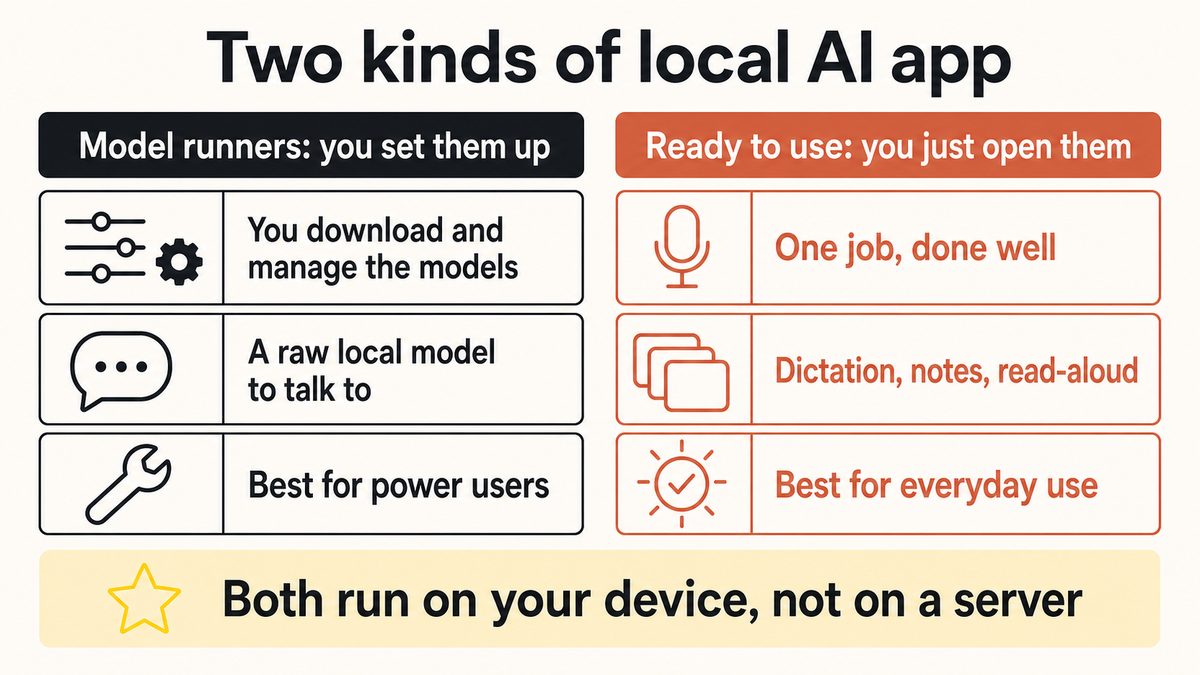
There are model-runners and ready-to-use apps. Model-runners, such as Ollama, LM Studio, Jan, and GPT4All, download a language model to your machine and let you chat with it directly, but they ask you to pick models, manage downloads, and wire things up yourself. Ready-to-use apps, such as on-device dictation or note tools, hide the model behind a normal interface and just do one job when you open them. The first family is for tinkerers, the second is for everyday use.
Is a local AI app private?
A truly local AI app is private by design, because the model runs on your device and your input is never uploaded, so there is no server copy to leak, subpoena, or use for training. That is a stronger guarantee than a policy promise, because it is a property of how the software works. Just confirm the app is genuinely local rather than a cloud app with a local badge, using the airplane-mode test.
Does a local AI app work offline?
The core features of a truly local AI app work offline, because the model is already on the device and does not need a server to think. Most local apps still touch the internet for a few honest extras, like downloading the model the first time, checking for updates, or verifying a subscription, but the main job runs with no signal. If the primary feature stops working in airplane mode, the app was relying on the cloud.
How can I tell if an app is truly local or on-device?
Run three quick tests. Turn on airplane mode and see whether the main feature still works, check whether it forces an account just to start, and read what it says it does with your audio or text. If it keeps working offline, runs its core feature without a mandatory sign-in, and processes your input on the device rather than uploading it, it is genuinely local. The airplane-mode test settles most cases on its own.
What is on-device AI?
On-device AI means the AI processing happens on the device in your hand or on your desk, rather than on a remote server. It is the same idea as a local AI app, described from the model's point of view: the computation runs on your phone or computer. On-device AI is what gives local apps their privacy, their offline reliability, and their low latency, because nothing has to make a round-trip to a data centre.
Are Ollama, LM Studio, and Jan local AI apps?
Yes, they are the best-known model-runners, which is one of the two families of local AI apps. They download open language models to your machine and let you chat with them privately and offline, with no subscription and no rate limit. The trade-off is setup: you choose which model to run, manage its downloads and updates, and often wire it into other tools yourself. They are excellent for power users who want direct control of a local model.
What is the best local AI app for productivity?
That depends on whether you want to run a raw model or get a specific job done. For an AI productivity app you just open, a ready-to-use local tool for dictation, notes, or transcription is usually the better fit, because there is nothing to configure. For a hands-on local model you fully control, a model-runner is the better choice. For ranked picks, our roundups "12 Best Offline AI Apps 2026" and "12 Best Local AI Tools for Mac" compare the options directly.
Do local AI apps cost money?
Many do not charge for the core local processing, because the model runs on hardware you already own, so there is no per-message cloud bill. Model-runners are generally free and use your own machine. Ready-to-use local apps often have a free tier for the core job and charge only for premium extras, such as optional cloud features or sync. Yaps, for example, has a free tier of 2,000 words a week, shared across all platforms, and paid plans for extras.
Is a local AI app as good as ChatGPT or a cloud model?
For raw capability, breadth of knowledge, and the widest language coverage, a large cloud model still holds the ceiling, so a cloud app can out-answer a local one on the hardest, most open-ended tasks. But for a specific job like dictation, note-taking, or offline transcription, a good local app now matches the experience while keeping your data private and working with no connection. The right question is not which is more powerful overall, but which fits the job in front of you.
Is Yaps a local AI app?
Yes, Yaps is a ready-to-use local AI app for voice and notes. Its core work runs on your device: dictation across about 25 auto-detected languages, on-device text cleanup, note storage in a local Markdown vault, local search, and offline read-aloud voices, none of which upload your private content. It does use the network for bounded extras like sign-in, subscription checks, model downloads, voice commands, optional cloud cleanup, and premium sync, but the private core stays on the machine.
Can a local AI app keep working if the company shuts the product down?
Largely, yes, and that is one of the strongest reasons to choose local. Because the model is already on your device, the core feature keeps running even if the vendor discontinues the product, whereas a cloud feature stops the moment its server is switched off. Some conveniences that rely on the network, like account sign-in or sync, could be affected, but the on-device intelligence you downloaded does not need anyone else to stay switched on.