Lokales oder Cloud-Diktieren: Was ist besser (und sicherer)?
Beim Cloud-Diktieren wird Ihre Stimme an einen Server gesendet, um eine etwas höhere Genauigkeit zu erreichen. Durch das lokale Diktieren bleibt es auf Ihrem Gerät, funktioniert offline und hat den größten Teil der Lücke geschlossen. Hier ist der ehrliche Vergleich auf Architekturebene und welche Telefonmodi Ihr Audio leise hochladen.
Vorwort
The difference between local and cloud dictation is where your voice goes to become text. Local (on-device) dictation runs the speech model on your own phone or computer, so the audio never leaves the device and it works with no internet. Cloud (online) dictation streams your microphone audio to a remote server, transcribes it there, and sends the text back, which needs a connection and puts your voice on someone else's infrastructure.
That single architectural choice decides almost everything that matters: privacy, offline capability, latency, cost, and where the accuracy ceiling sits. This guide explains the difference in plain English, shows exactly where the two paths split, and gives you an honest tradeoff table so you can pick the right one. It is the backbone piece for our privacy series, so we keep it about the architecture and let the is voice typing private guide carry the deeper privacy detail.
Erstens, was Diktat eigentlich ist
Dictation is real-time, intentional speech-to-text. One person deliberately talks to produce written text and controls the words, pauses, and punctuation, and the text appears as they speak. It is an input method, a way of voice typing, and it is different from transcription, which converts already-recorded speech (often several speakers) into text after the fact.
Both sit on top of the same underlying technology: speech recognition, also called automatic speech recognition or ASR, the model that listens to audio and turns spoken words into text. When people argue about "local vs cloud," they are really arguing about where that ASR model runs. Everything else follows from that. If you want the broader primer, start with what is AI dictation.
Wie das Diktieren funktioniert und wo sich die beiden Pfade trennen
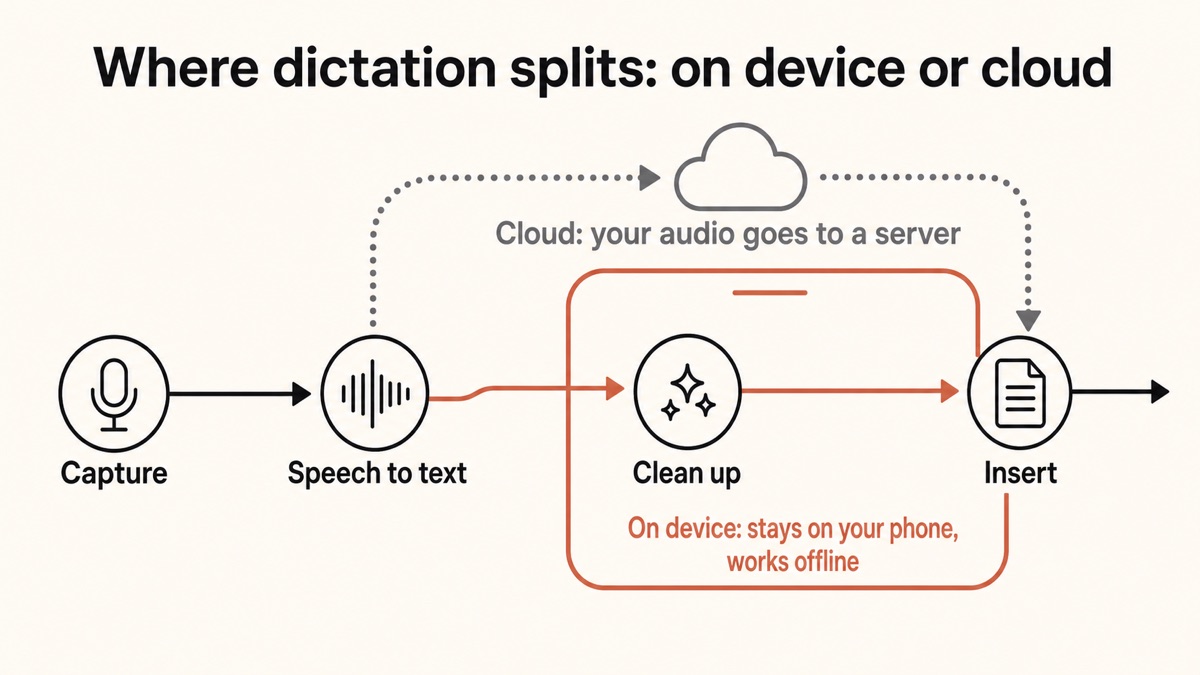
Every modern dictation tool runs the same four-stage pipeline. Understanding it tells you exactly where cloud and local diverge, because they are identical everywhere except one step.
Captureon device
You press a hotkey and the microphone records your voice. The audio is sampled and buffered in short chunks of roughly 50 to 200 milliseconds. This step is always local, on both paths.
Speech-to-textthe fork
The ASR model turns audio into raw text. This is the only step that differs. Cloud sends the audio to a remote server to do it. Local does it with a model already on your device. Nothing else in the pipeline changes.
AI cleanuplocal or cloud
A second model fixes punctuation, capitalisation, filler words, and false starts, and applies any custom-dictionary rules. This can run locally or in the cloud independently of the ASR step.
Injecton device
The finished text is typed into whatever app has focus. macOS uses the Accessibility API, Windows simulates keystrokes, and phones use a custom keyboard or accessibility service. Always local.
The takeaway is simple. Capture, injection, and often cleanup happen on your device either way. The whole cloud-versus-local debate lives in stage two: does your audio leave the device to be turned into text, or not? Once you see that, the tradeoffs stop being abstract.
Die ehrliche Kompromisstabelle
Here is the head-to-head across the dimensions that decide the choice. Yaps sits in the first column as the on-device example, not because it wins every row, but because it is the local architecture we can describe accurately. Every cell is a real tradeoff.
| Dimension | Local / on-device (e.g. Yaps) | Cloud / online dictation |
|---|---|---|
| Where your audio goes | Stays on the device | Streamed to a server |
| Works offline | Yes, no connection needed | No, requires internet |
| Latency | No network round-trip | Adds ~100 to 500 ms of network |
| Accuracy on clean, everyday speech | Effectively matched | Effectively matched |
| Accuracy ceiling in hard cases | Slightly behind | Higher for noise and crosstalk |
| Cost to use heavily | Free after a one-time download | Ongoing, usage-based |
| Model updates | Needs a download | Update server-side, instantly |
| Hardware demand | Needs local compute and RAM | Runs on almost anything |
| Privacy guarantee | Architectural, data cannot leave | A policy promise you must trust |
Read that table honestly and neither side is a clean sweep. Cloud wins on the accuracy ceiling in hard audio, on instant updates, and on running anywhere regardless of hardware. Local wins on privacy, offline use, latency, and cost when you dictate a lot. The right answer depends on which of those columns describes your work.
Ist die Cloud wirklich genauer? Meistens nein, ehrlich gesagt ja in den Randfällen
For years the case for the cloud was accuracy, and for years it was true. That gap has largely closed for the typical dictation case, meaning one person speaking clearly in a reasonably quiet room. Open speech models such as OpenAI's Whisper, trained on hundreds of thousands of hours of audio, reach roughly 2.7% word error rate on clean studio audio, and leading engines sit in the 3 to 5% range, approaching the human benchmark of about 2.5%. On clean audio, a good on-device model can match or beat a cloud service.
Word Error Rate, or WER, is the standard accuracy metric: the percentage of words wrong versus a reference transcript, where lower is better. The honest ceiling matters here. No dictation system, local or cloud, is 100% accurate. The best clean-audio results hover near 2.5 to 3%, and accents, background noise, crosstalk, and heavy jargon degrade both sides. Anyone promising perfect transcription is selling you something.
Where does cloud keep a real edge? In the hard cases. Very noisy audio, several people talking over each other, rare or low-resource languages, and highly specialised vocabulary all favour the cloud, which can run larger models and more sophisticated noise cancellation than fit comfortably on a phone. If your reality is a busy trading floor or a four-person meeting, that ceiling is worth paying for. For everyday dictation into an email or a document, it rarely shows up. We go deeper on the numbers in is AI dictation accurate.
Der Unterschied in der Privatsphäre ist architektonischer Natur und kein Versprechen
This is the part people get wrong in both directions. Cloud dictation is not automatically evil. Reputable services now offer encryption in transit, zero-retention or deletion options, and signed agreements for regulated work. The honest concern is the default data flow and the exposure surface it creates.
Cloud dictation sends your raw microphone audio across the internet to remote servers, often on major providers, where the audio and the resulting transcript can be stored, sometimes indefinitely, and some services retain recordings to train future models. The exposure exists at three points: capture, transmission, and storage. Even with good policies, you are trusting a third party and betting against breaches, subpoenas, and quiet changes to the terms.
On-device dictation processes the audio entirely on your hardware with locally installed models. No audio leaves the device, so there is no server to breach, no third party with access, and no data collection to opt out of. The key word is architectural. You can verify it by watching your network traffic and seeing nothing go out. That is a stronger and more defensible claim than any privacy policy, because it is about what the software can do, not what a company promises to do.
Privacy by architecture beats privacy by policy. If the audio never leaves the device, no retention setting, breach, or change of terms can expose what was never uploaded.
The principle behind on-device dictation
Welches Diktat auf Ihrem Telefon lädt tatsächlich Ihre Stimme hoch?
Here is the nuance almost every comparison skips. "Local vs cloud" is not a clean divide by brand. Some mainstream phone dictation runs on-device, and some of it uploads. It depends on the exact device, mode, and language, so check yours rather than assuming.
Usually goes to the cloud
Streams your audio to a server
Standard Gboard voice typing routes audio to Google Speech Services. Samsung Keyboard's default voice path commonly uses Google Voice Typing too. Google Docs voice typing streams audio to Google on mobile and desktop. Apple Dictation still sends some less-common languages to Apple's servers.
Runs on the device
Keeps the audio local
Gboard "advanced voice typing" runs on-device on Pixel 6 and newer and does not send audio, though its "Fix it" edits send text (not audio) to Google. Apple Dictation is on-device for most major languages on iPhone 6s and later. Dedicated on-device apps like Yaps process dictation locally by design.
A few specifics worth pinning down. Gboard's advanced voice typing is genuinely on-device, but it is gated to Pixel 6 and newer, and its detailed-edit features still send the transcript and field text (not the audio) to Google. Apple's new fully on-device advanced dictation is limited to the latest hardware, such as iPhone 17 Pro, iPhone Air, M4 iPad, and M3 Mac with enough RAM, and it is off by default in early releases. On Android you can check which mode you are in, and if you want a route that never touches Google, see our guide to accurate offline speech-to-text on Android.
Wobei Yaps als Beispiel auf dem Gerät passt
Yaps is a useful worked example of the local architecture because it commits to it. Dictation runs a modern speech model on your device, works offline, and does not upload your audio. It is multilingual with automatic language detection across about 25 languages, so you do not switch a setting, you just talk. The optional AI cleanup step can also run locally on your device, or, for Pro users who want it, in the cloud, which is exactly the stage-three flexibility the pipeline diagram showed.
In practice you push the Yaps hotkey, which is the Fn key on Mac and Windows or the dictation button on the Yaps keyboard on Android, then speak, and clean text appears in whatever app you are using. Because the speech step is local, it keeps working on a plane, in a basement, or on a locked-down network, and there is no per-word cloud bill for heavy use. The free tier covers 5,000 words a week on desktop and 1,000 words a week on mobile, shared across dictation and read-aloud. Yaps is available on Android, Windows, and macOS, with iOS coming soon. For the feature-level detail, see the dictation page, and for the offline angle specifically, the offline dictation guide.
To be fair about the edge cases: on-device dictation is not magic-free. It needs local compute and a first-run model download, and on older hardware the local speech step can take a few seconds rather than a fraction of one. And for read-aloud in many languages, a cloud reader is honestly the better fit, since on-device voices are limited. Those are the real costs of keeping everything local.
Was sollten Sie also wählen?
Match the architecture to your work, not to a slogan. Most people who dictate one voice into a document, on a machine they own, in a normal room, are best served by local dictation. People whose reality is consistently hard audio, or who need a model updated the instant it improves, lean toward cloud.
Choose local / on-device when you
- Handle confidential, privileged, HIPAA, or legal material where audio must not leave the device.
- Work offline or on locked-down networks: flights, basements, secure facilities, patchy connections.
- Dictate heavily and do not want an ongoing per-word cloud bill.
- Want the lowest, most consistent latency, with no network round-trip.
- Speak clearly, one at a time, in a reasonably quiet room (the common case).
Choose cloud / online when you
- Regularly dictate in very noisy places or with several people talking over each other.
- Need a rare or low-resource language, or dense specialist jargon, at the highest accuracy.
- Run older or low-powered hardware that cannot host a capable local model comfortably.
- Want the newest model improvements the moment they ship, with no download.
- Are fine trusting a vendor's data policy, ideally one with encryption and zero-retention options.
Letzte Gedanken
Local versus cloud is not a contest of good against evil. It is a choice about where your voice becomes text, and that one decision cascades into privacy, offline capability, latency, and cost. Cloud keeps a genuine edge for the hardest audio and updates instantly. Local keeps your audio on the device by design, works with the internet off, and costs nothing extra to use all day.
For the everyday case, one clear voice in a quiet room, the accuracy gap has closed enough that the deciding factors are privacy and offline reliability, and on both of those local wins on architecture rather than on trust. That is why a tool like Yaps is a reasonable default for most people, with the honest exception that consistently noisy, multi-speaker, or rare-language work still favours the cloud. Pick the path that matches your actual audio, then verify it with the airplane-mode test above.
Häufig gestellte Fragen
What is the difference between local and cloud dictation?
The difference is where the speech-to-text step runs. Local (on-device) dictation uses a model installed on your own phone or computer, so your audio never leaves the device and it works offline. Cloud dictation streams your microphone audio to a remote server, transcribes it there, and returns the text, which requires an internet connection and places your voice on a third party's infrastructure. Everything else in the pipeline, capturing the audio and typing the finished text into your app, happens locally either way.
Is cloud dictation more accurate than local dictation?
For everyday, clean, single-speaker dictation, no, the two are effectively tied. Modern on-device models reach roughly 2.7 to 5% word error rate on clean audio, close to the human ceiling of about 2.5%, and can match or beat cloud services on that kind of speech. Cloud keeps a real advantage only in hard cases: very noisy audio, several overlapping speakers, rare or low-resource languages, and dense specialist vocabulary, where larger models and stronger noise handling still matter. No system, local or cloud, is 100% accurate.
Is local dictation faster than cloud dictation?
Usually yes, because local dictation has no network round-trip. Cloud adds a minimum of roughly 100 to 500 milliseconds of network time on top of processing, and that grows on weak connections. Local processing is bounded by your device instead, which on modern chips is well under a second for short utterances, though on older hardware it can stretch to a few seconds. It is best described as "no network delay" rather than literally zero latency, since dictation is buffered from when you press the hotkey.
Does local (offline) dictation work without internet?
Yes. That is the defining feature of on-device dictation. Because the speech model lives on your device, it transcribes with no connection at all, which is why it keeps working on flights, in basements, in secure facilities, and anywhere with poor signal. The only things that might need the internet are optional extras like account sign-in, model updates, or a cloud-based cleanup mode, none of which are required for core on-device dictation.
Is on-device dictation actually private?
Yes, and in a stronger way than a policy promise. With on-device dictation the audio is processed on your hardware and never transmitted, so there is no server to breach, no third party with access, and no recordings to retain or train on. This is privacy by architecture: you can verify it by monitoring your network and seeing nothing leave the device. Cloud services can be run responsibly with encryption and zero-retention options, but their privacy depends on trusting the vendor, whereas local privacy depends on the data physically not going anywhere.
Does Gboard voice typing send my audio to Google?
It depends on the mode. Standard Gboard voice typing routes your audio to Google Speech Services in the cloud, so yes, your voice is uploaded. Gboard's "advanced voice typing," available only on Pixel 6 and newer, runs on-device and does not send your audio to Google, with one exception: its "Fix it" and detailed-edit features send the transcript and the field's text, though not the audio, to Google's servers. So some Android dictation is genuinely local, but the mainstream default path is cloud.
Does iPhone dictation work offline, or does it use Apple's servers?
Apple Dictation runs on-device for most major languages on iPhone 6s and later, so for those it works offline and keeps the audio local. Some less-common languages still require server processing, meaning the audio is sent to Apple, and which mode is active depends on your device, language, and settings, viewable under Settings, General, Keyboard. Apple's newer fully on-device advanced dictation is limited to the latest hardware, such as iPhone 17 Pro and Pro Max, iPhone Air, M4 iPad, and M3 Mac with enough RAM, and it is off by default in early releases.
Does Samsung voice typing use the cloud?
Commonly yes. Samsung phones default to the Samsung Keyboard, whose voice input can use either Samsung's own voice input or Google Voice Typing, and the usual path routes your speech to Google Speech Services in the cloud. Unless you are specifically using an on-device mode, assume a Samsung phone's default voice typing is uploading your audio. If you want to keep dictation local on Android, a dedicated on-device app is the reliable way to guarantee it.
Does Google Docs voice typing send audio to Google?
Yes. Google Docs voice typing, on both mobile and desktop, streams your microphone audio to Google's servers for transcription. It is convenient and free, but it is a cloud tool, so your spoken content leaves your device. For confidential documents you would want an on-device dictation tool that types into Google Docs locally instead of routing the audio through Google.
How much does cloud dictation cost compared to local?
Cloud speech services are usage-based, typically charging on the order of a fraction of a cent up to a few cents per 15 seconds of audio, which accrues the more you dictate. Local dictation costs nothing beyond hardware you already own once you have done a one-time model download, which ranges from tens of megabytes to a few gigabytes depending on the model. For heavy daily dictation, local is dramatically cheaper over time; for occasional light use, the cloud cost is small either way.
Is offline dictation safe for confidential, HIPAA, or legal work?
On-device dictation is well suited to it because the audio never leaves your device, which removes the transmission and storage exposure that cloud tools introduce. That architectural property is exactly what regulated and privileged work tends to require, though you should still confirm your specific tool's behaviour and consult your own compliance requirements rather than treating any single feature as sufficient on its own. Cloud dictation can be used for such work too, but usually only under a signed agreement with strict retention and encryption terms. For the deeper treatment, see our guide on whether voice typing is private.